ignition GMC SAVANA 2021 Owner's Guide
[x] Cancel search | Manufacturer: GMC, Model Year: 2021, Model line: SAVANA, Model: GMC SAVANA 2021Pages: 292, PDF Size: 6.38 MB
Page 96 of 292

GMC Savana Owner Manual (GMNA-Localizing-U.S./Canada-14583543) -
2021 - crc - 7/10/20
Lighting 95
When the battery's state of charge is low,
the voltage is raised slightly to quickly bring
the charge back up. When the state of
charge is high, the voltage is lowered
slightly to prevent overcharging. If the
vehicle has a voltmeter gauge or a voltage
display on the Driver Information Center
(DIC), you may see the voltage move up or
down. This is normal. If there is a problem,
an alert will be displayed.
The battery can be discharged at idle if the
electrical loads are very high. This is true for
all vehicles. This is because the generator
(alternator) may not be spinning fast
enough at idle to produce all the power that
is needed for very high electrical loads.
A high electrical load occurs when several of
the following are on, such as: headlamps,
high beams, fog lamps, rear window
defogger, climate control fan at high speed,
heated seats, engine cooling fans, trailer
loads, and loads plugged into accessory
power outlets.EPM works to prevent excessive discharge of
the battery. It does this by balancing the
generator's output and the vehicle's
electrical needs. It can increase engine idle
speed to generate more power, whenever
needed. It can temporarily reduce the power
demands of some accessories.
Normally, these actions occur in steps or
levels, without being noticeable. In rare
cases at the highest levels of corrective
action, this action may be noticeable to the
driver. If so, a Driver Information Center
(DIC) message might be displayed, such as
SERVICE BATTERY CHARGING SYSTEM. If this
messages displays, it is recommended that
the driver reduce the electrical loads as
much as possible.
Battery Power Protection
This feature shuts off the interior lamps if
they are left on for more than 10 minutes
when the ignition is off. This helps to
prevent the battery from running down.
Exterior Lighting Battery Saver
The exterior lamps turn off about 10 minutes
after the ignition is turned off, if the parking
lamps or headlamps have been manually
left on. This protects against draining the
battery. To restart the 10-minute timer, turn
the exterior lamp control to the
Oposition
and then back to the
;or2position.
To keep the lamps on for more than
10 minutes, the ignition must be on or in
ACC/ACCESSORY.
Page 97 of 292
GMC Savana Owner Manual (GMNA-Localizing-U.S./Canada-14583543) -
2021 - crc - 7/10/20
96 Infotainment System
Infotainment System
Introduction
Infotainment . . . . . . . . . . . . . . . . . . . . . . . . . . . 96
Theft-Deterrent Feature . . . . . . . . . . . . . . . . 97
Overview (AM-FM Radio) . . . . . . . . . . . . . . . 97
Overview (Radio with CD/MP3) . . . . . . . . . 99
Operation . . . . . . . . . . . . . . . . . . . . . . . . . . . . . 100
Radio
AM-FM Radio . . . . . . . . . . . . . . . . . . . . . . . . . . 101
Satellite Radio . . . . . . . . . . . . . . . . . . . . . . . . . 102
Radio Reception . . . . . . . . . . . . . . . . . . . . . . . 103
Fixed Mast Antenna . . . . . . . . . . . . . . . . . . . 103
Multi-Band Antenna . . . . . . . . . . . . . . . . . . . 104
Audio Players
Avoiding Untrusted Media Devices . . . . 104
CD Player . . . . . . . . . . . . . . . . . . . . . . . . . . . . . 104
Auxiliary Devices . . . . . . . . . . . . . . . . . . . . . . 108
OnStar System
OnStar System . . . . . . . . . . . . . . . . . . . . . . . . . 112
Phone
Bluetooth . . . . . . . . . . . . . . . . . . . . . . . . . . . . . . 112
Trademarks and License Agreements
Trademarks and License Agreements . . . 117
Introduction
Infotainment
Read the following pages to become familiar
with the features.
{Warning
Taking your eyes off the road for too
long or too often while using any
infotainment feature can cause a crash.
You or others could be injured or killed.
Do not give extended attention to
infotainment tasks while driving. Limit
your glances at the vehicle displays and
focus your attention on driving. Use voice
commands whenever possible.
The infotainment system has built-in
features intended to help avoid distraction
by disabling some functions when driving.
Many infotainment features are also
available through the instrument cluster and
steering wheel controls. Before driving:
.Become familiar with the operation,
center stack controls, and infotainment
controls.
.Set up the audio by presetting favorite
stations, setting the tone, and adjusting
the speakers.
.Set up phone numbers in advance so they
can be called easily by pressing a single
control or by using a single voice
command if equipped with Bluetooth
phone capability.
See Defensive Driving 0126.
To play the infotainment system with the
ignition off, see Retained Accessory Power
(RAP) 0138.
Active Noise Cancellation (ANC)
If equipped, ANC reduces engine noise in the
vehicle’s interior. ANC requires the
factory-installed audio system, radio,
speakers, amplifier (if equipped), induction
system, and exhaust system to work
properly. Deactivation is required by your
dealer if related aftermarket equipment is
installed.
Page 101 of 292
GMC Savana Owner Manual (GMNA-Localizing-U.S./Canada-14583543) -
2021 - crc - 7/10/20
100 Infotainment System
.Turn to adjust the volume.
14.
¨SEEK
.Seeks or scans to the next station.
15.
©SEEK
.Seeks or scans to the previous
station.
16. BAND
.Press to scroll through the available
bands FM1, FM2, AM, or SXM if
equipped.
17.
H
.Press to set the clock and date.
Operation
Using the Radio
O: Press to turn the system on and off.
Turn clockwise or counterclockwise to
increase or decrease the volume.
4: Press to switch the display between the
radio station frequency and the time. While
the ignition is off, press this button to
display the time. Press to display additional
text information related to the current
FM-RDS station or MP3 song. A choice of
additional information such as Channel,
Song, Artist, and CAT (category) can display. Continue pressing to highlight the desired
tab, or press the softkey under any one of
the tabs and the information about that tab
displays.
Speed Compensated Volume (SCV) :
SCV
automatically adjusts the radio volume to
compensate for road and wind noise as the
vehicle speed changes while driving, so that
the volume level stays consistent.
To activate SCV:
1. Set the radio volume to the desired level.
2. Press the MENU button to display the radio setup menu.
3. Press the softkey under the AUTO VOLUM (automatic volume) tab on the
infotainment display.
4. Press the softkey under the desired SCV setting (OFF, Low, Med, or High) to
select the level of radio volume
compensation. The display times out
after approximately 10 seconds. Each
higher setting allows for more radio
volume compensation at faster vehicle
speeds.
Setting the Tone (Bass/Treble)
To adjust the bass or treble:
1. Press the
fknob until Bass or Treble
displays.
2. To adjust the setting, do one of the following:
.Turn thefknob.
.Press¨SEEK, or©SEEK.
EQ : Press this button to choose bass and
treble equalization settings designed for
different types of music. Selecting MANUAL,
or changing bass or treble, returns the EQ to
the manual bass and treble settings.
Unique EQ settings can be saved for each
source.
Adjusting the Speakers (Balance/Fade)
BAL/FADE : To adjust the balance or fade:
1. Press the
fknob until the speaker
control tabs display.
2. Highlight the desired speaker control tab by doing one of the following:
.Press thefknob.
.Press the softkey under the
desired tab.
Page 106 of 292
GMC Savana Owner Manual (GMNA-Localizing-U.S./Canada-14583543) -
2021 - crc - 7/10/20
Infotainment System 105
Ejecting a CD
ZEJECT :Press and release to eject the
disc. Remove the CD when Remove Disc
displays. If the disc is not removed, after
several seconds the disc is automatically
pulled back into the player.
Playing a CD
If the ignition or radio is turned off with a
CD in the player, it stays in the player.
When the ignition or radio is turned on, the
CD starts playing where it stopped, if it was
the last selected audio source.
When a CD is inserted, the CD symbol
displays on the left side of the radio display.
As each new track starts to play, the track
number displays.
The CD player can play the smaller 8 cm
(3 in) single CDs with an adapter ring.
Full-size CDs and the smaller CDs are loaded
in the same manner.
CD/AUX : Press to cycle between CD or
Auxiliary when listening to the radio. The CD
icon and a message showing the disc and/or
track number will display when a CD is in
the player. Press again and the system
automatically searches for an auxiliary input device; see
Auxiliary Devices 0108. If a
portable audio player is not connected, “No
Input Device Found” displays.
4:Press to display additional text
information related to the current song.
If information is available, the song title
information displays on the top line of the
display and artist information displays on
the bottom line. When information is not
available, NO INFO displays.
f: Turn to select tracks on the CD that is
currently playing.
©SEEK : Press to go to the start of the
current track if more than 10 seconds on the
CD have played.
Press to go to the previous track if less than
10 seconds on the CD have played.
Press and hold, or press multiple times, to
continue moving backward through the
tracks on the CD.
¨SEEK : Press to go to the next track.
Press and hold, or press multiple times, to
continue moving forward through the tracks
on the CD.
sREV : Press and hold to reverse playback
quickly within a track.
\FWD : Press and hold to advance
playback quickly within a track.
RDM : For Radios with CD/MP3. Press to
listen to tracks in random, rather than
sequential order.
To use random:
1. Press the softkey under the RDM tab until Random Current Disc displays.
2. Press the softkey again to turn off random play.
MP3-Supported Files
Radios with CD/MP3 have the capability of
playing an MP3 CD-R or CD-RW disc.
Format
Radios that have the capability of playing
MP3s can play .mp3 or .wma files that were
recorded onto a CD-R or CD-RW disc. The
files can be recorded with the following
fixed bit rates: 32 kbps, 40 kbps, 56 kbps,
64 kbps, 80 kbps, 96 kbps, 112 kbps, 128 kbps,
160 kbps, 192 kbps, 224 kbps, 256 kbps, and
320 kbps or a variable bit rate.
Page 111 of 292
GMC Savana Owner Manual (GMNA-Localizing-U.S./Canada-14583543) -
2021 - crc - 7/10/20
110 Infotainment System
GM logo may appear on the iPod, and iPod
appears on the infotainment display. The
iPod music appears on the infotainment
display and begins playing.
The iPod charges while it is connected to
the vehicle if the ignition is on or in ACC/
ACCESSORY. When the vehicle is turned off,
the iPod automatically powers off and will
not charge or draw power from the vehicle's
battery.
If you have an older iPod model that is not
supported, it can still be used by connecting
it to the auxiliary input jack using a
standard 3.5 mm (1/8 in) stereo cable. See
“Using the Auxiliary Input Jack”previously in
this section.
Using the Radio to Control a USB
Storage Device or iPod
The radio can control a USB storage device
or an iPod using the radio buttons and
knobs, and can display song information on
the infotainment display.
f: Turn to select files.
©SEEK : Press to go to the start of the
track, if more than 10 seconds have played.
Press and hold or press multiple times to
continue moving backward through tracks.
¨SEEK : Press to go to the next track. Press
and hold or press multiple times to continue
moving forward through tracks.
sREV : Press and hold to reverse playback
quickly. Sound is heard at a reduced volume.
Release
sREV to resume playing. The
elapsed time of the file displays.
\FWD : Press and hold to advance
playback quickly. Sound is heard at a
reduced volume. Release
\FWD to resume
playing. The elapsed time of the file
displays.
4: Press to display additional information
about the selected track.
Using Softkeys to Control a USB Storage
Device or iPod
The five softkeys below the infotainment
display are used to control the functions
listed below.
To use the softkeys:
1. Press the first or fifth softkey below the infotainment display to display the
functions listed below, or press the
softkey below the function if it is
currently displayed. 2. Press the softkey below the tab with the
function on it to use that function.
j:Press the softkey belowjto pause the
track. The tab appears raised when pause is
being used. Press the softkey below
jagain
to resume playback.
Back : Press the softkey below the Back tab
to go back to the main display screen on an
iPod, or the root directory on a USB storage
device.
c: Press the softkey belowcto view
the contents of the current folder on the
USB drive. To browse and select files:
1. Press the softkey below
c.
2. Turn
fto scroll through the list of
folders.
3. Press
fto select the desired folder.
If there is more then one folder, repeat
Steps 1 and 2 until the desired folder is
reached.
4. Turn
fto scroll through the files in the
selected folder.
5. Press
fto select the desired file to be
played.
Page 113 of 292
GMC Savana Owner Manual (GMNA-Localizing-U.S./Canada-14583543) -
2021 - crc - 7/10/20
112 Infotainment System
OnStar System
OnStar with 4G LTE
If equipped with OnStar 4G LTE, up to seven
devices, such as smartphones, tablets, and
laptops, can be connected to high-speed
Internet through the vehicle’s built-in Wi-Fi
hotspot.
Call 1-888-4-ONSTAR (1-888-466-7827) to
connect to an OnStar Advisor for assistance.
See www.onstar.com for a detailed
instruction guide, vehicle availability, details,
and system limitations. Services and apps
vary by make, model, year, carrier,
availability, and conditions. 4G LTE service is
available in select markets. 4G LTE
performance is based on industry averages
and vehicle systems design. Some services
require a data plan.
Phone
Bluetooth
For vehicles equipped with Bluetooth
capability, the system can interact with
many cell phones, allowing:
.Placement and receipt of calls in a
hands-free mode.
.Sharing of the cell phone’s address book
or contact list with the vehicle.
To minimize driver distraction, before
driving, and with the vehicle parked:
.Become familiar with the features of the
cell phone. Organize the phone book and
contact lists clearly and delete duplicate
or rarely used entries. If possible,
program speed dial or other shortcuts.
.Review the controls and operation of the
infotainment system.
.Pair cell phone(s) to the vehicle. The
system may not work with all cell
phones. See “Pairing”in this section for
more information.
.If the cell phone has voice dialing
capability, learn to use that feature to
access the address book or contact list.
See “Voice Pass-Thru” in this section for
more information.
.See “Storing and Deleting Phone
Numbers” in this section for more
information.
{Warning
When using a cell phone, it can be
distracting to look too long or too often
at the screen of the phone or the
infotainment system. Taking your eyes
off the road too long or too often could
cause a crash resulting in injury or death.
Focus your attention on driving.
A Bluetooth system can use a
Bluetooth-capable cell phone with a
Hands-Free Profile to make and receive
phone calls. The system can be used while
the ignition is on or in ACC/ACCESSORY. The
range of the Bluetooth system can be up to
9.1 m (30 ft). Not all phones support all
functions, and not all phones work with the
in-vehicle Bluetooth system. See
www.gm.com/bluetooth for more
information on compatible phones in U.S.
and Canada only.
Page 117 of 292
GMC Savana Owner Manual (GMNA-Localizing-U.S./Canada-14583543) -
2021 - crc - 7/10/20
116 Infotainment System
3. Say each digit, one at a time, that youwant to dial. After each digit is entered,
the system repeats back the digit it
heard followed by a tone. After the last
digit has been entered, say “Dial.”
Once connected, the person called will be
heard through the audio speakers.
Using the “Re-dial”Command
1. Press and hold
b/gfor two seconds.
2. After the tone, say “Re-dial.”
Once connected, the person called will be
heard through the audio speakers.
Receiving a Call
When an incoming call is received, the audio
system mutes and a ring tone is heard in
the vehicle.
.Pressb/gto answer the call.
.Pressc/xto ignore a call.
Call Waiting
Call waiting must be supported on the cell
phone and enabled by the wireless service
carrier.
.Pressb/gto answer an incoming call
when another call is active. The original
call is placed on hold.
.Pressb/gagain to return to the
original call.
.To ignore the incoming call, no action is
required.
.Pressc/xto disconnect the current
call and switch to the call on hold.
Three-Way Calling
Three-way calling must be supported on the
cell phone and enabled by the wireless
service carrier.
1. While on a call, press
b/g.
2. Say “Three-way call.”
3. Use the dial or call command to dial the number of the third party to be called.
4. Once the call is connected, press
b/g
to link all callers together.
Ending a Call
Pressc/xto end a call.
Muting a Call
During a call, all sounds from inside the
vehicle can be muted so that the person on
the other end of the call cannot hear them.
.To mute a call, pressb/g, and then
say “Mute call.”
.To cancel mute, pressb/g, and then
say “Un-mute call.”
Transferring a Call
Audio can be transferred between the
Bluetooth system and the cell phone.
The cell phone must be paired and
connected with the Bluetooth system before
a call can be transferred. The connection
process can take up to two minutes after
the ignition is turned to on.
Transferring Audio from the Bluetooth
System to a Cell Phone
During a call with the audio in the vehicle:
1. Press
b/g.
2. Say “Transfer Call.”
Transferring Audio to the Bluetooth System
from a Cell Phone
During a call with the audio on the cell
phone, press
b/g. The audio transfers to
the vehicle. If the audio does not transfer to
the vehicle, use the audio transfer feature
on the cell phone. See your cell phone
manufacturer's user guide for more
information.
Page 121 of 292
GMC Savana Owner Manual (GMNA-Localizing-U.S./Canada-14583543) -
2021 - crc - 7/10/20
120 Climate Controls
):Air is divided between the instrument
panel and floor outlets, with some air
directed toward the windshield.
6: Air is directed to the floor outlets with
some air directed to the windshield and side
windows.
-: This mode clears the windows of fog or
moisture. Outside air is directed to the floor
and defroster outlets. Adjust the
temperature knob for warmer or cooler air.
The air conditioning compressor might turn
on in this setting to dehumidify the air.
1: This mode clears the windshield of fog
or frost more quickly. Air is directed to the
windshield, with some to the floor outlets
and front side windows. The air conditioning
compressor might turn on in this setting to
dehumidify the air.
Do not drive the vehicle until all the
windows are clear.
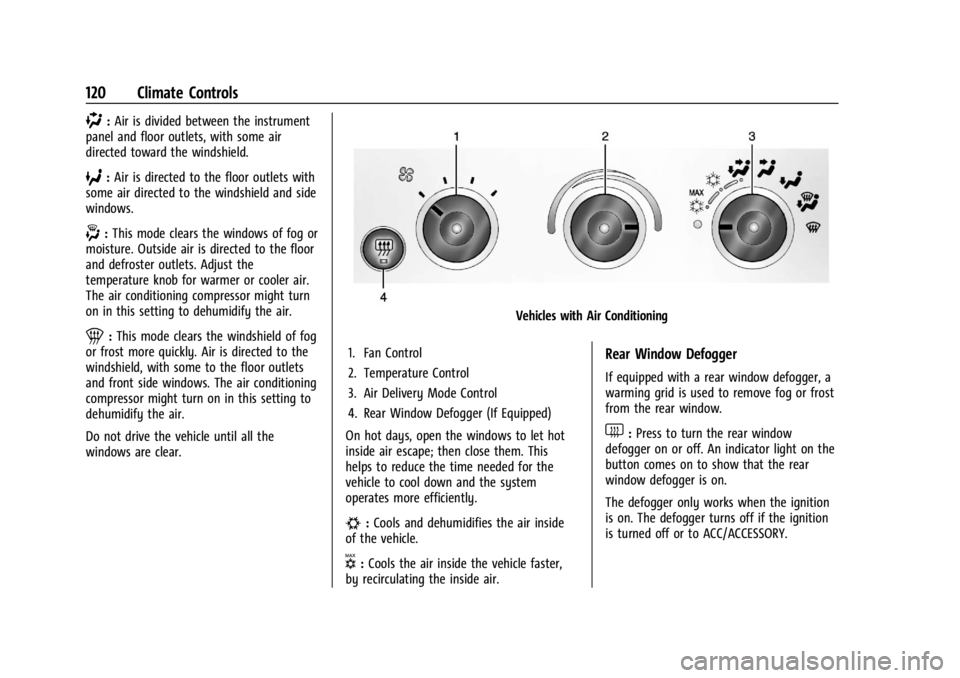
Vehicles with Air Conditioning
1. Fan Control
2. Temperature Control
3. Air Delivery Mode Control
4. Rear Window Defogger (If Equipped)
On hot days, open the windows to let hot
inside air escape; then close them. This
helps to reduce the time needed for the
vehicle to cool down and the system
operates more efficiently.
#: Cools and dehumidifies the air inside
of the vehicle.
V: Cools the air inside the vehicle faster,
by recirculating the inside air.
Rear Window Defogger
If equipped with a rear window defogger, a
warming grid is used to remove fog or frost
from the rear window.
1: Press to turn the rear window
defogger on or off. An indicator light on the
button comes on to show that the rear
window defogger is on.
The defogger only works when the ignition
is on. The defogger turns off if the ignition
is turned off or to ACC/ACCESSORY.
Page 126 of 292
GMC Savana Owner Manual (GMNA-Localizing-U.S./Canada-14583543) -
2021 - crc - 7/10/20
Driving and Operating 125
Driving and Operating
Driving Information
Driving for Better Fuel Economy . . . . . . . 126
Distracted Driving . . . . . . . . . . . . . . . . . . . . . 126
Defensive Driving . . . . . . . . . . . . . . . . . . . . . . 126
Impaired Driving . . . . . . . . . . . . . . . . . . . . . . . 127
Control of a Vehicle . . . . . . . . . . . . . . . . . . . . 127
Braking . . . . . . . . . . . . . . . . . . . . . . . . . . . . . . . . 127
Steering . . . . . . . . . . . . . . . . . . . . . . . . . . . . . . . 127
Off-Road Recovery . . . . . . . . . . . . . . . . . . . . . 128
Loss of Control . . . . . . . . . . . . . . . . . . . . . . . . 128
Driving on Wet Roads . . . . . . . . . . . . . . . . . 129
Hill and Mountain Roads . . . . . . . . . . . . . . 129
Winter Driving . . . . . . . . . . . . . . . . . . . . . . . . . 130
If the Vehicle Is Stuck . . . . . . . . . . . . . . . . . . 131
Vehicle Load Limits . . . . . . . . . . . . . . . . . . . . . 131
Starting and Operating
New Vehicle Break-In . . . . . . . . . . . . . . . . . . 134
Ignition Positions . . . . . . . . . . . . . . . . . . . . . . 135
Starting the Engine . . . . . . . . . . . . . . . . . . . . 136
Fast Idle System . . . . . . . . . . . . . . . . . . . . . . . 138
Retained Accessory Power (RAP) . . . . . . . 138
Engine Coolant Heater . . . . . . . . . . . . . . . . . 138
Shifting Into Park . . . . . . . . . . . . . . . . . . . . . 140
Shifting out of Park . . . . . . . . . . . . . . . . . . . 140
Parking over Things That Burn . . . . . . . . . 141
Engine Exhaust
Engine Exhaust . . . . . . . . . . . . . . . . . . . . . . . . 141
Running the Vehicle While Parked . . . . . 141
Automatic Transmission
Automatic Transmission . . . . . . . . . . . . . . . 142
Manual Mode . . . . . . . . . . . . . . . . . . . . . . . . . 144
Tow/Haul Mode . . . . . . . . . . . . . . . . . . . . . . . 145
Brakes
Antilock Brake System (ABS) . . . . . . . . . . . 145
Parking Brake . . . . . . . . . . . . . . . . . . . . . . . . . 146
Brake Assist . . . . . . . . . . . . . . . . . . . . . . . . . . . 146
Hill Start Assist (HSA) . . . . . . . . . . . . . . . . . 146
Ride Control Systems
Traction Control/Electronic StabilityControl . . . . . . . . . . . . . . . . . . . . . . . . . . . . . . 147
Locking Rear Axle . . . . . . . . . . . . . . . . . . . . . . 148
Cruise Control
Cruise Control . . . . . . . . . . . . . . . . . . . . . . . . . 149
Driver Assistance Systems
Driver Assistance Systems . . . . . . . . . . . . . 150
Rear Vision Camera (RVC) . . . . . . . . . . . . . . 152
Park Assist . . . . . . . . . . . . . . . . . . . . . . . . . . . . . 153
Forward Collision Alert (FCA) System . . . . . . . . . . . . . . . . . . . . . . . . . . . . . . 154
Side Blind Zone Alert (SBZA) . . . . . . . . . . . 155
Lane Departure Warning (LDW) . . . . . . . . 157
Fuel
Top Tier Fuel . . . . . . . . . . . . . . . . . . . . . . . . . . . 157
Recommended Fuel . . . . . . . . . . . . . . . . . . . . 158
Prohibited Fuels . . . . . . . . . . . . . . . . . . . . . . . 158
Fuels in Foreign Countries . . . . . . . . . . . . . 158
Fuel Additives . . . . . . . . . . . . . . . . . . . . . . . . . 158
Filling the Tank . . . . . . . . . . . . . . . . . . . . . . . . 158
Filling a Portable Fuel Container . . . . . . . 160
Trailer Towing
General Towing Information . . . . . . . . . . . 160
Driving Characteristics and Towing Tips . . . . . . . . . . . . . . . . . . . . . . . . . 160
Trailer Towing . . . . . . . . . . . . . . . . . . . . . . . . . 164
Towing Equipment . . . . . . . . . . . . . . . . . . . . . 172
Trailer Sway Control (TSC) . . . . . . . . . . . . . 175
Conversions and Add-Ons
Add-On Electrical Equipment . . . . . . . . . . . 176
Page 131 of 292
GMC Savana Owner Manual (GMNA-Localizing-U.S./Canada-14583543) -
2021 - crc - 7/10/20
130 Driving and Operating
{Warning
Using the brakes to slow the vehicle on a
long downhill slope can cause brake
overheating, can reduce brake
performance, and could result in a loss of
braking. Shift the transmission to a lower
gear to let the engine assist the brakes
on a steep downhill slope.
{Warning
Coasting downhill in N (Neutral) or with
the ignition off is dangerous. This can
cause overheating of the brakes and loss
of steering assist. Always have the engine
running and the vehicle in gear.
.Drive at speeds that keep the vehicle in
its own lane. Do not swing wide or cross
the center line.
.Be alert on top of hills; something could
be in your lane (e.g., stalled car, crash).
.Pay attention to special road signs (e.g.,
falling rocks area, winding roads, long
grades, passing or no-passing zones) and
take appropriate action.
Winter Driving
Driving on Snow or Ice
Snow or ice between the tires and the road
creates less traction or grip, so drive
carefully. Wet ice can occur at about 0 °C
(32 °F) when freezing rain begins to fall.
Avoid driving on wet ice or in freezing rain
until roads can be treated.
For slippery road driving:
.Accelerate gently. Accelerating too quickly
causes the wheels to spin and makes the
surface under the tires slick.
.Turn on Traction Control. SeeTraction
Control/Electronic Stability Control 0147.
.Antilock Brake System (ABS) improves
vehicle stability during hard stops, but
the brakes should be applied sooner than
when on dry pavement. See Antilock
Brake System (ABS) 0145.
.Allow greater following distance and
watch for slippery spots. Icy patches can
occur on otherwise clear roads in shaded
areas. The surface of a curve or an
overpass can remain icy when the
surrounding roads are clear. Avoid sudden
steering maneuvers and braking while
on ice.
.Turn off cruise control.
Blizzard Conditions
Stop the vehicle in a safe place and signal
for help. Stay with the vehicle unless there
is help nearby. If possible, use Roadside
Assistance. See Roadside Assistance Program
0 265. To get help and keep everyone in the
vehicle safe:
.Turn on the hazard warning flashers.
.Tie a red cloth to an outside mirror.
{Warning
Snow can trap engine exhaust under the
vehicle. This may cause exhaust gases to
get inside. Engine exhaust contains
carbon monoxide (CO), which cannot be
seen or smelled. It can cause
unconsciousness and even death.
If the vehicle is stuck in snow:
.Clear snow from the base of the
vehicle, especially any blocking the
exhaust pipe.
.Open a window about 5 cm (2 in) on
the vehicle side that is away from the
wind, to bring in fresh air.
(Continued)