battery location GMC SAVANA 2021 Owner's Manual
[x] Cancel search | Manufacturer: GMC, Model Year: 2021, Model line: SAVANA, Model: GMC SAVANA 2021Pages: 292, PDF Size: 6.38 MB
Page 9 of 292
GMC Savana Owner Manual (GMNA-Localizing-U.S./Canada-14583543) -
2021 - crc - 7/10/20
8 Keys, Doors, and Windows
With an active OnStar or connected service
plan, an OnStar Advisor may remotely
unlock the vehicle. SeeOnStar Overview
0 273.
Remote Keyless Entry (RKE)
System
Do not make changes or modifications to
the Remote Keyless Entry (RKE). This could
void authorization to use this equipment.
See Radio Frequency Statement 0270.
If there is a decrease in the RKE operating
range:
.Check the distance. The transmitter may
be too far from the vehicle.
.Check the location. Other vehicles or
objects may be blocking the signal.
.Check the transmitter's battery. See
“Battery Replacement” later in this
section.
.If the transmitter is still not working
correctly, see your dealer or a qualified
technician for service.
Remote Keyless Entry (RKE)
System Operation
If equipped, the RKE transmitter functions
work up to 60 m (197 ft) away from the
vehicle.
Other conditions can affect the performance
of the transmitter. See Remote Keyless Entry
(RKE) System 08.
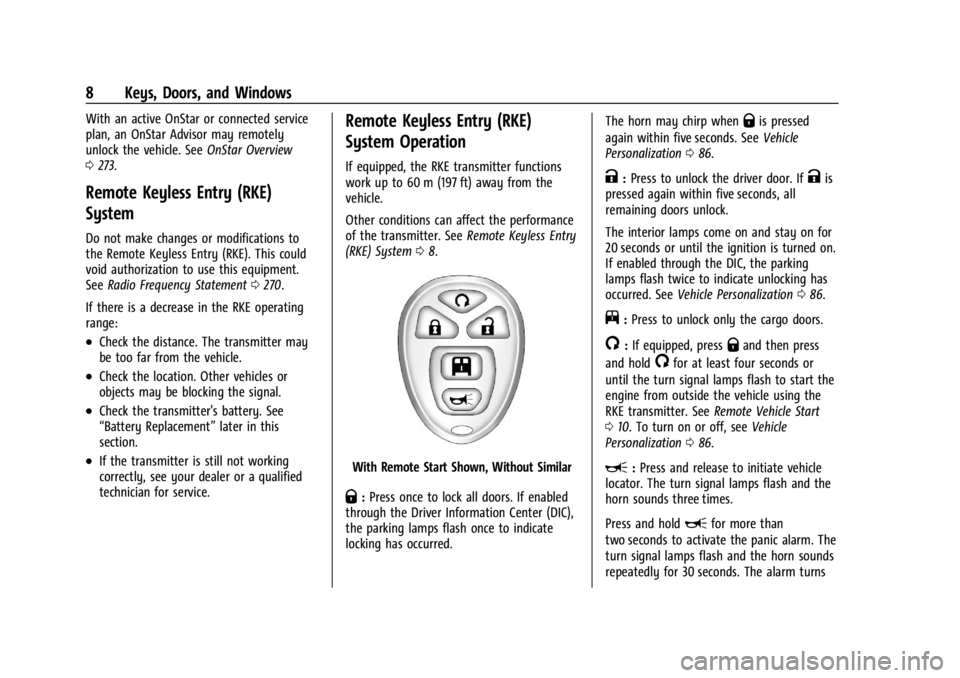
With Remote Start Shown, Without Similar
Q:Press once to lock all doors. If enabled
through the Driver Information Center (DIC),
the parking lamps flash once to indicate
locking has occurred. The horn may chirp when
Qis pressed
again within five seconds. See Vehicle
Personalization 086.
K:Press to unlock the driver door. IfKis
pressed again within five seconds, all
remaining doors unlock.
The interior lamps come on and stay on for
20 seconds or until the ignition is turned on.
If enabled through the DIC, the parking
lamps flash twice to indicate unlocking has
occurred. See Vehicle Personalization 086.
j:Press to unlock only the cargo doors.
/:If equipped, pressQand then press
and hold
/for at least four seconds or
until the turn signal lamps flash to start the
engine from outside the vehicle using the
RKE transmitter. See Remote Vehicle Start
0 10. To turn on or off, see Vehicle
Personalization 086.
L:Press and release to initiate vehicle
locator. The turn signal lamps flash and the
horn sounds three times.
Press and hold
Lfor more than
two seconds to activate the panic alarm. The
turn signal lamps flash and the horn sounds
repeatedly for 30 seconds. The alarm turns
Page 95 of 292
GMC Savana Owner Manual (GMNA-Localizing-U.S./Canada-14583543) -
2021 - crc - 7/10/20
94 Lighting
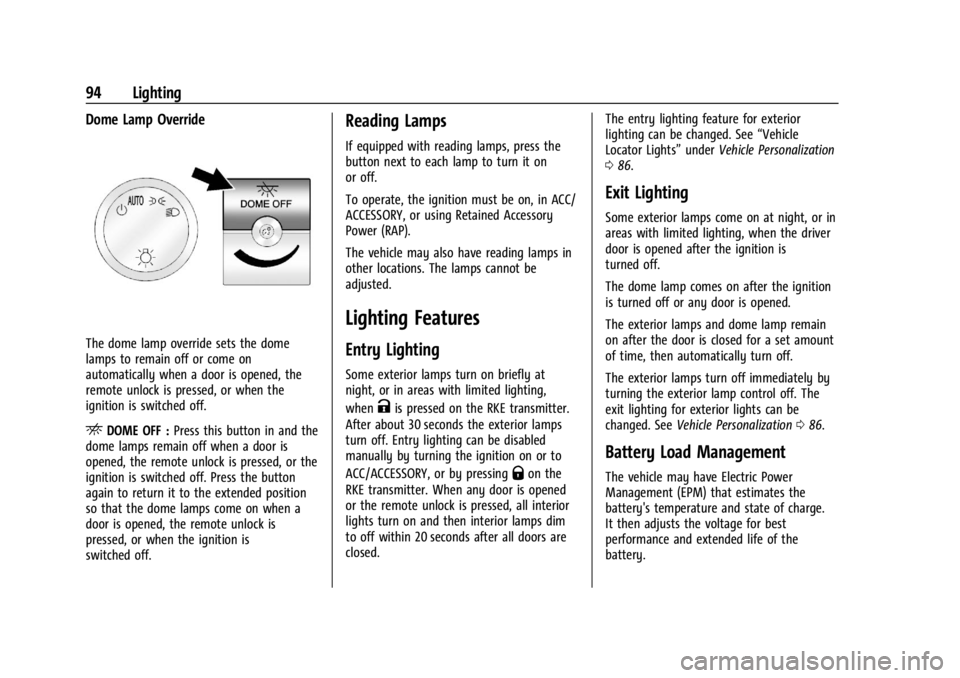
Dome Lamp Override
The dome lamp override sets the dome
lamps to remain off or come on
automatically when a door is opened, the
remote unlock is pressed, or when the
ignition is switched off.
EDOME OFF :Press this button in and the
dome lamps remain off when a door is
opened, the remote unlock is pressed, or the
ignition is switched off. Press the button
again to return it to the extended position
so that the dome lamps come on when a
door is opened, the remote unlock is
pressed, or when the ignition is
switched off.
Reading Lamps
If equipped with reading lamps, press the
button next to each lamp to turn it on
or off.
To operate, the ignition must be on, in ACC/
ACCESSORY, or using Retained Accessory
Power (RAP).
The vehicle may also have reading lamps in
other locations. The lamps cannot be
adjusted.
Lighting Features
Entry Lighting
Some exterior lamps turn on briefly at
night, or in areas with limited lighting,
when
Kis pressed on the RKE transmitter.
After about 30 seconds the exterior lamps
turn off. Entry lighting can be disabled
manually by turning the ignition on or to
ACC/ACCESSORY, or by pressing
Qon the
RKE transmitter. When any door is opened
or the remote unlock is pressed, all interior
lights turn on and then interior lamps dim
to off within 20 seconds after all doors are
closed. The entry lighting feature for exterior
lighting can be changed. See
“Vehicle
Locator Lights” underVehicle Personalization
0 86.
Exit Lighting
Some exterior lamps come on at night, or in
areas with limited lighting, when the driver
door is opened after the ignition is
turned off.
The dome lamp comes on after the ignition
is turned off or any door is opened.
The exterior lamps and dome lamp remain
on after the door is closed for a set amount
of time, then automatically turn off.
The exterior lamps turn off immediately by
turning the exterior lamp control off. The
exit lighting for exterior lights can be
changed. See Vehicle Personalization 086.
Battery Load Management
The vehicle may have Electric Power
Management (EPM) that estimates the
battery's temperature and state of charge.
It then adjusts the voltage for best
performance and extended life of the
battery.
Page 137 of 292
GMC Savana Owner Manual (GMNA-Localizing-U.S./Canada-14583543) -
2021 - crc - 7/10/20
136 Driving and Operating
{Warning
Turning off the vehicle while moving may
cause loss of power assist in the brake
and steering systems and disable the
airbags. While driving, turn off the
vehicle only in an emergency.
In an emergency, if the vehicle cannot be
pulled over and must be turned off while
driving: 1. Push the key all the way in toward the steering column, then turn the key to
ACC/ACCESSORY.
2. Brake using firm and steady pressure. Do not pump the brakes repeatedly. This
may deplete power assist, requiring
increased brake pedal force.
3. Shift the vehicle to N (Neutral). This can be done while the vehicle is moving.
Continue braking and steer the vehicle to
a safe location.
4. Come to a complete stop.
5. Shift to P (Park).
6. Continue to hold the brake pedal, then set the parking brake. See Parking Brake
0 146. 7. Push the key all the way in toward the
steering column, then turn the ignition
to LOCK/OFF.
8. Remove the key.
9. Release the brake pedal.
Caution
Use the correct key, make sure it is all
the way in —or pushed all the way in
toward the steering column when turning
off the vehicle —and turn it only with
your hand.
1 (ACC/ACCESSORY) : This position allows
features such as the infotainment system to
operate while the vehicle is off. It also
unlocks the steering column, if equipped
with a locking steering column. Use this
position if the vehicle must be pushed or
towed. See Retained Accessory Power (RAP)
0 138.
From ON/RUN, push the key all the way in
toward the steering column, then turn the
key to ACC/ACCESSORY.
If the key is left in ACC/ACCESSORY with the
engine off, the battery could drain and the
vehicle may not start. A warning chime will sound when the driver
door is opened and the key is in the
ignition.
2 (ON/RUN) :
This position can be used to
operate the electrical accessories and to
display some instrument cluster warning
and indicator lights. This position can also
be used for service and diagnostics, and to
verify the proper operation of the
malfunction indicator lamp as may be
required for emission inspection purposes.
The switch stays in this position when the
engine is running. The transmission is also
unlocked in this position.
If the key is left in ON/RUN with the engine
off, the battery could drain and the vehicle
may not start.
3 (START) : This is the position that starts
the engine. When the engine starts, release
the key. The ignition returns to ON/RUN for
driving.
Starting the Engine
If the vehicle has a diesel engine, see the
Duramax diesel supplement.
To place the transmission in the
proper gear:
Page 200 of 292
GMC Savana Owner Manual (GMNA-Localizing-U.S./Canada-14583543) -
2021 - crc - 7/10/20
Vehicle Care 199
Refer to the replacement number shown on
the original battery label when a new
battery is needed. SeeEngine Compartment
Overview 0180 for battery location.
{Warning
WARNING: Battery posts, terminals, and
related accessories contain lead and lead
compounds, chemicals known to the
State of California to cause cancer and
birth defects or other reproductive harm.
Batteries also contain other chemicals
known to the State of California to cause
cancer. WASH HANDS AFTER HANDLING.
For more information go to
www.P65Warnings.ca.gov/
passenger-vehicle.
See California Proposition 65 Warning 0178
and the back cover.
Vehicle Storage
{Warning
Batteries have acid that can burn you and
gas that can explode. You can be badly
(Continued)
Warning (Continued)
hurt if you are not careful. See Jump
Starting - North America 0236 for tips on
working around a battery without
getting hurt.
Infrequent Usage: Remove the black,
negative (−) cable from the battery to keep
the battery from running down.
Extended Storage: Remove the black,
negative (−) cable from the battery or use a
battery trickle charger.
Rear Axle
When to Check Lubricant
It is not necessary to regularly check the
rear axle fluid unless a leak is suspected or
an unusual noise is heard. A fluid loss could
indicate a problem. Have it inspected and
repaired. This service can be complex. See
your dealer.
Do not directly power wash the transfer
case and/or front/rear axle output seals.
High pressure water can overcome the seals
and contaminate the fluid. Contaminated fluid will decrease the life of the transfer
case and/or drive axles and should be
replaced.
Noise Control System
Noise Emissions Warranty
General Motors warrants to the first person
who purchases this vehicle for purposes
other than resale and to each subsequent
purchaser that this vehicle as manufactured
by General Motors, was designed, built and
equipped to conform at the time it left
General Motors’s control with all applicable
U.S. EPA Noise Control Regulations. This
warranty covers this vehicle as designed,
built and equipped by General Motors, and
is not limited to any particular part,
component or system of the vehicle
manufactured by General Motors. Defects in
design, assembly or in any part, component
or system of the vehicle as manufactured by
General Motors, which, at the time it left
General Motors’s control, caused noise
emissions to exceed Federal standards, are
covered by this warranty for the life of the
vehicle.
The following information relates to
compliance with federal noise emission
standards for vehicles with a Gross Vehicle
Page 238 of 292
GMC Savana Owner Manual (GMNA-Localizing-U.S./Canada-14583543) -
2021 - crc - 7/10/20
Vehicle Care 237
To avoid the possibility of the vehicles
rolling, set the parking brake firmly on
both vehicles involved in the jump start
procedure. Put an automatic transmission
in P (Park) or a manual transmission in
Neutral before setting the parking brake.
Caution
If any accessories are left on or plugged
in during the jump starting procedure,
they could be damaged. The repairs
would not be covered by the vehicle
warranty. Whenever possible, turn off or
unplug all accessories on either vehicle
when jump starting.
3. Turn the ignition off on both vehicles. Unplug unnecessary accessories plugged
into the cigarette lighter or the accessory
power outlet. Turn off the radio and all
lamps that are not needed. This will
avoid sparks and help save both
batteries. And it could save the radio!
4. Open the hoods and locate the positive (+) and negative (−) terminal
locations of the other vehicle.
On your van, use the unpainted radio
antenna bracket as a remote negative (−)
terminal.
{Warning
Using a match near a battery can cause
battery gas to explode. People have been
hurt doing this, and some have been
blinded. Use a flashlight if you need
more light.
Battery fluid contains acid that can burn
you. Do not get it on you. If you
accidentally get it in your eyes or on
your skin, flush the place with water and
get medical help immediately.
{Warning
Fans or other moving engine parts can
injure you badly. Keep your hands away
from moving parts once the engine is
running.
5. Check that the jumper cables do not have loose or missing insulation. If they
do, you could get a shock. The vehicles
could be damaged too.
Before you connect the cables, here are
some basic things you should know.
Positive (+) will go to positive (+) or to a
remote positive (+) terminal if the vehicle has one. Negative (−) will go to an
unpainted metal part or to a remote
negative (−) terminal if the vehicle has
one. On your van, use the unpainted
radio antenna bracket as a remote
negative (−) terminal.
Do not connect positive (+) to
negative (−) or you will get a short that
would damage the battery and maybe
other parts too. And do not connect the
negative (−) cable to the negative (−)
terminal on the dead battery because
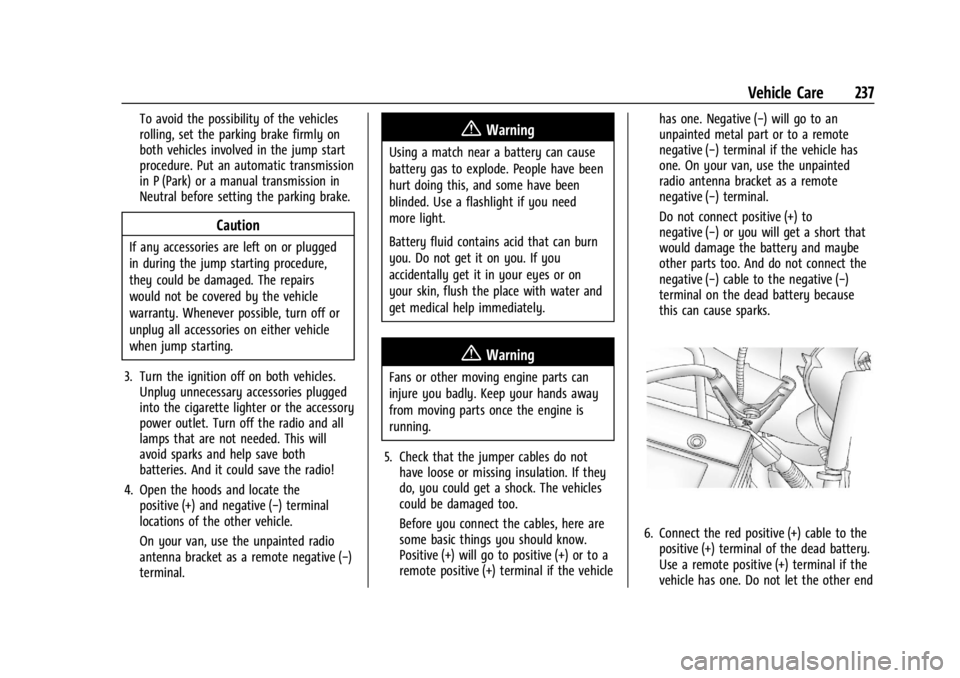
this can cause sparks.
6. Connect the red positive (+) cable to the
positive (+) terminal of the dead battery.
Use a remote positive (+) terminal if the
vehicle has one. Do not let the other end
Page 239 of 292
GMC Savana Owner Manual (GMNA-Localizing-U.S./Canada-14583543) -
2021 - crc - 7/10/20
238 Vehicle Care
touch metal. Connect it to the
positive (+) terminal of the good battery.
Use a remote positive (+) terminal if the
vehicle has one.
7. Now connect the black negative (−) cable to the negative (−) terminal of the good
battery. Use a remote negative (−)
terminal if the vehicle has one.
Do not let the other end touch anything
until the next step. The other end of the
negative (−) cable does not go to the
dead battery. It goes to a heavy,
unpainted metal engine part or to a
remote negative (−) terminal on the
vehicle with the dead battery. On your
van, use the unpainted radio antenna
bracket as a remote negative (−)
terminal.
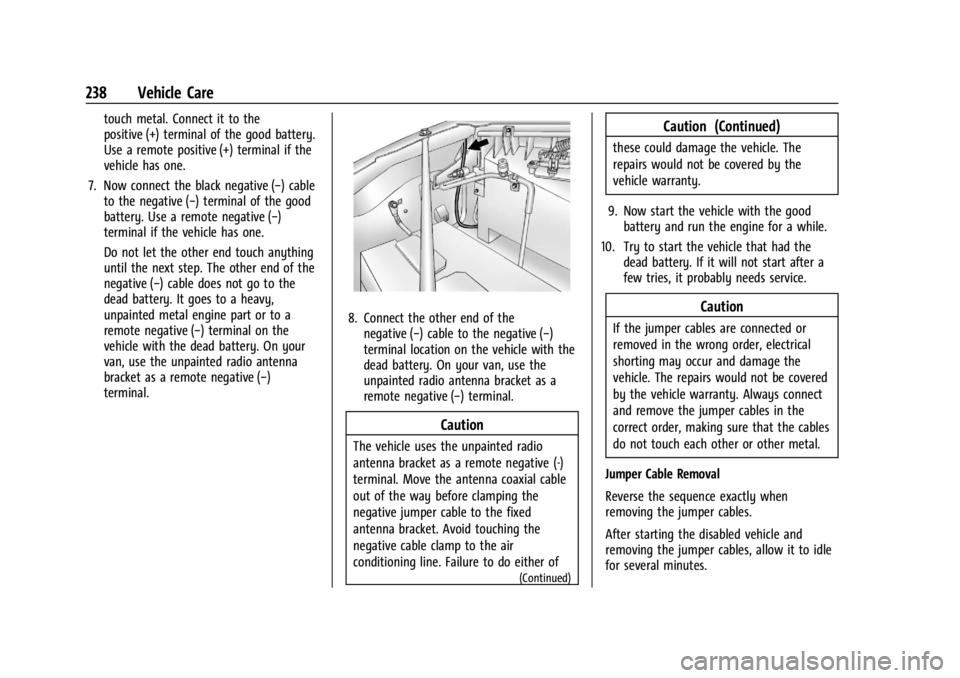
8. Connect the other end of thenegative (−) cable to the negative (−)
terminal location on the vehicle with the
dead battery. On your van, use the
unpainted radio antenna bracket as a
remote negative (−) terminal.
Caution
The vehicle uses the unpainted radio
antenna bracket as a remote negative (-)
terminal. Move the antenna coaxial cable
out of the way before clamping the
negative jumper cable to the fixed
antenna bracket. Avoid touching the
negative cable clamp to the air
conditioning line. Failure to do either of
(Continued)
Caution (Continued)
these could damage the vehicle. The
repairs would not be covered by the
vehicle warranty.
9. Now start the vehicle with the good battery and run the engine for a while.
10. Try to start the vehicle that had the dead battery. If it will not start after a
few tries, it probably needs service.
Caution
If the jumper cables are connected or
removed in the wrong order, electrical
shorting may occur and damage the
vehicle. The repairs would not be covered
by the vehicle warranty. Always connect
and remove the jumper cables in the
correct order, making sure that the cables
do not touch each other or other metal.
Jumper Cable Removal
Reverse the sequence exactly when
removing the jumper cables.
After starting the disabled vehicle and
removing the jumper cables, allow it to idle
for several minutes.
Page 274 of 292
GMC Savana Owner Manual (GMNA-Localizing-U.S./Canada-14583543) -
2021 - crc - 7/10/20
OnStar 273
OnStar
OnStar Overview
OnStar Overview . . . . . . . . . . . . . . . . . . . . . . 273
OnStar Services
Emergency . . . . . . . . . . . . . . . . . . . . . . . . . . . . 274
Security . . . . . . . . . . . . . . . . . . . . . . . . . . . . . . . 274
OnStar Additional Information
OnStar Additional Information . . . . . . . . . 274
OnStar Overview
=Voice Command Button
QBlue OnStar Button
>Red Emergency Button
This vehicle may be equipped with a
comprehensive, in-vehicle system that can
connect to an OnStar Advisor for Emergency,
Security, Navigation, Connections, and
Diagnostics Services. OnStar services may
require a paid service plan and data plan.
OnStar requires the vehicle battery and
electrical system, cellular service, and GPS
satellite signals to be available and
operating. OnStar acts as a link to existing
emergency service providers. OnStar may
collect information about you and your
vehicle, including location information. See
OnStar User Terms, Privacy Statement, and
Software Terms for more details including
system limitations at www.onstar.com (U.S.)
or www.onstar.ca (Canada). The OnStar system status light is next to
the OnStar buttons. If the status light is:
.Solid Green: System is ready.
.Flashing Green: On a call.
.Red: Indicates a problem.
.Off: System is off. PressQtwice to
speak with an OnStar Advisor.
Press
Qor call 1-888-4ONSTAR
(1-888-466-7827) to speak to an Advisor.
Functionality of the Voice Command button
may vary by vehicle and region.
Press
=to:
.Open the OnStar app on the infotainment
display. See OnStar System 0112 for
information on how to use the
OnStar app.
Or
.Give OnStar Turn-by-Turn Navigation voice
commands.
.Obtain and customize the Wi-Fi hotspot
name or SSID and password, if equipped.
Press
Qto connect to an Advisor to:
.Verify account information or update
contact information.
.Get driving directions.
Page 275 of 292
GMC Savana Owner Manual (GMNA-Localizing-U.S./Canada-14583543) -
2021 - crc - 7/10/20
274 OnStar
.Receive a Diagnostic check of the vehicle's
key operating systems.
.Receive Roadside Assistance.
.Manage Wi-Fi Settings, if equipped.
Press
>to get a priority connection to an
OnStar Advisor available 24/7 to:
.Get help for an emergency.
.Be a Good Samaritan or respond to an
AMBER Alert.
.Get assistance in severe weather or other
crisis situations and find evacuation
routes.
OnStar Services
Emergency
Emergency Services require an active safety
and security plan. With Automatic Crash
Response, built-in sensors can automatically
alert a specially trained OnStar Advisor who
is immediately connected in to the vehicle
to help.
Press
>for a priority connection to an
OnStar Advisor who can contact emergency
service providers, direct them to your exact
location, and relay important information. With OnStar Crisis Assist, specially trained
Advisors are available 24 hours a day, 7 days
a week, to provide a central point of
contact, assistance, and information during a
crisis.
With Roadside Assistance, Advisors can
locate a nearby service provider to help with
a flat tire, a battery jump, or an empty
gas tank.
Security
If equipped, OnStar provides these services:
.With Stolen Vehicle Assistance, OnStar
Advisors can use GPS to pinpoint the
vehicle and help authorities quickly
recover it.
.With Remote Ignition Block, if equipped,
OnStar can block the engine from being
restarted.
.With Stolen Vehicle Slowdown,
if equipped, OnStar can work with law
enforcement to gradually slow the
vehicle down.
Theft Alarm Notification
If equipped, if the doors are locked and the
vehicle alarm sounds, a notification by text,
e-mail, or phone call will be sent. If the
vehicle is stolen, an OnStar Advisor can work
with authorities to recover the vehicle.
OnStar Additional
Information
In-Vehicle Audio Messages
Audio messages may play important
information at the following times:
.Prior to vehicle purchase. PressQto set
up an account.
.After change in ownership and at
90 days.
Transferring Service
PressQto request account transfer
eligibility information. The Advisor can
cancel or change account information.
Selling/Transferring the Vehicle
Call 1-888-4ONSTAR (1-888-466-7827)
immediately to terminate your OnStar or
connected services if the vehicle is disposed
of, sold, transferred, or if the lease ends.
Page 277 of 292
GMC Savana Owner Manual (GMNA-Localizing-U.S./Canada-14583543) -
2021 - crc - 7/10/20
276 OnStar
Languages
The vehicle can be programmed to respond
in multiple languages. Press
Qand ask for
an Advisor. Advisors are available in English,
Spanish, and French. Available languages
may vary by country.
Potential Issues
OnStar cannot perform Remote Door Unlock
or Stolen Vehicle Assistance after the vehicle
has been off continuously for 10 days
without an ignition cycle. If the vehicle has
not been started for 10 days, OnStar can
contact Roadside Assistance or a locksmith
to help gain access to the vehicle.
Global Positioning System (GPS)
.Obstruction of the GPS can occur in a
large city with tall buildings; in parking
garages; around airports; in tunnels and
underpasses; or in an area with very
dense trees. If GPS signals are not
available, the OnStar system should still
operate to call OnStar. However, OnStar
could have difficulty identifying the exact
location.
.In emergency situations, OnStar can use
the last stored GPS location to send to
emergency responders. A temporary loss of GPS can cause loss of
the ability to send a Turn-by-Turn
Navigation route. The Advisor may give a
verbal route or may ask for a call back after
the vehicle is driven into an open area.
Cellular and GPS Antennas
Cellular reception is required for OnStar to
send remote signals to the vehicle. Do not
place items over or near the antenna to
prevent blocking cellular and GPS signal
reception.
Unable to Connect to OnStar Message
If there is limited cellular coverage or the
cellular network has reached maximum
capacity, this message may come on. Press
Qto try the call again or try again after
driving a few miles into another
cellular area.
Vehicle and Power Issues
OnStar services require a vehicle electrical
system, wireless service, and GPS satellite
technologies to be available and operating
for features to function properly. These
systems may not operate if the battery is
discharged or disconnected.
Add-on Electrical Equipment
The OnStar system is integrated into the
electrical architecture of the vehicle. Do not
add any electrical equipment. See Add-On
Electrical Equipment 0176. Added electrical
equipment may interfere with the operation
of the OnStar system and cause it to not
operate.
Vehicle Software Updates
OnStar or GM may remotely deliver
software updates or changes to the vehicle
without further notice or consent. These
updates or changes may enhance or
maintain safety, security, or the operation
of the vehicle or the vehicle systems.
Software updates or changes may affect or
erase data or settings that are stored in the
vehicle, such as saved navigation
destinations or pre-set radio stations.
Neither OnStar nor GM is responsible for
any affected or erased data or settings.
These updates or changes may also collect
personal information. Such collection is
described in the OnStar privacy statement or
separately disclosed at the time of
installation. These updates or changes may
also cause a system to automatically
communicate with GM servers to collect
information about vehicle system status,