ignition GMC SAVANA 2022 Owner's Guide
[x] Cancel search | Manufacturer: GMC, Model Year: 2022, Model line: SAVANA, Model: GMC SAVANA 2022Pages: 288, PDF Size: 10.66 MB
Page 95 of 288
GMC Savana Owner Manual (GMNA-Localizing-U.S./Canada-15555961) -
2022 - CRC - 4/14/22
94 Lighting
G:An arrow on the instrument cluster
flashes in the direction of the turn or lane
change.
To signal a turn, move the lever all the way
up or down.
To signal a lane change, raise or lower the
lever until the arrow starts to flash. The
turn signal automatically flashes three times
and if the Tow/Haul Mode is active it
flashes six times. Holding the turn signal
lever for more than one second causes the
turn signals to flash continually until the
lever is released.
The lever returns to its starting position
when released.
If after signaling a turn or lane change the
arrow flashes rapidly or does not come on, a
signal bulb may be burned out.
Have any burned out bulbs replaced. If a
bulb is not burned out, check the fuse. See
Fuses and Circuit Breakers 0199.
Turn Signal On Chime
If the turn signal is left on for more than
1.2 km (0.75 mi), a chime sounds at each
flash of the turn signal and the message
TURN SIGNAL ON also appears in the Driver Information Center (DIC). To turn off the
chime and message, move the turn signal
lever to the off position.
Interior Lighting
Instrument Panel Illumination
Control
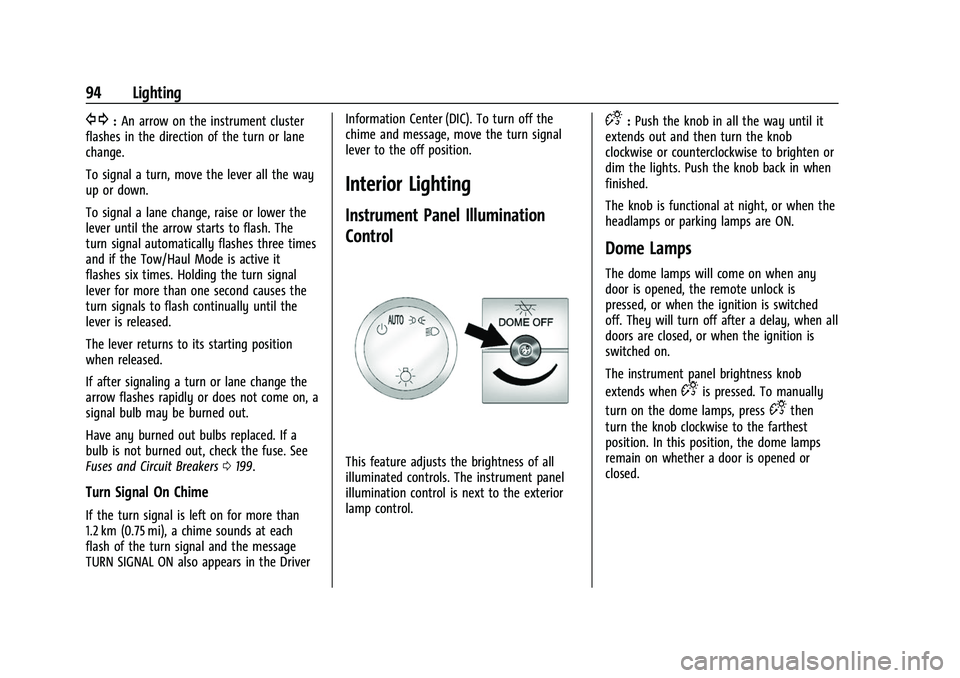
This feature adjusts the brightness of all
illuminated controls. The instrument panel
illumination control is next to the exterior
lamp control.
D:
Push the knob in all the way until it
extends out and then turn the knob
clockwise or counterclockwise to brighten or
dim the lights. Push the knob back in when
finished.
The knob is functional at night, or when the
headlamps or parking lamps are ON.
Dome Lamps
The dome lamps will come on when any
door is opened, the remote unlock is
pressed, or when the ignition is switched
off. They will turn off after a delay, when all
doors are closed, or when the ignition is
switched on.
The instrument panel brightness knob
extends when
Dis pressed. To manually
turn on the dome lamps, press
Dthen
turn the knob clockwise to the farthest
position. In this position, the dome lamps
remain on whether a door is opened or
closed.
Page 96 of 288
GMC Savana Owner Manual (GMNA-Localizing-U.S./Canada-15555961) -
2022 - CRC - 4/14/22
Lighting 95
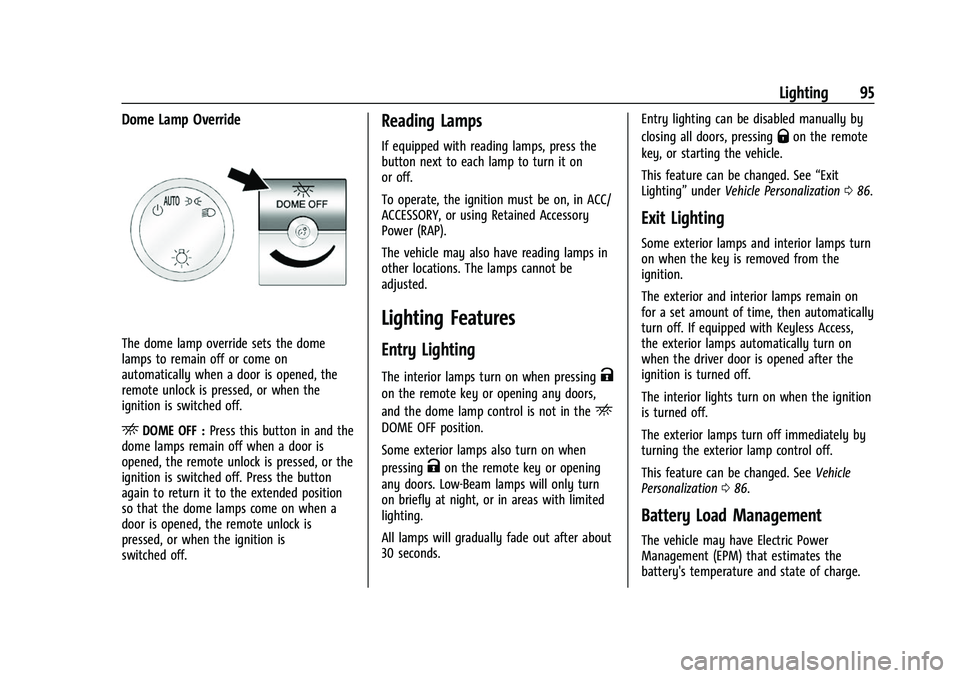
Dome Lamp Override
The dome lamp override sets the dome
lamps to remain off or come on
automatically when a door is opened, the
remote unlock is pressed, or when the
ignition is switched off.
EDOME OFF :Press this button in and the
dome lamps remain off when a door is
opened, the remote unlock is pressed, or the
ignition is switched off. Press the button
again to return it to the extended position
so that the dome lamps come on when a
door is opened, the remote unlock is
pressed, or when the ignition is
switched off.
Reading Lamps
If equipped with reading lamps, press the
button next to each lamp to turn it on
or off.
To operate, the ignition must be on, in ACC/
ACCESSORY, or using Retained Accessory
Power (RAP).
The vehicle may also have reading lamps in
other locations. The lamps cannot be
adjusted.
Lighting Features
Entry Lighting
The interior lamps turn on when pressingK
on the remote key or opening any doors,
and the dome lamp control is not in the
E
DOME OFF position.
Some exterior lamps also turn on when
pressing
Kon the remote key or opening
any doors. Low-Beam lamps will only turn
on briefly at night, or in areas with limited
lighting.
All lamps will gradually fade out after about
30 seconds. Entry lighting can be disabled manually by
closing all doors, pressing
Qon the remote
key, or starting the vehicle.
This feature can be changed. See “Exit
Lighting” underVehicle Personalization 086.
Exit Lighting
Some exterior lamps and interior lamps turn
on when the key is removed from the
ignition.
The exterior and interior lamps remain on
for a set amount of time, then automatically
turn off. If equipped with Keyless Access,
the exterior lamps automatically turn on
when the driver door is opened after the
ignition is turned off.
The interior lights turn on when the ignition
is turned off.
The exterior lamps turn off immediately by
turning the exterior lamp control off.
This feature can be changed. See Vehicle
Personalization 086.
Battery Load Management
The vehicle may have Electric Power
Management (EPM) that estimates the
battery's temperature and state of charge.
Page 97 of 288
GMC Savana Owner Manual (GMNA-Localizing-U.S./Canada-15555961) -
2022 - CRC - 4/14/22
96 Lighting
It then adjusts the voltage for best
performance and extended life of the
battery.
When the battery's state of charge is low,
the voltage is raised slightly to quickly
bring the charge back up. When the state of
charge is high, the voltage is lowered
slightly to prevent overcharging. If the
vehicle has a voltmeter gauge or a voltage
display on the Driver Information Center
(DIC), you may see the voltage move up or
down. This is normal. If there is a problem,
an alert will be displayed.
The battery can be discharged at idle if the
electrical loads are very high. This is true for
all vehicles. This is because the generator
(alternator) may not be spinning fast
enough at idle to produce all the power that
is needed for very high electrical loads.
A high electrical load occurs when several of
the following are on, such as: headlamps,
high beams, fog lamps, rear window
defogger, climate control fan at high speed,
heated seats, engine cooling fans, trailer
loads, and loads plugged into accessory
power outlets.
EPM works to prevent excessive discharge of
the battery. It does this by balancing the
generator's output and the vehicle'selectrical needs. It can increase engine idle
speed to generate more power, whenever
needed. It can temporarily reduce the power
demands of some accessories.
Normally, these actions occur in steps or
levels, without being noticeable. In rare
cases at the highest levels of corrective
action, this action may be noticeable to the
driver. If so, a Driver Information Center
(DIC) message might be displayed, such as
SERVICE BATTERY CHARGING SYSTEM. If this
messages displays, it is recommended that
the driver reduce the electrical loads as
much as possible.
Battery Power Protection
This feature helps prevent the battery from
being drained, if the interior courtesy lamps
or reading lamps are accidentally left on.
If any of these lamps are left on, they
automatically turn off after 10 minutes,
if the ignition is off. The lamps will not
come back on again until one of the
following occurs:
.The ignition is turned on.
.The doors are closed and then re-opened.
Exterior Lighting Battery Saver
The exterior lamps turn off about 10 minutes
after the ignition is turned off, if the parking
lamps or headlamps have been manually
left on. This protects against draining the
battery. To restart the 10-minute timer, turn
the exterior lamp control to the
Oposition
and then back to the
;or2position.
To keep the lamps on for more than
10 minutes, the ignition must be on or in
ACC/ACCESSORY.
Page 98 of 288
GMC Savana Owner Manual (GMNA-Localizing-U.S./Canada-15555961) -
2022 - CRC - 4/14/22
Infotainment System 97
Infotainment System
Introduction
Infotainment . . . . . . . . . . . . . . . . . . . . . . . . . . . 97
Theft-Deterrent Feature . . . . . . . . . . . . . . . . 98
Overview (AM-FM Radio) . . . . . . . . . . . . . . . 98
Operation . . . . . . . . . . . . . . . . . . . . . . . . . . . . . . 99
Radio
AM-FM Radio . . . . . . . . . . . . . . . . . . . . . . . . . . 100
Satellite Radio . . . . . . . . . . . . . . . . . . . . . . . . . 101
Radio Reception . . . . . . . . . . . . . . . . . . . . . . . 102
Fixed Mast Antenna . . . . . . . . . . . . . . . . . . . 103
Multi-Band Antenna . . . . . . . . . . . . . . . . . . . 103
Audio Players
Avoiding Untrusted Media Devices . . . . 103
Auxiliary Devices . . . . . . . . . . . . . . . . . . . . . . 103
Phone
Bluetooth . . . . . . . . . . . . . . . . . . . . . . . . . . . . . . 107
Trademarks and License Agreements
Trademarks and License Agreements . . . 112
Introduction
Infotainment
Read the following pages to become familiar
with the features.
{Warning
Taking your eyes off the road for too
long or too often while using any
infotainment feature can cause a crash.
You or others could be injured or killed.
Do not give extended attention to
infotainment tasks while driving. Limit
your glances at the vehicle displays and
focus your attention on driving. Use voice
commands whenever possible.
The infotainment system has built-in
features intended to help avoid distraction
by disabling some functions when driving.
Many infotainment features are also
available through the instrument cluster and
steering wheel controls. Before driving:
.Become familiar with the operation,
center stack controls, and infotainment
controls.
.Set up the audio by presetting favorite
stations, setting the tone, and adjusting
the speakers.
.Set up phone numbers in advance so they
can be called easily by pressing a single
control or by using a single voice
command if equipped with Bluetooth
phone capability.
See Defensive Driving 0121.
To play the infotainment system with the
ignition off, see Retained Accessory Power
(RAP) 0133.
Active Noise Cancellation (ANC)
If equipped, ANC reduces engine noise in the
vehicle’s interior. ANC requires the
factory-installed audio system, radio,
speakers, amplifier (if equipped), induction
system, and exhaust system to work
properly. Deactivation is required by your
dealer if related aftermarket equipment is
installed.
Page 100 of 288
GMC Savana Owner Manual (GMNA-Localizing-U.S./Canada-15555961) -
2022 - CRC - 4/14/22
Infotainment System 99
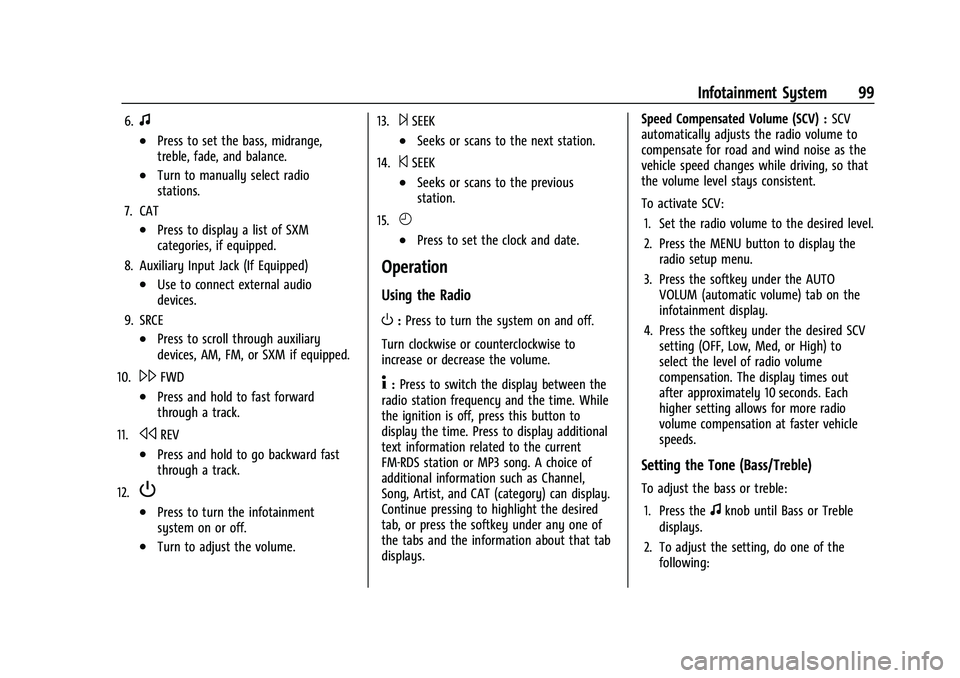
6.f
.Press to set the bass, midrange,
treble, fade, and balance.
.Turn to manually select radio
stations.
7. CAT
.Press to display a list of SXM
categories, if equipped.
8. Auxiliary Input Jack (If Equipped)
.Use to connect external audio
devices.
9. SRCE
.Press to scroll through auxiliary
devices, AM, FM, or SXM if equipped.
10.
\FWD
.Press and hold to fast forward
through a track.
11.
sREV
.Press and hold to go backward fast
through a track.
12.
P
.Press to turn the infotainment
system on or off.
.Turn to adjust the volume. 13.
¨SEEK
.Seeks or scans to the next station.
14.
©SEEK
.Seeks or scans to the previous
station.
15.
H
.Press to set the clock and date.
Operation
Using the Radio
O: Press to turn the system on and off.
Turn clockwise or counterclockwise to
increase or decrease the volume.
4: Press to switch the display between the
radio station frequency and the time. While
the ignition is off, press this button to
display the time. Press to display additional
text information related to the current
FM-RDS station or MP3 song. A choice of
additional information such as Channel,
Song, Artist, and CAT (category) can display.
Continue pressing to highlight the desired
tab, or press the softkey under any one of
the tabs and the information about that tab
displays. Speed Compensated Volume (SCV) :
SCV
automatically adjusts the radio volume to
compensate for road and wind noise as the
vehicle speed changes while driving, so that
the volume level stays consistent.
To activate SCV:
1. Set the radio volume to the desired level.
2. Press the MENU button to display the radio setup menu.
3. Press the softkey under the AUTO VOLUM (automatic volume) tab on the
infotainment display.
4. Press the softkey under the desired SCV setting (OFF, Low, Med, or High) to
select the level of radio volume
compensation. The display times out
after approximately 10 seconds. Each
higher setting allows for more radio
volume compensation at faster vehicle
speeds.
Setting the Tone (Bass/Treble)
To adjust the bass or treble:
1. Press the
fknob until Bass or Treble
displays.
2. To adjust the setting, do one of the following:
Page 106 of 288
GMC Savana Owner Manual (GMNA-Localizing-U.S./Canada-15555961) -
2022 - CRC - 4/14/22
Infotainment System 105
.Files with an .mp3 or .wma file extension.
.AAC files stored on an iPod.
.FAT16.
.FAT32.
Connecting a USB Storage Device or iPod
The USB port can be used to control an iPod
or a USB storage device.
To connect a USB storage device, connect
the device to the USB port on the
instrument panel.
To connect an iPod, connect one end of the
USB cable that came with the iPod to the
iPod’s dock connector and connect the other
end to the USB port on the instrument
panel. If the vehicle is on and the USB
connection works,“OK to disconnect” and a
GM logo may appear on the iPod, and iPod
appears on the infotainment display. The
iPod music appears on the infotainment
display and begins playing.
The iPod charges while it is connected to
the vehicle if the ignition is on or in ACC/
ACCESSORY. When the vehicle is turned off,
the iPod automatically powers off and will
not charge or draw power from the vehicle's
battery. If you have an older iPod model that is not
supported, it can still be used by connecting
it to the auxiliary input jack using a
standard 3.5 mm (1/8 in) stereo cable. See
“Using the Auxiliary Input Jack”
previously in
this section.Using the Radio to Control a USB
Storage Device or iPod
The radio can control a USB storage device
or an iPod using the radio buttons and
knobs, and can display song information on
the infotainment display.
f: Turn to select files.
©SEEK : Press to go to the start of the
track, if more than 10 seconds have played.
Press and hold or press multiple times to
continue moving backward through tracks.
¨SEEK : Press to go to the next track. Press
and hold or press multiple times to continue
moving forward through tracks.
sREV : Press and hold to reverse playback
quickly. Sound is heard at a reduced volume.
Release
sREV to resume playing. The
elapsed time of the file displays.
\FWD : Press and hold to advance
playback quickly. Sound is heard at a
reduced volume. Release
\FWD to resume
playing. The elapsed time of the file
displays.
4: Press to display additional information
about the selected track.
Using Softkeys to Control a USB Storage
Device or iPod
The five softkeys below the infotainment
display are used to control the functions
listed below.
To use the softkeys:
1. Press the first or fifth softkey below the infotainment display to display the
functions listed below, or press the
softkey below the function if it is
currently displayed.
2. Press the softkey below the tab with the function on it to use that function.
j:Press the softkey belowjto pause the
track. The tab appears raised when pause is
being used. Press the softkey below
jagain
to resume playback.
Page 108 of 288
GMC Savana Owner Manual (GMNA-Localizing-U.S./Canada-15555961) -
2022 - CRC - 4/14/22
Infotainment System 107
>:Press the softkey below2to turn
shuffle off. This is the default mode when a
USB storage device or iPod is first
connected.
2: Press the softkey below=orCto shuffle all songs on the USB
storage device or iPod.
C: Press the softkey below>to
shuffle all songs in the current album on
an iPod.
=: Press the softkey below>to
shuffle all songs in the current folder on a
USB storage device.
Phone
Bluetooth
For vehicles equipped with Bluetooth
capability, the system can interact with
many cell phones, allowing:
.Placement and receipt of calls in a
hands-free mode.
.Sharing of the cell phone’s address book
or contact list with the vehicle.
To minimize driver distraction, before
driving, and with the vehicle parked:
.Become familiar with the features of the
cell phone. Organize the phone book and
contact lists clearly and delete duplicate
or rarely used entries. If possible,
program speed dial or other shortcuts.
.Review the controls and operation of the
infotainment system.
.Pair cell phone(s) to the vehicle. The
system may not work with all cell
phones. See “Pairing”in this section for
more information.
.If the cell phone has voice dialing
capability, learn to use that feature to
access the address book or contact list.
See “Voice Pass-Thru” in this section for
more information.
.See “Storing and Deleting Phone
Numbers” in this section for more
information.
{Warning
When using a cell phone, it can be
distracting to look too long or too often
at the screen of the phone or the
infotainment system. Taking your eyes
off the road too long or too often could
cause a crash resulting in injury or death.
Focus your attention on driving. A Bluetooth system can use a
Bluetooth-capable cell phone with a
Hands-Free Profile to make and receive
phone calls. The system can be used while
the ignition is on or in ACC/ACCESSORY. The
range of the Bluetooth system can be up to
9.1 m (30 ft). Not all phones support all
functions, and not all phones work with the
in-vehicle Bluetooth system. See
www.gm.com/bluetooth for more
information on compatible phones in U.S.
and Canada only.
Voice Recognition
The Bluetooth system uses voice recognition
to interpret voice commands to dial phone
numbers and name tags.
For additional information, say
“Help”while
you are in a voice recognition menu.
Noise : Keep interior noise levels to a
minimum. The system may not recognize
voice commands if there is too much
background noise.
When to Speak : A short tone sounds after
the system responds indicating when it is
waiting for a voice command. Wait until the
tone and then speak.
Page 112 of 288
GMC Savana Owner Manual (GMNA-Localizing-U.S./Canada-15555961) -
2022 - CRC - 4/14/22
Infotainment System 111
Receiving a Call
When an incoming call is received, the audio
system mutes and a ring tone is heard in
the vehicle.
.Pressb/gto answer the call.
.Pressc/xto ignore a call.
Call Waiting
Call waiting must be supported on the cell
phone and enabled by the wireless service
carrier.
.Pressb/gto answer an incoming call
when another call is active. The original
call is placed on hold.
.Pressb/gagain to return to the
original call.
.To ignore the incoming call, no action is
required.
.Pressc/xto disconnect the current
call and switch to the call on hold.
Three-Way Calling
Three-way calling must be supported on the
cell phone and enabled by the wireless
service carrier.
1. While on a call, press
b/g.
2. Say “Three-way call.” 3. Use the dial or call command to dial the
number of the third party to be called.
4. Once the call is connected, press
b/g
to link all callers together.
Ending a Call
Pressc/xto end a call.
Muting a Call
During a call, all sounds from inside the
vehicle can be muted so that the person on
the other end of the call cannot hear them.
.To mute a call, pressb/g, and then
say “Mute call.”
.To cancel mute, pressb/g, and then
say “Un-mute call.”
Transferring a Call
Audio can be transferred between the
Bluetooth system and the cell phone.
The cell phone must be paired and
connected with the Bluetooth system before
a call can be transferred. The connection
process can take up to two minutes after
the ignition is turned to on. Transferring Audio from the Bluetooth
System to a Cell Phone
During a call with the audio in the vehicle:
1. Press
b/g.
2. Say “Transfer Call.”
Transferring Audio to the Bluetooth System
from a Cell Phone
During a call with the audio on the cell
phone, press
b/g. The audio transfers to
the vehicle. If the audio does not transfer to
the vehicle, use the audio transfer feature
on the cell phone. See your cell phone
manufacturer's user guide for more
information.
Voice Pass-Thru
Voice pass-thru allows access to the voice
recognition commands on the cell phone.
See your cell phone manufacturer's user
guide to see if the cell phone supports this
feature.
To access contacts stored in the cell phone:
1. Press and hold
b/gfor two seconds.
2. Say “Bluetooth.” This command can be
skipped.
Page 116 of 288
GMC Savana Owner Manual (GMNA-Localizing-U.S./Canada-15555961) -
2022 - CRC - 4/14/22
Climate Controls 115
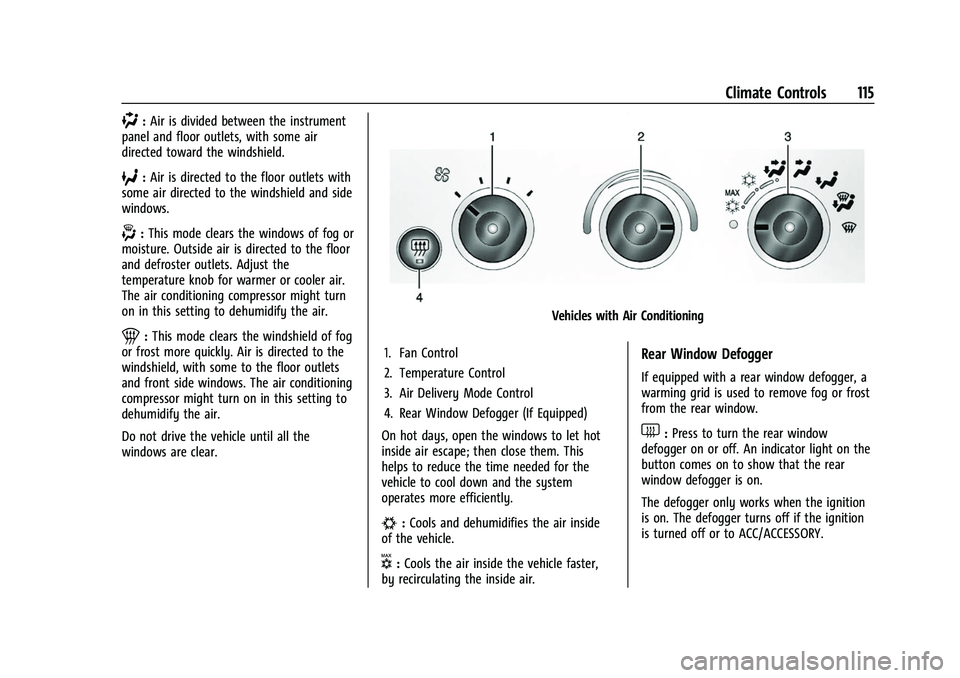
):Air is divided between the instrument
panel and floor outlets, with some air
directed toward the windshield.
6: Air is directed to the floor outlets with
some air directed to the windshield and side
windows.
-: This mode clears the windows of fog or
moisture. Outside air is directed to the floor
and defroster outlets. Adjust the
temperature knob for warmer or cooler air.
The air conditioning compressor might turn
on in this setting to dehumidify the air.
1: This mode clears the windshield of fog
or frost more quickly. Air is directed to the
windshield, with some to the floor outlets
and front side windows. The air conditioning
compressor might turn on in this setting to
dehumidify the air.
Do not drive the vehicle until all the
windows are clear.
Vehicles with Air Conditioning
1. Fan Control
2. Temperature Control
3. Air Delivery Mode Control
4. Rear Window Defogger (If Equipped)
On hot days, open the windows to let hot
inside air escape; then close them. This
helps to reduce the time needed for the
vehicle to cool down and the system
operates more efficiently.
#: Cools and dehumidifies the air inside
of the vehicle.
V: Cools the air inside the vehicle faster,
by recirculating the inside air.
Rear Window Defogger
If equipped with a rear window defogger, a
warming grid is used to remove fog or frost
from the rear window.
1: Press to turn the rear window
defogger on or off. An indicator light on the
button comes on to show that the rear
window defogger is on.
The defogger only works when the ignition
is on. The defogger turns off if the ignition
is turned off or to ACC/ACCESSORY.
Page 121 of 288
GMC Savana Owner Manual (GMNA-Localizing-U.S./Canada-15555961) -
2022 - CRC - 4/14/22
120 Driving and Operating
Driving and Operating
Driving Information
Driving for Better Fuel Economy . . . . . . . 121
Distracted Driving . . . . . . . . . . . . . . . . . . . . . . 121
Defensive Driving . . . . . . . . . . . . . . . . . . . . . . 121
Impaired Driving . . . . . . . . . . . . . . . . . . . . . . . 122
Control of a Vehicle . . . . . . . . . . . . . . . . . . . . 122
Braking . . . . . . . . . . . . . . . . . . . . . . . . . . . . . . . . 122
Steering . . . . . . . . . . . . . . . . . . . . . . . . . . . . . . . 122
Off-Road Recovery . . . . . . . . . . . . . . . . . . . . . 123
Loss of Control . . . . . . . . . . . . . . . . . . . . . . . . . 123
Driving on Wet Roads . . . . . . . . . . . . . . . . . 124
Hill and Mountain Roads . . . . . . . . . . . . . . 124
Winter Driving . . . . . . . . . . . . . . . . . . . . . . . . . 125
If the Vehicle Is Stuck . . . . . . . . . . . . . . . . . 126
Vehicle Load Limits . . . . . . . . . . . . . . . . . . . . 126
Starting and Operating
New Vehicle Break-In . . . . . . . . . . . . . . . . . . 129
Ignition Positions . . . . . . . . . . . . . . . . . . . . . . 130
Starting the Engine . . . . . . . . . . . . . . . . . . . . 132
Fast Idle System . . . . . . . . . . . . . . . . . . . . . . . 133
Retained Accessory Power (RAP) . . . . . . . 133
Engine Coolant Heater . . . . . . . . . . . . . . . . . 133
Shifting Into Park . . . . . . . . . . . . . . . . . . . . . . 135
Shifting out of Park . . . . . . . . . . . . . . . . . . . 136
Parking over Things That Burn . . . . . . . . . 136
Engine Exhaust
Engine Exhaust . . . . . . . . . . . . . . . . . . . . . . . . 136
Running the Vehicle While Parked . . . . . 137
Automatic Transmission
Automatic Transmission . . . . . . . . . . . . . . . 137
Manual Mode . . . . . . . . . . . . . . . . . . . . . . . . . 139
Tow/Haul Mode . . . . . . . . . . . . . . . . . . . . . . . 140
Brakes
Antilock Brake System (ABS) . . . . . . . . . . . 141
Parking Brake . . . . . . . . . . . . . . . . . . . . . . . . . . 141
Brake Assist . . . . . . . . . . . . . . . . . . . . . . . . . . . 142
Hill Start Assist (HSA) . . . . . . . . . . . . . . . . . . 142
Ride Control Systems
Traction Control/Electronic StabilityControl . . . . . . . . . . . . . . . . . . . . . . . . . . . . . . 142
Locking Rear Axle . . . . . . . . . . . . . . . . . . . . . . 143
Cruise Control
Cruise Control . . . . . . . . . . . . . . . . . . . . . . . . . 144
Driver Assistance Systems
Driver Assistance Systems . . . . . . . . . . . . . 145
Rear Vision Camera (RVC) . . . . . . . . . . . . . . 147
Park Assist . . . . . . . . . . . . . . . . . . . . . . . . . . . . 148
Forward Collision Alert (FCA) System . . . . . . . . . . . . . . . . . . . . . . . . . . . . . . 149
Side Blind Zone Alert (SBZA) . . . . . . . . . . . 150
Lane Departure Warning (LDW) . . . . . . . . 152
Fuel
Top Tier Fuel . . . . . . . . . . . . . . . . . . . . . . . . . . 152
Recommended Fuel . . . . . . . . . . . . . . . . . . . . 153
Prohibited Fuels . . . . . . . . . . . . . . . . . . . . . . . . 153
Fuels in Foreign Countries . . . . . . . . . . . . . 153
Fuel Additives . . . . . . . . . . . . . . . . . . . . . . . . . . 153
Filling the Tank . . . . . . . . . . . . . . . . . . . . . . . . 153
Filling a Portable Fuel Container . . . . . . . 155
Trailer Towing
General Towing Information . . . . . . . . . . . 155
Driving Characteristics and Towing Tips . . . . . . . . . . . . . . . . . . . . . . . . . . 155
Trailer Towing . . . . . . . . . . . . . . . . . . . . . . . . . 159
Towing Equipment . . . . . . . . . . . . . . . . . . . . . 167
Trailer Sway Control (TSC) . . . . . . . . . . . . . 170
Conversions and Add-Ons
Add-On Electrical Equipment . . . . . . . . . . . 171