change time GMC SAVANA PASSENGER 2008 User Guide
[x] Cancel search | Manufacturer: GMC, Model Year: 2008, Model line: SAVANA PASSENGER, Model: GMC SAVANA PASSENGER 2008Pages: 402, PDF Size: 2.34 MB
Page 159 of 402
To stop the timer, press the set/reset button briefly while
TIMER is displayed.
To reset the timer to zero, press and hold the set/reset
button while TIMER is displayed.
Average Speed
Press the trip/fuel button until AVERAGE SPEED
displays. This display shows the average speed of
the vehicle in miles per hour (mph) or kilometers per
hour (km/h). This average is calculated based on
the various vehicle speeds recorded since the last
reset of this value. To reset the value, press and hold
the set/reset button. The display will return to zero.
Digital Tachometer
Press the trip/fuel button until Tachometer ##00 RPM
displays. This display shows the engine speed in
revolutions per minute (RPM).
Blank Display
This display shows no information.
Vehicle Information Menu Items
T
(Vehicle Information):Press this button to scroll
through the following menu items:
Oil Life
Press the vehicle information button until OIL LIFE
REMAINING displays. This display shows an estimate of
the oil’s remaining useful life. If you see 99% OIL LIFE
REMAINING on the display, that means 99% of the
current oil life remains. The engine oil life system will alert
you to change the oil on a schedule consistent with your
driving conditions.
When the remaining oil life is low, the CHANGE
ENGINE OIL SOON message will appear on the
display. See “CHANGE ENGINE OIL SOON” underDIC
Warnings and Messages on page 3-49. You should
change the oil as soon as possible. SeeEngine Oil
(Gasoline Engine) on page 5-15. In addition to the
engine oil life system monitoring the oil life, additional
maintenance is recommended in the Maintenance
Schedule in this manual. SeeScheduled Maintenance
on page 6-4for more information.
Remember, you must reset the OIL LIFE yourself after
each oil change. It will not reset itself. Also, be careful
not to reset the OIL LIFE accidentally at any time
other than when the oil has just been changed.
3-45
Page 164 of 402
AUTOMATIC LIGHT CONTROL ON
This message displays when the automatic headlamps
are turned on. SeeExterior Lamps on page 3-13for
more information.
CALIBRATING: DRIVE IN CIRCLES
This message displays when calibrating the compass.
Drive the vehicle in circles at less than 5 mph (8 km/h)
to complete the calibration. SeeDIC Compass on
page 3-47for more information.
CALIBRATION COMPLETE
This message displays when the compass calibration is
complete. SeeDIC Compass on page 3-47for more
information.
CARGO DOOR OPEN
This message displays and a chime sounds if the cargo
door is open while the ignition is in ON/RUN. Turn off
the vehicle and check the cargo door. Restart the
vehicle and check for the message on the DIC display.
CHANGE ENGINE OIL SOON
This message displays when the engine oil needs to
be changed. When you change the engine oil, be sure
to reset the CHANGE ENGINE OIL SOON message.
SeeEngine Oil Life System on page 5-18for information
on how to reset the message. SeeEngine Oil (Gasoline
Engine) on page 5-15andScheduled Maintenance
on page 6-4for more information.
CHECK TIRE PRESSURE
If your vehicle has the Tire Pressure Monitor
System (TPMS), this message displays when the
pressure in one or more of the vehicle’s tires needs to
be checked. This message also displays LEFT FRONT,
RIGHT FRONT, LEFT REAR, or RIGHT REAR to
indicate which tire needs to be checked. You can receive
more than one tire pressure message at a time. To read
the other messages that may have been sent at the
same time, press the set/reset button. If a tire pressure
message appears on the DIC, stop as soon as you can.
Have the tire pressures checked and set to those shown
on the Tire Loading Information label. SeeTires on
page 5-53,Loading Your Vehicle on page 4-20, and
Inflation - Tire Pressure on page 5-60. The DIC also
shows the tire pressure values. SeeDIC Operation
and Displays on page 3-42. If the tire pressure is low,
the low tire pressure warning light comes on. SeeTire
Pressure Light on page 3-35.
3-50
Page 175 of 402
DELAY DOOR LOCK
This feature allows you to select whether or not the
locking of the vehicle’s doors will be delayed. When
locking the doors with the power door lock switch and a
door is open, this feature will delay locking the doors
until five seconds after the last door is closed. You will
hear three chimes to signal that the delayed locking
feature is in use. The key must be out of the ignition
for this feature to work. You can temporarily override
delayed locking by pressing the power door lock switch
twice or the lock button on the RKE transmitter twice.
SeeDelayed Locking on page 2-7for more information.
Press the customization button until DELAY DOOR
LOCK appears on the DIC display. Press the set/reset
button once to access the settings for this feature.
Then press the customization button to scroll through
the following settings:
OFF:There will be no delayed locking of the vehicle’s
doors.
ON (default):The doors will not lock until five seconds
after the last door is closed.
NO CHANGE:No change will be made to this feature.
The current setting will remain.
To select a setting, press the set/reset button while the
desired setting is displayed on the DIC.
EXIT LIGHTING
This feature allows you to select the amount of time you
want the exterior lamps to remain on when it is dark
enough outside. This happens after the key is turned
from ON/RUN to LOCK/OFF.
Press the customization button until EXIT LIGHTING
appears on the DIC display. Press the set/reset button
once to access the settings for this feature. Then press
the customization button to scroll through the following
settings:
OFF:The exterior lamps will not turn on.
30 SECONDS (default):The exterior lamps will stay on
for 30 seconds.
1 MINUTE:The exterior lamps will stay on for
one minute.
2 MINUTES:The exterior lamps will stay on for
two minutes.
NO CHANGE:No change will be made to this feature.
The current setting will remain.
To select a setting, press the set/reset button while the
desired setting is displayed on the DIC.
3-61
Page 179 of 402
Setting the Clock
AM-FM Radio with Optional CD Player
If your vehicle has an AM/FM radio with an optional
CD player, it has a
H(clock) button for setting the time.
With these types of radios, the clock can be set with
either the radio turned on or off.
Set the time by following these steps:
1. Press the
Hbutton until the hour begins flashing
on the display. Press the
Hbutton a second time
and the minutes begin flashing on the display. Press
the
Hbutton a third time and the 12HR or 24HR
time format begins flashing.
2. While either the hour or the minutes are flashing,
turn the
fknob, located on the upper right side of
the radio faceplate, clockwise or counterclockwise
to increase or decrease the time. While the 12HR
or 24HR time format is flashing, turn the
fknob
clockwise or counterclockwise to select the default
time settings.
3. Press the
Hbutton again until the clock display
stops flashing to set the currently displayed time;
otherwise, the flashing stops after five seconds and
the current time displayed is automatically set.
MP3 Radio with a Single CD Player
If your vehicle has a radio with a single CD (MP3)
player, the radio has a
Hbutton for setting the time
and date.
To set the time and date, follow the instructions:
1. Press the
Hbutton and the HR, MIN, MM, DD,
YYYY (hour, minute, month, day, and year) displays.
2. Press the pushbutton located under any one of
the labels that you want to change. Every time
the pushbutton is pressed again, the time or
the date if selected, increases by one.
•Another way to increase the time or date,
is to press the right
¨SEEK arrow or
the
\FWD (forward) button.
3. To decrease, press the left
©SEEK arrow or
the
sREV (reverse) button. You can also
turn the
fknob, located on the upper right side
of the radio, to adjust the selected setting.
3-65
Page 180 of 402
Changing the Time and Date Default
Settings
You can change the time default setting from 12 hours
to 24 hours or change the date default setting from
month/day/year to day/month/year.
To change the time or date default settings, follow these
instructions:
1. Press the
Hbutton and then the pushbutton
located under the forward arrow that is currently
displayed on the radio screen until the time
12H (hour) and 24H (hour), and the date
MM/DD (month and day) and DD/MM (day
and month) are displayed.
2. Press the pushbutton located under the desired
option.
3. Press the
Hbutton again to apply the selected
default, or let the screen time out.
MP3 Radio with a Six-Disc CD Player
If your vehicle has a radio with a six-disc CD player, the
radio has a MENU button instead of the
Hbutton to
set the time and date.
To set the time and date, follow these instructions:
1. Press the MENU button. Once the
Hoption
displays, press the pushbutton located under
that label. The HR, MIN, MM, DD, YYYY (hour,
minute, month, day, and year) displays.
2. Press the pushbutton located under any one of the
time or date setting labels that you want to change.
Every time the pushbutton is pressed again, the
time or the date if selected, increases by one.
•Another way to increase the time or date,
is to press the right
¨SEEK arrow or
the
\FWD (forward) button.
3. To decrease, press the left
©SEEK arrow or
the
sREV (reverse) button. You can also
turn the
fknob, located on the upper right side
of the radio, to adjust the selected setting.
3-66
Page 181 of 402
Changing the Time and Date Default
Settings
You can change the time default setting from 12 hours
to 24 hours or change the date default setting from
month/day/year to day/month/year.
To change the time or date default settings, follow these
instructions:
1. Press the MENU button. Once the
Hoption
displays, press the pushbutton located under
the forward arrow that is currently displayed on the
radio screen until the 12H (hour) and 24H (hour),
and the date MM/DD (month and day) and
DD/MM (day and month) displays.
2. Press the pushbutton located under the desired
option.
3. Press the MENU button again to apply the selected
default, or let the screen time out.
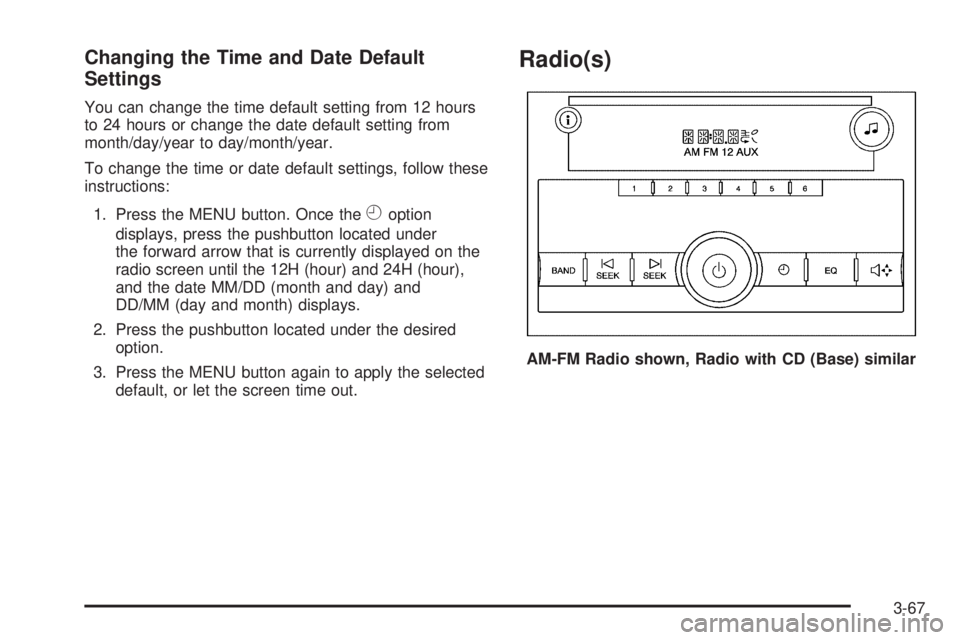
Radio(s)
AM-FM Radio shown, Radio with CD (Base) similar
3-67
Page 203 of 402
ABS can change the brake pressure faster than any
driver could. The computer is programmed to make the
most of available tire and road conditions. This can
help you steer around the obstacle while braking hard.
As you brake, the computer keeps receiving updates
on wheel speed and controls braking pressure
accordingly.
Remember: ABS does not change the time you need to
get your foot up to the brake pedal or always decrease
stopping distance. If you get too close to the vehicle
in front of you, you will not have time to apply the brakes
if that vehicle suddenly slows or stops. Always leave
enough room up ahead to stop, even though you
have ABS.
Using ABS
Do not pump the brakes. Just hold the brake pedal down
firmly and let antilock work for you. You might feel the
brakes vibrate or notice some noise, but this is normal.
Braking in Emergencies
With ABS, you can steer and brake at the same time.
In many emergencies, steering can help you more than
even the very best braking.
Locking Rear Axle
If your vehicle has this feature, your locking rear axle
can give you additional traction on snow, mud, ice, sand
or gravel. It works like a standard axle most of the
time, but when one of the rear wheels has no traction
and the other does, this feature will allow the wheel with
traction to move the vehicle.
StabiliTrak®System
If your vehicle has StabiliTrak®, it combines anti-lock
brake, traction and stability control systems and
helps the driver maintain directional control of the
vehicle in most driving conditions.
When you first start your vehicle and begin to drive away,
the system performs several diagnostic checks to ensure
that it is working properly. You may hear or feel the
system working. This is normal and does not mean there
is a problem with your vehicle. The system should
initialize before the vehicle reaches 20 mph (32 km/h). In
some cases, it may take approximately 2 miles (3.2 km)
of driving before the system initializes.
4-5
Page 226 of 402
Towing a Trailer
If your vehicle has a diesel engine, see the DURAMAX®
Diesel manual for more information.
{CAUTION:
If you do not use the correct equipment and
drive properly, you can lose control when you
pull a trailer. For example, if the trailer is too
heavy, the brakes may not work well — or even
at all. You and your passengers could be
seriously injured. You may also damage your
vehicle; the resulting repairs would not be
covered by your warranty. Pull a trailer only if
you have followed all the steps in this section.
Ask your dealer/retailer for advice and
information about towing a trailer with
your vehicle.Notice:Pulling a trailer improperly can damage
your vehicle and result in costly repairs that would
not be covered by your warranty. Always follow
the instructions in this section and check with your
dealer/retailer for more information about towing
a trailer with your vehicle.
To identify the trailering capacity of your vehicle, you
should read the information in “Weight of the Trailer” that
appears later in this section.
Trailering is different than just driving your vehicle by
itself. Trailering means changes in acceleration, braking,
handling, durability and fuel economy. Successful,
safe trailering takes correct equipment, and it has to be
used properly.
That’s the reason for this part. In it are many time-tested,
important trailering tips and safety rules. Many of
these are important for your safety and that of your
passengers. So please read this section carefully before
you pull a trailer.
4-28
Page 249 of 402
To ensure quick starts in the wintertime, the E85 fuel
must be formulated properly for your climate according to
ASTM specification D 5798. If you have trouble starting
on E85, it could be because the E85 fuel is not properly
formulated for your climate. If this happens, switching to
gasoline or adding gasoline to the fuel tank can improve
starting. For good starting and heater efficiency below
32°F (0°C), the fuel mix in the fuel tank should contain
no more than 70% ethanol. It is best not to alternate
repeatedly between gasoline and E85. If you do switch
fuels, it is recommended that you add as much fuel as
possible — do not add less than three gallons (11 L)
when refueling. You should drive the vehicle immediately
after refueling for at least seven miles (11 km) to allow the
vehicle to adapt to the change in ethanol concentration.
E85 has less energy per gallon than gasoline, so you will
need to refill the fuel tank more often when using E85
than when you are using gasoline. SeeFilling the Tank
on page 5-10.
Notice:Some additives are not compatible with
E85 fuel and can harm your vehicle’s fuel system.
Do not add anything to E85. Damage caused by
additives would not be covered by your new vehicle
warranty.Notice:Your vehicle was not designed for fuel that
contains methanol. Do not use fuel containing
methanol. It can corrode metal parts in the fuel
system and also damage plastic and rubber parts.
That damage would not be covered under your
warranty.
Fuels in Foreign Countries
If you plan on driving in another country outside the
United States or Canada, the proper fuel might be hard
to find. Never use leaded gasoline or any other fuel not
recommended in the previous text on fuel. Costly repairs
caused by use of improper fuel would not be covered by
your warranty.
To check the fuel availability, ask an auto club, or
contact a major oil company that does business in the
country where you will be driving.
5-9
Page 258 of 402
Engine Oil Additives
Do not add anything to the oil. The recommended
oils with the starburst symbol that meet
GM Standard GM6094M are all you need for good
performance and engine protection.
Engine Oil Life System
When to Change Engine Oil
Your vehicle has a computer system that lets you know
when to change the engine oil and filter. This is based
on engine revolutions and engine temperature, and not
on mileage. Based on driving conditions, the mileage
at which an oil change will be indicated can vary
considerably. For the oil life system to work properly, you
must reset the system every time the oil is changed.
When the system has calculated that oil life has been
diminished, it will indicate that an oil change is
necessary. A CHANGE ENGINE OIL SOON message
will come on. SeeDIC Warnings and Messages on
page 3-49. Change the oil as soon as possible within the
next 600 miles (1 000 km). It is possible that, if you are
driving under the best conditions, the oil life system might
not indicate that an oil change is necessary for over
a year. However, the engine oil and filter must be
changed at least once a year and at this time the system
must be reset. Your dealer/retailer has trained servicepeople who will perform this work using genuine parts
and reset the system. It is also important to check the oil
regularly and keep it at the proper level.
If the system is ever reset accidentally, you must
change the oil at 3,000 miles (5 000 km) since your last
oil change. Remember to reset the oil life system
whenever the oil is changed.
How to Reset the Engine Oil Life
System
The Engine Oil Life System calculates when to change
the engine oil and filter based on vehicle use. Whenever
the oil is changed, reset the system so it can calculate
when the next oil change is required. If a situation occurs
where you change the oil prior to a CHANGE ENGINE
OIL SOON message being turned on, reset the system.
To reset the CHANGE ENGINE OIL SOON message:
1. Turn the ignition key to ON/RUN with the engine off.
2. Fully press and release the accelerator pedal slowly
three times within five seconds.
3. Turn the key to LOCK/OFF.
If the message comes back on when you start your
vehicle, the engine oil life system has not reset. Repeat
the procedure. If it still does not reset, see your
dealer/retailer for service.
5-18