ECO mode GMC SAVANA PASSENGER 2009 User Guide
[x] Cancel search | Manufacturer: GMC, Model Year: 2009, Model line: SAVANA PASSENGER, Model: GMC SAVANA PASSENGER 2009Pages: 406, PDF Size: 2.34 MB
Page 200 of 406
Once the disc has scanned, the player defaults to
playing MP3 files in order by artist. The current artist
playing is shown on the second line of the display
between the arrows. Once all songs by that artist
are played, the player moves to the next artist in
alphabetical order on the CD-R/CD-RW and begins
playing MP3 files by that artist. If you want to listen to
MP3 files by another artist, press the pushbutton located
below either arrow button. You will go to the next or
previous artist in alphabetical order. Continue pressing
either button until the desired artist is displayed.
To change from playback by artist to playback by album,
press the pushbutton located below the Sort By label.
From the sort screen, push one of the buttons below the
album button. Press the pushbutton below the back
label to return to the main music navigator screen.
Now the album name is displayed on the second line
between the arrows and songs from the current
album begins to play. Once all songs from that album
are played, the player moves to the next album in
alphabetical order on the CD-R/CD-RW and begins
playing MP3 files from that album.
To exit music navigator mode, press the pushbutton
below the Back label to return to normal MP3 playback.
BAND:Press this button to listen to the radio when
a CD is playing. The inactive CD remains inside
the radio for future listening.CD/AUX (CD/Auxiliary):Press this button to play a CD
when listening to the radio. The CD icon and a message
showing disc and/or track number displays when a CD is
in the player. Press this button again and the system
automatically searches for an auxiliary input device such
as a portable audio player. If a portable audio player is
not connected, “No Input Device Found” displays.
Theft-Deterrent Feature
Non-RDS Radios
THEFTLOCK®is designed to discourage theft of your
vehicle’s radio. The feature works automatically by
learning a portion of the Vehicle Identification Number
(VIN). If the radio is moved to a different vehicle, it does
not operate and LOC displays.
With THEFTLOCK
®activated, the radio does not
operate if stolen.
RDS Radios
THEFTLOCK®is designed to discourage theft of your
vehicle’s radio. The feature works automatically by
learning a portion of the Vehicle Identification Number
(VIN). If the radio is moved to a different vehicle, it does
not operate and LOCKED displays.
When the radio and vehicle are turned off, the blinking
red light indicates that THEFTLOCK
®is armed.
With THEFTLOCK®activated, the radio does not operate
if stolen.
3-82
Page 237 of 406
If the loaded trailer being pulled will weigh more than
5,000 lbs (2 270 kg), be sure to use a properly mounted
weight-distributing hitch and sway control of the proper
size. This equipment is very important for proper vehicle
loading and good handling when driving. Always use a
sway control if the trailer will weigh more than these
limits. Ask a hitch dealer about sway controls.
Will any holes need to be made in the body of the
vehicle when a trailer hitch is installed?
If using the wiring provided with the factory-installed
trailering package, no holes need to be made in
the body of the vehicle. However, if an aftermarket hitch
is installed, holes may need to be made in the body.
If holes are made in the body, then be sure to seal the
holes later when the hitch is removed. If the holes
are not sealed, deadly carbon monoxide (CO) from the
engine’s exhaust can get into the vehicle as well as
dirt and water. See “Carbon Monoxide” underEngine
Exhaust on page 2-30.
Safety Chains
Always attach chains between the vehicle and the
trailer. Cross the safety chains under the tongue of the
trailer to help prevent the tongue from contacting
the road if it becomes separated from the hitch. Always
leave just enough slack so the rig can turn. Never
allow safety chains to drag on the ground.
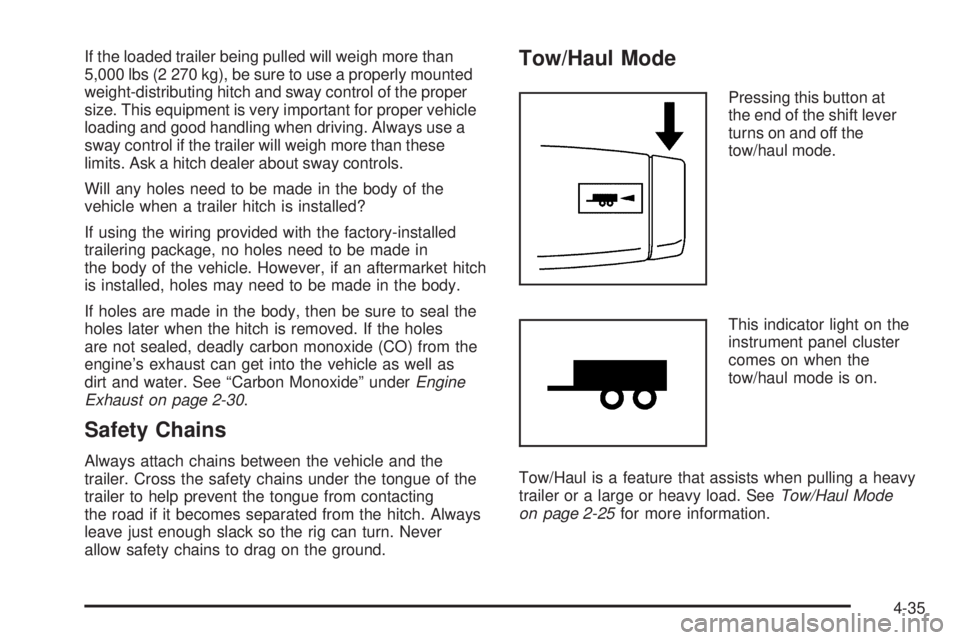
Tow/Haul Mode
Pressing this button at
the end of the shift lever
turns on and off the
tow/haul mode.
This indicator light on the
instrument panel cluster
comes on when the
tow/haul mode is on.
Tow/Haul is a feature that assists when pulling a heavy
trailer or a large or heavy load. SeeTow/Haul Mode
on page 2-25for more information.
4-35
Page 266 of 406
How to Add Automatic
Transmission Fluid
Refer to the Maintenance Schedule to determine what
kind of transmission fluid to use. SeeRecommended
Fluids and Lubricants on page 6-14.
Using a funnel, add fluid down the transmission dipstick
tube only after checking the transmission fluid while it is
hot. A cold check is used only as a reference. If the fluid
level is low, add only enough of the proper fluid to bring
the level up to the HOT area for a hot check. It does not
take much fluid, generally less than one pint (0.5 L).
Do not overfill.
Notice:Use of the incorrect automatic transmission
uid may damage the vehicle, and the damages may
not be covered by the vehicle’s warranty. Always
use the automatic transmission uid listed in
Recommended Fluids and Lubricants on page 6-14.
•After adding fluid, recheck the fluid level as described
under “How to Check Automatic Transmission Fluid,”
earlier in this section.
•When the correct fluid level is obtained, push the
dipstick back in all the way; then flip the handle down
to lock the dipstick in place.
Cooling System
If your vehicle has a diesel engine, see “Van Models”
under “Cooling System” in the DURAMAX®Diesel
Supplement.
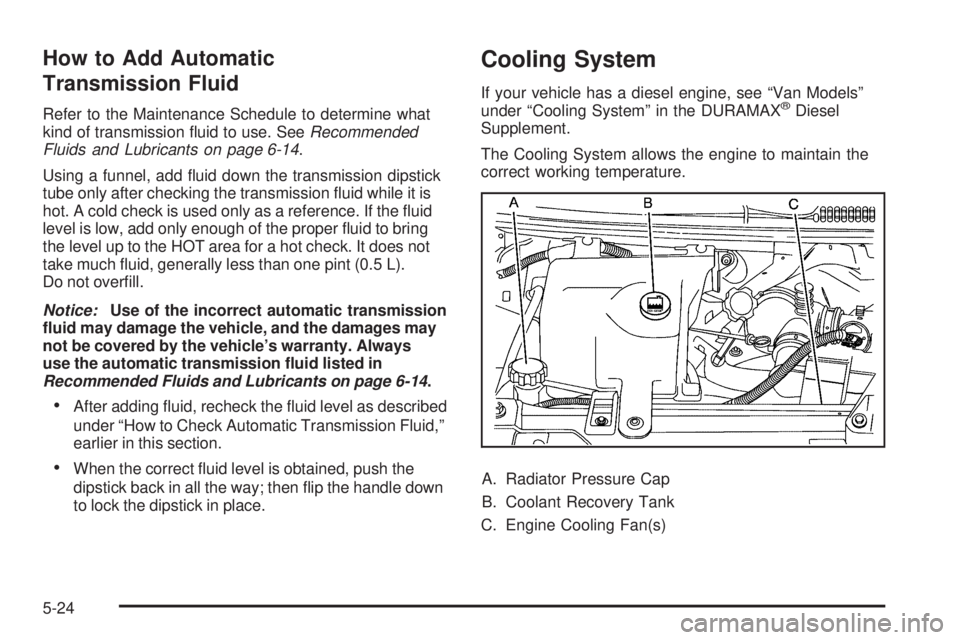
The Cooling System allows the engine to maintain the
correct working temperature.
A. Radiator Pressure Cap
B. Coolant Recovery Tank
C. Engine Cooling Fan(s)
5-24
Page 269 of 406
Checking Coolant
The vehicle must be on a level surface when checking
the coolant level.
Check to see if coolant is visible in the coolant recovery
tank. If the coolant inside the coolant recovery tank is
boiling, do not do anything else until it cools down.
If coolant is visible but the coolant level is not at or
above the COLD FILL mark, add a 50/50 mixture of
clean, drinkable water and DEX-COOL
®coolant at the
coolant recovery tank, but be sure the cooling system is
cool before this is done.
When the engine is cold, the coolant level should be at
or above the COLD FILL mark. If it is not, there could
be a leak in the cooling system.
If the coolant is low, add the coolant or take the vehicle
to a dealer/retailer for service.
How to Add Coolant to the Recovery
Tank for Gasoline Engines
If your vehicle has a diesel engine, see “How to
Add Coolant to the Coolant Recovery Tank” under
“Van Models” in the Cooling System section of
the DURAMAX
®Diesel Supplement for the proper
coolant fill procedure.
{CAUTION:
You can be burned if you spill coolant on hot
engine parts. Coolant contains ethylene glycol
and it will burn if the engine parts are hot enough.
Do not spill coolant on a hot engine.
Notice:This vehicle has a specic coolant ll
procedure. Failure to follow this procedure could
cause the engine to overheat and be severely
damaged.
If coolant is needed, add the proper DEX-COOL
®
coolant mixture at the coolant recovery tank.
5-27
Page 311 of 406
The TPMS sensor matching process is outlined below:
1. Set the parking brake.
2. Turn the ignition switch to ON/RUN with the
engine off.
3. Press the Remote Keyless Entry (RKE) transmitter’s
LOCK and UNLOCK buttons at the same time
for approximately five seconds. The horn sounds
twice to signal the receiver is in relearn mode and
TIRE LEARNING ACTIVE message displays on the
DIC screen.
If your vehicle does not have RKE, press the Driver
Information Center (DIC) vehicle information button
until the PRESS
VTO RELEARN TIRE POSITIONS
message displays. The horn sounds twice to signal
the receiver is in relearn mode and TIRE LEARNING
ACTIVE message displays on the DIC screen.
If your vehicle does not have RKE or DIC buttons,
press the trip odometer reset stem located on the
instrument panel cluster until the PRESS
VTO
RELEARN TIRE POSITIONS message displays.
The horn sounds twice to signal the receiver is in
relearn mode and TIRE LEARNING ACTIVE
message displays on the DIC screen.
4. Start with the driver side front tire.5. Remove the valve cap from the valve cap stem.
Activate the TPMS sensor by increasing or
decreasing the tire’s air pressure for five seconds,
or until a horn chirp sounds. The horn chirp,
which may take up to 30 seconds to sound,
confirms that the sensor identification code has
been matched to this tire and wheel position.
6. Proceed to the passenger side front tire, and repeat
the procedure in Step 5.
7. Proceed to the passenger side rear tire, and repeat
the procedure in Step 5.
8. Proceed to the driver side rear tire, and repeat the
procedure in Step 5. The horn sounds two times to
indicate the sensor identification code has been
matched to the driver side rear tire, and that the
TPMS sensor matching process is no longer active.
The TIRE LEARNING ACTIVE message on the DIC
display screen goes off.
9. Turn the ignition switch to LOCK/OFF.
10. Set all four tires to the recommended air pressure
level as indicated on the Tire and Loading
Information label.
11. Put the valve caps back on the valve stems.
5-69
Page 388 of 406
•Gather the important information you will need from
the other driver. Things like name, address, phone
number, driver’s license number, vehicle license
plate, vehicle make, model and model year, Vehicle
Identification Number (VIN), insurance company
and policy number, and a general description of the
damage to the other vehicle.
•If possible, call your insurance company from the
scene of the crash. They will walk you through the
information they will need. If they ask for a police
report, phone or go to the police department
headquarters the next day and you can get a copy of
the report for a nominal fee. In some states/provinces
with “no fault” insurance laws, a report may not be
necessary. This is especially true if there are no
injuries and both vehicles are driveable.
•Choose a reputable collision repair facility for your
vehicle. Whether you select a dealer/retailer or a
private collision repair facility to fix the damage,
make sure you are comfortable with them.
Remember, you will have to feel comfortable with
their work for a long time.
•Once you have an estimate, read it carefully and
make sure you understand what work will be
performed on your vehicle. If you have a question,
ask for an explanation. Reputable shops welcome
this opportunity.
Managing the Vehicle Damage Repair
Process
In the event that your vehicle requires damage repairs,
GM recommends that you take an active role in its
repair. If you have a pre-determined repair facility of
choice, take your vehicle there, or have it towed there.
Specify to the facility that any required replacement
collision parts be original equipment parts, either new
Genuine GM parts or recycled original GM parts.
Remember, recycled parts will not be covered by your
GM vehicle warranty.
Insurance pays the bill for the repair, but you must live
with the repair. Depending on your policy limits, your
insurance company may initially value the repair using
aftermarket parts. Discuss this with your repair
professional, and insist on Genuine GM parts. Remember
if your vehicle is leased you may be obligated to have the
vehicle repaired with Genuine GM parts, even if your
insurance coverage does not pay the full cost.
If another party’s insurance company is paying for the
repairs, you are not obligated to accept a repair
valuation based on that insurance company’s collision
policy repair limits, as you have no contractual limits with
that company. In such cases, you can have control of
the repair and parts choices as long as cost stays within
reasonable limits.
7-14
Page 401 of 406
Lap-Shoulder Belt...........................................1-24
LATCH System for Child Restraints...................1-41
Light
Airbag Off..................................................3-28
Airbag Readiness........................................3-27
Antilock Brake System (ABS) Warning............3-32
Brake System Warning.................................3-31
Charging System.........................................3-30
Cruise Control.............................................3-39
Highbeam On.............................................3-39
Oil Pressure...............................................3-38
Passenger Airbag Status Indicator..................3-29
Safety Belt Reminders..................................3-26
Security.....................................................3-39
StabiliTrak
®Indicator....................................3-33
Tire Pressure..............................................3-34
Tow/Haul Mode ...........................................3-40
Lighting
Entry/Exit...................................................3-16
Lights
Exterior Lamps............................................3-12
Flash-to-Pass............................................... 3-8
High/Low Beam Changer................................ 3-8
On Reminder..............................................3-13
Loading Your Vehicle.......................................4-18
Locking Rear Axle............................................ 4-8
Lockout Protection............................................ 2-9
Locks
Automatic Door Lock..................................... 2-8
Automatic Door Unlock.................................. 2-8Locks (cont.)
Cargo Door Relocking.................................... 2-7
Delayed Locking........................................... 2-7
Door ........................................................... 2-6
Lockout Protection......................................... 2-9
Power Door .................................................. 2-7
Programmable Automatic Door Locks............... 2-7
Rear Door Security Locks............................... 2-8
Loss of Control...............................................4-11
Lower Anchors and Tethers for Children.............1-41
M
Maintenance Schedule
Additional Required Services........................... 6-6
At Each Fuel Fill.........................................6-10
At Least Once a Month................................6-11
At Least Once a Year..................................6-11
At the First 100, 1,000 and 6,000 Miles
(160, 1 600 and 10 000km).......................6-10
Introduction.................................................. 6-2
Maintenance Footnotes.................................. 6-8
Maintenance Record....................................6-18
Maintenance Replacement Parts....................6-16
Maintenance Requirements............................. 6-2
Owner Checks and Services.........................6-10
Recommended Fluids and Lubricants.............6-14
7
Page 405 of 406
Spare Tire.....................................................5-95
Installing....................................................5-84
Removing...................................................5-81
Storing.......................................................5-94
Specifications, Capacities...............................5-110
Speedometer..................................................3-25
StabiliTrak
®Indicator Light...............................3-33
StabiliTrak®System.......................................... 4-6
Starting the Engine.........................................2-20
Steering.......................................................... 4-8
Steering Wheel Controls, Audio.........................3-83
Steering Wheel, Tilt Wheel................................. 3-6
Storage Areas................................................2-33
Stuck in Sand, Mud, Ice, or Snow.....................4-17
Sun Visors.....................................................2-16
Swing-Out Side Door, 60/40.............................2-10
Swing-Out Windows........................................2-15
T
Taillamps.......................................................5-52
Theft-Deterrent, Radio.....................................3-82
Theft-Deterrent Systems...................................2-16
PASS-Key
®III+ Electronic Immobilizer............2-16
PASS-Key®III+ Electronic Immobilizer
Operation................................................2-17
Tilt Wheel........................................................ 3-6
Time, Setting..................................................3-65
Tire
Pressure Light.............................................3-34Tires.............................................................5-55
Aluminum Wheels, Cleaning........................5-101
Buying New Tires........................................5-73
Chains.......................................................5-78
Changing a Flat Tire....................................5-80
Cleaning...................................................5-101
Different Size..............................................5-75
Dual Tire Operation.....................................5-64
If a Tire Goes Flat.......................................5-79
Inflation - Tire Pressure................................5-63
Inspection and Rotation................................5-70
Installing the Spare Tire................................5-84
Pressure Monitor Operation...........................5-66
Pressure Monitor System..............................5-65
Removing the Flat Tire.................................5-84
Removing the Spare Tire and Tools...............5-81
Secondary Latch System..............................5-91
Spare Tire..................................................5-95
Storing a Flat or Spare Tire and Tools............5-94
Tire Sidewall Labeling..................................5-56
Tire Terminology and Definitions....................5-60
Uniform Tire Quality Grading.........................5-75
Wheel Alignment and Tire Balance.................5-77
Wheel Replacement.....................................5-77
When It Is Time for New Tires......................5-72
Tow/Haul Mode ...............................................2-25
Tow/Haul Mode Light.......................................3-40
Towing
Recreational Vehicle.....................................4-24
Towing a Trailer..........................................4-28
Your Vehicle
...............................................4-24
11