brake GMC SIERRA 1500 2006 User Guide
[x] Cancel search | Manufacturer: GMC, Model Year: 2006, Model line: SIERRA 1500, Model: GMC SIERRA 1500 2006Pages: 600, PDF Size: 3.35 MB
Page 130 of 600
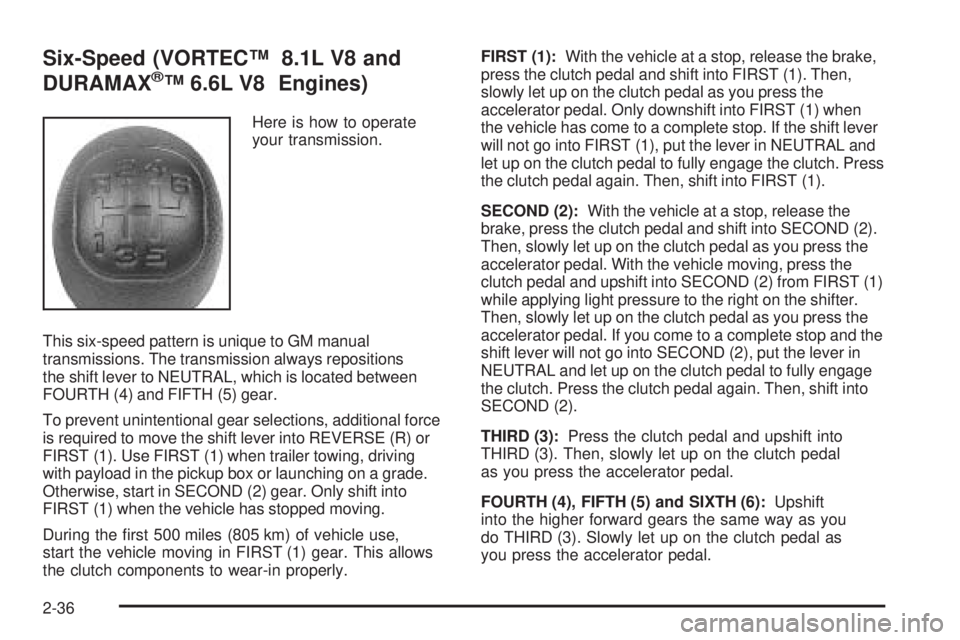
Six-Speed (VORTEC™ 8.1L V8 and
DURAMAX®™ 6.6L V8 Engines)
Here is how to operate
your transmission.
This six-speed pattern is unique to GM manual
transmissions. The transmission always repositions
the shift lever to NEUTRAL, which is located between
FOURTH (4) and FIFTH (5) gear.
To prevent unintentional gear selections, additional force
is required to move the shift lever into REVERSE (R) or
FIRST (1). Use FIRST (1) when trailer towing, driving
with payload in the pickup box or launching on a grade.
Otherwise, start in SECOND (2) gear. Only shift into
FIRST (1) when the vehicle has stopped moving.
During the rst 500 miles (805 km) of vehicle use,
start the vehicle moving in FIRST (1) gear. This allows
the clutch components to wear-in properly.FIRST (1):With the vehicle at a stop, release the brake,
press the clutch pedal and shift into FIRST (1). Then,
slowly let up on the clutch pedal as you press the
accelerator pedal. Only downshift into FIRST (1) when
the vehicle has come to a complete stop. If the shift lever
will not go into FIRST (1), put the lever in NEUTRAL and
let up on the clutch pedal to fully engage the clutch. Press
the clutch pedal again. Then, shift into FIRST (1).
SECOND (2):With the vehicle at a stop, release the
brake, press the clutch pedal and shift into SECOND (2).
Then, slowly let up on the clutch pedal as you press the
accelerator pedal. With the vehicle moving, press the
clutch pedal and upshift into SECOND (2) from FIRST (1)
while applying light pressure to the right on the shifter.
Then, slowly let up on the clutch pedal as you press the
accelerator pedal. If you come to a complete stop and the
shift lever will not go into SECOND (2), put the lever in
NEUTRAL and let up on the clutch pedal to fully engage
the clutch. Press the clutch pedal again. Then, shift into
SECOND (2).
THIRD (3):Press the clutch pedal and upshift into
THIRD (3). Then, slowly let up on the clutch pedal
as you press the accelerator pedal.
FOURTH (4), FIFTH (5) and SIXTH (6):Upshift
into the higher forward gears the same way as you
do THIRD (3). Slowly let up on the clutch pedal as
you press the accelerator pedal.
2-36
Page 131 of 600
NEUTRAL:Use this position when you start or idle
your engine.
REVERSE (R):To back up, press the clutch pedal.
Wait for the vehicle to stop moving and then, shift
to REVERSE (R). Let up on the clutch slowly while
pressing the accelerator pedal. Also, use REVERSE (R),
along with the parking brake, when turning off your
engine and parking your vehicle.
Shift Speeds
{CAUTION:
If you skip a gear when you downshift, you
could lose control of your vehicle. You could
injure yourself or others. Do not shift down
more than one gear at a time when you
downshift.Do not allow the engine rpm to overspeed and enter the
tachometer red lines. Engine overspeed occurs when
downshifting, or descending a grade, at too high a vehicle
speed. When going down steep grades, always select a
gear at least one position lower than you would use on
climbing a grade. This will allow the vehicle’s engine to
provide some braking and help to slow the vehicle as it
goes down the grade. Monitor your vehicle speed,
acceleration and engine rpm while applying the brakes
as you go down the grade to ensure you have complete
control over the vehicle.
If your engine speed drops below 600 rpm, or if the
engine is not running smoothly, you should downshift to
the next lower gear. When operating on slippery surfaces,
downshift at lower than normal vehicle speeds to prevent
the tires from slipping.
In bench seat equipped vehicles, move the tallest
beverage containers to the right cupholder to provide
additional clearance for the shift lever.
For vehicles equipped with a center console, the front
cup holder pulls out and turns 180° to provide additional
clearance between tall beverage containers and the
shift lever.
2-37
Page 134 of 600
An indicator light near the lever shows you the transfer
case settings:
Notice:Driving on clean, dry pavement in
four-wheel drive for an extended period of time may
cause premature wear on your vehicle’s powertrain.
Do not drive on clean, dry pavement in four-wheel
drive for extended periods of time.
4L (Four-Wheel Low):This setting also engages your
front axle and delivers extra torque. You may never need
4L. It sends maximum power to all four wheels. You might
choose 4L if you are driving off-road in deep sand, deep
mud, deep snow, and while climbing or descending steep
hills. When operating in Four-Wheel Low, the gear ratio
provides additional torque when compared to four-wheel
high. The transmission gear shift feel will be exaggerated.
{CAUTION:
Shifting the transfer case to NEUTRAL
can cause your vehicle to roll even if the
transmission is in PARK (P), or if you have a
manual transmission, even if you are in gear.
You or someone else could be seriously injured.
Be sure to set the parking brake before placing
the transfer case in NEUTRAL. SeeParking
Brake on page 2-52.N (Neutral):Shift to this setting only when your vehicle
needs to be towed. SeeRecreational Vehicle Towing
on page 4-62orTowing Your Vehicle on page 4-62.
2H (Two-Wheel High):This setting is used for driving in
most street and highway situations. Your front axle is not
engaged in two-wheel drive. This setting also provides
the best fuel economy.
4H (Four-Wheel High):Use this setting when you need
extra traction, such as on snowy or icy roads or in most
off-road situations. This setting also engages your front
axle to help drive your vehicle. This is the best setting to
use when plowing snow.
You can shift from 2H to 4H or 4H high to 2H while the
vehicle is moving. Your front axle will engage faster if
you take your foot off of the accelerator for a couple of
seconds after you shift. In extremely cold weather,
it may be necessary to stop or slow the vehicle to shift
into four-wheel high.
2-40
Page 135 of 600
When Using the Manual Transfer Case
Shifting should be made using quick motions.
Shifting slowly may make it more difficult to shift.
You may notice that it is harder to shift when the
vehicle is cold. After the vehicle warms up the
shifting will return to normal.
While in 4H or 4L you may experience reduced fuel
economy.
Avoid driving in four-wheel drive on clean, dry
pavement. It may cause your tires to wear faster,
and make your transfer case harder to shift and run
noisier.
Shifting from 2H (Two-Wheel High) to
4H (Four-Wheel High)
Shifts between 2H and 4H can be made at any
vehicle speed.
It is easiest to shift the transfer case when
maintaining a constant speed or a slight acceleration.
If possible, avoid shifting while slowing down, as it
will may make it harder to shift.
Shift your transfer case lever in one continuous
motion into either the 4H or 2H position.
In extremely cold weather, it may be necessary to
slow or stop the vehicle to shift into four-wheel high
until your vehicle has warmed up.
While in 4H, your vehicle can be driven at any posted
legal speed limit.
Shifting In or Out of 4L (Four-Wheel Low)
Notice:Shifting the transfer case into 4L while
moving at speeds faster than 3 mph (5 km/h) may
cause premature wear to the transfer case, and may
cause the gears to grind. To avoid causing premature
wear, and grinding the gears, do not shift the transfer
case into 4L while the vehicle is moving faster than
3 mph (5 km/h).
Shifts into 4L can be made with the vehicle at a stop, or
while slowly rolling about 1 to 3 mph (2 to 5 km/h).
Shift the automatic transmission into NEUTRAL (N),
or with a manual transmission, press the clutch
pedal, or shift into NEUTRAL (N).
Shift the transfer case shift lever in one continuous
motion into the 4L position.
When in 4L do not drive faster than 45 mph.
This will reduce wear and extend the life of
your transfer case.
Shifting In or Out of NEUTRAL
1. With the vehicle running and the engine at an idle
set the parking brake.
2. Place the transmission into NEUTRAL (N).
Shift the transfer case in one continuous motion into or
out of the NEUTRAL position.
2-41
Page 137 of 600
When the vehicle detects a loss of traction, the system
will automatically engage four-wheel drive. Driving in
this mode results in slightly lower fuel economy than
Two-Wheel High.
2
m(Two-Wheel High):This setting is used for driving
in most street and highway situations. Your front axle is
not engaged in two-wheel drive. This setting also
provides the best fuel economy.
{CAUTION:
Shifting the transfer case to NEUTRAL
can cause your vehicle to roll even if the
transmission is in PARK (P). You or someone
else could be seriously injured. Be sure to set
the parking brake before placing the transfer
case in NEUTRAL. SeeParking Brake on
page 2-52.
N (NEUTRAL):Shift the vehicle’s transfer case to
N (NEUTRAL) only when towing your vehicle. See
Recreational Vehicle Towing on page 4-62orTowing
Your Vehicle on page 4-62for more information.4
m(Four-Wheel High):Use this setting when you
need extra traction, such a on snowy or icy roads or in
most off-road situations. This setting also engages your
front axle to help drive your vehicle. This is the best
setting to use when plowing snow.
4
n(Four-Wheel Low):This setting also engages
your front axle and delivers extra torque. You may never
need Four-Wheel Low. It sends maximum power to all
four wheels. You might choose Four-Wheel Low if you
are driving off-road in deep sand, deep mud, deep snow,
and while climbing or descending steep hills. When
operating in Four-Wheel Low, the gear ratio provides
additional torque when compared to four-wheel high.
The transmission gear shift feel will be exaggerated.
Indicator lights in the switches show which setting your
transfer case is in. The indicator lights will come on briey
when you turn on the ignition and one will stay on. If the
lights do not come on, you should take your vehicle to
your dealer for service. An indicator light will ash while
the transfer case is being shifted. It will stay on when the
shift is complete. If for some reason the transfer case
cannot make a requested shift, it will return to the last
chosen setting.
If the SERVICE 4WD message stays on, you should take
your vehicle to your dealer for service. SeeDIC Warnings
and Messages on page 3-55for further information.
2-43
Page 139 of 600
Shifting Out of Four-Wheel Low
To shift from Four-Wheel Low to Four-Wheel High,
AUTO 4WD, or Two-Wheel High, your vehicle must be
stopped or moving less than 3 mph (5 km/h) with the
transmission in NEUTRAL (N) and the ignition in RUN.
The preferred method for shifting out of Four-Wheel
Low is to have your vehicle moving 1 to 2 mph (1.6 to
3.2 km/h). Press and release the Four-Wheel High,
AUTO 4WD, or Two-Wheel High switch. You must wait
for the Four-Wheel High, AUTO 4WD, or Two-Wheel
High indicator light to stop ashing and remain on before
shifting your transmission into gear.
Notice:Shifting the transmission into gear before
the Four-Wheel Low indicator light has stopped
ashing could damage the transfer case. To help
avoid damaging your vehicle, always wait for the
Four-Wheel Low indicator light to stop ashing
before shifting the transmission into gear.
The transfer case may make noise and the vehicle
may jerk when the transfer case is shifted between
Four-Wheel Low and Four-Wheel High ranges or
from NEUTRAL with the engine running.
If the four-wheel high, AUTO 4WD, or Two-Wheel High
switch is pressed when your vehicle is in gear and/or
moving, the Four-Wheel High, AUTO 4WD, or
Two-Wheel High indicator light will ash for 30 seconds
but will not complete the shift unless your vehicle is
moving less than 3 mph (5 km/h) and the transmission
is in NEUTRAL (N).
Shifting Into NEUTRAL
{CAUTION:
Shifting the transfer case to NEUTRAL
can cause your vehicle to roll even if the
transmission is in PARK (P). You or someone
else could be seriously injured. Be sure to set
the parking brake before placing the transfer
case in NEUTRAL. SeeParking Brake on
page 2-52.
To shift the transfer case to NEUTRAL do the following:
1. Make sure the vehicle is parked so that it will not roll.
2. Set the parking brake.
3. Start the vehicle or turn the ignition to RUN.
4. Put the transmission in NEUTRAL (N).
5. Shift the transfer case to Two-Wheel High.
6. Simultaneously press and hold the Two-Wheel High
and Four-Wheel Low buttons for 10 seconds. The
red NEUTRAL light will come on when the transfer
case shift to NEUTRAL is complete.
2-45
Page 140 of 600
7. If the engine is running, shift the transmission to
REVERSE (R) for one second, then shift the
transmission to DRIVE (D) for one second, or
FIRST (1) for vehicles equipped with a manual
transmission.
8. Turn the engine off, by turning the key to
ACCESSORY.
9. Place the transmission shift lever in PARK (P).
10. Turn the ignition to LOCK.
Shifting Out of NEUTRAL
To shift out of NEUTRAL:
1. Set the parking brake and apply the regular brake
pedal.
2. Turn the ignition to RUN with the engine off.
3. Shift the transmission to NEUTRAL (N).
4. Press the button for the desired transfer case
shift position (Two-Wheel High, Four-Wheel
High, AUTO 4WD, or Four-Wheel Low).
5. After the transfer case has shifted out of NEUTRAL
the red light will go out.
6. Release the parking brake.
7. You may start the engine and shift the transmission
to the desired position.Excessively shifting the transfer case into or out of the
different modes may cause the transfer case to enter the
shift protection mode. This will protect the transfer case
from possible damage and will only allow the transfer
case to respond to one shift per 10 seconds. The transfer
case may stay in this mode for up to three minutes.
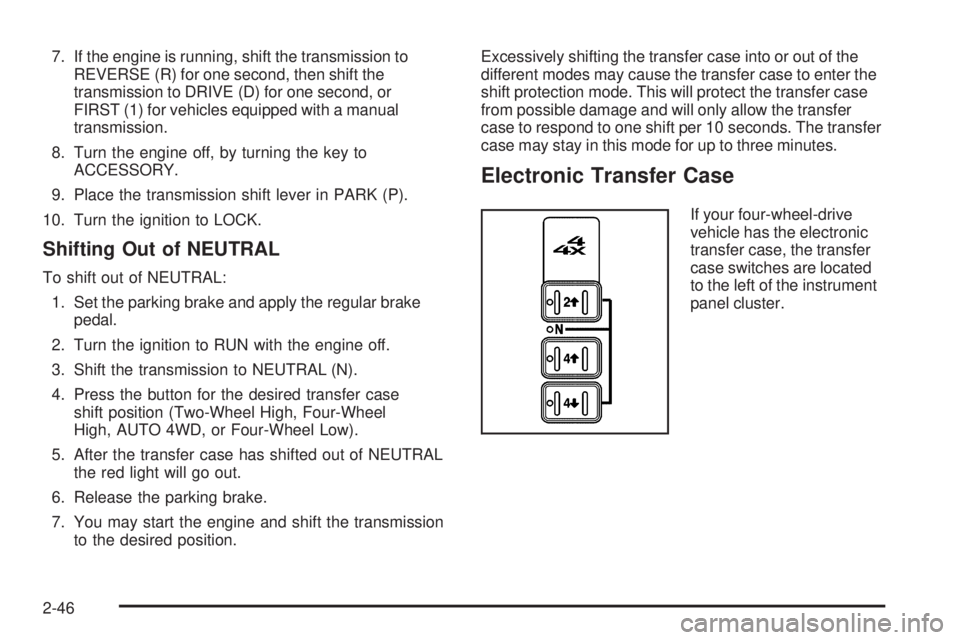
Electronic Transfer Case
If your four-wheel-drive
vehicle has the electronic
transfer case, the transfer
case switches are located
to the left of the instrument
panel cluster.
2-46
Page 141 of 600
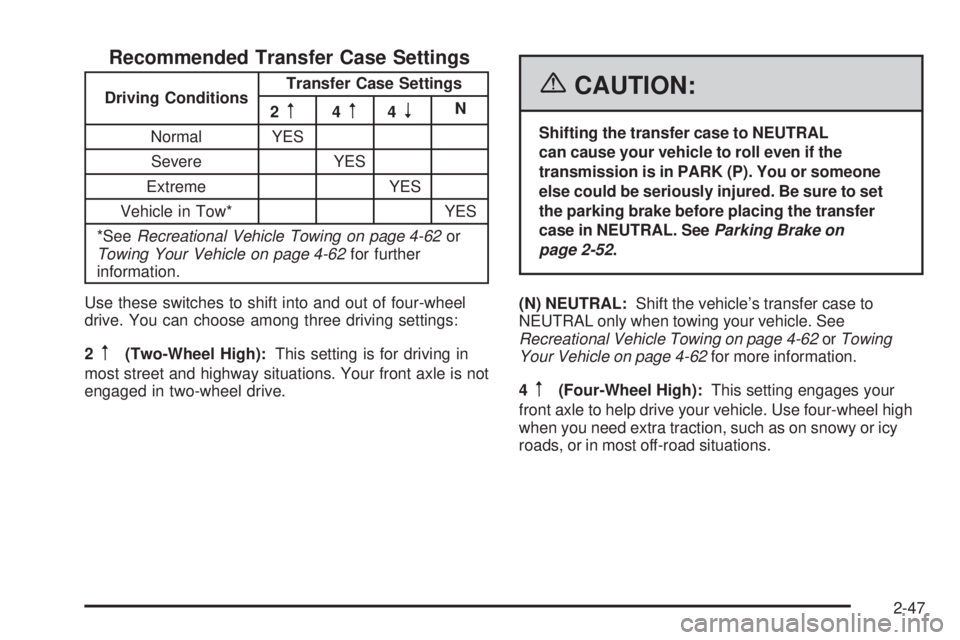
Recommended Transfer Case Settings
Driving ConditionsTransfer Case Settings
2m4m4nN
Normal YES
Severe YES
Extreme YES
Vehicle in Tow* YES
*SeeRecreational Vehicle Towing on page 4-62or
Towing Your Vehicle on page 4-62for further
information.
Use these switches to shift into and out of four-wheel
drive. You can choose among three driving settings:
2
m(Two-Wheel High):This setting is for driving in
most street and highway situations. Your front axle is not
engaged in two-wheel drive.
{CAUTION:
Shifting the transfer case to NEUTRAL
can cause your vehicle to roll even if the
transmission is in PARK (P). You or someone
else could be seriously injured. Be sure to set
the parking brake before placing the transfer
case in NEUTRAL. SeeParking Brake on
page 2-52.
(N) NEUTRAL:Shift the vehicle’s transfer case to
NEUTRAL only when towing your vehicle. See
Recreational Vehicle Towing on page 4-62orTowing
Your Vehicle on page 4-62for more information.
4
m(Four-Wheel High):This setting engages your
front axle to help drive your vehicle. Use four-wheel high
when you need extra traction, such as on snowy or icy
roads, or in most off-road situations.
2-47
Page 144 of 600
Shifting from Four-Wheel Low to
Four-Wheel High or Two-Wheel High
To shift from four-wheel low to Four-Wheel High or
Two-Wheel High, your vehicle must be stopped or
moving less than 3 mph (5 km/h) with the transmission in
NEUTRAL (N) for an automatic transmission or the clutch
pedal pressed for a manual transmission. The preferred
method for shifting out of Four-Wheel Low is to have your
vehicle moving 3 mph (5 km/h).
Press and release the Two-Wheel High or Four-Wheel
High switch. You must wait for the Two-Wheel High or
Four-Wheel High indicator light to stop ashing and
remain on before shifting your transmission into gear
or releasing the clutch pedal.
If the Four-Wheel High switch is pressed when your
vehicle is in gear and/or moving, the Four-Wheel High
indicator light will ash for 30 seconds but will not
complete the shift unless the vehicle is moving slower
than 3 mph (5 km/h) and the transmission is in
NEUTRAL (N).
Shifting into NEUTRAL
{CAUTION:
Shifting the transfer case to NEUTRAL
can cause your vehicle to roll even if the
transmission is in PARK (P). You or someone
else could be seriously injured. Be sure to set
the parking brake before placing the transfer
case in NEUTRAL. SeeParking Brake on
page 2-52.
To shift the transfer case to NEUTRAL, rst make sure
the vehicle is parked so that it will not roll:
1. Set the parking brake.
2. Start the vehicle or turn the ignition to RUN.
3. Press the foot brake pedal and put the transmission
in NEUTRAL (N).
2-50
Page 145 of 600
4. Shift the transfer case to Two-Wheel High.
5. Simultaneously press and hold the Two-Wheel High
and Four-Wheel Low buttons for 10 seconds. The
red NEUTRAL light will come on when the transfer
case shift to NEUTRAL is complete.
6. Start the engine if it is not already running.
7. Press and hold the foot brake pedal and Shift the
transmission to REVERSE (R) for one second, then
shift the transmission for one second to DRIVE (D)
for an automatic transmission, or FIRST (1) for
vehicles equipped with a manual transmission and
then let out the clutch. This is to ensure the transfer
case is in NEUTRAL. If not, repeat this procedure
starting at Step 3.
8. Turn the engine off, by turning the key to
ACCESSORY.
9. Place the transmission shift lever in PARK (P)
for an automatic transmission, or FIRST (1) for
vehicles equipped with a manual transmission.
10. Turn the ignition to LOCK.Shifting Out of NEUTRAL
To shift out of NEUTRAL:
1. Set the parking brake and press and hold the
regular brake pedal.
2. Shift the transmission to NEUTRAL (N) for an
automatic transmission, or press the clutch pedal
for vehicles equipped with a manual transmission.
Then turn the ignition to RUN with the engine off.
3. Press the button for the desired transfer case shift
position (Two-Wheel High, Four-Wheel High, or
Four-Wheel Low).
4. After the transfer case has shifted out of NEUTRAL
the red light will go out.
5. Release the parking brake.
6. You may start the engine and shift the transmission
to the desired position. Excessively shifting the
transfer case into or out of the different modes may
cause the transfer case to enter the shift protection
mode. This will protect the transfer case from
possible damage and will only allow the transfer
case to respond to one shift per 10 seconds.
The transfer case may stay in this mode for up
to three minutes.
7. After the transfer case has shifted out of NEUTRAL
the red light will go out.
2-51