roof GMC SIERRA 1500 2012 User Guide
[x] Cancel search | Manufacturer: GMC, Model Year: 2012, Model line: SIERRA 1500, Model: GMC SIERRA 1500 2012Pages: 556, PDF Size: 7.88 MB
Page 92 of 556
Black plate (24,1)GMC Sierra Owner Manual - 2012 - CRC - 11/15/11
3-24 Seats and Restraints
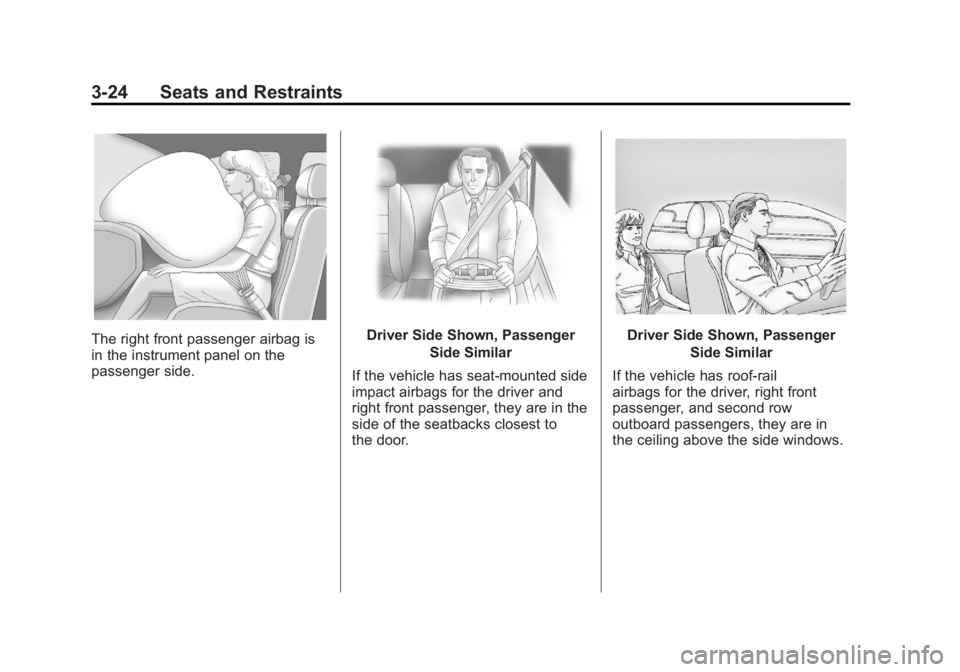
The right front passenger airbag is
in the instrument panel on the
passenger side.Driver Side Shown, PassengerSide Similar
If the vehicle has seat‐mounted side
impact airbags for the driver and
right front passenger, they are in the
side of the seatbacks closest to
the door.Driver Side Shown, Passenger Side Similar
If the vehicle has roof-rail
airbags for the driver, right front
passenger, and second row
outboard passengers, they are in
the ceiling above the side windows.
Page 93 of 556
Black plate (25,1)GMC Sierra Owner Manual - 2012 - CRC - 11/15/11
Seats and Restraints 3-25
{WARNING
If something is between an
occupant and an airbag, the
airbag might not inflate properly
or it might force the object into
that person causing severe injury
or even death. The path of an
inflating airbag must be kept
clear. Do not put anything
between an occupant and an
airbag, and do not attach or put
anything on the steering wheel
hub or on or near any other
airbag covering.
Do not use seat accessories that
block the inflation path of a
seat-mounted side impact airbag.
Never secure anything to the roof
of a vehicle with roof-rail airbags
by routing a rope or tie‐down
through any door or window
opening. If you do, the path of an
inflating roof-rail airbag will be
blocked.
When Should an Airbag
Inflate?
Frontal airbags are designed to
inflate in moderate to severe frontal
or near-frontal crashes to help
reduce the potential for severe
injuries mainly to the driver's or right
front passenger's head and chest.
However, they are only designed
to inflate if the impact exceeds a
predetermined deployment
threshold. Deployment thresholds
are used to predict how severe a
crash is likely to be in time for the
airbags to inflate and help restrain
the occupants.
Whether the frontal airbags will
or should deploy is not based on
how fast your vehicle is traveling.
It depends largely on what you hit,
the direction of the impact, and how
quickly your vehicle slows down.Frontal airbags may inflate at
different crash speeds. For
example:.If the vehicle hits a stationary
object, the airbags could inflate
at a different crash speed than if
the vehicle hits a moving object.
.If the vehicle hits an object that
deforms, the airbags could
inflate at a different crash speed
than if the vehicle hits an object
that does not deform.
.If the vehicle hits a narrow object
(like a pole), the airbags could
inflate at a different crash speed
than if the vehicle hits a wide
object (like a wall).
.If the vehicle goes into an object
at an angle, the airbags could
inflate at a different crash speed
than if the vehicle goes straight
into the object.
Thresholds can also vary with
specific vehicle design.
Page 94 of 556
Black plate (26,1)GMC Sierra Owner Manual - 2012 - CRC - 11/15/11
3-26 Seats and Restraints
Frontal airbags are not intended to
inflate during vehicle rollovers, rear
impacts, or in many side impacts.
If the GVWR (Gross Vehicle Weight
Rating) of your vehicle is 3 855 kg
(8,500 lb) or above, the vehicle has
single stage airbags. If the GVWR is
below 3 855 kg (8,500 lb) then the
vehicle has dual stage airbags.
Vehicles with a full bench seat are
equipped with single state airbags.
You can find the GVWR on the
certification label on the rear edge
of the driver door. SeeVehicle Load
Limits on page 9‑16 for more
information.
The vehicle may have dual‐stage
frontal airbags. Dual-stage airbags
adjust the restraint according to
crash severity. The vehicle has
electronic frontal sensors, which
help the sensing system distinguish
between a moderate frontal impact
and a more severe frontal impact.
For moderate frontal impacts,
dual-stage airbags inflate at a level less than full deployment. For
more severe frontal impacts, full
deployment occurs.
Vehicles with dual stage airbags
also have seat position sensors
which enable the sensing system to
monitor the position of the driver
seat (all models), and on crew cab
and extended cab models the right
front passenger seat on light duty
models only. The seat position
sensor provides information that is
used to determine if the airbags
should deploy at a reduced level or
at full deployment.
The vehicle may or may not have
seat‐mounted side impact and
roof-rail airbags. See
Airbag System
on page 3‑21. Seat‐mounted side
impact and roof-rail airbags are
intended to inflate in moderate to
severe side crashes. In addition,
these roof-rail airbags are intended
to inflate during a rollover or in a
severe frontal impact. Seat‐mounted
side impact and roof-rail airbags will
inflate if the crash severity is above the system's designed threshold
level. The threshold level can vary
with specific vehicle design.
Roof-rail airbags are not
intended to inflate in rear impacts.
A seat‐mounted side impact airbag
is intended to deploy on the side
of the vehicle that is struck. Both
roof-rail airbags will deploy when
either side of the vehicle is struck,
or if the sensing system predicts
that the vehicle is about to roll over,
or in a severe frontal impact.
In any particular crash, no one
can say whether an airbag should
have inflated simply because of the
damage to a vehicle or because
of what the repair costs were.
For frontal airbags, inflation is
determined by what the vehicle hits,
the angle of the impact, and how
quickly the vehicle slows down. For
seat‐mounted side impact and
roof-rail airbags, deployment is
determined by the location and
severity of the side impact. In a
Page 95 of 556
Black plate (27,1)GMC Sierra Owner Manual - 2012 - CRC - 11/15/11
Seats and Restraints 3-27
rollover event, roof-rail airbag
deployment is determined by the
direction of the roll.
What Makes an Airbag
Inflate?
In a deployment event, the sensing
system sends an electrical signal
triggering a release of gas from the
inflator. Gas from the inflator fills the
airbag causing the bag to break out
of the cover and deploy. The inflator,
the airbag, and related hardware are
all part of the airbag module.
Frontal airbag modules are located
inside the steering wheel and
instrument panel. For vehicles with
seat‐mounted side impact airbags,
there are airbags modules in the
side of the front seatbacks closest
to the door. For vehicles with
roof-rail airbags, there are airbag
modules in the ceiling of the vehicle,
near the side windows that have
occupant seating positions.
How Does an Airbag
Restrain?
In moderate to severe frontal or
near frontal collisions, even belted
occupants can contact the steering
wheel or the instrument panel. In
moderate to severe side collisions,
even belted occupants can contact
the inside of the vehicle.
Airbags supplement the protection
provided by safety belts. Frontal
airbags distribute the force of the
impact more evenly over the
occupant's upper body, stopping
the occupant more gradually.
Seat‐mounted side impact and
roof-rail airbags distribute the force
of the impact more evenly over the
occupant's upper body.
Rollover capable roof-rail airbags
are designed to help contain the
head and chest of occupants in the
outboard seating positions in the
first and second rows. The rollover
capable roof-rail airbags are
designed to help reduce the risk offull or partial ejection in rollover
events, although no system can
prevent all such ejections.
But airbags would not help in
many types of collisions, primarily
because the occupant's motion
is not toward those airbags. See
When Should an Airbag Inflate? on
page 3‑25
for more information.
Airbags should never be regarded
as anything more than a supplement
to safety belts.
What Will You See after
an Airbag Inflates?
After the frontal airbags and
seat-mounted side impact airbags
inflate, they quickly deflate, so
quickly that some people may not
even realize an airbag inflated.
Roof-rail airbags may still be at least
partially inflated for some time after
they deploy. Some components of
the airbag module may be hot for
several minutes. For location of the
airbag modules, see What Makes
an Airbag Inflate? on page 3‑27.
Page 100 of 556
Black plate (32,1)GMC Sierra Owner Manual - 2012 - CRC - 11/15/11
3-32 Seats and Restraints
Passenger Sensing
System
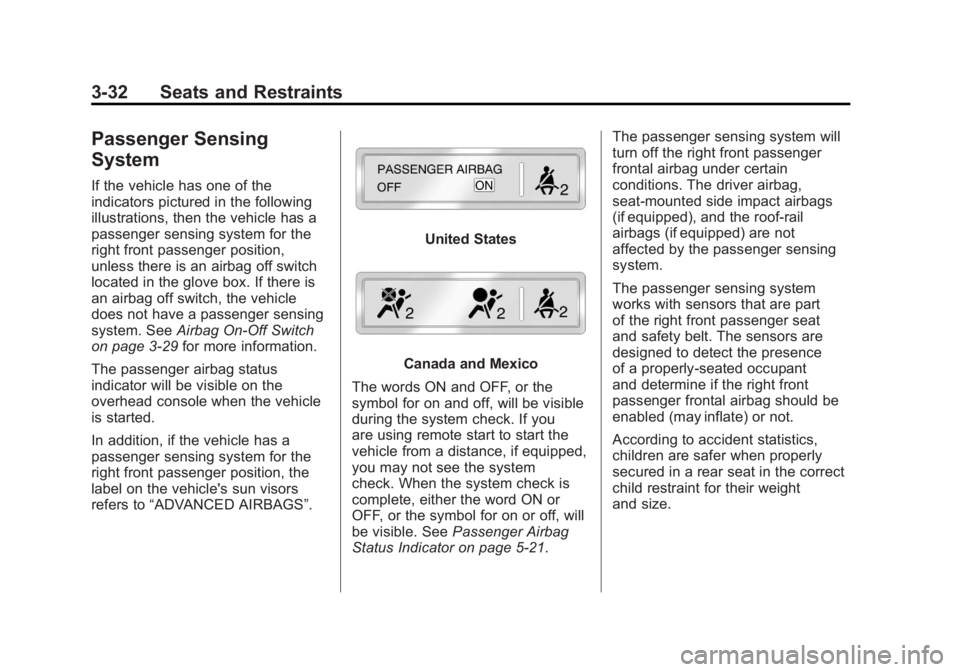
If the vehicle has one of the
indicators pictured in the following
illustrations, then the vehicle has a
passenger sensing system for the
right front passenger position,
unless there is an airbag off switch
located in the glove box. If there is
an airbag off switch, the vehicle
does not have a passenger sensing
system. SeeAirbag On-Off Switch
on page 3‑29 for more information.
The passenger airbag status
indicator will be visible on the
overhead console when the vehicle
is started.
In addition, if the vehicle has a
passenger sensing system for the
right front passenger position, the
label on the vehicle's sun visors
refers to “ADVANCED AIRBAGS”.
United States
Canada and Mexico
The words ON and OFF, or the
symbol for on and off, will be visible
during the system check. If you
are using remote start to start the
vehicle from a distance, if equipped,
you may not see the system
check. When the system check is
complete, either the word ON or
OFF, or the symbol for on or off, will
be visible. See Passenger Airbag
Status Indicator on page 5‑21. The passenger sensing system will
turn off the right front passenger
frontal airbag under certain
conditions. The driver airbag,
seat‐mounted side impact airbags
(if equipped), and the roof-rail
airbags (if equipped) are not
affected by the passenger sensing
system.
The passenger sensing system
works with sensors that are part
of the right front passenger seat
and safety belt. The sensors are
designed to detect the presence
of a properly-seated occupant
and determine if the right front
passenger frontal airbag should be
enabled (may inflate) or not.
According to accident statistics,
children are safer when properly
secured in a rear seat in the correct
child restraint for their weight
and size.
Page 105 of 556
Black plate (37,1)GMC Sierra Owner Manual - 2012 - CRC - 11/15/11
Seats and Restraints 3-37
WARNING (Continued)
proper service procedures, and
make sure the person performing
work for you is qualified to do so.
Adding Equipment to the
Airbag-Equipped Vehicle
Q: Is there anything I might addto or change about the vehicle
that could keep the airbags
from working properly?
A: Yes. If you add things that
change your vehicle's frame,
bumper system, height, front end
or side sheet metal, they may
keep the airbag system from
working properly. Changing or
moving any parts of the front
seats, safety belts, the airbag
sensing and diagnostic module,
steering wheel, instrument
panel, roof-rail airbag modules,
ceiling headliner or pillar garnish
trim, overhead console, front sensors, side impact sensors,
or airbag wiring can affect the
operation of the airbag system.
In addition, the vehicle may have
a passenger sensing system
for the right front passenger's
position, which includes sensors
that are part of the passenger's
seat. The passenger sensing
system may not operate properly
if the original seat trim is
replaced with non-GM covers,
upholstery or trim, or with
GM covers, upholstery or
trim designed for a different
vehicle. Any object, such as an
aftermarket seat heater or a
comfort enhancing pad or
device, installed under or on top
of the seat fabric, could also
interfere with the operation of
the passenger sensing system.
This could either prevent proper
deployment of the passenger
airbag(s) or prevent the
passenger sensing system
from properly turning off the
passenger airbag(s). See
Passenger Sensing System on
page 3‑32.
If you have any questions
about this, you should contact
Customer Assistance before you
modify your vehicle. The phone
numbers and addresses for
Customer Assistance are in
Step Two of the Customer
Satisfaction Procedure in
this manual. See
Customer
Satisfaction Procedure (U.S.
and Canada) on page 13‑1 or
Customer Satisfaction
Procedure (Mexico) on
page 13‑3.
If the vehicle has rollover
roof-rail airbags, see Different
Size Tires and Wheels on
page 10‑70 for additional
important information.
Page 145 of 556
Black plate (7,1)GMC Sierra Owner Manual - 2012 - CRC - 11/15/11
Instruments and Controls 5-7
To calibrate the compass, use the
following procedure:
Compass Calibration Procedure
1. Before calibrating the compass,make sure the compass zone is
set to the variance zone in which
the vehicle is located. See
“Compass Variance (Zone)
Procedure” earlier in this
section.
Do not operate any switches
such as window, sunroof,
climate controls, or seats during
the calibration procedure.
2. Press the vehicle information button until PRESS
VTO
CALIBRATE COMPASS
displays. Or, if the vehicle does
not have DIC buttons, press the
trip odometer reset stem until
CALIBRATE COMPASS
displays. 3. Press the set/reset button to
start the compass calibration.
Or, if the vehicle does not have
DIC buttons, press and hold the
trip odometer reset stem for
two seconds to start the
compass calibration.
4. The DIC will display CALIBRATING: DRIVE IN
CIRCLES. Drive the vehicle
in tight circles at less than
8 km/h (5 mph) to complete the
calibration. The DIC will display
CALIBRATION COMPLETE
for a few seconds when the
calibration is complete. The DIC
display will then return to the
previous menu.
Clock
AM-FM Radio and AM‐FM
Radio with CD Player
To set the clock:
1. Turn the ignition key to ACC/
ACCESSORY or ON/RUN, then
press the
Obutton to turn the
radio on.
2. Press the
Hbutton until the hour
numbers begin to flash, then
turn the
fknob to increase or
decrease the hour.
3. Press the
Hbutton until the
minute numbers begin to flash,
then turn the
fknob to increase
or decrease the minutes.
4. Press the
Hbutton until the
12HR or 24HR time format
begins to flash, then turn
the
fknob to change the time
format.
Page 201 of 556
Black plate (1,1)GMC Sierra Owner Manual - 2012 - CRC - 11/15/11
Lighting 6-1
Lighting
Exterior Lighting
Exterior Lamp Controls . . . . . . . . 6-1
Exterior Lamps OffReminder . . . . . . . . . . . . . . . . . . . . 6-2
Headlamp High/Low-Beam Changer . . . . . . . . . . . . . . . . . . . . . 6-3
Flash-to-Pass . . . . . . . . . . . . . . . . . 6-3
Daytime Running Lamps (DRL) . . . . . . . . . . . . . . . . 6-3
Automatic Headlamp System . . . . . . . . . . . . . . . . . . . . . . 6-4
Hazard Warning Flashers . . . . . 6-5
Turn and Lane-Change Signals . . . . . . . . . . . . . . . . . . . . . . 6-5
Fog Lamps . . . . . . . . . . . . . . . . . . . . 6-6
Auxiliary Roof-Mounted Lamp . . . . . . . . . 6-6
Interior Lighting
Instrument Panel IlluminationControl . . . . . . . . . . . . . . . . . . . . . . 6-7
Cargo Lamp . . . . . . . . . . . . . . . . . . 6-8
Dome Lamps . . . . . . . . . . . . . . . . . 6-8
Reading Lamps . . . . . . . . . . . . . . . 6-8
Lighting Features
Entry Lighting . . . . . . . . . . . . . . . . . 6-9
Exit Lighting . . . . . . . . . . . . . . . . . . . 6-9
Battery Load Management . . . . 6-9
Battery Power Protection . . . . 6-10
Exterior Lighting
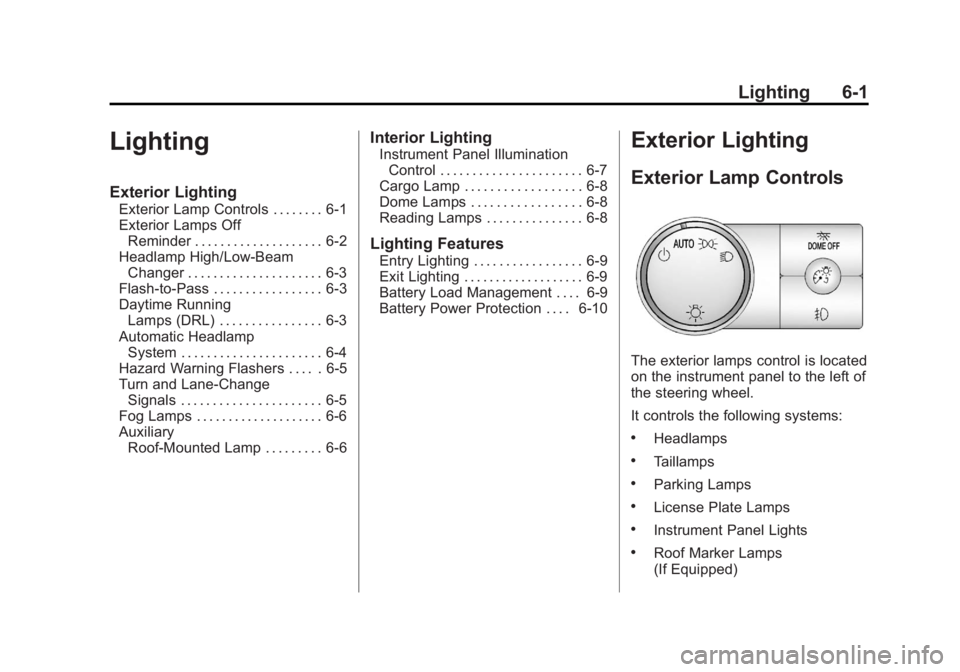
Exterior Lamp Controls
The exterior lamps control is located
on the instrument panel to the left of
the steering wheel.
It controls the following systems:
.Headlamps
.Taillamps
.Parking Lamps
.License Plate Lamps
.Instrument Panel Lights
.Roof Marker Lamps
(If Equipped)
Page 202 of 556
Black plate (2,1)GMC Sierra Owner Manual - 2012 - CRC - 11/15/11
6-2 Lighting
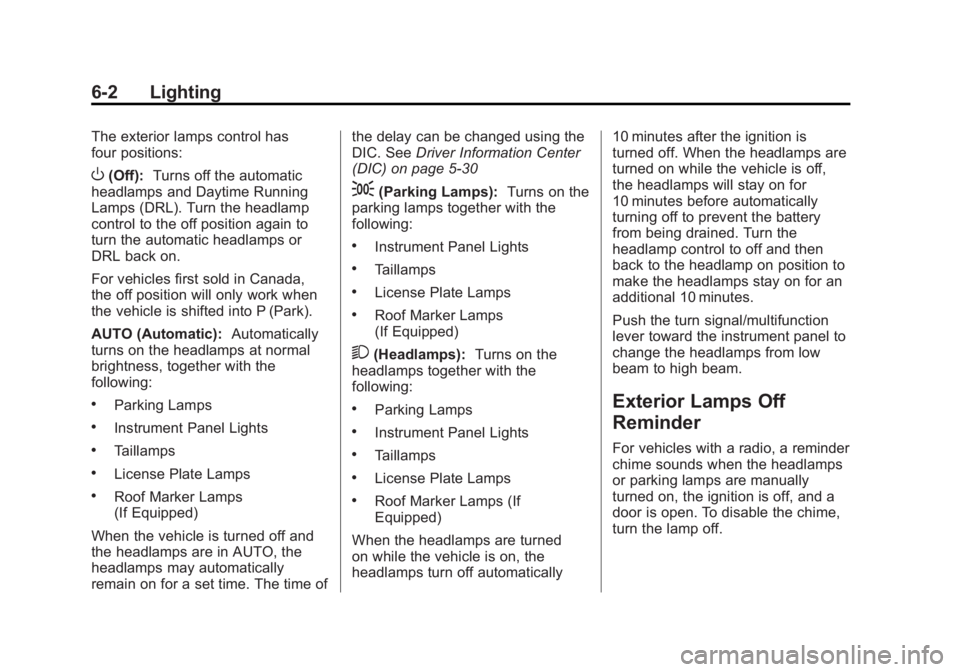
The exterior lamps control has
four positions:
O(Off):Turns off the automatic
headlamps and Daytime Running
Lamps (DRL). Turn the headlamp
control to the off position again to
turn the automatic headlamps or
DRL back on.
For vehicles first sold in Canada,
the off position will only work when
the vehicle is shifted into P (Park).
AUTO (Automatic): Automatically
turns on the headlamps at normal
brightness, together with the
following:
.Parking Lamps
.Instrument Panel Lights
.Taillamps
.License Plate Lamps
.Roof Marker Lamps
(If Equipped)
When the vehicle is turned off and
the headlamps are in AUTO, the
headlamps may automatically
remain on for a set time. The time of the delay can be changed using the
DIC. See
Driver Information Center
(DIC) on page 5‑30
;(Parking Lamps): Turns on the
parking lamps together with the
following:
.Instrument Panel Lights
.Taillamps
.License Plate Lamps
.Roof Marker Lamps
(If Equipped)
2(Headlamps): Turns on the
headlamps together with the
following:
.Parking Lamps
.Instrument Panel Lights
.Taillamps
.License Plate Lamps
.Roof Marker Lamps (If
Equipped)
When the headlamps are turned
on while the vehicle is on, the
headlamps turn off automatically 10 minutes after the ignition is
turned off. When the headlamps are
turned on while the vehicle is off,
the headlamps will stay on for
10 minutes before automatically
turning off to prevent the battery
from being drained. Turn the
headlamp control to off and then
back to the headlamp on position to
make the headlamps stay on for an
additional 10 minutes.
Push the turn signal/multifunction
lever toward the instrument panel to
change the headlamps from low
beam to high beam.
Exterior Lamps Off
Reminder
For vehicles with a radio, a reminder
chime sounds when the headlamps
or parking lamps are manually
turned on, the ignition is off, and a
door is open. To disable the chime,
turn the lamp off.
Page 206 of 556
Black plate (6,1)GMC Sierra Owner Manual - 2012 - CRC - 11/15/11
6-6 Lighting
Holding the turn signal lever for
more than one second will cause
the turn signals to flash until you
release the lever.
The lever returns to its starting
position whenever it is released.
If after signaling a turn or a lane
change the arrows flash rapidly or
do not come on, a signal bulb could
be burned out.
Have the bulbs replaced. If the bulb
is not burned out, check the fuse.
SeeFuses and Circuit Breakers on
page 10‑44.
Turn Signal On Chime
If the turn signal is left on for more
than 1.2 km (0.75 mi), a chime will
sound at each flash of the turn
signal and the message TURN
SIGNAL ON will also appear in the
Driver Information Control (DIC). To
turn the chime and message off,
move the turn signal lever to the off
position.Fog Lamps
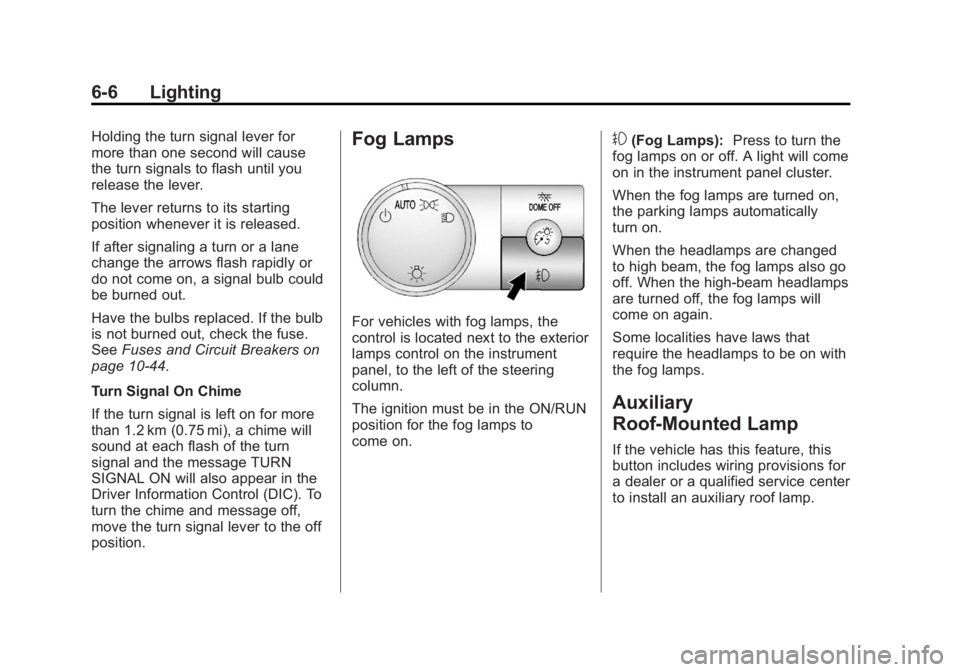
For vehicles with fog lamps, the
control is located next to the exterior
lamps control on the instrument
panel, to the left of the steering
column.
The ignition must be in the ON/RUN
position for the fog lamps to
come on.
#(Fog Lamps): Press to turn the
fog lamps on or off. A light will come
on in the instrument panel cluster.
When the fog lamps are turned on,
the parking lamps automatically
turn on.
When the headlamps are changed
to high beam, the fog lamps also go
off. When the high-beam headlamps
are turned off, the fog lamps will
come on again.
Some localities have laws that
require the headlamps to be on with
the fog lamps.
Auxiliary
Roof-Mounted Lamp
If the vehicle has this feature, this
button includes wiring provisions for
a dealer or a qualified service center
to install an auxiliary roof lamp.