lock GMC SIERRA 1500 2012 Manual Online
[x] Cancel search | Manufacturer: GMC, Model Year: 2012, Model line: SIERRA 1500, Model: GMC SIERRA 1500 2012Pages: 556, PDF Size: 7.88 MB
Page 250 of 556
Black plate (40,1)GMC Sierra Owner Manual - 2012 - CRC - 11/15/11
7-40 Infotainment System
See“Using the Auxiliary Input
Jack” under Auxiliary Devices on
page 7‑32 for more information
about changing the source.
Changing the RSE Video Screen
Settings
The screen display mode (normal,
full, and zoom), screen brightness,
and setup menu language can be
changed from the on screen setup
menu. To change any feature:
1. Press the
z(display menu)
button on the remote control.
2. Use the remote control
n,q,
p,o(navigation) arrows and
the
r(enter) button to use the
setup menu.
3. Press the
zbutton again to
remove the setup menu from the
screen.
Audio Output
Audio from the DVD player or
auxiliary inputs can be heard
through the following possible
sources:
.Wireless headphones
.Vehicle speakers
.Vehicle-wired headphone jacks
on the RSA system, if the
vehicle has this feature.
The RSE system always transmits
the audio signal to the wireless
headphones, if there is audio
available. See “Headphones” earlier
in this section for more information.
The DVD player is capable of
outputting audio to the wired
headphone jacks on the RSA
system, if the vehicle has this
feature. The DVD player can be
selected as an audio source on the
RSA system. See Rear Seat Audio
(RSA) System on page 7‑46 for
more information. When a device is connected to the
A/V jacks, or the radio's auxiliary
input jack if the vehicle has this
feature, the rear seat passengers
are able to hear audio from the
auxiliary device through the wireless
or wired headphones. The front seat
passengers are able to listen to
playback from this device through
the vehicle speakers by selecting
AUX as the source on the radio.
Video Screen
The video screen is located in the
overhead console.
To use the video screen:
1. Push the release button located
on the overhead console.
2. Move the screen to the desired position.
When the video screen is not in
use, push it up into its locked
position.
Page 251 of 556
Black plate (41,1)GMC Sierra Owner Manual - 2012 - CRC - 11/15/11
Infotainment System 7-41
If a DVD is playing and the screen
is raised to its locked position, the
screen remains on. This is normal,
and the DVD continues to play
through the previous audio source.
Use the remote control power button
or eject the disc to turn off the
screen.
The overhead console contains the
infrared transmitters for the wireless
headphones and the infrared
receivers for the remote control.
They are located at the rear of the
console.
Notice:Avoid directly touching
the video screen, as damage may
occur. See “Cleaning the Video
Screens” later in this section for
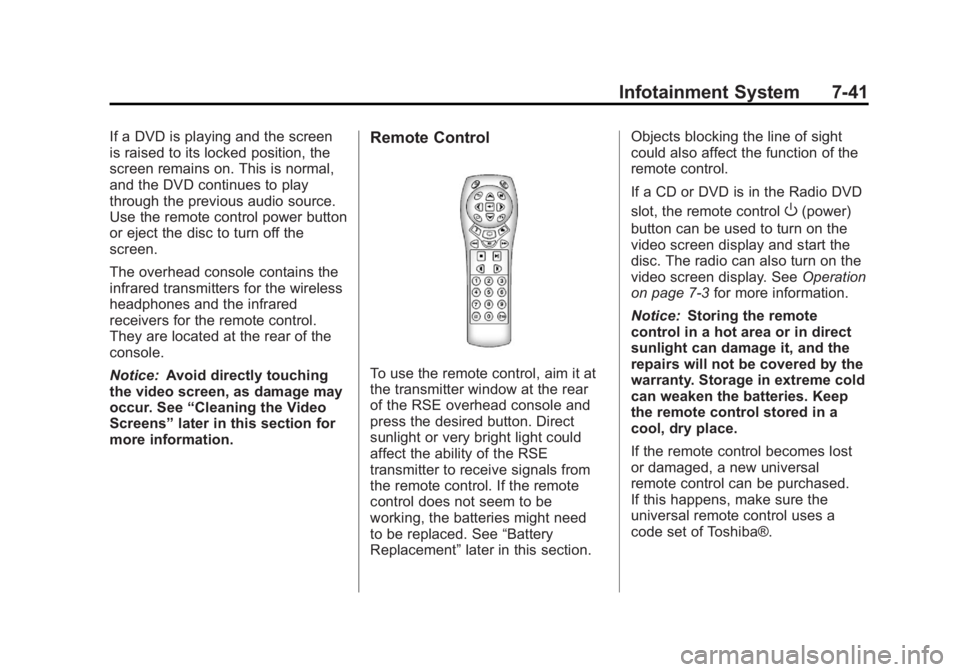
more information.Remote Control
To use the remote control, aim it at
the transmitter window at the rear
of the RSE overhead console and
press the desired button. Direct
sunlight or very bright light could
affect the ability of the RSE
transmitter to receive signals from
the remote control. If the remote
control does not seem to be
working, the batteries might need
to be replaced. See “Battery
Replacement” later in this section. Objects blocking the line of sight
could also affect the function of the
remote control.
If a CD or DVD is in the Radio DVD
slot, the remote control
O(power)
button can be used to turn on the
video screen display and start the
disc. The radio can also turn on the
video screen display. See Operation
on page 7‑3 for more information.
Notice: Storing the remote
control in a hot area or in direct
sunlight can damage it, and the
repairs will not be covered by the
warranty. Storage in extreme cold
can weaken the batteries. Keep
the remote control stored in a
cool, dry place.
If the remote control becomes lost
or damaged, a new universal
remote control can be purchased.
If this happens, make sure the
universal remote control uses a
code set of Toshiba®.
Page 267 of 556
Black plate (1,1)GMC Sierra Owner Manual - 2012 - CRC - 11/15/11
Climate Controls 8-1
Climate Controls
Climate Control Systems
Climate Control Systems (withAir Conditioning) . . . . . . . . . . . . . 8-1
Climate Control Systems (with Heater Only) . . . . . . . . . . . . . . . . . 8-4
Dual Automatic Climate Control System . . . . . . . . . . . . . . . . . . . . . . 8-5
Air Vents
Air Vents . . . . . . . . . . . . . . . . . . . . . 8-10
Climate Control Systems
Climate Control Systems (with Air Conditioning)
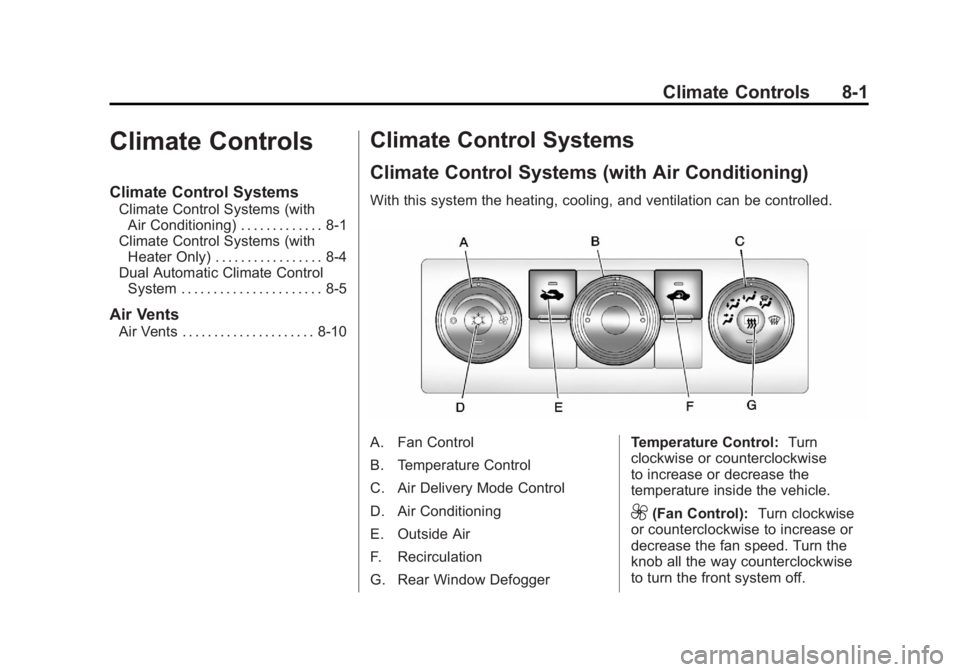
With this system the heating, cooling, and ventilation can be controlled.
A. Fan Control
B. Temperature Control
C. Air Delivery Mode Control
D. Air Conditioning
E. Outside Air
F. Recirculation
G. Rear Window Defogger Temperature Control:
Turn
clockwise or counterclockwise
to increase or decrease the
temperature inside the vehicle.
9(Fan Control): Turn clockwise
or counterclockwise to increase or
decrease the fan speed. Turn the
knob all the way counterclockwise
to turn the front system off.
Page 268 of 556
Black plate (2,1)GMC Sierra Owner Manual - 2012 - CRC - 11/15/11
8-2 Climate Controls
Air Delivery Mode Control:Turn
clockwise or counterclockwise to
change the direction of the airflow
inside the vehicle. The knob can be
positioned between two modes to
select a combination of those
modes.
Select from the following:
H(Vent): Air is directed to the
instrument panel outlets.
)(Bi-Level): Air is divided
between the instrument panel and
floor outlets.
6(Floor): Air is directed to the
floor outlets, with some air directed
to the windshield and side window
outlets. In this mode, the system
automatically selects outside air.
Recirculation cannot be selected in
floor mode.
-(Defog): This mode clears the
windows of fog or moisture. Air is
directed to the windshield, floor
outlets, and side window vents.
0(Defrost): This mode removes
fog or frost from the windshield
more quickly. Air is directed to the
windshield and the side window
vents, with some air directed
to the floor vents. The system
automatically forces outside air into
the vehicle.
The recirculation mode cannot be
selected in the defog or defrost
mode. When either mode is
selected, the system runs the air
conditioning compressor, unless
the outside temperature is close to
freezing.
Do not drive the vehicle until all the
windows are clear.
:(Outside Air): Press to turn
the outside air mode on. An
indicator light comes on to show
that outside air is on. In this mode
outside air circulates throughout
the vehicle. The outside air mode
can be used with all modes,
but it cannot be used with the
recirculation mode.
?(Recirculation): Press to turn
the recirculation mode on. An
indicator light comes on to show
that recirculation is on.
This mode recirculates and helps
to quickly cool the air inside the
vehicle. It can be used to help
prevent outside air and odors from
entering the vehicle.
The recirculation mode cannot be
used with floor, defog or defrost
modes. If recirculation is selected
with one of these modes, the
indicator light flashes three times
and then turns off. While in
recirculation mode the windows
may fog when the weather is cold
and damp. To clear the fog, select
either the defog or defrost mode
and increase the fan speed.
The recirculation mode can be
turned off by pressing the outside
air button, or by turning off the
ignition.
Page 269 of 556
Black plate (3,1)GMC Sierra Owner Manual - 2012 - CRC - 11/15/11
Climate Controls 8-3
#(Air Conditioning):Press to
turn the air conditioning system on
or off. An indicator light comes on to
show that the air conditioning is on.
The air conditioning can be selected
in any mode as long as the fan
switch is on.
The air conditioning system
removes moisture from the air, so a
small amount of water might drip
under the vehicle while idling or
after turning off the engine. This is
normal.Rear Window Defogger
For vehicles with a rear window
defogger, a warming grid is used to
remove fog from the rear window.
1(Rear): Press to turn the rear
window defogger on or off. An
indicator light on the button comes
on to show that the rear window
defogger is on.
The rear window defogger only
works when the ignition is in ON/
RUN. The rear window defogger
stays on for approximately
10 minutes after the button is
pressed, unless the ignition is
turned to ACC/ACCESSORY or
LOCK/OFF. The defogger can also
be turned off by turning off the
engine. Notice:
Do not use anything
sharp on the inside of the rear
window. If you do, you could cut
or damage the warming grid, and
the repairs would not be covered
by the vehicle warranty. Do not
attach a temporary vehicle
license, tape, a decal, or anything
similar to the defogger grid.
Page 270 of 556
Black plate (4,1)GMC Sierra Owner Manual - 2012 - CRC - 11/15/11
8-4 Climate Controls
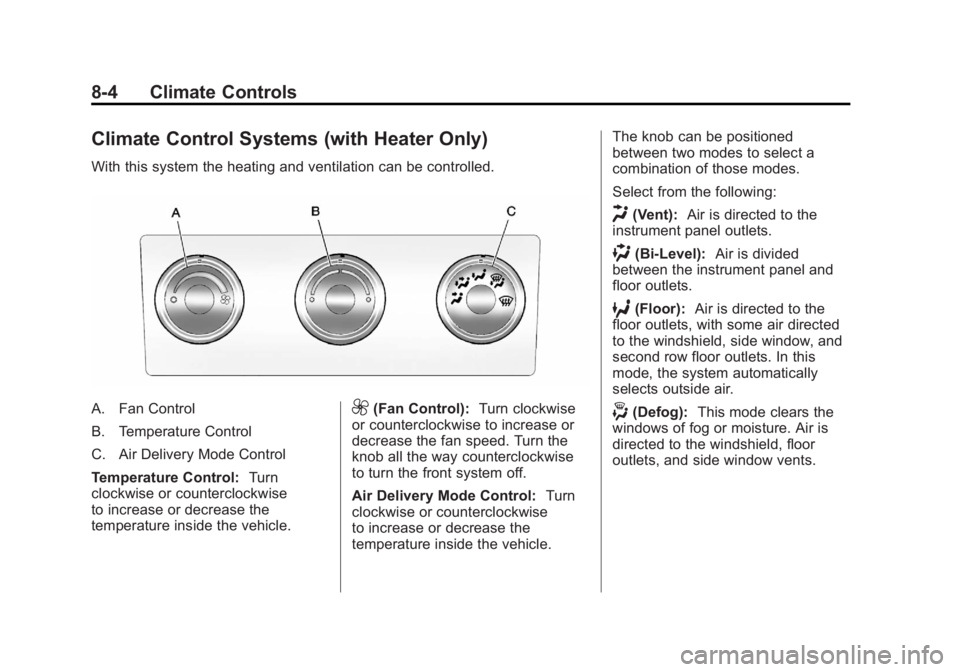
Climate Control Systems (with Heater Only)
With this system the heating and ventilation can be controlled.
A. Fan Control
B. Temperature Control
C. Air Delivery Mode Control
Temperature Control:Turn
clockwise or counterclockwise
to increase or decrease the
temperature inside the vehicle.9(Fan Control): Turn clockwise
or counterclockwise to increase or
decrease the fan speed. Turn the
knob all the way counterclockwise
to turn the front system off.
Air Delivery Mode Control: Turn
clockwise or counterclockwise
to increase or decrease the
temperature inside the vehicle. The knob can be positioned
between two modes to select a
combination of those modes.
Select from the following:
H(Vent):
Air is directed to the
instrument panel outlets.
)(Bi-Level): Air is divided
between the instrument panel and
floor outlets.
6(Floor): Air is directed to the
floor outlets, with some air directed
to the windshield, side window, and
second row floor outlets. In this
mode, the system automatically
selects outside air.
-(Defog): This mode clears the
windows of fog or moisture. Air is
directed to the windshield, floor
outlets, and side window vents.
Page 276 of 556
Black plate (10,1)GMC Sierra Owner Manual - 2012 - CRC - 11/15/11
8-10 Climate Controls
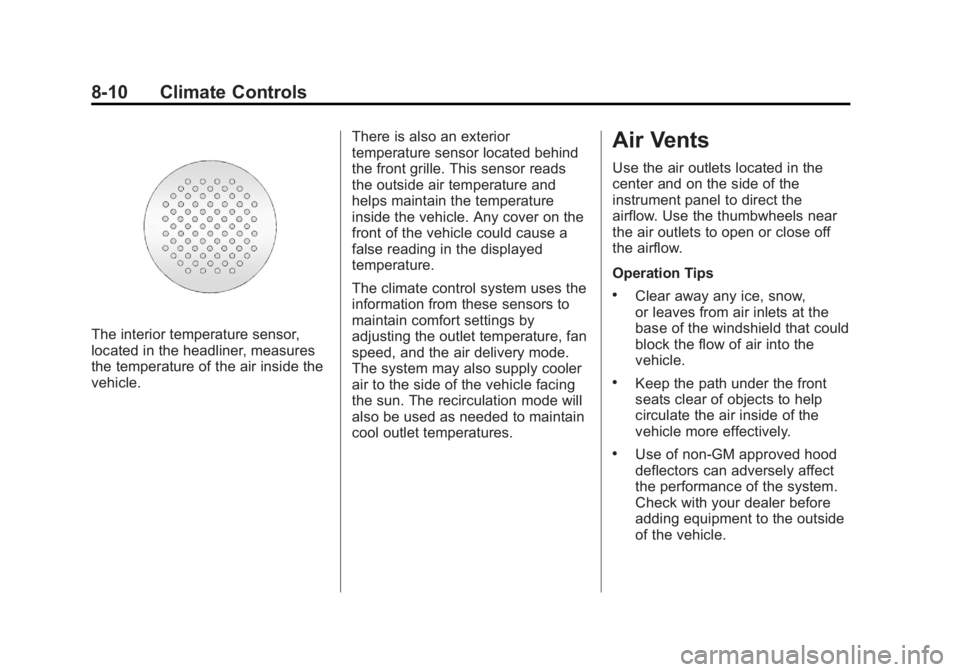
The interior temperature sensor,
located in the headliner, measures
the temperature of the air inside the
vehicle.There is also an exterior
temperature sensor located behind
the front grille. This sensor reads
the outside air temperature and
helps maintain the temperature
inside the vehicle. Any cover on the
front of the vehicle could cause a
false reading in the displayed
temperature.
The climate control system uses the
information from these sensors to
maintain comfort settings by
adjusting the outlet temperature, fan
speed, and the air delivery mode.
The system may also supply cooler
air to the side of the vehicle facing
the sun. The recirculation mode will
also be used as needed to maintain
cool outlet temperatures.
Air Vents
Use the air outlets located in the
center and on the side of the
instrument panel to direct the
airflow. Use the thumbwheels near
the air outlets to open or close off
the airflow.
Operation Tips
.Clear away any ice, snow,
or leaves from air inlets at the
base of the windshield that could
block the flow of air into the
vehicle.
.Keep the path under the front
seats clear of objects to help
circulate the air inside of the
vehicle more effectively.
.Use of non‐GM approved hood
deflectors can adversely affect
the performance of the system.
Check with your dealer before
adding equipment to the outside
of the vehicle.
Page 277 of 556
Black plate (1,1)GMC Sierra Owner Manual - 2012 - CRC - 11/15/11
Driving and Operating 9-1
Driving and
Operating
Driving Information
Distracted Driving . . . . . . . . . . . . . 9-2
Defensive Driving . . . . . . . . . . . . . 9-3
Drunk Driving . . . . . . . . . . . . . . . . . 9-3
Control of a Vehicle . . . . . . . . . . . 9-4
Braking . . . . . . . . . . . . . . . . . . . . . . . 9-4
Steering . . . . . . . . . . . . . . . . . . . . . . . 9-4
Off-Road Recovery . . . . . . . . . . . . 9-5
Loss of Control . . . . . . . . . . . . . . . . 9-5
Off-Road Driving . . . . . . . . . . . . . . 9-6
Driving on Wet Roads . . . . . . . . 9-11
Highway Hypnosis . . . . . . . . . . . 9-12
Hill and Mountain Roads . . . . . 9-12
Winter Driving . . . . . . . . . . . . . . . 9-13
If the Vehicle Is Stuck . . . . . . . . 9-15
Vehicle Load Limits . . . . . . . . . . 9-16
Truck-Camper LoadingInformation . . . . . . . . . . . . . . . . . 9-23
Starting and Operating
New Vehicle Break-In . . . . . . . . 9-25
Adjustable Throttle and BrakePedal . . . . . . . . . . . . . . . . . . . . . . . 9-25
Ignition Positions . . . . . . . . . . . . 9-26 Starting the Engine . . . . . . . . . . 9-27
Fast Idle System . . . . . . . . . . . . . 9-29
Retained Accessory
Power (RAP) . . . . . . . . . . . . . . . 9-29
Engine Coolant Heater . . . . . . . 9-30
Shifting Into Park . . . . . . . . . . . . 9-30
Shifting out of Park . . . . . . . . . . 9-32
Parking over Things
That Burn . . . . . . . . . . . . . . . . . . 9-32
Active Fuel Management
®. . . 9-32
Engine Exhaust
Engine Exhaust . . . . . . . . . . . . . . 9-33
Running the Vehicle While Parked . . . . . . . . . . . . . . . . . . . . . 9-34
Automatic Transmission
Automatic Transmission . . . . . 9-35
Manual Mode . . . . . . . . . . . . . . . . 9-38
Tow/Haul Mode . . . . . . . . . . . . . . 9-39
Drive Systems
Four-Wheel Drive . . . . . . . . . . . . 9-40
Brakes
Antilock BrakeSystem (ABS) . . . . . . . . . . . . . . 9-53
Parking Brake . . . . . . . . . . . . . . . 9-54
Brake Assist . . . . . . . . . . . . . . . . . 9-54
Hill Start Assist (HSA) . . . . . . . 9-54
Ride Control Systems
StabiliTrak®System . . . . . . . . . 9-55
Locking Rear Axle . . . . . . . . . . . 9-58
Cruise Control
Cruise Control . . . . . . . . . . . . . . . 9-58
Object Detection Systems
Ultrasonic Parking Assist . . . . 9-61
Rear Vision Camera (RVC) . . . . . . . . . . . . . 9-62
Fuel
Fuel . . . . . . . . . . . . . . . . . . . . . . . . . 9-68
Recommended Fuel . . . . . . . . . 9-68
Gasoline Specifications (U.S.and Canada Only) . . . . . . . . . . 9-69
California Fuel Requirements . . . . . . . . . . . . . . 9-69
Fuels in Foreign Countries . . . 9-69
Fuel Additives . . . . . . . . . . . . . . . 9-70
Fuel E85 (85% Ethanol) . . . . . 9-71
Filling the Tank . . . . . . . . . . . . . . 9-72
Filling a Portable Fuel Container . . . . . . . . . . . . . . . . . . . 9-73
Page 280 of 556
Black plate (4,1)GMC Sierra Owner Manual - 2012 - CRC - 11/15/11
9-4 Driving and Operating
Control of a Vehicle
Braking, steering, and accelerating
are important factors in helping to
control a vehicle while driving.
Braking
Braking action involves perception
time and reaction time. Deciding
to push the brake pedal is
perception time. Actually doing
it is reaction time.
Average driver reaction time is
about three-quarters of a second.
In that time, a vehicle moving at
100 km/h (60 mph) travels 20 m
(66 ft), which could be a lot of
distance in an emergency.
Helpful braking tips to keep in mind
include:
.Keep enough distance between
you and the vehicle in front
of you.
.Avoid needless heavy braking.
.Keep pace with traffic.If the engine ever stops while the
vehicle is being driven, brake
normally but do not pump the
brakes. Doing so could make the
pedal harder to push down. If the
engine stops, there will be some
power brake assist but it will be
used when the brake is applied.
Once the power assist is used up, it
can take longer to stop and the
brake pedal will be harder to push.
Steering
Hydraulic Power Steering
Your vehicle has hydraulic
power steering. It may require
maintenance. See Power Steering
Fluid
Power Steering Fluid on
page 10‑25.
If power steering assist is lost
because the engine stops or the
power steering system is not
functioning, the vehicle can be
steered but may required increased
effort. See your dealer if there is a
problem. If the vehicle is a hybrid, see the
hybrid supplement for more
information.
Curve Tips
.Take curves at a reasonable
speed.
.Reduce speed before entering a
curve.
.Maintain a reasonable steady
speed through the curve
.Wait until the vehicle is out of
the curve before accelerating
gently into the straightaway.
Steering in Emergencies
.There are some situations when
steering around a problem may
be more effective than braking.
.Holding both sides of the
steering wheel allows you to turn
180 degrees without removing
a hand.
.Antilock Brake System (ABS)
allows steering while braking.
Page 282 of 556
Black plate (6,1)GMC Sierra Owner Manual - 2012 - CRC - 11/15/11
9-6 Driving and Operating
.Try to avoid sudden steering,
acceleration, or braking,
including reducing vehicle speed
by shifting to a lower gear. Any
sudden changes could cause
the tires to slide.
Remember: Antilock brakes help
avoid only the braking skid.
Off-Road Driving
Four-wheel-drive vehicles can be
used for off-road driving. Vehicles
without four-wheel drive and
vehicles not equipped with All
Terrain (AT) or On-Off Road (OOR)
tires must not be driven off-road
except on a level, solid surface. To
contact the tire manufacturer for
more information about the original
equipment tires, see the Limited
Warranty and Owner Assistance
Information manual.
Controlling the vehicle is the key to
successful off-road driving. One of
the best ways to control the vehicle
is to control the speed.
{WARNING
When driving off-road, bouncing
and quick changes in direction
can easily throw you out of
position. This could cause you to
lose control and crash. You and
your passengers should always
wear safety belts.
Before Driving Off-Road
.Have all necessary maintenance
and service work completed.
.Fuel the vehicle, fill fluid levels,
and check inflation pressure in
all tires, including the spare,
if equipped.
.Read all the information about
four-wheel-drive vehicles in this
manual.
.Make sure all underbody
shields, if equipped, are properly
attached.
.Know the local laws that apply to
off-road driving. To gain more ground clearance if
needed, it may be necessary to
remove the front fascia lower
air dam.
Notice:
Operating the vehicle
for extended periods without
the front fascia lower air dam
installed can cause improper air
flow to the engine. Re‐attach the
front fascia air dam after off-road
driving.
Loading the Vehicle for
Off-Road Driving
{WARNING
.Unsecured cargo on the
load floor can be tossed
about when driving over
rough terrain. You or your
passengers can be struck by
flying objects. Secure the
cargo properly.
(Continued)