airbag disable GMC SIERRA 1500 2012 Owners Manual
[x] Cancel search | Manufacturer: GMC, Model Year: 2012, Model line: SIERRA 1500, Model: GMC SIERRA 1500 2012Pages: 556, PDF Size: 7.88 MB
Page 183 of 556
Black plate (45,1)GMC Sierra Owner Manual - 2012 - CRC - 11/15/11
Instruments and Controls 5-45
STABILITRAK OFF may also
display when the stability control
has been automatically disabled.
There are several conditions that
can cause this message to appear.
.One condition is overheating,
which could occur if StabiliTrak
activates continuously for an
extended period of time.
.The message also displays if the
brake system warning light is on.
SeeBrake System Warning
Light on page 5‑25.
.The message could display if the
stability system takes longer
than usual to complete its
diagnostic checks due to driving
conditions.
.The message displays if an
engine or vehicle related
problem has been detected and
the vehicle needs service. See
your dealer. The message turns off as soon as
the conditions that caused the
message to be displayed are no
longer present.
Airbag System Messages
SERVICE AIR BAG
This message displays if there is a
problem with the airbag system.
Have your dealer inspect the
system for problems. See
Airbag
Readiness Light on page 5‑18 and
Airbag System on page 3‑21 for
more information.
Anti-theft Alarm System
Messages
SERVICE THEFT DETERRENT
SYSTEM
This message displays when there
is a problem with the theft-deterrent
system. The vehicle may or may not
restart so you may want to take the
vehicle to your dealer before turning off the engine. See
Immobilizer
Operation on page 2‑13 for more
information.
Starting the Vehicle
Messages
FAST IDLE ON
If your vehicle has this feature, this
message displays when the fast idle
feature is on. See Fast Idle System
on page 9‑29 for more information.
Tire Messages
SERVICE TIRE MONITOR
SYSTEM
If the vehicle has the Tire Pressure
Monitor System (TPMS), this
message displays if a part on the
system is not working properly.
The tire pressure light also flashes
and then remains on during the
same ignition cycle. See Tire
Pressure Light on page 5‑27.
Page 302 of 556
Black plate (26,1)GMC Sierra Owner Manual - 2012 - CRC - 11/15/11
9-26 Driving and Operating
Ignition Positions
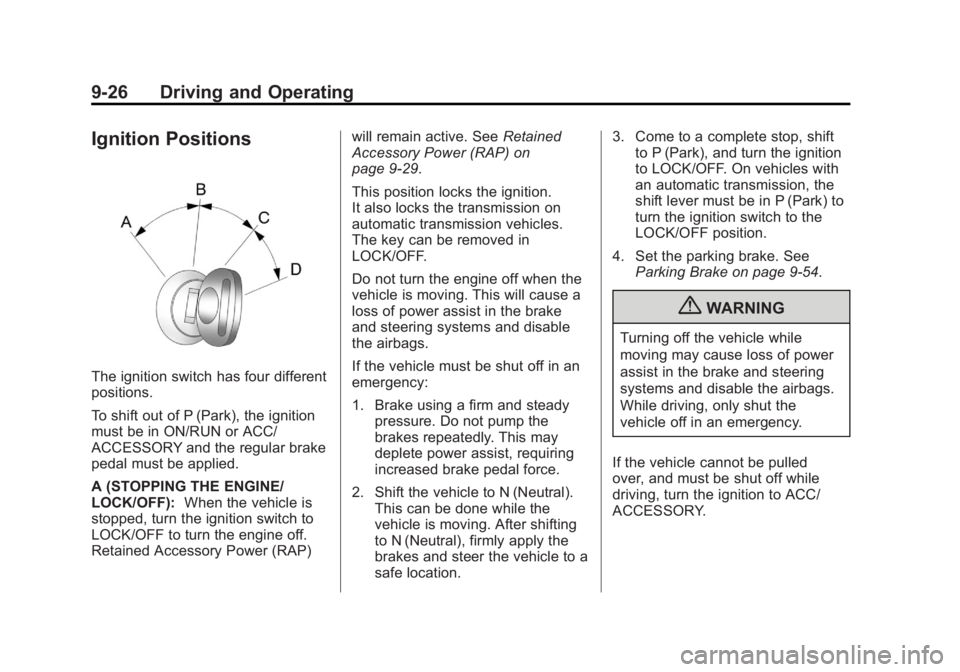
The ignition switch has four different
positions.
To shift out of P (Park), the ignition
must be in ON/RUN or ACC/
ACCESSORY and the regular brake
pedal must be applied.
A (STOPPING THE ENGINE/
LOCK/OFF):When the vehicle is
stopped, turn the ignition switch to
LOCK/OFF to turn the engine off.
Retained Accessory Power (RAP) will remain active. See
Retained
Accessory Power (RAP) on
page 9‑29.
This position locks the ignition.
It also locks the transmission on
automatic transmission vehicles.
The key can be removed in
LOCK/OFF.
Do not turn the engine off when the
vehicle is moving. This will cause a
loss of power assist in the brake
and steering systems and disable
the airbags.
If the vehicle must be shut off in an
emergency:
1. Brake using a firm and steady pressure. Do not pump the
brakes repeatedly. This may
deplete power assist, requiring
increased brake pedal force.
2. Shift the vehicle to N (Neutral). This can be done while the
vehicle is moving. After shifting
to N (Neutral), firmly apply the
brakes and steer the vehicle to a
safe location. 3. Come to a complete stop, shift
to P (Park), and turn the ignition
to LOCK/OFF. On vehicles with
an automatic transmission, the
shift lever must be in P (Park) to
turn the ignition switch to the
LOCK/OFF position.
4. Set the parking brake. See Parking Brake on page 9‑54.
{WARNING
Turning off the vehicle while
moving may cause loss of power
assist in the brake and steering
systems and disable the airbags.
While driving, only shut the
vehicle off in an emergency.
If the vehicle cannot be pulled
over, and must be shut off while
driving, turn the ignition to ACC/
ACCESSORY.