jump start GMC SIERRA 1500 2012 Owners Manual
[x] Cancel search | Manufacturer: GMC, Model Year: 2012, Model line: SIERRA 1500, Model: GMC SIERRA 1500 2012Pages: 556, PDF Size: 7.88 MB
Page 2 of 556
Black plate (2,1)GMC Sierra Owner Manual - 2012 - CRC - 11/15/11
2012 GMC Sierra Owner ManualM
Ride Control Systems . . . . . . . . 9-55
Cruise Control . . . . . . . . . . . . . . . . 9-58
Object Detection Systems . . . . 9-61
Fuel . . . . . . . . . . . . . . . . . . . . . . . . . . 9-68
Towing . . . . . . . . . . . . . . . . . . . . . . . 9-74
Conversions and
Add-Ons . . . . . . . . . . . . . . . . . . . 9-105
Vehicle Care . . . . . . . . . . . . . . . . . 10-1
General Information . . . . . . . . . . 10-2
Vehicle Checks . . . . . . . . . . . . . . . 10-4
Headlamp Aiming . . . . . . . . . . . 10-37
Bulb Replacement . . . . . . . . . . 10-39
Electrical System . . . . . . . . . . . . 10-43
Wheels and Tires . . . . . . . . . . . 10-50
Jump Starting . . . . . . . . . . . . . . . 10-88
Towing . . . . . . . . . . . . . . . . . . . . . . 10-93
Appearance Care . . . . . . . . . . . 10-98 Service and Maintenance
. . . 11-1
General Information . . . . . . . . . . 11-1
Maintenance Schedule . . . . . . . 11-3
Special Application
Services . . . . . . . . . . . . . . . . . . . . 11-8
Additional Maintenance and Care . . . . . . . . . . . . . . . . . . . . 11-9
Recommended Fluids,
Lubricants, and Parts . . . . . . 11-12
Maintenance Records . . . . . . . 11-16
Technical Data . . . . . . . . . . . . . . . 12-1
Vehicle Identification . . . . . . . . . 12-1
Vehicle Data . . . . . . . . . . . . . . . . . . 12-2 Customer Information
. . . . . . . 13-1
Customer Information . . . . . . . . 13-1
Reporting Safety Defects . . . . 13-17
Vehicle Data Recording and
Privacy . . . . . . . . . . . . . . . . . . . . 13-19
OnStar . . . . . . . . . . . . . . . . . . . . . . . 14-1
OnStar Overview . . . . . . . . . . . . . 14-1
OnStar Services . . . . . . . . . . . . . . 14-2
OnStar Additional
Information . . . . . . . . . . . . . . . . . . 14-5
Index . . . . . . . . . . . . . . . . . . . . . i-1
Page 177 of 556
Black plate (39,1)GMC Sierra Owner Manual - 2012 - CRC - 11/15/11
Instruments and Controls 5-39
Remember, you must reset the OIL
LIFE display after each oil change.
It will not reset itself. Also, be
careful not to reset the OIL LIFE
display accidentally at any time
other than when the oil has just
been changed. It cannot be reset
accurately until the next oil change.
To reset the engine oil life system,
seeEngine Oil Life System on
page 10‑10.Vehicle Messages
Messages displayed on the DIC
indicate the status of the vehicle or
some action may be needed to
correct a condition. Multiple
messages may appear one after
another.
The messages that do not
require immediate action can be
acknowledged and cleared by
pressing
V(Set/Reset) or the trip
odometer reset stem.
The messages that require
immediate action cannot be cleared
until that action is performed.
All messages should be taken
seriously and clearing the message
does not correct the problem.
The following are the possible
messages and some information
about them. If the vehicle has a diesel
engine, see the Duramax
®diesel
supplement for more information.
Battery Voltage and
Charging Messages
BATTERY LOW START
VEHICLE
When the vehicle’ s battery is
severely discharged, this message
will display and four chimes
will sound. Start the vehicle
immediately. If the vehicle is not
started and the battery continues to
discharge, the climate controls,
heated seats, and audio systems
will shut off and the vehicle may
require a jump start. These systems
will function again after the vehicle
is started.
Page 308 of 556
Black plate (32,1)GMC Sierra Owner Manual - 2012 - CRC - 11/15/11
9-32 Driving and Operating
When you are ready to drive, move
the shift lever out of P (Park) before
you release the parking brake.
If torque lock does occur, you may
need to have another vehicle push
yours a little uphill to take some of
the pressure from the parking pawl
in the transmission, then you will be
able to pull the shift lever out of
P (Park).
Shifting out of Park
This vehicle is equipped with
an electronic shift lock release
system. The shift lock release is
designed to:
.Prevent ignition key removal
unless the shift lever is in
P (Park) with the shift lever
button fully released.
.Prevent movement of the shift
lever out of P (Park), unless the
ignition is in ON/RUN or ACC/
ACCESSORY and the regular
brake pedal is applied.The shift lock release is always
functional except in the case of
an uncharged or low voltage (less
than 9 volt) battery.
If the vehicle has an uncharged
battery or a battery with low voltage,
try charging or jump starting the
battery. See
Jump Starting on
page 10‑88 for more information.
To shift out of P (Park) use the
following:
1. Apply the brake pedal.
2. Move the shift lever to the desired position.
If you still are unable to shift out of
P (Park):
1. Ease the pressure on the shift lever.
2. While holding down the brake pedal, press the shift lever all
the way into P (Park).
3. Move the shift lever to the desired position. If you are still having a problem
shifting, then have the vehicle
serviced soon.
Parking over Things
That Burn
{WARNING
Things that can burn could touch
hot exhaust parts under the
vehicle and ignite. Do not park
over papers, leaves, dry grass,
or other things that can burn.
Active Fuel Management®
Vehicles with V8 engines may
have Active Fuel Management™.
This system allows the engine to
operate on either all or half of its
cylinders, depending on the driving
conditions.
Page 388 of 556
Black plate (2,1)GMC Sierra Owner Manual - 2012 - CRC - 11/15/11
10-2 Vehicle Care
Wheels and Tires
Tires . . . . . . . . . . . . . . . . . . . . . . . . 10-50
Tire Sidewall Labeling . . . . . . 10-52
Tire Designations . . . . . . . . . . . 10-54
Tire Terminology andDefinitions . . . . . . . . . . . . . . . . 10-55
Tire Pressure . . . . . . . . . . . . . . . 10-58
Tire Pressure for High-Speed Operation . . . . . . . . . . . . . . . . . 10-60
Tire Pressure Monitor System . . . . . . . . . . . . . . . . . . . 10-60
Tire Pressure Monitor Operation . . . . . . . . . . . . . . . . . 10-62
Tire Inspection . . . . . . . . . . . . . . 10-65
Tire Rotation . . . . . . . . . . . . . . . 10-65
Dual Tire Rotation . . . . . . . . . . 10-67
When It Is Time for New Tires . . . . . . . . . . . . . . . . . . . . . . 10-68
Buying New Tires . . . . . . . . . . . 10-68
Different Size Tires and Wheels . . . . . . . . . . . . . . . . . . . 10-70 Uniform Tire Quality
Grading . . . . . . . . . . . . . . . . . . . 10-70
Wheel Alignment and Tire Balance . . . . . . . . . . . . . . . . . . . 10-72
Wheel Replacement . . . . . . . . 10-72
Tire Chains . . . . . . . . . . . . . . . . . 10-74
If a Tire Goes Flat . . . . . . . . . . 10-75
Tire Changing . . . . . . . . . . . . . . 10-76
Full-Size Spare Tire . . . . . . . . 10-87
Jump Starting
Jump Starting . . . . . . . . . . . . . . 10-88
Towing
Towing the Vehicle . . . . . . . . . 10-93
Recreational Vehicle
Towing . . . . . . . . . . . . . . . . . . . . 10-93
Appearance Care
Exterior Care . . . . . . . . . . . . . . . 10-98
Interior Care . . . . . . . . . . . . . . . 10-101
Floor Mats . . . . . . . . . . . . . . . . 10-104
General Information
For service and parts needs,
visit your dealer. You will receive
genuine GM parts and GM-trained
and supported service people.
Genuine GM parts have one of
these marks:
Page 393 of 556
Black plate (7,1)GMC Sierra Owner Manual - 2012 - CRC - 11/15/11
Vehicle Care 10-7
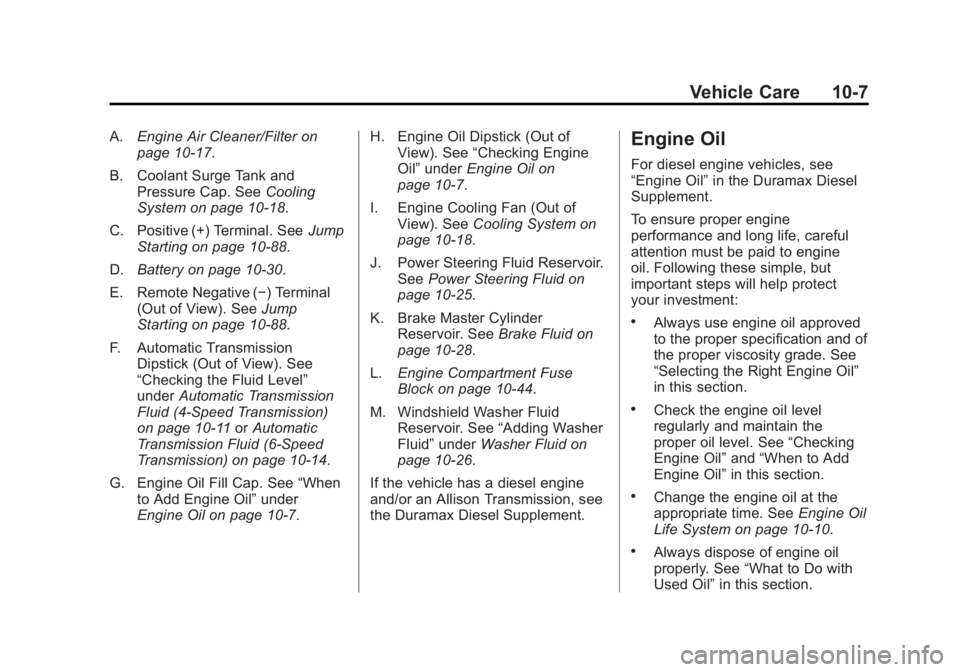
A.Engine Air Cleaner/Filter on
page 10‑17.
B. Coolant Surge Tank and Pressure Cap. See Cooling
System on page 10‑18.
C. Positive (+) Terminal. See Jump
Starting on page 10‑88.
D. Battery on page 10‑30.
E. Remote Negative (−) Terminal (Out of View). See Jump
Starting on page 10‑88.
F. Automatic Transmission Dipstick (Out of View). See
“Checking the Fluid Level”
under Automatic Transmission
Fluid (4-Speed Transmission)
on page 10‑11 orAutomatic
Transmission Fluid (6-Speed
Transmission) on page 10‑14.
G. Engine Oil Fill Cap. See “When
to Add Engine Oil” under
Engine Oil on page 10‑7. H. Engine Oil Dipstick (Out of
View). See “Checking Engine
Oil” under Engine Oil on
page 10‑7.
I. Engine Cooling Fan (Out of View). See Cooling System on
page 10‑18.
J. Power Steering Fluid Reservoir. See Power Steering Fluid on
page 10‑25.
K. Brake Master Cylinder Reservoir. See Brake Fluid on
page 10‑28.
L. Engine Compartment Fuse
Block on page 10‑44.
M. Windshield Washer Fluid Reservoir. See “Adding Washer
Fluid” under Washer Fluid on
page 10‑26.
If the vehicle has a diesel engine
and/or an Allison Transmission, see
the Duramax Diesel Supplement.Engine Oil
For diesel engine vehicles, see
“Engine Oil” in the Duramax Diesel
Supplement.
To ensure proper engine
performance and long life, careful
attention must be paid to engine
oil. Following these simple, but
important steps will help protect
your investment:
.Always use engine oil approved
to the proper specification and of
the proper viscosity grade. See
“Selecting the Right Engine Oil”
in this section.
.Check the engine oil level
regularly and maintain the
proper oil level. See “Checking
Engine Oil” and“When to Add
Engine Oil” in this section.
.Change the engine oil at the
appropriate time. See Engine Oil
Life System on page 10‑10.
.Always dispose of engine oil
properly. See “What to Do with
Used Oil” in this section.
Page 416 of 556
Black plate (30,1)GMC Sierra Owner Manual - 2012 - CRC - 11/15/11
10-30 Vehicle Care
Battery
If the vehicle is a Hybrid, see the
Hybrid Supplement for more
information.
This vehicle has a maintenance free
battery (or batteries). Refer to the
replacement number on the original
battery label when a new battery is
needed. SeeEngine Compartment
Overview on page 10‑6 for battery
location.
{WARNING
Battery posts, terminals, and
related accessories contain lead
and lead compounds, chemicals
known to the State of California to
cause cancer and reproductive
harm. Wash hands after handling.
Vehicle Storage
{WARNING
Batteries have acid that can burn
you and gas that can explode.
You can be badly hurt if you are
not careful. See Jump Starting on
page 10‑88 for tips on working
around a battery without
getting hurt.
Infrequent Usage: Remove the
black, negative (−) cable from the
battery to keep the battery from
running down.
Extended Storage: Remove the
black, negative (−) cable from the
battery or use a battery trickle
charger.
Four-Wheel Drive
Transfer Case
When to Check Lubricant
Refer to Maintenance Schedule on
page 11‑3 to determine when to
check the lubricant.
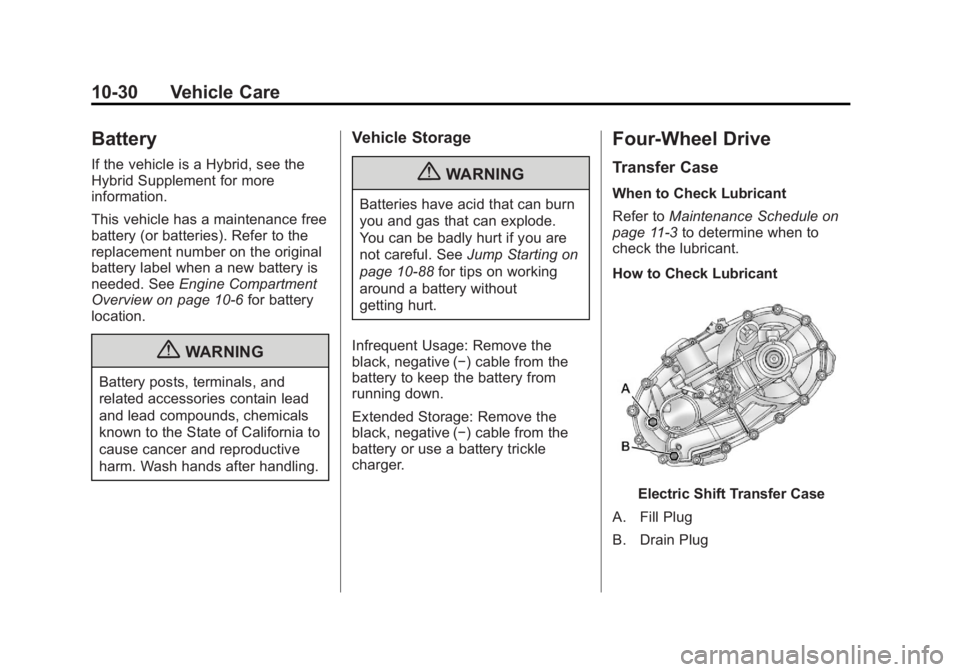
How to Check Lubricant
Electric Shift Transfer Case
A. Fill Plug
B. Drain Plug
Page 474 of 556
Black plate (88,1)GMC Sierra Owner Manual - 2012 - CRC - 11/15/11
10-88 Vehicle Care
Jump Starting
For more information about the
vehicle battery, seeBattery on
page 10‑30.
If the vehicle is a hybrid, see the
hybrid supplement for more
information.
If the vehicle's battery (or batteries)
has run down, you may want to use
another vehicle and some jumper
cables to start your vehicle. Be sure
to use the following steps to do it
safely.
{WARNING
Batteries can hurt you. They can
be dangerous because:
.They contain acid that can
burn you.
.They contain gas that can
explode or ignite.
.They contain enough
electricity to burn you.
If you do not follow these steps
exactly, some or all of these
things can hurt you. Notice:
Ignoring these steps
could result in costly damage to
the vehicle that would not be
covered by the warranty.
Trying to start the vehicle by
pushing or pulling it will not
work, and it could damage the
vehicle.
1. Check the other vehicle. It must
have a 12-volt battery with a
negative ground system.
Notice: Only use a vehicle that
has a 12-volt system with a
negative ground for jump
starting. If the other vehicle does
not have a 12-volt system with a
negative ground, both vehicles
can be damaged.
2. If you have a vehicle with a diesel engine with two batteries,
you should know before you
begin that, especially in cold
weather, you may not be able to
Page 475 of 556
Black plate (89,1)GMC Sierra Owner Manual - 2012 - CRC - 11/15/11
Vehicle Care 10-89
get enough power from a single
battery in another vehicle to
start your diesel engine. If your
vehicle has more than one
battery, using the battery that is
closer to the starter will reduce
electrical resistance. This is
located on the passenger side,
in the rear of the engine
compartment.
3. Get the vehicles close enough so the jumper cables can reach,
but be sure the vehicles are not
touching each other. If they are,
it could cause an unwanted
ground connection. You would
not be able to start your vehicle,
and the bad grounding could
damage the electrical systems. To avoid the possibility of the
vehicles rolling, set the parking
brake firmly on both vehicles
involved in the jump start
procedure. Put the automatic
transmission in P (Park) or a
manual transmission in Neutral
before setting the parking brake.
If you have a four-wheel-drive
vehicle, be sure the transfer
case is in a drive gear, not in
Neutral.
Notice: If any accessories are left
on or plugged in during the jump
starting procedure, they could be
damaged. The repairs would not
be covered by the vehicle
warranty. Whenever possible,
turn off or unplug all accessories
on either vehicle when jump
starting the vehicle. 4. Turn off the ignition on both
vehicles. Unplug unnecessary
accessories plugged into the
accessory power outlets. Turn
off the radio and all the lamps
that are not needed. This will
avoid sparks and help save both
batteries. And it could save the
radio!
5. Open the hood on the other vehicle and locate the
positive (+) and negative (−)
terminal locations on that
vehicle.
The positive (+) terminal, is
located under a red plastic cover
at the positive battery post. To
uncover the positive (+) terminal,
open the red plastic cover.
Page 477 of 556
Black plate (91,1)GMC Sierra Owner Manual - 2012 - CRC - 11/15/11
Vehicle Care 10-91
{WARNING
Fans or other moving engine
parts can injure you badly. Keep
your hands away from moving
parts once the engine is running.
6. Check that the jumper cables do not have loose or missing
insulation. If they do, you could
get a shock. The vehicles could
be damaged too.
Before you connect the cables,
here are some basic things you
should know. Positive (+) will go
to positive (+) or to a remote
positive (+) terminal if the vehicle
has one. Negative (−) will go to a
heavy, unpainted metal engine
part or to a remote negative (−)
terminal if the vehicle has one. Do not connect positive (+) to
negative (−) or you will get a
short that would damage the
battery and maybe other parts
too. And do not connect the
negative (−) cable to the
negative (−) terminal on the
dead battery because this can
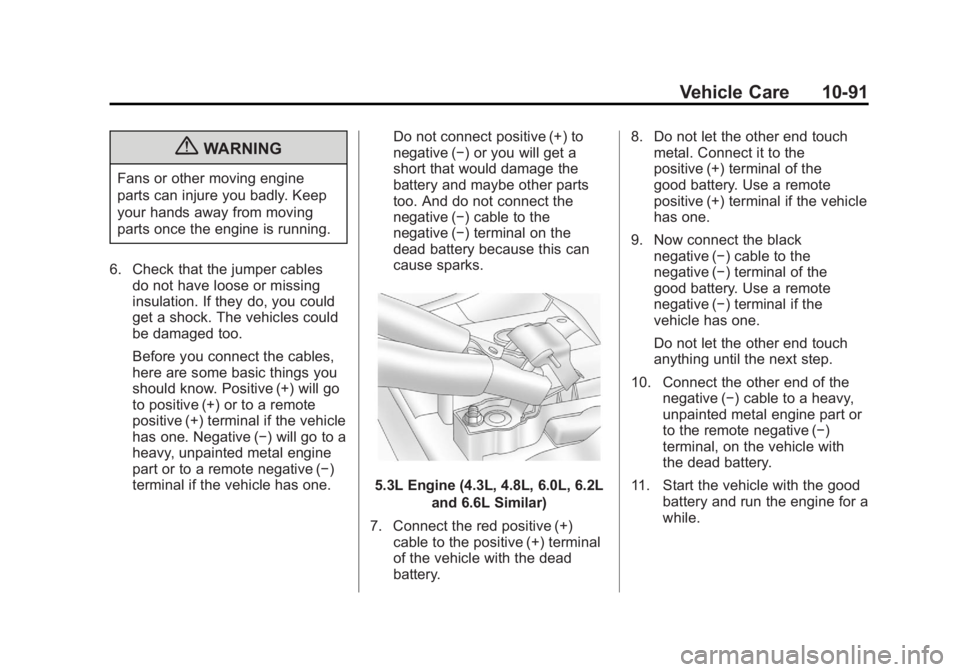
cause sparks.
5.3L Engine (4.3L, 4.8L, 6.0L, 6.2L
and 6.6L Similar)
7. Connect the red positive (+) cable to the positive (+) terminal
of the vehicle with the dead
battery. 8. Do not let the other end touch
metal. Connect it to the
positive (+) terminal of the
good battery. Use a remote
positive (+) terminal if the vehicle
has one.
9. Now connect the black negative (−) cable to the
negative (−) terminal of the
good battery. Use a remote
negative (−) terminal if the
vehicle has one.
Do not let the other end touch
anything until the next step.
10. Connect the other end of the negative (−) cable to a heavy,
unpainted metal engine part or
to the remote negative (−)
terminal, on the vehicle with
the dead battery.
11. Start the vehicle with the good battery and run the engine for a
while.
Page 478 of 556
Black plate (92,1)GMC Sierra Owner Manual - 2012 - CRC - 11/15/11
10-92 Vehicle Care
12. Try to start the vehicle thathad the dead battery. If it will
not start after a few tries, it
probably needs service.
Notice: If the jumper cables are
connected or removed in the
wrong order, electrical shorting
may occur and damage the
vehicle. The repairs would not be
covered by the vehicle warranty.
Always connect and remove the
jumper cables in the correct
order, making sure that the
cables do not touch each other
or other metal.
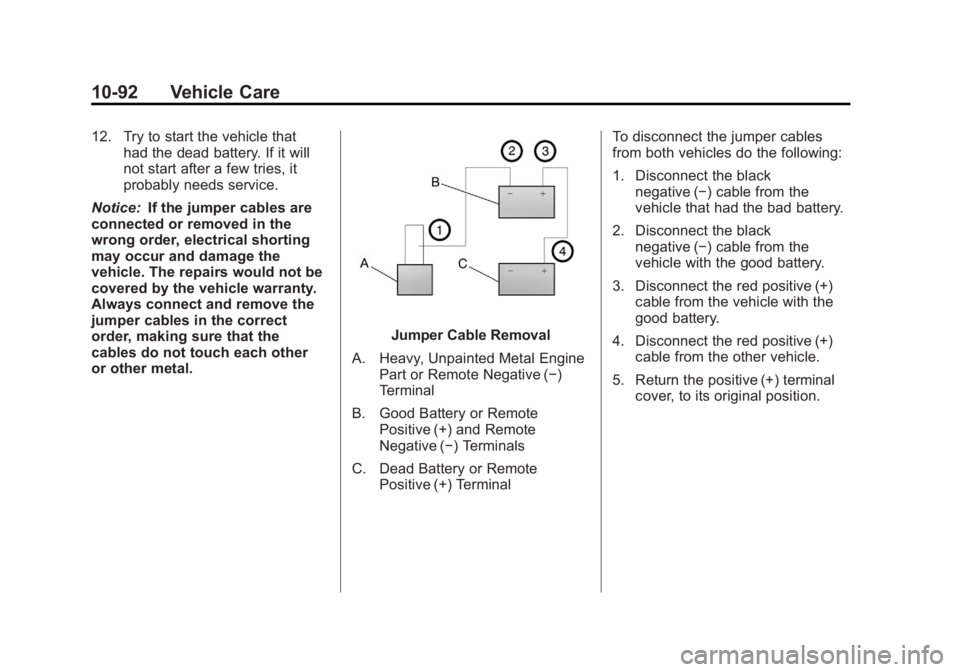
Jumper Cable Removal
A. Heavy, Unpainted Metal Engine Part or Remote Negative (−)
Terminal
B. Good Battery or Remote Positive (+) and Remote
Negative (−) Terminals
C. Dead Battery or Remote Positive (+) Terminal To disconnect the jumper cables
from both vehicles do the following:
1. Disconnect the black
negative (−) cable from the
vehicle that had the bad battery.
2. Disconnect the black negative (−) cable from the
vehicle with the good battery.
3. Disconnect the red positive (+) cable from the vehicle with the
good battery.
4. Disconnect the red positive (+) cable from the other vehicle.
5. Return the positive (+) terminal cover, to its original position.