airbag GMC SIERRA 1500 2013 Service Manual
[x] Cancel search | Manufacturer: GMC, Model Year: 2013, Model line: SIERRA 1500, Model: GMC SIERRA 1500 2013Pages: 534, PDF Size: 7.85 MB
Page 149 of 534
Black plate (19,1)GMC Sierra Owner Manual - 2013 - crc - 8/14/12
Instruments and Controls 5-19
{WARNING
If the right front passenger airbag
is turned off for a person who is
not in a risk group identified by
the national government, that
person will not have the extra
protection of an airbag. In a
crash, the airbag will not be able
to inflate and help protect the
person sitting there.
Do not turn off the passenger
airbag unless the person sitting
there is in a risk group identified
by the national government. See
Airbag On-Off Switch on
page 3‑28for more on this,
including important safety
information.
{WARNING
If the airbag readiness light ever
comes on and stays on, it means
that something may be wrong
with the airbag system. For
example, the right front
passenger airbag could inflate
even though the airbag on-off
switch is turned off.
To help avoid injury to yourself or
others, have the vehicle serviced
right away. See Airbag Readiness
Light on page 5‑17 for more
information, including important
safety information.
If the word ON or the on symbol is
lit, it means that the right front
passenger frontal airbag is enabled
(may inflate). See Airbag On-Off
Switch on page 3‑28 for more
information, including important
safety information. If, after several seconds, both status
indicator lights remain on, or if there
are no lights at all, there may be a
problem with the lights or the airbag
on-off switch. See your dealer for
service.
Passenger Airbag Status
Indicator
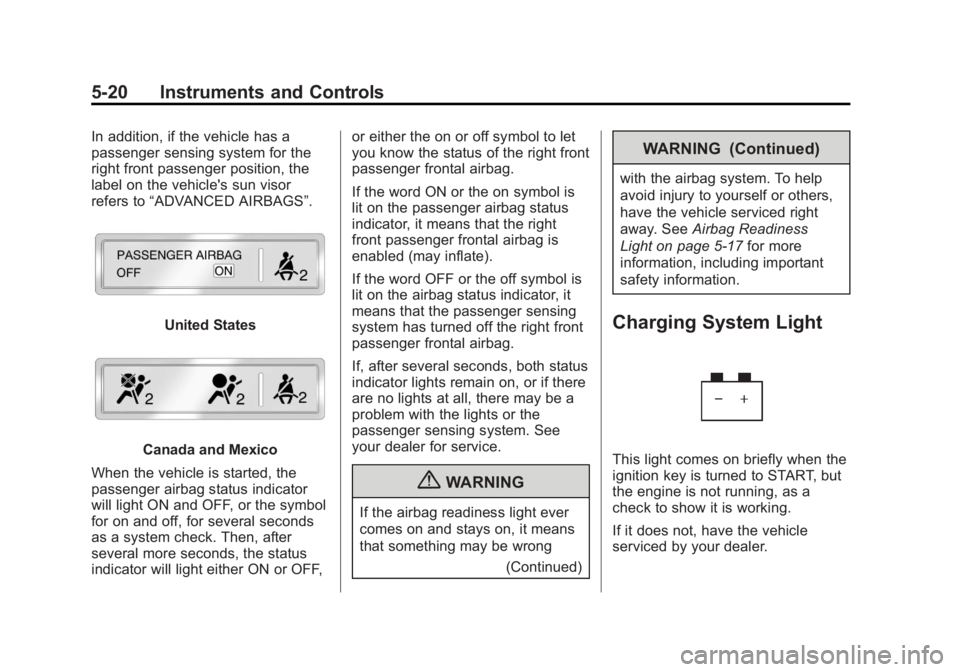
If the vehicle has one of the
indicators pictured in the following
illustrations, then the vehicle has a
passenger sensing system for the
right front passenger position unless
there is an airbag off switch located
in the glove box. If there is an
airbag off switch, the vehicle does
not have a passenger sensing
system. See
Airbag On-Off Switch
on page 3‑28.
The passenger airbag status
indicator is on the overhead
console. See Passenger Sensing
System on page 3‑31 for important
safety information.
Page 150 of 534
Black plate (20,1)GMC Sierra Owner Manual - 2013 - crc - 8/14/12
5-20 Instruments and Controls
In addition, if the vehicle has a
passenger sensing system for the
right front passenger position, the
label on the vehicle's sun visor
refers to“ADVANCED AIRBAGS”.
United States
Canada and Mexico
When the vehicle is started, the
passenger airbag status indicator
will light ON and OFF, or the symbol
for on and off, for several seconds
as a system check. Then, after
several more seconds, the status
indicator will light either ON or OFF, or either the on or off symbol to let
you know the status of the right front
passenger frontal airbag.
If the word ON or the on symbol is
lit on the passenger airbag status
indicator, it means that the right
front passenger frontal airbag is
enabled (may inflate).
If the word OFF or the off symbol is
lit on the airbag status indicator, it
means that the passenger sensing
system has turned off the right front
passenger frontal airbag.
If, after several seconds, both status
indicator lights remain on, or if there
are no lights at all, there may be a
problem with the lights or the
passenger sensing system. See
your dealer for service.
{WARNING
If the airbag readiness light ever
comes on and stays on, it means
that something may be wrong
(Continued)
WARNING (Continued)
with the airbag system. To help
avoid injury to yourself or others,
have the vehicle serviced right
away. SeeAirbag Readiness
Light on page 5‑17 for more
information, including important
safety information.
Charging System Light
This light comes on briefly when the
ignition key is turned to START, but
the engine is not running, as a
check to show it is working.
If it does not, have the vehicle
serviced by your dealer.
Page 173 of 534
Black plate (43,1)GMC Sierra Owner Manual - 2013 - crc - 8/14/12
Instruments and Controls 5-43
.One condition is overheating,
which could occur if StabiliTrak
activates continuously for an
extended period of time.
.The message also displays if the
brake system warning light is on.
SeeBrake System Warning
Light on page 5‑23.
.The message could display if the
stability system takes longer
than usual to complete its
diagnostic checks due to driving
conditions.
.The message displays if an
engine or vehicle related
problem has been detected and
the vehicle needs service. See
your dealer.
The message turns off as soon as
the conditions that caused the
message to be displayed are no
longer present.
Airbag System Messages
SERVICE AIR BAG
This message displays if there is a
problem with the airbag system.
Have your dealer inspect the
system for problems. See Airbag
Readiness Light on page 5‑17 and
Airbag System on page 3‑20 for
more information.
Security Messages
SERVICE THEFT DETERRENT
SYSTEM
This message displays when there
is a problem with the theft-deterrent
system. The vehicle may or may not
restart so you may want to take the
vehicle to your dealer before turning
off the engine. See Immobilizer
Operation on page 2‑11 for more
information.
Starting the Vehicle
Messages
FAST IDLE ON
If your vehicle has this feature, this
message displays when the fast idle
feature is on. See Fast Idle System
on page 9‑27 for more information.
Tire Messages
SERVICE TIRE MONITOR
SYSTEM
If the vehicle has the Tire Pressure
Monitor System (TPMS), this
message displays if a part on the
system is not working properly. The
tire pressure light also flashes and
then remains on during the same
ignition cycle. See Tire Pressure
Light on page 5‑26. Several
conditions may cause this message
to appear. See Tire Pressure
Monitor Operation on page 10‑58 for
more information. If the warning
Page 290 of 534
Black plate (24,1)GMC Sierra Owner Manual - 2013 - crc - 8/14/12
9-24 Driving and Operating
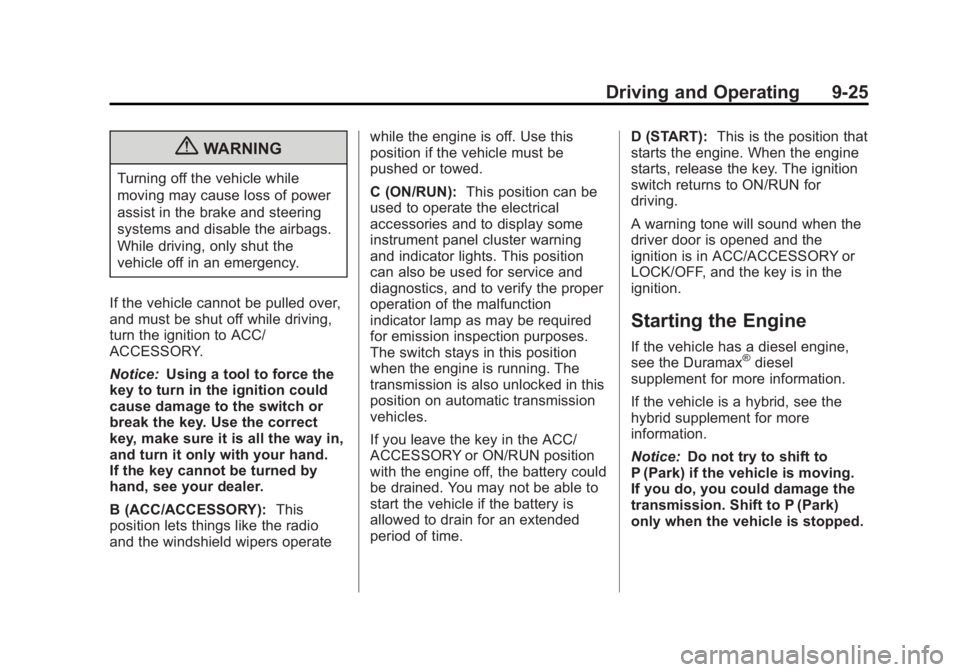
Ignition Positions
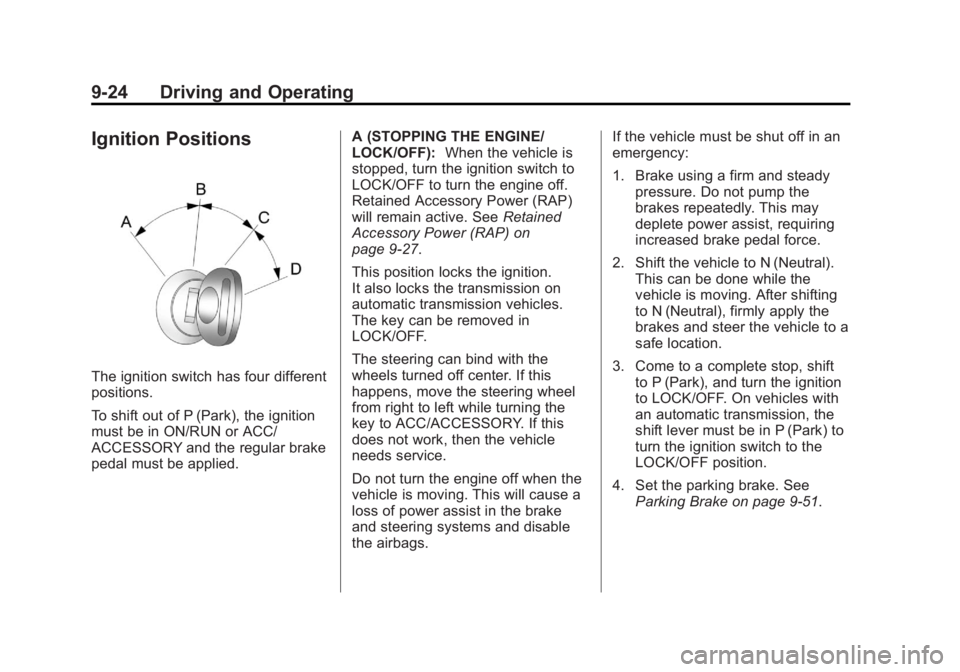
The ignition switch has four different
positions.
To shift out of P (Park), the ignition
must be in ON/RUN or ACC/
ACCESSORY and the regular brake
pedal must be applied.A (STOPPING THE ENGINE/
LOCK/OFF):
When the vehicle is
stopped, turn the ignition switch to
LOCK/OFF to turn the engine off.
Retained Accessory Power (RAP)
will remain active. See Retained
Accessory Power (RAP) on
page 9‑27.
This position locks the ignition.
It also locks the transmission on
automatic transmission vehicles.
The key can be removed in
LOCK/OFF.
The steering can bind with the
wheels turned off center. If this
happens, move the steering wheel
from right to left while turning the
key to ACC/ACCESSORY. If this
does not work, then the vehicle
needs service.
Do not turn the engine off when the
vehicle is moving. This will cause a
loss of power assist in the brake
and steering systems and disable
the airbags. If the vehicle must be shut off in an
emergency:
1. Brake using a firm and steady
pressure. Do not pump the
brakes repeatedly. This may
deplete power assist, requiring
increased brake pedal force.
2. Shift the vehicle to N (Neutral). This can be done while the
vehicle is moving. After shifting
to N (Neutral), firmly apply the
brakes and steer the vehicle to a
safe location.
3. Come to a complete stop, shift to P (Park), and turn the ignition
to LOCK/OFF. On vehicles with
an automatic transmission, the
shift lever must be in P (Park) to
turn the ignition switch to the
LOCK/OFF position.
4. Set the parking brake. See Parking Brake on page 9‑51.
Page 291 of 534
Black plate (25,1)GMC Sierra Owner Manual - 2013 - crc - 8/14/12
Driving and Operating 9-25
{WARNING
Turning off the vehicle while
moving may cause loss of power
assist in the brake and steering
systems and disable the airbags.
While driving, only shut the
vehicle off in an emergency.
If the vehicle cannot be pulled over,
and must be shut off while driving,
turn the ignition to ACC/
ACCESSORY.
Notice: Using a tool to force the
key to turn in the ignition could
cause damage to the switch or
break the key. Use the correct
key, make sure it is all the way in,
and turn it only with your hand.
If the key cannot be turned by
hand, see your dealer.
B (ACC/ACCESSORY): This
position lets things like the radio
and the windshield wipers operate while the engine is off. Use this
position if the vehicle must be
pushed or towed.
C (ON/RUN):
This position can be
used to operate the electrical
accessories and to display some
instrument panel cluster warning
and indicator lights. This position
can also be used for service and
diagnostics, and to verify the proper
operation of the malfunction
indicator lamp as may be required
for emission inspection purposes.
The switch stays in this position
when the engine is running. The
transmission is also unlocked in this
position on automatic transmission
vehicles.
If you leave the key in the ACC/
ACCESSORY or ON/RUN position
with the engine off, the battery could
be drained. You may not be able to
start the vehicle if the battery is
allowed to drain for an extended
period of time. D (START):
This is the position that
starts the engine. When the engine
starts, release the key. The ignition
switch returns to ON/RUN for
driving.
A warning tone will sound when the
driver door is opened and the
ignition is in ACC/ACCESSORY or
LOCK/OFF, and the key is in the
ignition.
Starting the Engine
If the vehicle has a diesel engine,
see the Duramax®diesel
supplement for more information.
If the vehicle is a hybrid, see the
hybrid supplement for more
information.
Notice: Do not try to shift to
P (Park) if the vehicle is moving.
If you do, you could damage the
transmission. Shift to P (Park)
only when the vehicle is stopped.
Page 367 of 534
Black plate (101,1)GMC Sierra Owner Manual - 2013 - crc - 8/14/12
Driving and Operating 9-101
Conversions and
Add-Ons
Add-On Electrical
Equipment
Notice:Some electrical
equipment can damage the
vehicle or cause components to
not work and would not be
covered by the warranty. Always
check with your dealer before
adding electrical equipment.
Add-on equipment can drain the
vehicle's 12-volt battery, even if the
vehicle is not operating.
The vehicle has an airbag system.
Before attempting to add anything
electrical to the vehicle, see
Servicing the Airbag-Equipped
Vehicle on page 3‑35 andAdding
Equipment to the Airbag-Equipped
Vehicle on page 3‑35.
Adding a Snow Plow or
Similar Equipment
Before installing a snow plow on the
vehicle, here are some things you
need to know:
Notice: If the vehicle does not
have the snow plow prep
package, adding a plow can
damage the vehicle, and the
repairs would not be covered by
warranty. Unless the vehicle was
built to carry a snow plow, do not
add one to the vehicle. If the
vehicle has the snow plow prep
package, called RPO VYU, then
the payload the vehicle can carry
will be reduced when a snow
plow is installed. The vehicle can
be damaged if either the front or
rear axle ratings or the Gross
Vehicle Weight Rating (GVWR)
are exceeded.
Some vehicles are built with a
special snow plow prep package,
called RPO VYU. If the vehicle has
this option, you can add a plow to it,
provided certain weights, such as the weights on the vehicle's axles
and the Gross Vehicle Weight
Rating (GVWR), are not exceeded.
The plow the vehicle can carry
depends on many things, such as:
.The options the vehicle came
with, and the weight of those
options.
.The weight and number of
passengers intended to be
carried.
.The weight of items added to the
vehicle, like a tool box or
truck cap.
.The total weight of any
additional cargo intended to be
carried.
Say, for example, you have a 318 kg
(700 lb) snow plow. The total weight
of all occupants and cargo inside
the cab should not exceed 135 kg
(300 lb). This means that you may
only be able to carry one passenger.
But, even this may be too much if
there is other equipment already
adding to the weight of the vehicle.
Page 373 of 534
Black plate (3,1)GMC Sierra Owner Manual - 2013 - crc - 8/14/12
Vehicle Care 10-3
cause cancer and birth defects or
other reproductive harm. Engine
exhaust, many parts and systems,
many fluids, and some component
wear by-products contain and/or
emit these chemicals.
California Perchlorate
Materials Requirements
Certain types of automotive
applications, such as airbag
initiators, safety belt pretensioners,
and lithium batteries contained in
Remote Keyless Entry transmitters,
may contain perchlorate materials.
Special handling may be necessary.
For additional information, see
www.dtsc.ca.gov/hazardouswaste/
perchlorate.
Accessories and
Modifications
Adding non‐dealer accessories or
making modifications to the vehicle
can affect vehicle performance and
safety, including such things as
airbags, braking, stability, ride andhandling, emissions systems,
aerodynamics, durability, and
electronic systems like antilock
brakes, traction control, and stability
control. These accessories or
modifications could even cause
malfunction or damage not covered
by the vehicle warranty.
Damage to vehicle components
resulting from modifications or the
installation or use of non‐GM
certified parts, including control
module or software modifications, is
not covered under the terms of the
vehicle warranty and may affect
remaining warranty coverage for
affected parts.
GM Accessories are designed to
complement and function with other
systems on the vehicle. See your
dealer to accessorize the vehicle
using genuine GM Accessories
installed by a dealer technician.
Also, see
Adding Equipment to the
Airbag-Equipped Vehicle on
page 3‑35.
Vehicle Checks
Doing Your Own
Service Work
If the vehicle is a hybrid, see the
hybrid supplement for more
information.
{WARNING
It can be dangerous to work on
your vehicle if you do not have
the proper knowledge, service
manual, tools, or parts. Always
follow owner manual procedures
and consult the service manual
for your vehicle before doing any
service work.
Page 374 of 534
Black plate (4,1)GMC Sierra Owner Manual - 2013 - crc - 8/14/12
10-4 Vehicle Care
If doing some of your own service
work, use the proper service
manual. It tells you much more
about how to service the vehicle
than this manual can. To order the
proper service manual, seeService
Publications Ordering Information
on page 13‑16.
This vehicle has an airbag system.
Before attempting to do your own
service work, see Airbag System
Check on page 3‑37.
Keep a record with all parts receipts
and list the mileage and the date of
any service work performed. See
Maintenance Records on
page 11‑16.
Notice: Even small amounts of
contamination can cause damage
to vehicle systems. Do not allow
contaminants to contact the
fluids, reservoir caps,
or dipsticks.Hood
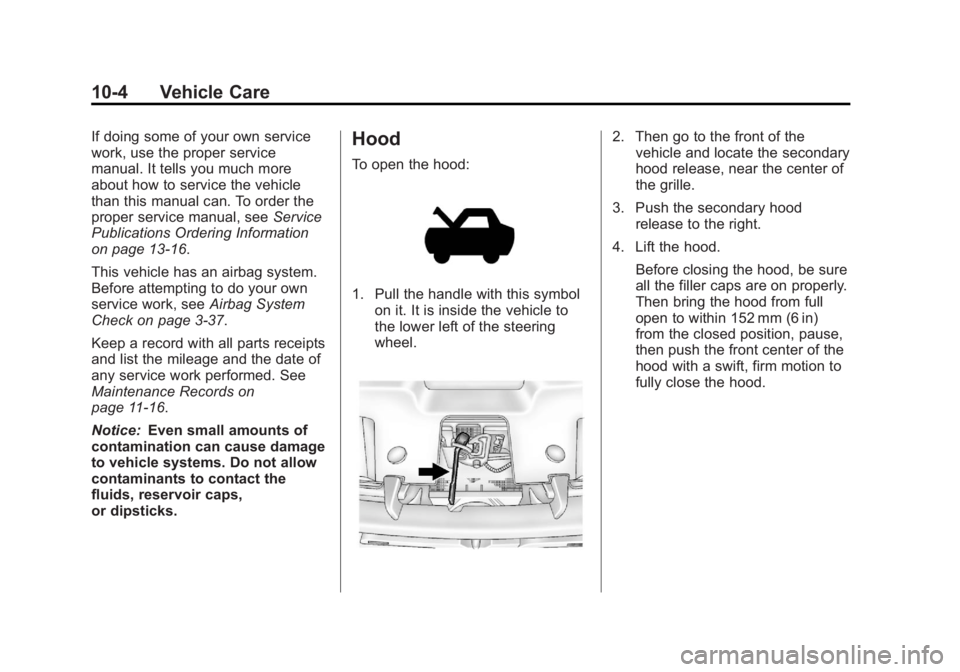
To open the hood:
1. Pull the handle with this symbol on it. It is inside the vehicle to
the lower left of the steering
wheel.
2. Then go to the front of thevehicle and locate the secondary
hood release, near the center of
the grille.
3. Push the secondary hood release to the right.
4. Lift the hood. Before closing the hood, be sure
all the filler caps are on properly.
Then bring the hood from full
open to within 152 mm (6 in)
from the closed position, pause,
then push the front center of the
hood with a swift, firm motion to
fully close the hood.
Page 412 of 534
Black plate (42,1)GMC Sierra Owner Manual - 2013 - crc - 8/14/12
10-42 Vehicle Care
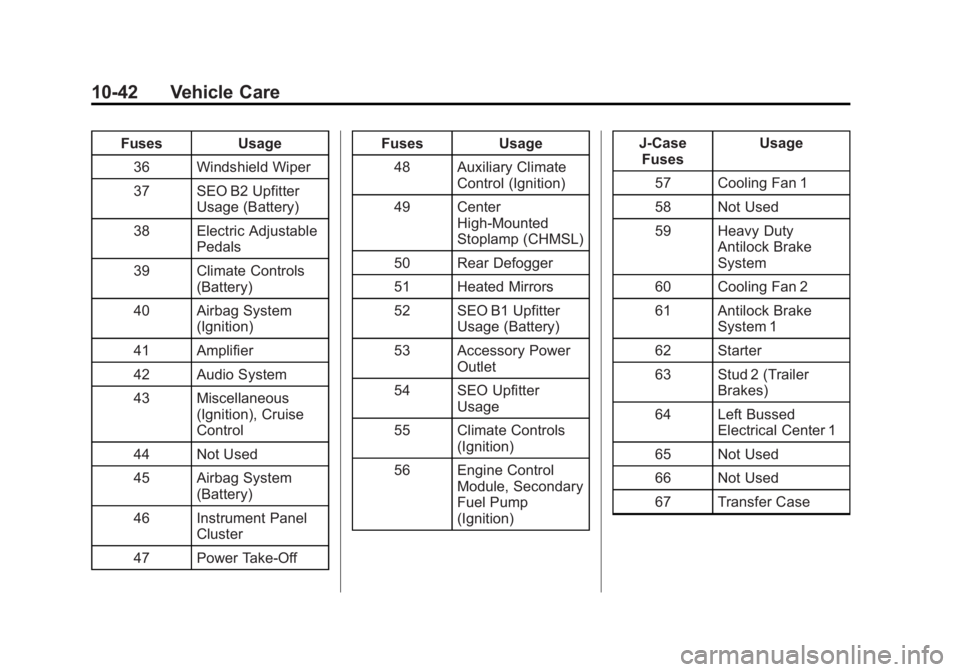
FusesUsage
36 Windshield Wiper
37 SEO B2 Upfitter Usage (Battery)
38 Electric Adjustable Pedals
39 Climate Controls (Battery)
40 Airbag System (Ignition)
41 Amplifier
42 Audio System
43 Miscellaneous (Ignition), Cruise
Control
44 Not Used
45 Airbag System (Battery)
46 Instrument Panel Cluster
47 Power Take-Off Fuses
Usage
48 Auxiliary Climate Control (Ignition)
49 Center High-Mounted
Stoplamp (CHMSL)
50 Rear Defogger
51 Heated Mirrors
52 SEO B1 Upfitter Usage (Battery)
53 Accessory Power Outlet
54 SEO Upfitter Usage
55 Climate Controls (Ignition)
56 Engine Control Module, Secondary
Fuel Pump
(Ignition) J-Case
Fuses Usage
57 Cooling Fan 1
58 Not Used
59 Heavy Duty Antilock Brake
System
60 Cooling Fan 2
61 Antilock Brake System 1
62 Starter
63 Stud 2 (Trailer Brakes)
64 Left Bussed Electrical Center 1
65 Not Used
66 Not Used
67 Transfer Case
Page 436 of 534
Black plate (66,1)GMC Sierra Owner Manual - 2013 - crc - 8/14/12
10-66 Vehicle Care
{WARNING
Mixing tires of different sizes,
brands, or types may cause
loss of control of the vehicle,
resulting in a crash or other
vehicle damage. Use the
correct size, brand, and type
of tires on all wheels.
This vehicle may have a
different size spare than the
road tires originally installed
on the vehicle. When new, the
vehicle included a spare tire
and wheel assembly with a
similar overall diameter as the
road tires and wheels, so it is
all right to drive on it. The
spare tire was developed for
use on this vehicle and will not
affect vehicle handling.{WARNING
Using bias-ply tires on the
vehicle may cause the wheel
rim flanges to develop cracks
after many miles of driving.
A tire and/or wheel could fail
suddenly and cause a crash.
Use only radial-ply tires with
the wheels on the vehicle.
If the vehicle tires must be
replaced with a tire that does not
have a TPC Spec number, make
sure they are the same size,
load range, speed rating, and
construction (radial) as the
original tires.
Vehicles that have a tire
pressure monitoring system
could give an inaccurate
low-pressure warning if non-TPC
Spec rated tires are installed.
See Tire Pressure Monitor
System on page 10‑57. The Tire and Loading
Information label indicates the
original equipment tires on the
vehicle. See
Vehicle Load Limits
on page 9‑15 for the label
location and more information
about the Tire and Loading
Information label.
Different Size Tires and
Wheels
If wheels or tires are installed that
are a different size than the original
equipment wheels and tires, vehicle
performance, including its braking,
ride and handling characteristics,
stability, and resistance to rollover
may be affected. If the vehicle has
electronic systems such as antilock
brakes, rollover airbags, traction
control, electronic stability control,
or All-Wheel Drive, the performance
of these systems can also be
affected.