auto locks GMC SIERRA 1500 2013 Owners Manual
[x] Cancel search | Manufacturer: GMC, Model Year: 2013, Model line: SIERRA 1500, Model: GMC SIERRA 1500 2013Pages: 534, PDF Size: 7.85 MB
Page 1 of 534
Black plate (1,1)GMC Sierra Owner Manual - 2013 - crc - 8/14/12
2013 GMC Sierra Owner ManualM
In Brief. . . . . . . . . . . . . . . . . . . . . . . . 1-1
Instrument Panel . . . . . . . . . . . . . . 1-2
Initial Drive Information . . . . . . . . 1-7
Vehicle Features . . . . . . . . . . . . . 1-24
Performance and Maintenance . . . . . . . . . . . . . . . . 1-31
Keys, Doors, and Windows . . . . . . . . . . . . . . . . . . . . 2-1
Keys and Locks . . . . . . . . . . . . . . . 2-1
Doors . . . . . . . . . . . . . . . . . . . . . . . . . . 2-8
Vehicle Security . . . . . . . . . . . . . . 2-10
Exterior Mirrors . . . . . . . . . . . . . . . 2-13
Interior Mirrors . . . . . . . . . . . . . . . . 2-16
Windows . . . . . . . . . . . . . . . . . . . . . 2-17
Roof . . . . . . . . . . . . . . . . . . . . . . . . . . 2-20
Seats and Restraints . . . . . . . . . 3-1
Head Restraints . . . . . . . . . . . . . . . 3-2
Front Seats . . . . . . . . . . . . . . . . . . . . 3-3
Rear Seats . . . . . . . . . . . . . . . . . . . . 3-9
Safety Belts . . . . . . . . . . . . . . . . . . 3-11
Airbag System . . . . . . . . . . . . . . . . 3-20
Child Restraints . . . . . . . . . . . . . . 3-38 Storage
. . . . . . . . . . . . . . . . . . . . . . . 4-1
Storage Compartments . . . . . . . . 4-1
Instruments and Controls . . . . 5-1
Controls . . . . . . . . . . . . . . . . . . . . . . . 5-2
Warning Lights, Gauges, and Indicators . . . . . . . . . . . . . . . . . . . 5-10
Information Displays . . . . . . . . . . 5-28
Vehicle Messages . . . . . . . . . . . . 5-37
Vehicle Personalization . . . . . . . 5-46
Universal Remote System . . . . 5-54
Lighting . . . . . . . . . . . . . . . . . . . . . . . 6-1
Exterior Lighting . . . . . . . . . . . . . . . 6-1
Interior Lighting . . . . . . . . . . . . . . . . 6-7
Lighting Features . . . . . . . . . . . . . . 6-8
Infotainment System . . . . . . . . . 7-1
Introduction . . . . . . . . . . . . . . . . . . . . 7-1
Radio . . . . . . . . . . . . . . . . . . . . . . . . . 7-10
Audio Players . . . . . . . . . . . . . . . . 7-17
Rear Seat Infotainment . . . . . . . 7-38
Phone . . . . . . . . . . . . . . . . . . . . . . . . 7-49
Trademarks and License
Agreements . . . . . . . . . . . . . . . . . 7-56 Climate Controls
. . . . . . . . . . . . . 8-1
Climate Control Systems . . . . . . 8-1
Air Vents . . . . . . . . . . . . . . . . . . . . . 8-10
Driving and Operating . . . . . . . . 9-1
Driving Information . . . . . . . . . . . . . 9-2
Starting and Operating . . . . . . . 9-23
Engine Exhaust . . . . . . . . . . . . . . 9-31
Automatic Transmission . . . . . . 9-32
Drive Systems . . . . . . . . . . . . . . . . 9-38
Brakes . . . . . . . . . . . . . . . . . . . . . . . 9-50
Ride Control Systems . . . . . . . . 9-53
Cruise Control . . . . . . . . . . . . . . . . 9-56
Object Detection Systems . . . . 9-59
Fuel . . . . . . . . . . . . . . . . . . . . . . . . . . 9-65
Towing . . . . . . . . . . . . . . . . . . . . . . . 9-71
Conversions and
Add-Ons . . . . . . . . . . . . . . . . . . . 9-101
Vehicle Care . . . . . . . . . . . . . . . . . 10-1
General Information . . . . . . . . . . 10-2
Vehicle Checks . . . . . . . . . . . . . . . 10-3
Headlamp Aiming . . . . . . . . . . . 10-34
Bulb Replacement . . . . . . . . . . 10-34
Electrical System . . . . . . . . . . . . 10-38
Wheels and Tires . . . . . . . . . . . 10-46
Page 41 of 534
Black plate (1,1)GMC Sierra Owner Manual - 2013 - crc - 8/14/12
Keys, Doors, and Windows 2-1
Keys, Doors, and
Windows
Keys and Locks
Keys . . . . . . . . . . . . . . . . . . . . . . . . . . 2-1
Remote Keyless Entry (RKE)System . . . . . . . . . . . . . . . . . . . . . . 2-2
Remote Keyless Entry (RKE) System Operation . . . . . . . . . . . 2-2
Remote Vehicle Start . . . . . . . . . 2-4
Door Locks . . . . . . . . . . . . . . . . . . . 2-6
Power Door Locks . . . . . . . . . . . . 2-7
Delayed Locking . . . . . . . . . . . . . . 2-7
Automatic Door Locks . . . . . . . . . 2-7
Lockout Protection . . . . . . . . . . . . 2-8
Safety Locks . . . . . . . . . . . . . . . . . . 2-8
Doors
Rear Doors (Extended Cab) . . . . . . . . . . . . . . 2-8
Tailgate . . . . . . . . . . . . . . . . . . . . . . . 2-9
Vehicle Security
Vehicle Security . . . . . . . . . . . . . . 2-10
Vehicle Alarm System . . . . . . . 2-10
Immobilizer . . . . . . . . . . . . . . . . . . 2-11
Immobilizer Operation . . . . . . . . 2-11
Exterior Mirrors
Convex Mirrors . . . . . . . . . . . . . . 2-13
Manual Mirrors . . . . . . . . . . . . . . . 2-13
Trailer-Tow Mirrors . . . . . . . . . . . 2-13
Power Mirrors . . . . . . . . . . . . . . . . 2-14
Folding Mirrors . . . . . . . . . . . . . . . 2-15
Heated Mirrors . . . . . . . . . . . . . . . 2-16
Park Tilt Mirrors . . . . . . . . . . . . . . 2-16
Interior Mirrors
Manual Rearview Mirror . . . . . . 2-16
Automatic Dimming Rearview Mirror . . . . . . . . . . . . . . . . . . . . . . . 2-17
Windows
Windows . . . . . . . . . . . . . . . . . . . . . 2-17
Manual Windows . . . . . . . . . . . . 2-18
Power Windows . . . . . . . . . . . . . 2-18
Rear Windows . . . . . . . . . . . . . . . 2-19
Sun Visors . . . . . . . . . . . . . . . . . . . 2-19
Roof
Sunroof (Extended Cab) . . . . . 2-20
Sunroof (Crew Cab) . . . . . . . . . 2-21
Keys and Locks
Keys
{WARNING
Leaving children in a vehicle with
the ignition key is dangerous and
children or others could be
seriously injured or killed. They
could operate the power windows
or other controls or make the
vehicle move. The windows will
function with the keys in the
ignition, and children or others
could be caught in the path of a
closing window. Do not leave
children in a vehicle with the
ignition key.
Page 47 of 534
Black plate (7,1)GMC Sierra Owner Manual - 2013 - crc - 8/14/12
Keys, Doors, and Windows 2-7
From outside, use the Remote
Keyless Entry (RKE) transmitter or
the key in the driver door.
From inside, use the power door
locks or manual door locks. To lock
or unlock the door with the manual
locks, push down or pull up on the
manual lock knob.
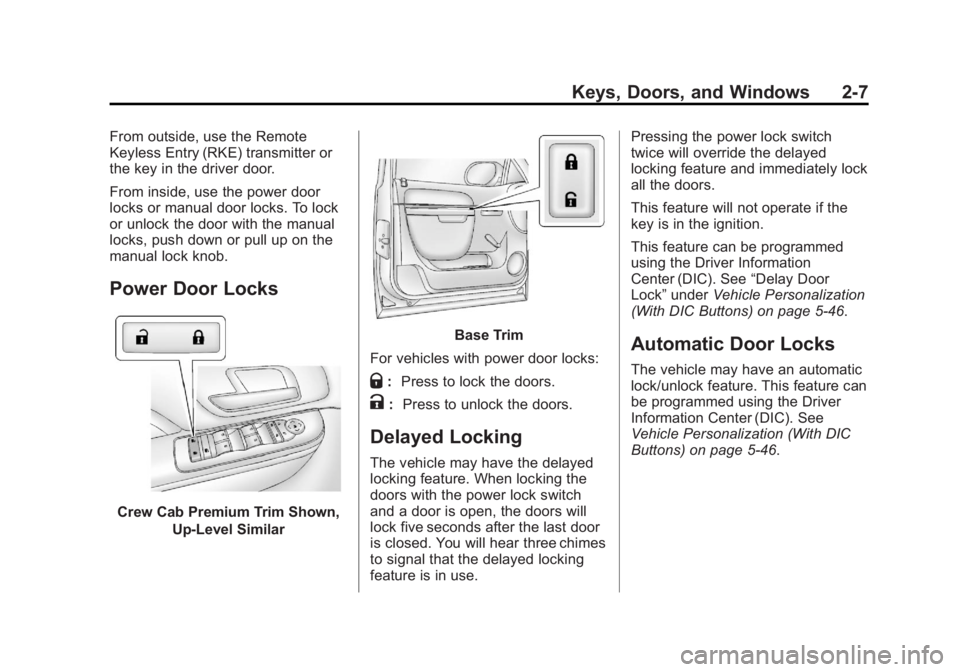
Power Door Locks
Crew Cab Premium Trim Shown,Up-Level Similar
Base Trim
For vehicles with power door locks:
Q: Press to lock the doors.
K: Press to unlock the doors.
Delayed Locking
The vehicle may have the delayed
locking feature. When locking the
doors with the power lock switch
and a door is open, the doors will
lock five seconds after the last door
is closed. You will hear three chimes
to signal that the delayed locking
feature is in use. Pressing the power lock switch
twice will override the delayed
locking feature and immediately lock
all the doors.
This feature will not operate if the
key is in the ignition.
This feature can be programmed
using the Driver Information
Center (DIC). See
“Delay Door
Lock” under Vehicle Personalization
(With DIC Buttons) on page 5‑46.
Automatic Door Locks
The vehicle may have an automatic
lock/unlock feature. This feature can
be programmed using the Driver
Information Center (DIC). See
Vehicle Personalization (With DIC
Buttons) on page 5‑46.
Page 177 of 534
Black plate (47,1)GMC Sierra Owner Manual - 2013 - crc - 8/14/12
Instruments and Controls 5-47
To change customization
preferences, use the following
procedure.
Entering the Feature
Settings Menu
1. Turn the ignition on and placethe vehicle in P (Park).
To avoid excessive drain on the
battery, turn the headlamps off.
2. Press the customization button to scroll through the available
customizable options.
Feature Settings Menu Items
The following customization features
allow you to program settings to the
vehicle:
DISPLAY IN ENGLISH
This feature will only display if a
language other than English has
been set. This feature allows you to
change the language in which the
DIC messages appear to English. Press the customization button until
the PRESS
VTO DISPLAY IN
ENGLISH screen appears on the
DIC display. Press the set/reset
button once to display all DIC
messages in English.
DISPLAY LANGUAGE
This feature allows you to select the
language in which the DIC
messages will appear.
Press the customization button until
the DISPLAY LANGUAGE screen
appears on the DIC display. Press
the set/reset button once to access
the settings for this feature. Then
press the customization button to
scroll through the following settings:
ENGLISH (default): All messages
will appear in English.
FRANCAIS: All messages will
appear in French.
ESPANOL: All messages will
appear in Spanish. NO CHANGE:
No change will be
made to this feature. The current
setting will remain.
To select a setting, press the set/
reset button while the desired
setting is displayed on the DIC.
You can also change the language
by pressing the trip odometer reset
stem. See “Language” underDriver
Information Center (DIC) on
page 5‑28 for more information.
AUTO DOOR LOCK
This feature allows you to select
when the vehicle's doors will
automatically lock. See Automatic
Door Locks on page 2‑7 for more
information.
Page 178 of 534
Black plate (48,1)GMC Sierra Owner Manual - 2013 - crc - 8/14/12
5-48 Instruments and Controls
Press the customization button until
AUTO DOOR LOCK appears on the
DIC display. Press the set/reset
button once to access the settings
for this feature. Then press the
customization button to scroll
through the following settings:
SHIFT OUT OF PARK (default):
The doors will automatically lock
when the vehicle is shifted out of
P (Park).
AT VEHICLE SPEED:The doors
will automatically lock when the
vehicle speed is above 13 km/h
(8 mph) for three seconds.
NO CHANGE: No change will be
made to this feature. The current
setting will remain.
To select a setting, press the set/
reset button while the desired
setting is displayed on the DIC. AUTO DOOR UNLOCK
This feature allows you to turn off
the automatic door unlocking
feature. It also allows you to select
which doors and when the doors will
automatically unlock. See
Automatic
Door Locks on page 2‑7 for more
information.
Press the customization button until
AUTO DOOR UNLOCK appears on
the DIC display. Press the set/reset
button once to access the settings
for this feature. Then press the
customization button to scroll
through the following settings:
OFF: None of the doors will
automatically unlock.
DRIVER AT KEY OUT: Only the
driver door will unlock when the key
is taken out of the ignition.
DRIVER IN PARK: Only the driver
door will unlock when the vehicle is
shifted into P (Park). ALL AT KEY OUT:
All of the doors
will unlock when the key is taken
out of the ignition.
ALL IN PARK (default): All of the
doors will unlock when the vehicle is
shifted into P (Park).
NO CHANGE: No change will be
made to this feature. The current
setting will remain.
To select a setting, press the set/
reset button while the desired
setting is displayed on the DIC.
REMOTE DOOR LOCK
This feature allows you to select the
type of feedback received when
locking the vehicle with the Remote
Keyless Entry (RKE) transmitter.
You will not receive feedback when
locking the vehicle with the RKE
transmitter if the doors are open.
See Remote Keyless Entry (RKE)
System Operation on page 2‑2 for
more information.
Page 290 of 534
Black plate (24,1)GMC Sierra Owner Manual - 2013 - crc - 8/14/12
9-24 Driving and Operating
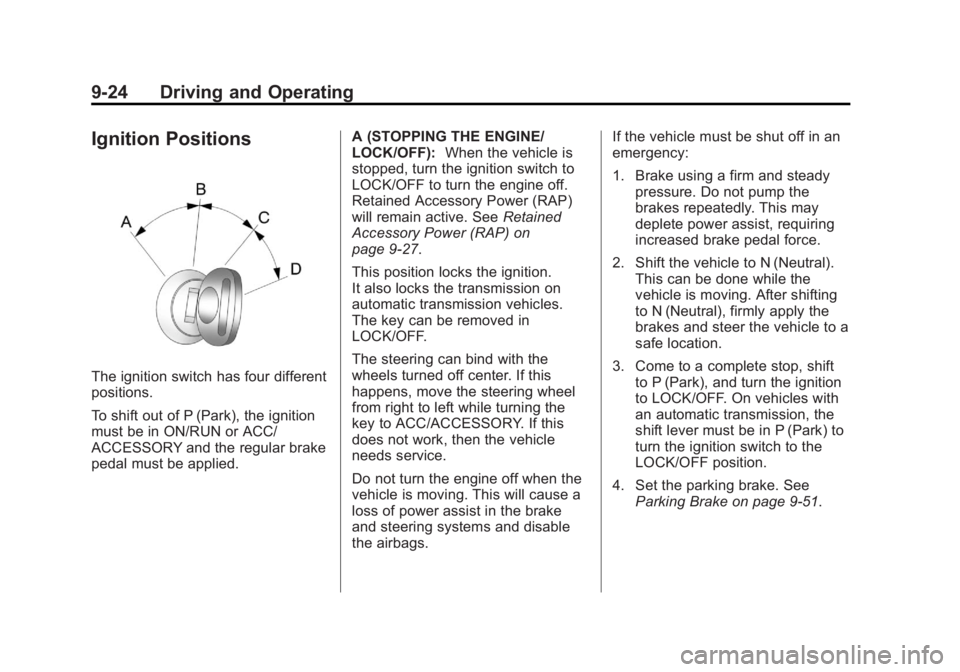
Ignition Positions
The ignition switch has four different
positions.
To shift out of P (Park), the ignition
must be in ON/RUN or ACC/
ACCESSORY and the regular brake
pedal must be applied.A (STOPPING THE ENGINE/
LOCK/OFF):
When the vehicle is
stopped, turn the ignition switch to
LOCK/OFF to turn the engine off.
Retained Accessory Power (RAP)
will remain active. See Retained
Accessory Power (RAP) on
page 9‑27.
This position locks the ignition.
It also locks the transmission on
automatic transmission vehicles.
The key can be removed in
LOCK/OFF.
The steering can bind with the
wheels turned off center. If this
happens, move the steering wheel
from right to left while turning the
key to ACC/ACCESSORY. If this
does not work, then the vehicle
needs service.
Do not turn the engine off when the
vehicle is moving. This will cause a
loss of power assist in the brake
and steering systems and disable
the airbags. If the vehicle must be shut off in an
emergency:
1. Brake using a firm and steady
pressure. Do not pump the
brakes repeatedly. This may
deplete power assist, requiring
increased brake pedal force.
2. Shift the vehicle to N (Neutral). This can be done while the
vehicle is moving. After shifting
to N (Neutral), firmly apply the
brakes and steer the vehicle to a
safe location.
3. Come to a complete stop, shift to P (Park), and turn the ignition
to LOCK/OFF. On vehicles with
an automatic transmission, the
shift lever must be in P (Park) to
turn the ignition switch to the
LOCK/OFF position.
4. Set the parking brake. See Parking Brake on page 9‑51.
Page 298 of 534
Black plate (32,1)GMC Sierra Owner Manual - 2013 - crc - 8/14/12
9-32 Driving and Operating
Running the Vehicle
While Parked
It is better not to park with the
engine running.
If the vehicle is left with the engine
running, follow the proper steps to
be sure the vehicle will not move.
SeeShifting Into Park on page 9‑28
and Engine Exhaust on page 9‑31.
If parking on a hill and pulling a
trailer, see Driving Characteristics
and Towing Tips on page 9‑71.
Automatic
Transmission
If the vehicle is a hybrid, see the
hybrid supplement for more
information.
Vehicles with an automatic
transmission have an electronic shift
position indicator within the
instrument panel cluster. This
display comes on when the ignition
key is turned to the ON/RUN
position.
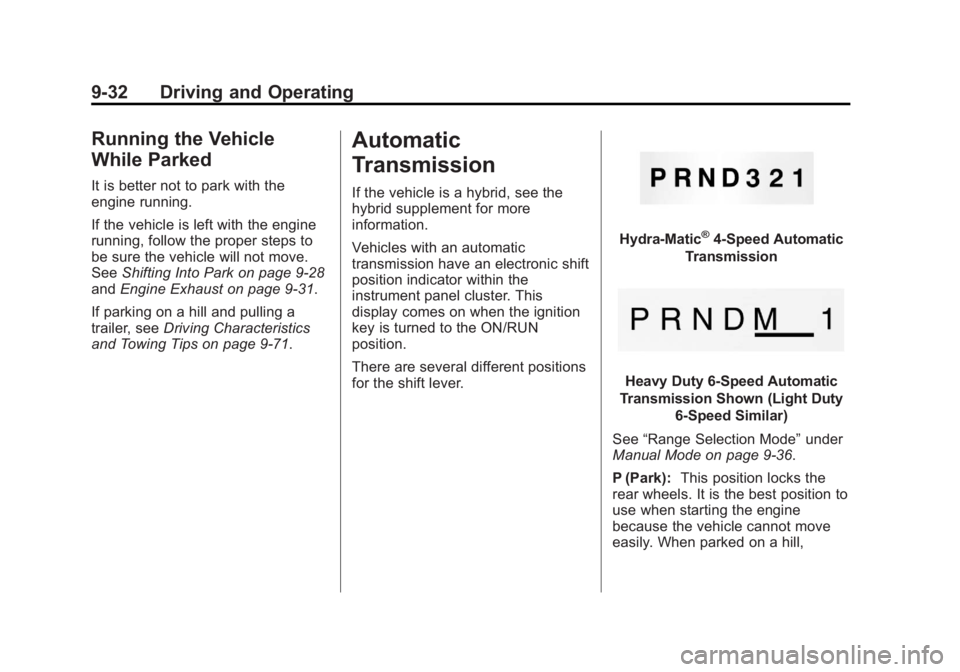
There are several different positions
for the shift lever.
Hydra-Matic®4-Speed Automatic
Transmission
Heavy Duty 6-Speed Automatic
Transmission Shown (Light Duty 6-Speed Similar)
See “Range Selection Mode” under
Manual Mode on page 9‑36.
P (Park): This position locks the
rear wheels. It is the best position to
use when starting the engine
because the vehicle cannot move
easily. When parked on a hill,
Page 514 of 534
Black plate (2,1)GMC Sierra Owner Manual - 2013 - crc - 8/14/12
14-2 OnStar
Press the OnStar Emergency
button
>to get a priority
connection to an Emergency
Advisor available 24/7 to:
.Get help for an emergency.
.Be a Good Samaritan or
respond to an AMBER Alert.
.Get crisis assistance and
evacuation routes.
OnStar Services
Emergency
With Automatic Crash Response,
the built-in system can automatically
connect to help in most crashes,
even if help cannot be requested.
Press
>to connect to an
Emergency Advisor. GPS
technology is used to identify the
vehicle location and can provide
critical information to emergency
personnel. The Advisor is also
trained to offer critical assistance in
emergency situations before first
responders arrive.
Security
OnStar provides services like Stolen
Vehicle Assistance, Remote Ignition
Block, and Roadside Assistance,
if the vehicle is equipped with these
services. OnStar can unlock the
vehicle doors remotely, if it is equipped with automatic door locks,
and can help police locate the
vehicle if it is stolen.
Navigation
OnStar navigation requires the
Directions and Connections
service plan.
Press
Qto receive directions or
have them sent to the vehicle
navigation screen, if equipped.
Destinations can also be forwarded
to the vehicle from MapQuest.com.
The OnStar mapping database is
continuously updated. Visit
www.onstar.com for coverage maps.
Turn-by-Turn Navigation
1. PressQto connect to a live
Advisor.
2. Request directions.
3. Directions are downloaded to the vehicle.
4. Follow the voice-guided commands.
Page 521 of 534
Black plate (1,1)GMC Sierra Owner Manual - 2013 - crc - 8/14/12
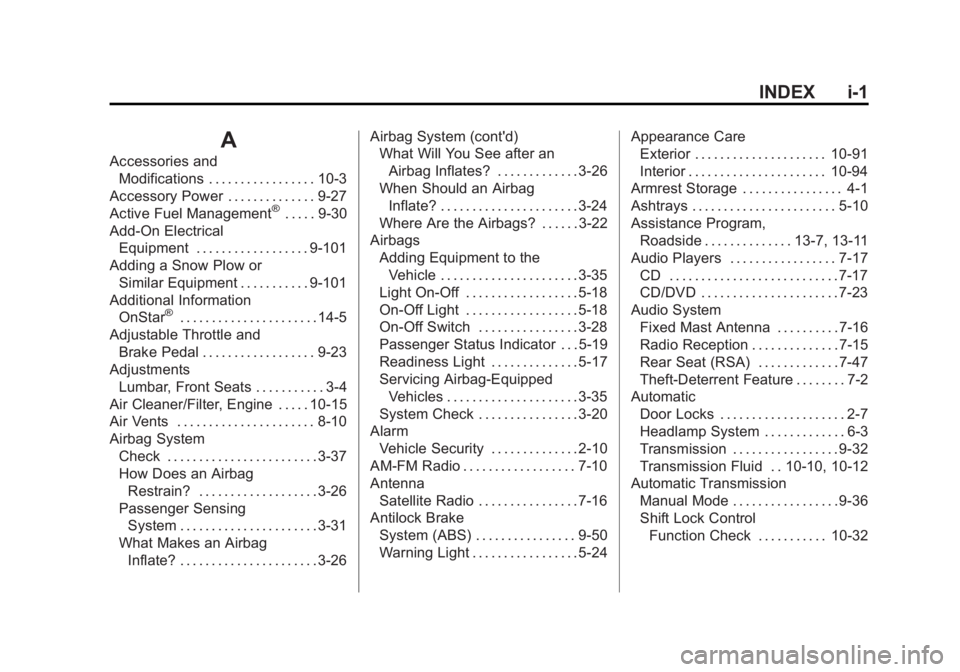
INDEX i-1
A
Accessories andModifications . . . . . . . . . . . . . . . . . 10-3
Accessory Power . . . . . . . . . . . . . . 9-27
Active Fuel Management
®. . . . . 9-30
Add-On Electrical Equipment . . . . . . . . . . . . . . . . . . 9-101
Adding a Snow Plow or Similar Equipment . . . . . . . . . . . 9-101
Additional Information OnStar
®. . . . . . . . . . . . . . . . . . . . . . 14-5
Adjustable Throttle and Brake Pedal . . . . . . . . . . . . . . . . . . 9-23
Adjustments Lumbar, Front Seats . . . . . . . . . . . 3-4
Air Cleaner/Filter, Engine . . . . . 10-15
Air Vents . . . . . . . . . . . . . . . . . . . . . . 8-10
Airbag System
Check . . . . . . . . . . . . . . . . . . . . . . . . 3-37
How Does an AirbagRestrain? . . . . . . . . . . . . . . . . . . . 3-26
Passenger Sensing System . . . . . . . . . . . . . . . . . . . . . . 3-31
What Makes an Airbag Inflate? . . . . . . . . . . . . . . . . . . . . . . 3-26 Airbag System (cont'd)
What Will You See after an
Airbag Inflates? . . . . . . . . . . . . . 3-26
When Should an Airbag
Inflate? . . . . . . . . . . . . . . . . . . . . . . 3-24
Where Are the Airbags? . . . . . . 3-22
Airbags Adding Equipment to theVehicle . . . . . . . . . . . . . . . . . . . . . . 3-35
Light On-Off . . . . . . . . . . . . . . . . . . 5-18
On-Off Light . . . . . . . . . . . . . . . . . . 5-18
On-Off Switch . . . . . . . . . . . . . . . . 3-28
Passenger Status Indicator . . . 5-19
Readiness Light . . . . . . . . . . . . . . 5-17
Servicing Airbag-Equipped Vehicles . . . . . . . . . . . . . . . . . . . . . 3-35
System Check . . . . . . . . . . . . . . . . 3-20
Alarm
Vehicle Security . . . . . . . . . . . . . . 2-10
AM-FM Radio . . . . . . . . . . . . . . . . . . 7-10
Antenna Satellite Radio . . . . . . . . . . . . . . . . 7-16
Antilock Brake
System (ABS) . . . . . . . . . . . . . . . . 9-50
Warning Light . . . . . . . . . . . . . . . . . 5-24 Appearance Care
Exterior . . . . . . . . . . . . . . . . . . . . . 10-91
Interior . . . . . . . . . . . . . . . . . . . . . . 10-94
Armrest Storage . . . . . . . . . . . . . . . . 4-1
Ashtrays . . . . . . . . . . . . . . . . . . . . . . . 5-10
Assistance Program, Roadside . . . . . . . . . . . . . . 13-7, 13-11
Audio Players . . . . . . . . . . . . . . . . . 7-17 CD . . . . . . . . . . . . . . . . . . . . . . . . . . . 7-17
CD/DVD . . . . . . . . . . . . . . . . . . . . . . 7-23
Audio System
Fixed Mast Antenna . . . . . . . . . . 7-16
Radio Reception . . . . . . . . . . . . . . 7-15
Rear Seat (RSA) . . . . . . . . . . . . . 7-47
Theft-Deterrent Feature . . . . . . . . 7-2
Automatic
Door Locks . . . . . . . . . . . . . . . . . . . . 2-7
Headlamp System . . . . . . . . . . . . . 6-3
Transmission . . . . . . . . . . . . . . . . . 9-32
Transmission Fluid . . 10-10, 10-12
Automatic Transmission
Manual Mode . . . . . . . . . . . . . . . . . 9-36
Shift Lock ControlFunction Check . . . . . . . . . . . 10-32
Page 523 of 534

Black plate (3,1)GMC Sierra Owner Manual - 2013 - crc - 8/14/12
INDEX i-3
Charging System Light . . . . . . . . 5-20
CheckEngine Light . . . . . . . . . . . . . . . . . . 5-21
IgnitionTransmission Lock . . . . . . . . 10-32
Child Restraints Infants and Young
Children . . . . . . . . . . . . . . . . . . . . . 3-40
Lower Anchors and Tethers for Children . . . . . . . . . 3-45
Older Children . . . . . . . . . . . . . . . . 3-38
Securing . . . . . . . . . . 3-54, 3-56, 3-57
Systems . . . . . . . . . . . . . . . . . . . . . . 3-42
Cigarette Lighter . . . . . . . . . . . . . . . . 5-9
Circuit Breakers . . . . . . . . . . . . . . 10-39
Cleaning Exterior Care . . . . . . . . . . . . . . . 10-91
Interior Care . . . . . . . . . . . . . . . . 10-94
Climate Control Systems . . . 8-1, 8-4 Air Conditioning . . . . . . . . . . 8-1, 8-4
Dual Automatic . . . . . . . . . . . . . . . . 8-5
Heating . . . . . . . . . . . . . . . . . . . 8-1, 8-4
Clock . . . . . . . . . . . . . . . . . . . . . . . . . . . 5-7
Cluster, Instrument . . . . . . . . . . . . 5-11
Collision Damage Repair . . . . . 13-14
Compass . . . . . . . . . . . . . . . . . . . . . . . 5-5 Connections
OnStar®. . . . . . . . . . . . . . . . . . . . . . 14-3
Control of a Vehicle . . . . . . . . . . . . . 9-3
Convex Mirrors . . . . . . . . . . . . . . . . 2-13
Coolant Engine . . . . . . . . . . . . . . . . . . . . . . 10-17
Engine TemperatureGauge . . . . . . . . . . . . . . . . . . . . . . 5-15
Cooling System . . . . . . . . . . . . . . . 10-16 Engine Messages . . . . . . . . . . . . 5-39
Courtesy Transportation
Program . . . . . . . . . . . . . . . . . . . . . 13-13
Cruise Control . . . . . . . . . . . . . . . . . 9-56 Light . . . . . . . . . . . . . . . . . . . . . . . . . . 5-28
Cupholders . . . . . . . . . . . . . . . . . . . . . 4-1
Customer Assistance . . . . . . . . . . 13-6 Offices . . . . . . . . . . . . . . . . . . . . . . . . 13-5
Text Telephone (TTY)Users . . . . . . . . . . . . . . . . . . . . . . . 13-6
Customer Information Service Publications
Ordering Information . . . . . . 13-16
Customer Satisfaction Procedure . . . . . . . . . . . . . . 13-2, 13-4D
Damage Repair, Collision . . . . . 13-14
Danger, Warnings, andCautions . . . . . . . . . . . . . . . . . . . . . . . . iv
Data Recorders, Event . . . . . . . 13-19
Daytime Running Lamps (DRL) . . . . . . . . . . . . . . . . . . 6-3
Defensive Driving . . . . . . . . . . . . . . . 9-3
Delayed Locking . . . . . . . . . . . . . . . . 2-7
Devices Auxiliary . . . . . . . . . . . . . . . . . . . . . . 7-33
Diagnostics OnStar
®. . . . . . . . . . . . . . . . . . . . . . 14-5
Distracted Driving . . . . . . . . . . . . . . . 9-2
Dome Lamps . . . . . . . . . . . . . . . . . . . 6-7
Door Ajar Messages . . . . . . . . . . . . . . . 5-38
Delayed Locking . . . . . . . . . . . . . . . 2-7
Locks . . . . . . . . . . . . . . . . . . . . . . . . . . 2-6
Power Locks . . . . . . . . . . . . . . . . . . . 2-7
Rear Doors . . . . . . . . . . . . . . . . . . . . 2-8
Drive Belt Routing, Engine . . . . . 12-6
Driver Information Center (DIC) . . . . . . . . . . . . . . . . . 5-28