seat memory GMC SIERRA 1500 2017 Owners Manual
[x] Cancel search | Manufacturer: GMC, Model Year: 2017, Model line: SIERRA 1500, Model: GMC SIERRA 1500 2017Pages: 494, PDF Size: 7.66 MB
Page 6 of 494
GMC Sierra/Sierra Denali Owner Manual (GMNA-Localizing-U.S./Canada/
Mexico-9955992) - 2017 - crc - 5/3/16
In Brief 5
In Brief
Instrument Panel
Instrument Panel . . . . . . . . . . . . . . . . 6
Initial Drive Information
Initial Drive Information . . . . . . . . . . 8
Remote Keyless Entry (RKE)System . . . . . . . . . . . . . . . . . . . . . . . . 8
Remote Vehicle Start . . . . . . . . . . . 9
Door Locks . . . . . . . . . . . . . . . . . . . . . 9
Windows . . . . . . . . . . . . . . . . . . . . . . . . 9
Seat Adjustment . . . . . . . . . . . . . . . 10
Memory Features . . . . . . . . . . . . . . 11
Heated and Ventilated Seats . . . 11
Head Restraint Adjustment . . . . 12
Safety Belts . . . . . . . . . . . . . . . . . . . . 12
Passenger Sensing System . . . 12
Mirror Adjustment . . . . . . . . . . . . . . 13
Interior Lighting . . . . . . . . . . . . . . . . 14
Exterior Lighting . . . . . . . . . . . . . . . 15
Windshield Wiper/Washer . . . . . . 15
Climate Controls . . . . . . . . . . . . . . . 16
Transmission . . . . . . . . . . . . . . . . . . 17
Four-Wheel Drive . . . . . . . . . . . . . . 17
Vehicle Features
Infotainment System . . . . . . . . . . . 19
Radio(s) . . . . . . . . . . . . . . . . . . . . . . . 19
Satellite Radio . . . . . . . . . . . . . . . . . 19 Portable Audio Devices . . . . . . . . 20
Bluetooth
®. . . . . . . . . . . . . . . . . . . . . 20
Steering Wheel Controls . . . . . . . 20
Cruise Control . . . . . . . . . . . . . . . . . 21
Driver Information Center (DIC) . . . . . . . . . . . . . . . . . 21
Forward Collision Alert (FCA) System . . . . . . . . . . . . . . . . . . . . . . . 22
Forward Automatic Braking (FAB) . . . . . . . . . . . . . . . . 22
Lane Departure Warning (LDW) . . . . . . . . . . . . . . . 22
Lane Keep Assist (LKA) . . . . . . . 22
Rear Vision Camera (RVC) . . . . 23
Parking Assist . . . . . . . . . . . . . . . . . 23
Power Outlets . . . . . . . . . . . . . . . . . 23
Universal Remote System . . . . . 23
Sunroof . . . . . . . . . . . . . . . . . . . . . . . . 24
Performance and Maintenance
Traction Control/Electronic Stability Control . . . . . . . . . . . . . . 24
Tire Pressure Monitor . . . . . . . . . . 25
Fuel (Except L86 6.2L Engine) . . . . . . . . . . . . . . . . . . . . . . . 25
Fuel (L86 6.2L Engine) . . . . . . . . 25
E85 or FlexFuel . . . . . . . . . . . . . . . . 26
Engine Oil Life System . . . . . . . . 26
Driving for Better Fuel Economy . . . . . . . . . . . . . . . . . . . . . 26 Roadside Assistance
Program . . . . . . . . . . . . . . . . . . . . . . 27
Page 12 of 494
GMC Sierra/Sierra Denali Owner Manual (GMNA-Localizing-U.S./Canada/
Mexico-9955992) - 2017 - crc - 5/3/16
In Brief 11
.Press and hold the control up to
increase upper lumbar support
and decrease lower lumbar
support.
Press and hold the control down
to increase lower lumbar support
and decrease upper lumbar
support.
See Lumbar Adjustment 052.
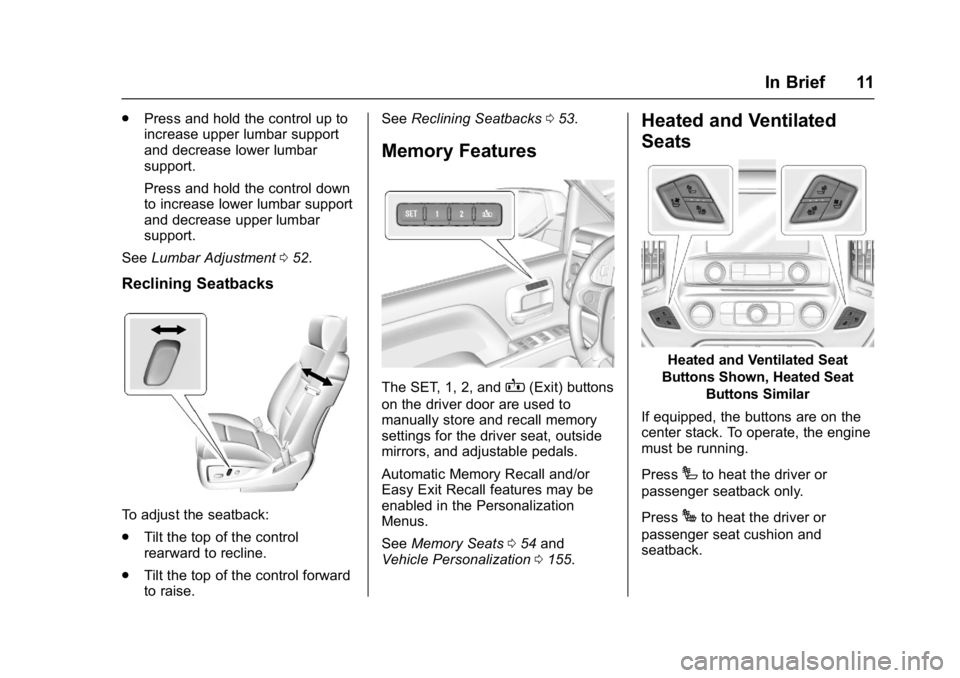
Reclining Seatbacks
To adjust the seatback:
.
Tilt the top of the control
rearward to recline.
. Tilt the top of the control forward
to raise. See
Reclining Seatbacks 053.
Memory Features
The SET, 1, 2, andB(Exit) buttons
on the driver door are used to
manually store and recall memory
settings for the driver seat, outside
mirrors, and adjustable pedals.
Automatic Memory Recall and/or
Easy Exit Recall features may be
enabled in the Personalization
Menus.
See Memory Seats 054 and
Vehicle Personalization 0155.
Heated and Ventilated
Seats
Heated and Ventilated Seat
Buttons Shown, Heated Seat Buttons Similar
If equipped, the buttons are on the
center stack. To operate, the engine
must be running.
Press
Ito heat the driver or
passenger seatback only.
Press
Jto heat the driver or
passenger seat cushion and
seatback.
Page 15 of 494
GMC Sierra/Sierra Denali Owner Manual (GMNA-Localizing-U.S./Canada/
Mexico-9955992) - 2017 - crc - 5/3/16
14 In Brief
2. Press the arrows on the controlpad while the indicator light on
the (1) or (3) button is
illuminated, to move the mirror
up, down, right, or left.
3. Adjust each outside mirror so that a little of the vehicle and
the area behind it can be seen.
4. Press either (1) or (3) again to deselect the mirror.
See Power Mirrors 042.
If equipped with power folding
mirrors: 1. Press (2) to fold the mirrors out to the driving position.
2. Press (2) again to fold the mirrors in to the folded position.
For manual, power, and auto folding
mirrors, see Folding Mirrors 043.
The mirrors may also include a
memory function that works with the
memory seats. See Memory
Seats 054.Interior Mirror
Adjustment
Adjust the mirror for a clear view of
the area behind the vehicle.
Manual Dimming Rearview Mirror
If equipped, push the tab forward for
daytime use and pull it for nighttime
use to avoid glare from the
headlamps from behind. See
Manual Rearview Mirror 045.
Automatic Dimming Rearview
Mirror
If equipped, the mirror will
automatically reduce the glare of the
headlamps from behind. The
dimming feature comes on when the
vehicle is started.
See Automatic Dimming Rearview
Mirror 045.
Interior Lighting
Dome Lamps
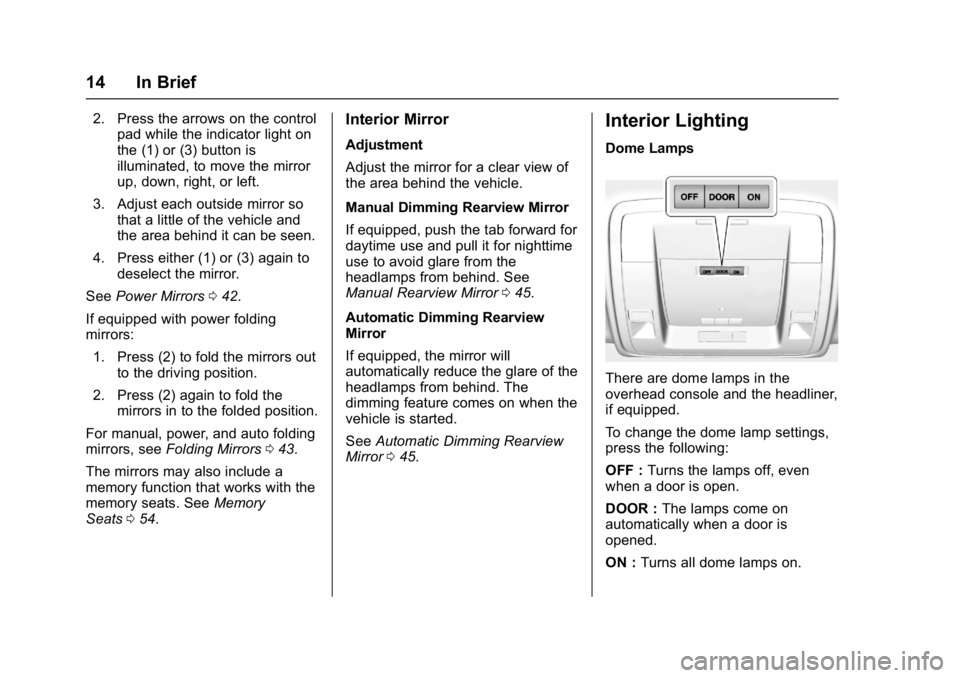
There are dome lamps in the
overhead console and the headliner,
if equipped.
To change the dome lamp settings,
press the following:
OFF : Turns the lamps off, even
when a door is open.
DOOR : The lamps come on
automatically when a door is
opened.
ON : Turns all dome lamps on.
Page 43 of 494
GMC Sierra/Sierra Denali Owner Manual (GMNA-Localizing-U.S./Canada/
Mexico-9955992) - 2017 - crc - 5/3/16
42 Keys, Doors, and Windows
seat. The convex mirror can be
adjusted manually to the driver
preferred position for better vision.
The mirror may have a turn signal
arrow that flashes in the direction of
the turn or lane change.
Power Mirrors
Using hood-mounted air deflectors
and add-on convex mirror
attachments could decrease mirror
performance.
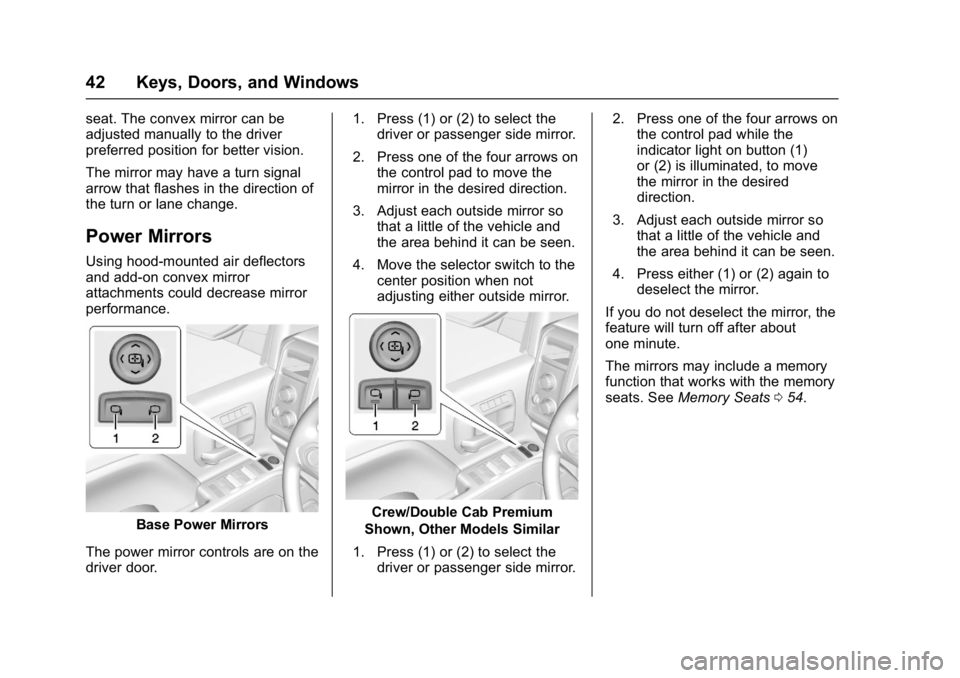
Base Power Mirrors
The power mirror controls are on the
driver door. 1. Press (1) or (2) to select the
driver or passenger side mirror.
2. Press one of the four arrows on the control pad to move the
mirror in the desired direction.
3. Adjust each outside mirror so that a little of the vehicle and
the area behind it can be seen.
4. Move the selector switch to the center position when not
adjusting either outside mirror.Crew/Double Cab Premium
Shown, Other Models Similar
1. Press (1) or (2) to select the driver or passenger side mirror. 2. Press one of the four arrows on
the control pad while the
indicator light on button (1)
or (2) is illuminated, to move
the mirror in the desired
direction.
3. Adjust each outside mirror so that a little of the vehicle and
the area behind it can be seen.
4. Press either (1) or (2) again to deselect the mirror.
If you do not deselect the mirror, the
feature will turn off after about
one minute.
The mirrors may include a memory
function that works with the memory
seats. See Memory Seats 054.
Page 44 of 494
GMC Sierra/Sierra Denali Owner Manual (GMNA-Localizing-U.S./Canada/
Mexico-9955992) - 2017 - crc - 5/3/16
Keys, Doors, and Windows 43
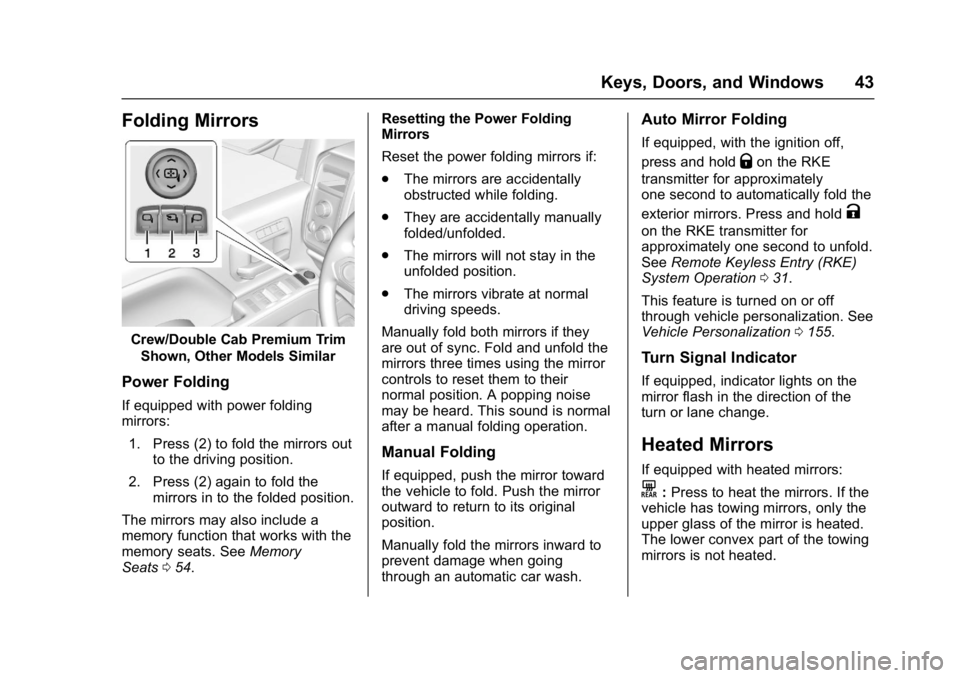
Folding Mirrors
Crew/Double Cab Premium TrimShown, Other Models Similar
Power Folding
If equipped with power folding
mirrors:
1. Press (2) to fold the mirrors out to the driving position.
2. Press (2) again to fold the mirrors in to the folded position.
The mirrors may also include a
memory function that works with the
memory seats. See Memory
Seats 054. Resetting the Power Folding
Mirrors
Reset the power folding mirrors if:
.
The mirrors are accidentally
obstructed while folding.
. They are accidentally manually
folded/unfolded.
. The mirrors will not stay in the
unfolded position.
. The mirrors vibrate at normal
driving speeds.
Manually fold both mirrors if they
are out of sync. Fold and unfold the
mirrors three times using the mirror
controls to reset them to their
normal position. A popping noise
may be heard. This sound is normal
after a manual folding operation.
Manual Folding
If equipped, push the mirror toward
the vehicle to fold. Push the mirror
outward to return to its original
position.
Manually fold the mirrors inward to
prevent damage when going
through an automatic car wash.
Auto Mirror Folding
If equipped, with the ignition off,
press and hold
Qon the RKE
transmitter for approximately
one second to automatically fold the
exterior mirrors. Press and hold
K
on the RKE transmitter for
approximately one second to unfold.
See Remote Keyless Entry (RKE)
System Operation 031.
This feature is turned on or off
through vehicle personalization. See
Vehicle Personalization 0155.
Turn Signal Indicator
If equipped, indicator lights on the
mirror flash in the direction of the
turn or lane change.
Heated Mirrors
If equipped with heated mirrors:
K:Press to heat the mirrors. If the
vehicle has towing mirrors, only the
upper glass of the mirror is heated.
The lower convex part of the towing
mirrors is not heated.
Page 46 of 494
GMC Sierra/Sierra Denali Owner Manual (GMNA-Localizing-U.S./Canada/
Mexico-9955992) - 2017 - crc - 5/3/16
Keys, Doors, and Windows 45
zone. Then, glance over your
shoulder to double check
before moving slowly into the
adjacent lane.
Reverse Tilt Mirrors
If equipped with memory seats, the
passenger and/or driver mirror tilts
to a preselected position when the
vehicle is in R (Reverse). This
allows the curb to be seen when
parallel parking.
The mirror(s) return to the original
position when:
.The vehicle is shifted out of
R (Reverse), or remains in
R (Reverse) for about
30 seconds.
. The ignition is turned off.
. The vehicle is driven in
R (Reverse) above a set speed.
To turn this feature on or off, see
Vehicle Personalization 0155.
Interior Mirrors
Interior Rearview Mirrors
Adjust the rearview mirror for a clear
view of the area behind your
vehicle.
If equipped with OnStar, the vehicle
may have three control buttons at
the bottom of the mirror. See your
dealer for more information about
OnStar and how to subscribe to it.
See OnStar Overview 0471.
Do not spray glass cleaner directly
on the mirror. Use a soft towel
dampened with water.
Manual Rearview Mirror
If equipped, push the tab forward for
daytime use and pull it rearward for
nighttime use to avoid glare from
the headlamps from behind.
Automatic Dimming
Rearview Mirror
The mirror will automatically reduce
the glare of the headlamps from
behind. The dimming feature comes
on each time the vehicle is started.
Page 51 of 494
GMC Sierra/Sierra Denali Owner Manual (GMNA-Localizing-U.S./Canada/
Mexico-9955992) - 2017 - crc - 5/3/16
50 Seats and Restraints
Seats and
Restraints
Head Restraints
Head Restraints . . . . . . . . . . . . . . . 51
Front Seats
Power Seat Adjustment . . . . . . . . 52
Lumbar Adjustment . . . . . . . . . . . . 52
Reclining Seatbacks . . . . . . . . . . . 53
Memory Seats . . . . . . . . . . . . . . . . . 54
Heated and Ventilated FrontSeats . . . . . . . . . . . . . . . . . . . . . . . . . 55
Rear Seats
Rear Seats (Double Cab FullBench) . . . . . . . . . . . . . . . . . . . . . . . 57
Rear Seats (Split Bench) . . . . . . 58
Safety Belts
Safety Belts . . . . . . . . . . . . . . . . . . . . 59
How to Wear Safety Belts Properly . . . . . . . . . . . . . . . . . . . . . . 60
Lap-Shoulder Belt . . . . . . . . . . . . . 61
Safety Belt Use During Pregnancy . . . . . . . . . . . . . . . . . . . . 64
Lap Belt . . . . . . . . . . . . . . . . . . . . . . . 64
Safety Belt Extender . . . . . . . . . . . 65
Safety System Check . . . . . . . . . . 65 Safety Belt Care . . . . . . . . . . . . . . . 65
Replacing Safety Belt System
Parts after a Crash . . . . . . . . . . . 66
Airbag System
Airbag System . . . . . . . . . . . . . . . . . 66
Where Are the Airbags? . . . . . . . 68
When Should an AirbagInflate? . . . . . . . . . . . . . . . . . . . . . . . 69
What Makes an Airbag Inflate? . . . . . . . . . . . . . . . . . . . . . . . 71
How Does an Airbag Restrain? . . . . . . . . . . . . . . . . . . . . . 71
What Will You See after an Airbag Inflates? . . . . . . . . . . . . . . 71
Airbag On-Off Switch . . . . . . . . . . 73
Passenger Sensing System . . . 75
Servicing the Airbag-Equipped Vehicle . . . . . . . . . . . . . . . . . . . . . . . 79
Adding Equipment to the Airbag-Equipped Vehicle . . . . . 79
Airbag System Check . . . . . . . . . . 80
Replacing Airbag System Parts after a Crash . . . . . . . . . . . . . . . . . 81
Child Restraints
Older Children . . . . . . . . . . . . . . . . . 81
Infants and Young Children . . . . 83
Child Restraint Systems . . . . . . . 85
Where to Put the Restraint . . . . . 87 Lower Anchors and Tethers for
Children (LATCH System) . . . . 88
Replacing LATCH System Parts After a Crash . . . . . . . . . . . . . . . . . 94
Securing Child Restraints (With
the Safety Belt in the
Rear Seat) . . . . . . . . . . . . . . . . . . . 95
Securing Child Restraints (With the Safety Belt in the Center
Front Seat) . . . . . . . . . . . . . . . . . . . 98
Securing Child Restraints (With the Safety Belt in the Front
Passenger Seat) . . . . . . . . . . . . . 98
Page 55 of 494
GMC Sierra/Sierra Denali Owner Manual (GMNA-Localizing-U.S./Canada/
Mexico-9955992) - 2017 - crc - 5/3/16
54 Seats and Restraints
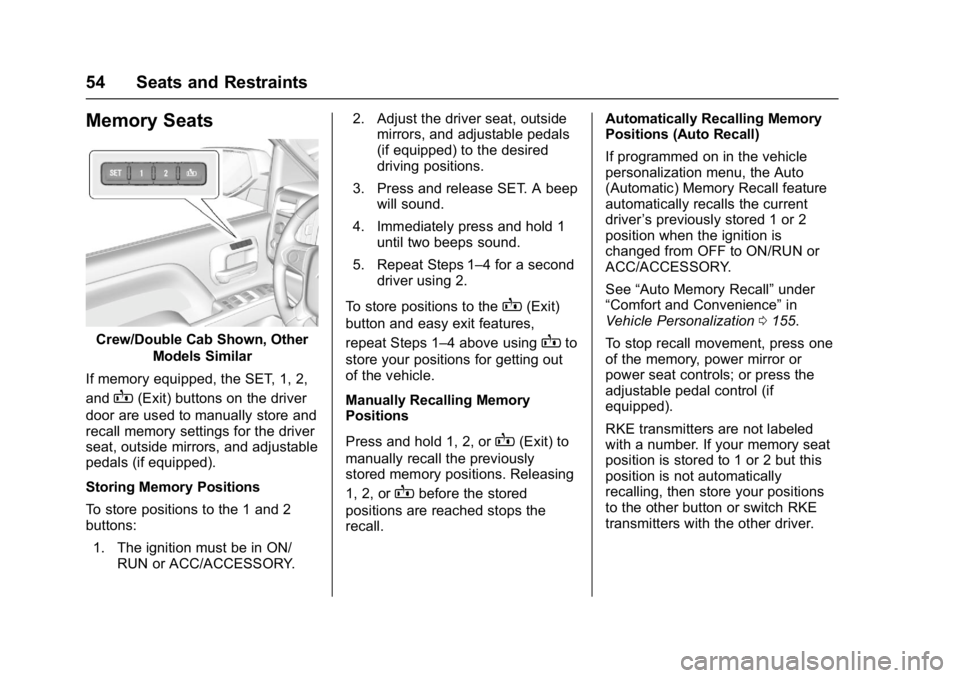
Memory Seats
Crew/Double Cab Shown, OtherModels Similar
If memory equipped, the SET, 1, 2,
and
B(Exit) buttons on the driver
door are used to manually store and
recall memory settings for the driver
seat, outside mirrors, and adjustable
pedals (if equipped).
Storing Memory Positions
To store positions to the 1 and 2
buttons:
1. The ignition must be in ON/ RUN or ACC/ACCESSORY. 2. Adjust the driver seat, outside
mirrors, and adjustable pedals
(if equipped) to the desired
driving positions.
3. Press and release SET. A beep will sound.
4. Immediately press and hold 1 until two beeps sound.
5. Repeat Steps 1–4 for a second driver using 2.
To store positions to the
B(Exit)
button and easy exit features,
repeat Steps 1–4 above using
Bto
store your positions for getting out
of the vehicle.
Manually Recalling Memory
Positions
Press and hold 1, 2, or
B(Exit) to
manually recall the previously
stored memory positions. Releasing
1, 2, or
Bbefore the stored
positions are reached stops the
recall. Automatically Recalling Memory
Positions (Auto Recall)
If programmed on in the vehicle
personalization menu, the Auto
(Automatic) Memory Recall feature
automatically recalls the current
driver
’s previously stored 1 or 2
position when the ignition is
changed from OFF to ON/RUN or
ACC/ACCESSORY.
See “Auto Memory Recall” under
“Comfort and Convenience” in
Vehicle Personalization 0155.
To stop recall movement, press one
of the memory, power mirror or
power seat controls; or press the
adjustable pedal control (if
equipped).
RKE transmitters are not labeled
with a number. If your memory seat
position is stored to 1 or 2 but this
position is not automatically
recalling, then store your positions
to the other button or switch RKE
transmitters with the other driver.
Page 56 of 494
GMC Sierra/Sierra Denali Owner Manual (GMNA-Localizing-U.S./Canada/
Mexico-9955992) - 2017 - crc - 5/3/16
Seats and Restraints 55
Easy Exit Recall
If programmed on in the vehicle
personalization menu, the easy exit
feature automatically recalls the
previously stored
B(Exit) position.
See “Storing Memory Positions”
listed previously. See also Vehicle
Personalization 0155.
Easy exit recall automatically
activates when one of the following
occurs:
. The vehicle is turned off and the
driver door is opened within a
short time.
. The vehicle is turned off with the
driver door open.
To stop recall movement, press one
of the memory, power mirror or
power seat controls; or press the
adjustable pedal control (if
equipped).
Obstructions
If something has blocked the driver
seat and/or adjustable pedals while
recalling a memory position, the recall may stop. Remove the
obstruction. Then do one of the
following:
.
For manual or automatic recall
positions, press and hold the
appropriate manual control for
two seconds. Try recalling again
by pressing the appropriate
memory button.
. For exit recall position, press
and hold the appropriate manual
control for the exit feature not
recalling for two seconds. Then
try recalling the exit position
again.
If the memory position is still not
recalling, see your dealer for
service.
Heated and Ventilated
Front Seats
{Warning
If you cannot feel temperature
change or pain to the skin, the
seat heater may cause burns. To (Continued)
Warning (Continued)
reduce the risk of burns, people
with such a condition should use
care when using the seat heater,
especially for long periods of
time. Do not place anything on
the seat that insulates against
heat, such as a blanket, cushion,
cover, or similar item. This may
cause the seat heater to
overheat. An overheated seat
heater may cause a burn or may
damage the seat.
Page 158 of 494
GMC Sierra/Sierra Denali Owner Manual (GMNA-Localizing-U.S./Canada/
Mexico-9955992) - 2017 - crc - 5/3/16
Instruments and Controls 157
Maximum Startup Volume
This feature sets the maximum
startup volume. If the vehicle is
started and the volume is greater
than this level, the volume is
adjusted to this level. To set the
maximum startup volume, turn the
MENU knob or press + or−to
increase or decrease.
Audio Cue Volume
This feature sets the volume of
audio files played at system startup
and shutdown.
Select On, then press + or −to
increase or decrease the volume.
Vehicle
Select and the following may
display:
. Climate and Air Quality
. Collision/Detection Systems
. Comfort and Convenience
. Lighting
. Power Door Locks
. Remote Lock, Unlock, Start Climate and Air Quality
Select and the following may
display:
.
Auto Fan Max Speed
. Auto Rear Defog
Auto Fan Max Speed
This feature will set the maximum
auto fan speed.
Select Low, Medium, or High.
Auto Rear Defog
This feature will automatically turn
on the rear defogger when it is cold
outside.
Select Off or On.Collision/Detection Systems
Select and the following may
display:
. Alert Type
. Park Assist
Alert Type
This feature will set crash alerts to
beeps or seat vibrations. This
setting affects all crash alerts including Forward Collision, Lane
Departure Warning, and Parking
Assist alerts.
Select Beeps or Safety Alert Seat.
Park Assist
If equipped, this feature can assist
in backing up and parking the
vehicle. See
Assistance Systems for
Parking or Backing 0291.
Select Off, On, or On with Towbar.
Comfort and Convenience
Select and the following may
display:
. Auto Memory Recall
. Easy Exit Options
. Chime Volume
. Reverse Tilt Mirror
. Auto Mirror Folding
Auto Memory Recall
This feature automatically recalls
the current driver ’s previously stored
1 or 2 button positions when
entering the vehicle. See Memory
Seats 054.