radio GMC SIERRA 1994 User Guide
[x] Cancel search | Manufacturer: GMC, Model Year: 1994, Model line: SIERRA, Model: GMC SIERRA 1994Pages: 404, PDF Size: 20.91 MB
Page 158 of 404
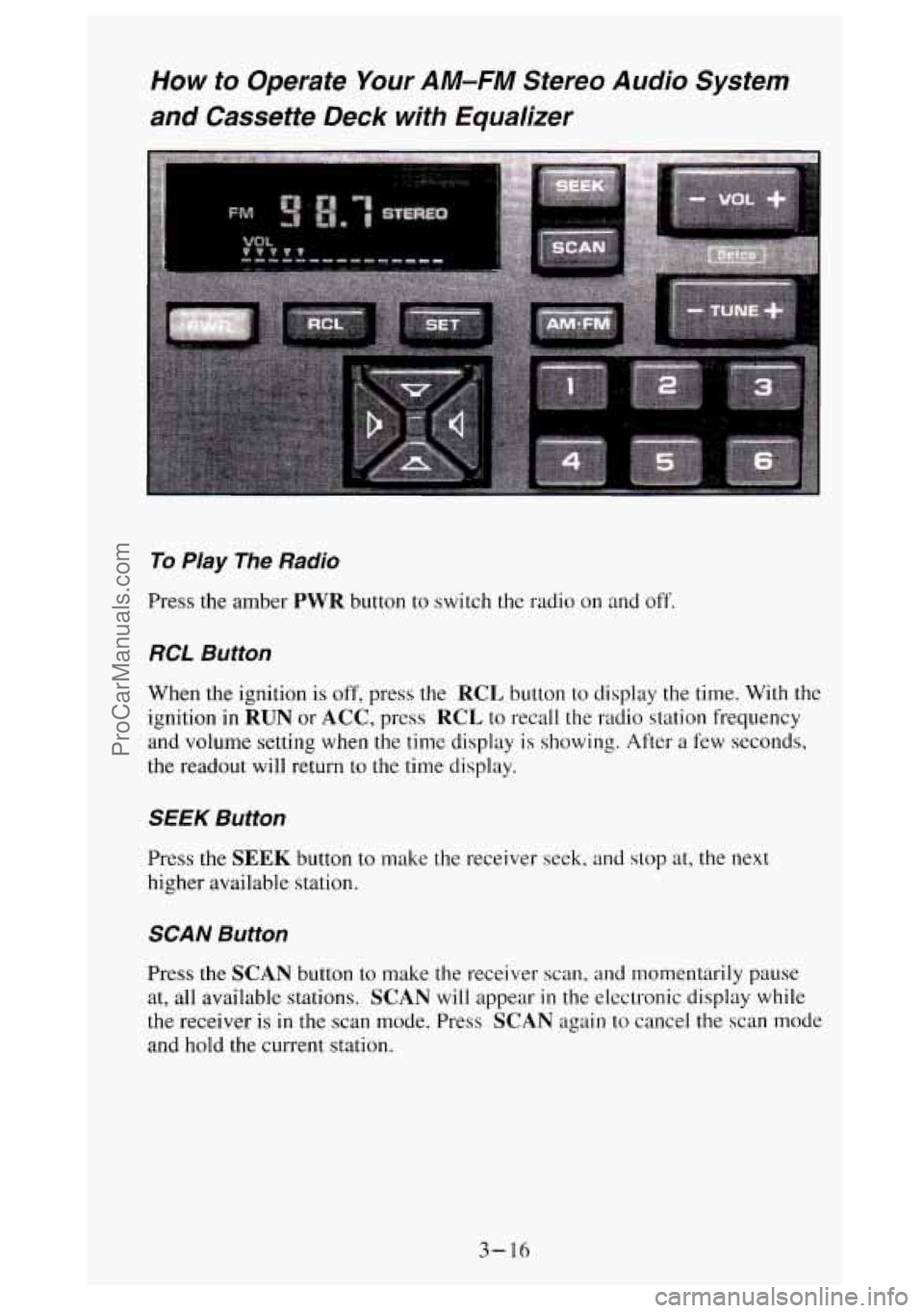
How to Operate Your AM-FM Stereo Audio System
and Cassette Deck with Equalizer
To Play The Radio
Press the amber PWR button to switch the radio on and off.
RCL Button
When the ignition is off, press the RCL button to display the time. With the
ignition
in RUN or ACC, press RCL to recall the radio station frequency
and volume setting when the time display is showing. After a few seconds,
the readout will return to
the time display.
SEEK Button
Press the SEEK button to make the receiver seek, and stop at, the next
higher available station.
SCAN Button
Press the SCAN button to make the receiver scan, and momentarily pause
at, all available stations.
SCAN will appear in the electronic display while
the receiver is
in the scan mode. Press SCAN again to cancel the scan mode
and hold the current station.
3-16
ProCarManuals.com
Page 159 of 404
AM-FM Button
Press the AM-FM button to switch between AM and FM.
Stereo (AM)
Your Delco@ radio can receive C-QUAM@ stereo broadcasts. Many AM
stations around the country use C-QUAM@ to produce stereo, though some
do not. If your Delco@ system can get C-QUAM@ signals, your STEREO
light
will come on when you are receiving stereo. (C-QUAM@ is a
registered trademark of Motorola Inc.).
VOL Button
The VOL button controls the volume. Pressing VOL "+" increases volume;
VOL "-" decreases volume.
TUNE Button
To tune in radio stations, press the TUNE button. TUNE "+" increases
radio station frequency;
TUNE "-" decreases radio station frequency.
BAUFADE Buttons
To
balance and fade the sound between the lefthight or frondrear speakers,
use the four buttons with the speaker symbols on them. Press the left and
right buttons
to adjust the left and right speaker balance. Pressing the top
and bottom buttons adjusts the front and rear speaker volume balance, or
fade. The relative balance and fade adjustments are shown
on the electronic
display.
Pushbuttons
The six pushbuttons let you return to favorite stations. You can set the
pushbuttons for up to twelve favorite stations
(6 AM and 6 FM). To set the
pushbuttons, just:
Tune in the station you want.
Press the SET button. (SET appears in the electronic display for a few
Within 5 seconds, push one of the six pushbuttons to store the station.
seconds.)
After that, whenever you press that button, the preset station will
return.
3- 17
ProCarManuals.com
Page 160 of 404
Clock
To set the clock, just:
0 Press the SET button. The word SET will light up in the electronic
display.
hour appears on the display.
0 Within 5 seconds, press and hold the SEEK button until the correct
0 Then, press and hold the SCAN button until the correct minute appears
0 After you set the time, the word SET will remain in the electronic
on the display.
display for a few seconds.
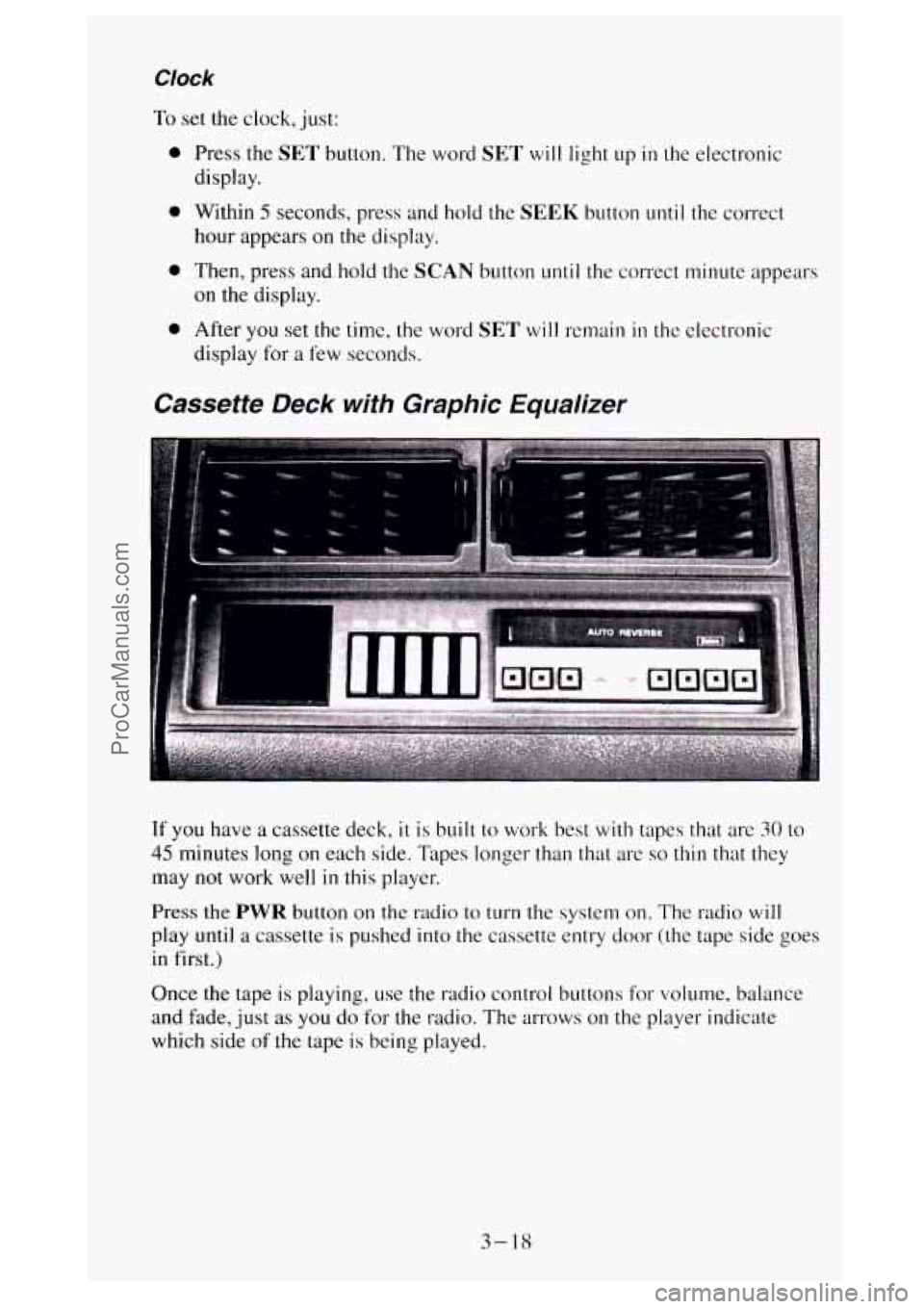
Cassette Deck with Graphic Equalizer
If you have a cassette deck, it is built to work best with tapes that are 30 to
45 minutes long on each side. Tapes longer than that are so thin that they
may not work well
in this player.
Press the PWR button on the radio to turn the system on. The radio will
play until a cassette is pushed into the cassette entry door (the tape side goes
in first.)
Once the tape
is playing, use the radio control buttons for volume, balance
and fade, just
as you do for the radio. The arrows on the player indicate
which side
of the tape is being played.
3- 18
ProCarManuals.com
Page 161 of 404
Graphic Equalizer
The graphic equalizer rets you fine tune bass, mid-range and treble
frequencies to your individual taste. The
unit has five separate adjustable
frequency ranges.
To emphasize
a frequency, press the top of the button “+” and to
de-emphasize a frequency, press the bottom of the button
“-”. It’s best to
begin with all the controls in the middle position, then adjust each control as
you like. Observe the electronic display for relative frequency emphasis.
Cr02 Button
For better sound when playing high bias chrome or metal tapes, press the
Cr02 button. The light in the button will be on while the player is in the
Cr02 mode. When playing standard tapes, you will get better sound while
in the standard mode. If the Cr02 button is lit, press it to return the player
to standard mode (the light
will go out).
PROG Button
To go from one side of the tape to the other, press the PROG button.
Observe the lighted arrows to determine which side
of the tape is being
played.
If a tape is inserted with side “I” (or “A”) up, then the up arrow means that
that side is being played. Likewise, a down arrow would indicate that side
“2” (or “B”) had been selected. The player will automatically switch to the
other side
of the tape when the first side ends.
EJECT Button
Press the EJECT button to eject the cassette tape from the player (the radio
will then play.)
TAPE
The up arrow and down arrow, below the word TAPE on the cassette deck,
let you know which side of the tape is currently playing. For more
information, see
PROG in this section.
FWD Button
To rapidly advance the tape, press the FWD button. The light in the button
will be lit and the tape will rapidly advance until you press the PROG
button or press the FWD button again. If the end of the tape is reached
while
in the FWD mode, the tape will change direction, and play will
resume on the opposite side of the tape.
3-19
ProCarManuals.com
Page 212 of 404
To Jump Start Your Vehicle
1. Check the other vehicle. It must have a 12-volt battery with a negative
ground system.
I NOTICE:
If the other system isn’t a 12-volt system with a negative
ground, both vehicles can be damaged.
If you have a diesel engine vehicle with two batteries (or more), you
should know before
you begin that, especially in cold weather, you may
not be able to get enough power from
a single battery in another
vehicle to start your diesel engine.
If your vehicle
has more than one battery, use the battery that’s on the
passenger side
of the vehicle - this will reduce electrical resistance.
sure the vehicle’s aren’t touching each other.
If they are, it could cause
a ground connection you don’t want. You wouldn’t be able to start your
vehicle, and the bad grounding could damage
the electrical systems.
You could be injured
if the vehicles roll. Set the parking brake firmly
on each vehicle. Put an automatic transmission
in “P” (Park) or a
manual transmission in “N” (Neutral). If you have a four-wheel-drive
vehicle, be sure
the transfer case is not in “N” (Neutral).
2. Get the vehicles
close enough
so the jumper cables can reach, but be
3. Turn off the ignition on both vehicles. Turn off all lights that aren’t
needed, and radios. This will avoid sparks and help save both batteries.
And it could save
your radio!
NOTICE:
If you leave your radio on, it could be badly damaged. The
repairs wouldn’t be covered by your warranty.
4. Open the hoods and locate the batteries. Find the positive (+) and
negative
(-) terminals on each battery.
5-4
ProCarManuals.com
Page 313 of 404
Trailer Wiring Harness
The optional seven-wire trailer wiring harness is protected by an in-line
fuse
in the battery feed wire. This fuse is near the junction block. See
“Trailer Wiring Harness”
in the Index for more information.
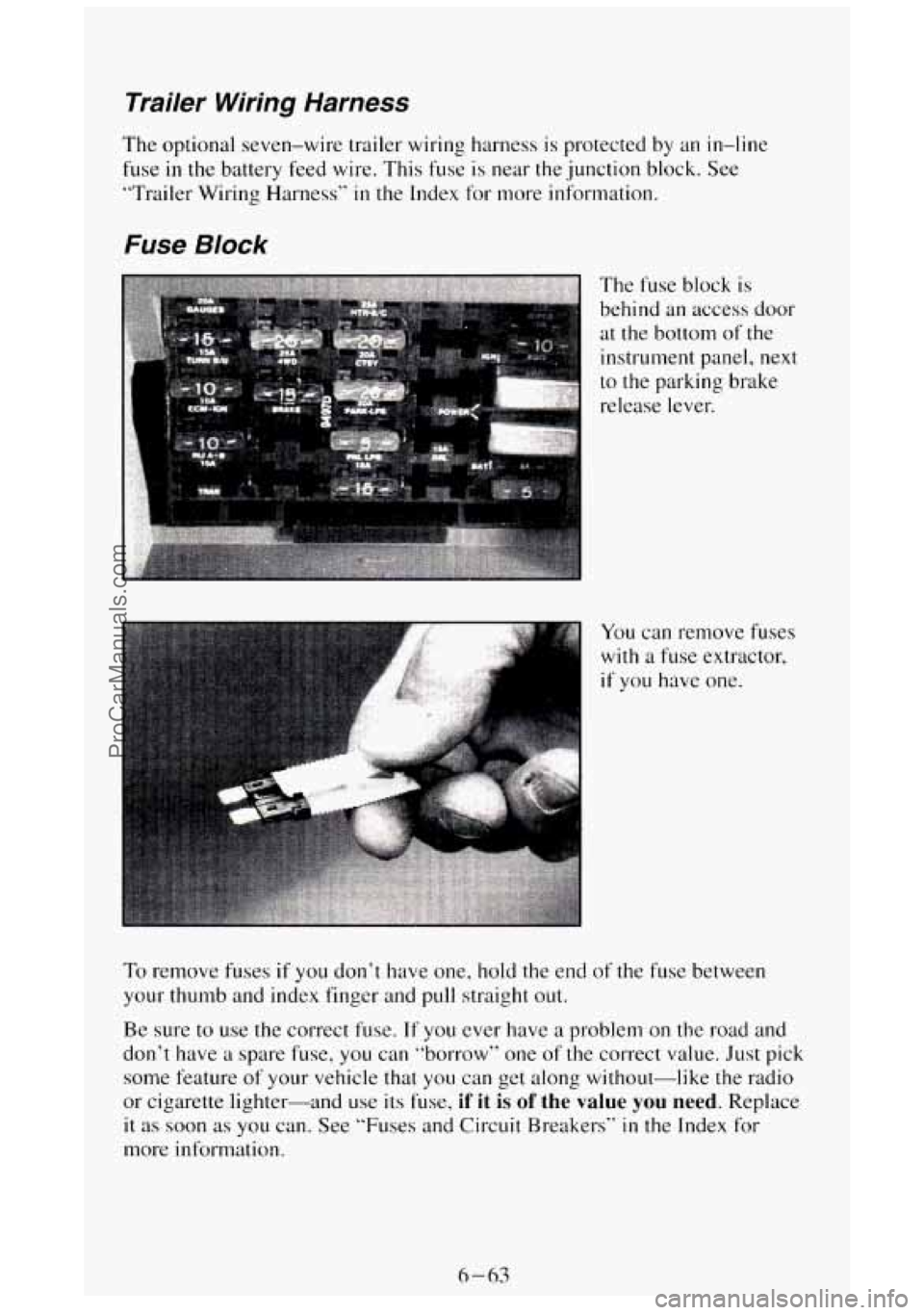
Fuse Block
The fuse block is
behind an access door
at the bottom of the
instrument panel,
next
to the parking brake
release lever.
To remove fuses if you don’t have one, hold the end of the fuse between
your thumb and index finger and pull straight out.
Be, sure to use the correct fuse.
If you ever have a problem on the road and
don’t have a spare fuse, you can “borrow” one of the correct value. Just pick
some feature
of your vehicle that you can get along without-like the radio
or cigarette lighter--and use
its fuse, if it is of the value you need. Replace
it as soon as you can. See “Fuses and Circuit Breakers“ in the Index for
more information.
6-63
ProCarManuals.com
Page 346 of 404
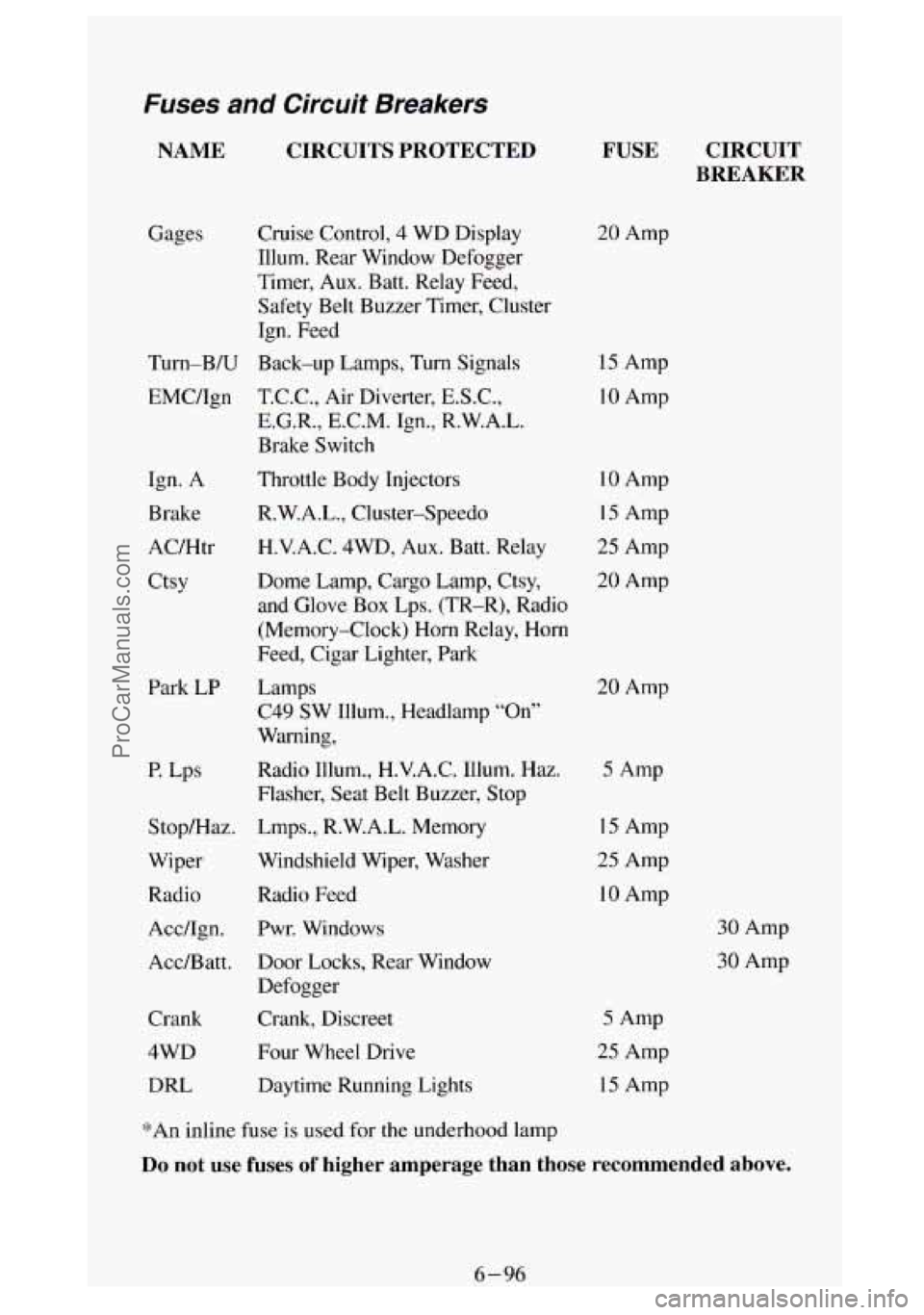
Fuses and Circuit Breakers
NAME CIRCUITS PROTECTED
Gages
Turn-B/U EMC/Ign
Ign. A
Brake
AC/Htr
Ctsy
Park LP
P. Lps
Stop/Haz.
Wiper
Radio
Acc/Ign.
Acc/Batt.
Crank
4WD
DRL
Cruise Control, 4 WD Display
Illum. Rear Window Defogger
Timer, Aux. Batt. Relay Feed,
Safety Belt Buzzer Timer, Cluster
Ign. Feed
Back-up Lamps,
Turn Signals
T.C.C., Air Diverter,
E.S.C.,
E.G.R., E.C.M. Ign., R.W.A.L.
Brake Switch
Throttle Body Injectors
R.W.A.L., Cluster-Speedo
H.V.A.C.
4WD, Aux. Batt. Relay
Dome Lamp, Cargo Lamp, Ctsy,
and Glove Box Lps. (TR-R), Radio
(Memory-Clock) Horn Relay, Horn
Feed, Cigar Lighter, Park
Lamps C49 SW Illum., Headlamp “On”
Warning,
Radio Illum., H.V.A.C. Illum. Haz.
Flasher, Seat Belt Buzzer, Stop
Lmps., R.W.A.L. Memory
Windshield Wiper, Washer
Radio Feed
Pwr. Windows
Door Locks, Rear Window
Defogger
Crank, Discreet
Four Wheel Drive
Daytime Running Lights
FUSE CIRCUIT
BREAKER
20 Amp
15 Amp
10 Amp
10 Amp
15 Amp
25 Amp
20 Amp
20 Amp
5 Amp
15 Amp
25 Amp
10 Amp
30 Amp
30 Amp
5 Amp
25 Amp
15 Amp
*An inline fuse is used
for the underhood lamp
Do not use fuses of higher amperage than those recommended above.
6-96
ProCarManuals.com
Page 393 of 404
Index
A
Aircleaner ..................................................... 6-29
Air Conditioning
............................................ 3.5. 6.S0
Aircontrols
.................................................. 3-7
Low Refrigerant Change Detection
................................ 3-8
Refrigerant Capacity
...................................... 3.97, 6.94
SystemControls
............................................... 3-6
Antenna, FixedMast
............................................. 3-18
Anti-Lock Brakes (See “Brakes”)
Appearancecare
................................................ 6-80
Materials Chart ............................................... 6-87
Arbitration Program
............................................... 8-3
Audiosystems
................................................... 3-9
AMRadio ................................................... 3-10
AM-FM Stereo Audio System with Cassette Deck ................... 3-12
AM-FM Stereo Audio System with Cassette Deck and Equalizer ........ 3-16
Cassette Deck
................................................ 3-14
Cassette Tape Player Care
....................................... 3-30
Automatic Transmission
.......................................... 2-21
Fluid
....................................................... 6-30
Axle Front
....................................................... 6-37
Front Locking Feature
.......................................... 2-36
Rear
........................................................ 6-39
RearLocking
.................................................. 6-39
Battery
........................................................ 6-52
Belts (See “Safety Belts”)
Better Business Bureau Mediation
.................................... 8-3
Blizzard ....................................................... 4-35
Brakes
Anti-Lock
.................................................... 4-6
Fluid
....................................................... 6-47
Leakcheck
.................................................. 6-47
Master Cylinder
.............................................. 6-46
Parking
..................................................... 2-28
PedalTravel ................................................. 6-48
Replacing Parts
............................................... 6-49
System Warning Light
......................................... 2-70
Trailer
...................................................... 441
In Emergencies ................................................ 4-7
Break-In, New Vehicle
........................................... 2- IO
Bulb Replacement ............................................... 6-97
Replacement Chart
............................................ 6-97
Braking
......................................................... 4-5
1 ProCarManuals.com
Page 400 of 404
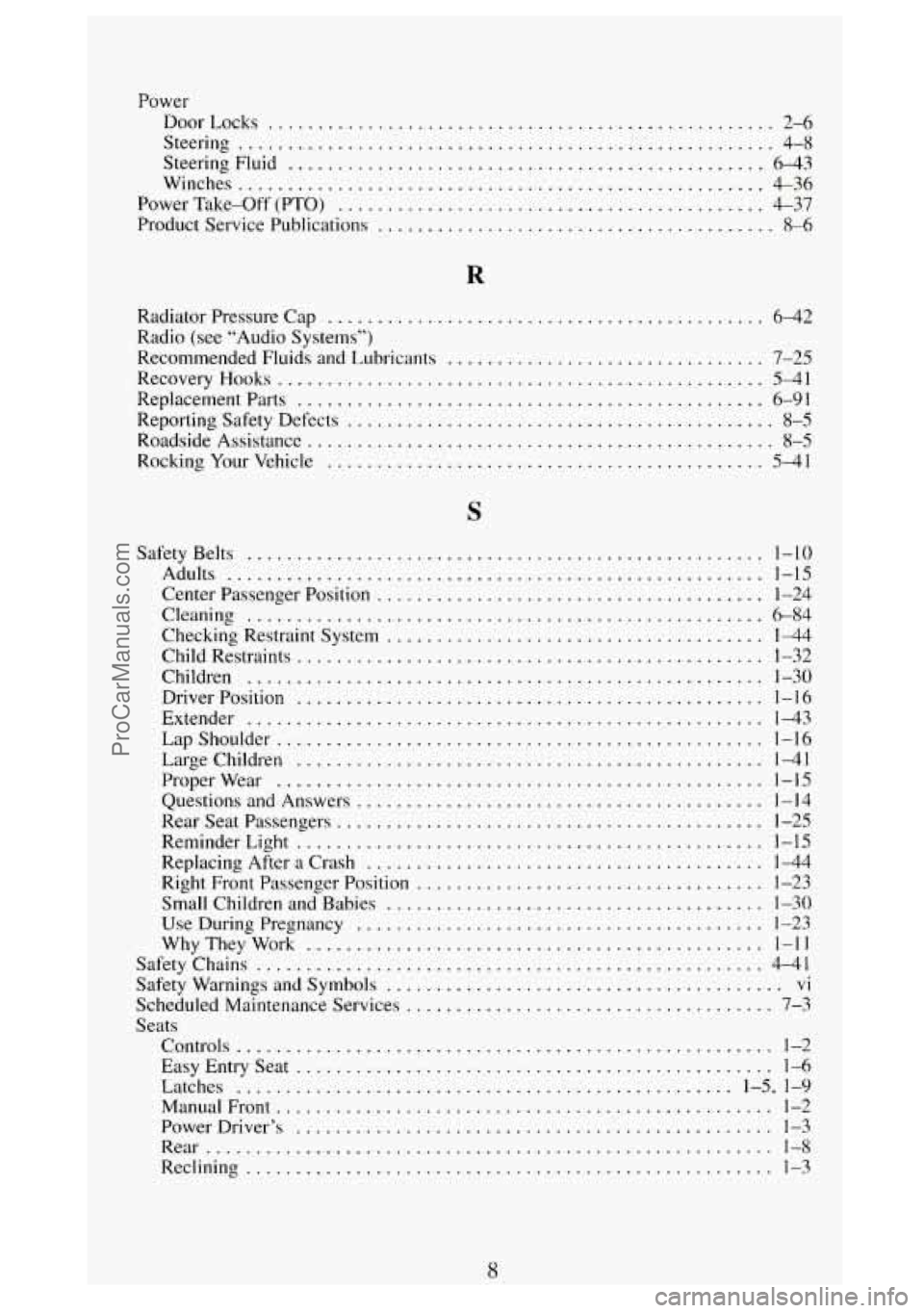
Power DoorLocks
................................................... 2-6
Steering
...................................................... 4-8
Steering Fluid ................................................ 6-43
Winches ..................................................... 4-36
Power Take-Off (PTO) ........................................... 4-37
Product Service Publications
........................................ 8-6
Radiator Pressure Cap
............................................ 6-42
Radio (see “Audio Systems”)
Recommended Fluids and Lubricants
................................ 7-25
Replacement Parts ............................................... 6-91
Reporting Safety Defects ........................................... 8-5
Roadside Assistance ............................................... 8-5
RockingYourVehicle ............................................ 5-41
Recovery Hooks ................................................. 5-41
Safety Belts
.................................................... 1-10
Adults ...................................................... 1-15
Center Passenger Position ....................................... 1-24
Cleaning
.................................................... 6-84
Checking Restraint System ......................................
Child Restraints ...............................................
Children ....................................................
DriverPosition ...............................................
Extender ....................................................
Lapshoulder .................................................
Large Children ...............................................
Properwear .................................................
Questions and Answers .........................................
Rearseatpassengers ...........................................
ReminderLight ...............................................
Right Front Passenger Position ...................................
Small Children and Babies ......................................
Use During Pregnancy .........................................
SafetyChains ...................................................
Replacing After a Crash ........................................
WhyTheyWork ..............................................
144
1-32
1-30
1-16
1-43
1-16
1-41
1-15
1-14
1-25
1-15
1-44
1-23
1-30
1-23
1-11
4-41
Safety Warnings and Symbols ........................................ vi
Scheduled Maintenance Services
..................................... 7-3
Seats
Controls
...................................................... 1-2
Easy Entry Seat ................................................ 1-6
Latches
.................................................. 1-5, 1-9
ManualFront .................................................. 1-2
PowerDriver’s
................................................ 1-3
Rear ......................................................... 1-8
Reclining ..................................................... 1-3
8
ProCarManuals.com