radio GMC SIERRA 1995 User Guide
[x] Cancel search | Manufacturer: GMC, Model Year: 1995, Model line: SIERRA, Model: GMC SIERRA 1995Pages: 488, PDF Size: 26.01 MB
Page 159 of 488
FADE - Press lightly on the FADE knob to release it from its stored
position and pull it out to the fully extended position. Rotate the knob
clockwise to adjust sound to the front speakers and counterclockwise to
adjust sound to the rear speakers. Push the knob back in to the stored
position when done.
BAL
- Press lightly on the BAL knob to release it from its stored position
and pull it out to the fully extended position. Rotate the kn\
ob clockwise to
adjust sound to the right speakers and counterclockwise to adju\
st sound to
the left speakers. Push the knob back in to the stored position when done.
BASS
- Press lightly on the BASS knob to release it from its stored
position and pull it out to the fully extended position. Rotate the knob
clockwise to increase the bass response and counterclockwise to decrease
bass response. Any time the BASS control is rotated, tone
is automatically
set back to MAN (manual). Push the knob back in to the stored position
when done.
TREBLE
- Press lightly on the TREB knob to release it from its stored
position and pull it out to the fully extended position. Rotate the knob
clockwise to increase the treble response and counterclockwise to decrease
treble response. Any time the TREB control is rotated, tone is automatically
set back to MAN (manual). Push the knob back in to the stored position
when done.
To Play a Cassette
To load a cassette tape with the ignition off, first press EJECT or RCL.
Then, insert the cassette tape.
Once the tape is playing, use the control knobs for volume, b\
alance, fade,
treble and bass just as you do for the radio. A lighted tape symbol shows
when a cassette tape is in the player. A lighted arrow will also appear and
show the direction of play when a tape is active.
The player automatically senses if the cassette tape is metal or CRO2 and
adjusts for best playback sound. For metal tapes,
00 (Dolby@ Noise
Reduction) will appear in the display.
Any time a cassette tape
is inserted, the top side is selected for play fiist.
PREV
(1) - Press PREV or 4 SEEK (in the direction that the lighted tape
direction arrow points) to search for the previous selection. A minimum
three-second blank gap is needed for the player to stop at the beginning of
the selection. The tape direction arrow will blink during the SEEK
operation.
PROG
(2) - Press PROG to go from one side of the tape to the other.
3-13
ProCarManuals.com
Page 160 of 488
NEXT (3) - Press NEXT or SEEK (in the direction that the lighted tape
direction arrow points) to search for the next selection.
A minimum
three-second blank gap is needed for the player
10 stop at the beginning of
the selection. NEXT
will appear in thc display.
REV
(4)- To rapidly revcrse the tape. press REV and the tape will rapidly
reverse to the beginning
of the cassette reel or until you press REV again.
The radio plays the last selected station during
REV.
00 (5)- Press 00 to reduce cassette tape noise. The 10 symbol will
appear in the display while thc player is in this mode.
FWD
(6)- To rapidly advance the tape. press FWD and the tape will
rapidly advance to the end of the cassette reel or until you press FWD again.
The radio plays the last selected station during FWD.
TAPE
AUX- To switch between the player and the radio when a tape is
playing, press the AM/FM button.
To return to the tape player, press TAPE
AUX. The lighted arrow
will appear and show the dircction of play when a
tape is active.
EJECT
- To remove the tape press the EJECT button. EJECT can be used
with either the ignition or radio off. Also, you must press EJECT before
loading a cassette
with the radio off to allow loading.
If a tape is inserted with side "1" (or "A") up. then the right arrow means
that that side is being played. Likewise, a left arrow would indicate that side
"2" (or 'bB") had been selected.
00 Dolby@ Noise Reduction is manufactured undcr a license from Dolby
Laboratories Licensing Corporation. Dolby" and the symbol are
trademarks of Dolby Laboratories Licensing Corporation.
THEFTLOCK" Theft Deterrent Feature
THEFTLOCK" is an anti-theft feature for the cassette player. It can be
used or ignored.
If ignored, the system plays normally. If it is used, your
player won't be usable
if it is ever stolen, because it will go to LOC mode
any time the battery power is removed. After
a loss of battery power, the
player cannot be turned on unless an unlock code
is entered. When
activated, an indicator
will flash while the ignition is off.
The following instructions tell you how to enter a secret code to activate the
THEFTLOCK system.
If your vehicle loses battery power for any reason,
you
must unlock the system with the secret code before the radio will turn on.
3-14
ProCarManuals.com
Page 161 of 488
To Lock The System:
1.
2.
3.
4.
5.
6.
7.
8.
9.
Write down any number from 000 to 999 and keep it in a safe place.
Turn the ignition to ACC or RUN.
Turn the radio off.
Press the
1 and 4 buttons together. Hold them down until “- - -” shows
on the display.
You are now ready
to enter your secret code. Don’t wait more than 15
seconds between any of the following steps. If you do, the radio
automatically returns
to time display and you must start the procedure
over at step
4.
Press MIN and “000” will appear on the display.
Press the
MIN button again to make the last two digits agree with your
code.
Press HR to make the first one or two digits agree
with your code.
Press AM/FM after you have confirmed that the code matches the one
you wrote down. rEP appears in the display, indicating that you need to
repeat steps
5 through 7.
Press AMEM and this time the display will show “SEC”. “SEC”
means the system is secured.
With the ignition
off, the THEFTLOCK indicator will flash.
To Unlock THEFTLOCK After a Power Loss
When battery power is reapplied to a secured radio, the radio won’t turn on
and “LOC” will appear on
the display.
Enter your secret code as follows. Pause no more than
15 seconds between
steps.
1. Turn the ignition on.
2. Turn the radio off.
3. Press MIN and “000” will appear on the display.
4. Press the MIN button again to make the last two digits agree with your
code.
5. Press HR to make the first one or two digits agree with your code.
6. Press AM/FM after you have confirmed that the code matches the one
you wrote down. SEC appears
in the display indicating that the radio is
now operable.
3- 15
ProCarManuals.com
Page 162 of 488
To Disable THEFTLOCK
1. Turn the ignition on.
2, Turn the radio off.
3. With the time showing in th e display, press th e 1 and 4 buttons
together. Hold them down
until “SEC” shows on the display.
You are now ready to enter your secret code. Don’t wait more than
15
seconds between any of the following steps.
4. Press MIN and “000” will appear on the display.
5. Press the MIN button again to make the last two digits agree with your
code.
6. Press HR to make the first one or two digits agree with your code,
7. Press AMFM after you have confirmed that the code matches the one
you wrote down. “- ” will appear in the display, indicating that the
system is unsecured (disabled).
If the code is incorrect, “SEC” will appear in the display and the system will
still be secured. The radio will still operate if it is secured or unsecured. If
“SEC” appears and you still want to disable the system, follow the disable
procedure again and enter the correct code.
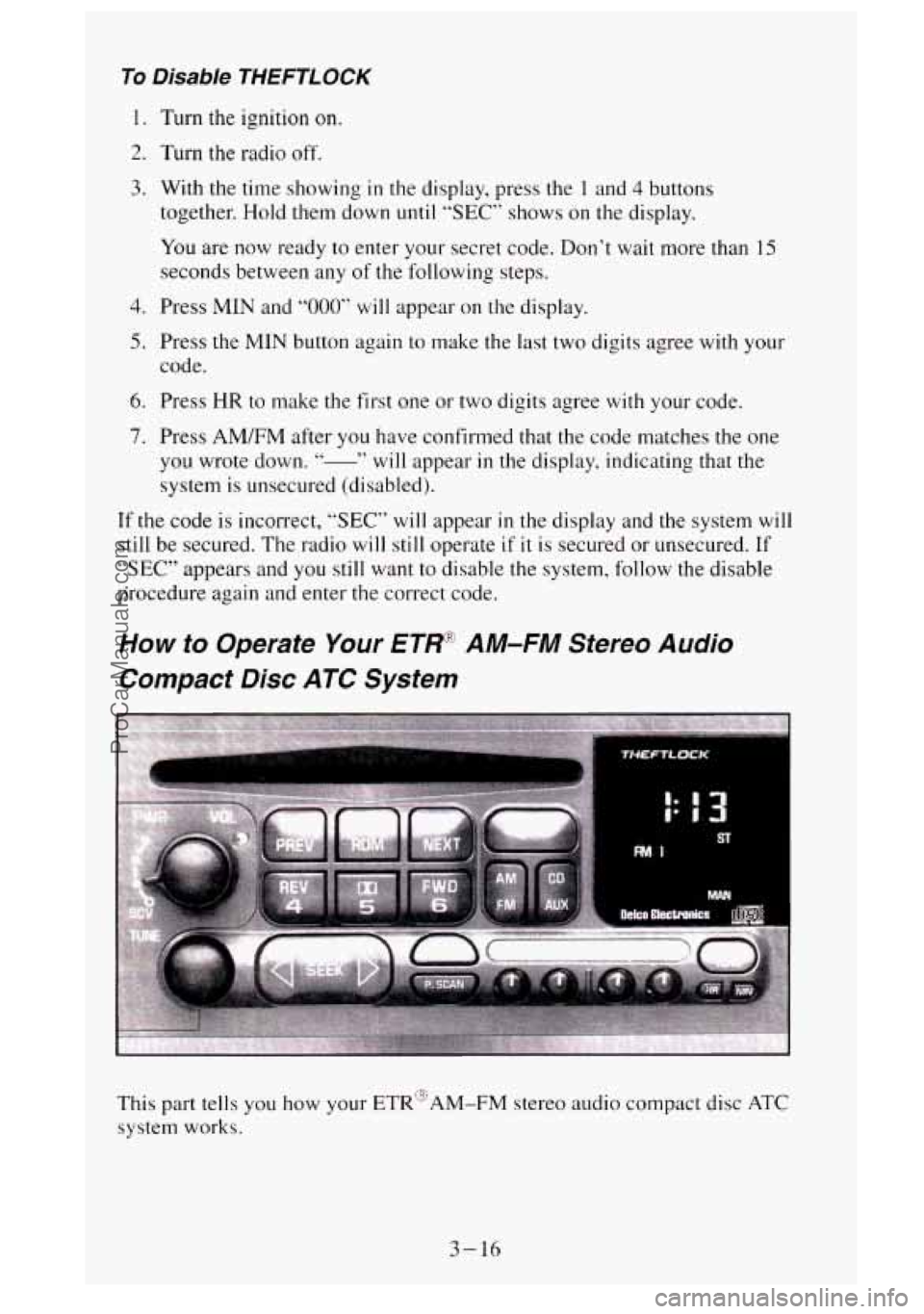
How to Operate Your ETRq AM-FM Stereo Audio
Compact Disc ATC System
This part tells you how your ETR“AM-FM stereo audio compact disc ATC
system works.
3-16
ProCarManuals.com
Page 163 of 488
Upper Knob (PWR-VOL) - The upper knob has these two functions:
0 Push it to switch the system on and off.
0 Turn it to control the volume.
SCV (Speed Compensated Volume)
- Move the control ring behind the
upper knob clockwise
to adjust the Speed Compensated Volume feature. As
you drive, this feature increases the volume to overcome noise at any
particular speed. Each clockwise position on the control ring allows more
compensation and at a faster rate.
AM/FM
- Press this button to switch between AM, FM I and FM2. The
display will show what mode the receiver
is in.
RCL (Recall) - Press this button to change between the clock and the radio
station frequency displayed when the radio
is on. Also, press this button to
display the time when the ignition is off.
TUNE
- Press lightly on the TUNE button to release it from its stored
position. Rotate the knob clockwise to increase frequency and
counterclockwise to decrease radio frequency. When done, press
the knob
again to return
it to its stored position.
Pushbuttons
- The six pushbuttons let you return to favorite stations. To
set the pushbuttons for up to 18 fworite stations (6 AM, 6 FM 1 and 6 FM2):
1. Tune in the desired station.
2. Press AUTO TONE to select the best setting for the type of station
chosen.
3. Press and hold one of the pushbuttons until sound returns
(approximately two seconds). Whenever you press that button, the
preset station
will return.
Repeat these steps for each pushbutton.
SEEK
- Press SEEK to cause the receiver to seek the next higher
station.
rress
4 SEEK to cause the receiver to seek the next lower station.
3-17
ProCarManuals.com
Page 166 of 488
REV (4)- Press and hold REV to return rapidly to a I'avorite passage. You
will hear the disc selection play at high speed while you press the REV
button. This allows you to listen and find out when the disc is at the desired
selection passage. Release
REV to reslmle playing.
00 (5)- Press 00 to reduce tape noise (fez Iwrotc ctr.s.smc picy~~r is
rrscci. The 00 symbol will appear in the display while thc player is in this
mode.
FWD
(6)- Press and hold FWD to adc.ance rapidly within a track. You will
hear the disc selection play
at high speed while you press the FWD button.
This allows
you to listen and find out when the disc is at the desired
selection passage. Release FWD
to resume playing.
CD AUX
- To switch between the player and thc radio whcn a disc is
pluying, press the AMEM button. To return to the tape player. press CD
AUX. When
a disc is plqing. thc letters CD and the CD symbol will appear
in the display.
EJECT - Press EJECT to eject the disc from the plnycr and play the radio.
When
the same or a new disc is inserted. the disc will start playing on track I.
00 Dolby'"' Noise Reduction is manufactured under a license from Dolby
Laboratories Licensing Corporation. Dolby" and the
00 symbol are
trademarks
of Dolby Laboratories Licensing Corporation.
THEFTLOCK Theft Deterrent Feature
THEFTLOCK is an anti-theft feature for the compact disc player. It can be
used or ignored.
If igno~-c=d, the system plays normally. If it is used. your
player
won't be usable if it is ever stolen. because it will go to LOC mode
any time
the battery power is removed. After a loss of battery power, the
player cannot
be turned on unless an unlock code is entered.
The following instructions
tell you how to enter II secret code into the
system. If your vehicle loses battery power for any reason. you must unlock
the system with
the secret code before the radio will turn on.
To Lock The System:
1. Write down any number from 000 to 999 and keep it in a safe place
2. Turn the ignition to ACC or RUN.
3. Turn the radio off.
4. Press the I and 4 buttons together. Hold them down until .'- - -" shows
on the display.
You are 11ow ready to enter your secret code. Don't wait more than 15
seconds bctween any of the following steps. If you do, the radio
automatically returns to time display
and you must start the procedure
over at step
4.
3-20
ProCarManuals.com
Page 167 of 488
5. Press MIN and “000” will appear on the display.
6. Press the MIN button again to make the last two digits agree with your
code.
7. Press HR to make the first one or two digits agree with your code.
8. Press AM/FM after you have confirmed that the code matches the one
you wrote down. rEP appears
in the display, indicating that you need to
repeat steps
5 through 7.
9. Press AM/FM and this time the display will show SEC.
With the ignition off, the THEFTLOCK indicator will flash.
To Unlock THEFTLOCK After a Power Loss
When battery power is reapplied to a secured radio, the radio won’t turn on
and
“LOC” will appear on the display.
Enter your secret code as follows. Pause no more than
15 seconds between
steps.
1. Turn the ignition on.
2. Turn the radio off.
3. Press MIN and “000” will appear on the display.
4. Press the MIN button again to make the last two digits agree with your
code.
5. Press HR to make the first one or two digits agree with your code.
6. Press AM/FM after you have confirmed that the code matches the one
you wrote down.
SEC appears in the display indicating that the radio is
now operable.
To Disable THEFTLOCK
1.
2.
3.
4.
5.
6.
Turn the ignition on.
Turn the radio off.
With the time showing
in the display, press the 1 and 4 buttons
together. Hold them down until
“SEC” shows on the display.
You are now ready
to enter your secret code. Don’t wait more than 15
seconds between any of the following steps.
Press MIN and
“000” will appear on the display.
Press the MIN button again
to make the last two digits agree with your
code.
Press
HR to make the first one or two digits agree with your code.
3-21
ProCarManuals.com
Page 168 of 488
7. Press AM/FM after you have confirmed that the code matches the one
you wrote down. -
system is unsecured (disabled).
id ’‘ will appear in the display, indicating that the
If the code is incorrect,
“SEC” will appear in the display and the system will
still be secured. The radio will still operate
if it is secured or unsecured. If
“SEC” appears and you still want to disable the system, follow the disable
procedure again and enter the correct code.
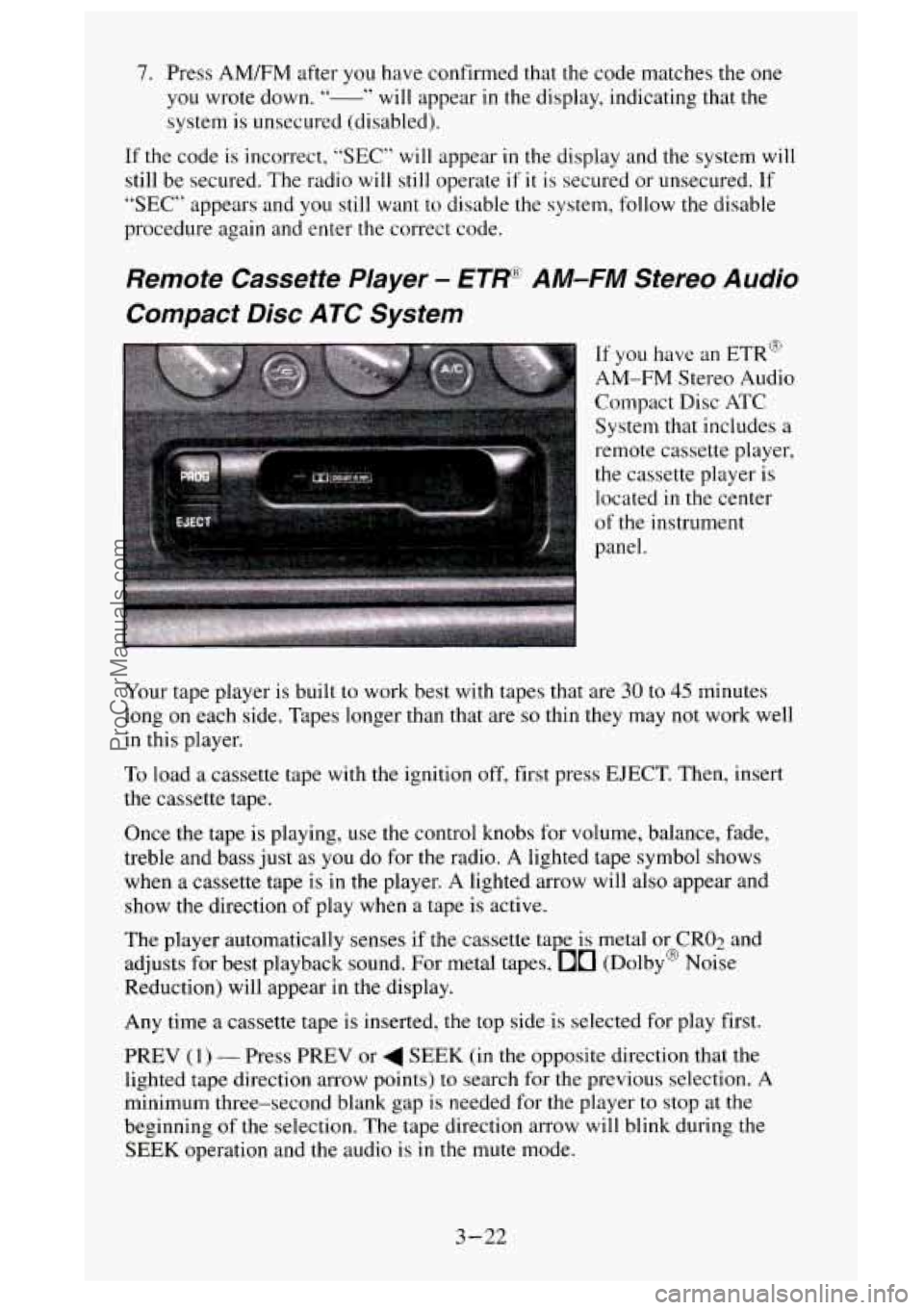
Remote Cassette Player - ETRR AM-FM Stereo Audio
Compact Disc ATC System
System that includes a
remote cassette player,
the cassette player
is
located in the center
of the instrument
panel.
Your tape player is built to work best with tapes that are
30 to 45 minutes
long on each side. Tapes longer than that are
so thin they may not work well
in this player.
To load a cassette tape with the ignition off, first press EJECT. Then, insert
the cassette tape.
Once the tape is playing,
use the control knobs for volume, balance, fade,
treble and bass just as
you do for the radio. A lighted tape symbol shows
when a cassette tape
is in the player. A lighted arrow will also appear and
show the direction of play when a tape is active.
The player automatically senses if the cassette tape
is metal or CRO;! and
adjusts for best playback sound. For metal tapes,
00 (Dolby@ Noise
Reduction) will appear
in the display.
Any time a cassette tape
is inserted, the top side is selected for play first.
PREV
(1) - Press PREV or 4 SEEK (in the opposite direction that the
lighted tape direction arrow points) to search for the previous selection.
A
minimum three-second blank gap is needed for the player to stop at the
beginning of the selection. The tape direction arrow will blink during
the
SEEK operation and the audio is in the mute mode.
3-22
ProCarManuals.com
Page 169 of 488
PROG (on cassette player) - Press PROG to go from one side of the tape
to the other.
NEXT
(3) - Press NEXT or SEEK (in the direction that the lighted tape
direction arrow points) to search for the next selection. A minimum
three-second blank gap is needed for the player to stop at the beginning of
the selection. NEXT will appear
in the display and the audio is in the mute
mode.
REV
(4) - To rapidly reverse the tape, press REV and the tape will rapidly
reverse to the beginning of
the cassette reel or until you press REV again.
The radio plays the last selected station during REV.
00 (5) - 00 is active at all times with a tape inserted in the remote
cassette.
00 will appear in the display.
FWD (6) - To rapidly advance the tape, press FWD and the tape will
rapidly advance to the end of the cassette reel or until you press FWD again.
The radio plays the last selected station during
FWD.
TAPE - To switch between the player and the radio when a tape is playing,
press the AM/FM button.
To return to the tape player, press CD AUX. The
lighted arrow
will appear next to the tape symbol and show the direction of
play when a tape is active.
EJECT (on cassette player)
- To remove the tape press the EJECT button.
EJECT can be used with either the ignition or radio off. Also, you must
press EJECT before loading
a cassette with the radio off to allow loading.
If a tape is inserted with side
“1” (or “A”) up, then the right arrow means
that that side is being played. Likewise,
a left arrow would indicate that side
b‘2“ (or “B”) had been selected.
00 Dolby” Noise Reduction is manufactured under a lice-nse from Dolby
Laboratories Licensing Corporation. DolbyB and the
00 symbol are
trademarks of Dolby Laboratories Licensing Corporation.
Understanding Radio Reception
FM stereo will give you the best sound. But FM signals will reach only
about
10 to 40 miles (I 6 to 65 km). And, tall buildings or hills can interfere
with FM signals, causing the sound to come and go.
The range for most AM stations is greater than for FM, especially at night.
The longer range, however, can cause stations to interfere with each other.
AM can pick up noise from things like stornx and power lines. Try reducing
the treble
to reduce this noise if you ever get it.
AM Stereo means the Delco‘ system can receive C-QUAM“stereo
broadcasts. Many AM stations around the county use C-QUAM“ to
produce stereo, though some
do not. (C-QUAM& is a registered trademark
of Motorola, Inc.)
If your Delco@ system can get C-QUAMa, your
“STEREO” light will come on when you’re receiving it.
3-23
ProCarManuals.com
Page 170 of 488
Be aware that hearing damage from loud noise is almost undetectable until
it is
too late. Your hearing can adapt to higher volumes of sound. Sound that
seems normal can be loud and harmful to your hearing. Take precautions by
adjusting the volume control on your radio to a safe sound level before your
hearing adapts
to it.
To help avoid hearing loss or damage:
1. Adjust the volume control to the lowest setting.
2. Increase volume slowly until you hear comfortably and clearly.
NOTICE:
Before you add any sound equipment to your vehicle - like a
tape player, CB radio, mobile telephone or two-way radio - be
sure you can add what you want.
If you can, it’s very important
to do it properly. Added sound equipment may interfere with th\
e operation
of your vehicle’s engine, Delcoa radio or other
systems, and even damage them. And, your vehicle’s systems
may interfere with the operation of sound equipment that has
been added improperly.
So, before adding sound equipment, check with your dealer and
be sure to check Federal rules covering mobile radio and
telephone units.
Care of Your Cassette Player and Tapes
A tape player that is not cleaned regularly is subject to reduced sound
quality, ruining the cassette, or damaging the mechanism. Tape cassettes that
are not properly stored
in their plastic cases away from contaminants, direct
sunlight, and extreme heat may not operate properly and could cause
premature failure of the tape player.
Your tape player should be cleaned with every
50 hours of use to provide
optimum performance. Your radio may display “Cln” (Clean)
to indicate
that you have used your tape player for
50 hours without re-setting the tape
clean timer. If
you notice a reduction in sound quality, regardless of when
the tape player was last cleaned, try playing a different cassette to see if the
tape or tape player is at fault. If the second cassette results in
no
improvement in sound quality, try cleaning the tape player.
Proper tape player cleaning should be done with a scrubbing action,
non-abrasive cleaning cassette. This
is a wet-type cleaning system that uses
a cleaning cassette with pads which scrub the tape head as the hubs of the
cleaner cassette turn.
To properly clean your tape player, follow instructions
with
the cleaning cassette. If you use this type of cleaner, the radio may
3-24
ProCarManuals.com