instrument panel GMC SIERRA 2003 Owner's Manual
[x] Cancel search | Manufacturer: GMC, Model Year: 2003, Model line: SIERRA, Model: GMC SIERRA 2003Pages: 408, PDF Size: 2.58 MB
Page 1 of 408

Seats and Restraint Systems........................... 1-1
Front Seats
............................................... 1-2
Rear Seats
............................................... 1-6
Safety Belts
.............................................. 1-7
Child Restraints
.......................................1-29
Air Bag Systems
......................................1-55
Restraint System Check
............................1-71
Features and Controls..................................... 2-1
Keys
........................................................ 2-2
Doors and Locks
....................................... 2-6
Windows
.................................................2-11
Theft-Deterrent Systems
............................2-13
Starting and Operating Your Vehicle
...........2-15
Mirrors
....................................................2-28
OnStar
®System
......................................2-33
HomeLink®Transmitter
.............................2-35
Storage Areas
.........................................2-39
Vehicle Personalization
.............................2-41
Instrument Panel............................................. 3-1
Instrument Panel Overview
.......................... 3-2
Climate Controls
......................................3-18
Warning Lights, Gages and Indicators
.........3-24
Driver Information Center (DIC)
..................3-42
Audio System(s)
.......................................3-56Driving Your Vehicle....................................... 4-1
Your Driving, the Road, and Your Vehicle
..... 4-2
Towing
...................................................4-46
Service and Appearance Care.......................... 5-1
Service
..................................................... 5-3
Fuel
......................................................... 5-4
Checking Things Under
the Hood
.............................................5-10
All-Wheel Drive
........................................5-45
Rear Axle
...............................................5-46
Front Axle
...............................................5-47
Bulb Replacement
....................................5-48
Windshield Wiper Blade Replacement
.........5-56
Tires
......................................................5-56
Appearance Care
.....................................5-82
Vehicle Identication
.................................5-90
Electrical System
......................................5-91
Capacities and Specications
.....................5-99
Normal Maintenance Replacement Parts
....5-100
Maintenance Schedule..................................... 6-1
Maintenance Schedule
................................ 6-2
Customer Assistance Information.................... 7-1
Customer Assistance Information
.................. 7-2
Reporting Safety Defects
............................ 7-8
Index................................................................ 1
2003 GMC Sierra Denali Owner ManualM
2003 - Sierra Denali Owner Manual
Page 4 of 408

Vehicle Damage Warnings
Also, in this book you willfind these notices:
Notice:These mean there is something that could
damage your vehicle.
A notice will tell you about something that can damage
your vehicle. Many times, this damage would not be
covered by your warranty, and it could be costly. But the
notice will tell you what to do to help avoid the
damage.
When you read other manuals, you might see CAUTION
and NOTICE warnings in different colors or in different
words.
You’ll also see warning labels on your vehicle. They use
the same words, CAUTION or NOTICE.
Vehicle Symbols
Your vehicle has components and labels that use
symbols instead of text. Symbols, used on your vehicle,
are shown along with the text describing the operation
or information relating to a specific component, control,
message, gage or indicator.
If you need helpfiguring out a specificnameofa
component, gage or indicator, reference the following
topics:
•Seats and Restraint Systems in Section 1
•Features and Controls in Section 2
•Instrument Panel Overview in Section 3
•Climate Controls in Section 3
•Warning Lights, Gages and Indicators in Section 3
•Audio System(s) in Section 3
•Engine Compartment Overview in Section 5
iv
2003 - Sierra Denali
Page 16 of 408

The person keeps going until stopped by something. In
a real vehicle, it could be the windshield...or the instrument panel...
1-10
2003 - Sierra Denali
Page 55 of 408
5. To tighten the belt, pull its free end while you push
down on the child restraint as you tighten the belt.
6. Push and pull the child restraint in different
directions to be sure it is secure.
To remove the child restraint, just unbuckle the vehicle’s
safety belt. It will be ready to work for an adult or
larger child passenger.
Securing a Child Restraint in the
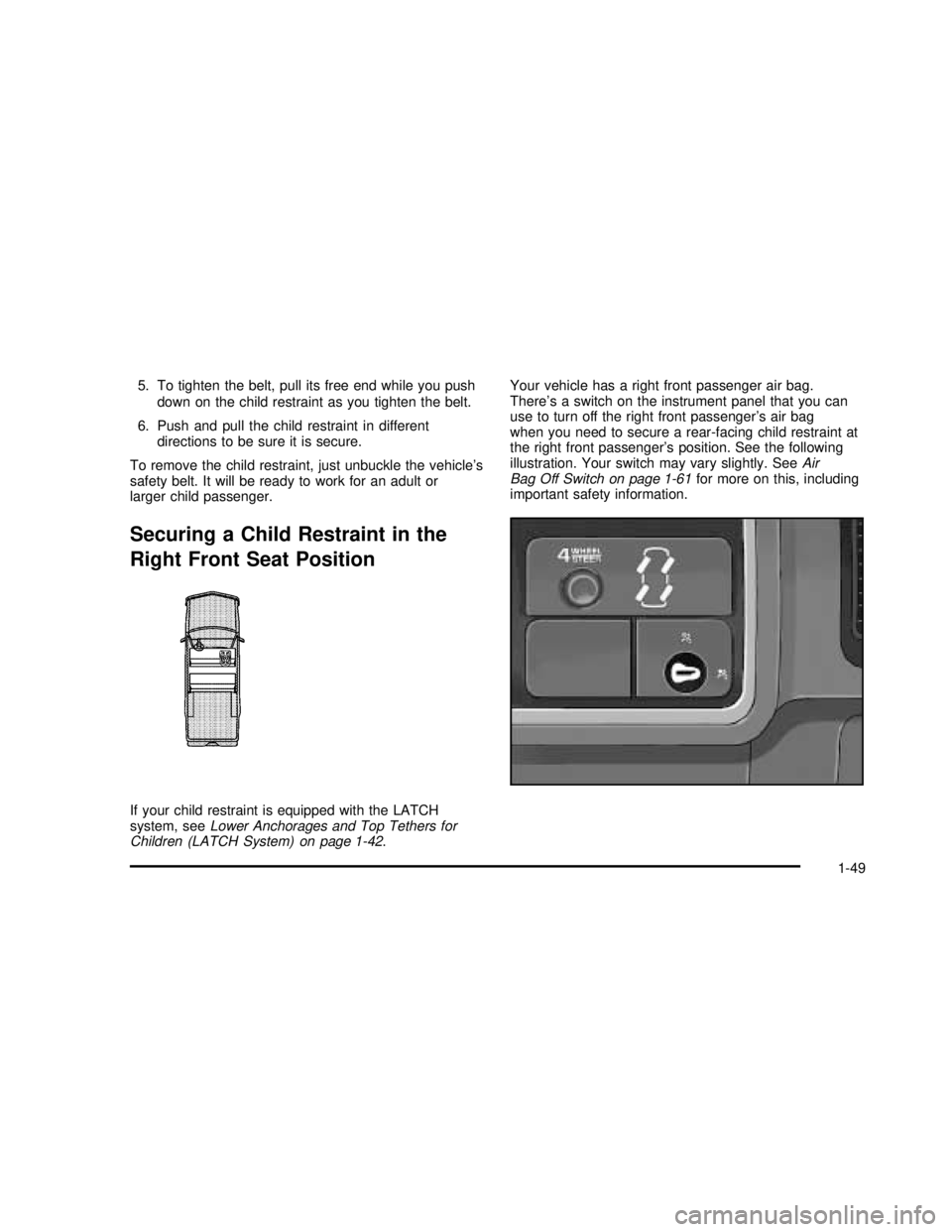
Right Front Seat Position
If your child restraint is equipped with the LATCH
system, seeLower Anchorages and Top Tethers for
Children (LATCH System) on page 1-42.Your vehicle has a right front passenger air bag.
There’s a switch on the instrument panel that you can
use to turn off the right front passenger’s air bag
when you need to secure a rear-facing child restraint at
the right front passenger’s position. See the following
illustration. Your switch may vary slightly. SeeAir
Bag Off Switch on page 1-61for more on this, including
important safety information.
1-49
2003 - Sierra Denali
Page 56 of 408

Never put a rear facing child restraint in the right front
passenger seat unless the air bag is off. Here’s why:
{CAUTION:
A child in a rear-facing child restraint can be
seriously injured or killed if the right front
passenger’s air bag inflates. This is because
the back of the rear-facing child restraint
would be very close to the inflating air bag. Be
sure to turn off the air bag before using a
rear-facing child restraint in the right front seat
position. If a forward-facing child restraint is
suitable for your child, always move the
passenger seat as far back as it will go.
Although a rear seat is a safer place, you can secure a
forward-facing child restraint in the right front seat.
{CAUTION:
If the air bag readiness light in the instrument
panel cluster ever comes on when you have
turned off the air bag, it means that something
may be wrong with the air bag system. The
right front passenger’s air bag could inflate
even though the switch is off. If this ever
happens, have the vehicle serviced promptly.
Until you have the vehicle serviced, don’t let
anyone whom the national government has
identified as a member of a passenger air bag
risk group sit in the right front passenger’s
position (for example, don’t secure a
rear-facing child restraint in your vehicle).
See″Air Bag Off Switch″in the Index.
In addition to the AIR BAG OFF switch, your vehicle
may have the passenger sensing system. See
Passenger Sensing System on page 1-66and
Passenger Air Bag Status Indicator on page 3-31for
more on this, including important safety information.
The passenger sensing system is designed to turn off
the right front passenger’s frontal air bag when a
rear facing child restraint is in the right front seat.
1-50
2003 - Sierra Denali
Page 57 of 408

In addition to the passenger sensing system, you may
use the AIR BAG OFF switch located on the instrument
panel to turn the air bag off. Never put a rear facing
child restraint in the right front passenger seat unless the
air bag is off. Here’s why.
{CAUTION:
A child in a rear-facing child restraint can be
seriously injured or killed if the right front
passenger’s air bag inflates. This is because the
back of the rear facing child restraint would be
very close to the inflating air bag. Be sure the air
bag is off before using a rear-facing child
restraint in the right front seat position.
Even though the passenger sensing system is
designed to turn off the passenger’s frontal air
bag if the system detects a rear-facing child
restraint, no system is fail-safe, and no one can
guarantee that an air bag will not deploy under
some unusual circumstance, even though it is
turned off. General Motors therefore
recommends that rear-facing child restraints be
secured in the rear seat whenever possible,
even if the air bag is off.You’ll be using the lap-shoulder belt. SeeTop Strap on
page 1-39if the child restraint has one. Be sure to
follow the instructions that came with the child restraint.
Secure the child in the child restraint when and as
the instructions say.
1. Your vehicle has a right front passenger’s air bag.
If you are using a rear-facing child restraint in this
seat, make sure the air bag is turned off. See
Air Bag Off Switch on page 1-61andPassenger
Sensing System on page 1-66. Always move
the seat as far back as it will go before securing the
child restraint in this seat. See“Seats”in the
Index.
When either the passenger sensing system and/or
the AIR BAG OFF switch has turned off the right
front passenger’s frontal air bag, the off indicator in
the passenger air bag status indicator on the
rearview mirror will light and stay lit when you turn
the ignition to RUN or START.
1-51
2003 - Sierra Denali
Page 58 of 408
{CAUTION:
If the air bag readiness light in the instrument
panel cluster ever comes on when you have
turned off the air bag, it means that something
may be wrong with the air bag system. The
right front passenger’s air bag could inflate
even though the switch is off. If this ever
happens, have the vehicle serviced promptly.
Until you have the vehicle serviced, don’t let
anyone whom the national government has
identified as a member of a passenger air bag
risk group sit in the right front passenger’s
position (for example, don’t secure a
rear-facing child restraint in your vehicle).
See″Air Bag Off Switch″in the Index.
2. Put the restraint on the seat.
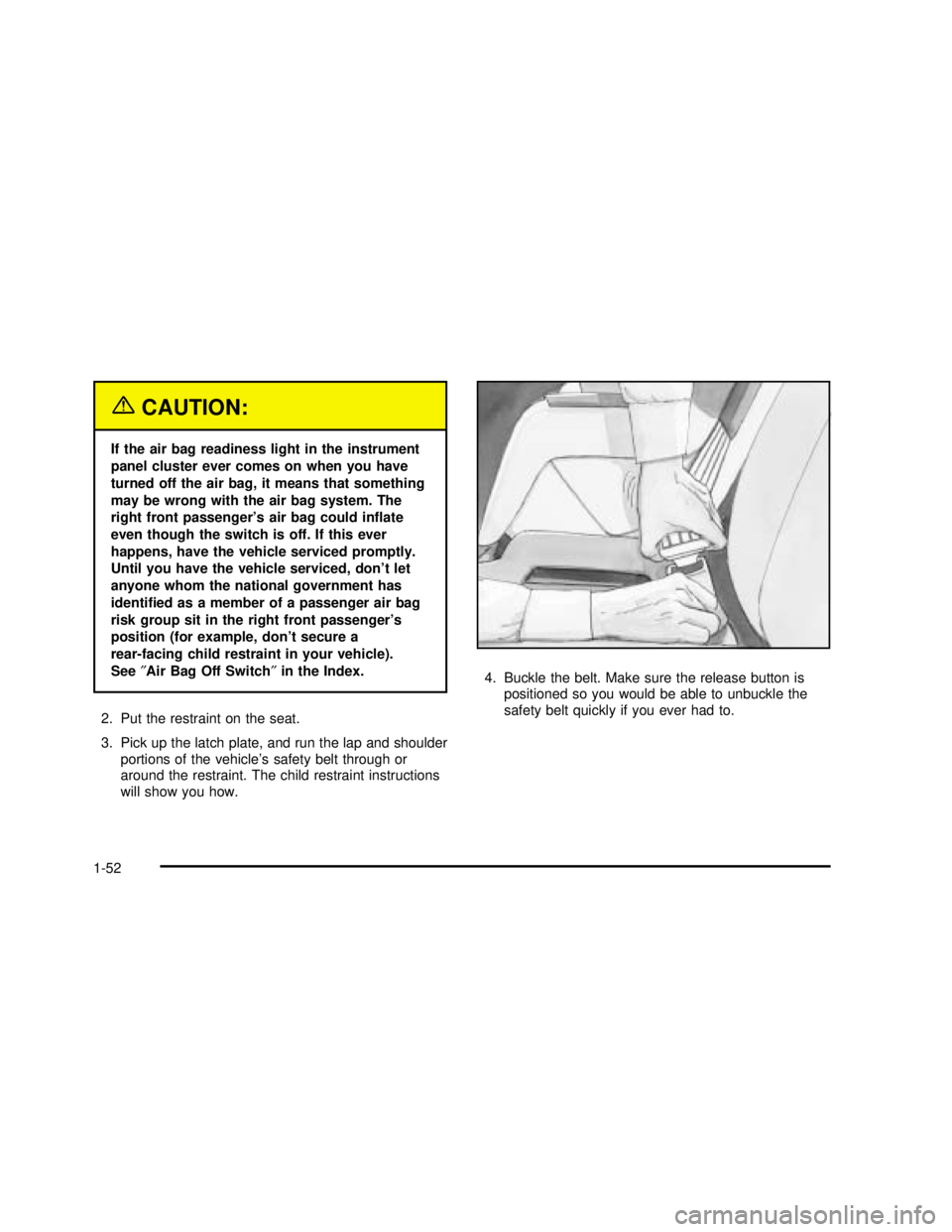
3. Pick up the latch plate, and run the lap and shoulder
portions of the vehicle’s safety belt through or
around the restraint. The child restraint instructions
will show you how.4. Buckle the belt. Make sure the release button is
positioned so you would be able to unbuckle the
safety belt quickly if you ever had to.
1-52
2003 - Sierra Denali
Page 62 of 408

{CAUTION:
Air bags inflate with great force, faster than the
blink of an eye. If you’re too close to an
inflating air bag, as you would be if you were
leaning forward, it could seriously injure you.
Safety belts help keep you in position before
and during a crash. Always wear your safety
belt, even with air bags. The driver should sit
as far back as possible while still maintaining
control of the vehicle.
{CAUTION:
Anyone who is up against, or very close to,
any air bag when it inflates can be seriously
injured or killed. Air bags plus lap-shoulder
belts offer the best protection for adults, but
not for young children and infants.
CAUTION: (Continued)
CAUTION: (Continued)
Neither the vehicle’s safety belt system nor its
air bag system is designed for them. Young
children and infants need the protection that a
child restraint system can provide. Always
secure children properly in your vehicle.
To read how, see the parts of this manual
called “Older Children” and “Infants and
Young Children.”
There is an air bag
readiness light on the
instrument panel cluster,
which shows the air
bag symbol.
The system checks the air bag electrical system for
malfunctions. The light tells you if there is an electrical
problem. SeeAir Bag Readiness Light on page 3-27
for more information.
1-56
2003 - Sierra Denali
Page 63 of 408

Where Are the Air Bags?
The driver’s air bag is in the middle of the steering
wheel.The right front passenger’s air bag is in the instrument
panel on the passenger’s side.
1-57
2003 - Sierra Denali
Page 65 of 408

Seat Position Sensors
Vehicle’s with dual stage air bags are also equipped
with special sensors which enable the sensing system to
monitor the position of both the driver and passenger
front seats. The seat position sensor provides
information which is used to determine if the air bags
should deploy at a reduced level or at full depoyment.
What Makes an Air Bag Inflate?
In an impact of sufficient severity, the air bag sensing
system detects that the vehicle is in a crash. The
sensing system triggers a release of gas from the
inflator, which inflates the air bag. The inflator, air bag,
and related hardware are all part of the air bag
modules inside the steering wheel and in the instrument
panel in front of the right front passenger.
How Does an Air Bag Restrain?
In moderate to severe frontal or near-frontal collisions,
even belted occupants can contact the steering wheel or
the instrument panel. Air bags supplement the
protection provided by safety belts. Air bags distribute
the force of the impact more evenly over the occupant’s
upper body, stopping the occupant more gradually.But air bags would not help you in many types of
collisions, including rollovers, rear impacts and many
side impacts, primarily because an occupant’s motion is
not toward those air bags. Air bags should never be
regarded as anything more than a supplement to safety
belts, and then only in moderate to severe frontal or
near-frontal collisions.
What Will You See After an Air Bag
Inflates?
After an air bag inflates, it quickly deflates, so quickly
that some people may not even realize the air bag
inflated. Some components of the air bag module–the
steering wheel hub for the driver’s air bag, or the
instrument panel for the right front passenger’s
bag–will be hot for a short time. The parts of the bag
that come into contact with you may be warm, but
not too hot to touch. There will be some smoke and dust
coming from the vents in the deflated air bags.
Air bag inflation doesn’t prevent the driver from seeing
or being able to steer the vehicle, nor does it stop
people from leaving the vehicle.
1-59
2003 - Sierra Denali