service indicator GMC SIERRA 2005 User Guide
[x] Cancel search | Manufacturer: GMC, Model Year: 2005, Model line: SIERRA, Model: GMC SIERRA 2005Pages: 574, PDF Size: 2.95 MB
Page 210 of 574
The following situations can cause the transmission to
operate at higher temperatures:
Towing a trailer
Hot outside air temperatures
Vehicle overloading
Hauling a large or heavy load
Low transmission uid level
High transmission uid level
Restricted air ow to the radiator and the auxiliary
transmission oil cooler (if equipped).
A temporary solution to hotter transmission operating
temperatures may be to let the transmission cool down.
If the transmission is operated at higher temperatures
on a frequent basis, seeScheduled Maintenance
on page 6-4for the proper transmission maintenance
intervals.
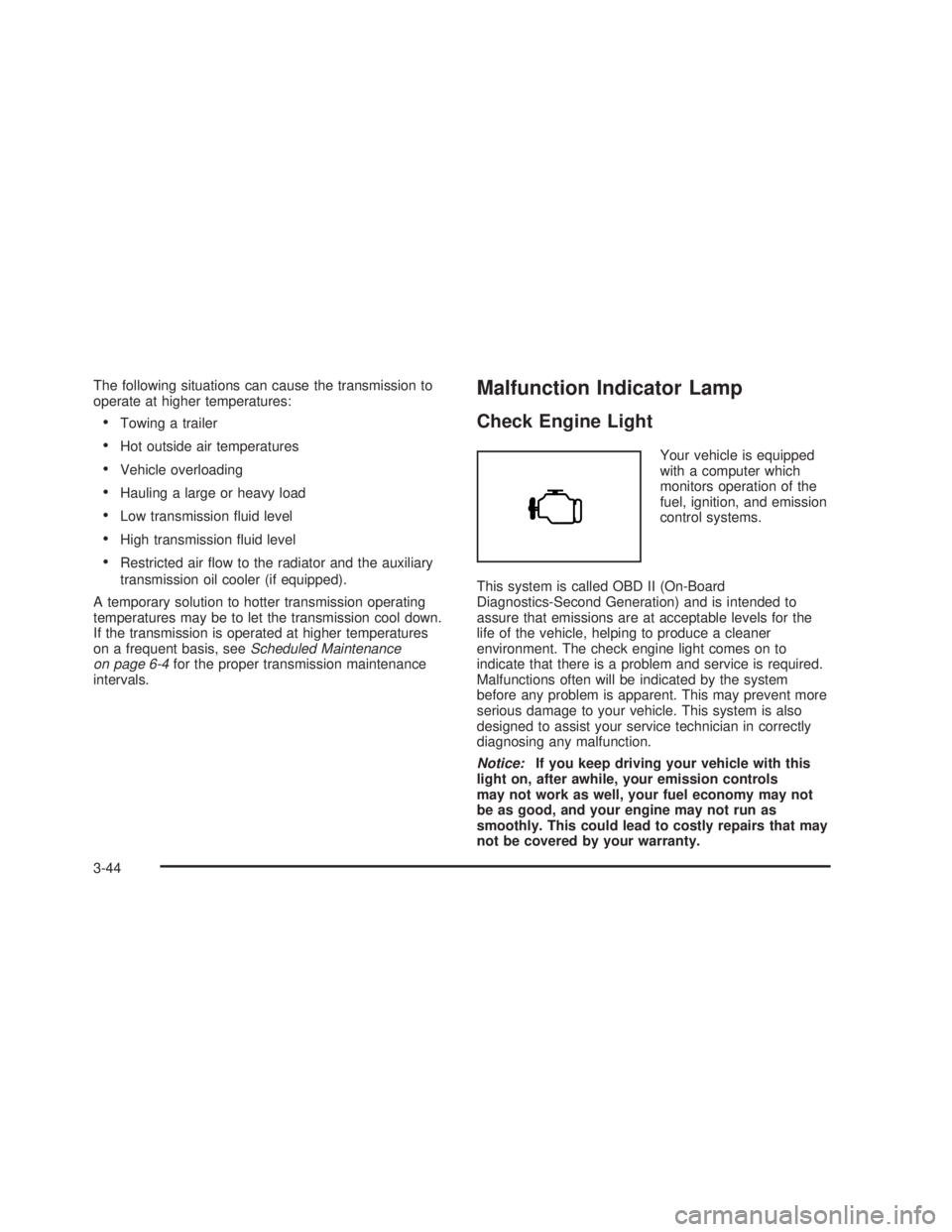
Malfunction Indicator Lamp
Check Engine Light
Your vehicle is equipped
with a computer which
monitors operation of the
fuel, ignition, and emission
control systems.
This system is called OBD II (On-Board
Diagnostics-Second Generation) and is intended to
assure that emissions are at acceptable levels for the
life of the vehicle, helping to produce a cleaner
environment. The check engine light comes on to
indicate that there is a problem and service is required.
Malfunctions often will be indicated by the system
before any problem is apparent. This may prevent more
serious damage to your vehicle. This system is also
designed to assist your service technician in correctly
diagnosing any malfunction.
Notice:If you keep driving your vehicle with this
light on, after awhile, your emission controls
may not work as well, your fuel economy may not
be as good, and your engine may not run as
smoothly. This could lead to costly repairs that may
not be covered by your warranty.
3-44
Page 225 of 574
RANGE SHIFT INHIBITED (Allison
Transmission®Only)
If the transmission is unable to shift into a selected
gear, this message will appear on the DIC. The
electronic shift position indicator on the instrument panel
cluster may blink when this occurs. To make the
vehicle shift to the requested gear, you may have to
shift back to PARK (P) or NEUTRAL (N) and re-select
the desired gear.
REDUCED ENGINE POWER
This message is displayed when the cooling system
temperature gets too hot and the engine further enters
the engine coolant protection mode.
SeeEngine Overheating on page 5-37for additional
information.
RIGHT REAR DOOR AJAR (Crew Cab)
If the passenger’s side rear door is not fully closed,
this message will appear on the display and you
will hear a chime. Stop and turn off the vehicle, check
the door for obstacles and close the door again.
Check to see if the message still appears on the DIC.Pressing any of the four DIC buttons, if equipped, will
acknowledge the message and clear it from the
DIC display. If your vehicle is not equipped with the
four DIC buttons, pressing the trip odometer reset stem
will acknowledge the message and clear it from the
DIC display.
SERVICE 4WD
If a problem occurs with the four-wheel-drive system,
this message will appear on the DIC. If this message
appears, stop as soon as possible and turn off the
vehicle. Restart the vehicle and check for the message
on the DIC display. If the message is still displayed
or appears again when you begin driving, the
four-wheel-drive system needs service. See your
GM dealer.
SERVICE 4 WHEEL STEER
If a problem occurs with the four-wheel steer system,
this message will appear on the DIC. If this message
appears, stop as soon as possible and turn off the
vehicle. Restart the vehicle and check for the message
on the DIC display. If the message is still displayed
or appears again when you begin driving, the four-wheel
steer system needs service. See your GM dealer. See
QUADRASTEER™ on page 4-14for more information.
3-59
Page 227 of 574
SERVICE BRAKE SYSTEM
If there is a problem with the brake system, this
message will be displayed on the DIC. If this message
appears, stop as soon as possible and turn off the
vehicle. Restart the vehicle and check for the message
on the DIC display. If the message is still displayed
or appears again when you begin driving, the brake
system needs service. See your GM dealer.
SERVICE CHARGING SYSTEM
On some vehicles, if there is a problem with the battery
charging system, this message will appear on the
DIC. Under certain conditions, the battery warning light
may also turn on in the instrument panel cluster.
SeeBattery Warning Light on page 3-38. The battery
will not be charging at an optimal rate and the vehicle
will lose the ability to enter the fuel economy mode. The
vehicle is safe to drive, however you should have the
electrical system checked by your GM dealer. Pressing
any of the four DIC buttons, if equipped, will
acknowledge the message and clear it from the DIC
display. If your vehicle is not equipped with the four DIC
buttons, pressing the trip odometer reset stem will
acknowledge the message and clear it from the DIC
display.
SERVICE RIDE CONTROL
If a problem occurs with the suspension system, this
message will appear on the DIC. If this message
appears, stop and turn off the vehicle. Restart the
vehicle and check for the message on the DIC display.
If the message is still displayed or appears again
when you begin driving, the air suspension system
needs service. See your GM dealer.
TIGHTEN FUEL CAP
If the vehicle’s fuel cap is not tightened properly, this
message may appear along with the check engine light
on the instrument panel. SeeMalfunction Indicator
Lamp on page 3-44. Fully reinstall the fuel cap.
SeeFilling Your Tank on page 5-10. The diagnostic
system can determine if the fuel cap has been left off or
improperly installed. A loose or missing fuel cap will
allow fuel to evaporate into the atmosphere. A few
driving trips with the cap properly installed should turn
the light and message off.
TRACTION ACTIVE
When the traction control system had detected that any
of the vehicle’s wheels are slipping, the traction
control system will activate and this message will appear
on the DIC. For more information, seeTraction Assist
System (TAS) on page 4-8.
3-61
Page 278 of 574
Headphones
The RSE system includes two sets of wireless
headphones.
Each set of headphones has an ON/OFF control.
An indicator light will illuminate on the headphones when
they are on. If the light does not illuminate, the
batteries may need to be replaced. See “Battery
Replacement” following for more information.
Each set of headphones has a volume knob. To adjust
the volume, adjust this knob.
The transmitters are located below the video display
screen. The headphones will shut off automatically
if they lose the signal from the system after about
four minutes to save battery power. The signal may be
lost if the system is turned off or if the headphones
are out of range of the transmitters.
When using the wired headphones, if the front seat
passengers play a CD in the Radio with Six-Disc CD
(if equipped) or use XM™ Satellite Radio Service
(if equipped), you will hear the audio for these sources,
instead of the DVD or CD that is currently playing
through the RSE.
Notice:Do not store the headphones in heat or
direct sunlight. This could damage the headphones
and repairs would not be covered by your warranty.
Keep the headphones stored in a cool, dry place.
Battery Replacement
To change the batteries, do the following:
1. Loosen the screw on the battery compartment door
located on the left side of the headphone earpiece.
2. Replace the two AAA batteries in the compartment.
Make sure that they are installed correctly, using
the diagram on the inside of the battery
compartment.
3. Tighten the screw to close the compartment door.
If the headphones are to be stored for a long period
of time, remove the batteries and keep them in a cool,
dry place.
Stereo RCA Jacks
The RCA jacks are located behind the video screen.
The RCA jacks allow audio and video signals to
be connected from an auxiliary device such as a
camcorder or a video game unit to the RSE system.
Standard RCA cables, not included, are needed
to connect the auxiliary device to the RCA jacks. The
yellow connector inputs video and the red and white
connectors input right and left audio. Refer to the
manufacturer’s instructions for proper connection of the
auxiliary device.
3-112
Page 292 of 574
When cleaning the cassette tape player with the
recommended non-abrasive cleaning cassette, it is
possible that the cassette may eject, because the cut
tape detection feature on the radio may recognize it as a
broken tape, in error. To prevent the cleaning cassette
from being ejected, use the following steps:
1. Turn the ignition on.
2. Turn the radio off.
3. Press and hold the TAPE DISC button for
ve seconds. READY will appear on the display and
the cassette symbol will ash for ve seconds.
4. Insert the scrubbing action cleaning cassette.
5. Eject the cleaning cassette after the manufacturer’s
recommended cleaning time.
When the cleaning cassette has been ejected, the
cut tape detection feature will be active again.
A non-scrubbing action, wet-type cleaner which uses a
cassette with a fabric belt to clean the tape head
can be used. This type of cleaning cassette will not
eject on its own. A non-scrubbing action cleaner may not
clean as thoroughly as the scrubbing type cleaner.
The use of a non-scrubbing action, dry-type cleaning
cassette is not recommended.After the player is cleaned, press and hold the eject
button for ve seconds to reset the CLEAN indicator.
The radio will display --- or CLEANED to show the
indicator was reset.
Cassettes are subject to wear and the sound quality
may degrade over time. Always make sure the cassette
tape is in good condition before the tape player is
serviced.
Care of Your CDs and DVDs
Handle discs carefully. Store them in their original cases
or other protective cases and away from direct sunlight
and dust. If the surface of a disc is soiled, dampen
a clean, soft cloth in a mild, neutral detergent solution
and clean it, wiping from the center to the edge.
Be sure never to touch the side without writing when
handling discs. Pick up discs by grasping the outer
edges or the edge of the hole and the outer edge.
Care of Your CD and DVD Player
The use of CD lens cleaners for CDs is not advised, due
to the risk of contaminating the lens of the CD optics
with lubricants internal to the CD mechanism.
3-126
Page 402 of 574
Some gasolines that are not reformulated for low
emissions may contain an octane-enhancing additive
called methylcyclopentadienyl manganese tricarbonyl
(MMT); ask the attendant where you buy gasoline
whether the fuel contains MMT. General Motors does
not recommend the use of such gasolines. Fuels
containing MMT can reduce the life of spark plugs and
the performance of the emission control system may
be affected. The malfunction indicator lamp may turn on.
If this occurs, return to your authorized GM dealer
for service.
Fuel E-85 (85% Ethanol)
The 8th digit of your vehicle identication number (VIN)
shows the code letter or number that identies your
engine. You will nd the VIN at the top left of the
instrument panel. SeeVehicle Identication Number
(VIN) on page 5-120.If your vehicle has the 5.3L V8 engine (VIN Code Z
only), you may use either regular unleaded gasoline or
ethanol fuel containing up to 85% ethanol (E-85);
also seeFuel on page 5-6. In all other engines, including
the 5.3L V8 (VIN Code T), use only regular unleaded
gasoline.
Only vehicles that have the 5.3L V8 engine (VIN Code Z)
may use 85% ethanol fuel (E-85). General Motors
encourages the use of E-85 in vehicles that are designed
to use it. The ethanol in E-85 is a “renewable” fuel,
meaning it is made from renewable sources such as corn
and other crops.
Many service stations will not have an 85% ethanol fuel
(E-85) pump available. The U. S. Department of
Energy has an alternative fuels website
(http://www.afdc.doe.gov/refueling_mapsite.shtml) that
can help you nd E-85 fuel. Those stations that do have
E-85 should have a label indicating ethanol content.
Do not use the fuel if the ethanol content isgreaterthan
85%. Your vehicle may not operate properly if the
ethanol content is greater than 85%.
5-8
Page 445 of 574
Brake Wear
Your vehicle has front disc brakes and may have rear
drum brakes or rear disc brakes.
Disc brake pads have built-in wear indicators that make
a high-pitched warning sound when the brake pads
are worn and new pads are needed. The sound
may come and go or be heard all the time your vehicle
is moving, except when you are pushing on the
brake pedal rmly.
{CAUTION:
The brake wear warning sound means that
soon your brakes will not work well. That
could lead to an accident. When you hear the
brake wear warning sound, have your vehicle
serviced.
Notice:Continuing to drive with worn-out brake
pads could result in costly brake repair.
Some driving conditions or climates may cause a brake
squeal when the brakes are rst applied or lightly
applied. This does not mean something is wrong with
your brakes.Properly torqued wheel nuts are necessary to help
prevent brake pulsation. When tires are rotated, inspect
brake pads for wear and evenly tighten wheel nuts in
the proper sequence to GM torque specications.
If you have rear drum brakes, they do not have wear
indicators, but if you ever hear a rear brake rubbing
noise, have the rear brake linings inspected immediately.
Rear brake drums should be removed and inspected
each time the tires are removed for rotation or changing.
Drum brakes have an inspection hole to inspect lining
wear during scheduled maintenance. When you
have the front brake pads replaced, have the rear
brakes inspected, too.
Brake linings should always be replaced as complete
axle sets.
Brake Pedal Travel
See your dealer if the brake pedal does not return to
normal height, or if there is a rapid increase in
pedal travel. This could be a sign of brake trouble.
Brake Adjustment
Every time you make a brake stop, your brakes adjust
for wear.
5-51
Page 533 of 574
Scheduled Maintenance
Service MaintenanceIMaintenanceII
Change engine oil and lter. SeeEngine Oil (Gasoline Engine) on page 5-20.
Reset oil life system. SeeEngine Oil Life System (Gasoline Engine) on
page 5-23.An Emission Control Service.••
Allison Transmission
®only: Replace external control-main lter only at the rst
maintenance service performed on the vehicle.
Lubricate chassis components.See footnote #.••
Visually check for any leaks or damage.See footnote (j).••
Inspect engine air cleaner lter or change indicator (if equipped). If necessary,
replace lter. SeeEngine Air Cleaner/Filter on page 5-25.An Emission Control
Service. See footnotes † and (p).•
Rotate tires and check ination pressures and wear. SeeTires on page 5-72.••
Inspect brake system.See footnote (a).••
Check engine coolant and windshield washer uid levels and add uid as
needed.••
Perform any needed additional services. See “Additional Required Services” in
this section.••
Inspect suspension and steering components.See footnote (b).•
Inspect engine cooling system.See footnote (c).•
Inspect wiper blades.See footnote (d).•
Inspect restraint system components.See footnote (e).•
Lubricate body components.See footnote (f).•
6-5
Page 534 of 574
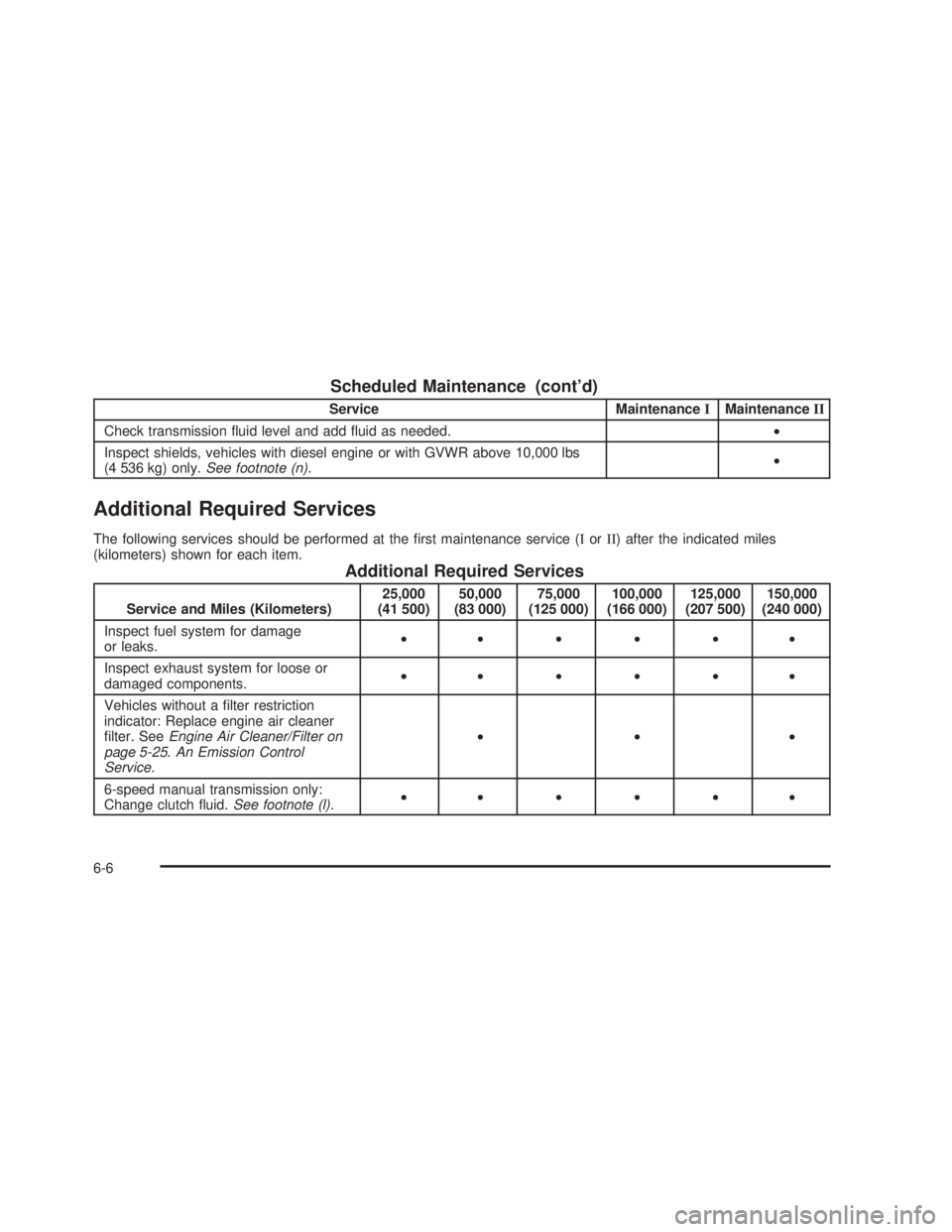
Scheduled Maintenance (cont’d)
Service MaintenanceIMaintenanceII
Check transmission uid level and add uid as needed.•
Inspect shields, vehicles with diesel engine or with GVWR above 10,000 lbs
(4 536 kg) only.See footnote (n).•
Additional Required Services
The following services should be performed at the rst maintenance service (IorII) after the indicated miles
(kilometers) shown for each item.
Additional Required Services
Service and Miles (Kilometers)25,000
(41 500)50,000
(83 000)75,000
(125 000)100,000
(166 000)125,000
(207 500)150,000
(240 000)
Inspect fuel system for damage
or leaks.••••••
Inspect exhaust system for loose or
damaged components.••••••
Vehicles without a lter restriction
indicator: Replace engine air cleaner
lter. SeeEngine Air Cleaner/Filter on
page 5-25.An Emission Control
Service.•••
6-speed manual transmission only:
Change clutch uid.See footnote (l).••••••
6-6
Page 538 of 574
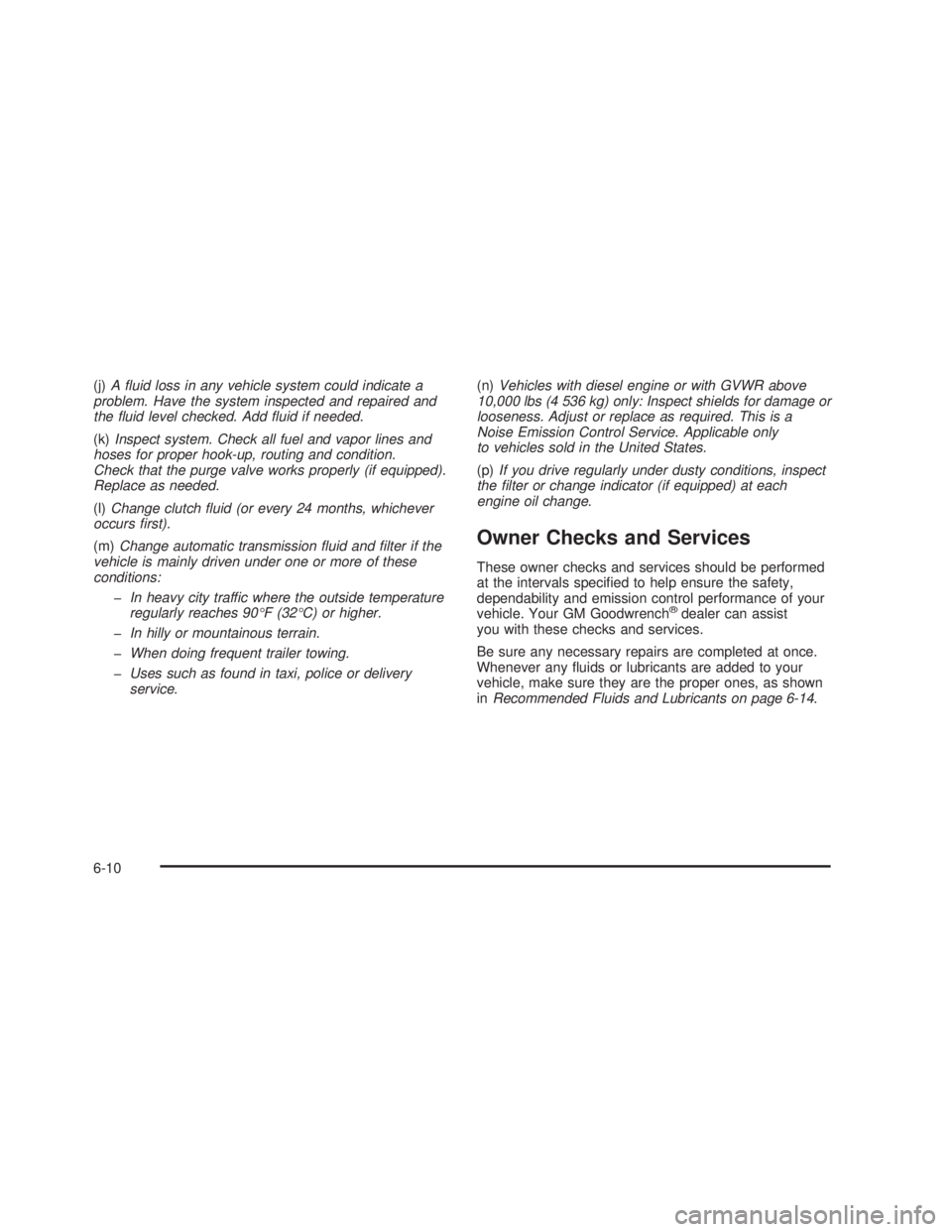
(j)A uid loss in any vehicle system could indicate a
problem. Have the system inspected and repaired and
the uid level checked. Add uid if needed.
(k)Inspect system. Check all fuel and vapor lines and
hoses for proper hook-up, routing and condition.
Check that the purge valve works properly (if equipped).
Replace as needed.
(l)Change clutch uid (or every 24 months, whichever
occurs rst).
(m)Change automatic transmission uid and lter if the
vehicle is mainly driven under one or more of these
conditions:
In heavy city traffic where the outside temperature
regularly reaches 90°F (32°C) or higher.
In hilly or mountainous terrain.
When doing frequent trailer towing.
Uses such as found in taxi, police or delivery
service.(n)Vehicles with diesel engine or with GVWR above
10,000 lbs (4 536 kg) only: Inspect shields for damage or
looseness. Adjust or replace as required. This is a
Noise Emission Control Service. Applicable only
to vehicles sold in the United States.
(p)If you drive regularly under dusty conditions, inspect
the lter or change indicator (if equipped) at each
engine oil change.
Owner Checks and Services
These owner checks and services should be performed
at the intervals specied to help ensure the safety,
dependability and emission control performance of your
vehicle. Your GM Goodwrench
®dealer can assist
you with these checks and services.
Be sure any necessary repairs are completed at once.
Whenever any uids or lubricants are added to your
vehicle, make sure they are the proper ones, as shown
inRecommended Fluids and Lubricants on page 6-14.
6-10