remote start GMC SIERRA 2006 User Guide
[x] Cancel search | Manufacturer: GMC, Model Year: 2006, Model line: SIERRA, Model: GMC SIERRA 2006Pages: 600, PDF Size: 3.49 MB
Page 429 of 600
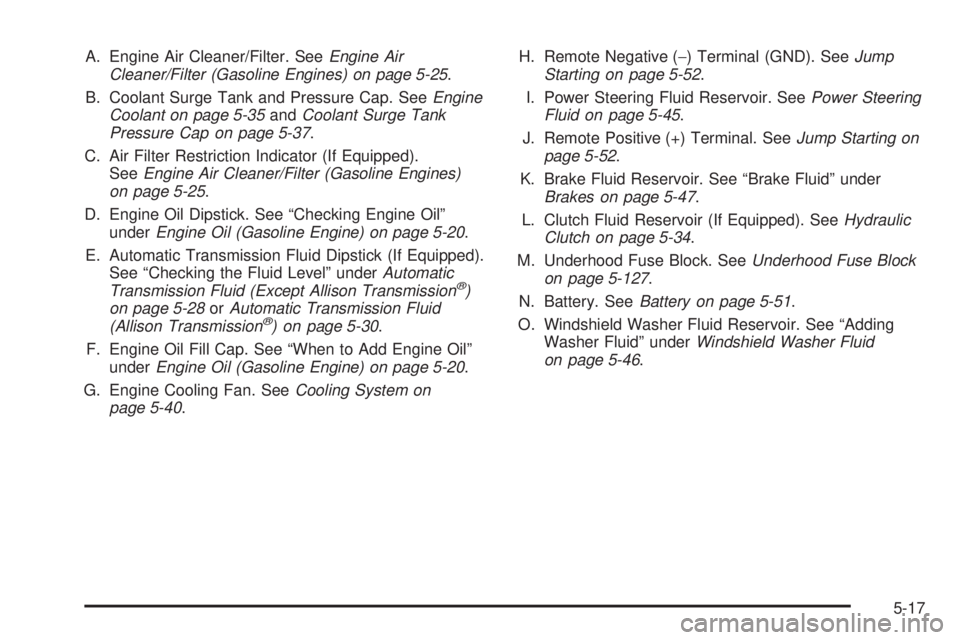
A. Engine Air Cleaner/Filter. SeeEngine Air
Cleaner/Filter (Gasoline Engines) on page 5-25.
B. Coolant Surge Tank and Pressure Cap. SeeEngine
Coolant on page 5-35andCoolant Surge Tank
Pressure Cap on page 5-37.
C. Air Filter Restriction Indicator (If Equipped).
SeeEngine Air Cleaner/Filter (Gasoline Engines)
on page 5-25.
D. Engine Oil Dipstick. See “Checking Engine Oil”
underEngine Oil (Gasoline Engine) on page 5-20.
E. Automatic Transmission Fluid Dipstick (If Equipped).
See “Checking the Fluid Level” underAutomatic
Transmission Fluid (Except Allison Transmission
®)
on page 5-28orAutomatic Transmission Fluid
(Allison Transmission
®) on page 5-30.
F. Engine Oil Fill Cap. See “When to Add Engine Oil”
underEngine Oil (Gasoline Engine) on page 5-20.
G. Engine Cooling Fan. SeeCooling System on
page 5-40.H. Remote Negative (−) Terminal (GND). SeeJump
Starting on page 5-52.
I. Power Steering Fluid Reservoir. SeePower Steering
Fluid on page 5-45.
J. Remote Positive (+) Terminal. SeeJump Starting on
page 5-52.
K. Brake Fluid Reservoir. See “Brake Fluid” under
Brakes on page 5-47.
L. Clutch Fluid Reservoir (If Equipped). SeeHydraulic
Clutch on page 5-34.
M. Underhood Fuse Block. SeeUnderhood Fuse Block
on page 5-127.
N. Battery. SeeBattery on page 5-51.
O. Windshield Washer Fluid Reservoir. See “Adding
Washer Fluid” underWindshield Washer Fluid
on page 5-46.
5-17
Page 431 of 600
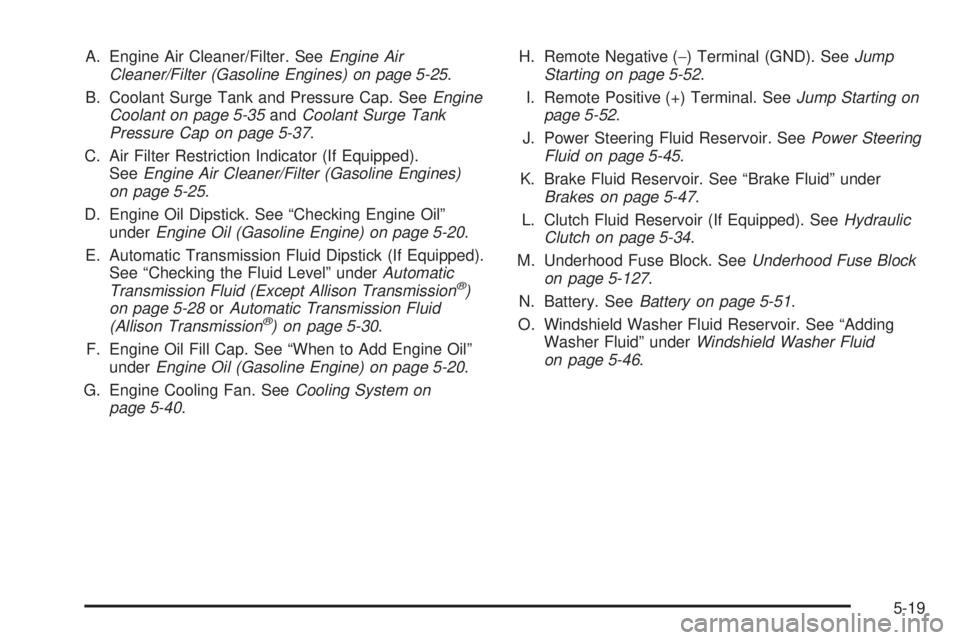
A. Engine Air Cleaner/Filter. SeeEngine Air
Cleaner/Filter (Gasoline Engines) on page 5-25.
B. Coolant Surge Tank and Pressure Cap. SeeEngine
Coolant on page 5-35andCoolant Surge Tank
Pressure Cap on page 5-37.
C. Air Filter Restriction Indicator (If Equipped).
SeeEngine Air Cleaner/Filter (Gasoline Engines)
on page 5-25.
D. Engine Oil Dipstick. See “Checking Engine Oil”
underEngine Oil (Gasoline Engine) on page 5-20.
E. Automatic Transmission Fluid Dipstick (If Equipped).
See “Checking the Fluid Level” underAutomatic
Transmission Fluid (Except Allison Transmission
®)
on page 5-28orAutomatic Transmission Fluid
(Allison Transmission
®) on page 5-30.
F. Engine Oil Fill Cap. See “When to Add Engine Oil”
underEngine Oil (Gasoline Engine) on page 5-20.
G. Engine Cooling Fan. SeeCooling System on
page 5-40.H. Remote Negative (−) Terminal (GND). SeeJump
Starting on page 5-52.
I. Remote Positive (+) Terminal. SeeJump Starting on
page 5-52.
J. Power Steering Fluid Reservoir. SeePower Steering
Fluid on page 5-45.
K. Brake Fluid Reservoir. See “Brake Fluid” under
Brakes on page 5-47.
L. Clutch Fluid Reservoir (If Equipped). SeeHydraulic
Clutch on page 5-34.
M. Underhood Fuse Block. SeeUnderhood Fuse Block
on page 5-127.
N. Battery. SeeBattery on page 5-51.
O. Windshield Washer Fluid Reservoir. See “Adding
Washer Fluid” underWindshield Washer Fluid
on page 5-46.
5-19
Page 466 of 600
5. Open the hoods and locate the positive (+) and
negative (−) terminal locations of the other vehicle.
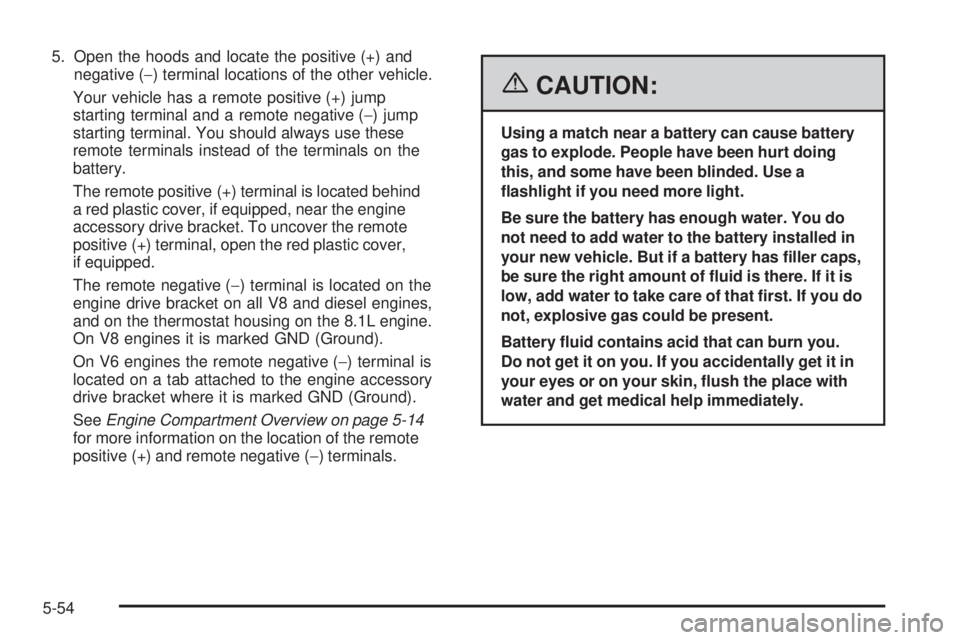
Your vehicle has a remote positive (+) jump
starting terminal and a remote negative (−) jump
starting terminal. You should always use these
remote terminals instead of the terminals on the
battery.
The remote positive (+) terminal is located behind
a red plastic cover, if equipped, near the engine
accessory drive bracket. To uncover the remote
positive (+) terminal, open the red plastic cover,
if equipped.
The remote negative (−) terminal is located on the
engine drive bracket on all V8 and diesel engines,
and on the thermostat housing on the 8.1L engine.
On V8 engines it is marked GND (Ground).
On V6 engines the remote negative (−) terminal is
located on a tab attached to the engine accessory
drive bracket where it is marked GND (Ground).
SeeEngine Compartment Overview on page 5-14
for more information on the location of the remote
positive (+) and remote negative (−) terminals.
{CAUTION:
Using a match near a battery can cause battery
gas to explode. People have been hurt doing
this, and some have been blinded. Use a
ashlight if you need more light.
Be sure the battery has enough water. You do
not need to add water to the battery installed in
your new vehicle. But if a battery has ller caps,
be sure the right amount of uid is there. If it is
low, add water to take care of that rst. If you do
not, explosive gas could be present.
Battery uid contains acid that can burn you.
Do not get it on you. If you accidentally get it in
your eyes or on your skin, ush the place with
water and get medical help immediately.
5-54
Page 468 of 600
10. Do not let the other end touch anything until the next
step. The other end of the negative (−) cable does
not go to the dead battery. It goes to a heavy
unpainted metal engine part of the vehicle with the
dead battery, or to a remote negative (–) terminal if
the vehicle has one.
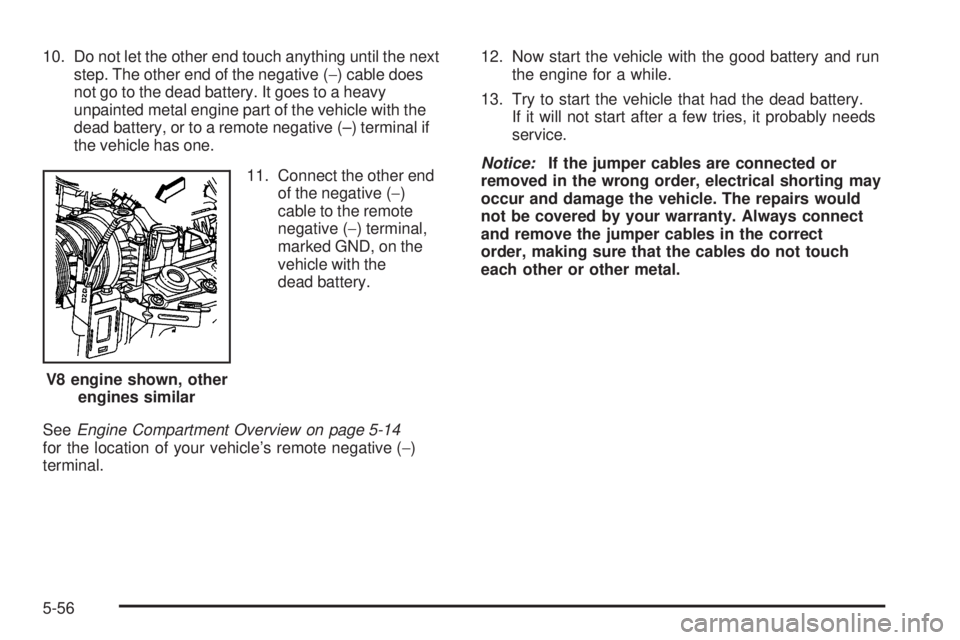
11. Connect the other end
of the negative (−)
cable to the remote
negative (−) terminal,
marked GND, on the
vehicle with the
dead battery.
SeeEngine Compartment Overview on page 5-14
for the location of your vehicle’s remote negative (−)
terminal.12. Now start the vehicle with the good battery and run
the engine for a while.
13. Try to start the vehicle that had the dead battery.
If it will not start after a few tries, it probably needs
service.
Notice:If the jumper cables are connected or
removed in the wrong order, electrical shorting may
occur and damage the vehicle. The repairs would
not be covered by your warranty. Always connect
and remove the jumper cables in the correct
order, making sure that the cables do not touch
each other or other metal.
V8 engine shown, other
engines similar
5-56
Page 543 of 600
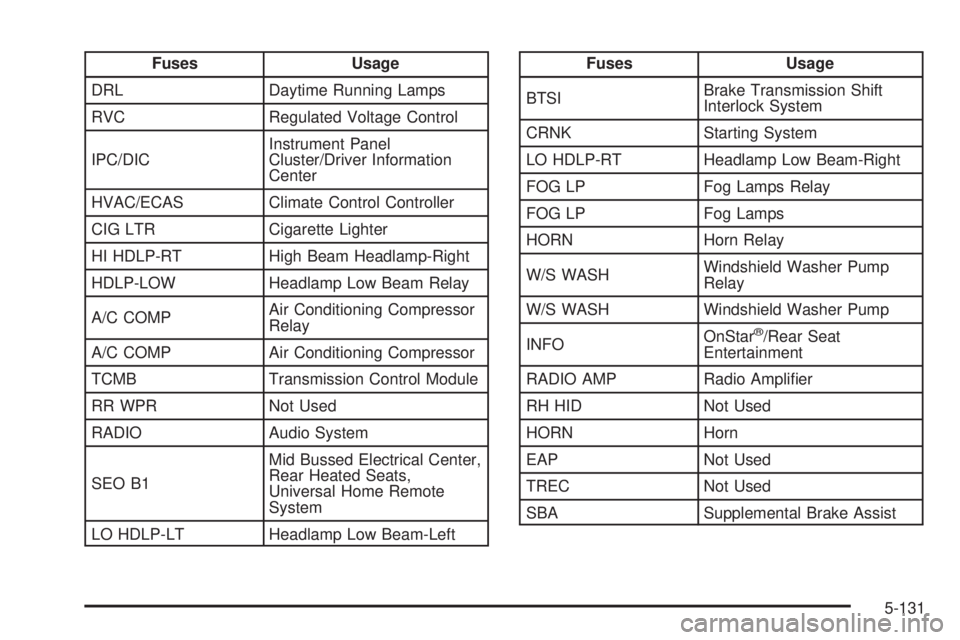
Fuses Usage
DRL Daytime Running Lamps
RVC Regulated Voltage Control
IPC/DICInstrument Panel
Cluster/Driver Information
Center
HVAC/ECAS Climate Control Controller
CIG LTR Cigarette Lighter
HI HDLP-RT High Beam Headlamp-Right
HDLP-LOW Headlamp Low Beam Relay
A/C COMPAir Conditioning Compressor
Relay
A/C COMP Air Conditioning Compressor
TCMB Transmission Control Module
RR WPR Not Used
RADIO Audio System
SEO B1Mid Bussed Electrical Center,
Rear Heated Seats,
Universal Home Remote
System
LO HDLP-LT Headlamp Low Beam-LeftFuses Usage
BTSIBrake Transmission Shift
Interlock System
CRNK Starting System
LO HDLP-RT Headlamp Low Beam-Right
FOG LP Fog Lamps Relay
FOG LP Fog Lamps
HORN Horn Relay
W/S WASHWindshield Washer Pump
Relay
W/S WASH Windshield Washer Pump
INFOOnStar
®/Rear Seat
Entertainment
RADIO AMP Radio Amplier
RH HID Not Used
HORN Horn
EAP Not Used
TREC Not Used
SBA Supplemental Brake Assist
5-131