remote start GMC SIERRA 2006 Owner's Manual
[x] Cancel search | Manufacturer: GMC, Model Year: 2006, Model line: SIERRA, Model: GMC SIERRA 2006Pages: 600, PDF Size: 3.49 MB
Page 1 of 600
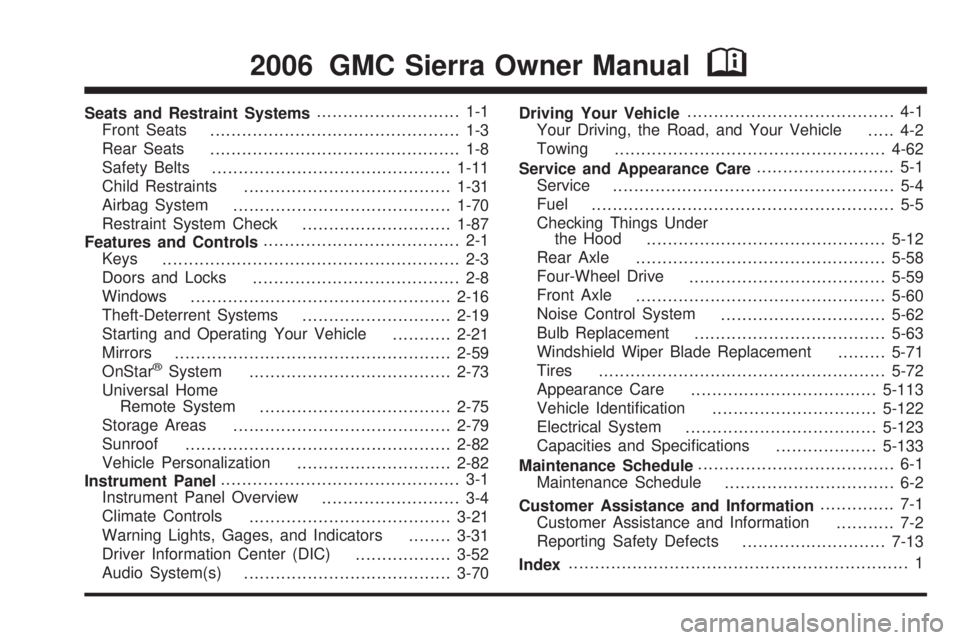
Seats and Restraint Systems........................... 1-1
Front Seats
............................................... 1-3
Rear Seats
............................................... 1-8
Safety Belts
.............................................1-11
Child Restraints
.......................................1-31
Airbag System
.........................................1-70
Restraint System Check
............................1-87
Features and Controls..................................... 2-1
Keys
........................................................ 2-3
Doors and Locks
....................................... 2-8
Windows
.................................................2-16
Theft-Deterrent Systems
............................2-19
Starting and Operating Your Vehicle
...........2-21
Mirrors
....................................................2-59
OnStar
®System
......................................2-73
Universal Home
Remote System
....................................2-75
Storage Areas
.........................................2-79
Sunroof
..................................................2-82
Vehicle Personalization
.............................2-82
Instrument Panel............................................. 3-1
Instrument Panel Overview
.......................... 3-4
Climate Controls
......................................3-21
Warning Lights, Gages, and Indicators
........3-31
Driver Information Center (DIC)
..................3-52
Audio System(s)
.......................................3-70Driving Your Vehicle....................................... 4-1
Your Driving, the Road, and Your Vehicle
..... 4-2
Towing
...................................................4-62
Service and Appearance Care.......................... 5-1
Service
..................................................... 5-4
Fuel
......................................................... 5-5
Checking Things Under
the Hood
.............................................5-12
Rear Axle
...............................................5-58
Four-Wheel Drive
.....................................5-59
Front Axle
...............................................5-60
Noise Control System
...............................5-62
Bulb Replacement
....................................5-63
Windshield Wiper Blade Replacement
.........5-71
Tires
......................................................5-72
Appearance Care
...................................5-113
Vehicle Identication
...............................5-122
Electrical System
....................................5-123
Capacities and Specications
...................5-133
Maintenance Schedule..................................... 6-1
Maintenance Schedule
................................ 6-2
Customer Assistance and Information.............. 7-1
Customer Assistance and Information
........... 7-2
Reporting Safety Defects
...........................7-13
Index................................................................ 1
2006 GMC Sierra Owner ManualM
Page 95 of 600
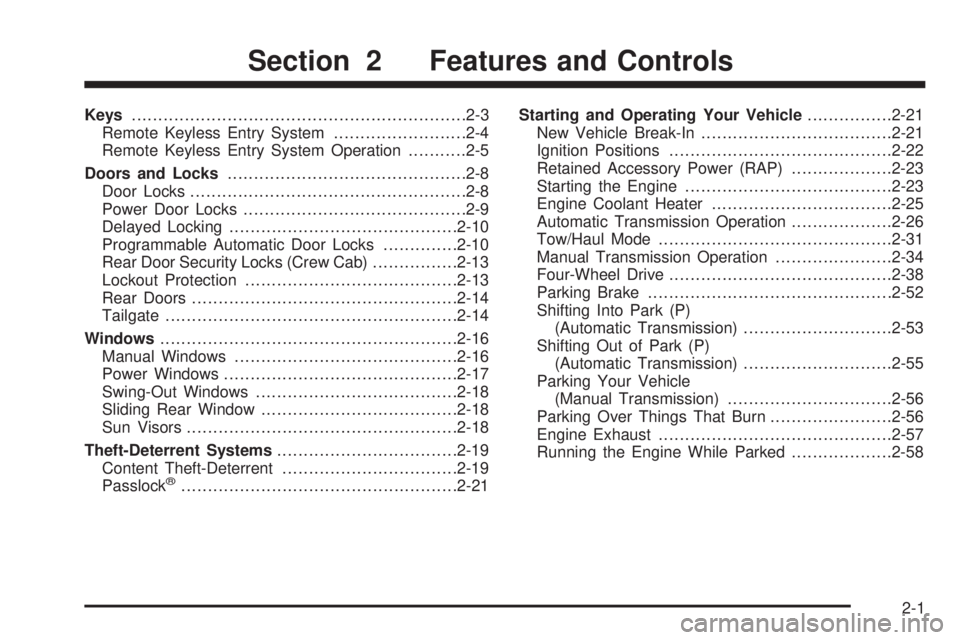
Keys...............................................................2-3
Remote Keyless Entry System.........................2-4
Remote Keyless Entry System Operation...........2-5
Doors and Locks.............................................2-8
Door Locks....................................................2-8
Power Door Locks..........................................2-9
Delayed Locking...........................................2-10
Programmable Automatic Door Locks..............2-10
Rear Door Security Locks (Crew Cab)................2-13
Lockout Protection........................................2-13
Rear Doors..................................................2-14
Tailgate.......................................................2-14
Windows........................................................2-16
Manual Windows..........................................2-16
Power Windows............................................2-17
Swing-Out Windows......................................2-18
Sliding Rear Window.....................................2-18
Sun Visors...................................................2-18
Theft-Deterrent Systems..................................2-19
Content Theft-Deterrent.................................2-19
Passlock
®....................................................2-21Starting and Operating Your Vehicle................2-21
New Vehicle Break-In....................................2-21
Ignition Positions..........................................2-22
Retained Accessory Power (RAP)...................2-23
Starting the Engine.......................................2-23
Engine Coolant Heater..................................2-25
Automatic Transmission Operation...................2-26
Tow/Haul Mode............................................2-31
Manual Transmission Operation......................2-34
Four-Wheel Drive..........................................2-38
Parking Brake..............................................2-52
Shifting Into Park (P)
(Automatic Transmission)............................2-53
Shifting Out of Park (P)
(Automatic Transmission)............................2-55
Parking Your Vehicle
(Manual Transmission)...............................2-56
Parking Over Things That Burn.......................2-56
Engine Exhaust............................................2-57
Running the Engine While Parked...................2-58
Section 2 Features and Controls
2-1
Page 100 of 600
Q(Lock):Press this button once to lock all of the
doors. Pressing lock again within three seconds may
cause the horn to chirp for lock conrmation. You can
choose different feedback options for each press of the
lock button. See “Lock Feedback” and “Unlock Feedback”
underDIC Vehicle Customization on page 3-64for more
information.
L(Panic):Press this button to sound the horn and
ash the headlamps and taillamps for up to 30 seconds.
Panic can be turned off by pressing the button again,
by waiting for 30 seconds, or by starting the vehicle.
Matching Transmitter(s) to Your
Vehicle
Each remote keyless entry transmitter is coded to prevent
another transmitter from unlocking your vehicle. If a
transmitter is lost or stolen, a replacement can be
purchased through your dealer. Remember to bring any
remaining transmitters with you when you go to your
dealer. When the dealer matches the replacement
transmitter to your vehicle, any remaining transmitters
must also be matched. Once your dealer has coded the
new transmitter, the lost transmitter will not unlock your
vehicle. Each vehicle can have a maximum of four
transmitters matched to it.
Battery Replacement
Under normal use, the battery in your remote keyless
entry transmitter should last about two years.
You can tell the battery is weak if the transmitter will not
work at the normal range in any location. If you have to
get close to your vehicle before the transmitter works, it
is probably time to change the battery.
Notice:When replacing the battery, use care not
to touch any of the circuitry. Static from your body
transferred to these surfaces may damage the
transmitter.
2-6
Page 113 of 600
Theft-Deterrent Systems
Vehicle theft is big business, especially in some cities.
Although your vehicle has a number of theft-deterrent
features, we know that nothing we put on it can make
it impossible to steal.
Content Theft-Deterrent
Your vehicle may be equipped with a content
theft-deterrent alarm system.
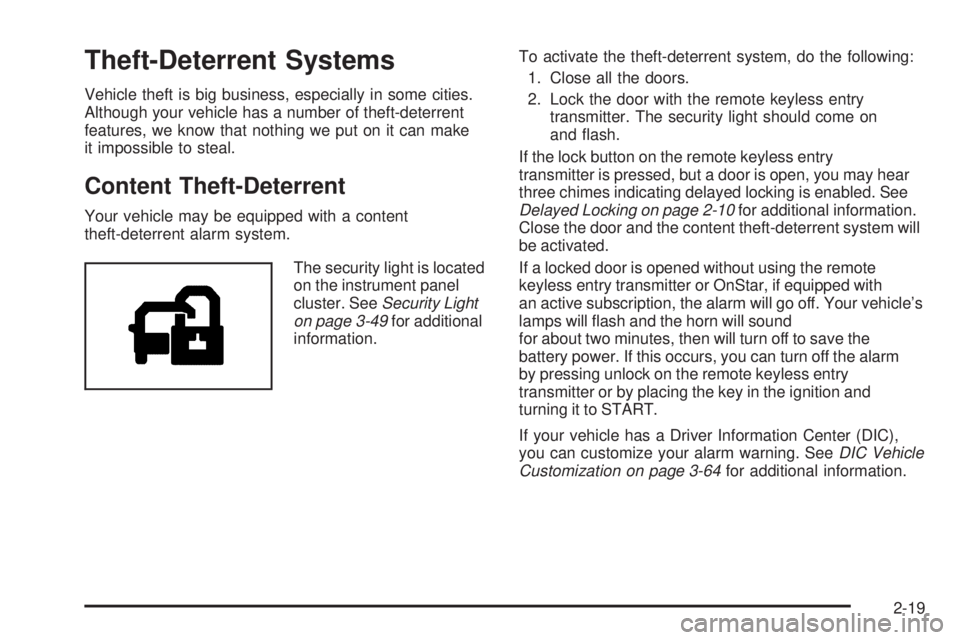
The security light is located
on the instrument panel
cluster. SeeSecurity Light
on page 3-49for additional
information.To activate the theft-deterrent system, do the following:
1. Close all the doors.
2. Lock the door with the remote keyless entry
transmitter. The security light should come on
and ash.
If the lock button on the remote keyless entry
transmitter is pressed, but a door is open, you may hear
three chimes indicating delayed locking is enabled. See
Delayed Locking on page 2-10for additional information.
Close the door and the content theft-deterrent system will
be activated.
If a locked door is opened without using the remote
keyless entry transmitter or OnStar, if equipped with
an active subscription, the alarm will go off. Your vehicle’s
lamps will ash and the horn will sound
for about two minutes, then will turn off to save the
battery power. If this occurs, you can turn off the alarm
by pressing unlock on the remote keyless entry
transmitter or by placing the key in the ignition and
turning it to START.
If your vehicle has a Driver Information Center (DIC),
you can customize your alarm warning. SeeDIC Vehicle
Customization on page 3-64for additional information.
2-19
Page 114 of 600
The horn may chirp for 10 seconds before the alarm
goes off if the theft-deterrent system is activated using
the remote keyless entry transmitter and the driver’s door
is opened. If this occurs, you can turn off the alarm by
pressing unlock on the remote keyless entry transmitter
or by placing the key in the ignition and turning it to
START.
Here is how to avoid setting off the alarm by accident:
If you do not want to activate the theft-deterrent
system, the vehicle should be locked with the
door key after the doors are closed.
Always unlock a door with the remote keyless entry
transmitter.
If you set off the alarm by accident, turn off the alarm by
pressing unlock on the remote keyless entry transmitter
or by placing the key in the ignition and turning it to
START.
Testing the Alarm
The alarm can be tested by following these steps:
1. From inside the vehicle, activate the system by
locking the doors with the remote keyless entry
transmitter.
2. Wait for the security light to go out.
3. Unlock the door with the manual door lock and
open the door. This should set off the alarm.
4. Turn off the alarm by pressing unlock on the remote
keyless entry transmitter or by placing the key in
the ignition and turning it to START.
If the alarm does not sound when it should, but the
vehicle’s headlamps ash, check to see if the horn
works. The horn fuse may be blown. To replace the
fuse, seeInstrument Panel Fuse Block on page 5-124
andUnderhood Fuse Block on page 5-127.
If the alarm does not sound or the vehicle’s headlamps
do not ash, see your dealer for service.
2-20
Page 171 of 600
5. Press and hold the newly-trained Universal Home
Remote button and observe the indicator light.
If the indicator light stays on constantly, programming
is complete and your device should activate when
the Universal Home Remote button is pressed and
released.
To program the remaining two Universal Home
Remote buttons, begin with Step 2 under
“Programming Universal Home Remote.”
Do not repeat Step 1 as this will erase all of
the programmed channels.
If the indicator light blinks rapidly for two seconds and
then turns to a constant light, continue with Steps 6
through 8 following to complete the programming of
a rolling-code equipped device, most commonly,
a garage door opener.
6. Locate in the garage, the garage door opener
receiver (motor-head unit). Locate the “Learn” or
“Smart” button. This can usually be found where
the hanging antenna wire is attached to the
motor-head unit.7. Firmly press and release the “Learn” or “Smart”
button. The name and color of the button may
vary by manufacturer.
You will have 30 seconds to start Step 8.
8. Return to the vehicle. Firmly press and hold the
programmed Universal Home Remote button for
two seconds, then release. Repeat the press/hold/
release sequence a second time, and depending on
the brand of the garage door opener, or other rolling
code device, repeat this sequence a third time to
complete the programming.
The Universal Home Remote should now activate
your rolling-code equipped device.
To program the remaining two Universal Home Remote
buttons, begin with Step 2 of “Programming Universal
Home Remote.” You do not want to repeat Step 1,
as this will erase all previous programming from
the Universal Home Remote buttons.
2-77
Page 298 of 600
y(Main DVD Menu):Press this button to access the
DVD menu. The DVD menu is different on every DVD.
Use the up, down, left, and right arrow buttons to move
the cursor around the DVD menu. After making a
selection press the enter button. This button only
operates when playing a DVD.
z(Set-up Menu):Press this button to adjust the
color, tint, brightness, contrast, display mode, and
dynamic range compression. The dynamic range
compression feature can be used to reduce loud audio
and increase low audio produced by some DVDs.
To change a feature back to the factory default setting,
press this button to display the feature, then press and
hold this button. The default setting will appear on the
display.
While playing an Audio or DVD disc, press and hold this
button to display and to remove the track and time
information.
n,q,p,o(Menu Navigation Arrows):Use the
arrow buttons to navigate through a menu.
r(Enter):Press this button to select the choices
that are highlighted in any menu.
Playing a Disc
To play a disc, gently insert the disc with the label side up
into the loading slot. The DVD player will continue loading
the disc and the player will automatically start, if the
vehicle is in RUN, ACCESSORY, or when RAP is active.
If a disc is already in the player, press the play/pause
button on the DVD player faceplate or on the remote
control.
Some DVDs will not allow fast forwarding or skipping of
the copyright information or the previews. Some DVDs
will begin playing after the previews have nished. If the
DVD does not begin to play the main title, refer to the
on-screen instructions.
Stopping and Resuming Playback
To stop playing a disc, press and release the stop
button on the DVD player faceplate or the remote
control.
To resume playback, press the play/pause button on the
DVD player faceplate or the remote control. The movie
should resume play from where it was last stopped, if the
disc has not been ejected and the stop button has not
been pressed twice. If the disc has been ejected or if the
stop button has been pressed twice, the disc will resume
play at the beginning.
3-120
Page 300 of 600
z(Set-up Menu):Press this button to adjust the color,
tint, brightness, contrast, display mode, and dynamic
range compression. The dynamic range compression
feature can be used to reduce loud audio and increase
low audio produced by some DVDs.
e(Audio):Press this button to display a menu that
will only appear when a DVD is being played. The format
and content of this function will vary for each disc.
r(Fast Reverse):Press this button to fast reverse
the DVD or CD. To stop fast reversing, press this button
again. This button may not work when the DVD is playing
the copyright information or the previews.
SRCE (Source):Press this button to switch between
the DVD player and an auxiliary source.
c(Stop):Press this button to stop playing, rewinding,
or fast forwarding a DVD or CD. Press this button twice to
return to the beginning of the DVD.
t(Previous Track/Chapter):Press this button to
return to the start of the current track or chapter. Press
this button again to return to the previous track or
chapter. This button may not work when the DVD is
playing the copyright information or the previews.1 through 0 (Numeric Keypad):The numeric keypad
provides you with the capability of direct chapter, title,
and track number selection.
}10 (Double Digit Entries):Press this button to select
chapter, title, and track numbers greater than 9. Press
this button before inputting the number.
\(Clear):Press this button within three seconds after
inputting a number to clear the number(s).
P(Illumination):Press this button to turn the remote
control backlight on. The backlight will time out after
about 7 to 10 seconds if no other button is pressed while
the backlight is on.
y(Main DVD Menu):Press this button to access the
DVD menu. The DVD menu is different on every DVD.
Use the up, down, left, and right arrow buttons to move
the cursor around the DVD menu. After making a
selection press the enter button. This button only
operates when playing a DVD.
r(Enter):Press this button to select the choices
that are highlighted in any menu.
3-122
Page 303 of 600
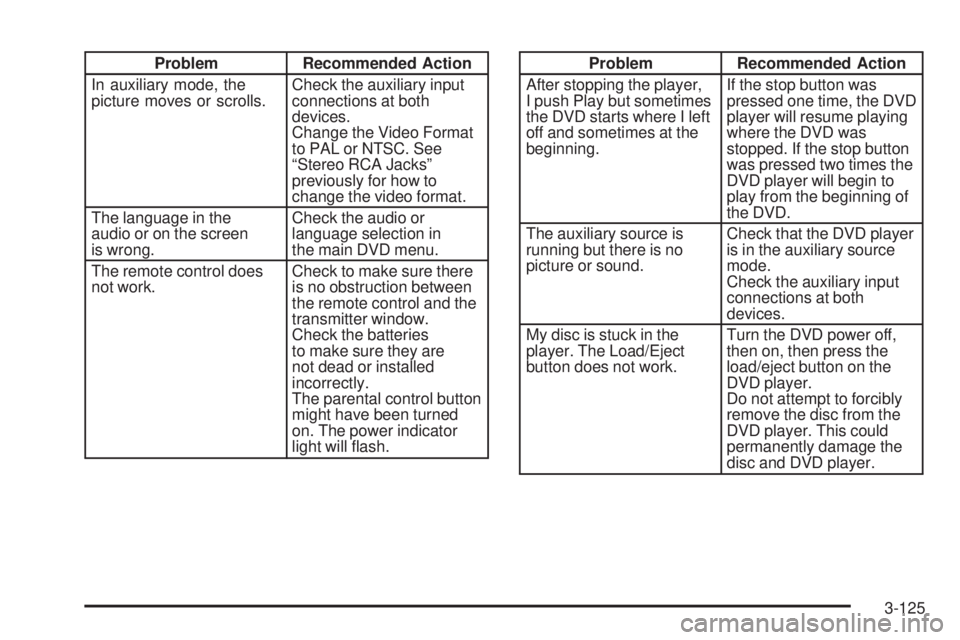
Problem Recommended Action
In auxiliary mode, the
picture moves or scrolls.Check the auxiliary input
connections at both
devices.
Change the Video Format
to PAL or NTSC. See
“Stereo RCA Jacks”
previously for how to
change the video format.
The language in the
audio or on the screen
is wrong.Check the audio or
language selection in
the main DVD menu.
The remote control does
not work.Check to make sure there
is no obstruction between
the remote control and the
transmitter window.
Check the batteries
to make sure they are
not dead or installed
incorrectly.
The parental control button
might have been turned
on. The power indicator
light will ash.Problem Recommended Action
After stopping the player,
I push Play but sometimes
the DVD starts where I left
off and sometimes at the
beginning.If the stop button was
pressed one time, the DVD
player will resume playing
where the DVD was
stopped. If the stop button
was pressed two times the
DVD player will begin to
play from the beginning of
the DVD.
The auxiliary source is
running but there is no
picture or sound.Check that the DVD player
is in the auxiliary source
mode.
Check the auxiliary input
connections at both
devices.
My disc is stuck in the
player. The Load/Eject
button does not work.Turn the DVD power off,
then on, then press the
load/eject button on the
DVD player.
Do not attempt to forcibly
remove the disc from the
DVD player. This could
permanently damage the
disc and DVD player.
3-125
Page 427 of 600
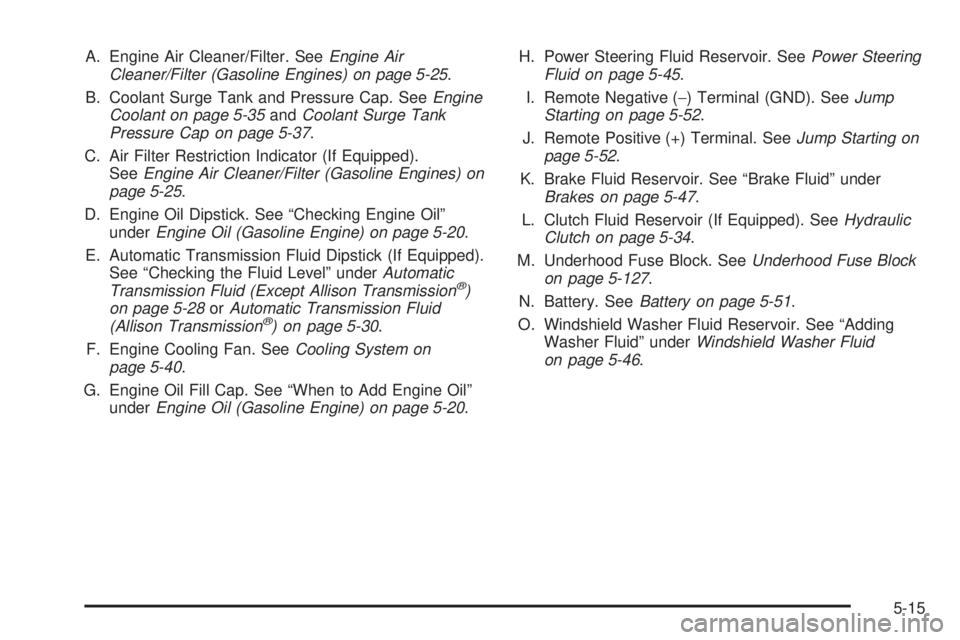
A. Engine Air Cleaner/Filter. SeeEngine Air
Cleaner/Filter (Gasoline Engines) on page 5-25.
B. Coolant Surge Tank and Pressure Cap. SeeEngine
Coolant on page 5-35andCoolant Surge Tank
Pressure Cap on page 5-37.
C. Air Filter Restriction Indicator (If Equipped).
SeeEngine Air Cleaner/Filter (Gasoline Engines) on
page 5-25.
D. Engine Oil Dipstick. See “Checking Engine Oil”
underEngine Oil (Gasoline Engine) on page 5-20.
E. Automatic Transmission Fluid Dipstick (If Equipped).
See “Checking the Fluid Level” underAutomatic
Transmission Fluid (Except Allison Transmission
®)
on page 5-28orAutomatic Transmission Fluid
(Allison Transmission
®) on page 5-30.
F. Engine Cooling Fan. SeeCooling System on
page 5-40.
G. Engine Oil Fill Cap. See “When to Add Engine Oil”
underEngine Oil (Gasoline Engine) on page 5-20.H. Power Steering Fluid Reservoir. SeePower Steering
Fluid on page 5-45.
I. Remote Negative (−) Terminal (GND). SeeJump
Starting on page 5-52.
J. Remote Positive (+) Terminal. SeeJump Starting on
page 5-52.
K. Brake Fluid Reservoir. See “Brake Fluid” under
Brakes on page 5-47.
L. Clutch Fluid Reservoir (If Equipped). SeeHydraulic
Clutch on page 5-34.
M. Underhood Fuse Block. SeeUnderhood Fuse Block
on page 5-127.
N. Battery. SeeBattery on page 5-51.
O. Windshield Washer Fluid Reservoir. See “Adding
Washer Fluid” underWindshield Washer Fluid
on page 5-46.
5-15