radio GMC SIERRA 2006 Repair Manual
[x] Cancel search | Manufacturer: GMC, Model Year: 2006, Model line: SIERRA, Model: GMC SIERRA 2006Pages: 600, PDF Size: 3.49 MB
Page 308 of 600
PROG (Program):Press this button to play a station
you have programmed on the radio preset pushbuttons.
The radio will only seek preset stations with a strong
signal that are in the selected band.
When a cassette tape is playing, press this button to
play the other side of the tape.
When a CD is playing in the CD changer, press this
button to go to the next available CD, if multiple CDs
are loaded.
QSOURCER:Press this button to switch between
FM1, FM2, AM, or XM1 or XM2 (if equipped), or a
cassette tape or CD. The cassette or CD must be
loaded to play. Available loaded sources are shown
on the display as a tape or a CD symbol.
QSEEKR:Press the up or the down arrow to go to
the next or to the previous radio station and stay there.
The radio will only seek stations with a strong signal that
are in the selected band.
When a cassette tape or CD is playing, press the up or
the down arrow to fast forward or reverse.
QVOLR(Volume):Press the up or the down arrow
to increase or to decrease the volume.
Radio Reception
You may experience frequency interference and static
during normal radio reception if items such as cellphone
chargers, vehicle convenience accessories, and external
electronic devices are plugged into the accessory power
outlet. If there is interference or static, unplug the item
from the accessory power outlet.
AM
The range for most AM stations is greater than for FM,
especially at night. The longer range can cause station
frequencies to interfere with each other. For better radio
reception, most AM radio stations will boost the power
levels during the day, and then reduce these levels during
the night. Static can also occur when things like storms
and power lines interfere with radio reception. When this
happens, try reducing the treble on your radio.
FM Stereo
FM stereo will give the best sound, but FM signals will
reach only about 10 to 40 miles (16 to 65 km). Tall
buildings or hills can interfere with FM signals, causing
the sound to fade in and out.
3-130
Page 309 of 600
XM™ Satellite Radio Service
XM™ Satellite Radio Service gives digital radio
reception from coast-to-coast in the 48 contiguous
United States, and in Canada (if available). Just as
with FM, tall buildings or hills can interfere with satellite
radio signals, causing the sound to fade in and out.
In addition, traveling or standing under heavy foliage,
bridges, garages, or tunnels may cause loss of the XM™
signal for a period of time. The radio may display NO
SIGNAL to indicate interference.
Care of the Cassette Tape Player
A tape player that is not cleaned regularly can cause
reduced sound quality, ruined cassettes, or a damaged
mechanism. Cassette tapes should be stored in their
cases away from contaminants, direct sunlight, and
extreme heat. If they are not, they may not operate
properly or may cause failure of the tape player.
The tape player should be cleaned regularly after every
50 hours of use. The radio may display CLEAN to
indicate that the tape player has been used for 50 hours
without resetting the tape clean timer. If this message
appears on the display, the cassette tape player needs to
be cleaned. It will still play tapes, but it should be cleaned
as soon as possible to prevent damage to the tapes and
player. If there is a reduction in sound quality, try a known
good cassette to see if the tape or the tape player is at
fault. If this other cassette has no improvement in sound
quality, clean the tape player.For best results, use a scrubbing action, non-abrasive
cleaning cassette with pads which scrub the tape head as
the hubs of the cleaner cassette turn. The recommended
cleaning cassette is available through your dealer.
When cleaning the cassette tape player with the
recommended non-abrasive cleaning cassette, it is
possible that the cassette may eject, because the cut
tape detection feature on the radio may recognize it as
a broken tape, in error. To prevent the cleaning cassette
from being ejected, use the following steps:
1. Turn the ignition on.
2. Turn the radio off.
3. Press and hold the TAPE DISC button for
ve seconds. READY will appear on the display
and the cassette symbol will ash for ve seconds.
4. Insert the scrubbing action cleaning cassette.
5. Eject the cleaning cassette after the manufacturer’s
recommended cleaning time.
When the cleaning cassette has been ejected, the
cut tape detection feature will be active again.
A non-scrubbing action, wet-type cleaner which uses a
cassette with a fabric belt to clean the tape head can be
used. This type of cleaning cassette will not eject on its
own. A non-scrubbing action cleaner may not clean as
thoroughly as the scrubbing type cleaner. The use of a
non-scrubbing action, dry-type cleaning cassette is not
recommended.
3-131
Page 310 of 600
After the player is cleaned, press and hold the eject
button for ve seconds to reset the CLEAN indicator.
The radio will display --- or CLEANED to show the
indicator was reset.
Cassettes are subject to wear and the sound quality
may degrade over time. Always make sure the cassette
tape is in good condition before the tape player is
serviced.
Care of Your CDs and DVDs
Handle CDs carefully. Store them in their original cases
or other protective cases and away from direct sunlight
and dust. The CD player scans the bottom surface of the
disc. If the surface of a CD is damaged, such as cracked,
broken, or scratched, the CD will not play properly or not
at all. If the surface of a CD is soiled, take a soft, lint free
cloth or dampen a clean, soft cloth in a mild, neutral
detergent solution mixed with water, and clean it.
Make sure the wiping process starts from the center to
the edge.Do not touch the bottom side of a CD while handling it;
this could damage the surface. Pick up CDs by grasping
the outer edges or the edge of the hole and the
outer edge.
Care of the CD and DVD Player
The use of CD lens cleaners for CDs is not advised,
due to the risk of contaminating the lens of the CD optics
with lubricants internal to the CD mechanism.
Fixed Mast Antenna
The xed mast antenna can withstand most car washes
without being damaged. If the mast should ever become
slightly bent, straighten it out by hand. If the mast is badly
bent, replace it.
Check occasionally to make sure the mast is still
tightened to the cowl. If tightening is required, tighten
by hand, then with a wrench one quarter turn.
3-132
Page 311 of 600
XM™ Satellite Radio Antenna
System
The XM™ Satellite Radio antenna is located on the roof
of your vehicle. Keep this antenna clear of snow and ice
build up for clear radio reception.
If your vehicle has a sunroof, the performance of the
XM™ system may be affected if the sunroof is open.
Loading items onto the roof of your vehicle can interfere
with the performance of the XM™ system. Make sure
the XM™ Satellite Radio antenna is not obstructed.
Chime Level Adjustment
The radio is used to adjust the vehicle’s chime level.
To change the volume level of the chime, press and hold
pushbutton 6 with the ignition on and the radio power off.
The volume level will change from the normal level to
loud, and LOUD will appear on the radio display. To
change back to the default or normal setting, press and
hold pushbutton 6 again. The volume level will change
from the loud level to normal, and NORMAL will appear
on the radio display. Each time the chime volume is
changed, three chimes will sound as an example of the
new volume selected. Removing the radio and not
replacing it with a factory radio or chime module will
disable vehicle chimes.
3-133
Page 322 of 600
The Traction Assist System, as delivered from the
factory, will automatically come on whenever you start
your vehicle. To limit wheel spin, especially in slippery
road conditions, you should always leave the system on.
But you can turn the TAS off if you ever need to. You
should turn the TAS off if your vehicle ever gets stuck in
sand, mud or snow and rocking the vehicle is required.
SeeRocking Your Vehicle to Get It Out on page 4-46and
If Your Vehicle is Stuck in Sand, Mud, Ice or Snow on
page 4-46.
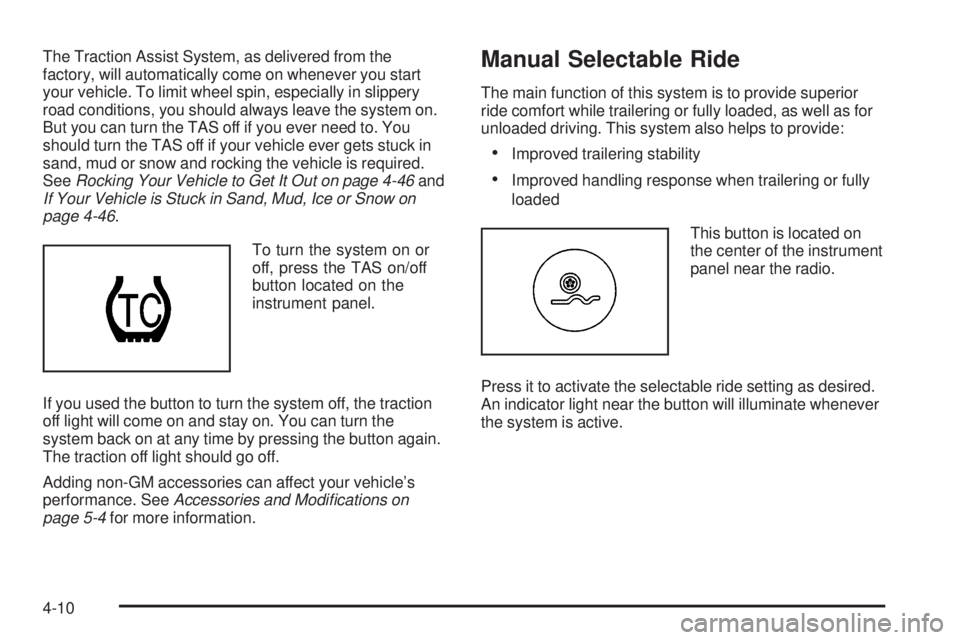
To turn the system on or
off, press the TAS on/off
button located on the
instrument panel.
If you used the button to turn the system off, the traction
off light will come on and stay on. You can turn the
system back on at any time by pressing the button again.
The traction off light should go off.
Adding non-GM accessories can affect your vehicle’s
performance. SeeAccessories and Modications on
page 5-4for more information.Manual Selectable Ride
The main function of this system is to provide superior
ride comfort while trailering or fully loaded, as well as for
unloaded driving. This system also helps to provide:
Improved trailering stability
Improved handling response when trailering or fully
loaded
This button is located on
the center of the instrument
panel near the radio.
Press it to activate the selectable ride setting as desired.
An indicator light near the button will illuminate whenever
the system is active.
4-10
Page 465 of 600
Notice:Ignoring these steps could result in costly
damage to your vehicle that would not be covered
by your warranty.
Trying to start your vehicle by pushing or pulling it
will not work, and it could damage your vehicle.
1. Check the other vehicle. It must have a 12-volt
battery with a negative ground system.
Notice:If the other vehicle’s system is not a 12-volt
system with a negative ground, both vehicles can
be damaged. Only use vehicles with 12-volt systems
with negative grounds to jump start your vehicle.
2. If you have a vehicle with a diesel engine with two
batteries (or more), you should know before you
begin that, especially in cold weather, you may not
be able to get enough power from a single battery in
another vehicle to start your diesel engine.
If your vehicle has more than one battery, use the
battery that is closer to the starter — this will reduce
electrical resistance.3. Get the vehicles close enough so the jumper cables
can reach, but be sure the vehicles are not touching
each other. If they are, it could cause a ground
connection you do not want. You would not be able
to start your vehicle, and the bad grounding
could damage the electrical systems.
To avoid the possibility of the vehicles rolling, set
the parking brake rmly on both vehicles involved in
the jump start procedure. Put an automatic
transmission in PARK (P) or a manual transmission
in NEUTRAL before setting the parking brake.
If you have a four-wheel-drive vehicle, be sure the
transfer case
is in a drive gear, not in NEUTRAL.
Notice:If you leave your radio or other accessories
on during the jump starting procedure, they could
be damaged. The repairs would not be covered
by your warranty. Always turn off your radio and
other accessories when jump starting your vehicle.
4. Turn off the ignition on both vehicles. Unplug
unnecessary accessories plugged into the cigarette
lighter or accessory power outlets. Turn off the radio
and all lamps that are not needed. This will avoid
sparks and help save both batteries. And it could
save the radio!
5-53
Page 535 of 600
Electrical System
Add-On Electrical Equipment
Notice:Don’t add anything electrical to your vehicle
unless you check with your dealer rst. Some
electrical equipment can damage your vehicle and
the damage wouldn’t be covered by your warranty.
Some add-on electrical equipment can keep other
components from working as they should.
Your vehicle has an airbag system. Before attempting to
add anything electrical to your vehicle, seeServicing
Your Airbag-Equipped Vehicle on page 1-86.
Windshield Wiper Fuses
The windshield wiper motor is protected by an internal
circuit breaker and a fuse. If the motor overheats due to
heavy snow, etc., the wiper will stop until the motor
cools. If the overload is caused by some electrical
problem and not snow, etc., be sure to get it xed.
Power Windows and Other
Power Options
Circuit breakers protect the power windows and other
power accessories. When the current load is too heavy,
the circuit breaker opens and closes, protecting the
circuit until the problem is xed or goes away.
Fuses and Circuit Breakers
The wiring circuits in your vehicle are protected from
short circuits by a combination of fuses, circuit breakers
and fusible thermal links. This greatly reduces the
chance of res caused by electrical problems.
Look at the silver-colored band inside the fuse. If the
band is broken or melted, replace the fuse. Be sure you
replace a bad fuse with a new one of the identical
size and rating.
If you ever have a problem on the road and don’t have
a spare fuse, you can borrow one that has the same
amperage. Just pick some feature of your vehicle
that you can get along without – like the radio or
cigarette lighter – and use its fuse, if it is the correct
amperage. Replace it as soon as you can.
5-123
Page 543 of 600
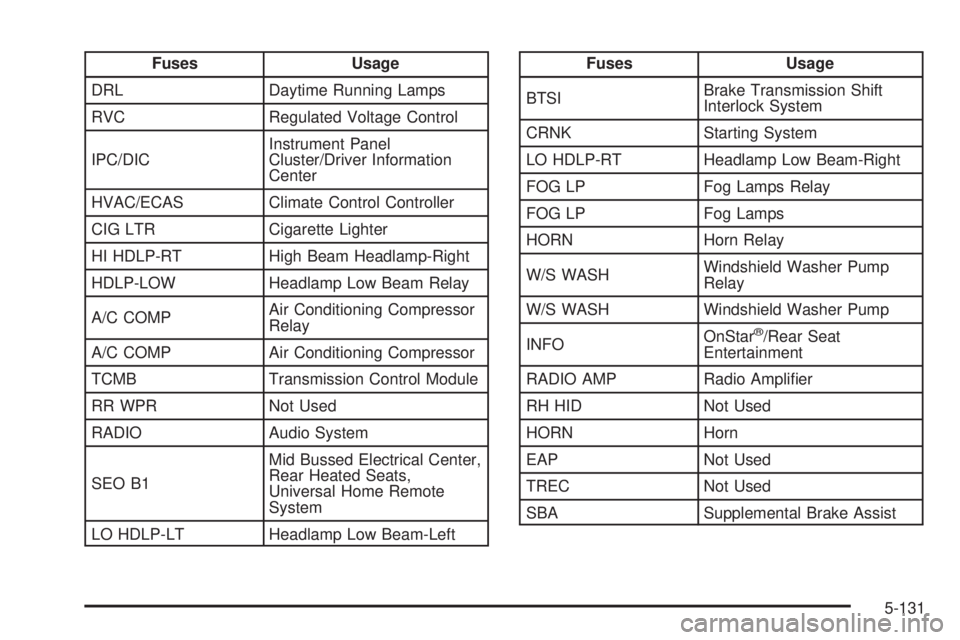
Fuses Usage
DRL Daytime Running Lamps
RVC Regulated Voltage Control
IPC/DICInstrument Panel
Cluster/Driver Information
Center
HVAC/ECAS Climate Control Controller
CIG LTR Cigarette Lighter
HI HDLP-RT High Beam Headlamp-Right
HDLP-LOW Headlamp Low Beam Relay
A/C COMPAir Conditioning Compressor
Relay
A/C COMP Air Conditioning Compressor
TCMB Transmission Control Module
RR WPR Not Used
RADIO Audio System
SEO B1Mid Bussed Electrical Center,
Rear Heated Seats,
Universal Home Remote
System
LO HDLP-LT Headlamp Low Beam-LeftFuses Usage
BTSIBrake Transmission Shift
Interlock System
CRNK Starting System
LO HDLP-RT Headlamp Low Beam-Right
FOG LP Fog Lamps Relay
FOG LP Fog Lamps
HORN Horn Relay
W/S WASHWindshield Washer Pump
Relay
W/S WASH Windshield Washer Pump
INFOOnStar
®/Rear Seat
Entertainment
RADIO AMP Radio Amplier
RH HID Not Used
HORN Horn
EAP Not Used
TREC Not Used
SBA Supplemental Brake Assist
5-131
Page 587 of 600
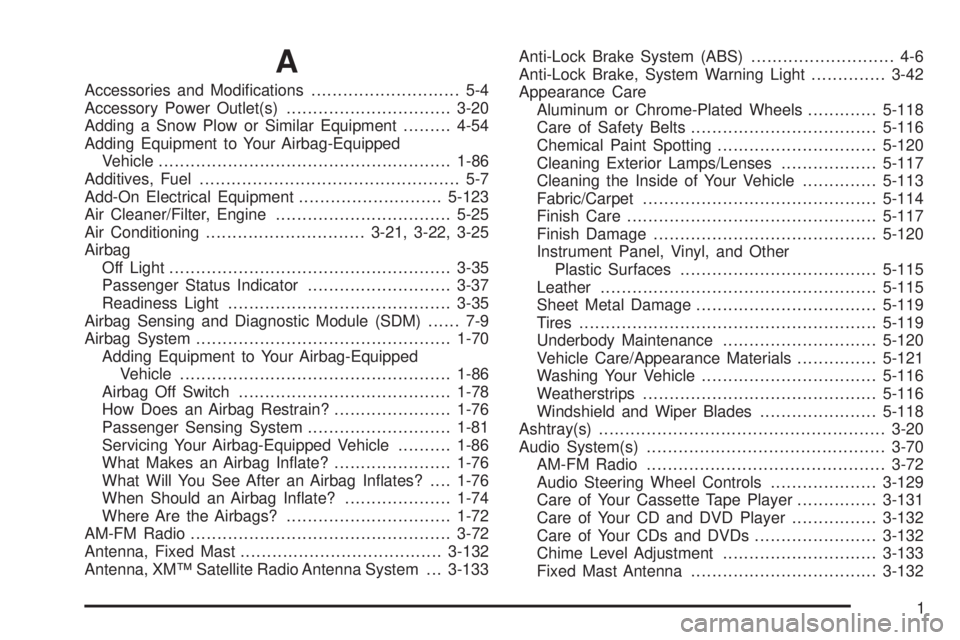
A
Accessories and Modications............................ 5-4
Accessory Power Outlet(s)...............................3-20
Adding a Snow Plow or Similar Equipment.........4-54
Adding Equipment to Your Airbag-Equipped
Vehicle.......................................................1-86
Additives, Fuel................................................. 5-7
Add-On Electrical Equipment...........................5-123
Air Cleaner/Filter, Engine.................................5-25
Air Conditioning..............................3-21, 3-22, 3-25
Airbag
Off Light.....................................................3-35
Passenger Status Indicator...........................3-37
Readiness Light..........................................3-35
Airbag Sensing and Diagnostic Module (SDM)...... 7-9
Airbag System................................................1-70
Adding Equipment to Your Airbag-Equipped
Vehicle...................................................1-86
Airbag Off Switch........................................1-78
How Does an Airbag Restrain?......................1-76
Passenger Sensing System...........................1-81
Servicing Your Airbag-Equipped Vehicle..........1-86
What Makes an Airbag Inate?......................1-76
What Will You See After an Airbag Inates?....1-76
When Should an Airbag Inate?....................1-74
Where Are the Airbags?...............................1-72
AM-FM Radio.................................................3-72
Antenna, Fixed Mast......................................3-132
Antenna, XM™ Satellite Radio Antenna System . . . 3-133Anti-Lock Brake System (ABS)........................... 4-6
Anti-Lock Brake, System Warning Light..............3-42
Appearance Care
Aluminum or Chrome-Plated Wheels.............5-118
Care of Safety Belts...................................5-116
Chemical Paint Spotting..............................5-120
Cleaning Exterior Lamps/Lenses..................5-117
Cleaning the Inside of Your Vehicle..............5-113
Fabric/Carpet............................................5-114
Finish Care...............................................5-117
Finish Damage..........................................5-120
Instrument Panel, Vinyl, and Other
Plastic Surfaces.....................................5-115
Leather....................................................5-115
Sheet Metal Damage..................................5-119
Tires........................................................5-119
Underbody Maintenance.............................5-120
Vehicle Care/Appearance Materials...............5-121
Washing Your Vehicle.................................5-116
Weatherstrips............................................5-116
Windshield and Wiper Blades......................5-118
Ashtray(s)......................................................3-20
Audio System(s).............................................3-70
AM-FM Radio.............................................3-72
Audio Steering Wheel Controls....................3-129
Care of Your Cassette Tape Player...............3-131
Care of Your CD and DVD Player................3-132
Care of Your CDs and DVDs.......................3-132
Chime Level Adjustment.............................3-133
Fixed Mast Antenna...................................3-132
1
Page 588 of 600
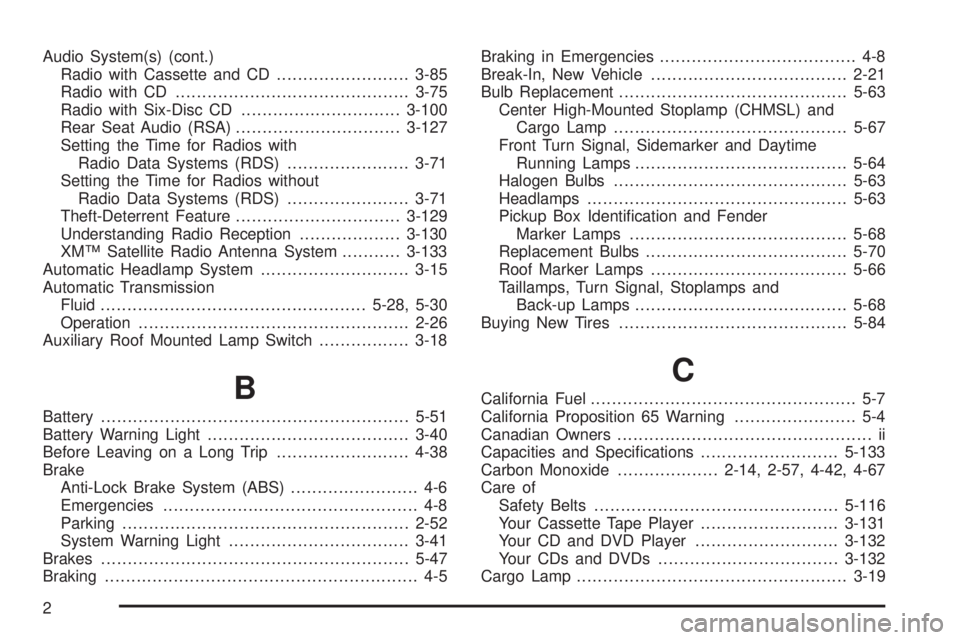
Audio System(s) (cont.)
Radio with Cassette and CD.........................3-85
Radio with CD............................................3-75
Radio with Six-Disc CD..............................3-100
Rear Seat Audio (RSA)...............................3-127
Setting the Time for Radios with
Radio Data Systems (RDS).......................3-71
Setting the Time for Radios without
Radio Data Systems (RDS).......................3-71
Theft-Deterrent Feature...............................3-129
Understanding Radio Reception...................3-130
XM™ Satellite Radio Antenna System...........3-133
Automatic Headlamp System............................3-15
Automatic Transmission
Fluid..................................................5-28, 5-30
Operation...................................................2-26
Auxiliary Roof Mounted Lamp Switch.................3-18
B
Battery..........................................................5-51
Battery Warning Light......................................3-40
Before Leaving on a Long Trip.........................4-38
Brake
Anti-Lock Brake System (ABS)........................ 4-6
Emergencies................................................ 4-8
Parking......................................................2-52
System Warning Light..................................3-41
Brakes..........................................................5-47
Braking........................................................... 4-5Braking in Emergencies..................................... 4-8
Break-In, New Vehicle.....................................2-21
Bulb Replacement...........................................5-63
Center High-Mounted Stoplamp (CHMSL) and
Cargo Lamp............................................5-67
Front Turn Signal, Sidemarker and Daytime
Running Lamps........................................5-64
Halogen Bulbs............................................5-63
Headlamps.................................................5-63
Pickup Box Identication and Fender
Marker Lamps.........................................5-68
Replacement Bulbs......................................5-70
Roof Marker Lamps.....................................5-66
Taillamps, Turn Signal, Stoplamps and
Back-up Lamps........................................5-68
Buying New Tires...........................................5-84
C
California Fuel.................................................. 5-7
California Proposition 65 Warning....................... 5-4
Canadian Owners................................................ ii
Capacities and Specications..........................5-133
Carbon Monoxide...................2-14, 2-57, 4-42, 4-67
Care of
Safety Belts..............................................5-116
Your Cassette Tape Player..........................3-131
Your CD and DVD Player...........................3-132
Your CDs and DVDs..................................3-132
Cargo Lamp...................................................3-19
2