air conditioning GMC SIERRA 2007 User Guide
[x] Cancel search | Manufacturer: GMC, Model Year: 2007, Model line: SIERRA, Model: GMC SIERRA 2007Pages: 680, PDF Size: 3.42 MB
Page 244 of 680
Defogging and Defrosting
Fog on the inside of the windows is a result of high
humidity (moisture) condensing on the cool window
glass. This can be minimized if the climate control
system is used properly. There are two modes to
clear fog or frost from the windshield.
Use the mode up and down arrows to select the
defog or defrost modes.
-(Defog):Press this button to clear the
windows of fog or moisture and warm the
passengers. This mode directs air to the
windshield, oor outlets, and side window vents.
When this mode is selected, the system turns
off recirculation and runs the air conditioning
compressor unless the outside temperature is
close to freezing. The recirculation mode cannot
be selected while in the defog mode. Do not drive
the vehicle until all the windows are clear.
0(Defrost):Press this button to remove fog or
frost from the windshield more quickly. This mode
directs a portion of the air to the windshield and side
window vents and some to the oor vents. In this
mode, the system will automatically force outside
air into your vehicle. The recirculation mode cannot
be selected while in the defrost mode. The air
conditioning compressor will run automatically in
this setting, unless the outside temperature is close
to freezing. Do not drive the vehicle until all the
windows are clear.
Rear Window Defogger
The rear window defogger uses a warming grid to
remove fog from the rear window.
<(Rear Window Defogger):If your vehicle
has this feature, press this button to turn the
defogger on or off. It will automatically turn
off several minutes after it has been activated.
The defogger can also be turned off by turning the
engine off. Do not drive the vehicle until all the
windows are clear.
244
Page 245 of 680
Notice:Do not use a razor blade or sharp
object to clear the inside rear window. Do not
adhere anything to the defogger grid lines
in the rear glass. These actions may damage
the rear defogger. Repairs would not be
covered by your warranty.
W(Heated Mirrors):If your vehicle has heated
outside rearview mirrors, the mirrors will heat
to help clear fog or frost from the surface of the
mirror when the rear window defog button is
pressed. SeeOutside Power Mirrors on page 176.
Outlet Adjustment
Use the air outlets located in the center and on
the side of the instrument panel to direct the
airow.
Operation Tips
Keep the hood and front air inlets free of ice,
snow, or any other obstruction, such as
leaves. The heater and defroster will work
better, reducing the chance of fogging
the inside of your windows.
When you enter a vehicle in cold weather, set
the fan speed to maximum airow for a few
moments before driving. This helps clear
the intake ducts of snow and moisture, and
reduces the chance of fogging the inside
of your windows.
Keep the air path under the front seats clear
of objects. This helps air to circulate
throughout your vehicle.
Adding outside equipment to the front of the
vehicle, such as hood-air deectors, may affect
the performance of the heating and air
conditioning system. Check with your dealer
before adding equipment to the outside of
your vehicle.
245
Page 281 of 680
As soon as it is safe to do so, carefully pull your
vehicle over to the side of the road and turn
the ignition off. Check the wiring connection to the
trailer and turn the ignition back on. This
message clears if the trailer is reconnected. This
message also clears if you acknowledge it. If
this message still displays, either your vehicle or
the trailer needs service. See your dealer.
See “Integrated Trailer Brake Control System”
underTowing a Trailer on page 445for more
information.
DRIVER DOOR OPEN
This message displays and a chime sounds if the
driver’s door is not fully closed and the vehicle
is in a drive gear. Stop and turn off the vehicle,
check the door for obstructions, and close the door
again. Check to see if the message still appears
on the DIC.
ENGINE HOT A/C (Air Conditioning)
TURNED OFF
This message displays when the engine coolant
becomes hotter than the normal operating
temperature. SeeEngine Coolant Temperature
Gage on page 258. To avoid added strain on a hot
engine, the air conditioning compressor
automatically turns off. When the coolant
temperature returns to normal, the air conditioning
compressor turns back on. You can continue to
drive your vehicle.
If this message continues to appear, have the
system repaired by your dealer as soon as
possible to avoid damage to the engine.
ENGINE OIL LOW ADD OIL
If your vehicle has an oil level sensor, this
message displays if the oil level in the vehicle is
low. Check the oil level and correct it as
necessary. You may need to let the vehicle cool
or warm up and cycle the ignition to be sure
this message clears.
This message clears itself after 10 seconds, until
the next ignition cycle. SeeEngine Oil (Gasoline
Engine) on page 500for additional information.
281
Page 473 of 680
Driving with a Trailer
{CAUTION:
If you have a rear-most window open and
you pull a trailer with your vehicle, carbon
monoxide (CO) could come into your
vehicle. You cannot see or smell CO. It
can cause unconsciousness or death. See
Engine Exhaust on page 167. To maximize
your safety when towing a trailer:
Have your exhaust system inspected
for leaks, and make necessary repairs
before starting on your trip.
Keep the rear-most windows closed.
CAUTION: (Continued)
CAUTION: (Continued)
If exhaust does come into your vehicle
through a window in the rear or
another opening, drive with your front,
main heating or cooling system on
and with the fan on any speed. This
will bring fresh, outside air into your
vehicle. Do not use the climate control
setting for maximum air because it
only recirculates the air inside your
vehicle. SeeClimate Control System
(With Air Conditioning ) on page 234
orClimate Control System (Heater
Only) on page 237.
Towing a trailer requires a certain amount of
experience. Before setting out for the open road,
you’ll want to get to know your rig. Acquaint
yourself with the feel of handling and braking with
the added weight of the trailer. And always
keep in mind that the vehicle you are driving is
now a good deal longer and not nearly as
responsive as your vehicle is by itself.
473
Page 525 of 680
Engine Fan Noise
If your vehicle has a clutched engine cooling fan,
when the clutch is engaged, the fan spins
faster to provide more air to cool the engine. In
most everyday driving conditions, the fan is
spinning slower and the clutch is not fully engaged.
This improves fuel economy and reduces fan
noise. Under heavy vehicle loading, trailer towing,
and/or high outside temperatures, the fan speed
increases as the clutch more fully engages, so you
may hear an increase in fan noise. This is
normal and should not be mistaken as the
transmission slipping or making extra shifts. It is
merely the cooling system functioning properly.
The fan will slow down when additional cooling is
not required and the clutch disengages.You may also hear this fan noise when you start
the engine. It will go away as the fan clutch
partially disengages.
If your vehicle has electric cooling fans, you may
hear the fans spinning at low speed during most
everyday driving. The fans may turn off if no cooling
is required. Under heavy vehicle loading, trailer
towing, and/or high outside temperatures, or if you
are operating your air conditioning system, the fans
may change to high speed and you may hear an
increase in fan noise. This is normal and indicates
that the cooling system is functioning properly. The
fans will change to low speed when additional
cooling is no longer required.
525
Page 556 of 680
(F) Service Description:The service description
indicates the load range and speed rating of a
tire. The load index can range from 1 to 279.
Speed ratings range from A to Z.
Tire Terminology and Denitions
Air Pressure:The amount of air inside the tire
pressing outward on each square inch of the
tire. Air pressure is expressed in pounds
per square inch (psi) or kilopascal (kPa).
Accessory Weight:This means the combined
weight of optional accessories. Some examples of
optional accessories are, automatic transmission,
power steering, power brakes, power windows,
power seats, and air conditioning.
Aspect Ratio:The relationship of a tire’s height
to its width.
Belt:A rubber coated layer of cords that is
located between the plies and the tread. Cords
may be made from steel or other reinforcing
materials.
Bead:The tire bead contains steel wires wrapped
by steel cords that hold the tire onto the rim.Bias Ply Tire:A pneumatic tire in which the plies
are laid at alternate angles less than 90 degrees
to the centerline of the tread.
Cold Tire Pressure:The amount of air pressure
in a tire, measured in pounds per square inch
(psi) or kilopascals (kPa) before a tire has built up
heat from driving. SeeInation - Tire Pressure
on page 559.
Curb Weight:This means the weight of a motor
vehicle with standard and optional equipment
including the maximum capacity of fuel, oil, and
coolant, but without passengers and cargo.
DOT Markings:A code molded into the sidewall
of a tire signifying that the tire is in compliance
with the U.S. Department of Transportation (DOT)
motor vehicle safety standards. The DOT code
includes the Tire Identication Number (TIN),
an alphanumeric designator which can also identify
the tire manufacturer, production plant, brand,
and date of production.
GVWR:Gross Vehicle Weight Rating. See
Loading Your Vehicle on page 425.
GAWR FRT:Gross Axle Weight Rating for the
front axle. SeeLoading Your Vehicle on page 425.
556
Page 614 of 680
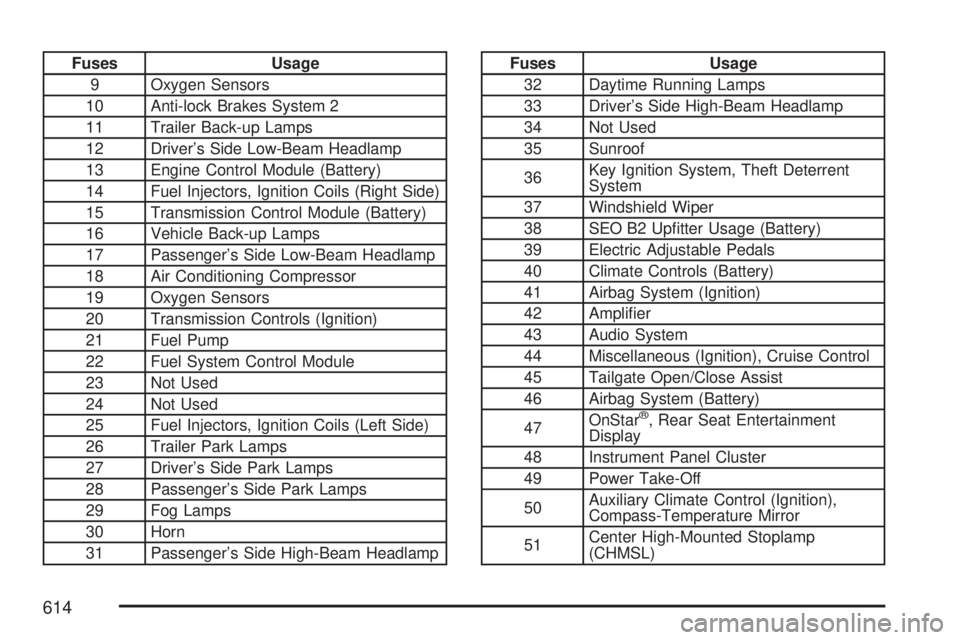
Fuses Usage
9 Oxygen Sensors
10 Anti-lock Brakes System 2
11 Trailer Back-up Lamps
12 Driver’s Side Low-Beam Headlamp
13 Engine Control Module (Battery)
14 Fuel Injectors, Ignition Coils (Right Side)
15 Transmission Control Module (Battery)
16 Vehicle Back-up Lamps
17 Passenger’s Side Low-Beam Headlamp
18 Air Conditioning Compressor
19 Oxygen Sensors
20 Transmission Controls (Ignition)
21 Fuel Pump
22 Fuel System Control Module
23 Not Used
24 Not Used
25 Fuel Injectors, Ignition Coils (Left Side)
26 Trailer Park Lamps
27 Driver’s Side Park Lamps
28 Passenger’s Side Park Lamps
29 Fog Lamps
30 Horn
31 Passenger’s Side High-Beam HeadlampFuses Usage
32 Daytime Running Lamps
33 Driver’s Side High-Beam Headlamp
34 Not Used
35 Sunroof
36Key Ignition System, Theft Deterrent
System
37 Windshield Wiper
38 SEO B2 Uptter Usage (Battery)
39 Electric Adjustable Pedals
40 Climate Controls (Battery)
41 Airbag System (Ignition)
42 Amplier
43 Audio System
44 Miscellaneous (Ignition), Cruise Control
45 Tailgate Open/Close Assist
46 Airbag System (Battery)
47OnStar
®, Rear Seat Entertainment
Display
48 Instrument Panel Cluster
49 Power Take-Off
50Auxiliary Climate Control (Ignition),
Compass-Temperature Mirror
51Center High-Mounted Stoplamp
(CHMSL)
614
Page 615 of 680
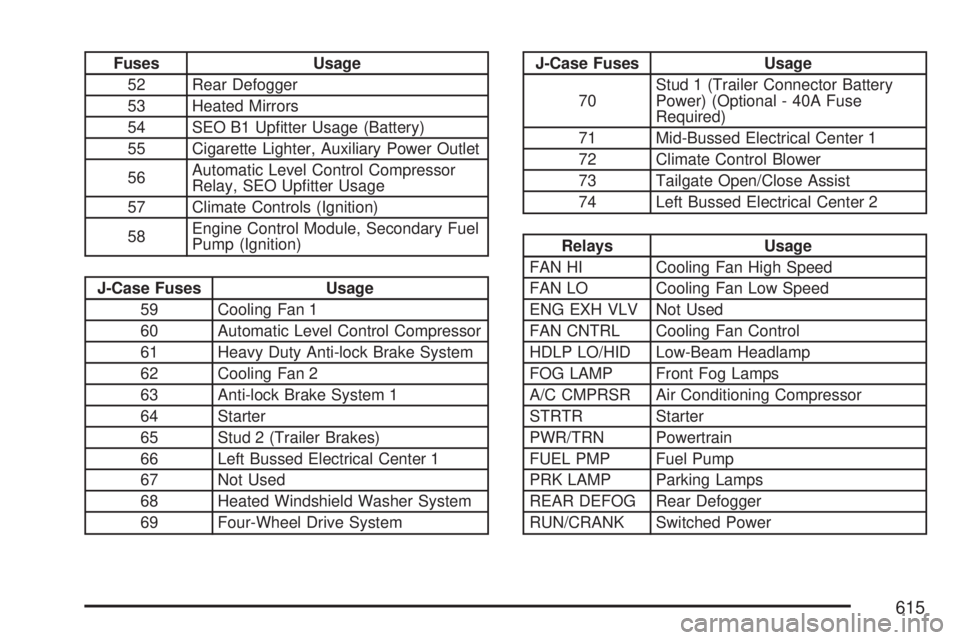
Fuses Usage
52 Rear Defogger
53 Heated Mirrors
54 SEO B1 Uptter Usage (Battery)
55 Cigarette Lighter, Auxiliary Power Outlet
56Automatic Level Control Compressor
Relay, SEO Uptter Usage
57 Climate Controls (Ignition)
58Engine Control Module, Secondary Fuel
Pump (Ignition)
J-Case Fuses Usage
59 Cooling Fan 1
60 Automatic Level Control Compressor
61 Heavy Duty Anti-lock Brake System
62 Cooling Fan 2
63 Anti-lock Brake System 1
64 Starter
65 Stud 2 (Trailer Brakes)
66 Left Bussed Electrical Center 1
67 Not Used
68 Heated Windshield Washer System
69 Four-Wheel Drive System
J-Case Fuses Usage
70Stud 1 (Trailer Connector Battery
Power) (Optional - 40A Fuse
Required)
71 Mid-Bussed Electrical Center 1
72 Climate Control Blower
73 Tailgate Open/Close Assist
74 Left Bussed Electrical Center 2
Relays Usage
FAN HI Cooling Fan High Speed
FAN LO Cooling Fan Low Speed
ENG EXH VLV Not Used
FAN CNTRL Cooling Fan Control
HDLP LO/HID Low-Beam Headlamp
FOG LAMP Front Fog Lamps
A/C CMPRSR Air Conditioning Compressor
STRTR Starter
PWR/TRN Powertrain
FUEL PMP Fuel Pump
PRK LAMP Parking Lamps
REAR DEFOG Rear Defogger
RUN/CRANK Switched Power
615
Page 616 of 680

Capacities and Specications
The following approximate capacities are given in English and metric conversions. SeeRecommended
Fluids and Lubricants on page 635for more information.
If your vehicle has the DURAMAX
®Diesel engine, see the DURAMAX®Diesel manual for more
information.
ApplicationCapacities
English Metric
Air Conditioning Refrigerant R134aFor the air conditioning system refrigerant charge
amount, see the refrigerant caution label located
under the hood. See your dealer for more
information.
Cooling System
4.3L V6 ** 16.5 qt 15.6 L
4.8L V8 ** 16.9 qt 16.0 L
5.3L V8 ** 16.9 qt 16.0 L
6.0L V8 * 16.4 qt 15.5 L
6.0L V8 ** 16.8 qt 15.9 L
* 2500, 3500 series
** 1500 series
Engine Oil with Filter
4.3L V6 4.5 qt 4.3 L
4.8L V8; 5.3L V8; 6.0L V8 6.0 qt 5.7 L
616
Page 629 of 680
Maintenance Footnotes
(Gasoline Engine)
This maintenance section applies to vehicles with
a gasoline engine. If your vehicle has a diesel
engine, see the maintenance schedule section in
the DURAMAX
®Diesel Engine Supplement.
†The U.S. Environmental Protection Agency or
the California Air Resources Board has determined
that the failure to perform this maintenance item
will not nullify the emission warranty or limit
recall liability prior to the completion of the
vehicle’s useful life. We, however, urge that all
recommended maintenance services be performed
at the indicated intervals and the maintenance
be recorded.
#Lubricate the front suspension, steering linkage,
transmission shift linkage, and parking brake
cable guides. Control arm ball joints on 2500/3500
series vehicles require lubrication but should
not be lubricated unless their temperature is 10°F
(−12°C) or higher, or they could be damaged.
Control arm ball joints on 1500 series vehicles are
maintenance-free. Vehicles used under severe
commercial operating conditions require lubrication
on a regular basis every 3,000 miles (5 000 km).(a)Visually inspect brake lines and hoses for
proper hook-up, binding, leaks, cracks, chang,
etc. Inspect disc brake pads for wear and rotors for
surface condition. Inspect drum brake
linings/shoes for wear or cracks. Inspect other
brake parts, including drums, wheel cylinders,
calipers, parking brake, etc.
(b)Visually inspect front and rear suspension and
steering system for damaged, loose or missing
parts, signs of wear or lack of lubrication. Inspect
power steering lines and hoses for proper
hook-up, binding, leaks, cracks, chang, etc.
Visually check constant velocity joints, rubber
boots, and axle seals for leaks.
(c)Visually inspect hoses and have them replaced
if they are cracked, swollen, or deteriorated.
Inspect all pipes, ttings and clamps; replace with
genuine GM parts as needed. To help ensure
proper operation, a pressure test of the cooling
system and pressure cap and cleaning the outside
of the radiator and air conditioning condenser is
recommended at least once a year.
(d)Visually inspect wiper blades for wear or
cracking. Replace wiper blades that appear worn
or damaged or that streak or miss areas of
the windshield.
629