radio GMC SIERRA 2007 User Guide
[x] Cancel search | Manufacturer: GMC, Model Year: 2007, Model line: SIERRA, Model: GMC SIERRA 2007Pages: 680, PDF Size: 3.42 MB
Page 223 of 680
When the DRL are on, only your DRL lamps will
be on. The taillamps, sidemarker, and other lamps
will not be on. The instrument panel back
lighting will not be on either.
When it begins to get dark, the automatic headlamp
system will switch from DRL to the headlamps.
When the headlamp switch is turned off, the
headlamps will go off.
Automatic Headlamp System
When it is dark enough outside, the automatic
headlamp system will turn on the headlamps at the
normal brightness, along with the taillamps,
sidemarker, parking lamps, and the instrument
panel lights. The radio back lighting will also be
dimly lit.
To turn off the automatic headlamp system, turn
the exterior lamps switch to the off position.
Turning off the automatic headlamp system with
the headlamp switch is not available for vehicles
rst sold in Canada.
Your vehicle has a light sensor located on the top
of the instrument panel in the defroster grille
that regulates when the automatic headlamps turn
on. Be sure it is not covered, or the headlamps
will come on whenever the ignition is on.The system may also turn on the headlamps when
driving through a parking garage, heavy overcast
weather, or a tunnel. This is normal.
There is a delay in the transition between the
daytime and nighttime operation of the Daytime
Running Lamps (DRL) and the automatic headlamp
systems so that driving under bridges or bright
overhead street lights does not affect the system.
The DRL and automatic headlamp system will only
be affected when the light sensor detects a change
in lighting lasting longer than the delay.
If you start your vehicle in a dark garage, the
automatic headlamp system will come on
immediately. Once you leave the garage, it will
take approximately one minute for the automatic
headlamp system to change to DRL if it is
bright enough outside. During that delay, your
instrument panel cluster may not be as bright as
usual. Make sure your instrument panel brightness
control is in the full bright position. SeeInstrument
Panel Brightness on page 225.
223
Page 225 of 680
Auxiliary Roof Mounted Lamp
If your vehicle has this feature, this button includes
wiring provisions for a dealer or a qualied
service center to install an auxiliary roof lamp.
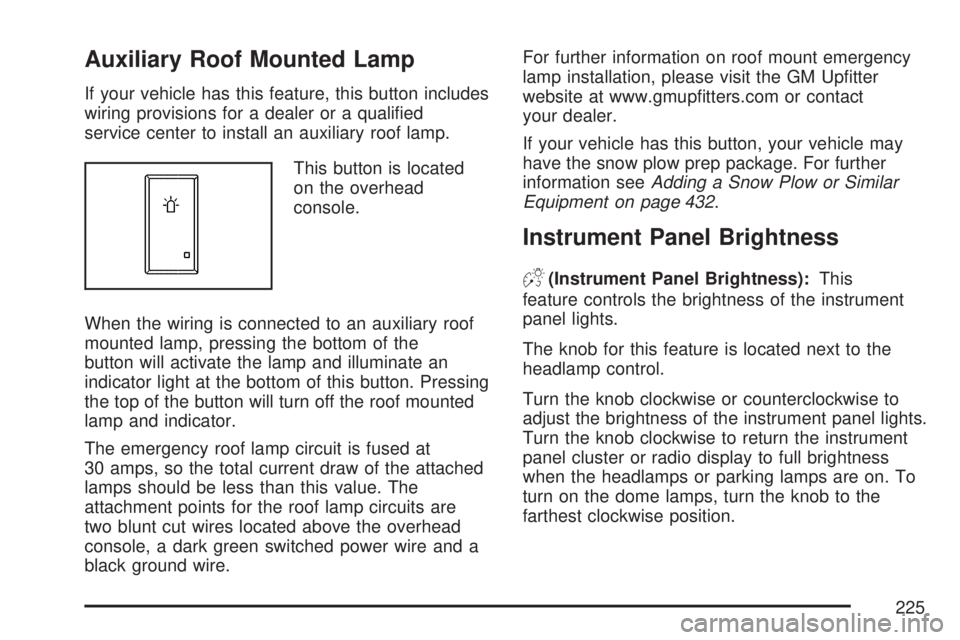
This button is located
on the overhead
console.
When the wiring is connected to an auxiliary roof
mounted lamp, pressing the bottom of the
button will activate the lamp and illuminate an
indicator light at the bottom of this button. Pressing
the top of the button will turn off the roof mounted
lamp and indicator.
The emergency roof lamp circuit is fused at
30 amps, so the total current draw of the attached
lamps should be less than this value. The
attachment points for the roof lamp circuits are
two blunt cut wires located above the overhead
console, a dark green switched power wire and a
black ground wire.For further information on roof mount emergency
lamp installation, please visit the GM Uptter
website at www.gmuptters.com or contact
your dealer.
If your vehicle has this button, your vehicle may
have the snow plow prep package. For further
information seeAdding a Snow Plow or Similar
Equipment on page 432.
Instrument Panel Brightness
D(Instrument Panel Brightness):This
feature controls the brightness of the instrument
panel lights.
The knob for this feature is located next to the
headlamp control.
Turn the knob clockwise or counterclockwise to
adjust the brightness of the instrument panel lights.
Turn the knob clockwise to return the instrument
panel cluster or radio display to full brightness
when the headlamps or parking lamps are on. To
turn on the dome lamps, turn the knob to the
farthest clockwise position.
225
Page 232 of 680
For Driver Information Center messages related to
URPA, seeDIC Warnings and Messages on
page 279.
If the vehicle bumper is damaged, the URPA
system may not work properly. Take the vehicle to
your dealer to repair the system.
Accessory Power Outlet(s)
Accessory power outlets can be used to connect
auxiliary electrical equipment, such as a cellular
telephone or CB radio.
The vehicle may have two accessory power outlets
located below the climate control system, or may
have one accessory power outlet and one cigarette
lighter. The cigarette lighter is designed to t only in
the receptacle closest to the driver. There may be
another accessory power outlet in the rear cargo
area. If the vehicle has a oor console, there is an
outlet inside the storage bin and one on the rear of
the oor console.To use an outlet, remove the protective cap.
When not in use, always cover the outlet with the
protective cap. The accessory power outlet is
operational at all times.
Notice:Leaving electrical equipment plugged
in for an extended period of time while the
vehicle is off will drain the battery. Power is
always supplied to the outlets. Always unplug
electrical equipment when not in use and
do not plug in equipment that exceeds
the maximum 20 ampere rating.
Certain power accessory plugs may not be
compatible to the accessory power outlet and
could result in blown vehicle or adapter fuses.
If you experience a problem, see your dealer
for additional information on the accessory
power plugs.
232
Page 254 of 680
If, after several seconds, both status indicator
lights remain on, or if there are no lights at
all, there may be a problem with the lights or the
passenger sensing system. See your
dealer/retailer for service.
{CAUTION:
If the airbag readiness light in the
instrument panel cluster ever comes on
and stays on, it means that something may
be wrong with the airbag system. If this
ever happens, have the vehicle serviced
promptly, because an adult-size person
sitting in the right front passenger’s seat
may not have the protection of the
airbag(s). SeeAirbag Readiness Light on
page 250for more on this, including
important safety information.
Charging System Light
If this light comes on
when the engine is
running, there could be
a problem with the
charging system.
This light will also stay on while the key is in RUN
until the engine is started.
If the light stays on after starting the engine it
could indicate a problem with the generator drive
belt, or some other charging system problem.
Have it checked right away. Driving while this light
is on could drain the battery.
If you must drive a short distance with this light
on, it helps to turn off all of the electrical
accessories, such as the radio and the blower.
254
Page 300 of 680
Audio System(s)
Determine which radio your vehicle has and then
read the pages following to familiarize yourself
with its features.
Driving without distraction is a necessity for a
safer driving experience. SeeDefensive Driving on
page 374. By taking a few moments to read this
manual and get familiar with your vehicle’s
audio system, you can use it with less effort, as
well as take advantage of its features. While your
vehicle is parked, set up your audio system by
presetting your favorite radio stations, setting the
tone and adjusting the speakers. Then, when
driving conditions permit, you can tune to
your favorite stations using the presets and
steering wheel controls if the vehicle has them.{CAUTION:
This system provides you with a far greater
access to audio stations and song listings.
Giving extended attention to entertainment
tasks while driving can cause a crash and
you or others can be injured or killed.
Always keep your eyes on the road and
your mind on the drive — avoid engaging
in extended searching while driving.
Keeping your mind on the drive is important for
safe driving. Here are some ways in which you can
help avoid distraction while driving.
While your vehicle is parked:
Familiarize yourself with all of its controls.
Familiarize yourself with its operation.
300
Page 301 of 680
Set up your audio system by presetting your
favorite radio stations, setting the tone, and
adjusting the speakers. Then, when driving
conditions permit, you can tune to your favorite
radio stations using the presets and steering
wheel controls if the vehicle has them.
Notice:Before adding any sound equipment to
your vehicle, such as an audio system, CD
player, CB radio, mobile telephone, or two-way
radio, make sure that it can be added by
checking with your dealer/retailer. Also, check
federal rules covering mobile radio and
telephone units. If sound equipment can be
added, it is very important to do it properly.
Added sound equipment can interfere with the
operation of your vehicle’s engine, radio, or
other systems, and even damage them. Your
vehicle’s systems can interfere with the
operation of sound equipment that has
been added.
Your vehicle has a feature called Retained
Accessory Power (RAP). With RAP, the audio
system can be played even after the ignition
is turned off. SeeRetained Accessory Power
(RAP) on page 134for more information.Setting the Time
AM-FM Radio with Optional CD Player
If your vehicle has an AM/FM radio with an
optional CD player, it has a clock button for setting
the time. With these types of radios, the clock
can be set with either the radio turned on or off.
Set the time by following these steps:
1. Press the clock button until the hour numbers
begin ashing on the display. Press the clock
button a second time and the minute
numbers begin ashing on the display. Press
the clock button a third time and the 12HR
or 24HR time format begins ashing.
2. While either the hour or the minute numbers
are ashing, turn the tune knob, located on
the upper right side of the radio faceplate,
clockwise or counterclockwise to increase or
decrease the time. While the 12HR or
24HR time format is ashing, turn the tune
knob clockwise or counterclockwise to select
the default time settings.
3. Press the clock button again until the clock
display stops ashing to set the currently
displayed time; otherwise, the ashing stops
after ve seconds and the current time
displayed will be automatically set.
301
Page 302 of 680
MP3 Radios with a Single CD or a
Single CD and DVD Player
If your vehicle has a radio with a single CD or a
CD and DVD player, it has a clock button for
setting the time and date.
To set the time and date, follow the instructions:
1. Press the clock button and the HR, MIN, MM,
DD, YYYY (hour, minute, month, day, and
year) displays.
2. Press the pushbutton located under any
one of the labels that you want to change.
Every time the pushbutton is pressed again,
the time or the date if selected, increases
by one.
Another way to increase the time or date, is
to press the right SEEK arrow or the FWD
(forward) button.
3. To decrease the time or date, press the left
SEEK arrow or the REV (reverse) button.
You can also turn the tune knob, located on
the upper right side of the radio, to adjust
the selected setting.
Changing the Time and Date Default
Settings
You can change the time default setting from
12 hours to 24 hours or change the date default
setting from month/day/year to day/month/year.
To change the time or date default settings, follow
these instructions:
1. Press the clock button and then the
pushbutton located under the forward arrow
that is currently displayed on the radio screen
until the time 12H (hour) and 24H (hour),
and the date MM/DD (month and day)
and DD/MM (day and month) displays.
2. Press the pushbutton located under the
desired option.
3. Press the clock button again to apply the
selected default, or let the screen time out.
302
Page 303 of 680
MP3 Radio with a Six-Disc CD Player
If your vehicle has a radio with a six-disc CD
player, the radio has a MENU button instead of
the clock button to set the time and date.
To set the time and date, follow these instructions:
1. Press the MENU button. Once the clock
option displays, press the pushbutton
located under that label. The HR, MIN, MM,
DD, YYYY (hour, minute, month, day,
and year) displays.
2. Press the pushbutton located under any
one of the time or date setting labels that
you want to change. Every time the
pushbutton is pressed again, the time or the
date if selected, increases by one.
Another way to increase the time or date, is
to press the right SEEK arrow or the FWD
(forward) button.
3. To decrease the time or date, press the left
SEEK arrow or the REV (reverse) button.
You can also turn the tune knob, located on
the upper right side of the radio, to adjust
the selected setting.
Changing the Time and Date Default
Settings
You can change the time default setting from
12 hours to 24 hours or change the date default
setting from month/day/year to day/month/year.
To change the time or date default settings, follow
these instructions:
1. Press the MENU button. Once the clock
option displays, press the pushbutton
located under the forward arrow that is
currently displayed on the radio screen until
the 12H (hour) and 24H (hour), and the
date MM/DD (month and day) and DD/MM
(day and month) displays.
2. Press the pushbutton located under the
desired option.
3. Press the MENU button again to apply the
selected default, or let the screen time out.
303
Page 304 of 680
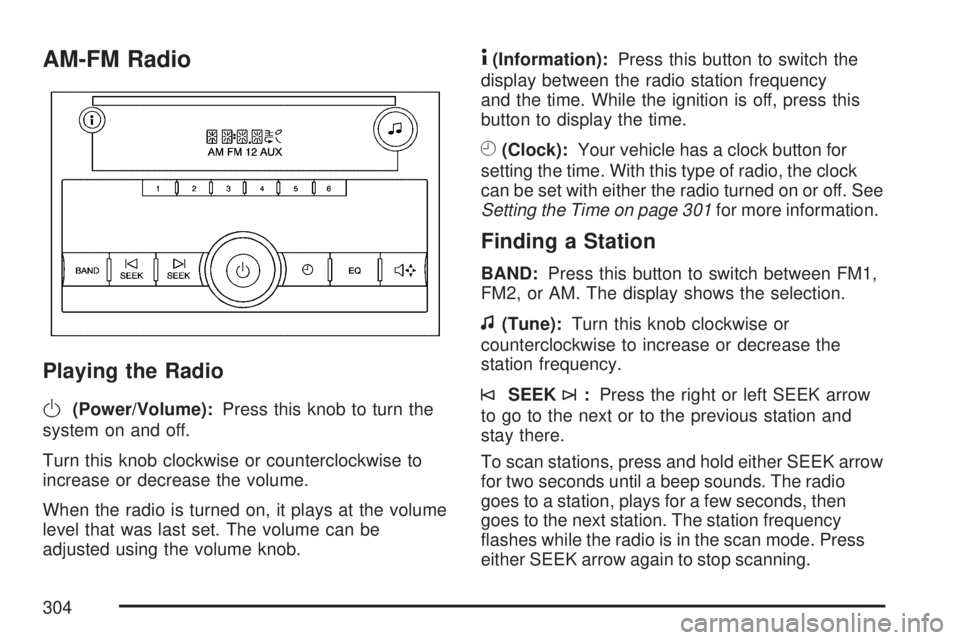
AM-FM Radio
Playing the Radio
O
(Power/Volume):Press this knob to turn the
system on and off.
Turn this knob clockwise or counterclockwise to
increase or decrease the volume.
When the radio is turned on, it plays at the volume
level that was last set. The volume can be
adjusted using the volume knob.
4(Information):Press this button to switch the
display between the radio station frequency
and the time. While the ignition is off, press this
button to display the time.
H(Clock):Your vehicle has a clock button for
setting the time. With this type of radio, the clock
can be set with either the radio turned on or off. See
Setting the Time on page 301for more information.
Finding a Station
BAND:Press this button to switch between FM1,
FM2, or AM. The display shows the selection.
f(Tune):Turn this knob clockwise or
counterclockwise to increase or decrease the
station frequency.
©SEEK¨:Press the right or left SEEK arrow
to go to the next or to the previous station and
stay there.
To scan stations, press and hold either SEEK arrow
for two seconds until a beep sounds. The radio
goes to a station, plays for a few seconds, then
goes to the next station. The station frequency
ashes while the radio is in the scan mode. Press
either SEEK arrow again to stop scanning.
304
Page 305 of 680
The radio seeks and scans stations only with a
strong signal that are in the selected band.
To scan presets within the current selected band,
press and hold either seek arrow for four seconds
until a double beep sounds. The radio goes to a
stored preset, plays for a few seconds if a strong
signal is present, then goes to the next stored
preset. The station frequency ashes while the
radio is in the scan mode.
Setting Preset Stations
Up to 18 stations (six FM1, six FM2, and six AM),
can be programmed on the six numbered
pushbuttons, by performing the following steps:
1. Turn the radio on.
2. Press BAND to select FM1, FM2, or AM.
3. Tune in the desired station.
4. Press and hold one of the six numbered
pushbuttons for three seconds until a beep
sounds. Whenever that pushbutton is pressed
and released, the station that was set, returns.
5. Repeat the Steps 2-4 for each pushbutton.
Setting the Tone (Bass/Treble)
Bass/Treble:To adjust the bass or treble, press
the tune knob or the EQ button until the desired
tone control label displays. Turn the tune
knob clockwise or counterclockwise to increase or
decrease the setting. The display shows the
current bass or treble level. If a station’s frequency
is weak, or if there is static, decrease the treble.
Adjusting the Speakers (Balance/Fade)
`
(Balance/Fade):To adjust the balance or
fade, press this button or the tune knob until the
desired speaker control label displays. Turn
the tune knob clockwise or counterclockwise to
adjust the setting.
The setting can also be adjusted by pressing the
seek arrows.
Radio Messages
Loc (Locked):This message displays while the
THEFTLOCK®system has locked up the radio.
Take the vehicle to your dealer for service.
If any error occurs repeatedly or if an error cannot
be corrected, contact your dealer.
305