change time GMC SIERRA 2007 Owner's Guide
[x] Cancel search | Manufacturer: GMC, Model Year: 2007, Model line: SIERRA, Model: GMC SIERRA 2007Pages: 680, PDF Size: 3.42 MB
Page 333 of 680
Playing a DVD
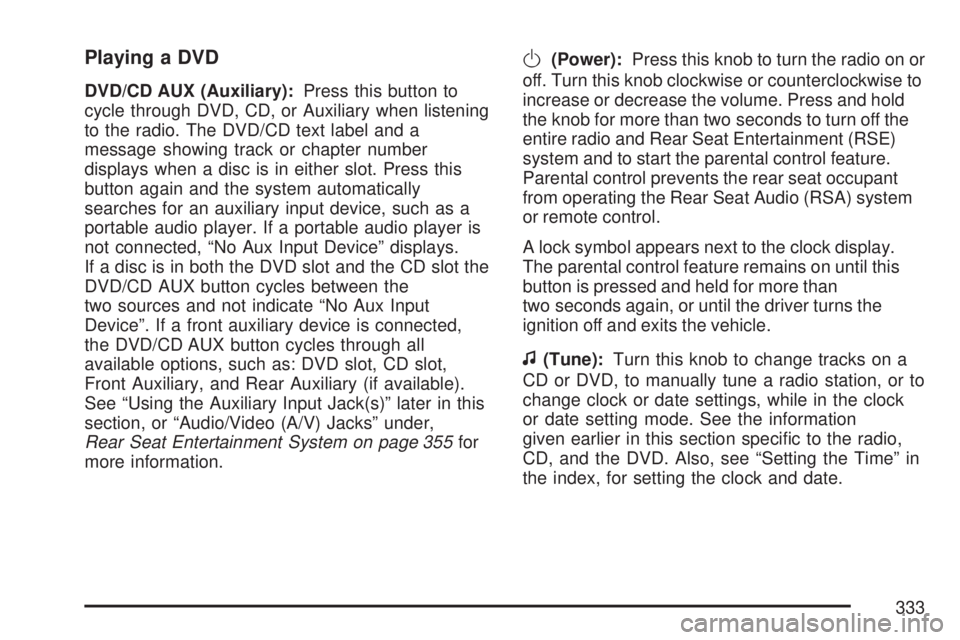
DVD/CD AUX (Auxiliary):Press this button to
cycle through DVD, CD, or Auxiliary when listening
to the radio. The DVD/CD text label and a
message showing track or chapter number
displays when a disc is in either slot. Press this
button again and the system automatically
searches for an auxiliary input device, such as a
portable audio player. If a portable audio player is
not connected, “No Aux Input Device” displays.
If a disc is in both the DVD slot and the CD slot the
DVD/CD AUX button cycles between the
two sources and not indicate “No Aux Input
Device”. If a front auxiliary device is connected,
the DVD/CD AUX button cycles through all
available options, such as: DVD slot, CD slot,
Front Auxiliary, and Rear Auxiliary (if available).
See “Using the Auxiliary Input Jack(s)” later in this
section, or “Audio/Video (A/V) Jacks” under,
Rear Seat Entertainment System on page 355for
more information.
O(Power):Press this knob to turn the radio on or
off. Turn this knob clockwise or counterclockwise to
increase or decrease the volume. Press and hold
the knob for more than two seconds to turn off the
entire radio and Rear Seat Entertainment (RSE)
system and to start the parental control feature.
Parental control prevents the rear seat occupant
from operating the Rear Seat Audio (RSA) system
or remote control.
A lock symbol appears next to the clock display.
The parental control feature remains on until this
button is pressed and held for more than
two seconds again, or until the driver turns the
ignition off and exits the vehicle.
f(Tune):Turn this knob to change tracks on a
CD or DVD, to manually tune a radio station, or to
change clock or date settings, while in the clock
or date setting mode. See the information
given earlier in this section specic to the radio,
CD, and the DVD. Also, see “Setting the Time” in
the index, for setting the clock and date.
333
Page 364 of 680
Battery Replacement
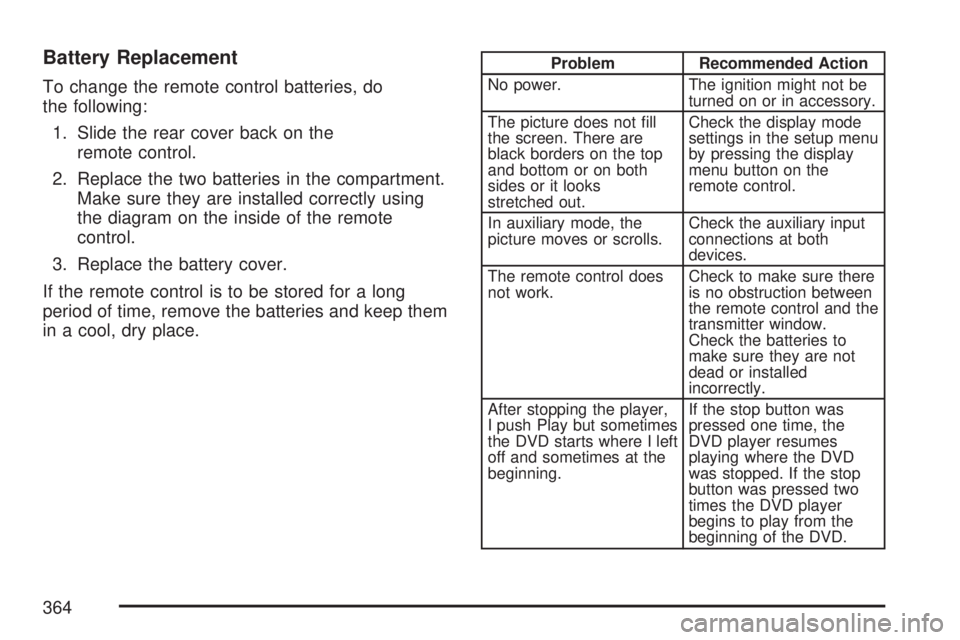
To change the remote control batteries, do
the following:
1. Slide the rear cover back on the
remote control.
2. Replace the two batteries in the compartment.
Make sure they are installed correctly using
the diagram on the inside of the remote
control.
3. Replace the battery cover.
If the remote control is to be stored for a long
period of time, remove the batteries and keep them
in a cool, dry place.
Problem Recommended Action
No power. The ignition might not be
turned on or in accessory.
The picture does not ll
the screen. There are
black borders on the top
and bottom or on both
sides or it looks
stretched out.Check the display mode
settings in the setup menu
by pressing the display
menu button on the
remote control.
In auxiliary mode, the
picture moves or scrolls.Check the auxiliary input
connections at both
devices.
The remote control does
not work.Check to make sure there
is no obstruction between
the remote control and the
transmitter window.
Check the batteries to
make sure they are not
dead or installed
incorrectly.
After stopping the player,
I push Play but sometimes
the DVD starts where I left
off and sometimes at the
beginning.If the stop button was
pressed one time, the
DVD player resumes
playing where the DVD
was stopped. If the stop
button was pressed two
times the DVD player
begins to play from the
beginning of the DVD.
364
Page 381 of 680
Remember: ABS does not change the time you
need to get your foot up to the brake pedal
or always decrease stopping distance. If you get
too close to the vehicle in front of you, you will not
have time to apply your brakes if that vehicle
suddenly slows or stops. Always leave enough
room up ahead to stop, even though you
have ABS.
Using ABS
Do not pump the brakes. Just hold the brake
pedal down rmly and let anti-lock work for you.
You may feel the brakes vibrate, or you may notice
some noise, but this is normal.
Braking in Emergencies
With ABS, you can steer and brake at the same
time. In many emergencies, steering can help you
more than even the very best braking.
Locking Rear Axle
If your vehicle has this feature, your locking rear
axle can give you additional traction on snow, mud,
ice, sand or gravel. It works like a standard axle
most of the time, but when one of the rear wheels
has no traction and the other does, this feature will
allow the wheel with traction to move the vehicle.
StabiliTrak®System
Your vehicle may be equipped with the
StabiliTrak®system which combines antilock
brake, traction and stability control systems and
helps the driver maintain directional control of the
vehicle in most driving conditions.
When you rst start your vehicle and begin to
drive away, the system performs several diagnostic
checks to ensure there are no problems. You
may hear or feel the system working. This
is normal and does not mean there is a problem
with your vehicle. The system should initialize
before the vehicle reaches 20 mph (32 km/h). In
some cases, it may take approximately two
miles of driving before the system initializes.
381
Page 388 of 680
So here are some tips for passing:
Drive ahead. Look down the road, to the
sides, and to crossroads for situations
that might affect your passing patterns. If you
have any doubt whatsoever about making
a successful pass, wait for a better time.
Watch for traffic signs, pavement markings,
and lines. If you can see a sign up ahead
that might indicate a turn or an intersection,
delay your pass. A broken center line
usually indicates it is all right to pass, providing
the road ahead is clear. Never cross a solid
line on your side of the lane or a double solid
line, even if the road seems empty of
approaching traffic.
Do not get too close to the vehicle you want
to pass while you are awaiting an opportunity.
For one thing, following too closely reduces
your area of vision, especially if you are
following a larger vehicle. Also, you will not
have adequate space if the vehicle ahead
suddenly slows or stops. Keep back a
reasonable distance.
When it looks like a chance to pass is coming
up, start to accelerate but stay in the right
lane and do not get too close. Time your moveso you will be increasing speed as the time
comes to move into the other lane. If the way
is clear to pass, you will have a running
start that more than makes up for the distance
you would lose by dropping back. And if
something happens to cause you to cancel
your pass, you need only slow down and drop
back again and wait for another opportunity.
If other vehicles are lined up to pass a slow
vehicle, wait your turn. But take care that
someone is not trying to pass you as you pull
out to pass the slow vehicle. Remember to
glance over your shoulder and check the
blind spot.
Check your vehicle’s mirrors, glance over your
shoulder, and start your left lane change signal
before moving out of the right lane to pass.
When you are far enough ahead of the passed
vehicle to see its front in your vehicle’s inside
mirror, activate the right lane change signal
and move back into the right lane. Remember
that, if your vehicle’s passenger side outside
mirror is convex, the vehicle you just passed
may seem to be farther away from you than it
really is.
388
Page 394 of 680
Getting Familiar with Off-Road Driving
It is a good idea to practice in an area that is
safe and close to home before you go into the
wilderness. Off-road driving does require some new
and different driving skills. Here is what we mean.
Tune your senses to different kinds of signals.
Your eyes, for example, need to constantly sweep
the terrain for unexpected obstacles. Your ears
need to listen for unusual tire or engine sounds.
With your arms, hands, feet, and body, you
will need to respond to vibrations and vehicle
bounce.
Controlling your vehicle is the key to successful
off-road driving. One of the best ways to
control your vehicle is to control your speed.Here are some things to keep in mind. At higher
speeds:You approach things faster and you have less
time to scan the terrain for obstacles.
You have less time to react.
You have more vehicle bounce when you
drive over obstacles.
You will need more distance for braking,
especially since you are on an unpaved
surface.
{CAUTION:
When you are driving off-road, bouncing
and quick changes in direction can easily
throw you out of position. This could
cause you to lose control and crash. So,
whether you are driving on or off the road,
you and your passengers should wear
safety belts.
394
Page 445 of 680
Towing a Trailer
If your vehicle has a diesel engine, see the
DURAMAX®Diesel manual for more information.
Do not tow a trailer during break-in. SeeNew
Vehicle Break-In on page 132for more information.
{CAUTION:
If you do not use the correct equipment
and drive properly, you can lose control
when you pull a trailer. For example, if the
trailer is too heavy, the brakes may not
work well — or even at all. You and your
passengers could be seriously injured. Pull
a trailer only if you have followed all the
steps in this section. Ask your dealer for
advice and information about towing a
trailer with your vehicle.Notice:Pulling a trailer improperly can
damage your vehicle and result in costly repairs
not covered by your warranty. To pull a trailer
correctly, follow the advice in this part, and see
your dealer for important information about
towing a trailer with your vehicle.
To identify the trailering capacity of your vehicle,
you should read the information in “Weight of
the Trailer” that appears later in this section.
Trailering is different than just driving your vehicle
by itself. Trailering means changes in acceleration,
braking, handling, durability and fuel economy.
Successful, safe trailering takes correct equipment,
and it has to be used properly.
That’s the reason for this part. In it are many
time-tested, important trailering tips and safety
rules. Many of these are important for your safety
and that of your passengers. So please read
this section carefully before you pull a trailer.
445
Page 470 of 680
Manual Trailer Brake Apply
The Manual Trailer Brake Apply Lever is located on
the Trailer Brake Control Panel and is used to apply
the trailer’s electric brakes independent of your
vehicle’s brakes. This lever is used in the Trailer
Gain Adjustment Procedure to properly adjust the
power output to the trailer brakes. Sliding the lever
to the left will apply only the trailer brakes. The
power output to the trailer is indicated in the Trailer
Brake Display Page in the DIC. If your vehicle’s
service brakes are applied while using the Manual
Trailer Brake Apply Lever, the trailer output power
will be the greater of the two.
The trailer and the vehicle’s brake lamps will come
on when either vehicle braking or manual trailer
brakes are applied.
Trailer Gain Adjustment Procedure
Trailer Gain should be set for a specic trailering
condition and must be adjusted any time
vehicle loading, trailer loading or road surface
conditions change.
Setting the Trailer Gain properly is needed for the
best trailer stopping performance. A trailer that
is over-gained may result in locked trailer brakes.
A trailer that is under-gained may result in notenough trailer braking. Both of these conditions
may result in poorer stopping and stability of
the vehicle and trailer.
Use the following procedure to correctly adjust
Trailer Gain for each towing condition:
1. Make sure the trailer brakes are in proper
working condition.
2. Connect a properly loaded trailer to the
vehicle and make all necessary mechanical
and electrical connections. SeeLoading Your
Vehicle on page 425for more information.
3. After the electrical connection is made to a
trailer equipped with electric brakes:
A TRAILER CONNECTED message will be
briey displayed on the DIC display.
The Trailer Brake Display Page will appear
on the DIC showing TRAILER GAIN and
TRAILER OUTPUT.
In the Trailer Output display on the
DIC, “------“will disappear if there is no
error present. Connecting a trailer without
electric brakes will not clear the six dashed
lines.
470
Page 471 of 680
4. Adjust the Trailer Gain by using the gain
adjustment (+ / -) buttons on the Trailer
Brake Control Panel.
5. Drive the vehicle with the trailer attached on a
level road surface representative of the towing
condition and free of traffic at about 20 to
25 mph (32 to 40 km/h) and fully apply
the Manual Trailer Brake Apply lever.
Adjusting trailer gain at speeds lower than
20 to 25 mph (32 to 40 km/h) may result in an
incorrect gain setting.
6. Adjust the Trailer Gain to just below the point
of trailer wheel lock-up, indicated by trailer
wheel squeal or puffs of tire smoke when
a trailer wheel locks.
Trailer wheel lock-up may not occur if towing
a heavily loaded trailer. In this case, adjust
the Trailer Gain to the highest allowable
setting for the towing condition.
7. Re-adjust Trailer Gain any time vehicle
loading, trailer loading or road surface
conditions change or if you notice trailer wheel
lock-up at any time while you are towingOther ITBC Related DIC Messages
In addition to displaying TRAILER GAIN and
TRAILER OUTPUT through the DIC, trailer
connection and ITBC system status is displayed in
the DIC.
TRAILER CONNECTED – This message will be
briey displayed when a trailer with electric brakes
is rst connected to the vehicle. This message
will automatically turn off in about ten seconds.
The driver can also acknowledge this message
before it automatically turns off.
CHECK TRAILER WIRING – This message will be
displayed if:
1. The ITBC system rst determines connection
to a trailer with electric brakes and then the
trailer harness becomes disconnected
from the vehicle.
If the disconnect occurs while the vehicle is
stationary, this message will automatically turn
off in about thirty seconds. This message
will also turn off if the driver acknowledges this
message off or if the trailer harness is
re-connected.
471
Page 492 of 680
To ensure quick starts in the wintertime, the E85
fuel must be formulated properly for your
climate according to ASTM specication D 5798.
If you have trouble starting on E85, it could
be because the E85 fuel is not properly formulated
for your climate. If this happens, switching to
gasoline or adding gasoline to the fuel tank can
improve starting. For good starting and heater
efficiency below 32°F (0°C), the fuel mix in the fuel
tank should contain no more than 70% ethanol.
It is best not to alternate repeatedly between
gasoline and E85. If you do switch fuels, it
is recommended that you add as much fuel as
possible — do not add less than three gallons
(11 L) when refueling. You should drive the vehicle
immediately after refueling for at least seven miles
(11 km) to allow the vehicle to adapt to the
change in ethanol concentration.
E85 has less energy per gallon than gasoline, so
you will need to rell the fuel tank more often
when using E85 than when you are using gasoline.
SeeFilling the Tank on page 493.Notice:Some additives are not compatible
with E85 fuel and can harm your vehicle’s fuel
system. Damage caused by additives would
not be covered by your new vehicle warranty.
Notice:Your vehicle was not designed for
fuel that contains methanol. Do not use
fuel containing methanol. It can corrode metal
parts in the fuel system and also damage
plastic and rubber parts. That damage would
not be covered under your warranty.
Fuels in Foreign Countries
If you plan on driving in another country outside
the United States or Canada, the proper fuel might
be hard to nd. Never use leaded gasoline or
any other fuel not recommended in the previous
text on fuel. Costly repairs caused by use of
improper fuel would not be covered by your
warranty.
To check the fuel availability, ask an auto club, or
contact a major oil company that does business
in the country where you will be driving.
492
Page 503 of 680
Notice:Use only engine oil identied as
meeting GM Standard GM6094M and showing
the American Petroleum Institute Certied
For Gasoline Engines starburst symbol. Failure
to use the recommended oil can result in
engine damage not covered by your warranty.
GM Goodwrench
®oil meets all the requirements
for your vehicle.
If you are in an area of extreme cold, where the
temperature falls below−20°F (−29°C), it is
recommended that you use either an SAE 5W-30
synthetic oil or an SAE 0W-30 oil. Both provide
easier cold starting and better protection for
the engine at extremely low temperatures.
Engine Oil Additives
Do not add anything to the oil. The recommended
oils with the starburst symbol that meet GM
Standard GM6094M are all you need for good
performance and engine protection.
Engine Oil Life System
When to Change Engine Oil
Your vehicle has a computer system that lets you
know when to change the engine oil and lter.
This is based on engine revolutions and engine
temperature, and not on mileage. Based on driving
conditions, the mileage at which an oil change
will be indicated can vary considerably. For the oil
life system to work properly, you must reset the
system every time the oil is changed.
When the system has calculated that oil life has
been diminished, it will indicate that an oil change
is necessary. A CHANGE ENGINE OIL SOON
message will come on. SeeDIC Warnings
and Messages on page 279. Change your oil
as soon as possible within the next 600 miles
(1 000 km). It is possible that, if you are driving
under the best conditions, the oil life system may
not indicate that an oil change is necessary for
over a year. However, your engine oil and
lter must be changed at least once a year and
at this time the system must be reset.
503