radio GMC SIERRA 2007 Repair Manual
[x] Cancel search | Manufacturer: GMC, Model Year: 2007, Model line: SIERRA, Model: GMC SIERRA 2007Pages: 680, PDF Size: 3.42 MB
Page 355 of 680
Navigation/Radio System
Your vehicle may have a navigation radio system.
The navigation system has built-in features
intended to minimize driver distraction. Technology
alone, no matter how advanced, can never
replace your own judgment. See the Navigation
System manual for some tips to help you
reduce distractions while driving.
Rear Seat Entertainment System
Your vehicle may have a DVD Rear Seat
Entertainment (RSE) system. The RSE system
works with the vehicle’s audio system. The
DVD player is part of the front radio. The RSE
system includes a radio with a DVD player, a video
display screen, audio/video jacks, two wireless
headphones, and a remote control. SeeRadio with
CD and DVD (MP3) on page 322for more
information on the vehicle’s audio/DVD system.
Before You Drive
The RSE is designed for rear seat passengers
only. The driver cannot safely view the video
screen while driving and should not try to do so.
In severe or extreme weather conditions the
RSE system might not work until the temperature
is within the operating range. The operating
range for the RSE system is above−4°F (−20°C)
or below 140°F (60°C). If the temperature of
your vehicle is outside of this range, heat or cool
the vehicle until the temperature is within the
operating range of the RSE system.
Parental Control
The RSE system could have a Parental Control
feature, depending on the radio. The Parental
Control feature turns off the video screen and Rear
Seat Audio (RSA). This feature also disables all
button operations from the remote control and
all audio button operations from the RSA.
This feature can be used to gain the attention of
the rear passengers that are using headphones.
355
Page 356 of 680
To enable Parental Control, press and hold the
radio power button for more than two seconds. If
on, the radio, video screen, and RSA turns
off. If a DVD and/or CD is playing, it stops. While
Parental Control is on, either a padlock icon or
a text message comes on, depending on the radio.
When the radio is turned back on, the RSE
system remains in Parental Control.
To turn off Parental Control, press and hold the
radio power button for more than two seconds. The
video screen and RSA returns to the state they
were in before Parental Control was turned on and
if the padlock icon is on the display, it disappears.
Parental Control is also turned off by inserting
or ejecting a disc, by pressing the play icon on the
radio DVD display menu, or when the ignition is
turned off.Headphones
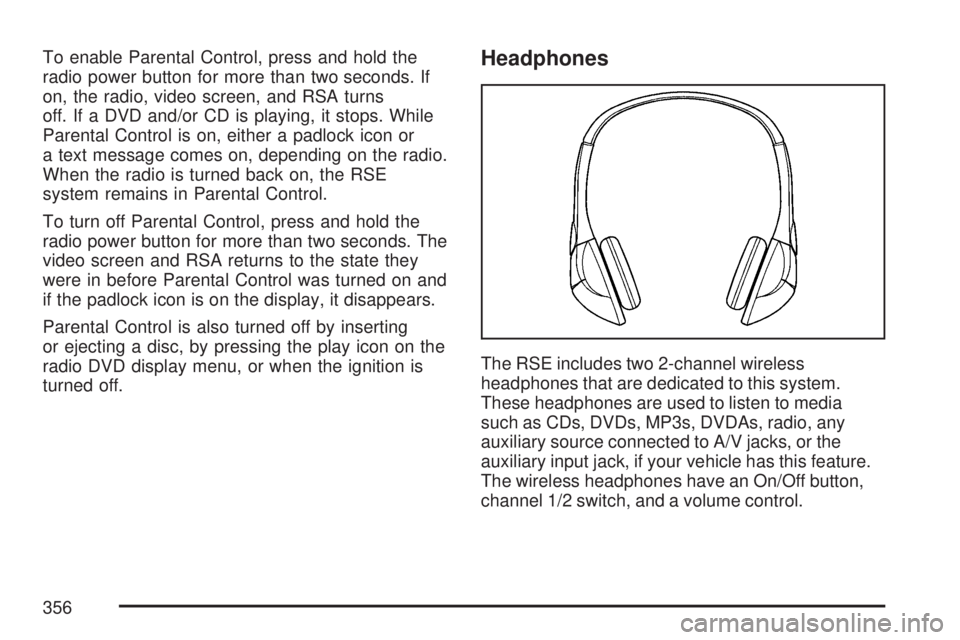
The RSE includes two 2-channel wireless
headphones that are dedicated to this system.
These headphones are used to listen to media
such as CDs, DVDs, MP3s, DVDAs, radio, any
auxiliary source connected to A/V jacks, or the
auxiliary input jack, if your vehicle has this feature.
The wireless headphones have an On/Off button,
channel 1/2 switch, and a volume control.
356
Page 358 of 680
Battery Replacement
To change the batteries on the headphones, do
the following:
1. Turn the screw with a coin or screw driver to
loosen the battery door located on the left
side of the headphones. Slide the battery
door open.
2. Replace the two batteries in the compartment.
Make sure that they are installed correctly,
using the diagram on the inside of the battery
compartment.
3. Replace the battery door and tighten the
door screw.
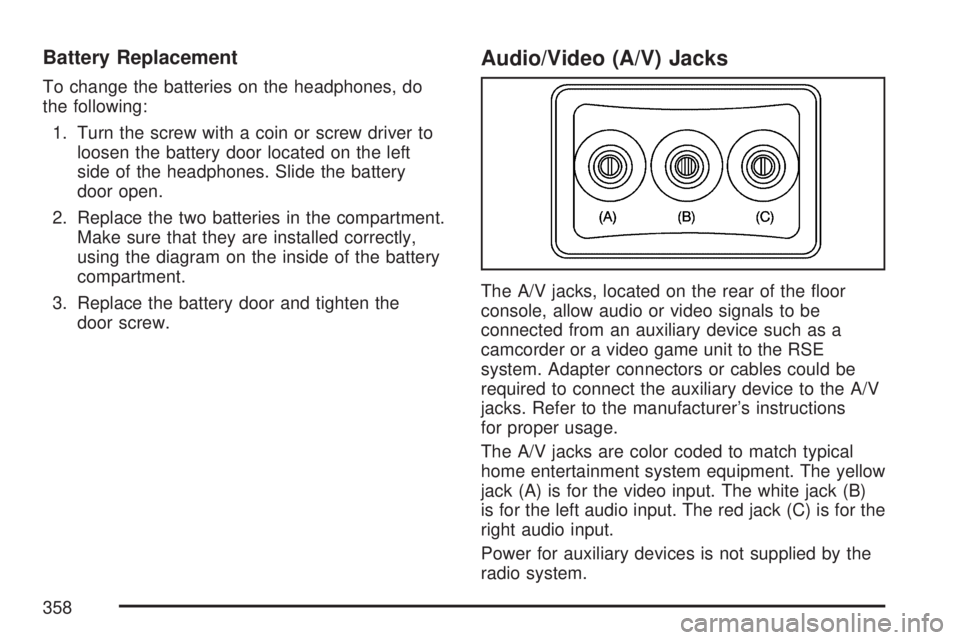
Audio/Video (A/V) Jacks
The A/V jacks, located on the rear of the oor
console, allow audio or video signals to be
connected from an auxiliary device such as a
camcorder or a video game unit to the RSE
system. Adapter connectors or cables could be
required to connect the auxiliary device to the A/V
jacks. Refer to the manufacturer’s instructions
for proper usage.
The A/V jacks are color coded to match typical
home entertainment system equipment. The yellow
jack (A) is for the video input. The white jack (B)
is for the left audio input. The red jack (C) is for the
right audio input.
Power for auxiliary devices is not supplied by the
radio system.
358
Page 359 of 680
To use the auxiliary inputs of the RSE system,
connect an external auxiliary device to the
color-coded A/V jacks and turn both the auxiliary
device and the video screen power on. If the
video screen is in the DVD player mode, pressing
the AUX (auxiliary) button on the remote control
switches the video screen from the DVD
player mode to the auxiliary device. The radio can
listen to the audio of the connected auxiliary
device by sourcing to auxiliary. SeeRadio with CD
and DVD (MP3) on page 322for more information.
How to Change the RSE Video Screen
Settings
The screen display mode (normal, full, and zoom),
screen brightness, and setup menu language
can be changed from the on screen setup menu.
To change any feature, do the following:
1. Press the display menu button on the
remote control.
2. Use the remote control menu navigation
arrows and the enter button to use the
setup menu.
3. Press the display menu button again to
remove the setup menu from the screen.
Audio Output
Audio from the DVD player or auxiliary inputs may
be heard through the following possible sources:
Wireless Headphones
Vehicle Speakers
Vehicle wired headphone jacks on the rear
seat audio system, if your vehicle has this
feature.
The RSE system always transmits the audio
signal to the wireless headphones, if there is audio
available. See “Headphones” earlier in this
section for more information.
The DVD player is capable of outputting audio to
the wired headphone jacks on the RSA system,
if your vehicle has this feature. The DVD
player can be selected as an audio source on the
RSA system. SeeRear Seat Audio (RSA) on
page 366for more information.
359
Page 360 of 680
When a device is connected to the A/V jacks, or
the radio’s auxiliary input jack, if your vehicle
has this feature, the rear seat passengers are able
to hear audio from the auxiliary device through
the wireless or wired headphones. The front seat
passengers are able to listen to playback from
this device through the vehicle speakers by
selecting AUX as the source on the radio.
Video Screen
The video screen is located in the RSE
overhead console.
To use the video screen, do the following:
1. Push the release button located on the RSE
overhead console.
2. Move the screen to the desired position.When the video screen is not in use, push it up
into its locked position.
If a DVD is playing and the screen is raised to its
locked position, the screen remains on, this is
normal, and the DVD continues to play through the
previous audio source. Use the remote control
power button or eject the disc to turn off the screen.
The RSE overhead console contains the infrared
receivers for the wireless headphones and
the infrared receivers for the remote control. They
are located at the rear of the console.
Notice:Avoid directly touching the video
screen, as damage may occur. See “Cleaning
the Video Screen” later in this section for
more information.
360
Page 361 of 680
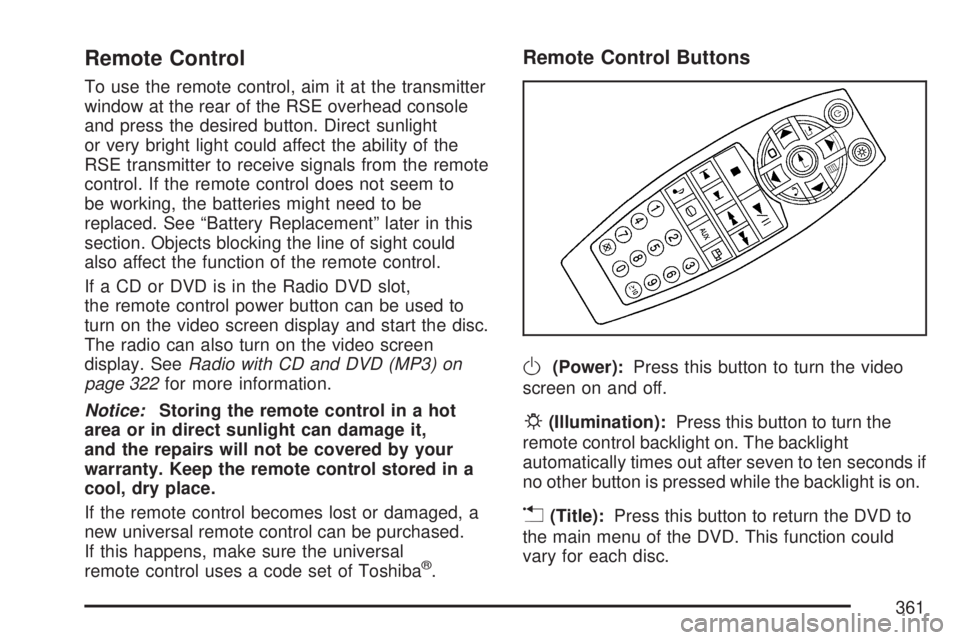
Remote Control
To use the remote control, aim it at the transmitter
window at the rear of the RSE overhead console
and press the desired button. Direct sunlight
or very bright light could affect the ability of the
RSE transmitter to receive signals from the remote
control. If the remote control does not seem to
be working, the batteries might need to be
replaced. See “Battery Replacement” later in this
section. Objects blocking the line of sight could
also affect the function of the remote control.
If a CD or DVD is in the Radio DVD slot,
the remote control power button can be used to
turn on the video screen display and start the disc.
The radio can also turn on the video screen
display. SeeRadio with CD and DVD (MP3) on
page 322for more information.
Notice:Storing the remote control in a hot
area or in direct sunlight can damage it,
and the repairs will not be covered by your
warranty. Keep the remote control stored in a
cool, dry place.
If the remote control becomes lost or damaged, a
new universal remote control can be purchased.
If this happens, make sure the universal
remote control uses a code set of Toshiba
®.
Remote Control Buttons
O(Power):Press this button to turn the video
screen on and off.
P(Illumination):Press this button to turn the
remote control backlight on. The backlight
automatically times out after seven to ten seconds if
no other button is pressed while the backlight is on.
v(Title):Press this button to return the DVD to
the main menu of the DVD. This function could
vary for each disc.
361
Page 365 of 680
Problem Recommended Action
The auxiliary source is
running but there is no
picture or sound.Check that the RSE video
screen is in the auxiliary
source mode.
Check the auxiliary
input connections at
both devices.
Sometimes the wireless
headphone audio cuts out
or buzzes.Check for obstructions,
low batteries, reception
range, and interference
from cellular telephone
towers or by using your
cellular telephone in the
vehicle.
Check that the
headphones are on
correctly using the L (left)
and R (right) on the
headphones.
I lost the remote and/or
the headphones.See your dealer for
assistance.
The DVD is playing,
but there is no picture
or sound.Check that the RSE video
screen is sourced to the
DVD player.DVD Display Error Messages
The DVD display error message depends on the
radio that is in the vehicle. The video screen
can display one of the following:
Disc Load/Eject Error:This message displays
when there are disc load or eject problems.
Disc Format Error:This message displays, if the
disc is inserted with the disc label wrong side
up, or if the disc is damaged.
Disc Region Error:This message displays, if the
disc is not from a correct region.
No Disc Inserted:This message displays, if no
disc is present when the EJECT button is pressed
on the radio.
365
Page 366 of 680
DVD Distortion
Video distortion can occur when operating cellular
phones, scanners, CB radios, Global Position
Systems (GPS)*, two-way radios, mobile fax, or
walkie talkies.
It might be necessary to turn off the DVD player
when operating one of these devices in or near
the vehicle.
*Excludes the OnStar
®System.
Cleaning the RSE Overhead Console
When cleaning the RSE overhead console
surface, use only a clean cloth dampened with
clean water.
Cleaning the Video Screen
When cleaning the video screen, use only a clean
cloth dampened with clean water. Use care
when directly touching or cleaning the screen, as
damage could result.
Rear Seat Audio (RSA)
This feature allows rear seat passengers to listen
to and control any of the music sources: radio,
CDs, DVDs, or other auxiliary sources. The
rear seat passengers can control the same music
sources the front seat passengers are listening
to (dual control, available depending upon radio) or
a different source. For example, rear seat
passengers can control a CD and listen to it
through the headphones, while the driver listens to
the radio through the speakers. The rear seat
passengers have control of the volume for each
set of headphones.
You can operate the RSA functions even when
the main radio is off.
Audio can be heard through wired headphones
(not included) plugged into the jacks on the RSA.
If your vehicle has this feature, audio can also
be heard on Channel 2 of the wireless
headphones.
366
Page 367 of 680
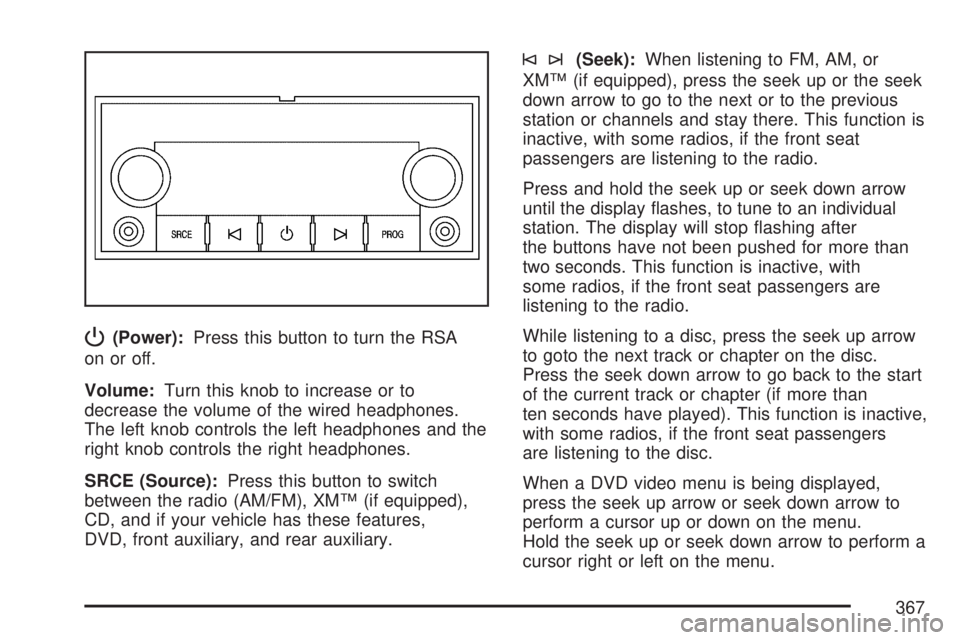
P(Power):Press this button to turn the RSA
on or off.
Volume:Turn this knob to increase or to
decrease the volume of the wired headphones.
The left knob controls the left headphones and the
right knob controls the right headphones.
SRCE (Source):Press this button to switch
between the radio (AM/FM), XM™ (if equipped),
CD, and if your vehicle has these features,
DVD, front auxiliary, and rear auxiliary.
©¨(Seek):When listening to FM, AM, or
XM™ (if equipped), press the seek up or the seek
down arrow to go to the next or to the previous
station or channels and stay there. This function is
inactive, with some radios, if the front seat
passengers are listening to the radio.
Press and hold the seek up or seek down arrow
until the display ashes, to tune to an individual
station. The display will stop ashing after
the buttons have not been pushed for more than
two seconds. This function is inactive, with
some radios, if the front seat passengers are
listening to the radio.
While listening to a disc, press the seek up arrow
to goto the next track or chapter on the disc.
Press the seek down arrow to go back to the start
of the current track or chapter (if more than
ten seconds have played). This function is inactive,
with some radios, if the front seat passengers
are listening to the disc.
When a DVD video menu is being displayed,
press the seek up arrow or seek down arrow to
perform a cursor up or down on the menu.
Hold the seek up or seek down arrow to perform a
cursor right or left on the menu.
367
Page 368 of 680
PROG (Program):Press this button to go to the
next preset radio station or channel set on the
main radio. This function is inactive, with
some radios, if the front seat passengers are
listening to the radio.
When a CD or DVD audio is playing, press this
button to go to the beginning of the CD or
DVD audio. This function is inactive, with some
radios, if the front seat passengers are listening to
the CD or DVD audio.
When a CD is playing in the CD changer, press
this button to select the next disc, if multiple discs
are loaded. This function is inactive, with some
radios, if the front seat passengers are listening to
the CD.
When a DVD video menu is being displayed,
press the PROG button to perform the menu
function, then press Enter.Theft-Deterrent Feature
THEFTLOCK®is designed to discourage theft of
your vehicle’s radio. The feature works
automatically by learning a portion of the Vehicle
Identication Number (VIN). If the radio is
moved to a different vehicle, it does not operate
and LOCKED displays.
Audio Steering Wheel Controls
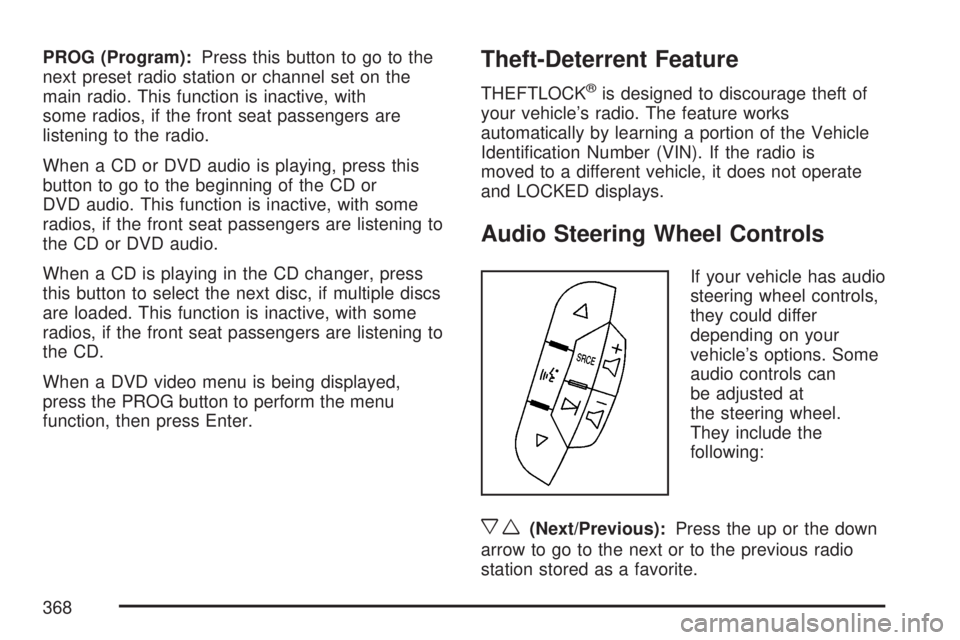
If your vehicle has audio
steering wheel controls,
they could differ
depending on your
vehicle’s options. Some
audio controls can
be adjusted at
the steering wheel.
They include the
following:
xw(Next/Previous):Press the up or the down
arrow to go to the next or to the previous radio
station stored as a favorite.
368