air condition GMC SIERRA 2008 Owner's Manual
[x] Cancel search | Manufacturer: GMC, Model Year: 2008, Model line: SIERRA, Model: GMC SIERRA 2008Pages: 578, PDF Size: 6.47 MB
Page 35 of 578
Safety Belt Pretensioners
Your vehicle has safety belt pretensioners for front
outboard occupants. Although you cannot see them,
they are part of the safety belt assembly. They can help
tighten the safety belts during the early stages of a
moderate to severe frontal, near frontal, or rear crash if
the threshold conditions for pretensioner activation
are met. And, if your vehicle has side impact airbags,
safety belt pretensioners can help tighten the safety
belts in a side crash or a rollover event.
Pretensioners work only once. If they activate in a
crash, you will need to get new ones, and probably other
new parts for your safety belt system. SeeReplacing
Restraint System Parts After a Crash on page 1-88.
Rear Safety Belt Comfort Guides
Rear shoulder belt comfort guides may provide added
safety belt comfort for older children who have outgrown
booster seats and for some adults. When installed on
a shoulder belt, the comfort guide positions the belt
away from the neck and head.There is one guide for each outboard passenger
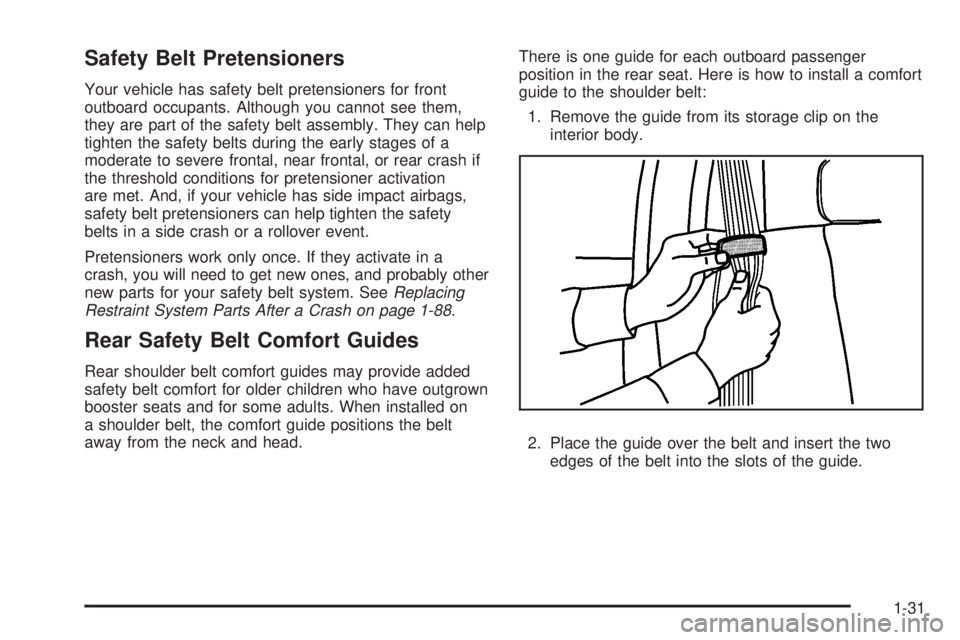
position in the rear seat. Here is how to install a comfort
guide to the shoulder belt:
1. Remove the guide from its storage clip on the
interior body.
2. Place the guide over the belt and insert the two
edges of the belt into the slots of the guide.
1-31
Page 66 of 578
Securing a Child Restraint in the
Right Front Seat Position (With
Passenger Sensing System)
Your vehicle has airbags. A rear seat is a safer place to
secure a forward-facing child restraint. SeeWhere to
Put the Restraint on page 1-44.
In addition, your vehicle may have a passenger sensing
system which is designed to turn off the right front
passenger’s frontal airbag under certain conditions. See
Passenger Sensing System on page 1-80and
Passenger Airbag Status Indicator on page 3-41for
more information on this, including important safety
information.
A label on your sun visor says, “Never put a rear-facing
child seat in the front.” This is because the risk to the
rear-facing child is so great, if the airbag deploys.
{CAUTION:
A child in a rear-facing child restraint can be
seriously injured or killed if the right front
passenger’s airbag inates. This is because
the back of the rear-facing child restraint
would be very close to the inating airbag.
Even though the passenger sensing system is
designed to turn off the right front passenger’s
frontal airbag if the system detects a
rear-facing child restraint, no system is
fail-safe, and no one can guarantee that an
airbag will not deploy under some unusual
circumstance, even though it is turned off. We
recommend that rear-facing child restraints be
secured in a rear seat, even if the airbag is off.
If you secure a forward-facing child restraint in
the right front seat, always move the front
passenger seat as far back as it will go. It is
better to secure the child restraint in a rear seat.
SeePassenger Sensing System on page 1-80
for additional information.
1-62
Page 82 of 578
Medical Condition.A passenger has a
medical condition which, according to his or
her physician:
Causes the passenger airbag to pose a special risk
for the passenger; and
Makes the potential harm from the passenger
airbag in a crash greater than the potential
harm from turning off the airbag and allowing the
passenger, even if belted, to hit the dashboard
or windshield in a crash.
{CAUTION:
If the right front passenger’s airbag is turned
off for a person who is not in a risk group
identied by the national government, that
person will not have the extra protection of an
airbag. In a crash, the airbag will not be able to
inate and help protect the person sitting there.
Do not turn off the passenger’s airbag unless
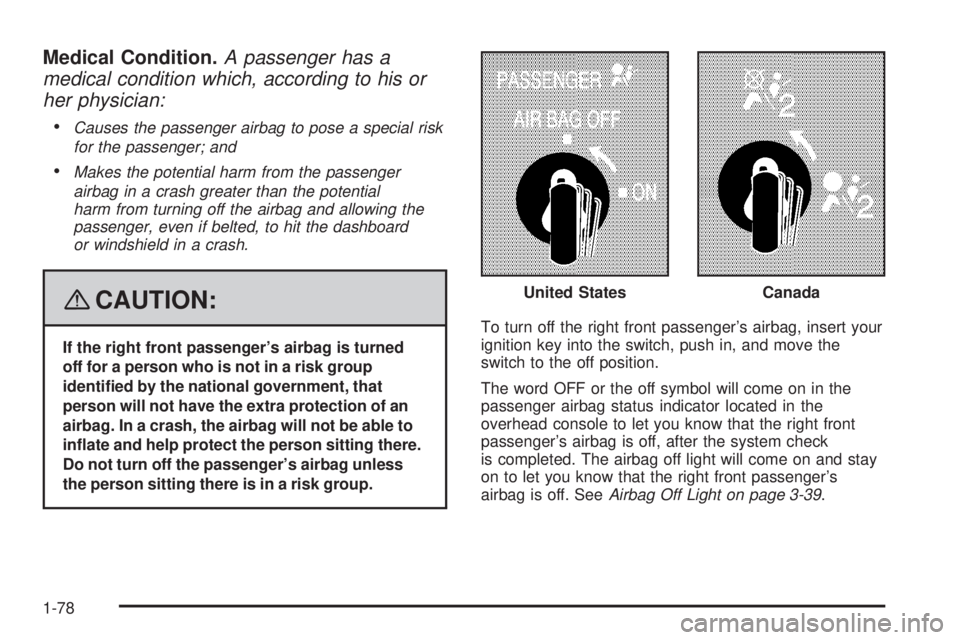
the person sitting there is in a risk group.To turn off the right front passenger’s airbag, insert your
ignition key into the switch, push in, and move the
switch to the off position.
The word OFF or the off symbol will come on in the
passenger airbag status indicator located in the
overhead console to let you know that the right front
passenger’s airbag is off, after the system check
is completed. The airbag off light will come on and stay
on to let you know that the right front passenger’s
airbag is off. SeeAirbag Off Light on page 3-39. United States
Canada
1-78
Page 84 of 578
Passenger Sensing System
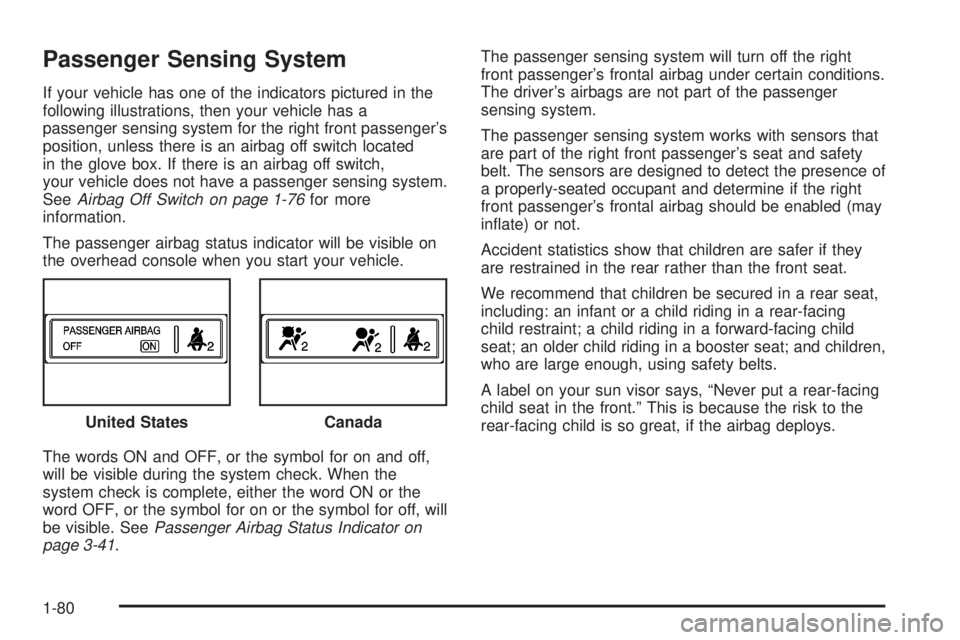
If your vehicle has one of the indicators pictured in the
following illustrations, then your vehicle has a
passenger sensing system for the right front passenger’s
position, unless there is an airbag off switch located
in the glove box. If there is an airbag off switch,
your vehicle does not have a passenger sensing system.
SeeAirbag Off Switch on page 1-76for more
information.
The passenger airbag status indicator will be visible on
the overhead console when you start your vehicle.
The words ON and OFF, or the symbol for on and off,
will be visible during the system check. When the
system check is complete, either the word ON or the
word OFF, or the symbol for on or the symbol for off, will
be visible. SeePassenger Airbag Status Indicator on
page 3-41.The passenger sensing system will turn off the right
front passenger’s frontal airbag under certain conditions.
The driver’s airbags are not part of the passenger
sensing system.
The passenger sensing system works with sensors that
are part of the right front passenger’s seat and safety
belt. The sensors are designed to detect the presence of
a properly-seated occupant and determine if the right
front passenger’s frontal airbag should be enabled (may
inate) or not.
Accident statistics show that children are safer if they
are restrained in the rear rather than the front seat.
We recommend that children be secured in a rear seat,
including: an infant or a child riding in a rear-facing
child restraint; a child riding in a forward-facing child
seat; an older child riding in a booster seat; and children,
who are large enough, using safety belts.
A label on your sun visor says, “Never put a rear-facing
child seat in the front.” This is because the risk to the
rear-facing child is so great, if the airbag deploys. United States
Canada
1-80
Page 90 of 578
Q:What if I added a snow plow? Will it keep the
airbags from working properly?
A:We have designed our airbag systems to work
properly under a wide range of conditions,
including snow plowing with vehicles that have the
optional Snow Plow Prep Package (RPO VYU).
But do not change or defeat the snow plow’s
“tripping mechanism.” If you do, it can damage your
snow plow and your vehicle, and it may cause an
airbag ination.
Q:Because I have a disability, I have to get my
vehicle modied. How can I nd out whether
this will affect my airbag system?
A:If you have questions, call Customer Assistance.
The phone numbers and addresses for Customer
Assistance are in Step Two of the Customer
Satisfaction Procedure in this manual. See
Customer Satisfaction Procedure on page 7-2.
In addition, your dealer/retailer and the service manual
have information about the location of the airbag
sensors, sensing and diagnostic module and airbag
wiring.
1-86
Page 99 of 578
Battery Replacement
Replace the battery if the REPLACE BATTERY IN
REMOTE KEY message displays in the DIC. See
“REPLACE BATTERY IN REMOTE KEY” underDIC
Warnings and Messages on page 3-63for additional
information.
Notice:When replacing the battery, use care not to
touch any of the circuitry. Static from your body
transferred to these surfaces may damage the
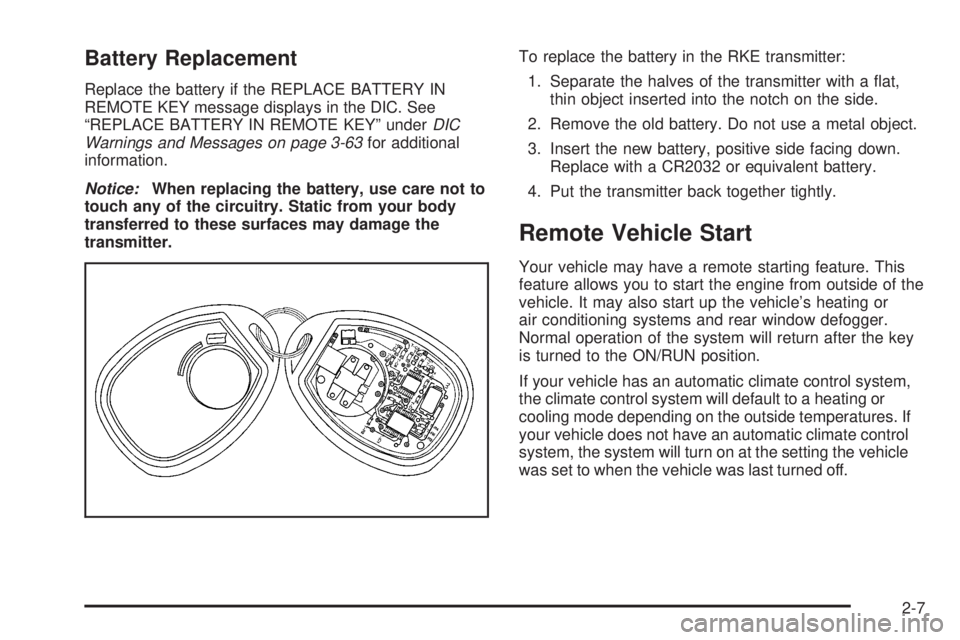
transmitter.To replace the battery in the RKE transmitter:
1. Separate the halves of the transmitter with a at,
thin object inserted into the notch on the side.
2. Remove the old battery. Do not use a metal object.
3. Insert the new battery, positive side facing down.
Replace with a CR2032 or equivalent battery.
4. Put the transmitter back together tightly.
Remote Vehicle Start
Your vehicle may have a remote starting feature. This
feature allows you to start the engine from outside of the
vehicle. It may also start up the vehicle’s heating or
air conditioning systems and rear window defogger.
Normal operation of the system will return after the key
is turned to the ON/RUN position.
If your vehicle has an automatic climate control system,
the climate control system will default to a heating or
cooling mode depending on the outside temperatures. If
your vehicle does not have an automatic climate control
system, the system will turn on at the setting the vehicle
was set to when the vehicle was last turned off.
2-7
Page 122 of 578
NEUTRAL (N):In this position, your engine does not
connect with the wheels. To restart when you are
already moving, use NEUTRAL (N) only. Also, use
NEUTRAL (N) when your vehicle is being towed.
{CAUTION:
Shifting into a drive gear while the engine is
running at high speed is dangerous. Unless
your foot is rmly on the brake pedal, your
vehicle could move very rapidly. You could
lose control and hit people or objects. Do not
shift into a drive gear while your engine is
running at high speed.
Notice:Shifting out of PARK (P) or NEUTRAL (N)
with the engine running at high speed may damage
the transmission. The repairs would not be
covered by your warranty. Be sure the engine is not
running at high speed when shifting your vehicle.DRIVE (D):This position is for normal driving. It
provides the best fuel economy for your vehicle. If you
need more power for passing, and you are:
Going less than about 35 mph (55 km/h), push your
accelerator pedal about halfway down.
Going about 35 mph (55 km/h) or more, push the
accelerator all the way down.
By doing this, the vehicle shifts down to the next
gear and has more power.
DRIVE (D) can be used when towing a trailer, carrying a
heavy load, driving on steep hills, or for off-road
driving. You might want to shift the transmission to a
lower gear selection if the transmission shifts too often.
Downshifting the transmission in slippery road
conditions could result in skidding. See Skidding under
Loss of Control on page 4-11
Your vehicle has a shift stabilization feature that adjusts
the transmission shifting to the current driving
conditions in order to reduce rapid upshifts and
downshifts. This shift stabilization feature is designed to
determine, before making an upshift, if the engine is
able to maintain vehicle speed by analyzing things such
as vehicle speed, throttle position, and vehicle load.
If the shift stabilization feature determines that a current
vehicle speed cannot be maintained, the transmission
does not upshift and instead holds the current gear.
2-30
Page 125 of 578
To use this feature, do the following:
1. Move the shift lever to the MANUAL MODE (M).
2. Press the plus/minus buttons, located on the
steering column shift lever, to select the desired
range of gears for your current driving conditions.
When MANUAL MODE (M) is selected a number
displays next to the M, indicating the current gear.
This number is the highest gear that can be used.
However, your vehicle can automatically shift to lower
gears as it adjusts to driving conditions. This means that
all gears below that number are available. When
FIFTH (5) is selected, FIRST (1) through FIFTH (5)
gears are automatically shifted by the vehicle, but
SIXTH (6) cannot be used until the plus/minus button
located on the steering column lever is used to change
to the gear.
Grade Braking is not available when the Range
Selection Mode is active. SeeTow/Haul Mode on
page 2-34.While using the Range Selection mode feature, cruise
control and the Tow/Haul mode can be used.
Notice:Spinning the tires or holding the vehicle in
one place on a hill using only the accelerator
pedal may damage the transmission. The repair will
not be covered by your warranty. If you are stuck,
do not spin the tires. When stopping on a hill,
use the brakes to hold the vehicle in place.
Low Traction Mode
If your vehicle has the Allison Transmission®,orthe
Hydra-Matic®6-Speed Automatic Transmission, it has a
Low Traction Mode that assist in vehicle acceleration
when road conditions are slippery, such as with ice
or snow. While the vehicle is at a stop, select the second
gear range using the Range Selection system. This
will limit torque to the wheels after it detects wheel slip,
preventing the tires from spinning.
2-33
Page 157 of 578
When the System Does Not Seem to
Work Properly
The driver disables the system.
The parking brake pedal is depressed.
The ultrasonic sensors are not clean. Keep your
vehicle’s rear bumper free of mud, dirt, snow,
ice and slush. For cleaning instructions, see
Washing Your Vehicle on page 5-116.
A trailer was attached to your vehicle, or a bicycle
or an object was hanging out of your tailgate
during your last drive cycle, the red light may
illuminate in the rear display. Once the attached
object is removed, URPA will return to normal
operation.
A tow bar is attached to your vehicle.
The vehicle’s bumper is damaged. Take the vehicle
to your dealer/retailer to repair the system.
Other conditions may affect system performance,
such as vibrations from a jackhammer or the
compression of air brakes on a very large truck.
If the system is still disabled, after driving forward at
least 15 mph (25 km/h), take your vehicle to your
dealer/retailer.
OnStar®System
OnStar uses several innovative technologies and live
advisors to provide you with a wide range of safety,
security, information, and convenience services. If your
airbags deploy, the system is designed to make an
automatic call to OnStar Emergency advisors who can
request emergency services be sent to your location.
If you lock your keys in the vehicle, call OnStar at
1-888-4-ONSTAR and they can send a signal to unlock
your doors. If you need roadside assistance, press
the OnStar button and they can contact Roadside
Service for you.
OnStar service is provided to you subject to the OnStar
Terms and Conditions. You may cancel your OnStar
service at any time by contacting OnStar. A complete
OnStar Owner’s Guide and the OnStar Terms and
Conditions are included in the vehicle’s OnStar
2-65
Page 173 of 578
Instrument Panel Overview...............................3-4
Instrument Panel Overview
(Base/Uplevel version).................................3-4
Instrument Panel Overview
(Premium version).......................................3-6
Hazard Warning Flashers................................3-8
Other Warning Devices...................................3-8
Horn.............................................................3-8
Tilt Wheel.....................................................3-9
Turn Signal/Multifunction Lever.........................3-9
Turn and Lane-Change Signals.......................3-10
Headlamp High/Low-Beam Changer.................3-11
Flash-to-Pass...............................................3-11
Windshield Wipers........................................3-12
Rainsense™ II Wipers...................................3-12
Windshield Washer.......................................3-13
Cruise Control..............................................3-14
Exterior Lamps.............................................3-17
Headlamps on Reminder................................3-18
Daytime Running Lamps (DRL).......................3-18
Automatic Headlamp System..........................3-19
Puddle Lamps..............................................3-20
Fog Lamps..................................................3-20
Auxiliary Roof Mounted Lamp.........................3-20Instrument Panel Brightness...........................3-21
Dome Lamps...............................................3-21
Dome Lamp Override....................................3-21
Entry Lighting...............................................3-21
Exit Lighting.................................................3-21
Reading Lamps............................................3-22
Cargo Lamp.................................................3-22
Electric Power Management...........................3-22
Battery Run-Down Protection..........................3-23
Accessory Power Outlet(s).............................3-23
Ashtray(s) and Cigarette Lighter......................3-24
Climate Controls............................................3-25
Climate Control System
(With Air Conditioning)...............................3-25
Climate Control System (Heater Only)..............3-27
Dual Automatic Climate Control System...........3-28
Outlet Adjustment.........................................3-33
Warning Lights, Gages, and Indicators............3-34
Instrument Panel Cluster................................3-35
Speedometer and Odometer...........................3-36
Trip Odometer..............................................3-36
Tachometer.................................................3-36
Safety Belt Reminders...................................3-37
Section 3 Instrument Panel
3-1