fuel cap GMC SIERRA 2008 Owner's Manual
[x] Cancel search | Manufacturer: GMC, Model Year: 2008, Model line: SIERRA, Model: GMC SIERRA 2008Pages: 578, PDF Size: 6.47 MB
Page 1 of 578
Seats and Restraint Systems........................... 1-1
Front Seats
............................................... 1-3
Rear Seats
..............................................1-12
Safety Belts
.............................................1-14
Child Restraints
.......................................1-35
Airbag System
.........................................1-68
Restraint System Check
............................1-87
Features and Controls..................................... 2-1
Keys
........................................................ 2-3
Doors and Locks
......................................2-10
Windows
.................................................2-15
Theft-Deterrent Systems
............................2-18
Starting and Operating Your Vehicle
...........2-22
Mirrors
....................................................2-55
Object Detection Systems
..........................2-63
OnStar
®System
......................................2-65
Universal Home Remote System
................2-68
Storage Areas
.........................................2-74
Sunroof
..................................................2-79
Instrument Panel............................................. 3-1
Instrument Panel Overview
.......................... 3-4
Climate Controls
......................................3-25
Warning Lights, Gages, and Indicators
........3-34
Driver Information Center (DIC)
..................3-54
Audio System(s)
.......................................3-80Driving Your Vehicle....................................... 4-1
Your Driving, the Road, and Your Vehicle
..... 4-2
Towing
...................................................4-50
Service and Appearance Care.......................... 5-1
Service
..................................................... 5-4
Fuel
......................................................... 5-6
Checking Things Under the Hood
...............5-12
Rear Axle
...............................................5-51
Four-Wheel Drive
.....................................5-52
Front Axle
...............................................5-54
Noise Control System
...............................5-56
Headlamp Aiming
.....................................5-56
Bulb Replacement
....................................5-59
Windshield Wiper Blade Replacement
.........5-65
Tires
......................................................5-66
Appearance Care
...................................5-112
Vehicle Identication
...............................5-121
Electrical System
....................................5-122
Capacities and Specications
...................5-130
Maintenance Schedule..................................... 6-1
Maintenance Schedule
................................ 6-2
Customer Assistance Information.................... 7-1
Customer Assistance and Information
........... 7-2
Reporting Safety Defects
...........................7-14
Vehicle Data Recording and Privacy
...........7-16
Index................................................................ 1
2008 GMC Sierra Owner ManualM
Page 221 of 578
If the Light is Flashing
The following can prevent more serious damage to your
vehicle:
Reduce vehicle speed.
Avoid hard accelerations.
Avoid steep uphill grades.
If you are towing a trailer, reduce the amount of
cargo being hauled as soon as it is possible.
If the light stops ashing and remains on steady, see “If
the Light Is On Steady” following.
If the light continues to ash, when it is safe to do so,
stop the vehicle. Find a safe place to park the vehicle.
Turn the ignition off, wait at least 10 seconds, and restart
the engine. If the light remains on steady, see “If the
Light Is On Steady” following. If the light is still ashing,
follow the previous steps and see your dealer/retailer
for service as soon as possible.
If the Light Is On Steady
You might be able to correct the emission system
malfunction by considering the following:
Did you recently put fuel into your vehicle?
If so, reinstall the fuel cap, making sure to fully install
the cap. SeeFilling the Tank on page 5-10. The
diagnostic system can determine if the fuel cap hasbeen left off or improperly installed. A loose or missing
fuel cap allows fuel to evaporate into the atmosphere.
A few driving trips with the cap properly installed should
turn the light off.
Did you just drive through a deep puddle of water?
If so, your vehicle’s electrical system might be wet. The
condition is usually corrected when the electrical system
dries out. A few driving trips should turn the light off.
Have you recently changed brands of fuel?
If so, be sure to fuel your vehicle with quality fuel. See
Gasoline Octane on page 5-6. Poor fuel quality causes
the engine not to run as efficiently as designed. You
might notice this as stalling after start-up, stalling when
you put the vehicle into gear, misring, hesitation on
acceleration, or stumbling on acceleration — these
conditions might go away once the engine is warmed up.
This will be detected by the system and cause the light to
turn on.
If you experience one or more of these conditions,
change the fuel brand you use. It will require at least
one full tank of the proper fuel to turn the light off.
If none of the above steps have made the light turn off,
your dealer/retailer can check the vehicle. Your
dealer/retailer has the proper test equipment and
diagnostic tools to x any mechanical or electrical
problems that might have developed.
3-49
Page 226 of 578
Here are some situations you may experience with your
fuel gage. None of these indicate a problem with the
fuel gage.
At the gas station, the fuel pump shuts off before
the gage reads full.
It takes a little more or less fuel to ll up than the
fuel gage indicated. For example, the gage may
have indicated the tank was half full, but it actually
took a little more or less than half the tank’s
capacity to ll the tank.
The gage goes back to empty when you turn off the
ignition.
If you have a diesel engine, see “Fuel Gage” in the
Diesel Engine Supplement.
Low Fuel Warning Light
This light, under the fuel
gage, will come on briey
when you are starting
the engine.This light and a chime will come on when the fuel tank
is low on fuel. There will also be a “FUEL LEVEL
LOW” message on the Driver Information Center, see
DIC Warnings and Messages on page 3-63for more
information. When you add fuel this light and message
should go off. If it does not, have your vehicle
serviced.
Driver Information Center (DIC)
Your vehicle has a Driver Information Center (DIC).
The DIC displays information about your vehicle. It also
displays warning messages if a system problem is
detected.
All messages will appear in the DIC display located
below the tachometer in the instrument panel cluster.
The DIC comes on when the ignition is on. After a short
delay, the DIC will display the information that was
last displayed before the engine was turned off.
If your vehicle has DIC buttons, see “DIC Operation and
Displays (With DIC Buttons)” later in this section and
DIC Vehicle Customization (With DIC Buttons) on
page 3-72for the displays available.
If your vehicle does not have DIC buttons, see “DIC
Operation and Displays (Without DIC Buttons)” later in
this section for the displays available.
3-54
Page 242 of 578
STABILITRAK OFF
If your vehicle has StabiliTrak®, this message displays
when you turn off StabiliTrak®, or when the stability
control has been automatically disabled. To limit wheel
spin and realize the full benets of the stability
enhancement system, you should normally leave
StabiliTrak
®on. However, you should turn StabiliTrak®
off if your vehicle gets stuck in sand, mud, ice, or
snow and you want to rock your vehicle to attempt to
free it, or if you are driving in extreme off-road conditions
and require more wheel spin. SeeIf Your Vehicle is
Stuck in Sand, Mud, Ice, or Snow on page 4-34. To turn
the StabiliTrak
®system on or off, seeStabiliTrak®
System on page 4-6.
There are several conditions that can cause this
message to appear.
One condition is overheating, which could occur if
StabiliTrak®activates continuously for an extended
period of time.
The message also displays if the brake system
warning light is on. SeeBrake System Warning
Light on page 3-44.
The message could display if the stability system
takes longer than usual to complete its diagnostic
checks due to driving conditions.
The message displays if an engine or vehicle
related problem has been detected and the vehicle
needs service. See your dealer/retailer.
The message also displays if the vehicle is shifted
into 4LO.
The message turns off as soon as the conditions that
caused the message to be displayed are no longer
present.
TIGHTEN GAS CAP
This message may display along with the check engine
light on the instrument panel cluster if the vehicle’s
fuel cap is not tightened properly. SeeMalfunction
Indicator Lamp on page 3-48. Reinstall the fuel cap fully.
SeeFilling the Tank on page 5-10. The diagnostic
system can determine if the fuel cap has been left off or
improperly installed. A loose or missing fuel cap
allows fuel to evaporate into the atmosphere. A few
driving trips with the cap properly installed should turn
this light and message off.
3-70
Page 338 of 578
The GVWR includes the weight of the vehicle, all
occupants, fuel, and cargo.
The Certication/Tire label also tells you the
maximum weights for the front and rear axles,
called Gross Axle Weight Rating (GAWR). To nd
out the actual loads on your front and rear
axles, you need to go to a weigh station and
weigh your vehicle. Your dealer can help you with
this. Be sure to spread out your load equally on
both sides of the centerline.
Never exceed the GVWR for your vehicle, or the
GAWR for either the front or rear axle.
The Certication/Tire label also contains important
information about your Front Axle Reserve
Capacity. See “What is front axle reserve capacity,
and how do I calculate it?” underAdding a
Snow Plow or Similar Equipment on page 4-43.
{CAUTION:
In the case of a sudden stop or collision,
things carried in the bed of your truck
could shift forward and come into the
passenger area, injuring you and others. If
you put things in the bed of your truck,
you should make sure they are properly
secured.
{CAUTION:
Do not load your vehicle any heavier than
the Gross Vehicle Weight Rating (GVWR),
or either the maximum front or rear Gross
Axle Weight Rating (GAWR). If you do,
parts on your vehicle can break, and it
can change the way your vehicle handles.
These could cause you to lose control
and crash. Also, overloading can shorten
the life of your vehicle.
4-40
Page 342 of 578
Here are some guidelines for safely carrying a snow
plow on your vehicle:
Make sure the weight on the front and rear axles
does not exceed the axle rating for each.
For the front axle, if more cargo or passengers must
be carried, appropriate counter ballast must be
installed rear of the rear axle. Counter ballast must
be properly secured so it will not move during driving.
Follow the snow plow manufacturer’s
recommendations regarding rear ballast. Rear
ballast may be required to ensure a proper front and
rear weight distribution ratio, even though the actual
weight at the front axle may be less than the front
axle rating.
The snow plow manufacturer or installer can assist
you in determining the amount of rear ballast
required, to help make sure your snowplow/vehicle
combination does not exceed the GVW rating, the
front and rear axle ratings, and the front and rear
weight distribution ratio.
The total vehicle must not exceed the GVW rating.Front axle reserve capacity is the difference between
your front Gross Axle Weight Rating (GAWR) and the
front axle weight of your vehicle with full fuel and
passengers. Basically, it is the amount of weight you can
add to your front axle before reaching your front GAWR.
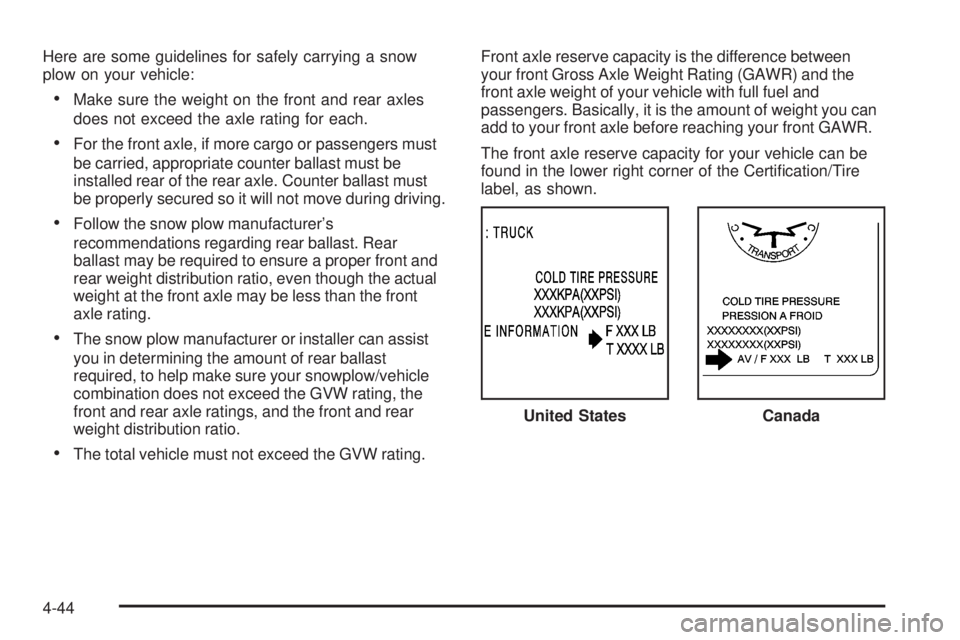
The front axle reserve capacity for your vehicle can be
found in the lower right corner of the Certication/Tire
label, as shown.
United States
Canada
4-44
Page 345 of 578
Total vehicle reserve capacity is the difference between
your GVWR and the weight of your truck with full fuel
and passengers. It is the amount of weight you can add
to your vehicle before reaching your GVWR. Keep in
mind that reserve capacity numbers are intended
as a guide when selecting the amount of equipment or
cargo your truck can carry. If you are unsure of your
vehicle’s front, rear, or total weight, go to a weigh station
and weigh your vehicle. Your dealer/retailer can also
help you with this.
The total vehicle reserve capacity for your vehicle can
be found in the lower right corner of the Certication/Tire
label as shown previously.
See your dealer/retailer for additional advice and
information about using a snow plow on your vehicle.
Also, seeLoading Your Vehicle on page 4-36.
Emergency Roof Lamp Provisions
Vehicles with the RPO VYU snow plow prep package
also have an emergency roof lamp provision package,
RPO TRW. Wiring for the emergency roof lamp is
provided above the overhead console. SeeAuxiliary
Roof Mounted Lamp on page 3-20for switch location.
Truck-Camper Loading Information
A vehicle specic Truck-Camper Loading
information label is attached to the inside of your
vehicle’s glove box. This label will tell you if
your vehicle can carry a slide-in camper, how
much of a load your vehicle can carry, and how to
correctly spread out the load. Also, it will help
you match the right slide-in camper to your vehicle.
When you carry a slide-in camper, the total
cargo load of your vehicle is the weight of the
camper, plus the following:
Everything else added to the camper after it
left the factory
Everything in the camper
All the people inside
The Cargo Weight Rating (CWR) is the maximum
weight of the load your vehicle can carry. It
does not include the weight of the people inside.
But, you can gure about 150 lbs (68 kg) for
each seat.
The total cargo load must not be more than your
vehicle’s CWR.
4-47
Page 353 of 578
6. Release the parking brake only after the vehicle
being towed is rmly attached to the tow vehicle.
7. Turn the ignition to LOCK/OFF.
Towing a Trailer
If your vehicle has a diesel engine, see the DURAMAX®
Diesel manual for more information.
Do not tow a trailer during break-in. SeeNew Vehicle
Break-In on page 2-22for more information.
{CAUTION:
If you do not use the correct equipment and
drive properly, you can lose control when you
pull a trailer. For example, if the trailer is too
heavy, the brakes may not work well — or even
at all. You and your passengers could be
seriously injured. Pull a trailer only if you have
followed all the steps in this section. Ask your
dealer for advice and information about towing
a trailer with your vehicle.Notice:Pulling a trailer improperly can damage
your vehicle and result in costly repairs not covered
by your warranty. To pull a trailer correctly, follow
the advice in this part, and see your dealer for
important information about towing a trailer with
your vehicle.
To identify the trailering capacity of your vehicle, you
should read the information in “Weight of the Trailer” that
appears later in this section.
Trailering is different than just driving your vehicle by
itself. Trailering means changes in acceleration, braking,
handling, durability and fuel economy. Successful,
safe trailering takes correct equipment, and it has to be
used properly.
That’s the reason for this part. In it are many time-tested,
important trailering tips and safety rules. Many of
these are important for your safety and that of your
passengers. So please read this section carefully before
you pull a trailer.
4-55
Page 393 of 578
Service............................................................5-4
Accessories and Modications..........................5-4
California Proposition 65 Warning.....................5-4
California Perchlorate Materials Requirements.....5-5
Doing Your Own Service Work.........................5-5
Adding Equipment to the Outside of Your
Vehicle......................................................5-6
Fuel................................................................5-6
Gasoline Octane............................................5-6
Gasoline Specications....................................5-6
California Fuel...............................................5-7
Additives.......................................................5-7
Fuel E85 (85% Ethanol)..................................5-8
Fuels in Foreign Countries...............................5-9
Filling the Tank............................................5-10
Filling a Portable Fuel Container.....................5-12
Checking Things Under the Hood....................5-12
Hood Release..............................................5-13
Engine Compartment Overview.......................5-14
Engine Oil (Gasoline Engine)..........................5-15
Engine Oil Life System..................................5-18
Engine Air Cleaner/Filter
(Gasoline Engines)....................................5-19Automatic Transmission Fluid
(6-Speed Transmission)..............................5-22
Automatic Transmission Fluid
(4-Speed Transmission)..............................5-25
Engine Coolant.............................................5-28
Coolant Surge Tank Pressure Cap..................5-30
Engine Overheating.......................................5-30
Overheated Engine Protection Operating Mode
(V8 Engines Only).....................................5-33
Cooling System............................................5-34
Engine Fan Noise.........................................5-39
Power Steering Fluid.....................................5-39
Windshield Washer Fluid................................5-40
Brakes........................................................5-42
Battery........................................................5-45
Jump Starting...............................................5-46
Rear Axle.......................................................5-51
Four-Wheel Drive............................................5-52
Front Axle......................................................5-54
Noise Control System.....................................5-56
Tampering with Noise Control System
Prohibited.................................................5-56
Section 5 Service and Appearance Care
5-1
Page 402 of 578
Filling the Tank
If your vehicle has the DURAMAX®Diesel engine, see
the DURAMAX®Diesel manual for more information.
{CAUTION:
Fuel vapor burns violently and a fuel re can
cause bad injuries. To help avoid injuries to
you and others, read and follow all the
instructions on the pump island. Turn off your
engine when you are refueling. Do not smoke
if you are near fuel or refueling your vehicle.
Do not use cellular phones. Keep sparks,
ames, and smoking materials away from fuel.
Do not leave the fuel pump unattended when
refueling your vehicle. This is against the law
in some places. Do not re-enter the vehicle
while pumping fuel. Keep children away from
the fuel pump; never let children pump fuel.The tethered fuel cap is located behind a hinged fuel
door on the driver’s side of the vehicle. If the vehicle has
E85 fuel capability, a yellow cap with the words
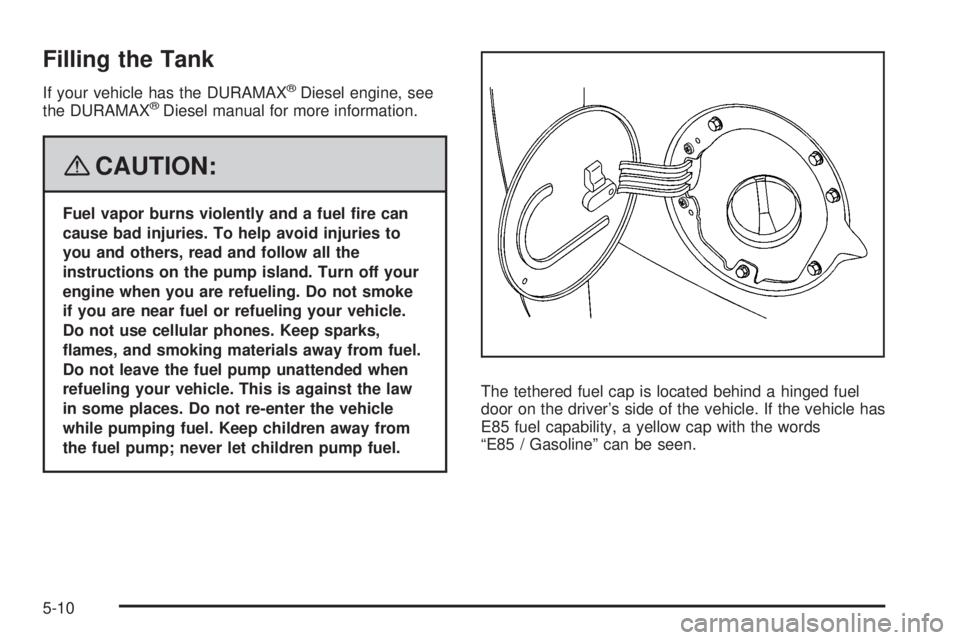
“E85 / Gasoline” can be seen.
5-10