park assist GMC SIERRA 2009 Owner's Manual
[x] Cancel search | Manufacturer: GMC, Model Year: 2009, Model line: SIERRA, Model: GMC SIERRA 2009Pages: 596, PDF Size: 3.25 MB
Page 100 of 596
Park Tilt Mirrors............................................2-60
Outside Convex Mirror...................................2-61
Outside Heated Mirrors..................................2-61
Object Detection Systems...............................2-62
Ultrasonic Rear Parking
Assist (URPA)...........................................2-62
Rear Vision Camera (RVC)............................2-65
OnStar
®System.............................................2-71
Universal Home Remote System......................2-74
Universal Home Remote System Operation
(With Three Round LED).............................2-75Storage Areas................................................2-81
Glove Box...................................................2-81
Cupholders..................................................2-81
Instrument Panel Storage...............................2-81
Center Console Storage.................................2-82
Luggage Carrier...........................................2-82
Rear Seat Armrest........................................2-83
Cargo Management System...........................2-84
Sunroof.........................................................2-85
Section 2 Features and Controls
2-2
Page 122 of 596
Starting the Engine
If the vehicle has the DURAMAX®Diesel engine, see
the DURAMAX®Diesel manual for more information.
If the vehicle is a Two-mode Hybrid, see the Two-mode
Hybrid manual for more information.
Notice:Do not try to shift to P (Park) if the
vehicle is moving. If you do, you could damage the
transmission. Shift to P (Park) only when the vehicle
is stopped.
Move the shift lever to P (Park) or N (Neutral).
The engine will not start in any other position.
To restart the engine when the vehicle is already
moving, use N (Neutral) only.
Starting Procedure
1. With your foot off the accelerator pedal, turn the
ignition key to START. When the engine starts,
let go of the key. The idle speed will go down as
your engine gets warm. Do not race the engine
immediately after starting it. Operate the engine
and transmission gently to allow the oil to warm
up and lubricate all moving parts.The vehicle has a Computer-Controlled Cranking
System. This feature assists in starting the engine
and protects components. If the ignition key is turned
to the START position, and then released when the
engine begins cranking, the engine will continue
cranking for a few seconds or until the vehicle starts.
If the engine does not start and the key is held in
START for many seconds, cranking will be stopped
after 15 seconds to prevent cranking motor damage.
To prevent gear damage, this system also prevents
cranking if the engine is already running. Engine
cranking can be stopped by turning the ignition
switch to the ACC/ACCESSORY or LOCK/OFF
position.
Notice:Cranking the engine for long periods of
time, by returning the key to the START position
immediately after cranking has ended, can overheat
and damage the cranking motor, and drain the
battery. Wait at least 15 seconds between each try,
to let the cranking motor cool down.
2-24
Page 160 of 596
Object Detection Systems
Ultrasonic Rear Parking
Assist (URPA)
For vehicles with the Ultrasonic Rear Parking Assist
(URPA) system, it operates at speeds less than 5 mph
(8 km/h), and assists the driver with parking and avoiding
objects while in R (Reverse). The sensors on the rear
bumper are used to detect the distance to an object up to
8 feet (2.5 m) behind the vehicle, and at least 10 inches
(25.4 cm) off the ground.
{CAUTION:
The Ultrasonic Rear Parking Assist (URPA)
system does not replace driver vision. It cannot
detect:
objects that are below the bumper, underneath
the vehicle, or if they are too close or far from
the vehicle
children, pedestrians, bicyclists, or pets.
CAUTION: (Continued)
CAUTION: (Continued)
If you do not use proper care before and while
backing; vehicle damage, injury, or death could
occur. Even with URPA, always check behind the
vehicle before backing up. While backing, be sure
to look for objects and check the vehicle’s mirrors.
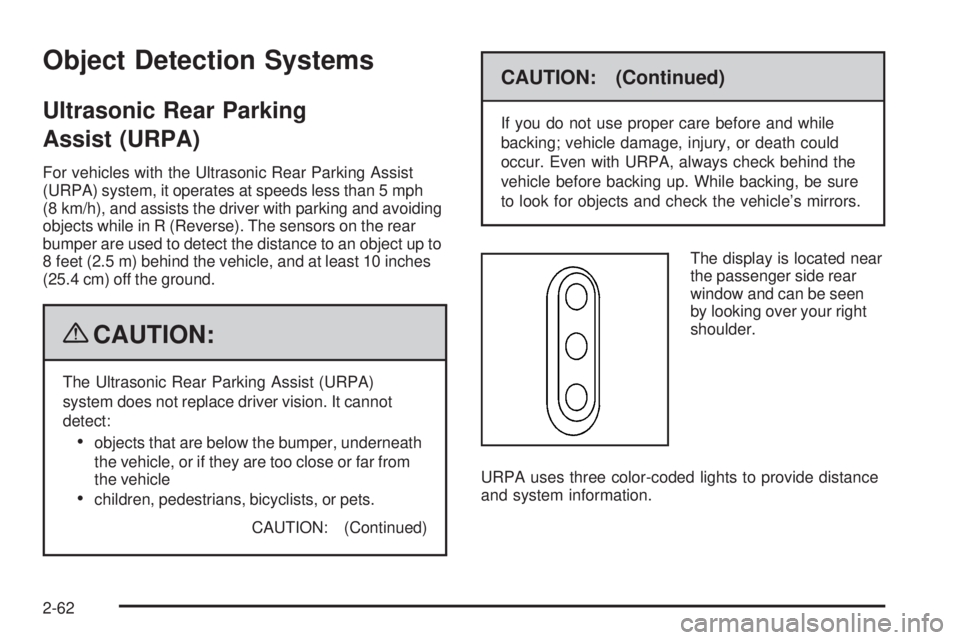
The display is located near
the passenger side rear
window and can be seen
by looking over your right
shoulder.
URPA uses three color-coded lights to provide distance
and system information.
2-62
Page 162 of 596
The indicator light will come on and PARK ASSIST
OFF displays on the Driver Information Center (DIC)
to indicate that URPA is off, seeDIC Warnings and
Messages on page 3-66for information about clearing
the message.
Notice:If you use URPA while the tailgate is
lowered, it may not detect an object behind your
vehicle, and you might back into the object and
damage your vehicle. Always verify the tailgate is
closed when using URPA or turn off URPA when
driving with the tailgate lowered.
When the System Does Not Seem to
Work Properly
If the URPA system will not activate due to a temporary
condition, the message PARK ASSIST OFF will be
displayed on the DIC and a red light will be shown on
the rear URPA display when the shift lever is moved into
R (Reverse). This occurs under the following conditions:
The driver disables the system.
The ultrasonic sensors are not clean. Keep the
vehicle’s rear bumper free of mud, dirt, snow,
ice and slush. For cleaning instructions, see
Washing Your Vehicle on page 5-117.
A trailer was attached to the vehicle, or a bicycle or
an object was hanging out of the tailgate during the
last drive cycle, the red light may illuminate in the
rear display. Once the attached object is removed,
URPA will return to normal operation.
A tow bar is attached to the vehicle.
The vehicle’s bumper is damaged. Take the vehicle
to your dealer/retailer to repair the system.
Other conditions may affect system performance,
such as vibrations from a jackhammer or the
compression of air brakes on a very large truck.
If the system is still disabled, after driving forward
at least 15 mph (25 km/h), take the vehicle to your
dealer/retailer.
2-64
Page 165 of 596
Adjusting the Brightness and Contrast of
the Screen
To adjust the brightness and contrast of the screen,
press the MENU button while the rear vision camera
image is on the display. Any adjustments made will only
affect the rear vision camera screen.
](Brightness):Touch the + (plus) or – (minus)
screen buttons to increase or decrease the brightness
of the screen.
_(Contrast):Touch the + (plus) or – (minus) screen
buttons to increase or decrease the contrast of the
screen.
Symbols
The navigation system may have a feature that lets the
driver view symbols on the navigation screen while using
the rear vision camera. The Ultrasonic Rear Park Assist
(URPA) system must not be disabled to use the caution
symbols. If URPA has been disabled and the symbols
have been turned on, the Rear Parking Assist Symbols
Unavailable error message may display. SeeUltrasonic
Rear Parking Assist (URPA) on page 2-62.The symbols appear when an object has been detected
by the URPA system. The symbol may cover the
object when viewing the navigation screen.
To turn the symbols on or off:
1. Make sure that URPA has not been disabled.
2. Shift into P (Park).
3. Press the MENU hard key to enter the congure
menu options, then press the MENU hard key
repeatedly until Display is selected or touch
the Display screen button.
4. Select the Rear Camera Options screen button.
The Rear Camera Options screen will display.
5. Touch the Symbols screen button. The screen
button will be highlighted when on.Rear Vision Camera Error Messages
Service Rear Vision Camera System:This message
can display when the system is not receiving information
it requires from other vehicle systems.
If any other problem occurs or if a problem persists, see
your dealer/retailer.
2-67
Page 173 of 596
Universal Home Remote System
Operation (With Three Round LED)
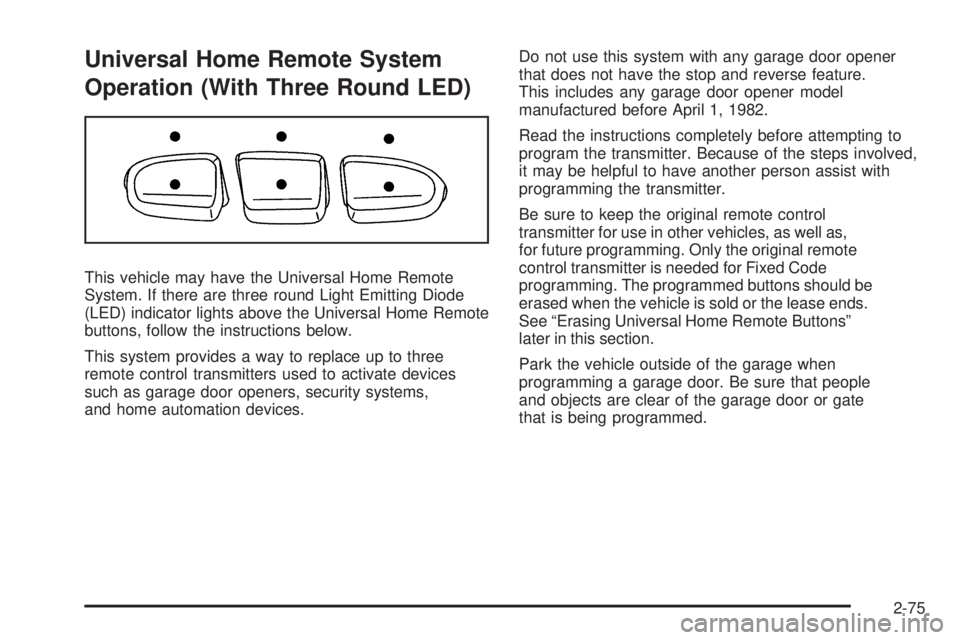
This vehicle may have the Universal Home Remote
System. If there are three round Light Emitting Diode
(LED) indicator lights above the Universal Home Remote
buttons, follow the instructions below.
This system provides a way to replace up to three
remote control transmitters used to activate devices
such as garage door openers, security systems,
and home automation devices.Do not use this system with any garage door opener
that does not have the stop and reverse feature.
This includes any garage door opener model
manufactured before April 1, 1982.
Read the instructions completely before attempting to
program the transmitter. Because of the steps involved,
it may be helpful to have another person assist with
programming the transmitter.
Be sure to keep the original remote control
transmitter for use in other vehicles, as well as,
for future programming. Only the original remote
control transmitter is needed for Fixed Code
programming. The programmed buttons should be
erased when the vehicle is sold or the lease ends.
See “Erasing Universal Home Remote Buttons”
later in this section.
Park the vehicle outside of the garage when
programming a garage door. Be sure that people
and objects are clear of the garage door or gate
that is being programmed.
2-75
Page 189 of 596
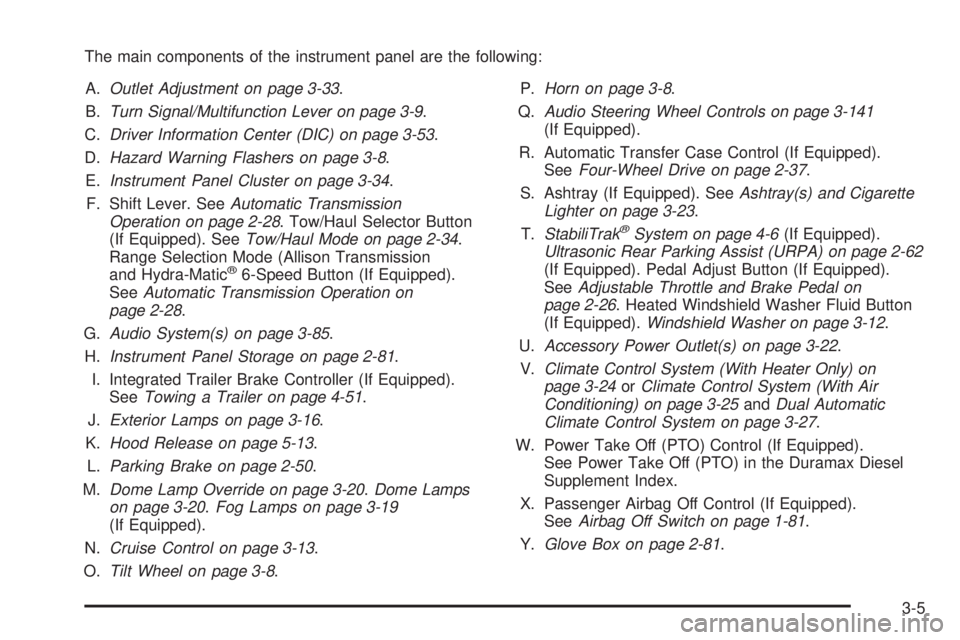
The main components of the instrument panel are the following:
A.Outlet Adjustment on page 3-33.
B.Turn Signal/Multifunction Lever on page 3-9.
C.Driver Information Center (DIC) on page 3-53.
D.Hazard Warning Flashers on page 3-8.
E.Instrument Panel Cluster on page 3-34.
F. Shift Lever. SeeAutomatic Transmission
Operation on page 2-28. Tow/Haul Selector Button
(If Equipped). SeeTow/Haul Mode on page 2-34.
Range Selection Mode (Allison Transmission
and Hydra-Matic
®6-Speed Button (If Equipped).
SeeAutomatic Transmission Operation on
page 2-28.
G.Audio System(s) on page 3-85.
H.Instrument Panel Storage on page 2-81.
I. Integrated Trailer Brake Controller (If Equipped).
SeeTowing a Trailer on page 4-51.
J.Exterior Lamps on page 3-16.
K.Hood Release on page 5-13.
L.Parking Brake on page 2-50.
M.Dome Lamp Override on page 3-20.Dome Lamps
on page 3-20.Fog Lamps on page 3-19
(If Equipped).
N.Cruise Control on page 3-13.
O.Tilt Wheel on page 3-8.P.Horn on page 3-8.
Q.Audio Steering Wheel Controls on page 3-141
(If Equipped).
R. Automatic Transfer Case Control (If Equipped).
SeeFour-Wheel Drive on page 2-37.
S. Ashtray (If Equipped). SeeAshtray(s) and Cigarette
Lighter on page 3-23.
T.StabiliTrak
®System on page 4-6(If Equipped).
Ultrasonic Rear Parking Assist (URPA) on page 2-62
(If Equipped). Pedal Adjust Button (If Equipped).
SeeAdjustable Throttle and Brake Pedal on
page 2-26. Heated Windshield Washer Fluid Button
(If Equipped).Windshield Washer on page 3-12.
U.Accessory Power Outlet(s) on page 3-22.
V.Climate Control System (With Heater Only) on
page 3-24orClimate Control System (With Air
Conditioning) on page 3-25andDual Automatic
Climate Control System on page 3-27.
W. Power Take Off (PTO) Control (If Equipped).
See Power Take Off (PTO) in the Duramax Diesel
Supplement Index.
X. Passenger Airbag Off Control (If Equipped).
SeeAirbag Off Switch on page 1-81.
Y.Glove Box on page 2-81.
3-5
Page 191 of 596
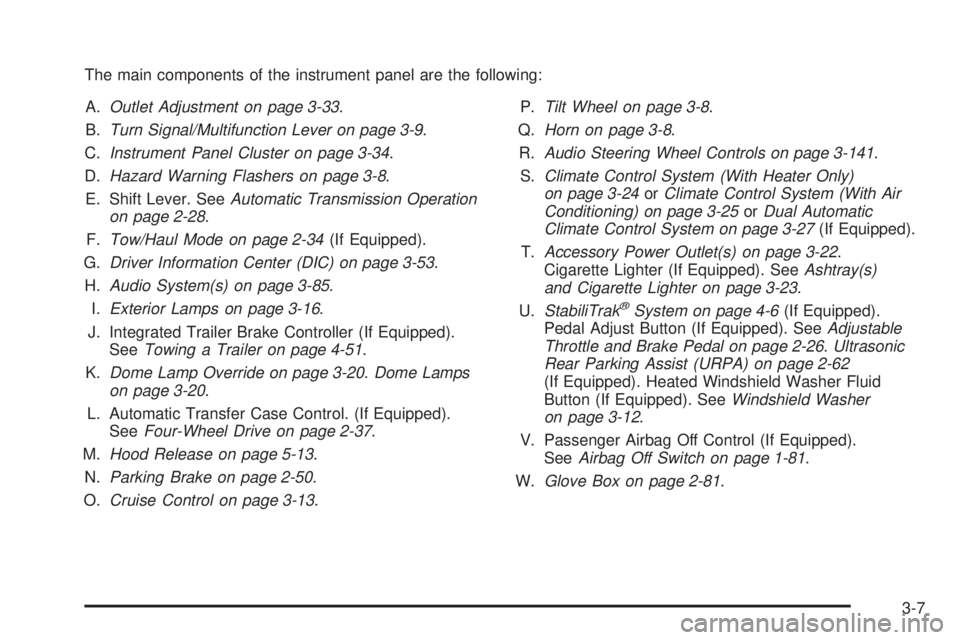
The main components of the instrument panel are the following:
A.Outlet Adjustment on page 3-33.
B.Turn Signal/Multifunction Lever on page 3-9.
C.Instrument Panel Cluster on page 3-34.
D.Hazard Warning Flashers on page 3-8.
E. Shift Lever. SeeAutomatic Transmission Operation
on page 2-28.
F.Tow/Haul Mode on page 2-34(If Equipped).
G.Driver Information Center (DIC) on page 3-53.
H.Audio System(s) on page 3-85.
I.Exterior Lamps on page 3-16.
J. Integrated Trailer Brake Controller (If Equipped).
SeeTowing a Trailer on page 4-51.
K.Dome Lamp Override on page 3-20.Dome Lamps
on page 3-20.
L. Automatic Transfer Case Control. (If Equipped).
SeeFour-Wheel Drive on page 2-37.
M.Hood Release on page 5-13.
N.Parking Brake on page 2-50.
O.Cruise Control on page 3-13.P.Tilt Wheel on page 3-8.
Q.Horn on page 3-8.
R.Audio Steering Wheel Controls on page 3-141.
S.Climate Control System (With Heater Only)
on page 3-24orClimate Control System (With Air
Conditioning) on page 3-25orDual Automatic
Climate Control System on page 3-27(If Equipped).
T.Accessory Power Outlet(s) on page 3-22.
Cigarette Lighter (If Equipped). SeeAshtray(s)
and Cigarette Lighter on page 3-23.
U.StabiliTrak
®System on page 4-6(If Equipped).
Pedal Adjust Button (If Equipped). SeeAdjustable
Throttle and Brake Pedal on page 2-26.Ultrasonic
Rear Parking Assist (URPA) on page 2-62
(If Equipped). Heated Windshield Washer Fluid
Button (If Equipped). SeeWindshield Washer
on page 3-12.
V. Passenger Airbag Off Control (If Equipped).
SeeAirbag Off Switch on page 1-81.
W.Glove Box on page 2-81.
3-7
Page 230 of 596
If the check engine light comes on and stays on, while
the engine is running, this indicates that there is an
OBD II problem and service is required.
Malfunctions often are indicated by the system before
any problem is apparent. Being aware of the light
can prevent more serious damage to the vehicle.
This system assists the service technician in correctly
diagnosing any malfunction.
Notice:If the vehicle is continually driven with
this light on, after a while, the emission controls
might not work as well, the vehicle’s fuel economy
might not be as good, and the engine might not
run as smoothly. This could lead to costly repairs
that might not be covered by the vehicle warranty.
Notice:Modications made to the engine,
transmission, exhaust, intake, or fuel system of the
vehicle or the replacement of the original tires with
other than those of the same Tire Performance
Criteria (TPC) can affect the vehicle’s emission
controls and can cause this light to come on.
Modications to these systems could lead to
costly repairs not covered by the vehicle warranty.
This could also result in a failure to pass a
required Emission Inspection/Maintenance test.
SeeAccessories and Modifications on page 5-4.This light comes on during a malfunction in one of
two ways:
Light Flashing:A misre condition has been detected.
A misre increases vehicle emissions and could
damage the emission control system on the vehicle.
Diagnosis and service might be required.
To prevent more serious damage to the vehicle:
Reduce vehicle speed.
Avoid hard accelerations.
Avoid steep uphill grades.
If towing a trailer, reduce the amount of cargo being
hauled as soon as it is possible.
If the light continues to ash, when it is safe to do so,
stop the vehicle. Find a safe place to park the vehicle.
Turn the key off, wait at least 10 seconds, and restart
the engine. If the light is still ashing, follow the previous
steps and see your dealer/retailer for service as soon
as possible.
3-46
Page 254 of 596
OIL PRESSURE LOW STOP ENGINE
Notice:If you drive your vehicle while the engine
oil pressure is low, severe engine damage may
occur. If a low oil pressure warning appears on the
Driver Information Center (DIC), stop the vehicle
as soon as possible. Do not drive the vehicle until
the cause of the low oil pressure is corrected.
SeeEngine Oil on page 5-15for more information.
This message displays if low oil pressure levels
occur. Stop the vehicle as soon as safely possible and
do not operate it until the cause of the low oil pressure
has been corrected. Check the oil as soon as possible
and have your vehicle serviced by your dealer/retailer.
SeeEngine Oil on page 5-15.
PARK ASSIST OFF
If your vehicle has the Ultrasonic Rear Parking Assist
(URPA) system, after the vehicle has been started, this
message displays to remind the driver that the URPA
system has been turned off. Press the set/reset button
or the trip odometer reset stem to acknowledge this
message and clear it from the DIC display. To turn the
URPA system back on, seeUltrasonic Rear Parking
Assist (URPA) on page 2-62.
PASSENGER DOOR OPEN
This message displays and a chime sounds if the front
passenger door is not fully closed and the vehicle is
shifted out of P (Park). Stop and turn off the vehicle,
check the door for obstructions, and close the door
again. Check to see if the message still appears on
the DIC.
REMOTE KEY LEARNING ACTIVE
This message displays while you are matching a
Remote Keyless Entry (RKE) transmitter to your vehicle.
See “Matching Transmitter(s) to Your Vehicle” under
Remote Keyless Entry (RKE) System Operation
on page 2-5andDIC Operation and Displays (With DIC
Buttons) on page 3-53orDIC Operation and Displays
(Without DIC Buttons) on page 3-59for more
information.
REPLACE BATTERY IN REMOTE KEY
This message displays if a Remote Keyless Entry (RKE)
transmitter battery is low. The battery needs to be
replaced in the transmitter. See “Battery Replacement”
underRemote Keyless Entry (RKE) System Operation
on page 2-5.
3-70