audio GMC SIERRA 2010 User Guide
[x] Cancel search | Manufacturer: GMC, Model Year: 2010, Model line: SIERRA, Model: GMC SIERRA 2010Pages: 630, PDF Size: 4.65 MB
Page 159 of 630
D (START) :This is the position that starts the engine.
When the engine starts, release the key. The ignition
switch returns to ON/RUN for driving.
A warning tone will sound when the driver door is
opened, the ignition is in ACC/ACCESSORY or
LOCK/OFF and the key is in the ignition.
Retained Accessory Power (RAP)
The following vehicle accessories can be used for up to
10 minutes after the engine is turned off:
.Audio System
.Power Windows
.OnStar®System (if equipped)
.Sunroof (if equipped)
These features work when the key is in ON/RUN or
ACC/ACCESSORY. Once the key is turned from
ON/RUN to LOCK/OFF, the windows and sunroof
continue to work up to 10 minutes until any door is
opened. The radio continues to work for up to
10 minutes or until the driver door is opened.
Starting the Engine
If the vehicle has the DURAMAX®Diesel engine, see
the DURAMAX®Diesel manual for more information.
If the vehicle is a Two-mode Hybrid, see the Two-mode
Hybrid manual for more information.
Notice: Do not try to shift to P (Park) if the vehicle
is moving. If you do, you could damage the
transmission. Shift to P (Park) only when the
vehicle is stopped.
Move the shift lever to P (Park) or N (Neutral).
The engine will not start in any other position.
To restart the engine when the vehicle is already
moving, use N (Neutral) only.
3-23
Page 220 of 630
Section 4 Instrument Panel
Tire Pressure Light . . . . . . . . . . . . . . . . . . . . . . . . . . . . 4-42
Malfunction Indicator Lamp . . . . . . . . . . . . . . . . . . . . 4-42
Oil Pressure Gage . . . . . . . . . . . . . . . . . . . . . . . . . . . . . 4-46
Oil Pressure Light . . . . . . . . . . . . . . . . . . . . . . . . . . . . . 4-47
Security Light . . . . . . . . . . . . . . . . . . . . . . . . . . . . . . . . . . 4-48
Fog Lamp Light . . . . . . . . . . . . . . . . . . . . . . . . . . . . . . . . 4-48
Cruise Control Light . . . . . . . . . . . . . . . . . . . . . . . . . . . 4-48
Highbeam On Light . . . . . . . . . . . . . . . . . . . . . . . . . . . . 4-48
Four-Wheel-Drive Light . . . . . . . . . . . . . . . . . . . . . . . . 4-49
Tow/Haul Mode Light . . . . . . . . . . . . . . . . . . . . . . . . . . 4-49
Fuel Gage . . . . . . . . . . . . . . . . . . . . . . . . . . . . . . . . . . . . . 4-49
Low Fuel Warning Light . . . . . . . . . . . . . . . . . . . . . . . . 4-50
Driver Information Center (DIC) . . . . . . . . . . . . . . . . . .4-51
DIC Operation and Displays (With DIC Buttons) . . . . . . . . . . . . . . . . . . . . . . . . . . 4-51
DIC Operation and Displays (Without DIC Buttons) . . . . . . . . . . . . . . . . . . . . . . . 4-58
DIC Compass . . . . . . . . . . . . . . . . . . . . . . . . . . . . . . . . . . 4-62
DIC Warnings and Messages . . . . . . . . . . . . . . . . . . 4-65
DIC Vehicle Customization (With DIC Buttons) . . . . . . . . . . . . . . . . . . . . . . . . . . 4-75 Audio System(s)
. . . . . . . . . . . . . . . . . . . . . . . . . . . . . . . . . . 4-84
Setting the Clock . . . . . . . . . . . . . . . . . . . . . . . . . . . . . . 4-84
Radio(s) . . . . . . . . . . . . . . . . . . . . . . . . . . . . . . . . . . . . . . . 4-87
Using an MP3 (Radios with CD) . . . . . . . . . . . . . . 4-107
Using an MP3 (Radios with CD and DVD) . . . . 4-114
XM Radio Messages . . . . . . . . . . . . . . . . . . . . . . . . . 4-122
Navigation/Radio System . . . . . . . . . . . . . . . . . . . . . 4-123
Bluetooth
®. . . . . . . . . . . . . . . . . . . . . . . . . . . . . . . . . . . . 4-123
Rear Seat Entertainment (RSE) System . . . . . . 4-134
Rear Seat Audio (RSA) . . . . . . . . . . . . . . . . . . . . . . . 4-143
Theft-Deterrent Feature . . . . . . . . . . . . . . . . . . . . . . 4-145
Audio Steering Wheel Controls . . . . . . . . . . . . . . . 4-145
Radio Reception . . . . . . . . . . . . . . . . . . . . . . . . . . . . . . 4-148
Fixed Mast Antenna . . . . . . . . . . . . . . . . . . . . . . . . . . 4-149
XM™ Satellite Radio Antenna System . . . . . . . . 4-149
4-2
Page 283 of 630
DIC Warnings and Messages
Messages are displayed on the DIC to notify the
driver that the status of the vehicle has changed and
that some action may be needed by the driver to
correct the condition. Multiple messages may appear
one after another.
Some messages may not require immediate action, but
you can press any of the DIC buttons on the instrument
panel or the trip odometer reset stem on the instrument
panel cluster to acknowledge that you received the
messages and to clear them from the display.
Some messages cannot be cleared from the DIC
display because they are more urgent. These
messages require action before they can be cleared.
You should take any messages that appear on the
display seriously and remember that clearing the
messages will only make the messages disappear,
not correct the problem.
The following are the possible messages that can be
displayed and some information about them.
If your vehicle has the DURAMAX
®Diesel engine, see
the DURAMAX Diesel manual for more information.
BATTERY LOW START VEHICLE
When the vehicle’ s battery is severely discharged,
this message will display and four chimes may sound.
Start the vehicle immediately. If the vehicle is not
started and the battery continues to discharge, the
climate controls, heated seats, and audio systems will
shut off and the vehicle may require a jump start.
These systems will function again after the vehicle
is started.
CHANGE ENGINE OIL SOON
This message displays when the engine oil needs to be
changed. When you change the engine oil, be sure to
reset the CHANGE ENGINE OIL SOON message.
See Engine Oil Life System
on page 6‑20for
information on how to reset the message. See Engine
Oil
on page 6‑18and Scheduled Maintenanceon
page 7‑3for more information.
4-65
Page 302 of 630
Audio System(s)
Determine which radio the vehicle has and read the
following pages to become familiar with its features.
{WARNING:
Taking your eyes off the road for extended periods
could cause a crash resulting in injury or death to
you or others. Do not give extended attention to
entertainment tasks while driving.
This system provides access to many audio and non
audio listings.
To minimize taking your eyes off the road while driving,
do the following while the vehicle is parked:
.Become familiar with the operation and controls of
the audio system.
.Set up the tone, speaker adjustments, and preset
radio stations.
For more information, see Defensive Driving
on
page 5‑2. Notice:
Contact your dealer/retailer before adding
any equipment.
Adding audio or communication equipment could
interfere with the operation of the vehicle's engine,
radio, or other systems, and could damage them.
Follow federal rules covering mobile radio and
telephone equipment.
The vehicle has Retained Accessory Power (RAP).
With RAP, the audio system can be played even after
the ignition is turned off. See Retained Accessory
Power (RAP)
on page 3‑23for more information.
Setting the Clock
AM-FM Radio
To set the time:
1. Turn the ignition key to ACC/ACCESSORY or ON/RUN, then press the
Obutton to turn the
radio on.
2. Press the
Hbutton until the hour numbers begin to
flash, then turn the
fknob to increase or decrease
the hour.
4-84
Page 306 of 630
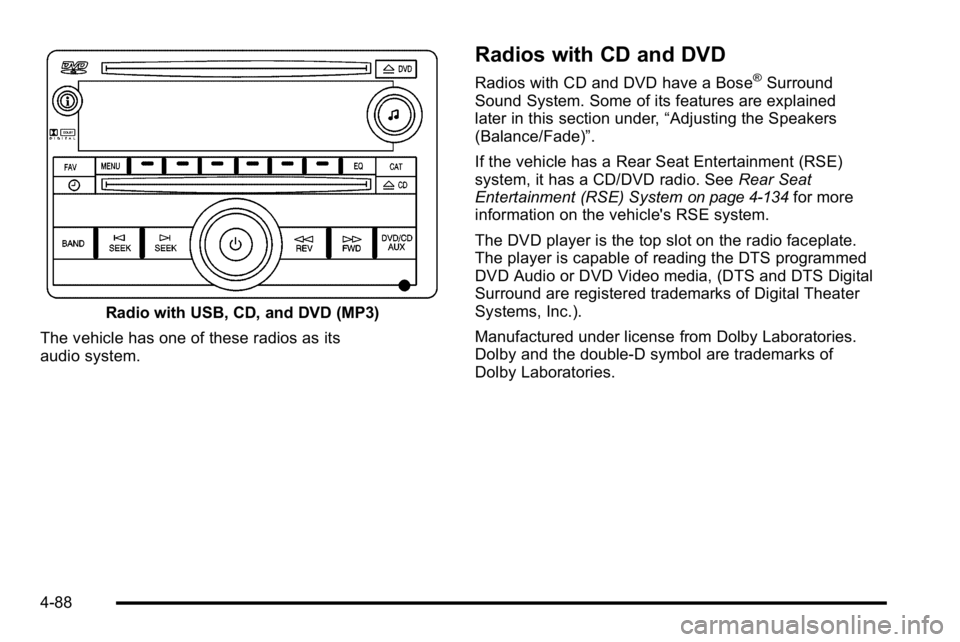
Radio with USB, CD, and DVD (MP3)
The vehicle has one of these radios as its
audio system.
Radios with CD and DVD
Radios with CD and DVD have a Bose®Surround
Sound System. Some of its features are explained
later in this section under, “Adjusting the Speakers
(Balance/Fade)”.
If the vehicle has a Rear Seat Entertainment (RSE)
system, it has a CD/DVD radio. See Rear Seat
Entertainment (RSE) System
on page 4‑134for more
information on the vehicle's RSE system.
The DVD player is the top slot on the radio faceplate.
The player is capable of reading the DTS programmed
DVD Audio or DVD Video media, (DTS and DTS Digital
Surround are registered trademarks of Digital Theater
Systems, Inc.).
Manufactured under license from Dolby Laboratories.
Dolby and the double-D symbol are trademarks of
Dolby Laboratories.
4-88
Page 310 of 630
Setting the Tone (Bass/Treble)
(AM-FM Radio)
Bass/Treble :To adjust the bass or treble, press
the tune knob or the EQ button until the desired tone
control tab displays. Turn the tune knob clockwise or
counterclockwise to increase or decrease the setting.
The display shows the current bass or treble level.
If a station's frequency is weak, or if there is static,
decrease the treble.
Setting the Tone (Bass/Midrange/Treble)
(All Except AM-FM Radio)
BASS/MID/TREB (Bass, Midrange, or Treble) :
To adjust bass, midrange, or treble:
1. Press the
fknob until the tone control tabs
display.
2. Highlight the desired tone control tab by doing one of the following:
.Pressing thefknob.
.Press the softkey under the desired tab. 3. Adjust the setting by doing one of the following:
.Turn thefknob clockwise or counterclockwise.
.Press the¨SEEK, or©SEEK button.
.Press the\FWD, orsREV button.
If a station's frequency is weak or if there is static,
decrease the treble.
To quickly adjust bass, midrange, or treble to the middle
position, press the softkey positioned under the BASS,
MID, or TREB tab for more than two seconds. A beep
sounds and the level adjusts to the middle position.
To quickly adjust all tone and speaker controls to the
middle position, press the
fknob for more than
two seconds until a beep sounds.
EQ (Equalization) : Press this button to choose bass
and treble equalization settings designed for different
types of music. The choices are pop, rock, country, talk,
jazz, and classical. Selecting MANUAL or changing
bass or treble, returns the EQ to the manual bass and
treble settings.
Unique EQ settings can be saved for each source.
If the radio has a Bose
®audio system, the EQ settings
are either MANUAL or TALK.
4-92
Page 311 of 630
Adjusting the Speakers (Balance/Fade)
BAL/FADE (Balance/Fade) :To adjust balance or fade
on radios without a
`button, press thefknob until
the speaker control tabs display. Continue pressing to
highlight the desired tab, or press the softkey under
the desired tab. Turn the
fknob clockwise or
counterclockwise to adjust the highlighted setting,
or adjust the highlighted setting by pressing either
SEEK arrow,
\FWD, orsREV button until the
desired levels are obtained.
To quickly adjust balance or fade to the middle position,
press the softkey positioned under the BAL or FADE tab
for more than two seconds. A beep sounds and the
level adjusts to the middle position.
To quickly adjust all speaker and tone controls to the
middle position, press the
fknob for more than
two seconds.
If the Rear Seat Audio (RSA) is turned on, the radio
disables FADE and mutes the rear speakers.
`(Balance/Fade): To adjust the balance or fade for
radios with a
`button, press this button or the tune
knob until the desired speaker control tab displays.
Turn the tune knob clockwise or counterclockwise to
adjust the setting.
The setting can also be adjusted by pressing the
seek arrows.
Finding a Category (CAT) Station
CAT (Category) : The CAT button is used to find
XM stations when the radio is in the XM mode.
To find XM channels within a desired category:
1. Press the BAND button until the XM frequency displays. Press the CAT button to display the
category tabs. Continue pressing the CAT button
until the desired category name displays.
.Radios with CD and DVD can also navigate the
category list by pressing the
\FWD or the
sREV button.
2. Press either of the two buttons below the desired category tab to immediately tune to the first
XM station associated with that category.
4-93
Page 312 of 630
3. Turn thefknob, press the buttons below the
right or left arrows displayed, or press either
SEEK arrow to go to the previous or to the next
XM station within the selected category.
4. To exit the category search mode, press the FAV button or BAND button to display the
favorites again.
Undesired XM categories can be removed through the
setup menu. To remove an undesired category: 1. Press the MENU button to display the radio setup menu.
2. Press the softkey located below the XM CAT tab.
3. Turn the
fknob to display the category to be
removed.
4. Press the softkey located under the Remove tab until the category name along with the word
Removed displays.
5. Repeat the steps to remove more categories.
Removed categories can be restored by pressing the
softkey under the Add tab when a removed category
is displayed or by pressing the softkey under the
Restore All tab.
Categories cannot be removed or added while the
vehicle is moving faster than 5 mph (8 km/h).
Radio Messages
Calibration Error : The audio system has been
calibrated for the vehicle from the factory. If Calibration
Error displays, it means that the radio has not been
configured properly for the vehicle and it must be
returned to your dealer/retailer for service.
Locked or Loc : One of these messages will display
when the THEFTLOCK
®system has locked up the
radio. Take the vehicle to your dealer/retailer for service.
If any error occurs repeatedly or if an error cannot be
corrected, contact your dealer/retailer.
XM™ Satellite Radio Service
XM is a satellite radio service that is based in the
48 contiguous United States and 10 Canadian
provinces. XM Satellite Radio has a wide variety
of programming and commercial-free music,
coast-to-coast, and in digital-quality sound. A service
fee is required to receive the XM service. For more
information, contact XM at www.xmradio.com or call
1-800-929-2100 in the U.S. and www.xmradio.ca or
call 1-877-438-9677 in Canada.
Radio Messages for XM Only
SeeXM Radio Messageson page 4‑122later in this
section for further detail.
4-94
Page 314 of 630
Inserting a CD (Single CD Player)
Insert a CD partway into the slot, label side up.
The player pulls it in and the CD should begin playing.
Inserting a CD(s) (Six-Disc CD Player)
LOAD^:Press to load CDs into the CD player.
This CD player holds up to six CDs.
To insert one CD:
1. Press and release the
^button.
2. Wait for the message to insert the disc.
3. Load a CD. Insert the CD partway into the slot, label side up. The player pulls the CD in.
To insert multiple CDs:
1. Press and hold the
^button for two seconds.
A beep sounds and Load All Discs displays.
2. Follow the displayed instruction on when to insert the discs. The CD player takes up to six CDs.
3. Press the
^button again to cancel loading
more CDs.
Insert a CD partway into the slot, label side up.
The player pulls it in and the CD should begin
playing. To insert a CD with the ignition off,
first press the
Zbutton or the DISP knob. If the ignition or radio is turned off with a CD in the
player it stays in the player. When the ignition or radio is
turned on, the CD starts to play where it stopped, if it
was the last selected audio source.
When the CD is inserted, the CD symbol displays. As
each new track starts to play, the track number displays.
The CD player can play the smaller 3 inch (8 cm) single
CDs with an adapter ring. Full-size CDs and the smaller
CDs are loaded in the same manner.
Ejecting a Disc
Z
EJECT or CD (Eject):
Press and release to eject
the disc that is currently playing. A CD ejecting from
a radio with CD/MP3/DVD and USB, ejects from the
bottom slot. A beep sounds and Ejecting Disc displays.
Once the disc is ejected, Remove Disc displays. The
disc can be removed. If the disc is not removed, after
several seconds, the disc automatically pulls back into
the player.
ZDVD (Eject): Press and release to eject the disc
that is currently playing in the top slot. A beep sounds
and Ejecting Disc displays.
If loading and reading of a disc cannot be completed,
such as unknown format, etc., and the disc fails to eject,
press and hold for more than five seconds to force the
disc to eject.
4-96
Page 315 of 630
Playing a CD (In Either the DVD or
CD Slot)
Insert a CD partway into the slot, label side up.
The player pulls it in and the CD should begin playing
(loading a disc into the system, depending on media
type and format ranges from 5 to 20 seconds for a
CD, and up to 30 seconds for a DVD to begin playing).
If the ignition or radio is turned off, with a CD in the
player, it stays in the player. When the ignition or
radio is turned on, the CD starts playing where it
stopped, if it was the last selected audio source. The
CD is controlled by the buttons on the radio faceplate
or by the RSA unit. SeeRear Seat Audio (RSA)
on
page 4‑143for more information. The DVD/CD decks,
(upper slot is the DVD deck and the lower slot is the
CD deck) of the radio are compatible with most audio
CDs, CD-R, CD-RW, and MP3s.
When a CD is inserted, the text tab DVD or CD symbol
displays on the left side of the radio display. As each
new track starts to play, the track number displays.
The CD player can play the smaller 3 inch (8 cm) single
CDs with an adapter ring. Full-size CDs and the smaller
CDs are loaded in the same manner.
ZEJECT or CD (Eject): Press and release to eject
the disc that is currently playing. A CD ejecting from a
radio with CD and DVD, ejects from the bottom slot.
A beep sounds and Ejecting Disc displays. Once the
disc is ejected, Remove Disc displays. The disc can be
removed. If the disc is not removed, after several
seconds, the disc automatically pulls back into
the player.
For the Six-Disc CD player, press and hold for
two seconds to eject all discs.
ZDVD (Eject): Press and release to eject the disc
that is currently playing in the top slot. A beep sounds
and Ejecting Disc displays.
If loading and reading of a disc cannot be completed,
such as with an unknown format error, etc., and the disc
fails to eject, press and hold for more than five seconds
to force the disc to eject.
f(Tune): Turn to select tracks on the CD that is
currently playing.
©SEEK¨: Press the left arrow to go to the start
of the current track, if more than ten seconds on the
CD have played. Press the right arrow to go to the
next track.
4-97