Section 7 GMC SIERRA 2010 Owner's Guide
[x] Cancel search | Manufacturer: GMC, Model Year: 2010, Model line: SIERRA, Model: GMC SIERRA 2010Pages: 630, PDF Size: 4.65 MB
Page 306 of 630
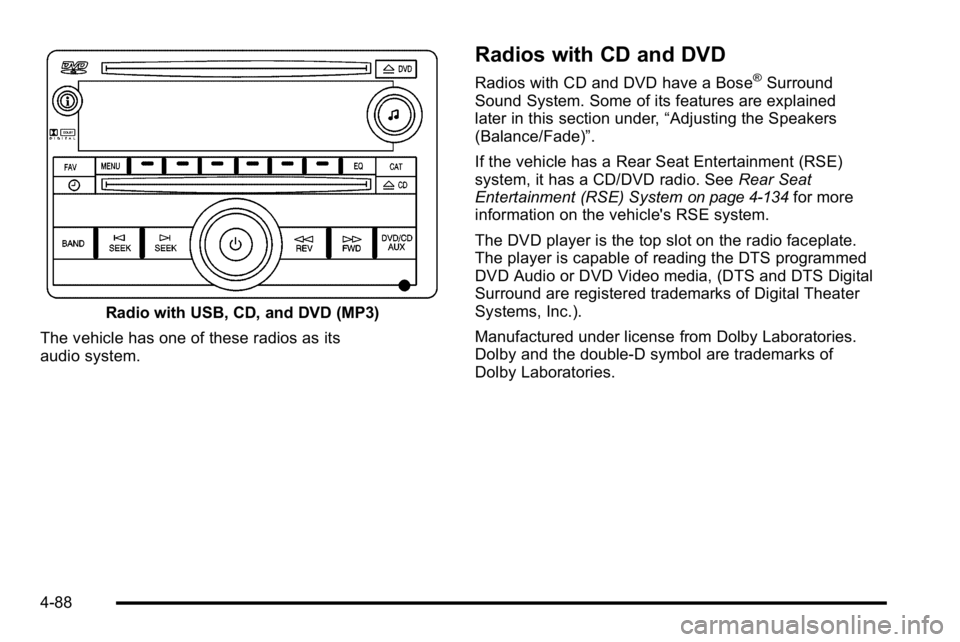
Radio with USB, CD, and DVD (MP3)
The vehicle has one of these radios as its
audio system.
Radios with CD and DVD
Radios with CD and DVD have a Bose®Surround
Sound System. Some of its features are explained
later in this section under, “Adjusting the Speakers
(Balance/Fade)”.
If the vehicle has a Rear Seat Entertainment (RSE)
system, it has a CD/DVD radio. See Rear Seat
Entertainment (RSE) System
on page 4‑134for more
information on the vehicle's RSE system.
The DVD player is the top slot on the radio faceplate.
The player is capable of reading the DTS programmed
DVD Audio or DVD Video media, (DTS and DTS Digital
Surround are registered trademarks of Digital Theater
Systems, Inc.).
Manufactured under license from Dolby Laboratories.
Dolby and the double-D symbol are trademarks of
Dolby Laboratories.
4-88
Page 312 of 630
3. Turn thefknob, press the buttons below the
right or left arrows displayed, or press either
SEEK arrow to go to the previous or to the next
XM station within the selected category.
4. To exit the category search mode, press the FAV button or BAND button to display the
favorites again.
Undesired XM categories can be removed through the
setup menu. To remove an undesired category: 1. Press the MENU button to display the radio setup menu.
2. Press the softkey located below the XM CAT tab.
3. Turn the
fknob to display the category to be
removed.
4. Press the softkey located under the Remove tab until the category name along with the word
Removed displays.
5. Repeat the steps to remove more categories.
Removed categories can be restored by pressing the
softkey under the Add tab when a removed category
is displayed or by pressing the softkey under the
Restore All tab.
Categories cannot be removed or added while the
vehicle is moving faster than 5 mph (8 km/h).
Radio Messages
Calibration Error : The audio system has been
calibrated for the vehicle from the factory. If Calibration
Error displays, it means that the radio has not been
configured properly for the vehicle and it must be
returned to your dealer/retailer for service.
Locked or Loc : One of these messages will display
when the THEFTLOCK
®system has locked up the
radio. Take the vehicle to your dealer/retailer for service.
If any error occurs repeatedly or if an error cannot be
corrected, contact your dealer/retailer.
XM™ Satellite Radio Service
XM is a satellite radio service that is based in the
48 contiguous United States and 10 Canadian
provinces. XM Satellite Radio has a wide variety
of programming and commercial-free music,
coast-to-coast, and in digital-quality sound. A service
fee is required to receive the XM service. For more
information, contact XM at www.xmradio.com or call
1-800-929-2100 in the U.S. and www.xmradio.ca or
call 1-877-438-9677 in Canada.
Radio Messages for XM Only
SeeXM Radio Messageson page 4‑122later in this
section for further detail.
4-94
Page 313 of 630
Care of the CD and DVD Player
Do not add any label to a CD. It could get caught in the
CD or DVD player. If a CD is recorded on a personal
computer and a description label is needed, try labeling
the top of the recorded CD with a marking pen.
The use of CD lens cleaners for CDs is not advised,
due to the risk of contaminating the lens of the CD
optics with lubricants internal to the CD and DVD player
mechanism.
Notice:If a label is added to a CD, or more than
one CD is inserted into the slot at a time, or an
attempt is made to play scratched or damaged CDs,
the CD player could be damaged. While using the
CD player, use only CDs in good condition without
any label, load one CD at a time, and keep the CD
player and the loading slot free of foreign materials,
liquids, and debris.
If an error displays, see “CD Messages”later in
this section.
Care of CDs and DVDs
If playing a CD-R, the sound quality can be reduced
due to CD-R or CD-RW quality, the method of
recording, the quality of the music that has been
recorded, and the way the CD-R or CD-RW has been
handled. Handle them carefully. Store CD-R(s) or
CD-RW(s) in their original cases or other protective
cases and away from direct sunlight and dust. The
CD or DVD player scans the bottom surface of the disc.
If the surface of a CD or DVD is damaged, such as
cracked, broken, or scratched, the CD or DVD does not
play properly or not at all. Do not touch the bottom side
of a CD or DVD while handling it; this could damage the
surface. Pick up CDs by grasping the outer edges or
the edge of the hole and the outer edge.
If the surface of a CD or DVD is soiled, clean it with a
soft, lint free cloth or dampen a clean, soft cloth in a
mild, neutral detergent solution mixed with water.
Make sure the wiping process starts from the center
to the edge.
4-95
Page 317 of 630

RPT (Repeat) :For the AM-FM Radio with CD, press
and release the RPT button to repeat the current track.
An arrow symbol displays. Press RPT again to turn off
repeat play.
BAND : Press to listen to the radio when a CD is
playing. The CD remains inside the radio for
future listening.
For the radio with CD and DVD, press to listen to the
radio when a CD or DVD is playing. The CD or DVD
remains inside the radio for future listening or for
viewing entertainment.
CD/AUX (CD/Auxiliary) : Press to play a CD when
listening to the radio. The CD icon and a message
showing the disc and/or track number displays when a
CD is in the player. Press again and the system
automatically searches for an auxiliary input device,
such as a portable audio player. If a portable audio
player is not connected, “No Input Device Found”
displays. DVD/CD AUX (Auxiliary) :
Press this button to cycle
through DVD, CD, or Auxiliary when listening to the
radio. The DVD/CD text tab and a message showing
the track or chapter number displays when a disc is in
either slot. Press this button again and the system
automatically searches for an auxiliary input device,
such as a portable audio player. If a portable audio
player is not connected, “No Aux Input Device”displays.
If a disc is in both the DVD slot and the CD slot the
DVD/CD AUX button cycles between the two sources
and does not indicate “No Aux Input Device”. If a front
auxiliary device is connected, the DVD/CD AUX button
cycles through all available options, such as: DVD slot,
CD slot, Front Auxiliary, and Rear Auxiliary (if available).
See “Using the Auxiliary Input Jack(s)” later in this
section, or “Audio/Video (A/V) Jacks” under,Rear Seat
Entertainment (RSE) System
on page 4‑134for more
information.
If a disc is inserted into top DVD slot, the rear seat
operator can turn on the video screen and use the
remote control to navigate the CD (tracks only) through
the remote control.
4-99
Page 318 of 630
Radios with CD and DVD Audio Output
Only one audio source can be heard through the
speakers at one time. An audio source is defined as
DVD slot, CD slot, XM, FM/AM, Front Auxiliary Jack,
or Rear Auxiliary Jack.
Press the
Obutton to turn the radio on. The radio can
be heard through all of the vehicle speakers.
Front seat passengers can listen to the radio
(AM, FM, or XM) by pressing the BAND button or the
DVD/CD AUX button to select CD slot, DVD slot, front
or rear auxiliary input (if available).
If a playback device is plugged into the radio’s front
auxiliary input jack or the rear auxiliary jack, the front
seat passengers are able to listen to playback from this
source through the vehicle speakers. See “Using the
Auxiliary Input Jack(s)” later in this section, or“Audio/
Video (A/V) Jacks” under,Rear Seat Entertainment
(RSE) System
on page 4‑134for more information.
In some vehicles, depending on audio options, the rear
speakers can be muted when the RSA power is turned
on. See Rear Seat Audio (RSA)
on page 4‑143for
more information.
Playing an MP3 CD-R or CD-RW Disc
The Radio with CD (MP3), Radio with USB and CD
(MP3), and Radio with USB and Six-Disc CD (MP3)
have the capability of playing an MP3 CD-R or CD-RW
disc. For more information on how to play an MP3 CD-R
or CD-RW disc, see Using an MP3 (Radios with CD)
on
page 4‑107or Using an MP3 (Radios with CD and DVD)on page 4‑114for more information.
Playing an MP3/WMA CD-R or
CD-RW Disc
Radios with CD and DVD has the capability of playing
an MP3/WMA CD-R or CD-RW disc. For more
information on how to play an MP3/WMA CD-R or
CD-RW disc, see Using an MP3 (Radios with CD)
on
page 4‑107or Using an MP3 (Radios with CD and DVD)on page 4‑114for more information.
CD Messages
CHECK DISC : Radios with a Single CD player or
radios with a Six-Disc player displays CHECK DISC
and/or ejects the CD if an error occurs.
4-100
Page 319 of 630
Radios with a CD and DVD player may display other
messages when an error occurs:
Optical Error :The disc was inserted upside down.
Disk Read Error : A disc was inserted with an invalid or
unknown format.
Player Error : There are disc LOAD or disc EJECT
problems.
.It is very hot. When the temperature returns to
normal, the CD should play.
.The road is very rough. When the road becomes
smoother, the CD should play.
.The CD is dirty, scratched, wet, or upside down.
.The air is very humid. If so, wait about an hour and
try again.
.There could have been a problem while burning
the CD.
.The label could be caught in the CD player.
If the CD is not playing correctly, for any other reason,
try a known good CD. If any error occurs repeatedly or if an error cannot be
corrected, contact your dealer/retailer. If the radio
displays an error message, write it down and provide it
to your dealer/retailer when reporting the problem.
Using the DVD Player
The DVD player is controlled by the buttons on the
remote control, or by the RSA system, or by the buttons
on the radio faceplate. See
“Remote Control”, under
Rear Seat Entertainment (RSE) System
on page 4‑134and Rear Seat Audio (RSA)on page 4‑143for more
information.
The DVD player is only compatible with DVDs of the
appropriate region code that is printed on the jacket of
most DVDs.
The DVD slot of the radio is compatible with most audio
CDs, CD-R, CD-RW, DVD-Video, DVD-Audio, DVD-R/
RW, DVD+R/RW media along with MP3 and WMA
formats.
If an error message displays on the video screen or the
radio, see “DVD Display Error Messages” under,Rear
Seat Entertainment (RSE) System
on page 4‑134and
“DVD Radio Error Messages” in this section for more
information.
4-101
Page 320 of 630

Playing a DVD
DVD/CD AUX (Auxiliary) :Press this button to cycle
through DVD, CD, or Auxiliary when listening to the
radio. The DVD/CD text tab and a message showing
track or chapter number displays when a disc is in
either slot. Press this button again and the system
automatically searches for an auxiliary input device,
such as a portable audio player. If a portable audio
player is not connected, “No Aux Input Device”displays.
If a disc is in both the DVD slot and the CD slot the
DVD/CD AUX button cycles between the two sources
and not indicate “No Aux Input Device”. If a front
auxiliary device is connected, the DVD/CD AUX button
cycles through all available options, such as: DVD slot,
CD slot, Front Auxiliary, and Rear Auxiliary (if available).
See “Using the Auxiliary Input Jack(s)” later in this
section, or “Audio/Video (A/V) Jacks” under,Rear Seat
Entertainment (RSE) System
on page 4‑134for more
information.
O(Power): Press to turn the radio on or off. Turn this
knob clockwise or counterclockwise to increase or
decrease the volume. Press and hold for more than
two seconds to turn off the entire radio and Rear Seat
Entertainment (RSE) system and to start the parental
control feature. Parental control prevents the rear seat
occupant from operating the Rear Seat Audio (RSA)
system or remote control. A lock symbol displays next to the clock display.
The parental control feature remains on until the knob
is pressed and held for more than two seconds again,
or until the driver turns the ignition off and exits the
vehicle.
f(Tune):
Turn to change tracks on a CD or DVD, to
manually tune a radio station, or to change clock or
date settings, while in the clock or date setting mode.
See the information given earlier in this section specific
to the radio, CD, and the DVD. Also, see “Setting the
Time” in the index, for setting the clock and date.
©SEEK (Previous Track/Chapter): Press the left
arrow to return to the start of the current track or
chapter. Press the left arrow again to go to the previous
track or chapter. This button might not work when the
DVD is playing the copyright information or the
previews.
SEEK
¨(Next Track/Chapter): Press the right arrow
to go to the next track or chapter. This button might not
work when the DVD is playing the copyright information
or the previews.
sREV (Fast Reverse): Press to quickly reverse the
CD or DVD at five times the normal speed. The radio
displays the elapsed time while in fast reverse. To stop
fast reversing, press again. This button might not work
when the DVD is playing the copyright information or
the previews.
4-102
Page 324 of 630
Drivers are encouraged to set up any auxiliary device
while the vehicle is in P (Park). SeeDefensive Driving
on page 5‑2for more information on driver distraction.
To use a portable audio player, connect a 3.5 mm
(1/8 in) cable to the radio's front auxiliary input jack.
When a device is connected, press the radio CD/AUX
button to begin playing audio from the device over the
vehicle speakers.
For optimal sound quality, increase the portable audio
device's volume to the loudest level.
It is always best to power the portable audio device
through its own battery while playing.
O(Power/Volume): Turn clockwise or
counterclockwise to increase or decrease the
volume of the portable player. Additional volume
adjustments might have to be made from the portable
device if the volume is not loud or soft enough.
BAND : Press to listen to the radio when a portable
audio device is playing. The portable audio device
continues playing.
CD/AUX (CD/Auxiliary) : Press to play a CD when a
portable audio device is playing. Press again and the
system begins playing audio from the connected
portable audio player. If a portable audio player is not
connected, “No Input Device Found” displays.DVD/CD AUX (CD/Auxiliary) :
Press to cycle thro
ugh DVD, CD, or Auxiliary when listening to the radio.
The DVD/CD text tab and a message showing track or
chapter number displays when a disc is in either slot.
Press again and the system automatically searches for
an auxiliary input device, such as a portable audio
player. If a portable audio player is not connected,
“No Aux Input Device” displays. If a disc is in both the
DVD slot and the CD slot the DVD/CD AUX button
cycles between the two sources and not indicate
“No Aux Input Device”. If a front auxiliary device is
connected, the DVD/CD AUX button cycles through
all available options, such as: DVD slot, CD slot,
Front Auxiliary, and Rear Auxiliary (if available).
See “Using the Auxiliary Input Jack(s)” later in this
section, or “Audio/Video (A/V) Jacks” under,Rear Seat
Entertainment (RSE) System
on page 4‑134for more
information.
Using the USB Port
Radios with a USB port can control a USB storage
device or an iPod®using the radio buttons and knobs.
See Using an MP3 (Radios with CD)on page 4‑107or
Using an MP3 (Radios with CD and DVD)on
page 4‑114for information about how to connect and
control a USB storage device or an iPod.
4-106
Page 342 of 630
Bluetooth Controls
Use the buttons located on the steering wheel to
operate the in‐vehicle Bluetooth system. SeeAudio
Steering Wheel Controls
on page 4‑145for more
information.
b g(Push To Talk) : Press to answer incoming calls,
to confirm system information, and to start speech
recognition.
c x(Phone On Hook): Press to end a call, reject a
call, or to cancel an operation.
Pairing
A Bluetooth enabled cell phone must be paired to the
in‐vehicle Bluetooth system first and then connected to
the vehicle before it can be used. See the cell phone
manufacturers user guide for Bluetooth functions before
pairing the cell phone. If a Bluetooth phone is not
connected, calls will be made using OnStar
®
Hands‐Free Calling, if available. Refer to the
OnStar owner's guide for more information. Pairing Information:
.Up to five cell phones can be paired to the
in‐vehicle Bluetooth system.
.The pairing process is disabled when the vehicle
is moving.
.The in‐vehicle Bluetooth system automatically links
with the first available paired cell phone in the
order the phone was paired.
.Only one paired cell phone can be connected to
the in‐vehicle Bluetooth system at a time.
.Pairing should only need to be completed once,
unless changes to the pairing information have
been made or the phone is deleted.
To link to a different paired phone, see Linking to a
Different Phone later in this section.
4-124
Page 351 of 630
Sending a Number During a Call
1. Pressbg. The system responds with “Ready”
followed by a tone.
2. Say “Dial”. The system responds with “Say a
number to send tones” followed by a tone.
3. Say the number to send.
.If the system clearly recognizes the number it
responds with “OK, Sending Number” and the
dial tones are sent and the call continues.
.If the system is not sure it recognized the
number properly, it responds “Dial Number,
Please say yes or no?” followed by a tone.
If the number is correct, say “Yes”. The system
responds with “OK, Sending Number” and the
dial tones are sent and the call continues.
Sending a Stored Name Tag During a Call
1. Pressb g. The system responds with “Ready”
followed by a tone.
2. Say “Send name tag.” The system responds with
“Say a name tag to send tones” followed by a tone.3. Say the name tag to send.
.If the system clearly recognizes the name tag it
responds with
“OK, Sending
the dial tones are sent and the call continues.
.If the system is not sure it recognized the name
tag properly, it responds “Dial
Please say yes or no?” followed by a tone.
If the name tag is correct, say “Yes”. The
system responds with “OK, Sending
continues.
Clearing the System
Unless information is deleted out of the in‐vehicle
Bluetooth system, it will be retained indefinitely. This
includes all saved name tags in the phonebook and
phone pairing information. For information on how to
delete this information, see the above sections on
Deleting a Paired Phone and Deleting Name Tags.
Other Information
The Bluetooth®word mark and logos are owned by the
Bluetooth®SIG, Inc. and any use of such marks by
General Motors is under license. Other trademarks and
trade names are those of their respective owners.
See Radio Frequency Statement
on page 8‑19for
FCC information.
4-133