door lock GMC SIERRA 2010 Owner's Guide
[x] Cancel search | Manufacturer: GMC, Model Year: 2010, Model line: SIERRA, Model: GMC SIERRA 2010Pages: 630, PDF Size: 4.65 MB
Page 294 of 630

DISPLAY LANGUAGE
This feature allows you to select the language in which
the DIC messages will appear.
Press the customization button until the DISPLAY
LANGUAGE screen appears on the DIC display.
Press the set/reset button once to access the settings
for this feature. Then press the customization button
to scroll through the following settings:
ENGLISH (default) :All messages will appear
in English.
FRANCAIS : All messages will appear in French.
ESPANOL : All messages will appear in Spanish.
NO CHANGE : No change will be made to this feature.
The current setting will remain.
To select a setting, press the set/reset button while the
desired setting is displayed on the DIC.
You can also change the language by pressing the trip
odometer reset stem. See “Language”under DIC
Operation and Displays (Without DIC Buttons) earlier in
this section for more information.
AUTO DOOR LOCK
This feature allows you to select when the vehicle's
doors will automatically lock. See Programmable
Automatic Door Locks
on page 3‑10for more
information.
Press the customization button until AUTO DOOR
LOCK appears on the DIC display. Press the set/reset
button once to access the settings for this feature.
Then press the customization button to scroll through
the following settings:
SHIFT OUT OF PARK (default) : The doors will
automatically lock when the vehicle is shifted out of
P (Park).
AT VEHICLE SPEED : The doors will automatically lock
when the vehicle speed is above 8 mph (13 km/h) for
three seconds.
NO CHANGE : No change will be made to this feature.
The current setting will remain.
To select a setting, press the set/reset button while the
desired setting is displayed on the DIC.
4-76
Page 295 of 630
AUTO DOOR UNLOCK
This feature allows you to select whether or not to turn
off the automatic door unlocking feature. It also allows
you to select which doors and when the doors will
automatically unlock. SeeProgrammable Automatic
Door Locks
on page 3‑10for more information.
Press the customization button until AUTO DOOR
UNLOCK appears on the DIC display. Press the set/
reset button once to access the settings for this feature.
Then press the customization button to scroll through
the following settings:
OFF : None of the doors will automatically unlock.
DRIVER AT KEY OUT : Only the driver's door will
unlock when the key is taken out of the ignition.
DRIVER IN PARK : Only the driver's door will unlock
when the vehicle is shifted into P (Park) .
ALL AT KEY OUT : All of the doors will unlock when
the key is taken out of the ignition.
ALL IN PARK (default) : All of the doors will unlock
when the vehicle is shifted into P (Park).
NO CHANGE : No change will be made to this feature.
The current setting will remain.
To select a setting, press the set/reset button while the
desired setting is displayed on the DIC.
REMOTE DOOR LOCK
This feature allows you to select the type of feedback
you will receive when locking the vehicle with the
Remote Keyless Entry (RKE) transmitter. You will not
receive feedback when locking the vehicle with the
RKE transmitter if the doors are open. See Remote
Keyless Entry (RKE) System Operation
on page 3‑4for more information.
Press the customization button until REMOTE DOOR
LOCK appears on the DIC display. Press the set/reset
button once to access the settings for this feature.
Then press the customization button to scroll through
the following settings:
OFF : There will be no feedback when you press the
lock button on the RKE transmitter.
LIGHTS ONLY : The exterior lamps will flash when you
press the lock button on the RKE transmitter.
HORN ONLY : The horn will sound on the second press
of the lock button on the RKE transmitter.
HORN & LIGHTS (default) : The exterior lamps will
flash when you press the lock button on the RKE
transmitter, and the horn will sound when the lock
button is pressed again within five seconds of the
previous command.
4-77
Page 296 of 630
NO CHANGE :No change will be made to this feature.
The current setting will remain.
To select a setting, press the set/reset button while the
desired setting is displayed on the DIC.
REMOTE DOOR UNLOCK
This feature allows you to select the type of feedback
you will receive when unlocking the vehicle with the
Remote Keyless Entry (RKE) transmitter. You will not
receive feedback when unlocking the vehicle with the
RKE transmitter if the doors are open. See Remote
Keyless Entry (RKE) System Operation
on page 3‑4for more information.
Press the customization button until REMOTE DOOR
UNLOCK appears on the DIC display. Press the set/
reset button once to access the settings for this feature.
Then press the customization button to scroll through
the following settings:
LIGHTS OFF : The exterior lamps will not flash when
you press the unlock button on the RKE transmitter.
LIGHTS ON (default) : The exterior lamps will flash
when you press the unlock button on the RKE
transmitter.
NO CHANGE : No change will be made to this feature.
The current setting will remain.
To select a setting, press the set/reset button while the
desired setting is displayed on the DIC.
DELAY DOOR LOCK
On vehicles with a crew cab, this feature allows you to
select whether or not the locking of the vehicle's doors
will be delayed. When locking the doors with the power
door lock switch and a door is open, this feature will
delay locking the doors until five seconds after the last
door is closed. You will hear three chimes to signal that
the delayed locking feature is in use. The key must be
out of the ignition for this feature to work. You can
temporarily override delayed locking by pressing the
power door lock switch twice. See Delayed Locking
on
page 3‑10for more information.
Press the customization button until DELAY DOOR
LOCK appears on the DIC display. Press the set/reset
button once to access the settings for this feature.
Then press the customization button to scroll through
the following settings:
OFF : There will be no delayed locking of the vehicle's
doors.
ON (default) : The doors will not lock until five seconds
after the last door is closed.
NO CHANGE : No change will be made to this feature.
The current setting will remain.
To select a setting, press the set/reset button while the
desired setting is displayed on the DIC.
4-78
Page 398 of 630
Loading the Vehicle
It is very important to know how much weight your
vehicle can carry. This weight is called the vehicle
capacity weight and includes the weight of all
occupants, cargo, and all nonfactory-installed
options. Two labels on your vehicle show how
much weight it was designed to carry, the Tire and
Loading Information label and the Certification/Tire
label.
{WARNING:
Do not load the vehicle any heavier than
the Gross Vehicle Weight Rating (GVWR),
or either the maximum front or rear Gross
Axle Weight Rating (GAWR). If you do, parts
on the vehicle can break, and it can change
the way the vehicle handles. These could
cause you to lose control and crash.
Also, overloading can shorten the life
of the vehicle.
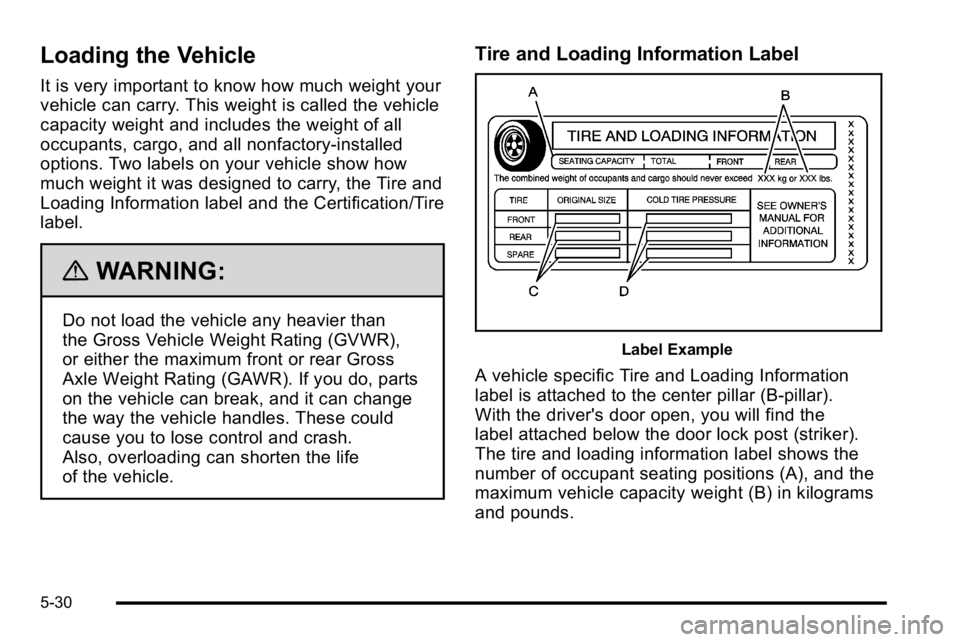
Tire and Loading Information Label
Label Example
A vehicle specific Tire and Loading Information
label is attached to the center pillar (B-pillar).
With the driver's door open, you will find the
label attached below the door lock post (striker).
The tire and loading information label shows the
number of occupant seating positions (A), and the
maximum vehicle capacity weight (B) in kilograms
and pounds.
5-30
Page 458 of 630
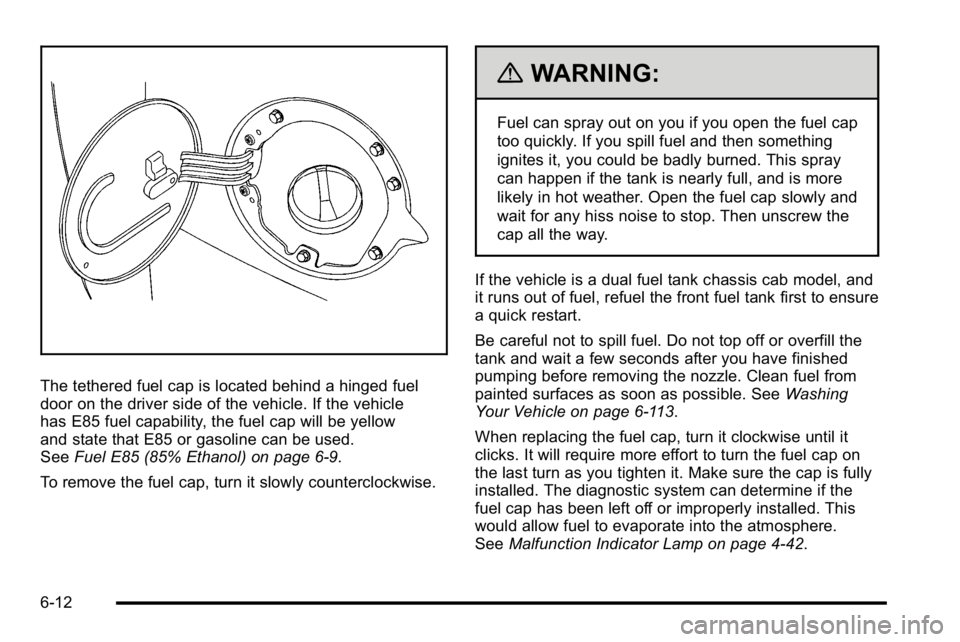
The tethered fuel cap is located behind a hinged fuel
door on the driver side of the vehicle. If the vehicle
has E85 fuel capability, the fuel cap will be yellow
and state that E85 or gasoline can be used.
SeeFuel E85 (85% Ethanol) on page 6‑9.
To remove the fuel cap, turn it slowly counterclockwise.
{WARNING:
Fuel can spray out on you if you open the fuel cap
too quickly. If you spill fuel and then something
ignites it, you could be badly burned. This spray
can happen if the tank is nearly full, and is more
likely in hot weather. Open the fuel cap slowly and
wait for any hiss noise to stop. Then unscrew the
cap all the way.
If the vehicle is a dual fuel tank chassis cab model, and
it runs out of fuel, refuel the front fuel tank first to ensure
a quick restart.
Be careful not to spill fuel. Do not top off or overfill the
tank and wait a few seconds after you have finished
pumping before removing the nozzle. Clean fuel from
painted surfaces as soon as possible. See Washing
Your Vehicle on page 6‑113.
When replacing the fuel cap, turn it clockwise until it
clicks. It will require more effort to turn the fuel cap on
the last turn as you tighten it. Make sure the cap is fully
installed. The diagnostic system can determine if the
fuel cap has been left off or improperly installed. This
would allow fuel to evaporate into the atmosphere.
See Malfunction Indicator Lamp on page 4‑42.
6-12
Page 565 of 630
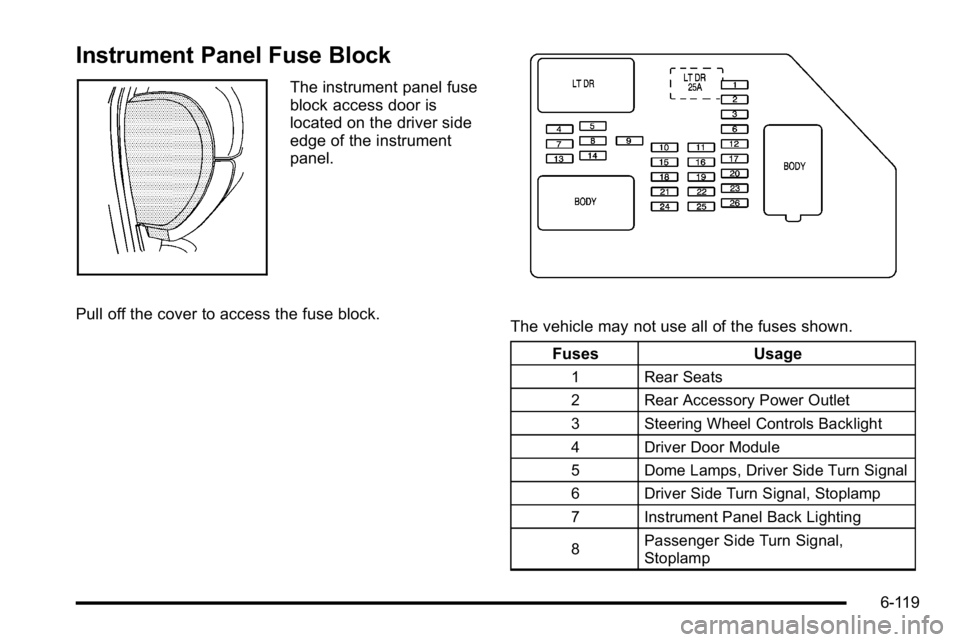
Instrument Panel Fuse Block
The instrument panel fuse
block access door is
located on the driver side
edge of the instrument
panel.
Pull off the cover to access the fuse block.
The vehicle may not use all of the fuses shown. Fuses Usage
1 Rear Seats
2 Rear Accessory Power Outlet
3 Steering Wheel Controls Backlight
4 Driver Door Module
5 Dome Lamps, Driver Side Turn Signal
6 Driver Side Turn Signal, Stoplamp
7 Instrument Panel Back Lighting
8 Passenger Side Turn Signal,
Stoplamp
6-119
Page 566 of 630
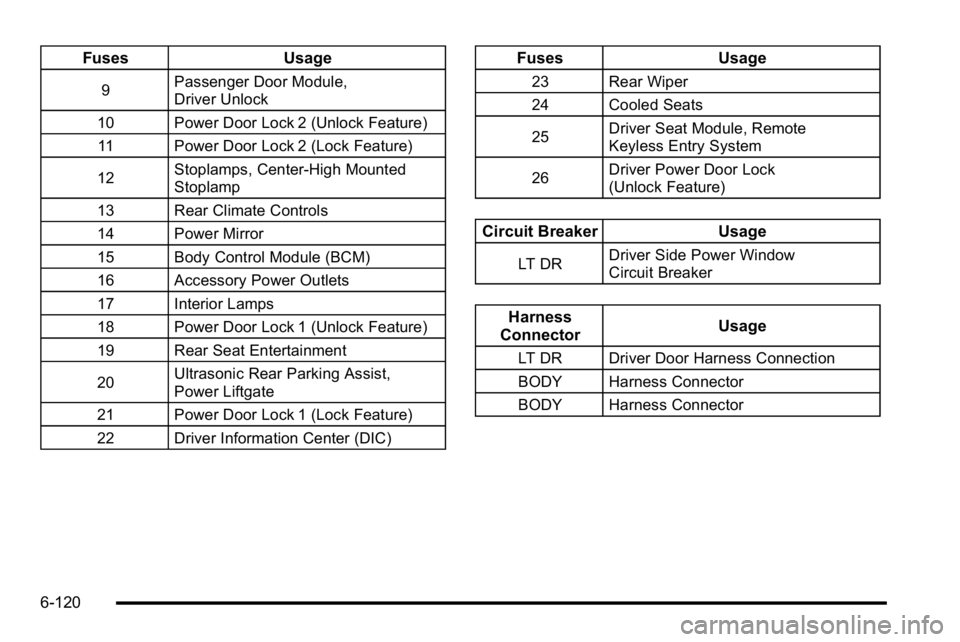
FusesUsage
9Passenger Door Module,
Driver Unlock
10 Power Door Lock 2 (Unlock Feature) 11 Power Door Lock 2 (Lock Feature)
12 Stoplamps, Center-High Mounted
Stoplamp
13 Rear Climate Controls
14 Power Mirror
15 Body Control Module (BCM)
16 Accessory Power Outlets
17 Interior Lamps
18 Power Door Lock 1 (Unlock Feature)
19 Rear Seat Entertainment
20 Ultrasonic Rear Parking Assist,
Power Liftgate
21 Power Door Lock 1 (Lock Feature)
22 Driver Information Center (DIC)
Fuses Usage
23 Rear Wiper
24 Cooled Seats
25Driver Seat Module, Remote
Keyless Entry System
26 Driver Power Door Lock
(Unlock Feature)
Circuit Breaker
Usage
LT DRDriver Side Power Window
Circuit Breaker
Harness
Connector Usage
LT DR Driver Door Harness Connection
BODY Harness Connector
BODY Harness Connector
6-120
Page 613 of 630
GM will not access this data or share it with others
except: with the consent of the vehicle owner or, if the
vehicle is leased, with the consent of the lessee; in
response to an official request of police or similar
government office; as part of GM's defense of litigation
through the discovery process; or, as required by law.
Data that GM collects or receives may also be used for
GM research needs or may be made available to others
for research purposes, where a need is shown and the
data is not tied to a specific vehicle or vehicle owner.
OnStar®
If the vehicle has OnStar and you subscribe to the
OnStar services, please refer to the OnStar Terms and
Conditions for information on data collection and use.
Navigation System
If your vehicle has a navigation system, use of the
system may result in the storage of destinations,
addresses, telephone numbers, and other trip
information. Refer to the navigation system operating
manual for information on stored data and for deletion
instructions.
Radio Frequency
Identification (RFID)
RFID technology is used in some vehicles for functions
such as tire pressure monitoring and ignition system
security, as well as in connection with conveniences
such as key fobs for remote door locking/unlocking and
starting, and in-vehicle transmitters for garage door
openers. RFID technology in GM vehicles does not use
or record personal information or link with any other
GM system containing personal information.
Radio Frequency Statement
This vehicle has systems that operate on a radio
frequency that comply with Part 15 of the Federal
Communications Commission (FCC) Rules and with
RSS-210/211 of Industry and Science Canada.
Operation is subject to the following two conditions:1. The device may not cause interference.
2. The device must accept any interference received, including interference that may cause undesired
operation of the device.
Changes or modifications to any of these systems by
other than an authorized service facility could void
authorization to use this equipment.
8-19
Page 619 of 630

DoorDelayed Locking . . . . . . . . . . . . . . . . . . . . . . . . . . . . . . . . . . 3-10
Locks . . . . . . . . . . . . . . . . . . . . . . . . . . . . . . . . . . . . . . . . . . . . . . 3-9
Power Locks . . . . . . . . . . . . . . . . . . . . . . . . . . . . . . . . . . . . . . . 3-9
Programmable Automatic Door Locks . . . . . . . . . . . . 3-10
Rear Door Security Locks . . . . . . . . . . . . . . . . . . . . . . . . 3-10
Rear Doors . . . . . . . . . . . . . . . . . . . . . . . . . . . . . . . . . . . . . . . 3-11
Driver Information Center (DIC) . . . . . . . . . . . . . . . . . . . . 4-51 DIC Operation and Displays . . . . . . . . . . . . . . . . 4-51, 4-58
DIC Vehicle Customization . . . . . . . . . . . . . . . . . . . . . . . 4-75
DIC Warnings and Messages . . . . . . . . . . . . . . . . . . . . . 4-65
Driving At Night . . . . . . . . . . . . . . . . . . . . . . . . . . . . . . . . . . . . . . . . . . . 5-23
Before a Long Trip . . . . . . . . . . . . . . . . . . . . . . . . . . . . . . . . 5-24
Defensive . . . . . . . . . . . . . . . . . . . . . . . . . . . . . . . . . . . . . . . . . . 5-2
Drunk . . . . . . . . . . . . . . . . . . . . . . . . . . . . . . . . . . . . . . . . . . . . . . 5-2
Highway Hypnosis . . . . . . . . . . . . . . . . . . . . . . . . . . . . . . . . 5-24
Hill and Mountain Roads . . . . . . . . . . . . . . . . . . . . . . . . . . 5-25
In Rain and on Wet Roads . . . . . . . . . . . . . . . . . . . . . . . . 5-23
Loss of Control . . . . . . . . . . . . . . . . . . . . . . . . . . . . . . . . . . . 5-10
Off-Road . . . . . . . . . . . . . . . . . . . . . . . . . . . . . . . . . . . . . . . . . 5-11
Off-Road Recovery . . . . . . . . . . . . . . . . . . . . . . . . . . . . . . . 5-10
Recovery Hooks . . . . . . . . . . . . . . . . . . . . . . . . . . . . . . . . . . 5-29
Rocking Your Vehicle to Get it Out . . . . . . . . . . . . . . . . 5-28
Winter . . . . . . . . . . . . . . . . . . . . . . . . . . . . . . . . . . . . . . . . . . . . 5-26 Driving for Better Fuel Economy . . . . . . . . . . . . . . . . . . . 1-33
Dual Automatic Climate Control System . . . . . . . . . . . 4-22
Dual Tire Operation . . . . . . . . . . . . . . . . . . . . . . . . . . . . . . . . 6-74
DVD
Rear Seat Entertainment System . . . . . . . . . . . . . . . .4-134
E
E85 Fuel . . . . . . . . . . . . . . . . . . . . . . . . . . . . . . . . . . . . . . . . . . . . .6-9
EDR . . . . . . . . . . . . . . . . . . . . . . . . . . . . . . . . . . . . . . . . . . . . . . . 8-18
Electrical Equipment, Add-On . . . . . . . . . . . . . . . . . . . . 6-117
Electrical SystemCenter Instrument Panel Fuse Block . . . . . . . . . . . . .6-121
Fuses and Circuit Breakers . . . . . . . . . . . . . . . . . . . . . . 6-118
Instrument Panel Fuse Block . . . . . . . . . . . . . . . . . . . . 6-119
Power Windows and Other Power Options . . . . . . 6-118
Underhood Fuse Block . . . . . . . . . . . . . . . . . . . . . . . . . .6-122
Windshield Wiper Fuses . . . . . . . . . . . . . . . . . . . . . . . . . 6-118
Electronic Immobilizer
PASS-Key
®III+ . . . . . . . . . . . . . . . . . . . . . . . . . . . . . . . . . . . 3-19
Electronic Immobilizer Operation PASS-Key
®III+ . . . . . . . . . . . . . . . . . . . . . . . . . . . . . . . . . . . 3-19
Engine Air Cleaner/Filter . . . . . . . . . . . . . . . . . . . . . . . . . . . . . . . . . 6-21
Check and Service Engine Soon Lamp . . . . . . . . . . . 4-42
Compartment Overview . . . . . . . . . . . . . . . . . . . . . . . . . . . 6-16
i - 5
Page 621 of 630

Fuel . . . . . . . . . . . . . . . . . . . . . . . . . . . . . . . . . . . . . . . . . . . . . . . . .6-6Additives . . . . . . . . . . . . . . . . . . . . . . . . . . . . . . . . . . . . . . . . . . 6-8
California Fuel . . . . . . . . . . . . . . . . . . . . . . . . . . . . . . . . . . . . . 6-8
E85 (85% Ethanol) . . . . . . . . . . . . . . . . . . . . . . . . . . . . . . . . 6-9
Filling a Portable Fuel Container . . . . . . . . . . . . . . . . . . 6-13
Filling the Tank . . . . . . . . . . . . . . . . . . . . . . . . . . . . . . . . . . . 6-11
Fuels in Foreign Countries . . . . . . . . . . . . . . . . . . . . . . . . 6-11
Gage . . . . . . . . . . . . . . . . . . . . . . . . . . . . . . . . . . . . . . . . . . . . . 4-49
Gasoline Octane . . . . . . . . . . . . . . . . . . . . . . . . . . . . . . . . . . . 6-7
Gasoline Specifications . . . . . . . . . . . . . . . . . . . . . . . . . . . . 6-7
Low Fuel Warning Light . . . . . . . . . . . . . . . . . . . . . . . . . . . 4-50
Management, Active . . . . . . . . . . . . . . . . . . . . . . . . . . . . . . 3-27
Fuel Economy Driving for Better . . . . . . . . . . . . . . . . . . . . . . . . . . . . . . . . . 1-33
Fuses Center Instrument Panel Fuse Block . . . . . . . . . . . . .6-121
Fuses and Circuit Breakers . . . . . . . . . . . . . . . . . . . . . . 6-118
Instrument Panel Fuse Block . . . . . . . . . . . . . . . . . . . . 6-119
Underhood Fuse Block . . . . . . . . . . . . . . . . . . . . . . . . . .6-122
Windshield Wiper . . . . . . . . . . . . . . . . . . . . . . . . . . . . . . . . 6-118G
Gages
Engine Coolant Temperature . . . . . . . . . . . . . . . . . . . . . 4-41
Fuel . . . . . . . . . . . . . . . . . . . . . . . . . . . . . . . . . . . . . . . . . . . . . . 4-49
Oil Pressure . . . . . . . . . . . . . . . . . . . . . . . . . . . . . . . . . . . . . . 4-46
Speedometer . . . . . . . . . . . . . . . . . . . . . . . . . . . . . . . . . . . . . 4-31
Tachometer . . . . . . . . . . . . . . . . . . . . . . . . . . . . . . . . . . . . . . . 4-31
Trip Odometer . . . . . . . . . . . . . . . . . . . . . . . . . . . . . . . . . . . . 4-31
Voltmeter Gage . . . . . . . . . . . . . . . . . . . . . . . . . . . . . . . . . . . 4-38
Garage Door Opener . . . . . . . . . . . . . . . . . . . . . . . . . . . . . . 3-69
Gasoline Octane . . . . . . . . . . . . . . . . . . . . . . . . . . . . . . . . . . . . . . . . . . . . 6-7
Specifications . . . . . . . . . . . . . . . . . . . . . . . . . . . . . . . . . . . . . . 6-7
Glove Box . . . . . . . . . . . . . . . . . . . . . . . . . . . . . . . . . . . . . . . . . 3-75
GM Mobility Reimbursement Program . . . . . . . . . . . . . . .8-7
H
Halogen Bulbs . . . . . . . . . . . . . . . . . . . . . . . . . . . . . . . . . . . . . 6-57
Hazard Warning Flashers . . . . . . . . . . . . . . . . . . . . . . . . . . . .4-3
Head Restraints . . . . . . . . . . . . . . . . . . . . . . . . . . . . . . . . . . . . .2-3
Headlamps . . . . . . . . . . . . . . . . . . . . . . . . . . . . . . . . . . . . . . . . 6-57 Aiming . . . . . . . . . . . . . . . . . . . . . . . . . . . . . . . . . . . . . . . . . . . . 6-54
Bulb Replacement . . . . . . . . . . . . . . . . . . . . . . . . . . . . . . . . 6-57
Daytime Running Lamps (DRL) . . . . . . . . . . . . . . . . . . . 4-12
i - 7