clock GMC SIERRA 2011 User Guide
[x] Cancel search | Manufacturer: GMC, Model Year: 2011, Model line: SIERRA, Model: GMC SIERRA 2011Pages: 594, PDF Size: 6.55 MB
Page 257 of 594
Black plate (31,1)GMC Sierra Owner Manual - 2011
Infotainment System 7-31
O(Power):Press to turn the
radio on or off. Turn clockwise or
counterclockwise to increase or
decrease the volume. Press and
hold for more than two seconds to
turn off the entire radio and Rear
Seat Entertainment (RSE) system
and to start the Parental Control
feature. Parental Control prevents
the rear seat occupant from
operating the Rear Seat Audio
(RSA) system or remote control.
A lock symbol displays next to the
clock display. The Parental Control
feature remains on until the knob
is pressed and held for more than
two seconds again, or until the
driver turns the ignition off and
exits the vehicle.
f(Tune): Turn to select tracks on
a CD or DVD.
©SEEK: Press to return to the
start of the current track or chapter.
Press again to go to the previous
track or chapter. This button might
not work when the DVD is playing
the copyright information or the
previews.
¨SEEK: Press to go to the next
track or chapter. This button might
not work when the DVD is playing
the copyright information or the
previews.
sREV (Fast Reverse): Press
to quickly reverse the CD or DVD
at five times the normal speed.
To stop fast reversing, press again.
This button might not work when
the DVD is playing the copyright
information or the previews.
\FWD (Fast Forward): Press
to fast forward the CD or DVD at
five times the normal speed. To stop
fast forwarding, press again. This
button might not work when the
DVD is playing the copyright
information or the previews. Using Softkeys to Play a DVD-V
(Video)
Once a DVD-V is inserted, the
radio display menu shows several
tab options for playback. Press the
softkey located under any tab option
during DVD-V playback.
r/j(Play/Pause):
Press either
the Play or Pause tab displayed on
the radio, to toggle between pausing
or restarting playback of a DVD.
If the forward arrow is showing on
the display, the system is in pause
mode. If the Pause tab is showing
on the display, the system is in
playback mode. If the DVD screen
is off, press the play button to turn
the screen on.
Some DVDs begin playing after the
previews have finished, although
there could be a delay of up to
30 seconds. If the DVD does
not begin playing the movie
automatically, press the softkey
located under the play/pause
symbol tag displayed on the radio.
Page 260 of 594
Black plate (34,1)GMC Sierra Owner Manual - 2011
7-34 Infotainment System
Player Error:This message
displays if there are disc load or
disc eject problems.
.It is very hot. When the
temperature returns to normal,
the disc should play.
.The road is very rough. When
the road becomes smoother, the
disc should play.
.The disc is dirty, scratched, wet,
or upside down.
.The air is very humid. If so, wait
about an hour and try again.
.There was a problem while
burning the disc.
.The label is caught in the
CD/DVD player.
If the disc is not playing correctly,
for any other reason, try a known
good disc. If any error occurs repeatedly
or if an error cannot be corrected,
contact your dealer. If the radio
displays an error message, write it
down and provide it to your dealer
when reporting the problem.
Auxiliary Devices
Using the Auxiliary Input Jack
Radios with an auxiliary input jack
located on the lower right side of the
faceplate can connect to an external
audio device such as an iPod
®,
MP3 player, or CD player, for use as
another source for audio listening.
This input jack is not an audio
output; do not plug headphones
into the front auxiliary input jack.
Drivers are encouraged to
set up any auxiliary device
while the vehicle is in P (Park).
See Defensive Driving on page 9‑2
for more information on driver
distraction. To use a portable audio player,
connect a 3.5 mm (1/8 in) cable to
the radio's front auxiliary input jack.
When a device is connected, press
the radio CD/AUX button to begin
playing audio from the device over
the vehicle speakers.
For optimal sound quality, increase
the portable audio device's volume
to the loudest level.
It is always best to power the
portable audio device through its
own battery while playing.O(Power/Volume):
Turn clockwise
or counterclockwise to increase
or decrease the volume of the
portable player. Additional volume
adjustments might have to be made
from the portable device if the
volume is not loud or soft enough.
BAND: Press to listen to the radio
when a portable audio device is
playing. The portable audio device
continues playing.
Page 284 of 594
Black plate (2,1)GMC Sierra Owner Manual - 2011
8-2 Climate Controls
Temperature Control:Turn
clockwise or counterclockwise
to increase or decrease the
temperature inside the vehicle.
9(Fan Control): Turn clockwise
or counterclockwise to increase or
decrease the fan speed. Turn the
knob all the way counterclockwise
to turn the front system off.
Air Delivery Mode Control: Turn
clockwise or counterclockwise to
change the direction of the airflow
inside the vehicle. The knob can
be positioned between two modes
to select a combination of those
modes.
Select from the following:
H(Vent): Air is directed to the
instrument panel outlets.
)(Bi-Level): Air is divided
between the instrument panel
and floor outlets.
6(Floor): Air is directed to the
floor outlets, with some air directed
to the windshield and side window
outlets. In this mode, the system
automatically selects outside air.
Recirculation cannot be selected
in floor mode.
-(Defog): This mode clears the
windows of fog or moisture. Air is
directed to the windshield, floor
outlets, and side window vents.
0(Defrost): This mode removes
fog or frost from the windshield
more quickly. Air is directed to
the windshield and the side
window vents, with some air
directed to the floor vents.
The system automatically forces
outside air into the vehicle. The recirculation mode cannot be
selected in the defog or defrost
mode. When either mode is
selected, the system runs the air
conditioning compressor, unless
the outside temperature is close
to freezing.
Do not drive the vehicle until all the
windows are clear.
:(Outside Air):
Press to
turn the outside air mode on.
An indicator light comes on to
show that outside air is on.
In this mode outside air circulates
throughout the vehicle. The outside
air mode can be used with all
modes, but it cannot be used
with the recirculation mode.
Page 286 of 594
Black plate (4,1)GMC Sierra Owner Manual - 2011
8-4 Climate Controls
Climate Control Systems (with Heater Only)
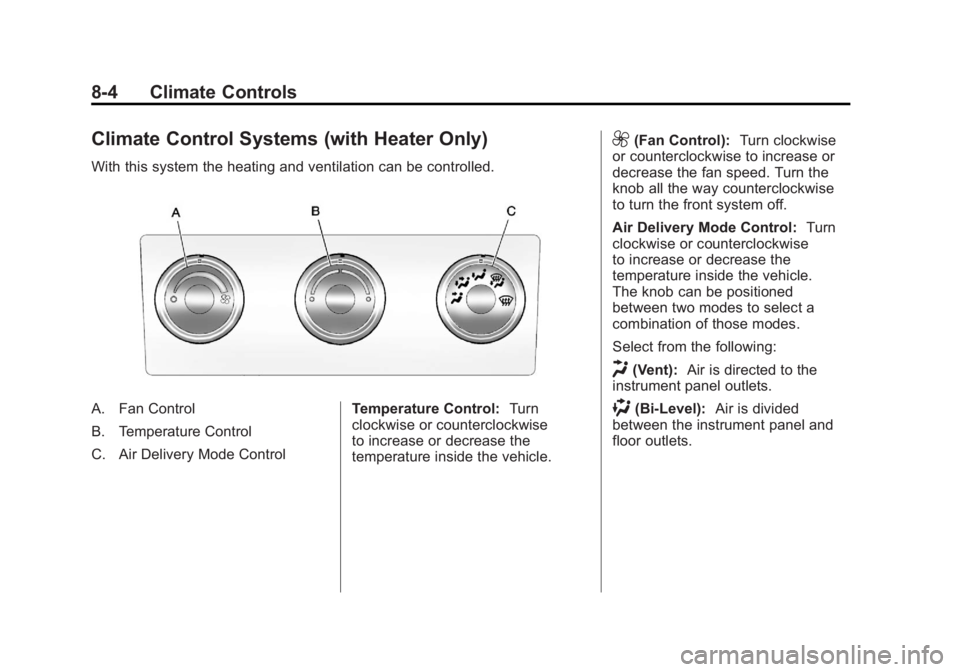
With this system the heating and ventilation can be controlled.
A. Fan Control
B. Temperature Control
C. Air Delivery Mode ControlTemperature Control:
Turn
clockwise or counterclockwise
to increase or decrease the
temperature inside the vehicle.
9(Fan Control): Turn clockwise
or counterclockwise to increase or
decrease the fan speed. Turn the
knob all the way counterclockwise
to turn the front system off.
Air Delivery Mode Control: Turn
clockwise or counterclockwise
to increase or decrease the
temperature inside the vehicle.
The knob can be positioned
between two modes to select a
combination of those modes.
Select from the following:
H(Vent): Air is directed to the
instrument panel outlets.
)(Bi-Level): Air is divided
between the instrument panel and
floor outlets.
Page 299 of 594
Black plate (5,1)GMC Sierra Owner Manual - 2011
Driving and Operating 9-5
Steering in Emergencies
There are times when steering
can be more effective than braking.
For example, you come over a hill
and find a truck stopped in your
lane, or a car suddenly pulls out
from nowhere, or a child darts out
from between parked cars and stops
right in front of you. These problems
can be avoided by braking—if you
can stop in time. But sometimes you
cannot stop in time because there
is no room. That is the time for
evasive action —steering around
the problem.
The vehicle can perform very
well in emergencies like these.
First, apply the brakes. See Braking
on page 9‑3. It is better to remove
as much speed as possible from
a collision. Then steer around
the problem, to the left or right
depending on the space available.
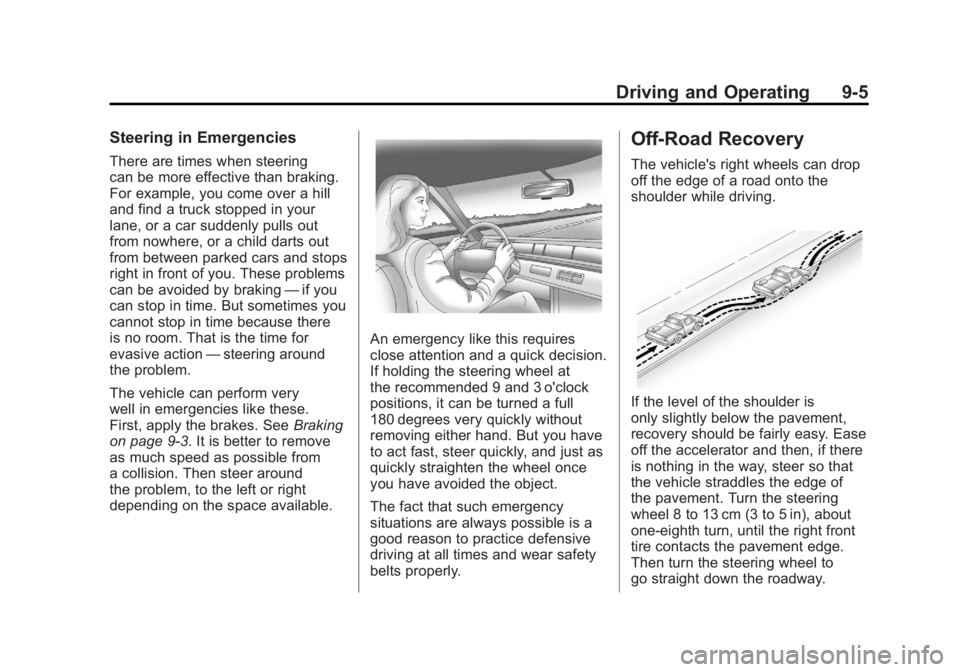
An emergency like this requires
close attention and a quick decision.
If holding the steering wheel at
the recommended 9 and 3 o'clock
positions, it can be turned a full
180 degrees very quickly without
removing either hand. But you have
to act fast, steer quickly, and just as
quickly straighten the wheel once
you have avoided the object.
The fact that such emergency
situations are always possible is a
good reason to practice defensive
driving at all times and wear safety
belts properly.
Off-Road Recovery
The vehicle's right wheels can drop
off the edge of a road onto the
shoulder while driving.
If the level of the shoulder is
only slightly below the pavement,
recovery should be fairly easy. Ease
off the accelerator and then, if there
is nothing in the way, steer so that
the vehicle straddles the edge of
the pavement. Turn the steering
wheel 8 to 13 cm (3 to 5 in), about
one-eighth turn, until the right front
tire contacts the pavement edge.
Then turn the steering wheel to
go straight down the roadway.
Page 308 of 594
Black plate (14,1)GMC Sierra Owner Manual - 2011
9-14 Driving and Operating
.While backing down the hill, put
your left hand on the steering
wheel at the 12 o'clock position
so you can tell if the wheels are
straight and can maneuver as
you back down. It is best to back
down the hill with the wheels
straight rather than in the left
or right direction. Turning the
wheel too far to the left or right
will increase the possibility of a
rollover.
Things not to do if the vehicle stalls,
or is about to stall, when going up
a hill:
.Never attempt to prevent a stall
by shifting into N (Neutral) to
rev-up the engine and regain
forward momentum. This will
not work. The vehicle can roll
backward very quickly and
could go out of control.
.Never try to turn around if about
to stall when going up a hill.
If the hill is steep enough to
stall the vehicle, it is steep
enough to cause it to roll over.
If you cannot make it up the hill,
back straight down the hill.
If, after stalling, you try to back
down the hill and decide you just
cannot do it, set the parking brake,
put your transmission in P (Park),
and turn off the engine. Leave
the vehicle and go get some help.
Exit on the uphill side and stay clear
of the path the vehicle would take
if it rolled downhill. Do not shift the
transfer case to Neutral when you
leave the vehicle. Leave it in
some gear.
{WARNING
Shifting the transfer case to
Neutral can cause your vehicle to
roll even if the transmission is in
P (Park). This is because the
Neutral position on the transfer
case overrides the transmission.
You or someone else could be
injured. If you are going to leave
your vehicle, set the parking
brake and shift the transmission
to P (Park). But do not shift the
transfer case to Neutral.
Page 356 of 594
Black plate (62,1)GMC Sierra Owner Manual - 2011
9-62 Driving and Operating
Shifting into Neutral
To shift the transfer case to
N (Neutral) do the following:
1. Make sure the vehicle is parkedso that it will not roll.
2. Set the parking brake and press and hold the regular brake
pedal. See Parking Brake on
page 9‑69 for more information.
3. Start the vehicle or turn the ignition to ON/RUN.
4. Shift the transmission to N (Neutral).
5. Shift the transfer case to Two-Wheel Drive High.
6. Turn the transfer case dial clockwise to N (Neutral) until
it stops and hold it there until
the Neutral light starts blinking.
This will take at least 10 seconds. Then slowly release
the dial to the four low position.
The N (Neutral) light will come
on when the transfer case shift
to N (Neutral) is complete.
7. If the engine is running, verify that the transfer case is in
N (Neutral) by shifting the
transmission to R (Reverse)
for one second, then shift the
transmission to D (Drive) for
one second.
8. Turn the ignition to ACC/ACCESSORY, which
will turn the engine off.
9. Place the transmission shift lever in P (Park).
10. Release the parking brake prior to moving the vehicle.
11. Turn the ignition to LOCK/OFF. Shifting Out of Neutral
To shift the transfer case out of
N (Neutral) do the following:
1. Set the parking brake and apply
the regular brake pedal.
2. Turn the ignition to ON/RUN with the engine off, and shift
the transmission to N (Neutral).
3. Turn the transfer case dial to Two-Wheel Drive High.
After the transfer case has
shifted out of N (Neutral), the
N (Neutral) light will go out.
4. Release the parking brake prior to moving the vehicle.
Page 361 of 594
Black plate (67,1)GMC Sierra Owner Manual - 2011
Driving and Operating 9-67
6. Turn the transfer case dialclockwise to N (Neutral) until
it stops and hold it there until
the N (Neutral) light starts
blinking. This will take at least
10 seconds. Then slowly release
the dial to the four low position.
The N (Neutral) light will come
on when the transfer case shift
to N (Neutral) is complete.
7. If the engine is running, make sure that the transfer case is
in N (Neutral) by shifting the
transmission to R (Reverse)
for one second, then shift the
transmission to D (Drive) for
one second.
8. Turn the ignition to ACC/ACCESSORY, which
will turn the engine off.
9. Place the transmission shift lever in P (Park). 10. Release the parking brake prior
to moving the vehicle.
11. Turn the ignition to LOCK/OFF.
Shifting Out of Neutral
To shift out of N (Neutral) do the
following:
1. Set the parking brake and apply the regular brake pedal.
2. Turn the ignition to ON/RUN with the engine off, and shift the
transmission to N (Neutral).
3. Turn the transfer case dial to Two-Wheel Drive High,
Four-Wheel Drive High,
or AUTO.
After the transfer case has
shifted out of N (Neutral), the
N (Neutral) light will go out. 4. Release the parking brake prior
to moving the vehicle.
Notice: Shifting the transmission
into gear before the requested
mode indicator light has stopped
flashing could damage the
transfer case. To help avoid
damaging the vehicle, always
wait for the mode indicator lights
to stop flashing before shifting
the transmission into gear.
5. Start the engine and shift the transmission to the desired
position.
Page 382 of 594
Black plate (88,1)GMC Sierra Owner Manual - 2011
9-88 Driving and Operating
E85 has less energy per liter
(gallon) than gasoline, so you will
need to refill the fuel tank more
often when using E85 than when
you are using gasoline. SeeFilling
the Tank on page 9‑88.
Notice: Some additives are not
compatible with E85 fuel and can
harm the vehicle's fuel system.
Do not add anything to E85.
Damage caused by additives
would not be covered by the
vehicle warranty.
Notice: This vehicle was not
designed for fuel that contains
methanol. Do not use fuel
containing methanol. It can
corrode metal parts in the fuel
system and also damage plastic
and rubber parts. That damage
would not be covered under the
vehicle warranty.Filling the Tank
If the vehicle has a diesel engine,
see the Duramax diesel supplement
for more information.
{WARNING
Fuel vapor burns violently and a
fuel fire can cause bad injuries.
To help avoid injuries to you and
others, read and follow all the
instructions on the fuel pump
island. Turn off the engine when
refueling. Do not smoke near fuel
or when refueling the vehicle.
Do not use cellular phones. Keep
sparks, flames, and smoking
materials away from fuel. Do not
leave the fuel pump unattended
when refueling the vehicle. This is
against the law in some places.
Do not re-enter the vehicle while
pumping fuel. Keep children away
from the fuel pump; never let
children pump fuel.
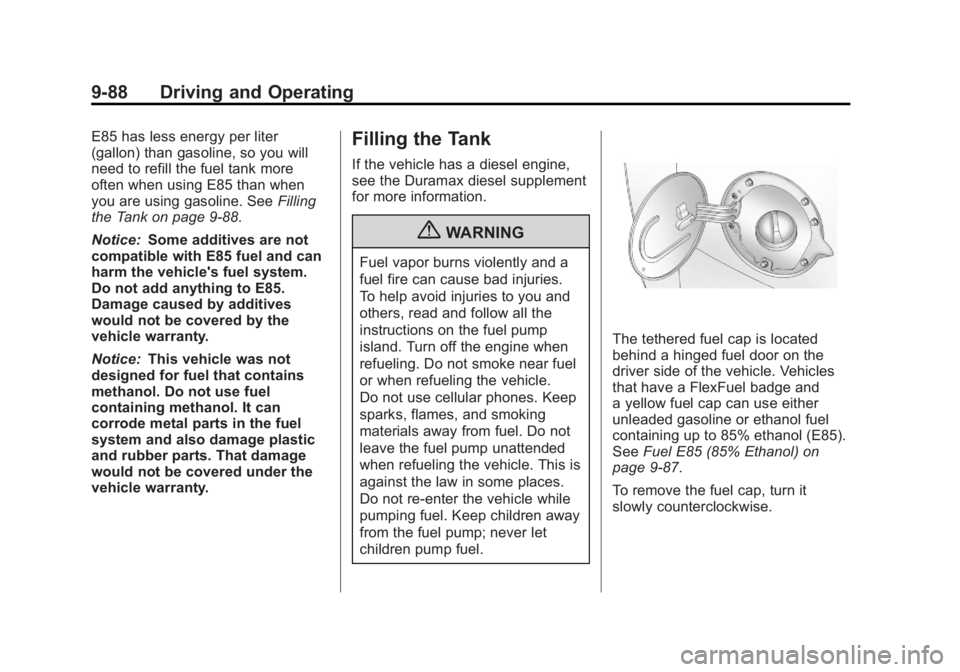
The tethered fuel cap is located
behind a hinged fuel door on the
driver side of the vehicle. Vehicles
that have a FlexFuel badge and
a yellow fuel cap can use either
unleaded gasoline or ethanol fuel
containing up to 85% ethanol (E85).
See Fuel E85 (85% Ethanol) on
page 9‑87.
To remove the fuel cap, turn it
slowly counterclockwise.
Page 383 of 594
Black plate (89,1)GMC Sierra Owner Manual - 2011
Driving and Operating 9-89
{WARNING
Fuel can spray out on you if you
open the fuel cap too quickly.
If you spill fuel and then
something ignites it, you could be
badly burned. This spray can
happen if the tank is nearly full,
and is more likely in hot weather.
Open the fuel cap slowly and wait
for any hiss noise to stop. Then
unscrew the cap all the way.
If the vehicle is a dual fuel tank
chassis cab model, and it runs out
of fuel, refuel the front fuel tank first
to ensure a quick restart.
Be careful not to spill fuel. Do not
top off or overfill the tank and wait a
few seconds after you have finished pumping before removing the
nozzle. Clean fuel from painted
surfaces as soon as possible.
See
Exterior Care on page 10‑108.
When replacing the fuel cap, turn it
clockwise until it clicks. It will require
more effort to turn the fuel cap on
the last turn as you tighten it. Make
sure the cap is fully installed. The
diagnostic system can determine if
the fuel cap has been left off or
improperly installed. This would
allow fuel to evaporate into the
atmosphere. See Malfunction
Indicator Lamp on page 5‑25.
The TIGHTEN GAS CAP message
displays on the Driver Information
Center (DIC) if the fuel cap is not
properly installed. See Fuel System
Messages on page 5‑46 for more
information.
{WARNING
If a fire starts while you are
refueling, do not remove the
nozzle. Shut off the flow of fuel
by shutting off the pump or by
notifying the station attendant.
Leave the area immediately.
Notice: If a new fuel cap is
needed, be sure to get the right
type of cap from your dealer.
The wrong type of fuel cap might
not fit properly, might cause the
malfunction indicator lamp to
light, and could damage the
fuel tank and emissions system.
See Malfunction Indicator Lamp
on page 5‑25.