ABS GMC SIERRA 2011 Owner's Guide
[x] Cancel search | Manufacturer: GMC, Model Year: 2011, Model line: SIERRA, Model: GMC SIERRA 2011Pages: 594, PDF Size: 6.55 MB
Page 363 of 594
Black plate (69,1)GMC Sierra Owner Manual - 2011
Driving and Operating 9-69
Braking in Emergencies
ABS allows the driver to steer and
brake at the same time. In many
emergencies, steering can help
more than even the very best
braking.
Parking Brake
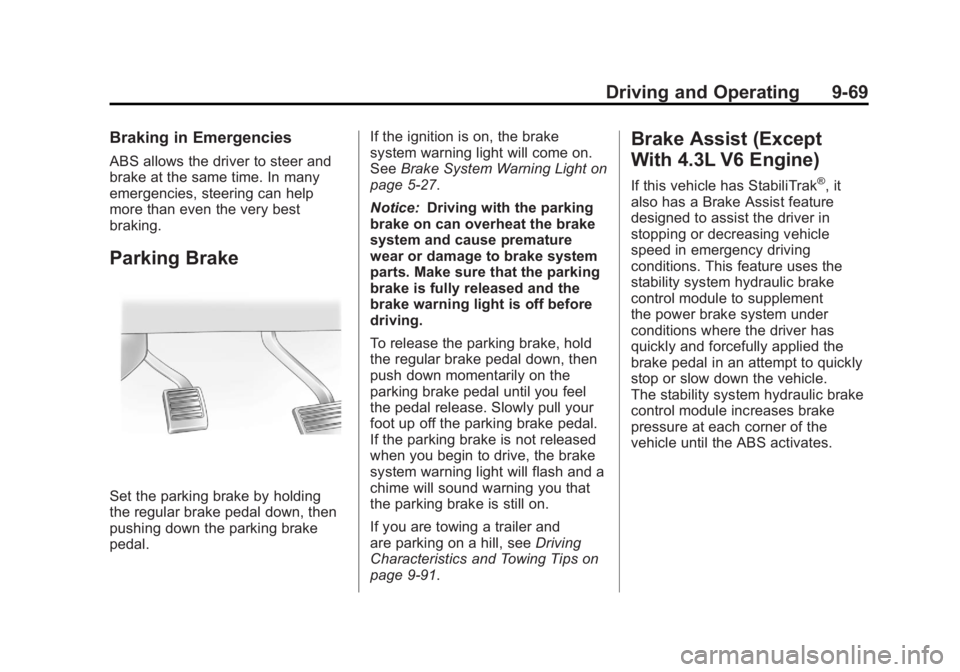
Set the parking brake by holding
the regular brake pedal down, then
pushing down the parking brake
pedal.If the ignition is on, the brake
system warning light will come on.
See
Brake System Warning Light on
page 5‑27.
Notice: Driving with the parking
brake on can overheat the brake
system and cause premature
wear or damage to brake system
parts. Make sure that the parking
brake is fully released and the
brake warning light is off before
driving.
To release the parking brake, hold
the regular brake pedal down, then
push down momentarily on the
parking brake pedal until you feel
the pedal release. Slowly pull your
foot up off the parking brake pedal.
If the parking brake is not released
when you begin to drive, the brake
system warning light will flash and a
chime will sound warning you that
the parking brake is still on.
If you are towing a trailer and
are parking on a hill, see Driving
Characteristics and Towing Tips on
page 9‑91.
Brake Assist (Except
With 4.3L V6 Engine)
If this vehicle has StabiliTrak®, it
also has a Brake Assist feature
designed to assist the driver in
stopping or decreasing vehicle
speed in emergency driving
conditions. This feature uses the
stability system hydraulic brake
control module to supplement
the power brake system under
conditions where the driver has
quickly and forcefully applied the
brake pedal in an attempt to quickly
stop or slow down the vehicle.
The stability system hydraulic brake
control module increases brake
pressure at each corner of the
vehicle until the ABS activates.
Page 366 of 594
Black plate (72,1)GMC Sierra Owner Manual - 2011
9-72 Driving and Operating
When TCS or StabiliTrak is
turned off, the StabiliTrak light
and the appropriate message
will be displayed on the DIC to
warn the driver. The vehicle will
still have brake-traction control
when traction control is off, but will
not be able to use the engine speed
management system. See“Traction
Control Operation” next for more
information.
When the traction control system
has been turned off, system noises
may still be heard as a result of the
brake-traction control coming on.
It is recommended to leave the
system on for normal driving
conditions, but it may be necessary
to turn the system off if the vehicle
is stuck in sand, mud, ice or snow,
and you want to “rock”the vehicle
to attempt to free it. It may also be
necessary to turn off the system
when driving in extreme off-road
conditions where high wheel spin
is required. See If the Vehicle is
Stuck on page 9‑23. When the transfer case is in 4LO,
the stability system is automatically
disabled, the StabiliTrak light comes
on, and the STABILITRAK OFF
message will appear on the DIC.
Both traction control and StabiliTrak
are automatically disabled in this
condition.
Traction Control Operation
The traction control system is part
of the StabiliTrak system. Traction
control limits wheel spin by reducing
engine power to the wheels (engine
speed management) and by
applying brakes to each individual
wheel (brake-traction control) as
necessary.
The traction control system is
enabled automatically when the
vehicle is started. It will activate
and the StabiliTrak light will flash
if it senses that any of the wheels
are spinning or beginning to lose
traction while driving. If traction
control is turned off, only the
brake-traction control portion
of traction control will work.
The engine speed management
will be disabled. In this mode,
engine power is not reduced
automatically and the driven
wheels can spin more freely.
This can cause the brake-traction
control to activate constantly.
Notice:
If the wheel(s) of one axle
is allowed to spin excessively
while the StabiliTrak
®, ABS, brake
warning lights, and any relevant
DIC messages are displayed, the
transfer case could be damaged.
The repairs would not be covered
by the vehicle warranty. Reduce
engine power and do not spin
the wheel(s) excessively while
these lights and messages are
displayed.
Page 388 of 594
Black plate (94,1)GMC Sierra Owner Manual - 2011
9-94 Driving and Operating
To avoid this, let the engine
run while parked, preferably on
level ground, with the automatic
transmission in P (Park) for a few
minutes before turning the engine
off. If the overheat warning comes
on, seeEngine Overheating on
page 10‑25.
Parking on Hills
{WARNING
Parking the vehicle on a hill
with the trailer attached can be
dangerous. If something goes
wrong, the rig could start to move.
People can be injured, and both
the vehicle and the trailer can be
damaged. When possible, always
park the rig on a flat surface. If parking the rig on a hill:
1. Press the brake pedal, but
do not shift into P (Park) yet.
Turn the wheels into the curb if
facing downhill or into traffic if
facing uphill.
2. Have someone place chocks under the trailer wheels.
3. When the wheel chocks are in place, release the regular brakes
until the chocks absorb the load.
4. Reapply the brake pedal. Then apply the parking brake and shift
into P (Park).
5. If the vehicle is four-wheel-drive, be sure the transfer case is in a
drive gear and not in N (Neutral).
6. Release the brake pedal.
{WARNING
It can be dangerous to get out of
the vehicle if the shift lever is not
fully in P (Park) with the parking
brake firmly set. The vehicle
can roll.
If the engine has been left
running, the vehicle can move
suddenly. You or others could be
injured. To be sure the vehicle will
not move, even when on fairly
level ground, use the steps that
follow.
Always put the shift lever fully in
P (Park) with the parking brake
firmly set.
If the transfer case on a
four-wheel-drive vehicle is in
N (Neutral), the vehicle will be
free to roll, even if the shift lever
is in P (Park). Be sure the transfer
case is in a drive gear —not in
N (Neutral).
Page 514 of 594
Black plate (90,1)GMC Sierra Owner Manual - 2011
10-90 Vehicle Care
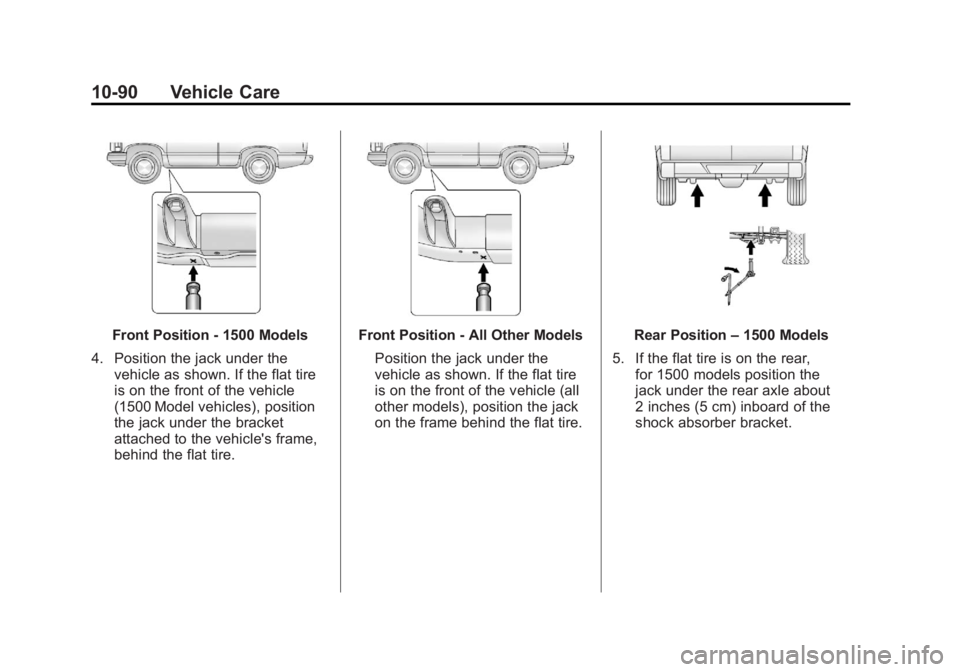
Front Position - 1500 Models
4. Position the jack under the vehicle as shown. If the flat tire
is on the front of the vehicle
(1500 Model vehicles), position
the jack under the bracket
attached to the vehicle's frame,
behind the flat tire.Front Position - All Other Models
Position the jack under the
vehicle as shown. If the flat tire
is on the front of the vehicle (all
other models), position the jack
on the frame behind the flat tire.Rear Position –1500 Models
5. If the flat tire is on the rear, for 1500 models position the
jack under the rear axle about
2 inches (5 cm) inboard of the
shock absorber bracket.
Page 515 of 594
Black plate (91,1)GMC Sierra Owner Manual - 2011
Vehicle Care 10-91
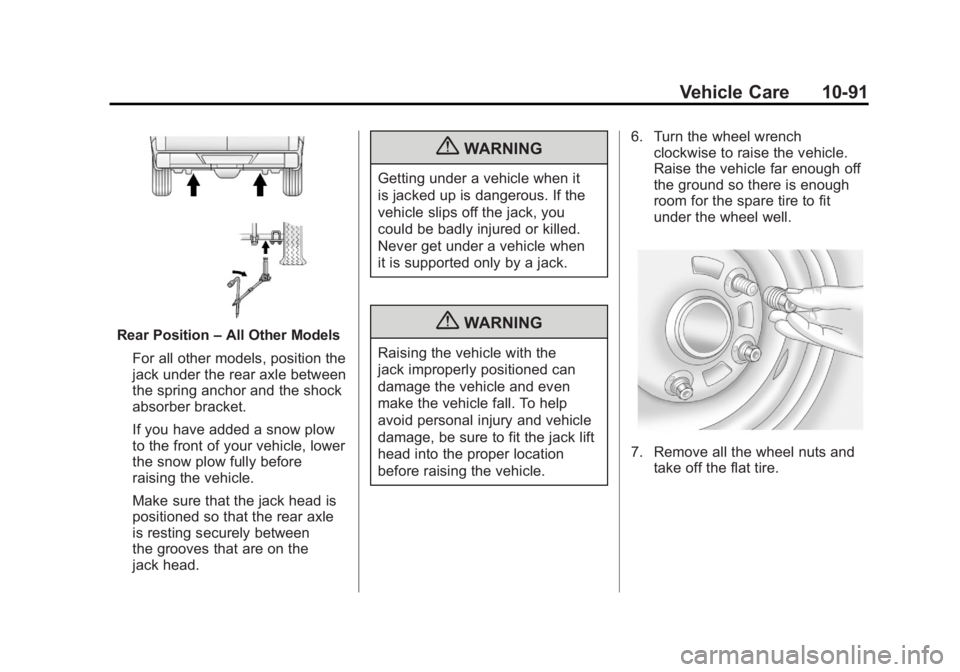
Rear Position–All Other Models
For all other models, position the
jack under the rear axle between
the spring anchor and the shock
absorber bracket.
If you have added a snow plow
to the front of your vehicle, lower
the snow plow fully before
raising the vehicle.
Make sure that the jack head is
positioned so that the rear axle
is resting securely between
the grooves that are on the
jack head.
{WARNING
Getting under a vehicle when it
is jacked up is dangerous. If the
vehicle slips off the jack, you
could be badly injured or killed.
Never get under a vehicle when
it is supported only by a jack.
{WARNING
Raising the vehicle with the
jack improperly positioned can
damage the vehicle and even
make the vehicle fall. To help
avoid personal injury and vehicle
damage, be sure to fit the jack lift
head into the proper location
before raising the vehicle. 6. Turn the wheel wrench
clockwise to raise the vehicle.
Raise the vehicle far enough off
the ground so there is enough
room for the spare tire to fit
under the wheel well.
7. Remove all the wheel nuts andtake off the flat tire.
Page 538 of 594
Black plate (114,1)GMC Sierra Owner Manual - 2011
10-114 Vehicle Care
Fabric/Carpet
Use a vacuum cleaner with a soft
brush attachment to remove dust
and loose dirt. A canister vacuum
with a beater bar in the nozzle
may only be used on floor carpet
and carpeted floor mats. For soils,
always try to remove them first with
plain water or club soda. Before
cleaning, gently remove as much
of the soil as possible using one
of the following techniques:
.For liquids: gently blot the
remaining soil with a paper
towel. Allow the soil to absorb
into the paper towel until no
more can be removed.
.For solid dry soils: remove as
much as possible and then
vacuum.
To clean:
1. Saturate a lint-free, clean white cloth with water or club soda.
2. Remove excess moisture. 3. Start on the outside edge of the
soil and gently rub toward the
center. Continue cleaning, using
a clean area of the cloth each
time it becomes soiled.
4. Continue to gently rub the soiled area.
5. If the soil is not completely removed, use a mild soap
solution and repeat the cleaning
process that was used with plain
water.
If any of the soil remains, a
commercial fabric cleaner or spot
lifter may be necessary. Test a small
hidden area for colorfastness before
using a commercial upholstery
cleaner or spot lifter. If the locally
cleaned area gives any impression
that a ring formation may result,
clean the entire surface.
A paper towel can be used to blot
excess moisture from the fabric or
carpet after the cleaning process.
Leather/Leatherette
Leather, and lighter colored leather
in particular, will need more frequent
cleaning to prevent the buildup of
dust, dirt, and colors transferred
from other items so that these do
not become permanent stains.
To remove dust, a soft cloth
dampened with water can be used.
If a more thorough cleaning is
necessary, a soft cloth dampened
with a mild soap solution can
be used. Your dealer has a GM
approved leather cleaner available
that provides superior cleaning
performance when used regularly
on finished automotive leathers.
Allow the leather to dry naturally.
Do not use heat, steam, spot lifters
or spot removers, or shoe polish on
leather. Many commercial leather
cleaners and coatings that are
sold to preserve and protect leather
may permanently change the
appearance and feel of the leather
and are not recommended.
Page 581 of 594
Black plate (1,1)GMC Sierra Owner Manual - 2011
INDEX i-1
A
Accessories andModifications . . . . . . . . . . . . . . . . . 10-3
Accessory Power . . . . . . . . . . . . . . 9-40
Active Fuel Management
®. . . . . 9-44
Add-On Electrical Equipment . . . . . . . . . . . . . . . . . . 9-125
Adding a Snow Plow or Similar Equipment . . . . . . . . . . . 9-125
Adjustable Throttle and Brake Pedal . . . . . . . . . . . . . . . . . . 9-35
Adjustments Lumbar, Front Seats . . . . . . . . . . . 3-6
Air Cleaner/Filter, Engine . . . . . 10-19
Air Vents . . . . . . . . . . . . . . . . . . . . . . 8-11
Airbag Light On-Off . . . . . . . . . . . . . . . . . . 5-21
Airbag System Check . . . . . . . . . . . . . . . . . . . . . . . . 3-48
How Does an AirbagRestrain? . . . . . . . . . . . . . . . . . . . 3-35
Passenger Sensing System . . . . . . . . . . . . . . . . . . . . . . 3-40
What Makes an Airbag Inflate? . . . . . . . . . . . . . . . . . . . . . . 3-34 Airbag System (cont.)
What Will You See After
an Airbag Inflates? . . . . . . . . . . 3-35
When Should an Airbag
Inflate? . . . . . . . . . . . . . . . . . . . . . . 3-32
Where Are the Airbags? . . . . . . 3-31
Airbags Adding Equipment to theVehicle . . . . . . . . . . . . . . . . . . . . . . 3-46
On-Off Light . . . . . . . . . . . . . . . . . . 5-21
On-Off Switch . . . . . . . . . . . . . . . . 3-37
Passenger Status Indicator . . . 5-23
Readiness Light . . . . . . . . . . . . . . 5-20
Servicing Airbag-Equipped Vehicles . . . . . . . . . . . . . . . . . . . . . 3-46
System Check . . . . . . . . . . . . . . . . 3-29
Alarm System Anti-Theft . . . . . . . . . . . . . . . . . . . . . 2-12
AM-FM Radio . . . . . . . . . . . . . . . . . . . 7-8
Antenna Satellite Radio . . . . . . . . . . . . . . . . 7-15
Anti-Theft Alarm System . . . . . . . . . . . . . . . . 2-12
Alarm System Messages . . . . . 5-48 Antilock Brake
System (ABS) . . . . . . . . . . . . . . . . 9-68
Warning Light . . . . . . . . . . . . . . . . . 5-28
Appearance Care Exterior . . . . . . . . . . . . . . . . . . . . 10-108
Interior . . . . . . . . . . . . . . . . . . . . . 10-112
Armrest Storage . . . . . . . . . . . . . . . . 4-1
Ashtrays . . . . . . . . . . . . . . . . . . . . . . . 5-12
Assistance Program,
Roadside . . . . . . . . . . . . . . 13-8, 13-10
Audio Players . . . . . . . . . . . . . . . . . 7-15
CD . . . . . . . . . . . . . . . . . . . . . . . . . . . 7-15
CD/DVD . . . . . . . . . . . . . . . . . . . . . . 7-22
Audio System Fixed Mast Antenna . . . . . . . . . . 7-15
Radio Reception . . . . . . . . . . . . . . 7-14
Rear Seat (RSA) . . . . . . . . . . . . . 7-48
Theft-Deterrent Feature . . . . . . . . 7-2
Automatic Door Locks . . . . . . . . . . . . . . . . . . . . 2-9
Headlamp System . . . . . . . . . . . . . 6-4
Automatic Transmission . . . . . . . 9-46 Fluid . . . . . . . . . . . . . . . . . 10-13, 10-16
Manual Mode . . . . . . . . . . . . . . . . . 9-50
Shift Lock ControlFunction Check . . . . . . . . . . . 10-40
Page 588 of 594
Black plate (8,1)GMC Sierra Owner Manual - 2011
i-8 INDEX
Lap Belt . . . . . . . . . . . . . . . . . . . . . . . 3-26
Lap-Shoulder Belt . . . . . . . . . . . . . 3-21
LATCH SystemReplacing Parts After aCrash . . . . . . . . . . . . . . . . . . . . . . . 3-66
Latch, Lower Anchors and Tethers for Children . . . . . . . . . . 3-57
Lighter, Cigarette . . . . . . . . . . . . . . 5-11
Lighting Entry . . . . . . . . . . . . . . . . . . . . . . . . . . 6-9
Exit . . . . . . . . . . . . . . . . . . . . . . . . . . . . 6-9
Illumination Control . . . . . . . . . . . . 6-7
Lights Airbag On-Off . . . . . . . . . . . . . . . . . 5-21
Airbag Readiness . . . . . . . . . . . . . 5-20
Antilock Brake System(ABS) Warning . . . . . . . . . . . . . . 5-28
Brake System Warning . . . . . . . 5-27
Charging System . . . . . . . . . . . . . 5-24
Cruise Control . . . . . . . . . . . . . . . . 5-32
Engine Oil Pressure . . . . . . . . . . 5-31
Flash-to-Pass . . . . . . . . . . . . . . . . . . 6-3
Four-Wheel-Drive . . . . . . . . . . . . . 5-29
Front Fog Lamps . . . . . . . . . . . . . 5-32 Lights (cont.)
High-Beam On . . . . . . . . . . . . . . . . 5-32
High/Low Beam Changer . . . . . . 6-3
Low Fuel Warning . . . . . . . . . . . . 5-31
Safety Belt Reminders . . . . . . . . 5-19
Security . . . . . . . . . . . . . . . . . . . . . . 5-32
StabiliTrak
®Indicator . . . . . . . . . 5-30
Tire Pressure . . . . . . . . . . . . . . . . . 5-30
Tow/Haul Mode . . . . . . . . . . . . . . . 5-29
Locking Rear Axle . . . . . . . . . . . . . 9-73
Locks Automatic Door . . . . . . . . . . . . . . . . 2-9
Delayed Locking . . . . . . . . . . . . . . . 2-8
Door . . . . . . . . . . . . . . . . . . . . . . . . . . . 2-8
Lockout Protection . . . . . . . . . . . . . 2-9
Power Door . . . . . . . . . . . . . . . . . . . . 2-8
Safety . . . . . . . . . . . . . . . . . . . . . . . . . 2-9
Loss of Control . . . . . . . . . . . . . . . . . 9-6
Low Fuel Warning Light . . . . . . . . 5-31
Lower Anchors and
Tethers for Children
(LATCH SYSTEM) . . . . . . . . . . . 3-57
Lumbar Adjustment . . . . . . . . . . . . . 3-6
Front Seats . . . . . . . . . . . . . . . . . . . . 3-6
M
MaintenanceRecords . . . . . . . . . . . . . . . . . . . . .11-12
Maintenance Schedule Recommended Fluids andLubricants . . . . . . . . . . . . . . . . . . . 11-8
Scheduled Maintenance . . . . . . 11-2
Transfer Case . . . . . . . . . . . . . . . . 9-54
Malfunction Indicator Lamp . . . . 5-25
Manual Mirrors . . . . . . . . . . . . . . . . 2-15
Manual Mode . . . . . . . . . . . . . . . . . . 9-50
Manual Windows . . . . . . . . . . . . . . 2-19
Memory Features . . . . . . . . . . . . . . 1-13
Messages Airbag System . . . . . . . . . . . . . . . . 5-48
Anti-Theft Alarm System . . . . . . 5-48
Battery Voltage andCharging . . . . . . . . . . . . . . . . . . . . 5-41
Brake System . . . . . . . . . . . . . . . . 5-42
Door Ajar . . . . . . . . . . . . . . . . . . . . . 5-43
Engine Cooling System . . . . . . . 5-44
Engine Oil . . . . . . . . . . . . . . . . . . . . 5-45
Engine Power . . . . . . . . . . . . . . . . 5-45