4 wheel drive service GMC SIERRA 2011 Owner's Manual
[x] Cancel search | Manufacturer: GMC, Model Year: 2011, Model line: SIERRA, Model: GMC SIERRA 2011Pages: 594, PDF Size: 6.55 MB
Page 178 of 594

Black plate (30,1)GMC Sierra Owner Manual - 2011
5-30 Instruments and Controls
StabiliTrak®Indicator
Light
For vehicles with the StabiliTrak
system, this light comes on briefly
while starting the engine.
If it does not, have the vehicle
serviced by your dealer. If the
system is working normally the
indicator light then goes off.
If the light comes on and stays
on while driving, there could be a
problem with the StabiliTrak system
and the vehicle might need service.
When this warning light is on, the
StabiliTrak system is off and does
not limit wheel spin. The light flashes if the system is
active and is working to assist the
driver with directional control of the
vehicle in difficult driving conditions.
See
StabiliTrak
®System on
page 9‑70 for more information.
If the vehicle is a hybrid, see
the hybrid supplement for more
information.
Tire Pressure Light
For vehicles with the Tire Pressure
Monitor System (TPMS), this light
comes on briefly when the engine
is started. It provides information
about tire pressures and the TPMS. When the Light is On Steady
This indicates that one or more
of the tires are significantly
underinflated.
A tire pressure message can
accompany the light. See
Tire
Messages on page 5‑49 for more
information. Stop as soon as
possible, and inflate the tires to
the pressure value shown on the
Tire and Loading Information label.
See Tire Pressure on page 10‑66
for more information.
When the Light Flashes First and
Then is On Steady
This indicates that there may be
a problem with the Tire Pressure
Monitor System. The light flashes
for about a minute and stays on
steady for the remainder of the
ignition cycle. This sequence
repeats with every ignition cycle.
See Tire Pressure Monitor
Operation on page 10‑69 for
more information.
Page 195 of 594
Black plate (47,1)GMC Sierra Owner Manual - 2011
Instruments and Controls 5-47
SERVICE PARK ASSIST
If the vehicle has the Ultrasonic
Rear Parking Assist (URPA) system,
this message displays if there is
a problem with the URPA system.
Do not use this system to help you
park. SeeUltrasonic Parking Assist
on page 9‑76 for more information.
See your dealer for service.
Ride Control System
Messages
SERVICE STABILITRAK
If the vehicle has StabiliTrak and
this message displays, it means
there may be a problem with the
StabiliTrak system. If you see this
message, try to reset the system. Stop; turn off the engine for at least
15 seconds; then start the engine
again. If this message still comes
on, it means there is a problem.
You should see your dealer for
service. The vehicle is safe to
drive; however, you do not have
the benefit of StabiliTrak, so reduce
your speed and drive accordingly.
SERVICE TRACTION
CONTROL
If the vehicle has StabiliTrak, this
message displays when there is a
problem with the Traction Control
System (TCS). When this message
displays, the system will not limit
wheel spin. Adjust your driving
accordingly. See your dealer for
service. See
StabiliTrak
®System on
page 9‑70 for more information.
STABILITRAK OFF
If the vehicle has StabiliTrak, this
message displays when you turn
off StabiliTrak, or when the stability
control has been automatically
disabled. To limit wheel spin
and realize the full benefits of
the stability enhancement system,
you should normally leave
StabiliTrak on. However, you
should turn StabiliTrak off if your
vehicle gets stuck in sand, mud, ice,
or snow and you want to rock your
vehicle to attempt to free it, or if
you are driving in extreme off-road
conditions and require more wheel
spin. SeeIf the Vehicle is Stuck on
page 9‑23. To turn the StabiliTrak
system on or off, see StabiliTrak
®
System on page 9‑70.
Page 198 of 594
Black plate (50,1)GMC Sierra Owner Manual - 2011
5-50 Instruments and Controls
Transmission Messages
SERVICE 4 WHEEL DRIVE
If the vehicle has four-wheel
drive, this message may display
if a problem occurs with the
four-wheel-drive system. If this
message appears, stop as soon
as possible and turn off the vehicle.
Make sure the key is in the
LOCK/OFF position for at least
one minute and then restart the
vehicle and check for the message
on the DIC display. If the message
is still displayed or appears again
when you begin driving, the
four-wheel-drive system needs
service. See your dealer.
TRANSMISSION HOT IDLE
ENGINE
Notice:If you drive the vehicle
while the transmission fluid is
overheating and the transmission
temperature warning is displayed
on the instrument panel cluster
and/or DIC, you can damage the
transmission. This could lead to
costly repairs that would not be
covered by the warranty. Do not
drive the vehicle with overheated
transmission fluid or while the
transmission temperature
warning is displayed.
This message displays and a chime
may sound if the transmission fluid
in the vehicle gets hot. Driving with
the transmission fluid temperature
high can cause damage to the
vehicle. Stop the vehicle and let it
idle to allow the transmission to
cool. This message clears and
the chime stops when the fluid
temperature reaches a safe level.
Vehicle Reminder
Messages
CHECK TRAILER WIRING
On vehicles with the Integrated
Trailer Brake Control (ITBC) system,
this message may display and a
chime may sound when one of the
following conditions exists:
.A trailer with electric brakes
becomes disconnected from the
vehicle.
‐ If the disconnect occurs while
the vehicle is stopped, this
message clears itself after a
short time.
‐ If the disconnect occurs while
the vehicle is moving, this
message stays on until the
ignition is turned off.
.There is a short in the wiring to
the electric trailer brakes.
Page 238 of 594
Black plate (12,1)GMC Sierra Owner Manual - 2011
7-12 Infotainment System
Storing XM Channels
Drivers are encouraged to store
XM channels while the vehicle is
parked; seeDefensive Driving on
page 9‑2. Tune to stored radio
stations using the presets, favorites
button, and steering wheel controls,
if the vehicle has this feature.
Up to 36 stations can be
programmed as favorites using
the six softkeys below the radio
station frequency tabs and by
using the FAV button. Press the
FAV button to go through up to six
pages of favorites, each having six
favorite stations available per page.
Each page of favorites can contain
any combination of AM, FM, or XM,
if equipped, stations.
Storing an XM Channel as a
Favorite
To store a station as a favorite:
1. Tune to an XM channel.
2. Press the FAV button to display the page where the station will
be stored. 3. Press and hold one of the six
softkeys until a beep sounds.
4. Repeat Steps 1 through 3 to store additional radio stations.
The number of favorites pages can
be set up using the MENU button.
To set up the number of favorites
pages:
1. Press the MENU button.
2. Press the softkey located below the FAV 1-6 tab.
3. Select the number of favorites pages by pressing the softkey
located below the displayed
page numbers.
4. Press the FAV button, or let the menu time out, to return to
the original main radio screen
showing the radio station
frequency tabs and to begin
the process of programming
favorites.
XM Radio Messages
XL (Explicit Language
Channels): These channels,
or any others, can be blocked at
a customer's request, by calling
1-800-929-2100 in the U.S. and
1-877-438-9677 in Canada.
XM Updating: The encryption
code in the receiver is being
updated, and no action is required.
This process should take no longer
than 30 seconds.
No XM Signal: The system is
functioning correctly, but the vehicle
is in a location that is blocking the
XM signal. When the vehicle is
moved into an open area, the
signal should return.
Loading XM: The audio system is
acquiring and processing audio and
text data. No action is needed. This
message should disappear shortly.
Channel Off Air: This channel is
not currently in service. Tune in to
another channel.
Page 301 of 594
Black plate (7,1)GMC Sierra Owner Manual - 2011
Driving and Operating 9-7
Off-Road Driving
Vehicles with four-wheel drive
can be used for off-road driving.
Vehicles without four-wheel drive
and vehicles with 20‐inch tire/wheel
assemblies should not be driven
off-road except on a level, solid
surface.
The airbag system is designed to
work properly under a wide range
of conditions, including off‐road
usage. Always wear your safety belt
and observe safe driving speeds,
especially on rough terrain.
Drinking and driving can be very
dangerous on any road and this is
certainly true for off-road driving.
At the very time you need special
alertness and driving skills, your
reflexes, perceptions, and judgment
can be affected by even a small
amount of alcohol. You could have aserious
—or even fatal —accident
if you drink and drive or ride with a
driver who has been drinking.
Off-roading can be great fun but has
some definite hazards. The greatest
of these is the terrain itself. When
off-road driving, traffic lanes are not
marked, curves are not banked, and
there are no road signs. Surfaces
can be slippery, rough, uphill,
or downhill.
Avoid sharp turns and abrupt
maneuvers. Failure to operate the
vehicle correctly off‐road could
result in loss of vehicle control
or vehicle rollover.
Off-roading involves some new
skills. That is why it is very
important that you read these
driving tips and suggestions to
help make off-road driving safer
and more enjoyable.
Before You Go Off-Roading
.Have all necessary maintenance
and service work done.
.Make sure there is enough fuel,
that fluid levels are where they
should be, and that the spare
tire is fully inflated.
.Be sure to read all
the information about
four-wheel-drive vehicles
in this manual.
.Make sure all underbody
shields, if the vehicle has them,
are properly attached.
.Know the local laws that apply
to off-roading where you will
be driving or check with law
enforcement people in the area.
.Be sure to get the necessary
permission if you will be on
private land.
Page 312 of 594
Black plate (18,1)GMC Sierra Owner Manual - 2011
9-18 Driving and Operating
Driving in Water
{WARNING
Driving through rushing water can
be dangerous. Deep water can
sweep your vehicle downstream
and you and your passengers
could drown. If it is only shallow
water, it can still wash away the
ground from under your tires, and
you could lose traction and roll
the vehicle over. Do not drive
through rushing water.
Heavy rain can mean flash flooding,
and flood waters demand extreme
caution. Find out how deep the water is
before driving through it. Do not
try it if it is deep enough to cover
the wheel hubs, axles, or exhaust
pipe
—you probably will not get
through. Deep water can damage
the axle and other vehicle parts.
If the water is not too deep, drive
slowly through it. At faster speeds,
water splashes on the ignition
system and the vehicle can stall.
Stalling can also occur if you get the
tailpipe under water. If the tailpipe is
under water, you will never be able
to start the engine. When going
through water, remember that when
the brakes get wet, it might take
longer to stop. See Driving on Wet
Roads on page 9‑19.
After Off-Road Driving
Remove any brush or debris that
has collected on the underbody,
chassis, or under the hood. These
accumulations can be a fire hazard.
After operation in mud or sand,
have the brake linings cleaned and
checked. These substances can
cause glazing and uneven braking.
Check the body structure, steering,
suspension, wheels, tires, and
exhaust system for damage and
check the fuel lines and cooling
system for any leakage.
The vehicle requires more frequent
service due to off-road use. Refer
to the Maintenance Schedule for
additional information.
Page 353 of 594
Black plate (59,1)GMC Sierra Owner Manual - 2011
Driving and Operating 9-59
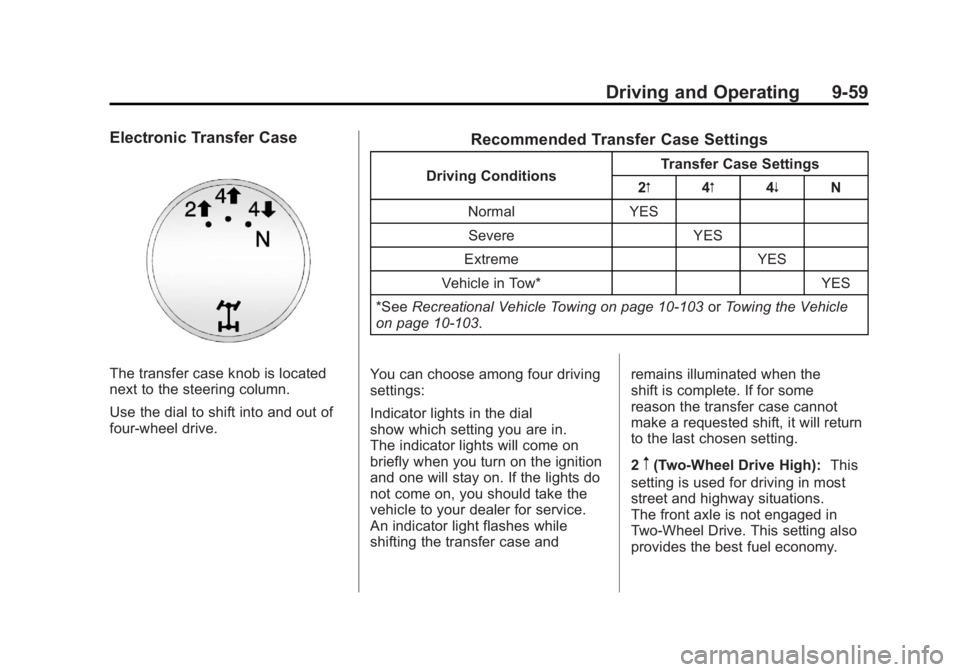
Electronic Transfer Case
The transfer case knob is located
next to the steering column.
Use the dial to shift into and out of
four-wheel drive.
Recommended Transfer Case Settings
Driving ConditionsTransfer Case Settings
2m 4m4n N
Normal YES Severe YES
Extreme YES
Vehicle in Tow* YES
*See Recreational Vehicle Towing on page 10‑103 orTowing the Vehicle
on page 10‑103.
You can choose among four driving
settings:
Indicator lights in the dial
show which setting you are in.
The indicator lights will come on
briefly when you turn on the ignition
and one will stay on. If the lights do
not come on, you should take the
vehicle to your dealer for service.
An indicator light flashes while
shifting the transfer case and remains illuminated when the
shift is complete. If for some
reason the transfer case cannot
make a requested shift, it will return
to the last chosen setting.
2
m(Two-Wheel Drive High):
This
setting is used for driving in most
street and highway situations.
The front axle is not engaged in
Two-Wheel Drive. This setting also
provides the best fuel economy.
Page 354 of 594
Black plate (60,1)GMC Sierra Owner Manual - 2011
9-60 Driving and Operating
4m(Four-Wheel Drive High):Use
the Four-Wheel Drive High position
when extra traction is needed, such
as on snowy or icy roads or in most
off-road situations. This setting also
engages the front axle to help drive
the vehicle. This is the best setting
to use when plowing snow.
4
n(Four-Wheel Drive Low): This
setting also engages the front axle
and delivers extra torque. You may
never need this setting. It sends
maximum power to all four wheels.
You might choose Four-Wheel
Drive Low while driving off-road in
deep sand, deep mud, deep snow,
and while climbing or descending
steep hills.
If the vehicle has StabiliTrak
®,
shifting into Four-Wheel Drive
Low will turn Traction Control and
StabiliTrak off. See StabiliTrak
®
System on page 9‑70.
{WARNING
Shifting the transfer case to
N (Neutral) can cause the vehicle
to roll even if the transmission
is in P (Park). You or someone
else could be seriously injured.
Be sure to set the parking brake
before placing the transfer case
in N (Neutral). SeeParking Brake
on page 9‑69.
N (Neutral): Shift the vehicle's
transfer case to N (Neutral)
only when towing the vehicle.
See Recreational Vehicle Towing on
page 10‑103 orTowing the Vehicle
on page 10‑103 for more
information.
If the SERVICE 4 WHEEL DRIVE
message stays on, you should
take the vehicle to your dealer for
service. See “SERVICE 4 WHEEL
DRIVE message” under
Transmission Messages on
page 5‑50. Shifting Into Two-Wheel
Drive High
Turn the knob to the Two-Wheel
Drive High position. This can be
done at any speed, except when
shifting from Four-Wheel Drive Low.
See
“Shifting Out of Four-Wheel
Drive Low” for more information.
Shifting Into Four-Wheel
Drive Low
When Four-Wheel Drive Low is
engaged, vehicle speed should
be kept below 72 km/h (45 mph).
Extended high-speed operation in
Four-Wheel Drive Low may damage
or shorten the life of the drivetrain.
To shift to the Four-Wheel Drive
Low position, the ignition must be
in ON/RUN and the vehicle must be
stopped or moving less than 5 km/h
(3 mph) with the transmission in
N (Neutral). The preferred method
for shifting into Four-Wheel Drive
Low is to have the vehicle moving
1.6 to 3.2 km/h (1 to 2 mph).
Page 357 of 594
Black plate (63,1)GMC Sierra Owner Manual - 2011
Driving and Operating 9-63
Notice:Shifting the transmission
into gear before the requested
mode indicator light has stopped
flashing could damage the
transfer case. To help avoid
damaging the vehicle, always
wait for the mode indicator lights
to stop flashing before shifting
the transmission into gear.
5. Start the engine and shift the
transmission to the desired
position.
Excessively shifting the transfer
case into or out of the different
modes may cause the transfer case
to enter the shift protection mode.
This will protect the transfer case
from possible damage and will only
allow the transfer case to respond
to one shift per 10 seconds.
The transfer case may stay in this
mode for up to three minutes.Automatic Transfer Case
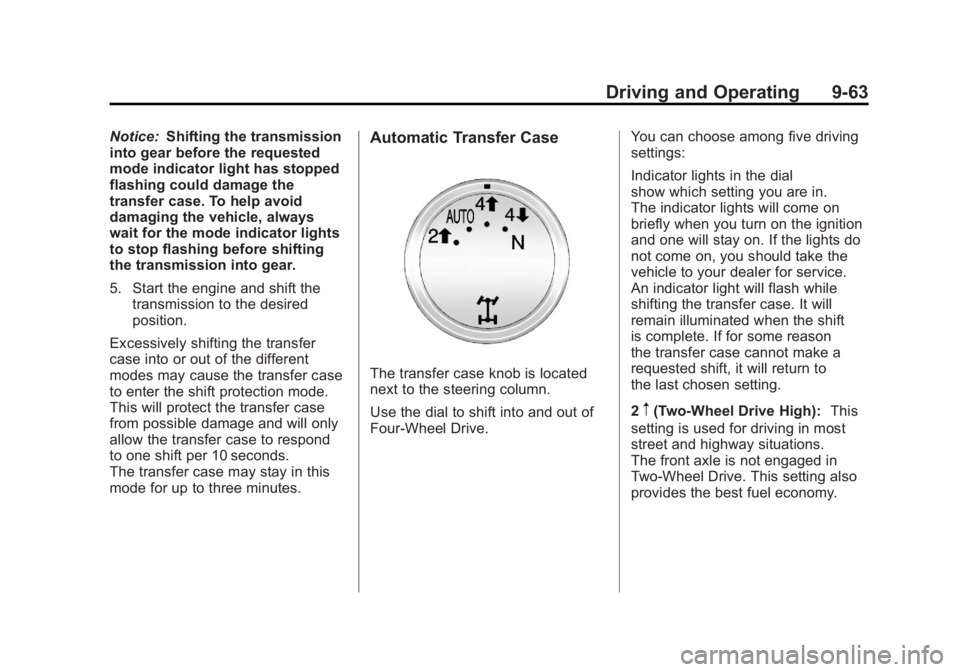
The transfer case knob is located
next to the steering column.
Use the dial to shift into and out of
Four-Wheel Drive. You can choose among five driving
settings:
Indicator lights in the dial
show which setting you are in.
The indicator lights will come on
briefly when you turn on the ignition
and one will stay on. If the lights do
not come on, you should take the
vehicle to your dealer for service.
An indicator light will flash while
shifting the transfer case. It will
remain illuminated when the shift
is complete. If for some reason
the transfer case cannot make a
requested shift, it will return to
the last chosen setting.
2
m(Two-Wheel Drive High):
This
setting is used for driving in most
street and highway situations.
The front axle is not engaged in
Two-Wheel Drive. This setting also
provides the best fuel economy.
Page 358 of 594
Black plate (64,1)GMC Sierra Owner Manual - 2011
9-64 Driving and Operating
AUTO (Automatic Four-Wheel
Drive):This setting is ideal for
use when road surface traction
conditions are variable. When
driving the vehicle in AUTO,
the front axle is engaged, but the
vehicle's power is sent only to the
front and rear wheels automatically
based on driving conditions. Driving
in this mode results in slightly lower
fuel economy than Two-Wheel
Drive High.
4
m(Four-Wheel Drive High): Use
the Four-Wheel Drive High position
when extra traction is needed, such
as on snowy or icy roads or in most
off-road situations. This setting also
engages the front axle to help drive
the vehicle. This is the best setting
to use when plowing snow. 4
n(Four-Wheel Drive Low):
This
setting also engages the front axle
and delivers extra torque. You may
never need this setting. It sends
maximum power to all four wheels.
You might choose Four-Wheel Drive
Low if you are driving off-road in
deep sand, deep mud, deep snow,
and while climbing or descending
steep hills.
If the vehicle has StabiliTrak
®,
shifting into Four-Wheel Drive
Low will turn Traction Control and
StabiliTrak off. See StabiliTrak
®
System on page 9‑70.
{WARNING
Shifting the transfer case to
N (Neutral) can cause the vehicle
to roll even if the transmission
is in P (Park). You or someone
else could be seriously injured.
Be sure to set the parking brake
before placing the transfer case in
N (Neutral). SeeParking Brake on
page 9‑69. N (Neutral):
Shift the vehicle's
transfer case to N (Neutral)
only when towing the vehicle.
See Recreational Vehicle Towing on
page 10‑103 orTowing the Vehicle
on page 10‑103 for more
information.
If the SERVICE 4 WHEEL DRIVE
message stays on, you should
take the vehicle to your dealer for
service. See “SERVICE 4 WHEEL
DRIVE message” under
Transmission Messages on
page 5‑50.
Shifting Into Four-Wheel Drive
High or AUTO (Automatic
Four-Wheel Drive)
Turn the knob to the Four-Wheel
Drive High or AUTO position. This
can be done at any speed, except
when shifting from Four-Wheel
Drive Low. The indicator light will
flash while shifting. It will remain
on when the shift is completed.