center GMC SIERRA 2015 Service Manual
[x] Cancel search | Manufacturer: GMC, Model Year: 2015, Model line: SIERRA, Model: GMC SIERRA 2015Pages: 439, PDF Size: 4.6 MB
Page 166 of 439
Black plate (5,1)GMC 2015i Sierra Denali Owner Manual (GMNA-Localizing-U.S./Canada/
Mexico-8431500) - 2015 - crc - 6/20/14
Lighting 6-5
one second will cause the turn
signals to flash until the lever is
released.
The lever returns to its starting
position whenever it is released.
If after signaling a turn or a lane
change the arrows flash rapidly or
do not come on, a signal bulb could
be burned out.
Replace any burned out bulbs. If a
bulb is not burned out, check the
fuse. SeeFuses on page 10-41.
Turn Signal On Chime
If the turn signal is left on for more
than 1.2 km (0.75 mi), a chime
sounds at each flash of the turn
signal. The message TURN
SIGNAL ON will also appear in the
Driver Information Center (DIC). To
turn the chime and message off,
move the turn signal lever to the off
position.Fog Lamps
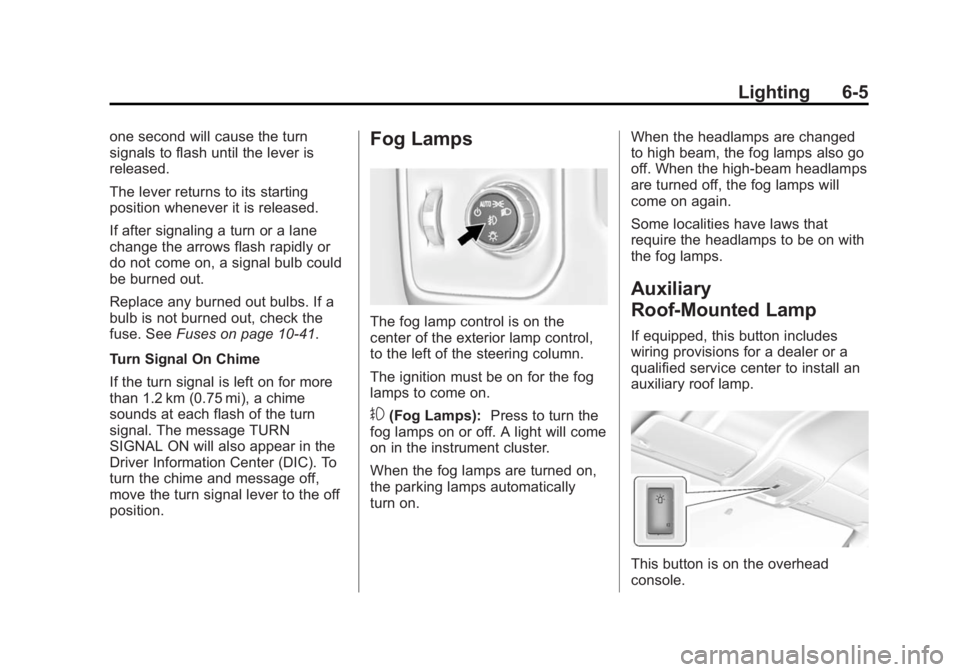
The fog lamp control is on the
center of the exterior lamp control,
to the left of the steering column.
The ignition must be on for the fog
lamps to come on.
#(Fog Lamps): Press to turn the
fog lamps on or off. A light will come
on in the instrument cluster.
When the fog lamps are turned on,
the parking lamps automatically
turn on. When the headlamps are changed
to high beam, the fog lamps also go
off. When the high-beam headlamps
are turned off, the fog lamps will
come on again.
Some localities have laws that
require the headlamps to be on with
the fog lamps.
Auxiliary
Roof-Mounted Lamp
If equipped, this button includes
wiring provisions for a dealer or a
qualified service center to install an
auxiliary roof lamp.
This button is on the overhead
console.
Page 169 of 439
Black plate (8,1)GMC 2015i Sierra Denali Owner Manual (GMNA-Localizing-U.S./Canada/
Mexico-8431500) - 2015 - crc - 6/20/14
6-8 Lighting
Lighting Features
Entry Lighting
The vehicle has an illuminated entry
feature.
When a door is opened, the dome
lamps and puddle lamps come on if
the dome lamp control is in the
DOOR position. If the dome lamp
control is in the OFF position, the
lamps do not come on.
The headlamps, parking lamps,
taillamps, and back-up lamps turn
on briefly at night, or in areas with
limited lighting, when
Kis pressed
on the Remote Keyless Entry (RKE)
transmitter. After about 30 seconds
the exterior lamps turn off. Entry
lighting can be disabled manually by
changing the ignition out of the OFF
position, or by pressing the RKE
transmitter
Qbutton.
This feature can be changed. See
“Vehicle Locator Lights” under
Vehicle Personalization on
page 5-42.
Exit Lighting
The interior lamps, headlamps,
parking lamps, back-up lamps, and
license plate lamps come on when
the key is removed from the ignition.
The interior lamps turn off
automatically in 20 seconds. The
interior lamps do not come on if the
dome lamp control is in the OFF
position.
The exterior lamps turn off
immediately by turning the exterior
lamps control off.
This feature can be changed. See
Vehicle Personalization on
page 5-42.
Battery Load
Management
The vehicle has Electric Power
Management (EPM), which
estimates the battery's temperature
and state of charge. It then adjusts
the voltage for best performance
and extended life of the battery. When the battery's state of charge
is low, the voltage is raised slightly
to quickly bring the charge back up.
When the state of charge is high,
the voltage is lowered slightly to
prevent overcharging. The voltmeter
gauge or the voltage display on the
Driver Information Center (DIC),
if equipped, may show the voltage
moving up or down. This is normal.
If there is a problem, an alert will be
displayed.
The battery can be discharged at
idle if the electrical loads are very
high. This is true for all vehicles.
This is because the generator
(alternator) may not be spinning fast
enough at idle to produce all the
power that is needed for very high
electrical loads.
A high electrical load occurs when
several of the following are on, such
as: headlamps, high beams, fog
lamps, rear window defogger,
climate control fan at high speed,
heated seats, engine cooling fans,
trailer loads, and loads plugged into
accessory power outlets.
Page 177 of 439
Black plate (4,1)GMC 2015i Sierra Denali Owner Manual (GMNA-Localizing-U.S./Canada/
Mexico-8431500) - 2015 - crc - 6/20/14
8-4 Climate Controls
Caution (Continued)
not be covered by the vehicle
warranty. Do not clear the inside
rear window with sharp objects.
Heated Mirror: If equipped with
heated outside rearview mirrors, the
mirrors heat to help clear fog or frost
from the surface of the mirror when
the rear window defog button is
pressed. See Heated Mirrors on
page 2-17.
Sensors
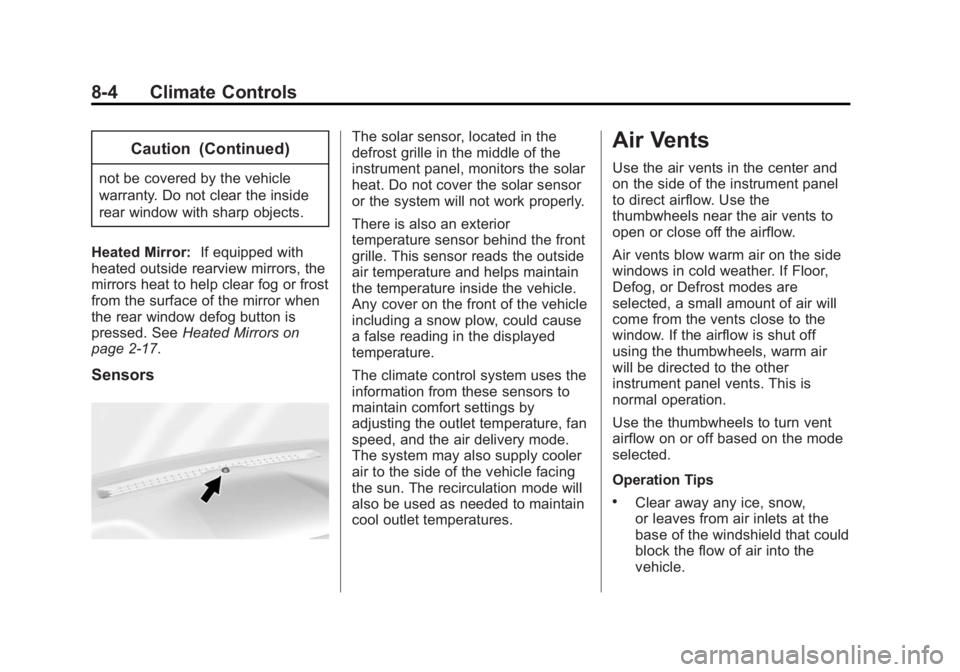
The solar sensor, located in the
defrost grille in the middle of the
instrument panel, monitors the solar
heat. Do not cover the solar sensor
or the system will not work properly.
There is also an exterior
temperature sensor behind the front
grille. This sensor reads the outside
air temperature and helps maintain
the temperature inside the vehicle.
Any cover on the front of the vehicle
including a snow plow, could cause
a false reading in the displayed
temperature.
The climate control system uses the
information from these sensors to
maintain comfort settings by
adjusting the outlet temperature, fan
speed, and the air delivery mode.
The system may also supply cooler
air to the side of the vehicle facing
the sun. The recirculation mode will
also be used as needed to maintain
cool outlet temperatures.Air Vents
Use the air vents in the center and
on the side of the instrument panel
to direct airflow. Use the
thumbwheels near the air vents to
open or close off the airflow.
Air vents blow warm air on the side
windows in cold weather. If Floor,
Defog, or Defrost modes are
selected, a small amount of air will
come from the vents close to the
window. If the airflow is shut off
using the thumbwheels, warm air
will be directed to the other
instrument panel vents. This is
normal operation.
Use the thumbwheels to turn vent
airflow on or off based on the mode
selected.
Operation Tips
.Clear away any ice, snow,
or leaves from air inlets at the
base of the windshield that could
block the flow of air into the
vehicle.
Page 186 of 439
Black plate (7,1)GMC 2015i Sierra Denali Owner Manual (GMNA-Localizing-U.S./Canada/
Mexico-8431500) - 2015 - crc - 6/20/14
Driving and Operating 9-7
{Caution
Operating the vehicle for
extended periods without the front
fascia lower air dam installed can
cause improper air flow to the
engine. Re-attach the front fascia
air dam after off-road driving.
Loading the Vehicle for
Off-Road Driving
{Warning
.Unsecured cargo on the load
floor can be tossed about
when driving over rough
terrain. You or your
passengers can be struck by
flying objects. Secure the
cargo properly.(Continued)
Warning (Continued)
.Keep cargo in the cargo area
as far forward and as low as
possible. The heaviest things
should be on the floor,
forward of the rear axle.
.Heavy loads on the roof raise
the vehicle's center of gravity,
making it more likely to roll
over. You can be seriously or
fatally injured if the vehicle
rolls over. Put heavy loads
inside the cargo area, not on
the roof.
For more information about loading
the vehicle, see Vehicle Load Limits
on page 9-15 andTires on
page 10-50.
Environmental Concerns
.Always use established trails,
roads, and areas that have been
set aside for public off-road
recreational driving and obey all
posted regulations.
.Do not damage shrubs, flowers,
trees, or grasses or disturb
wildlife.
.Do not park over things that
burn. See Parking over Things
That Burn on page 9-32.
Driving on Hills
Driving safely on hills requires good
judgment and an understanding of
what the vehicle can and cannot do.
{Warning
Many hills are simply too steep
for any vehicle. Driving up hills
can cause the vehicle to stall.
Driving down hills can cause loss
of control. Driving across hills can
cause a rollover. You could be
injured or killed. Do not drive on
steep hills.
Before driving on a hill, assess the
steepness, traction, and
obstructions. If the terrain ahead
Page 191 of 439
Black plate (12,1)GMC 2015i Sierra Denali Owner Manual (GMNA-Localizing-U.S./Canada/
Mexico-8431500) - 2015 - crc - 6/20/14
9-12 Driving and Operating
.Check all fluid levels and brakes,
tires, cooling system, and
transmission.
.Shift to a lower gear when going
down steep or long hills.
{Warning
Using the brakes to slow the
vehicle on a long downhill slope
can cause brake overheating, can
reduce brake performance, and
could result in a loss of braking.
Shift the transmission to a lower
gear to let the engine assist the
brakes on a steep downhill slope.
{Warning
Coasting downhill in N (Neutral)
or with the ignition off is
dangerous. This can cause
overheating of the brakes and(Continued)
Warning (Continued)
loss of steering. Always have the
engine running and the vehicle
in gear.
.Stay in your own lane. Do not
swing wide or cut across the
center of the road. Drive at
speeds that let you stay in your
own lane.
.Be alert on top of hills;
something could be in your lane
(stalled car, accident).
.Pay attention to special road
signs (falling rocks area, winding
roads, long grades, passing or
no-passing zones) and take
appropriate action.
Winter Driving
Driving on Snow or Ice
Drive carefully when there is snow
or ice between the tires and the
road, creating less traction or grip. Wet ice can occur at about 0°C
(32°F) when freezing rain begins to
fall, resulting in even less traction.
Avoid driving on wet ice or in
freezing rain until roads can be
treated with salt or sand.
Drive with caution, whatever the
condition. Accelerate gently so
traction is not lost. Accelerating too
quickly causes the wheels to spin
and makes the surface under the
tires slick, so there is even less
traction.
Traction Control should be turned
on. See
Traction Control/Electronic
Stability Control on page 9-49.
The Antilock Brake System (ABS)
improves vehicle stability during
hard stops on slippery roads, but
apply the brakes sooner than when
on dry pavement. See Antilock
Brake System (ABS) on page 9-46.
Allow greater following distance on
any slippery road and watch for
slippery spots. Icy patches can
occur on otherwise clear roads in
shaded areas. The surface of a
Page 194 of 439
Black plate (15,1)GMC 2015i Sierra Denali Owner Manual (GMNA-Localizing-U.S./Canada/
Mexico-8431500) - 2015 - crc - 6/20/14
Driving and Operating 9-15
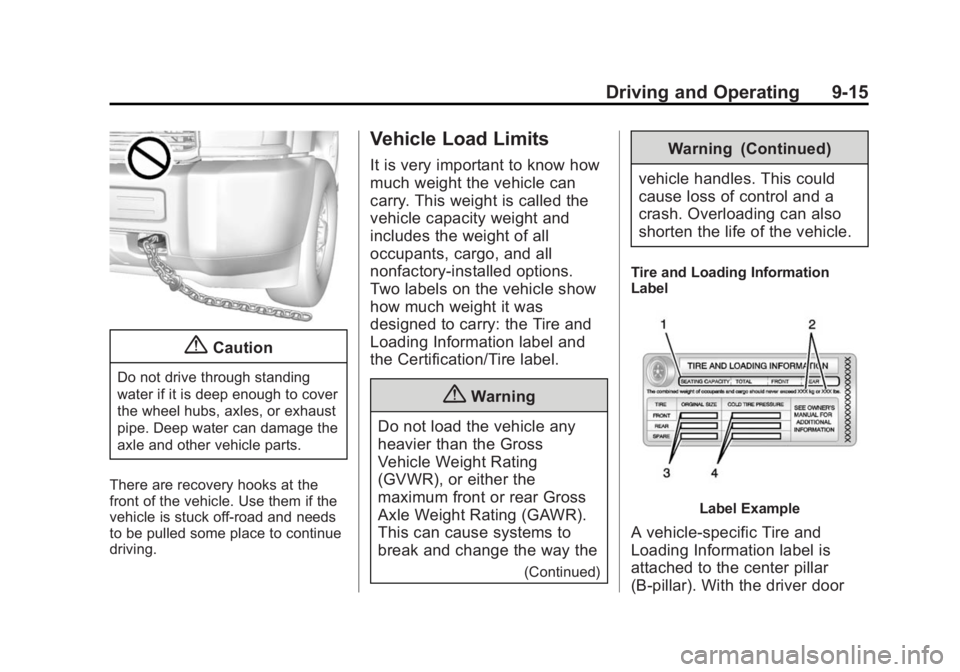
{Caution
Do not drive through standing
water if it is deep enough to cover
the wheel hubs, axles, or exhaust
pipe. Deep water can damage the
axle and other vehicle parts.
There are recovery hooks at the
front of the vehicle. Use them if the
vehicle is stuck off-road and needs
to be pulled some place to continue
driving.
Vehicle Load Limits
It is very important to know how
much weight the vehicle can
carry. This weight is called the
vehicle capacity weight and
includes the weight of all
occupants, cargo, and all
nonfactory-installed options.
Two labels on the vehicle show
how much weight it was
designed to carry: the Tire and
Loading Information label and
the Certification/Tire label.
{Warning
Do not load the vehicle any
heavier than the Gross
Vehicle Weight Rating
(GVWR), or either the
maximum front or rear Gross
Axle Weight Rating (GAWR).
This can cause systems to
break and change the way the
(Continued)
Warning (Continued)
vehicle handles. This could
cause loss of control and a
crash. Overloading can also
shorten the life of the vehicle.
Tire and Loading Information
Label
Label Example
A vehicle-specific Tire and
Loading Information label is
attached to the center pillar
(B-pillar). With the driver door
Page 197 of 439
Black plate (18,1)GMC 2015i Sierra Denali Owner Manual (GMNA-Localizing-U.S./Canada/
Mexico-8431500) - 2015 - crc - 6/20/14
9-18 Driving and Operating
of the driver, passengers, and
cargo should never exceed the
vehicle's capacity weight.
Certification/Tire Label
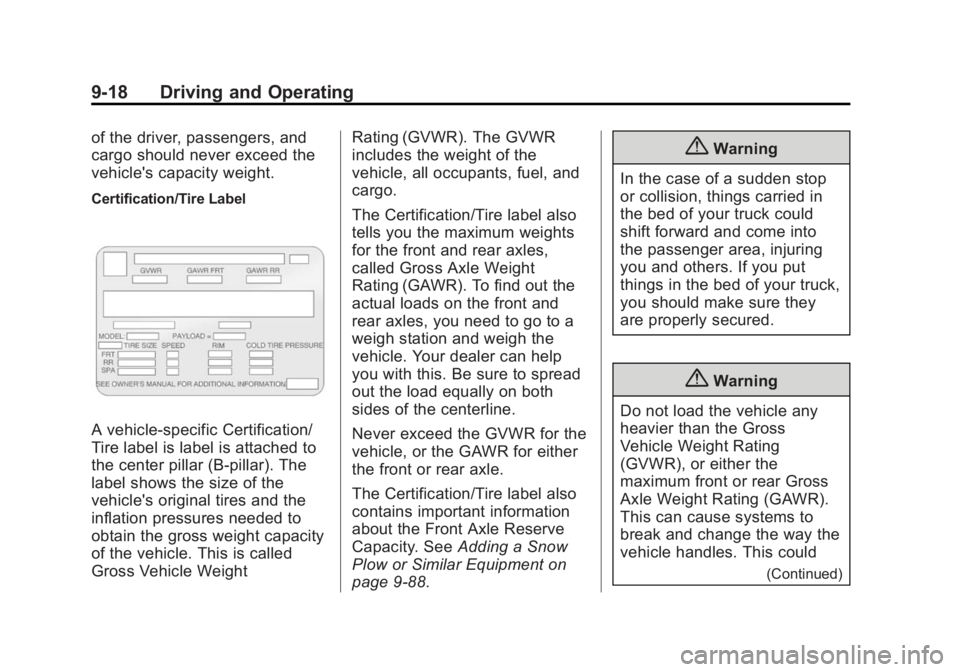
A vehicle-specific Certification/
Tire label is label is attached to
the center pillar (B-pillar). The
label shows the size of the
vehicle's original tires and the
inflation pressures needed to
obtain the gross weight capacity
of the vehicle. This is called
Gross Vehicle WeightRating (GVWR). The GVWR
includes the weight of the
vehicle, all occupants, fuel, and
cargo.
The Certification/Tire label also
tells you the maximum weights
for the front and rear axles,
called Gross Axle Weight
Rating (GAWR). To find out the
actual loads on the front and
rear axles, you need to go to a
weigh station and weigh the
vehicle. Your dealer can help
you with this. Be sure to spread
out the load equally on both
sides of the centerline.
Never exceed the GVWR for the
vehicle, or the GAWR for either
the front or rear axle.
The Certification/Tire label also
contains important information
about the Front Axle Reserve
Capacity. See
Adding a Snow
Plow or Similar Equipment on
page 9-88.
{Warning
In the case of a sudden stop
or collision, things carried in
the bed of your truck could
shift forward and come into
the passenger area, injuring
you and others. If you put
things in the bed of your truck,
you should make sure they
are properly secured.
{Warning
Do not load the vehicle any
heavier than the Gross
Vehicle Weight Rating
(GVWR), or either the
maximum front or rear Gross
Axle Weight Rating (GAWR).
This can cause systems to
break and change the way the
vehicle handles. This could
(Continued)
Page 199 of 439
Black plate (20,1)GMC 2015i Sierra Denali Owner Manual (GMNA-Localizing-U.S./Canada/
Mexico-8431500) - 2015 - crc - 6/20/14
9-20 Driving and Operating
When using this upper load
platform, be sure the load is
securely tied down to prevent it
from shifting. The load's center
of gravity should be positioned
in a zone over the rear axle. The
zone is located in the area
between the front of each wheel
well and the rear of each wheel
well. The center of gravity height
must not extend above the top
of the pickup box flareboard.
Any load that extends beyond
the vehicle's taillamp area must
be properly marked according to
local laws and regulations.
Remember not to exceed the
Gross Axle Weight
Rating (GAWR) of the front or
rear axle.
Add-On Equipment
When carrying removable items,
a limit on how many people
carried inside the vehicle maybe necessary. Be sure to weigh
the vehicle before buying and
installing the new equipment.
{Caution
Overloading the vehicle may
cause damage. Repairs would not
be covered by the vehicle
warranty. Do not overload the
vehicle.
Remember not to exceed the
Gross Axle Weight
Rating (GAWR) of the front or
rear axle.
* Equipment Maximum
Weight
Ladder Rack
and Cargo 340 kg (750 lb)
Cross Toolbox
and Cargo 181 kg (400 lb) * Equipment
Maximum
Weight
Side Boxes
and Cargo 113 kg per
side (250 lb
per side)
* The combined weight for all
rail-mounted equipment should
not exceed 454 kg (1,000 lb).
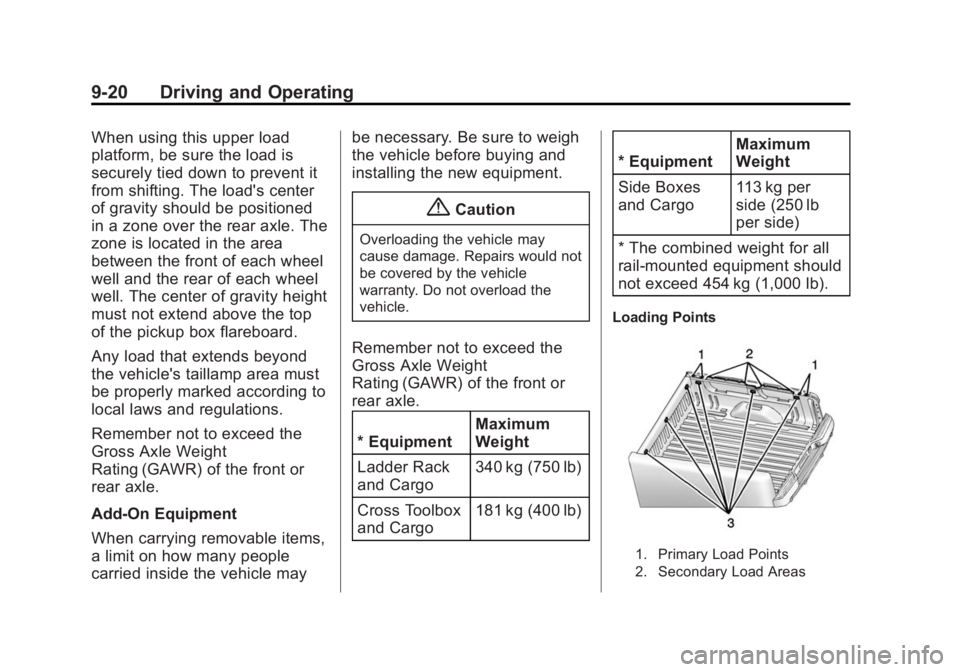
Loading Points
1. Primary Load Points
2. Secondary Load Areas
Page 200 of 439
Black plate (21,1)GMC 2015i Sierra Denali Owner Manual (GMNA-Localizing-U.S./Canada/
Mexico-8431500) - 2015 - crc - 6/20/14
Driving and Operating 9-21
3. GM Approved AccessoryMounting Points
Structural members (1) and (2) are
included in the pickup box design.
Additional accessories should use
these load points. Depending on the
accessory design, use a spacer
under the accessory at the load
points to remove gap. The holes for
GM approved accessories (3) are
not intended for aftermarket
equipment. See www.gmupfitter.com
for additional pickup box load
bearing structural information.
Truck-Camper Loading
Information
A vehicle-specific Truck-Camper
Loading Information label is
attached to the inside of the
vehicle's glove box. This label
indicates if a slide-in camper
can be carried, how much of a
load the vehicle can carry, and
how to correctly spread out the load. It will help to match the
right slide-in camper to the
vehicle.
Your dealer can help make a
good vehicle-camper match and
help determine the Cargo
Weight Rating (CWR).
When installing and loading a
slide-in camper, check the
manufacturer's instructions.
When carrying a slide-in
camper, the total cargo load of
the vehicle is the weight of the
camper plus:
.Everything added to the
camper after it left the
factory.
.Everything in the camper.
.All the people inside.
The CWR is the maximum
weight of the load the vehicle
can carry. It does not include the weight of the people inside. But,
use about 68 kg (150 lb) for
each seat.
The total cargo load must not be
more than the vehicle's CWR.
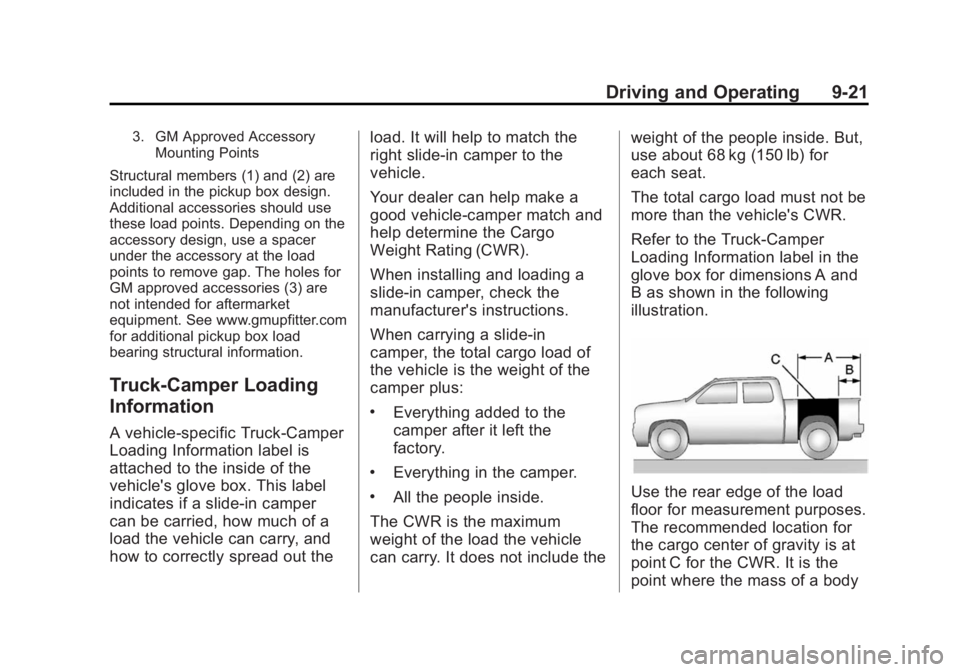
Refer to the Truck-Camper
Loading Information label in the
glove box for dimensions A and
B as shown in the following
illustration.Use the rear edge of the load
floor for measurement purposes.
The recommended location for
the cargo center of gravity is at
point C for the CWR. It is the
point where the mass of a body
Page 201 of 439
Black plate (22,1)GMC 2015i Sierra Denali Owner Manual (GMNA-Localizing-U.S./Canada/
Mexico-8431500) - 2015 - crc - 6/20/14
9-22 Driving and Operating
is concentrated and,
if suspended at that point, would
balance the front and rear.
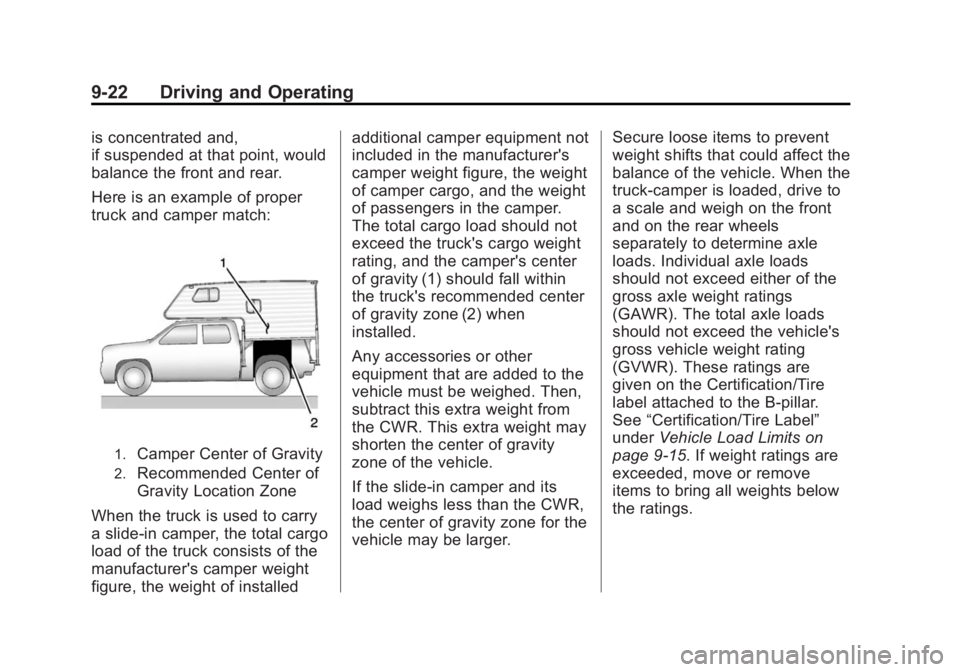
Here is an example of proper
truck and camper match:
1.Camper Center of Gravity
2.Recommended Center of
Gravity Location Zone
When the truck is used to carry
a slide-in camper, the total cargo
load of the truck consists of the
manufacturer's camper weight
figure, the weight of installed additional camper equipment not
included in the manufacturer's
camper weight figure, the weight
of camper cargo, and the weight
of passengers in the camper.
The total cargo load should not
exceed the truck's cargo weight
rating, and the camper's center
of gravity (1) should fall within
the truck's recommended center
of gravity zone (2) when
installed.
Any accessories or other
equipment that are added to the
vehicle must be weighed. Then,
subtract this extra weight from
the CWR. This extra weight may
shorten the center of gravity
zone of the vehicle.
If the slide-in camper and its
load weighs less than the CWR,
the center of gravity zone for the
vehicle may be larger.
Secure loose items to prevent
weight shifts that could affect the
balance of the vehicle. When the
truck-camper is loaded, drive to
a scale and weigh on the front
and on the rear wheels
separately to determine axle
loads. Individual axle loads
should not exceed either of the
gross axle weight ratings
(GAWR). The total axle loads
should not exceed the vehicle's
gross vehicle weight rating
(GVWR). These ratings are
given on the Certification/Tire
label attached to the B-pillar.
See
“Certification/Tire Label”
under Vehicle Load Limits on
page 9-15. If weight ratings are
exceeded, move or remove
items to bring all weights below
the ratings.