center GMC SIERRA 2015 Owner's Manual
[x] Cancel search | Manufacturer: GMC, Model Year: 2015, Model line: SIERRA, Model: GMC SIERRA 2015Pages: 439, PDF Size: 4.6 MB
Page 8 of 439
Black plate (1,1)GMC 2015i Sierra Denali Owner Manual (GMNA-Localizing-U.S./Canada/
Mexico-8431500) - 2015 - crc - 6/20/14
In Brief 1-1
In Brief
Instrument Panel
Instrument Panel . . . . . . . . . . . . . . 1-2
Initial Drive Information
Remote Keyless Entry (RKE)System . . . . . . . . . . . . . . . . . . . . . . 1-4
Remote Vehicle Start . . . . . . . . . 1-5
Door Locks . . . . . . . . . . . . . . . . . . . 1-5
Windows . . . . . . . . . . . . . . . . . . . . . . 1-6
Seat Adjustment . . . . . . . . . . . . . . 1-7
Memory Features . . . . . . . . . . . . . 1-8
Heated and Cooled Front Seats . . . . . . . . . . . . . . . . . . . . . . . . 1-8
Head Restraint Adjustment . . . . 1-9
Safety Belts . . . . . . . . . . . . . . . . . . . 1-9
Passenger Sensing System . . . 1-9
Mirror Adjustment . . . . . . . . . . . . 1-10 Steering Wheel
Adjustment . . . . . . . . . . . . . . . . . 1-11
Throttle and Brake Pedal Adjustment . . . . . . . . . . . . . . . . . 1-12
Interior Lighting . . . . . . . . . . . . . . 1-12
Exterior Lighting . . . . . . . . . . . . . 1-13
Windshield Wiper/Washer . . . . 1-13
Climate Controls . . . . . . . . . . . . . 1-14
Transmission . . . . . . . . . . . . . . . . 1-15
Four-Wheel Drive . . . . . . . . . . . . 1-15
Vehicle Features
Infotainment System . . . . . . . . . 1-16
Steering Wheel Controls . . . . . 1-16
Cruise Control . . . . . . . . . . . . . . . 1-17
Driver Information Center (DIC) . . . . . . . . . . . . . . . 1-17
Forward Collision Alert (FCA) System . . . . . . . . . . . . . . . . . . . . . 1-18 Lane Departure
Warning (LDW) . . . . . . . . . . . . . 1-18
Rear Vision Camera (RVC) . . . . . . . . . . . . . 1-18
Parking Assist . . . . . . . . . . . . . . . 1-18
Power Outlets . . . . . . . . . . . . . . . 1-18
Universal Remote System . . . 1-19
Sunroof . . . . . . . . . . . . . . . . . . . . . . 1-19
Performance and Maintenance
Traction Control/Electronic
Stability Control . . . . . . . . . . . . 1-20
Tire Pressure Monitor . . . . . . . . 1-20
Engine Oil Life System . . . . . . 1-21
E85 or FlexFuel . . . . . . . . . . . . . . 1-21
Driving for Better Fuel Economy . . . . . . . . . . . . . . . . . . . 1-21
Roadside Assistance Program . . . . . . . . . . . . . . . . . . . . 1-22
OnStar
®. . . . . . . . . . . . . . . . . . . . . 1-22
Page 10 of 439
Black plate (3,1)GMC 2015i Sierra Denali Owner Manual (GMNA-Localizing-U.S./Canada/
Mexico-8431500) - 2015 - crc - 6/20/14
In Brief 1-3
1.Instrument Panel Illumination
Control on page 6-6.
2. Integrated Trailer Brake Control (ITBC) System (If Equipped).
See Towing Equipment on
page 9-78.
3. Exterior Lamp Controls on
page 6-1.
Fog Lamps on page 6-5 (If
Equipped).
4. Air Vents on page 8-4.
5. Turn Signal Lever. See Turn and
Lane-Change Signals on
page 6-4.
Windshield Wiper/Washer on
page 5-3.
6. Favorite Switches (Out of View). See Steering Wheel Controls on
page 5-2.
Volume Switches (Out of View).
See Steering Wheel Controls on
page 5-2.
7. Instrument Cluster on page 5-9. 8.
Hazard Warning Flashers on
page 6-4
9. Shift Lever. See Automatic
Transmission on page 9-33.
Tow/Haul Selector Button (If
Equipped). See Tow/Haul Mode
on page 9-39.
Range Selection Mode (If
Equipped). See Manual Mode on
page 9-36.
10. Light Sensor. See Automatic
Headlamp System on
page 6-3.
11. Infotainment on page 7-1.
12. Electronic Transfer Case Control (If Equipped). See
Four-Wheel Drive on
page 9-40.
13. Parking Brake on page 9-47.
14. Data Link Connector (DLC) (Out of View). See Malfunction
Indicator Lamp on page 5-18. 15.
Cruise Control on page 9-52.
Forward Collision Alert (FCA)
System on page 9-59 (If
Equipped).
16. Steering Wheel Adjustment on
page 5-2 (Out of View).
17. Horn on page 5-3.
18. Hood Release. See Hood on
page 10-4.
19. Steering Wheel Controls on
page 5-2 (If Equipped).
Driver Information Center (DIC)
Controls. See Driver
Information Center (DIC) on
page 5-27.
20. Heated and Cooled Front
Seats on page 3-7 (If
Equipped).
21. Dual Automatic Climate Control
System on page 8-1.
Page 15 of 439
Black plate (8,1)GMC 2015i Sierra Denali Owner Manual (GMNA-Localizing-U.S./Canada/
Mexico-8431500) - 2015 - crc - 6/20/14
1-8 In Brief
.Press and hold the control up to
increase upper lumbar support
and decrease lower lumbar
support.
Press and hold the control down
to increase lower lumbar support
and decrease upper lumbar
support.
See Lumbar Adjustment on
page 3-3.
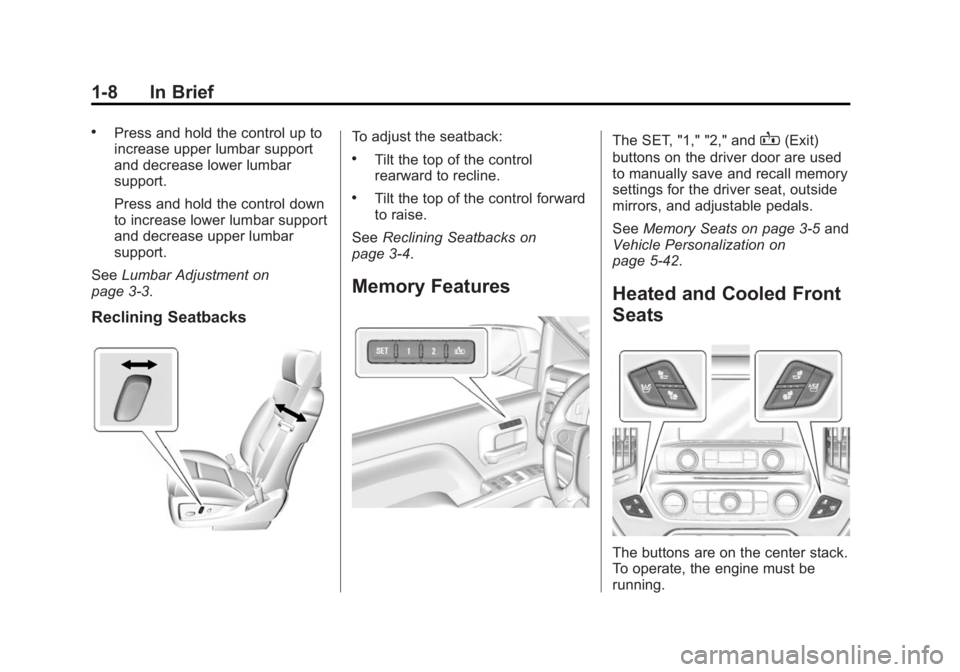
Reclining Seatbacks
To adjust the seatback:
.Tilt the top of the control
rearward to recline.
.Tilt the top of the control forward
to raise.
See Reclining Seatbacks on
page 3-4.
Memory Features
The SET, "1," "2," andB(Exit)
buttons on the driver door are used
to manually save and recall memory
settings for the driver seat, outside
mirrors, and adjustable pedals.
See Memory Seats on page 3-5 and
Vehicle Personalization on
page 5-42.
Heated and Cooled Front
Seats
The buttons are on the center stack.
To operate, the engine must be
running.
Page 17 of 439
Black plate (10,1)GMC 2015i Sierra Denali Owner Manual (GMNA-Localizing-U.S./Canada/
Mexico-8431500) - 2015 - crc - 6/20/14
1-10 In Brief
The passenger airbag status
indicator lights on the on the
overhead console are visible when
the vehicle is started. See
Passenger Airbag Status Indicator
on page 5-17.
Mirror Adjustment
Using hood-mounted air deflectors
and add-on convex mirror
attachments could decrease mirror
performance.
Exterior Mirrors
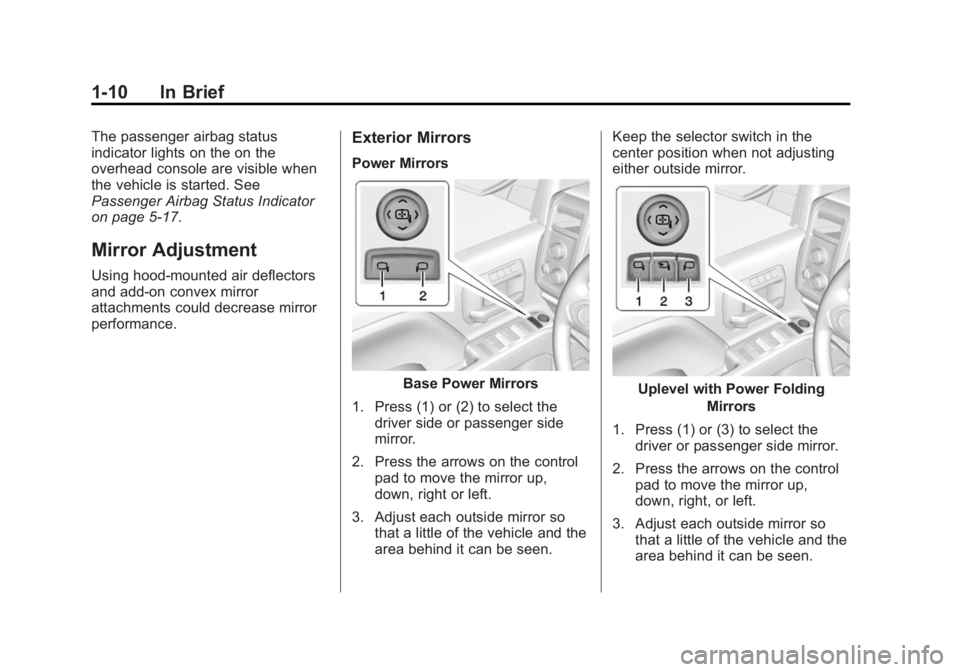
Power Mirrors
Base Power Mirrors
1. Press (1) or (2) to select the driver side or passenger side
mirror.
2. Press the arrows on the control pad to move the mirror up,
down, right or left.
3. Adjust each outside mirror so that a little of the vehicle and the
area behind it can be seen. Keep the selector switch in the
center position when not adjusting
either outside mirror.Uplevel with Power Folding
Mirrors
1. Press (1) or (3) to select the driver or passenger side mirror.
2. Press the arrows on the control pad to move the mirror up,
down, right, or left.
3. Adjust each outside mirror so that a little of the vehicle and the
area behind it can be seen.
Page 19 of 439
Black plate (12,1)GMC 2015i Sierra Denali Owner Manual (GMNA-Localizing-U.S./Canada/
Mexico-8431500) - 2015 - crc - 6/20/14
1-12 In Brief
Throttle and Brake Pedal
Adjustment
If equipped, the position of the
throttle and brake pedals can be
changed.
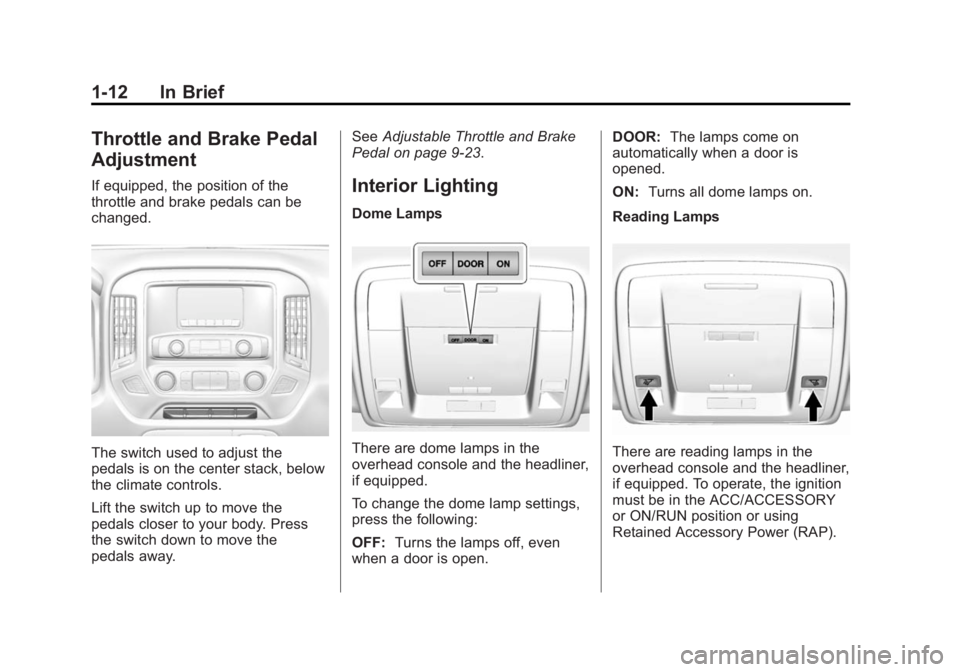
The switch used to adjust the
pedals is on the center stack, below
the climate controls.
Lift the switch up to move the
pedals closer to your body. Press
the switch down to move the
pedals away.See
Adjustable Throttle and Brake
Pedal on page 9-23.
Interior Lighting
Dome Lamps
There are dome lamps in the
overhead console and the headliner,
if equipped.
To change the dome lamp settings,
press the following:
OFF: Turns the lamps off, even
when a door is open. DOOR:
The lamps come on
automatically when a door is
opened.
ON: Turns all dome lamps on.
Reading LampsThere are reading lamps in the
overhead console and the headliner,
if equipped. To operate, the ignition
must be in the ACC/ACCESSORY
or ON/RUN position or using
Retained Accessory Power (RAP).
Page 24 of 439
Black plate (17,1)GMC 2015i Sierra Denali Owner Manual (GMNA-Localizing-U.S./Canada/
Mexico-8431500) - 2015 - crc - 6/20/14
In Brief 1-17
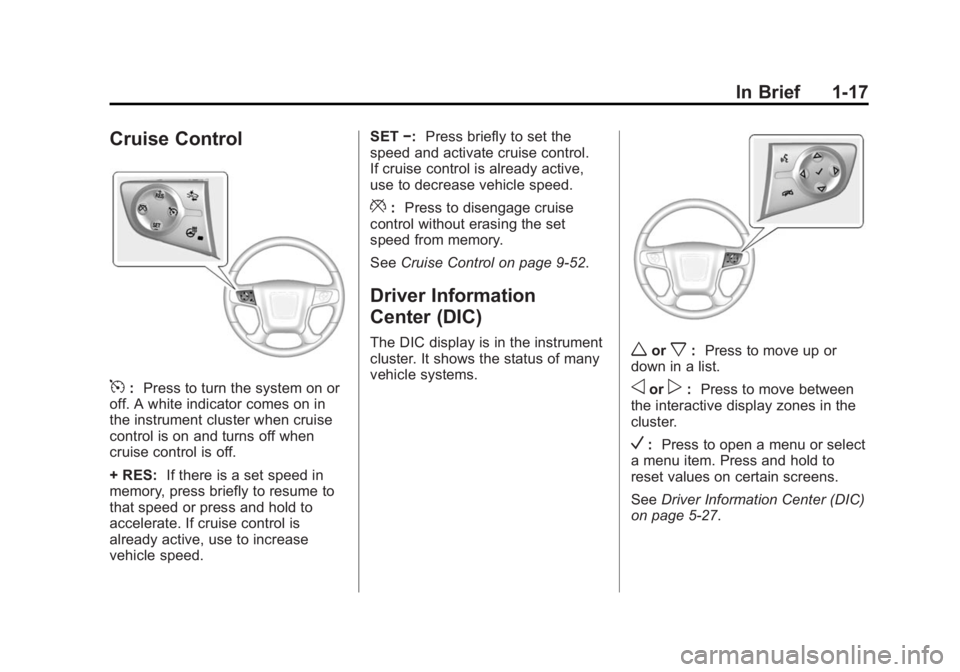
Cruise Control
5:Press to turn the system on or
off. A white indicator comes on in
the instrument cluster when cruise
control is on and turns off when
cruise control is off.
+ RES: If there is a set speed in
memory, press briefly to resume to
that speed or press and hold to
accelerate. If cruise control is
already active, use to increase
vehicle speed. SET
−:Press briefly to set the
speed and activate cruise control.
If cruise control is already active,
use to decrease vehicle speed.
*: Press to disengage cruise
control without erasing the set
speed from memory.
See Cruise Control on page 9-52.
Driver Information
Center (DIC)
The DIC display is in the instrument
cluster. It shows the status of many
vehicle systems.worx:Press to move up or
down in a list.
oorp: Press to move between
the interactive display zones in the
cluster.
V: Press to open a menu or select
a menu item. Press and hold to
reset values on certain screens.
See Driver Information Center (DIC)
on page 5-27.
Page 25 of 439

Black plate (18,1)GMC 2015i Sierra Denali Owner Manual (GMNA-Localizing-U.S./Canada/
Mexico-8431500) - 2015 - crc - 6/20/14
1-18 In Brief
Forward Collision Alert
(FCA) System
If equipped, FCA may help avoid or
reduce the harm caused by
front-end crashes. FCA provides a
green indicator,
V, when a vehicle
is detected ahead. This indicator
displays amber if you follow a
vehicle much too closely. When
approaching a vehicle ahead too
quickly, FCA provides a flashing red
alert on the windshield and rapidly
beeps or pulses the driver seat.
See Forward Collision Alert (FCA)
System on page 9-59.
Lane Departure
Warning (LDW)
If equipped, LDW may help avoid
unintentional lane departures at
speeds of 56 km/h (35 mph) or
greater. LDW uses a camera sensor
to detect the lane markings. The
LDW light,
@, is green if a lane
marking is detected. If the vehicle
departs the lane, the light will change to amber and flash. In
addition, the driver seat will pulse or
beeps will sound.
See
Lane Departure Warning (LDW)
on page 9-61.
Rear Vision
Camera (RVC)
If equipped, the RVC displays a
view of the area behind the vehicle,
on the center stack display, when
the vehicle is shifted into
R (Reverse).
See Assistance Systems for Parking
or Backing on page 9-56.
Parking Assist
If equipped, Rear Parking Assist
(RPA) uses sensors on the rear
bumper to assist with parking and
avoiding objects while in
R (Reverse). It operates at speeds
less than 8 km/h (5 mph). RPA may
display a warning triangle on the
Rear Vision Camera screen and a
graphic on the instrument cluster to provide the object distance. In
addition, multiple beeps or seat
pulses may occur if very close to an
object.
The vehicle may also have the Front
Parking Assist system.
See
Assistance Systems for Parking
or Backing on page 9-56.
Power Outlets
Accessory power outlets can be
used to plug in electrical equipment,
such as a cell phone, MP3
player, etc.
The vehicle may have up to four
accessory power outlets.
Vehicles with a Center Console
.One or two in front of the
cupholders on the center
console.
.One inside the center console.
.One on the rear of the center
console.
Page 26 of 439
Black plate (19,1)GMC 2015i Sierra Denali Owner Manual (GMNA-Localizing-U.S./Canada/
Mexico-8431500) - 2015 - crc - 6/20/14
In Brief 1-19
Vehicles with Bench Seats
.One on the center stack below
the climate control system.
.One or two in the storage area
on the bench seat.
Lift the cover to access and replace
when not in use.
See Power Outlets on page 5-5.
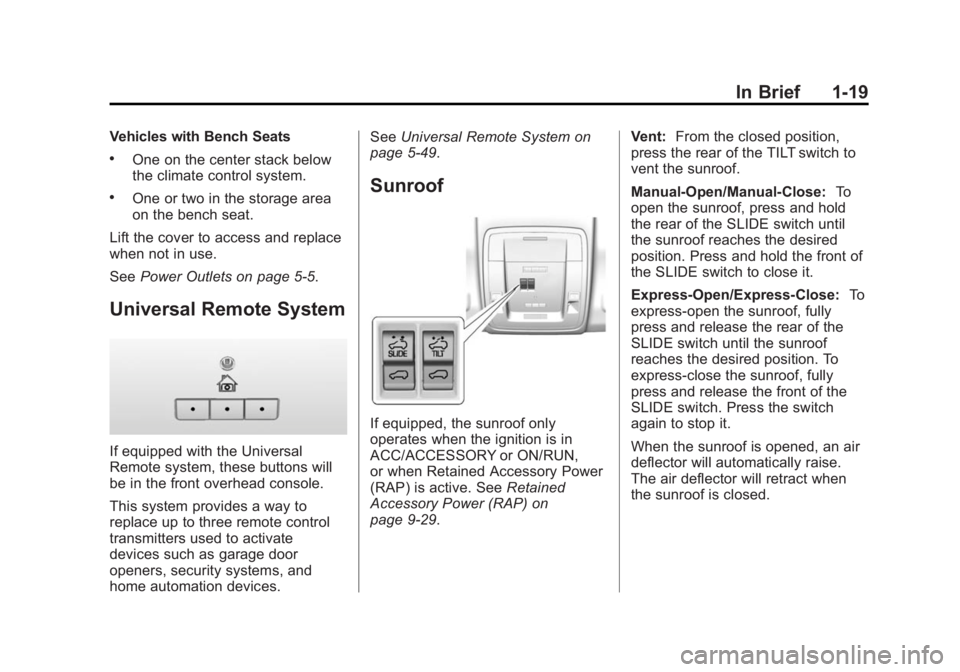
Universal Remote System
If equipped with the Universal
Remote system, these buttons will
be in the front overhead console.
This system provides a way to
replace up to three remote control
transmitters used to activate
devices such as garage door
openers, security systems, and
home automation devices. See
Universal Remote System on
page 5-49.
Sunroof
If equipped, the sunroof only
operates when the ignition is in
ACC/ACCESSORY or ON/RUN,
or when Retained Accessory Power
(RAP) is active. See Retained
Accessory Power (RAP) on
page 9-29. Vent:
From the closed position,
press the rear of the TILT switch to
vent the sunroof.
Manual-Open/Manual-Close: To
open the sunroof, press and hold
the rear of the SLIDE switch until
the sunroof reaches the desired
position. Press and hold the front of
the SLIDE switch to close it.
Express-Open/Express-Close: To
express-open the sunroof, fully
press and release the rear of the
SLIDE switch until the sunroof
reaches the desired position. To
express-close the sunroof, fully
press and release the front of the
SLIDE switch. Press the switch
again to stop it.
When the sunroof is opened, an air
deflector will automatically raise.
The air deflector will retract when
the sunroof is closed.
Page 27 of 439
Black plate (20,1)GMC 2015i Sierra Denali Owner Manual (GMNA-Localizing-U.S./Canada/
Mexico-8431500) - 2015 - crc - 6/20/14
1-20 In Brief
The sunroof also has a sunshade
that can be pulled forward to block
the rays of the sun. Open and close
the sunshade manually.
If an object is in the path of the
sunroof while it is closing, the
anti-pinch feature will detect the
object and stop the sunroof.
SeeSunroof on page 2-22.Performance and
Maintenance
Traction Control/
Electronic Stability
Control
The vehicle has a traction control
system that limits wheel spin and
the StabiliTrak system that assists
with directional control of the vehicle
in difficult driving conditions. Both
systems come on automatically
when the vehicle is started and
begins to move.
.To turn off traction control, press
and release
gon the center
stack. The traction off light
i
displays in the instrument
cluster. The appropriate Driver
Information Center (DIC)
message displays. See Ride
Control System Messages on
page 5-36.
.To turn off both traction control
and StabiliTrak, press and
hold
guntiliandgilluminate
in the instrument cluster and the
appropriate DIC message
displays. See Ride Control
System Messages on page 5-36.
.Press and releasegagain to
turn on both systems.
.StabiliTrak will automatically turn
on if the vehicle exceeds
56 km/h (35 mph). Traction
control will remain off.
See Traction Control/Electronic
Stability Control on page 9-49.
Tire Pressure Monitor
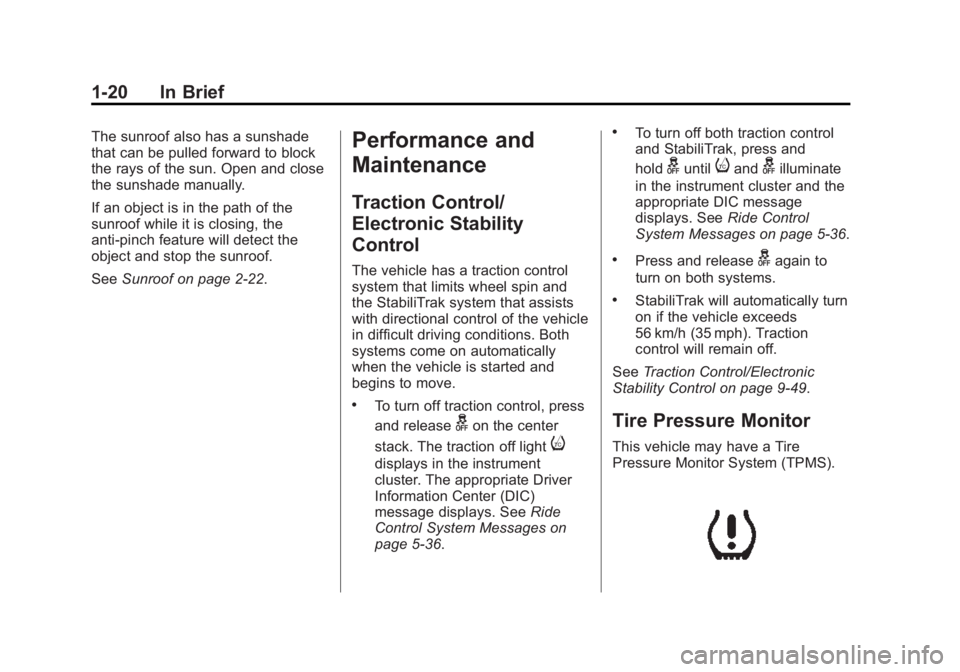
This vehicle may have a Tire
Pressure Monitor System (TPMS).
Page 28 of 439
Black plate (21,1)GMC 2015i Sierra Denali Owner Manual (GMNA-Localizing-U.S./Canada/
Mexico-8431500) - 2015 - crc - 6/20/14
In Brief 1-21
The low tire pressure warning light
alerts to a significant loss in
pressure of one of the vehicle's
tires. If the warning light comes on,
stop as soon as possible and inflate
the tires to the recommended
pressure shown on the Tire and
Loading Information label. See
Vehicle Load Limits on page 9-15.
The warning light will remain on until
the tire pressure is corrected.
The low tire pressure warning light
may come on in cool weather when
the vehicle is first started, and then
turn off as the vehicle is driven. This
may be an early indicator that the
tire pressures are getting low and
the tires need to be inflated to the
proper pressure.
The TPMS does not replace normal
monthly tire maintenance. Maintain
the correct tire pressures.
SeeTire Pressure Monitor System
on page 10-61.Engine Oil Life System
The engine oil life system calculates
engine oil life based on vehicle use
and displays a DIC message when
it is necessary to change the engine
oil and filter. The oil life system
should be reset to 100% only
following an oil change.
Resetting the Oil Life System
1. Display OIL LIFE REMAINING
on the DIC. See Driver
Information Center (DIC) on
page 5-27.
2. Press and hold
Vfor several
seconds. The oil life will change
to 100%.
The oil life system can also be reset
as follows:
1. Turn the ignition to ON/RUN with the engine off.
2. Fully press the accelerator pedal slowly three times within
five seconds. 3. Display the OIL LIFE
REMAINING on the DIC. If the
display shows 100%, the system
is reset.
See Engine Oil Life System on
page 10-11.
E85 or FlexFuel
Vehicles with a yellow fuel cap can
use either unleaded gasoline or
ethanol fuel containing up to 85%
ethanol (E85). See E85 or FlexFuel
on page 9-65. For all other vehicles,
use only the unleaded gasoline
described under Fuel on page 9-63.
Driving for Better Fuel
Economy
Driving habits can affect fuel
mileage. Here are some driving tips
to get the best fuel economy
possible.
.Avoid fast starts and accelerate
smoothly.
.Brake gradually and avoid
abrupt stops.