lock GMC SIERRA 2016 Owner's Guide
[x] Cancel search | Manufacturer: GMC, Model Year: 2016, Model line: SIERRA, Model: GMC SIERRA 2016Pages: 509, PDF Size: 6.51 MB
Page 53 of 509
GMC Sierra Owner Manual (GMNA-Localizing-U.S./Canada/Mexico-
9234758) - 2016 - crc - 11/9/15
52 Keys, Doors, and Windows
Express Window Anti-Pinch
Override
{Warning
If express override is activated,
the window will not reverse
automatically. You or others could
be injured and the window could
be damaged. Before you use
express override, make sure that
all people and obstructions are
clear of the window path.
The anti-pinch feature can be
overridden in a supervised mode.
Hold the window switch in the
partially or fully pulled up position.
The window rises for as long as the
switch is held. Once the switch is
released, the express mode is
reactivated.
In this mode, the window can still
close on an object in its path. Use
care when using the override mode.
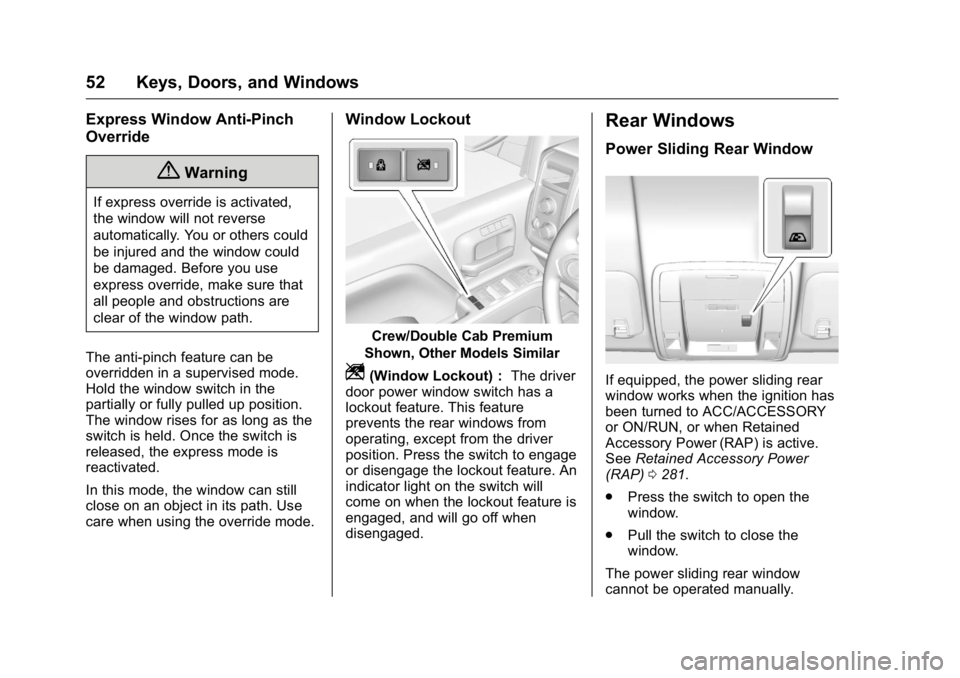
Window Lockout
Crew/Double Cab Premium
Shown, Other Models Similar
Z(Window Lockout) : The driver
door power window switch has a
lockout feature. This feature
prevents the rear windows from
operating, except from the driver
position. Press the switch to engage
or disengage the lockout feature. An
indicator light on the switch will
come on when the lockout feature is
engaged, and will go off when
disengaged.
Rear Windows
Power Sliding Rear Window
If equipped, the power sliding rear
window works when the ignition has
been turned to ACC/ACCESSORY
or ON/RUN, or when Retained
Accessory Power (RAP) is active.
See Retained Accessory Power
(RAP) 0281.
. Press the switch to open the
window.
. Pull the switch to close the
window.
The power sliding rear window
cannot be operated manually.
Page 54 of 509
GMC Sierra Owner Manual (GMNA-Localizing-U.S./Canada/Mexico-
9234758) - 2016 - crc - 11/9/15
Keys, Doors, and Windows 53
Sun Visors
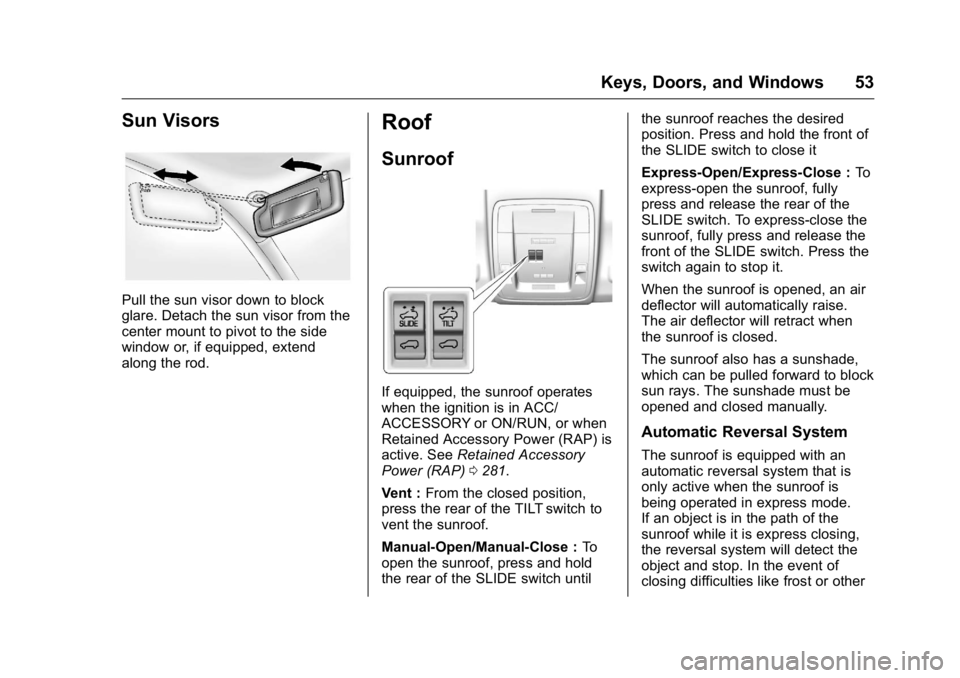
Pull the sun visor down to block
glare. Detach the sun visor from the
center mount to pivot to the side
window or, if equipped, extend
along the rod.
Roof
Sunroof
If equipped, the sunroof operates
when the ignition is in ACC/
ACCESSORY or ON/RUN, or when
Retained Accessory Power (RAP) is
active. SeeRetained Accessory
Power (RAP) 0281.
Vent : From the closed position,
press the rear of the TILT switch to
vent the sunroof.
Manual-Open/Manual-Close : To
open the sunroof, press and hold
the rear of the SLIDE switch until the sunroof reaches the desired
position. Press and hold the front of
the SLIDE switch to close it
Express-Open/Express-Close :
To
express-open the sunroof, fully
press and release the rear of the
SLIDE switch. To express-close the
sunroof, fully press and release the
front of the SLIDE switch. Press the
switch again to stop it.
When the sunroof is opened, an air
deflector will automatically raise.
The air deflector will retract when
the sunroof is closed.
The sunroof also has a sunshade,
which can be pulled forward to block
sun rays. The sunshade must be
opened and closed manually.
Automatic Reversal System
The sunroof is equipped with an
automatic reversal system that is
only active when the sunroof is
being operated in express mode.
If an object is in the path of the
sunroof while it is express closing,
the reversal system will detect the
object and stop. In the event of
closing difficulties like frost or other
Page 57 of 509
GMC Sierra Owner Manual (GMNA-Localizing-U.S./Canada/Mexico-
9234758) - 2016 - crc - 11/9/15
56 Seats and Restraints
Head Restraints
Front Seats
The vehicle’s front seats have
adjustable head restraints in the
outboard seating positions.
{Warning
With head restraints that are not
installed and adjusted properly,
there is a greater chance that
occupants will suffer a neck/
spinal injury in a crash. Do not
drive until the head restraints for
all occupants are installed and
adjusted properly.
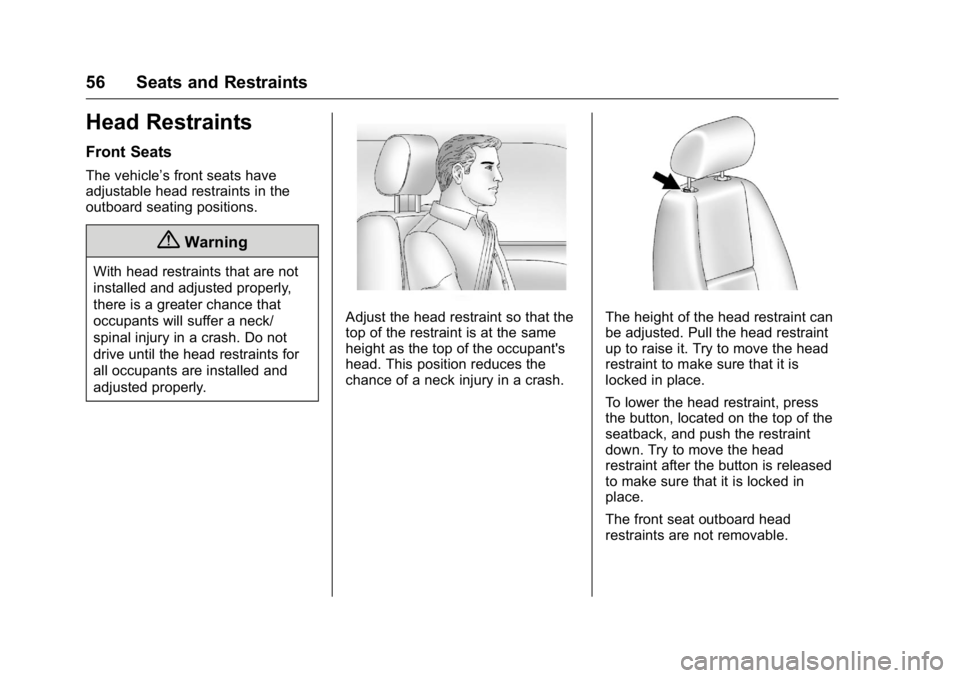
Adjust the head restraint so that the
top of the restraint is at the same
height as the top of the occupant's
head. This position reduces the
chance of a neck injury in a crash.The height of the head restraint can
be adjusted. Pull the head restraint
up to raise it. Try to move the head
restraint to make sure that it is
locked in place.
To lower the head restraint, press
the button, located on the top of the
seatback, and push the restraint
down. Try to move the head
restraint after the button is released
to make sure that it is locked in
place.
The front seat outboard head
restraints are not removable.
Page 58 of 509
GMC Sierra Owner Manual (GMNA-Localizing-U.S./Canada/Mexico-
9234758) - 2016 - crc - 11/9/15
Seats and Restraints 57
Rear Seats
The rear seat has adjustable
headrests in the outboard seating
positions.
The height of the headrest can be
adjusted. Pull the headrest up to
raise it. To lower the headrest, push
the headrest down.
If you are installing a child restraint
in the rear seat, see“Securing a
Child Restraint Designed for the
LATCH System” underLower
Anchors and Tethers for Children
(LATCH System) 094.
Front Seats
Seat Adjustment
{Warning
You can lose control of the
vehicle if you try to adjust a driver
seat while the vehicle is moving.
Adjust the driver seat only when
the vehicle is not moving.
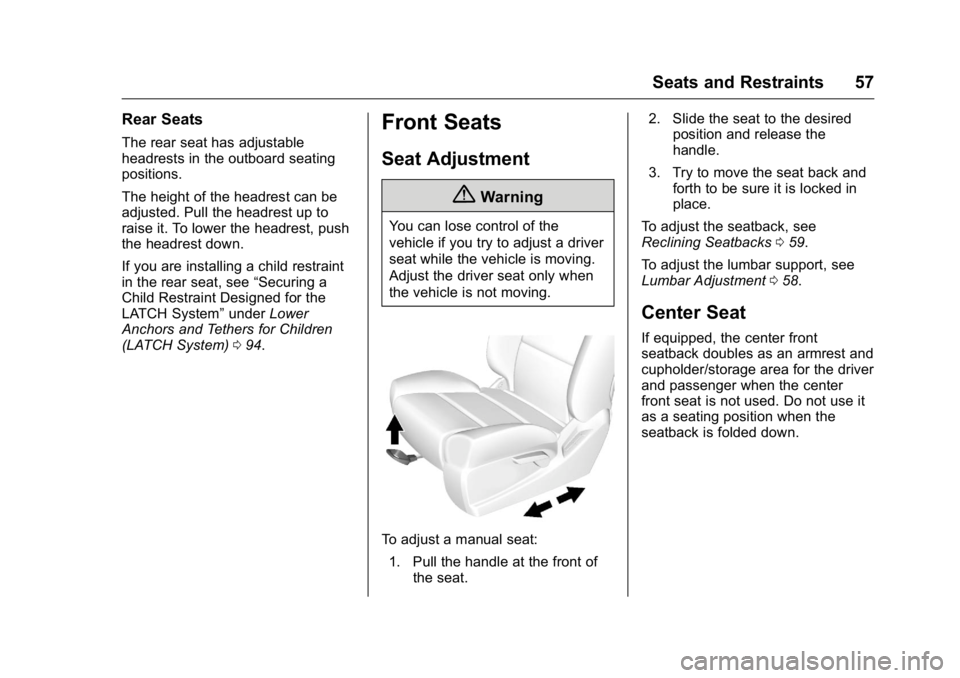
To adjust a manual seat:
1. Pull the handle at the front of the seat. 2. Slide the seat to the desired
position and release the
handle.
3. Try to move the seat back and forth to be sure it is locked in
place.
To adjust the seatback, see
Reclining Seatbacks 059.
To adjust the lumbar support, see
Lumbar Adjustment 058.
Center Seat
If equipped, the center front
seatback doubles as an armrest and
cupholder/storage area for the driver
and passenger when the center
front seat is not used. Do not use it
as a seating position when the
seatback is folded down.
Page 60 of 509
GMC Sierra Owner Manual (GMNA-Localizing-U.S./Canada/Mexico-
9234758) - 2016 - crc - 11/9/15
Seats and Restraints 59
Reclining Seatbacks
{Warning
Sitting in a reclined position when
the vehicle is in motion can be
dangerous. Even when buckled
up, the safety belts cannot do
their job.
The shoulder belt will not be
against your body. Instead, it will
be in front of you. In a crash, you
could go into it, receiving neck or
other injuries.
The lap belt could go up over
your abdomen. The belt forces
would be there, not at your pelvic
bones. This could cause serious
internal injuries.
For proper protection when the
vehicle is in motion, have the
seatback upright. Then sit well
back in the seat and wear the
safety belt properly.
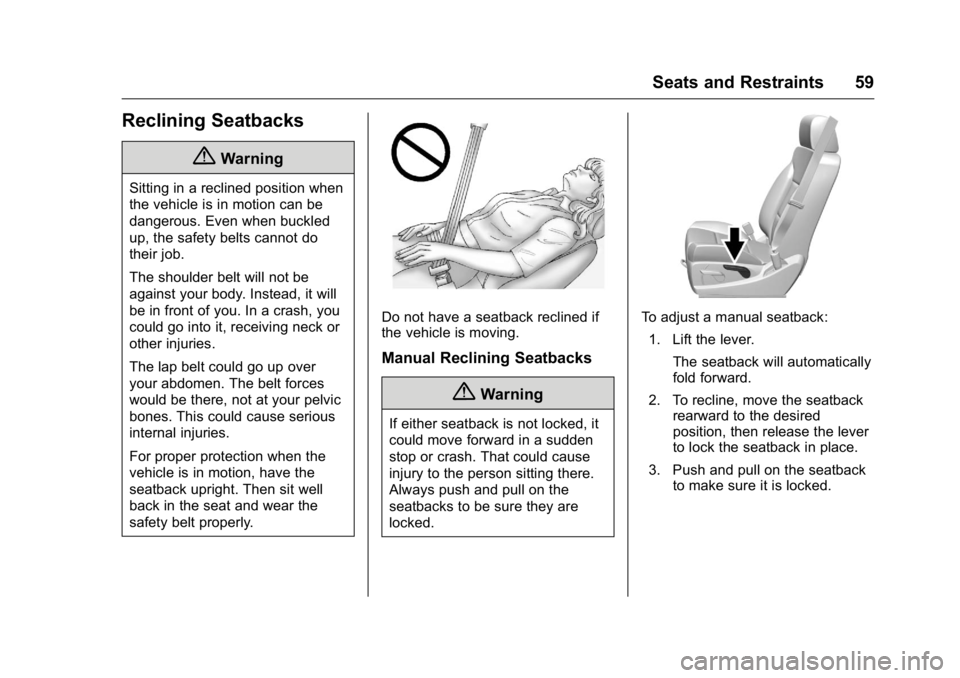
Do not have a seatback reclined if
the vehicle is moving.
Manual Reclining Seatbacks
{Warning
If either seatback is not locked, it
could move forward in a sudden
stop or crash. That could cause
injury to the person sitting there.
Always push and pull on the
seatbacks to be sure they are
locked.
To adjust a manual seatback:1. Lift the lever. The seatback will automatically
fold forward.
2. To recline, move the seatback rearward to the desired
position, then release the lever
to lock the seatback in place.
3. Push and pull on the seatback to make sure it is locked.
Page 61 of 509
GMC Sierra Owner Manual (GMNA-Localizing-U.S./Canada/Mexico-
9234758) - 2016 - crc - 11/9/15
60 Seats and Restraints
To return the seatback to the upright
position:1. Lift the lever fully without applying pressure to the
seatback, and the seatback will
return to the upright position.
2. Push and pull on the seatback to make sure it is locked.
Power Reclining Seatbacks
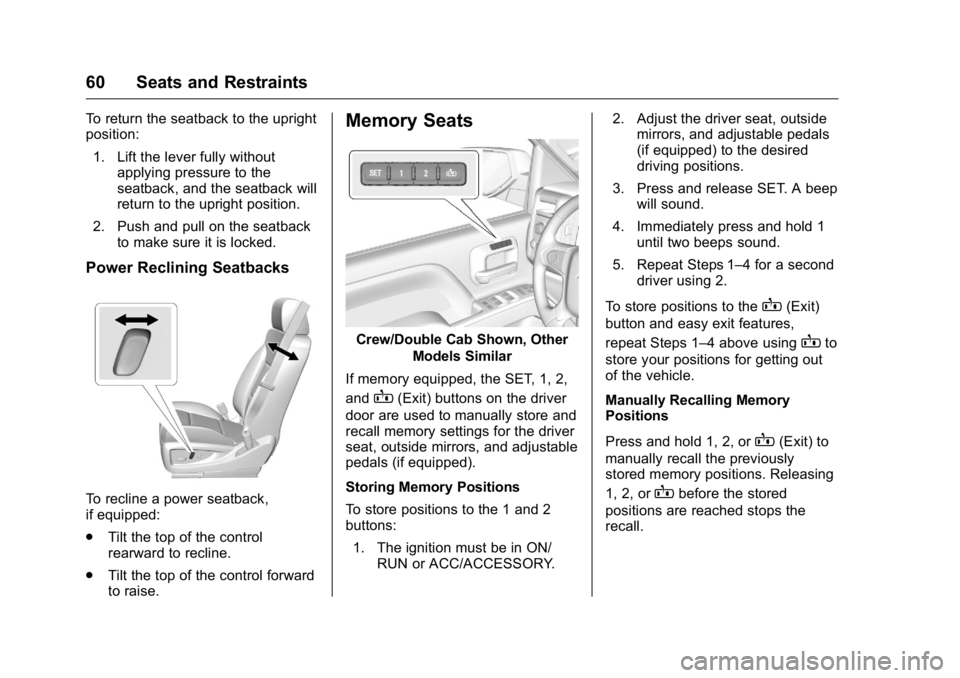
To recline a power seatback,
if equipped:
.Tilt the top of the control
rearward to recline.
. Tilt the top of the control forward
to raise.
Memory Seats
Crew/Double Cab Shown, Other
Models Similar
If memory equipped, the SET, 1, 2,
and
B(Exit) buttons on the driver
door are used to manually store and
recall memory settings for the driver
seat, outside mirrors, and adjustable
pedals (if equipped).
Storing Memory Positions
To store positions to the 1 and 2
buttons:
1. The ignition must be in ON/ RUN or ACC/ACCESSORY. 2. Adjust the driver seat, outside
mirrors, and adjustable pedals
(if equipped) to the desired
driving positions.
3. Press and release SET. A beep will sound.
4. Immediately press and hold 1 until two beeps sound.
5. Repeat Steps 1–4 for a second driver using 2.
To store positions to the
B(Exit)
button and easy exit features,
repeat Steps 1–4 above using
Bto
store your positions for getting out
of the vehicle.
Manually Recalling Memory
Positions
Press and hold 1, 2, or
B(Exit) to
manually recall the previously
stored memory positions. Releasing
1, 2, or
Bbefore the stored
positions are reached stops the
recall.
Page 62 of 509
GMC Sierra Owner Manual (GMNA-Localizing-U.S./Canada/Mexico-
9234758) - 2016 - crc - 11/9/15
Seats and Restraints 61
Automatically Recalling Memory
Positions (Auto Recall)
If programmed on in the vehicle
personalization menu, the Auto
(Automatic) Memory Recall feature
automatically recalls the current
driver’s previously stored 1 or 2
position when the ignition is
changed from OFF to ON/RUN or
ACC/ACCESSORY.
See “Auto Memory Recall” under
“Comfort and Convenience” in
Vehicle Personalization 0163.
To stop recall movement, press one
of the memory, power mirror or
power seat controls; or press the
adjustable pedal control (if
equipped).
RKE Transmitters are not labeled
with a number. If your memory seat
position is stored to 1 or 2 but this
position is not automatically
recalling, then store your positions
to the other button or switch RKE
transmitters with the other driver. Easy Exit Recall
If programmed on in the vehicle
personalization menu, the easy exit
feature automatically recalls the
previously stored
B(Exit) position.
See “Storing Memory Positions”
listed previously. See also Vehicle
Personalization 0163.
Easy exit recall automatically
activates when one of the following
occurs:
. The vehicle is turned off and the
driver door is opened within a
short time.
. The vehicle is turned off with the
driver door open.
Obstructions
If something has blocked the driver
seat and/or adjustable pedals while
recalling a memory position, the
recall may stop. Remove the
obstruction. Then do one of the
following:
. For manual or automatic recall
positions, press and hold the
appropriate manual control for two seconds. Try recalling again
by pressing the appropriate
memory button.
. For exit recall position, press
and hold the appropriate manual
control for the exit feature not
recalling for two seconds. Then
try recalling the exit position
again.
If the memory position is still not
recalling, see your dealer for
service.
Heated and Ventilated
Front Seats
{Warning
If you cannot feel temperature
change or pain to the skin, the
seat heater may cause burns. To
reduce the risk of burns, people
with such a condition should use
care when using the seat heater,
especially for long periods of
time. Do not place anything on
the seat that insulates against (Continued)
Page 64 of 509
GMC Sierra Owner Manual (GMNA-Localizing-U.S./Canada/Mexico-
9234758) - 2016 - crc - 11/9/15
Seats and Restraints 63
Rear Seats
Rear Seats (Double Cab
Full Bench)
Folding the Rear SeatCaution
Folding a rear seat with the safety
belts still fastened may cause
damage to the seat or the safety
belts. Always unbuckle the safety
belts and return them to their
normal stowed position before
folding a rear seat.
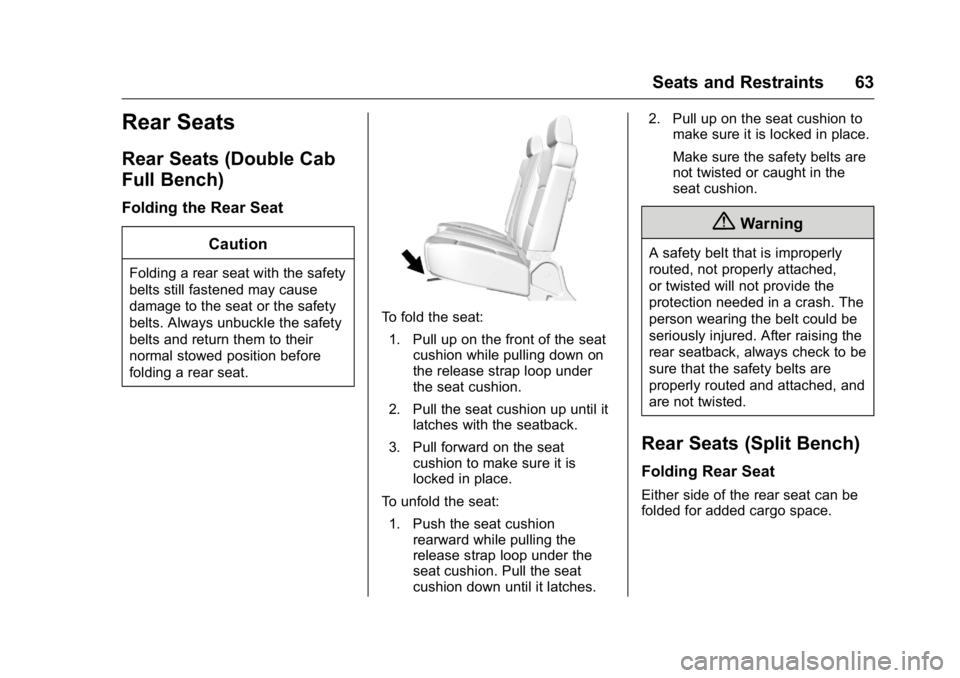
To fold the seat:1. Pull up on the front of the seat cushion while pulling down on
the release strap loop under
the seat cushion.
2. Pull the seat cushion up until it latches with the seatback.
3. Pull forward on the seat cushion to make sure it is
locked in place.
To unfold the seat: 1. Push the seat cushion rearward while pulling the
release strap loop under the
seat cushion. Pull the seat
cushion down until it latches. 2. Pull up on the seat cushion to
make sure it is locked in place.
Make sure the safety belts are
not twisted or caught in the
seat cushion.
{Warning
A safety belt that is improperly
routed, not properly attached,
or twisted will not provide the
protection needed in a crash. The
person wearing the belt could be
seriously injured. After raising the
rear seatback, always check to be
sure that the safety belts are
properly routed and attached, and
are not twisted.
Rear Seats (Split Bench)
Folding Rear Seat
Either side of the rear seat can be
folded for added cargo space.
Page 67 of 509
GMC Sierra Owner Manual (GMNA-Localizing-U.S./Canada/Mexico-
9234758) - 2016 - crc - 11/9/15
66 Seats and Restraints
How to Wear Safety Belts
Properly
This section is only for people of
adult size.
There are special things to know
about safety belts and children. And
there are different rules for smaller
children and infants. If a child will be
riding in the vehicle, seeOlder
Children 087 orInfants and Young
Children 088. Follow those rules for
everyone's protection.
It is very important for all occupants
to buckle up. Statistics show that
unbelted people are hurt more often
in crashes than those who are
wearing safety belts.
There are important things to know
about wearing a safety belt properly.
. Sit up straight and always keep
your feet on the floor in front
of you.
. Always use the correct buckle
for your seating position.
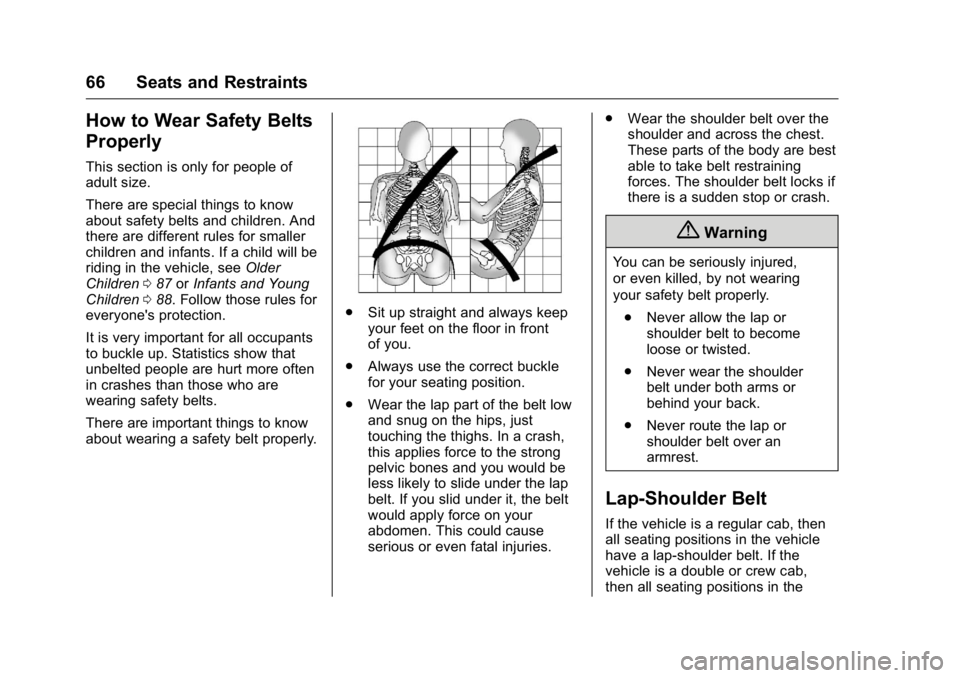
. Wear the lap part of the belt low
and snug on the hips, just
touching the thighs. In a crash,
this applies force to the strong
pelvic bones and you would be
less likely to slide under the lap
belt. If you slid under it, the belt
would apply force on your
abdomen. This could cause
serious or even fatal injuries. .
Wear the shoulder belt over the
shoulder and across the chest.
These parts of the body are best
able to take belt restraining
forces. The shoulder belt locks if
there is a sudden stop or crash.
{Warning
You can be seriously injured,
or even killed, by not wearing
your safety belt properly.
. Never allow the lap or
shoulder belt to become
loose or twisted.
. Never wear the shoulder
belt under both arms or
behind your back.
. Never route the lap or
shoulder belt over an
armrest.
Lap-Shoulder Belt
If the vehicle is a regular cab, then
all seating positions in the vehicle
have a lap-shoulder belt. If the
vehicle is a double or crew cab,
then all seating positions in the
Page 68 of 509
GMC Sierra Owner Manual (GMNA-Localizing-U.S./Canada/Mexico-
9234758) - 2016 - crc - 11/9/15
Seats and Restraints 67
vehicle have a lap-shoulder belt
except for the center front
passenger position (if equipped),
which has a lap belt. SeeLap
Belt 070.
The following instructions explain
how to wear a lap-shoulder belt
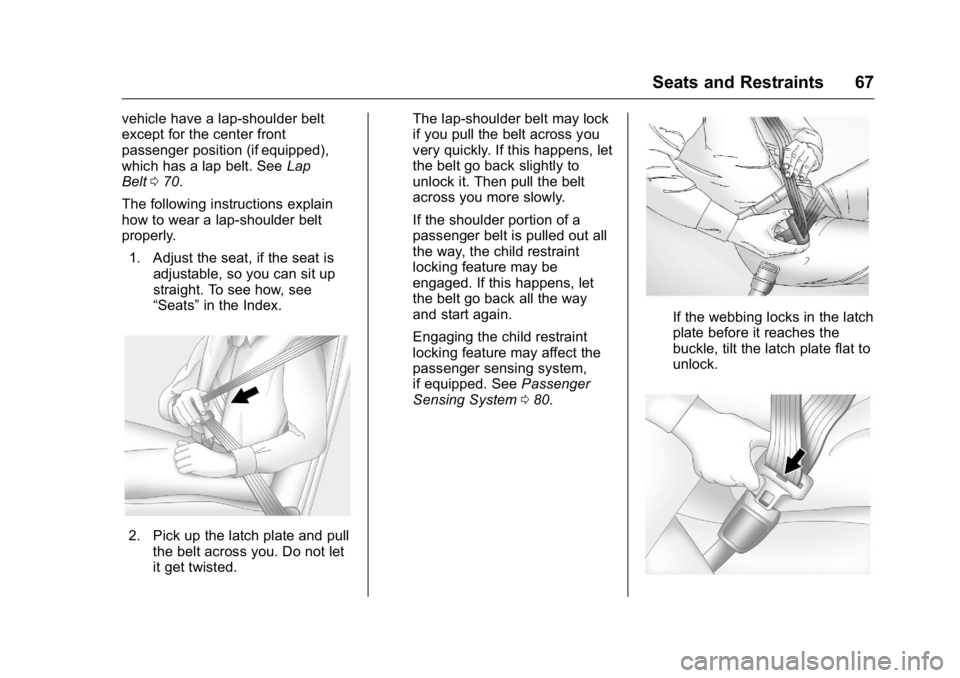
properly. 1. Adjust the seat, if the seat is adjustable, so you can sit up
straight. To see how, see
“Seats” in the Index.
2. Pick up the latch plate and pull
the belt across you. Do not let
it get twisted. The lap-shoulder belt may lock
if you pull the belt across you
very quickly. If this happens, let
the belt go back slightly to
unlock it. Then pull the belt
across you more slowly.
If the shoulder portion of a
passenger belt is pulled out all
the way, the child restraint
locking feature may be
engaged. If this happens, let
the belt go back all the way
and start again.
Engaging the child restraint
locking feature may affect the
passenger sensing system,
if equipped. See
Passenger
Sensing System 080.
If the webbing locks in the latch
plate before it reaches the
buckle, tilt the latch plate flat to
unlock.