ignition GMC SIERRA 2017 Owners Manual
[x] Cancel search | Manufacturer: GMC, Model Year: 2017, Model line: SIERRA, Model: GMC SIERRA 2017Pages: 511, PDF Size: 5.21 MB
Page 437 of 511

GMC Sierra/Sierra Denali Owner Manual (GMNA-Localizing-U.S./Canada/
Mexico-9955992) - 2017 - crc - 4/18/17
436 Vehicle Care
Caution
Ignoring these steps could result
in costly damage to the vehicle
that would not be covered by the
vehicle warranty. Trying to start
the vehicle by pushing or pulling it
will not work, and it could damage
the vehicle.
1. Check the other vehicle. It must have a 12-volt battery
with a negative ground system.
Caution
If the other vehicle does not have
a 12-volt system with a negative
ground, both vehicles can be
damaged. Only use a vehicle that
has a 12-volt system with a
negative ground for jump starting.
2. If you have a vehicle with a diesel engine with two
batteries, you should know
before you begin that,
especially in cold weather, you may not be able to get enough
power from a single battery in
another vehicle to start your
diesel engine. If your vehicle
has more than one battery,
using the battery that is closer
to the starter will reduce
electrical resistance. This is
located on the passenger side,
in the rear of the engine
compartment.
3. Get the vehicles close enough so the jumper cables can
reach, but be sure the vehicles
are not touching each other.
If they are, it could cause an
unwanted ground connection.
You would not be able to start
your vehicle, and the bad
grounding could damage the
electrical systems.
To avoid the possibility of the
vehicles rolling, set the parking
brake firmly on both vehicles
involved in the jump start
procedure. Put the automatic
transmission in P (Park) or a
manual transmission in Neutral
before setting the parking
brake. If you have a four-wheel-drive vehicle, be
sure the transfer case is in a
drive gear, not in N (Neutral).
Caution
If any accessories are left on or
plugged in during the jump
starting procedure, they could be
damaged. The repairs would not
be covered by the vehicle
warranty. Whenever possible, turn
off or unplug all accessories on
either vehicle when jump starting.
4. Turn off the ignition on both vehicles. Unplug unnecessary
accessories plugged into the
accessory power outlets. Turn
off the radio and all the lamps
that are not needed. This will
avoid sparks and help save
both batteries. And it could
save the radio!
5. Open the hood on the other vehicle and locate the
positive (+) and negative (−)
terminal locations on that
vehicle.
Page 442 of 511
GMC Sierra/Sierra Denali Owner Manual (GMNA-Localizing-U.S./Canada/
Mexico-9955992) - 2017 - crc - 4/18/17
Vehicle Care 441
{Warning
Shifting a four-wheel-drive
vehicle's transfer case into
N (Neutral) can cause the vehicle
to roll even if the transmission is
in P (Park). You or others could
be injured. Set the parking brake
before shifting the transfer case
to N (Neutral).
To dinghy tow: 1. Position the vehicle being towed behind the tow vehicle,
facing forward and on a level
surface.
2. Securely attach the vehicle being towed to the tow vehicle.
3. Apply the parking brake and start the engine.
4. Shift the transfer case to N (Neutral). See “Shifting into
N (Neutral)” underFour-Wheel
Drive 0289. Check that the
vehicle is in N (Neutral) by
shifting the transmission to
R (Reverse) and then to D (Drive). There should be no
movement of the vehicle while
shifting.
5. Turn the engine off.
Caution
Failure to disconnect the negative
battery cable or to have it contact
the terminals can cause damage
to the vehicle.
6. Disconnect the negative battery cable at the battery and
secure the nut and bolt. Cover
the negative battery post with a
non-conductive material to
prevent any contact with the
negative battery terminal.
7. Shift the transmission to P (Park).
Caution
If the steering column is locked,
vehicle damage may occur. 8. Move the steering wheel to
make sure the steering column
is unlocked.
9. With a foot on the brake pedal, release the parking brake.
Keep the ignition key in the
towed vehicle in ACC/
ACCESSORY to prevent the
steering column from locking.
Disconnecting the Towed Vehicle
Before disconnecting the towed
vehicle: 1. Park on a level surface.
2. Set the parking brake, then shift the transmission to
P (Park), and move the ignition
key to OFF.
3. Connect the battery.
4. Apply the brake pedal.
5. Turn the ignition to ON/RUN with the engine off. Shift the
transfer case out of N (Neutral)
to Two-Wheel Drive High. See
“Shifting out of N (Neutral)”
under Four-Wheel Drive 0289.
Page 443 of 511
GMC Sierra/Sierra Denali Owner Manual (GMNA-Localizing-U.S./Canada/
Mexico-9955992) - 2017 - crc - 4/18/17
442 Vehicle Care
See your dealer if the transfer
case cannot be shifted out of
N (Neutral).
6. Check that the vehicle is in Two-Wheel Drive High by
shifting the transmission to
R (Reverse) and then to D
(Drive). There should be
movement of the vehicle while
shifting.
7. Shift the transmission to P (Park) and turn off the
ignition.
8. Disconnect the vehicle from the tow vehicle.
9. Release the parking brake.
10. Reset any lost presets.
The outside temperature
display will default to 0 °C (32 °
F) but will reset with normal
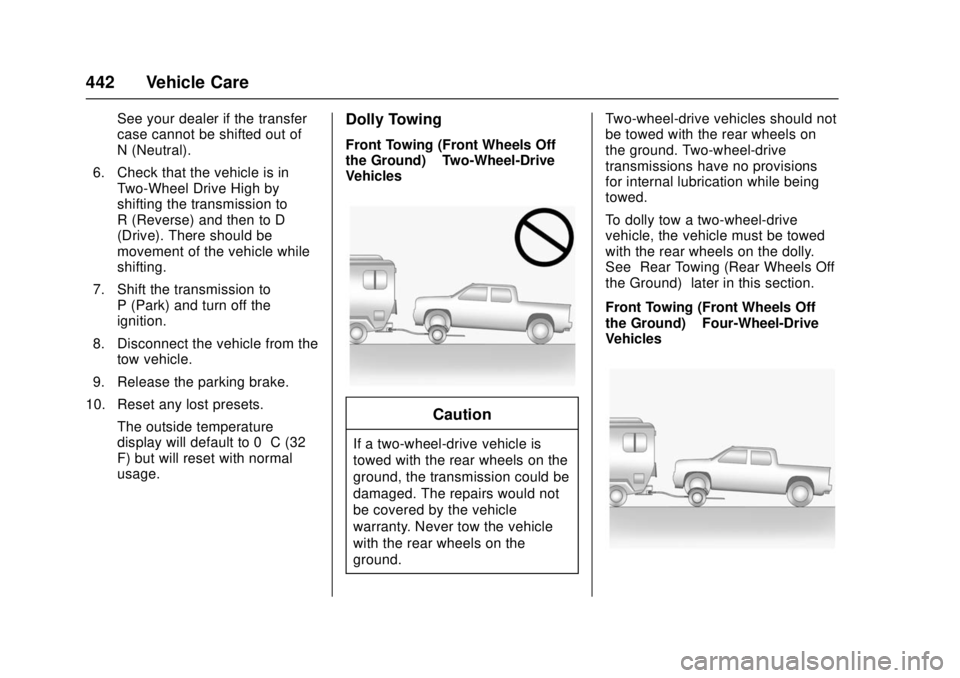
usage.Dolly Towing
Front Towing (Front Wheels Off
the Ground) –Two-Wheel-Drive
Vehicles
Caution
If a two-wheel-drive vehicle is
towed with the rear wheels on the
ground, the transmission could be
damaged. The repairs would not
be covered by the vehicle
warranty. Never tow the vehicle
with the rear wheels on the
ground. Two-wheel-drive vehicles should not
be towed with the rear wheels on
the ground. Two-wheel-drive
transmissions have no provisions
for internal lubrication while being
towed.
To dolly tow a two-wheel-drive
vehicle, the vehicle must be towed
with the rear wheels on the dolly.
See
“Rear Towing (Rear Wheels Off
the Ground)” later in this section.
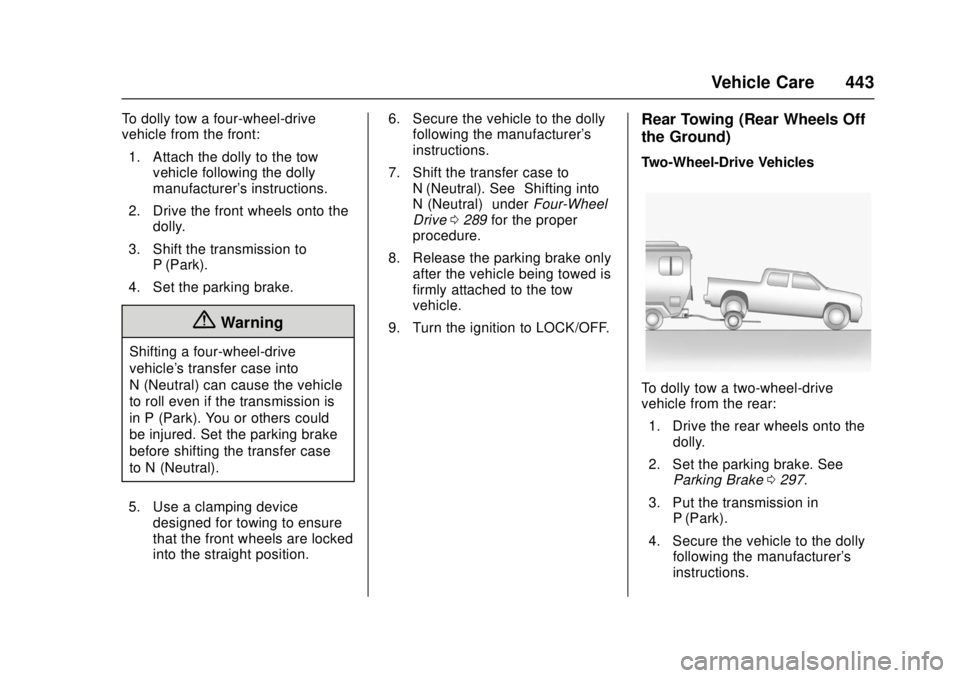
Front Towing (Front Wheels Off
the Ground) –Four-Wheel-Drive
Vehicles
Page 444 of 511
GMC Sierra/Sierra Denali Owner Manual (GMNA-Localizing-U.S./Canada/
Mexico-9955992) - 2017 - crc - 4/18/17
Vehicle Care 443
To dolly tow a four-wheel-drive
vehicle from the front:1. Attach the dolly to the tow vehicle following the dolly
manufacturer's instructions.
2. Drive the front wheels onto the dolly.
3. Shift the transmission to P (Park).
4. Set the parking brake.
{Warning
Shifting a four-wheel-drive
vehicle's transfer case into
N (Neutral) can cause the vehicle
to roll even if the transmission is
in P (Park). You or others could
be injured. Set the parking brake
before shifting the transfer case
to N (Neutral).
5. Use a clamping device designed for towing to ensure
that the front wheels are locked
into the straight position. 6. Secure the vehicle to the dolly
following the manufacturer's
instructions.
7. Shift the transfer case to N (Neutral). See “Shifting into
N (Neutral)” underFour-Wheel
Drive 0289 for the proper
procedure.
8. Release the parking brake only after the vehicle being towed is
firmly attached to the tow
vehicle.
9. Turn the ignition to LOCK/OFF.
Rear Towing (Rear Wheels Off
the Ground)
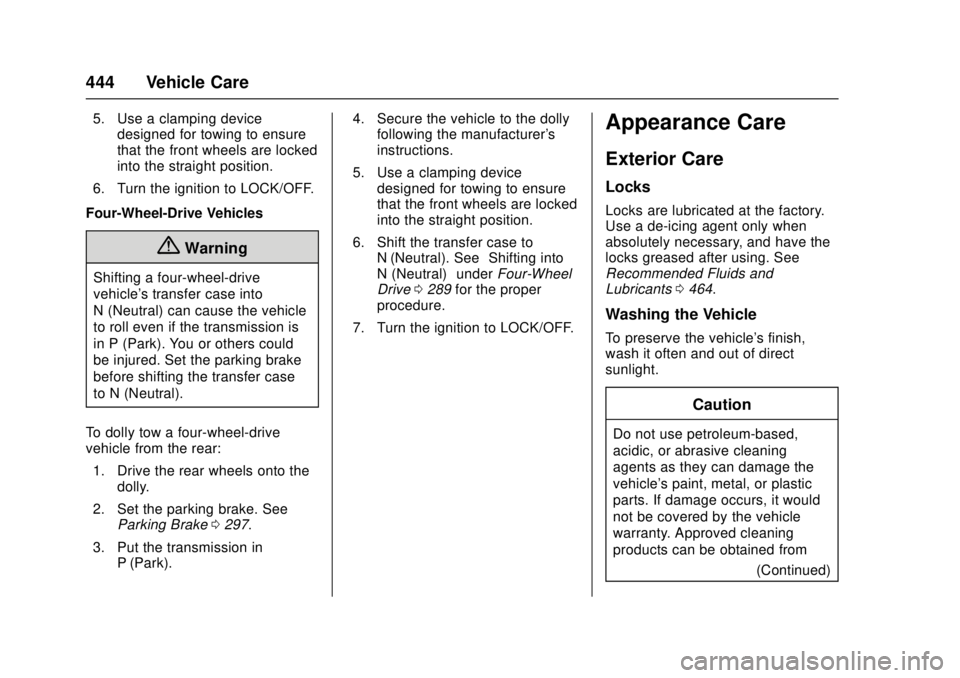
Two-Wheel-Drive Vehicles
To dolly tow a two-wheel-drive
vehicle from the rear: 1. Drive the rear wheels onto the dolly.
2. Set the parking brake. See Parking Brake 0297.
3. Put the transmission in P (Park).
4. Secure the vehicle to the dolly following the manufacturer's
instructions.
Page 445 of 511
GMC Sierra/Sierra Denali Owner Manual (GMNA-Localizing-U.S./Canada/
Mexico-9955992) - 2017 - crc - 4/18/17
444 Vehicle Care
5. Use a clamping devicedesigned for towing to ensure
that the front wheels are locked
into the straight position.
6. Turn the ignition to LOCK/OFF.
Four-Wheel-Drive Vehicles
{Warning
Shifting a four-wheel-drive
vehicle's transfer case into
N (Neutral) can cause the vehicle
to roll even if the transmission is
in P (Park). You or others could
be injured. Set the parking brake
before shifting the transfer case
to N (Neutral).
To dolly tow a four-wheel-drive
vehicle from the rear: 1. Drive the rear wheels onto the dolly.
2. Set the parking brake. See Parking Brake 0297.
3. Put the transmission in P (Park). 4. Secure the vehicle to the dolly
following the manufacturer's
instructions.
5. Use a clamping device designed for towing to ensure
that the front wheels are locked
into the straight position.
6. Shift the transfer case to N (Neutral). See “Shifting into
N (Neutral)” underFour-Wheel
Drive 0289 for the proper
procedure.
7. Turn the ignition to LOCK/OFF.
Appearance Care
Exterior Care
Locks
Locks are lubricated at the factory.
Use a de-icing agent only when
absolutely necessary, and have the
locks greased after using. See
Recommended Fluids and
Lubricants 0464.
Washing the Vehicle
To preserve the vehicle's finish,
wash it often and out of direct
sunlight.
Caution
Do not use petroleum-based,
acidic, or abrasive cleaning
agents as they can damage the
vehicle's paint, metal, or plastic
parts. If damage occurs, it would
not be covered by the vehicle
warranty. Approved cleaning
products can be obtained from
(Continued)
Page 458 of 511

GMC Sierra/Sierra Denali Owner Manual (GMNA-Localizing-U.S./Canada/
Mexico-9955992) - 2017 - crc - 4/18/17
Service and Maintenance 457
.Lubricate body components. See
Exterior Care 0444.
. Check starter switch. See Starter
Switch Check 0387.
. Check automatic transmission
shift lock control function. See
Automatic Transmission Shift
Lock Control Function Check
0387.
. Check ignition transmission lock.
See Ignition Transmission Lock
Check 0388.
. Check parking brake and
automatic transmission park
mechanism. See Park Brake and
P (Park) Mechanism Check
0 388.
. Check accelerator pedal for
damage, high effort, or binding.
Replace if needed. .
Visually inspect gas strut for
signs of wear, cracks, or other
damage. Check the hold open
ability of the strut. See your
dealer if service is required.
. Inspect sunroof track and seal,
if equipped. See Sunroof053.
. Verify spare tire key lock
operation and lubricate as
needed. See Tire Changing
0 425.
Page 490 of 511
GMC Sierra/Sierra Denali Owner Manual (GMNA-Localizing-U.S./Canada/
Mexico-9955992) - 2017 - crc - 4/18/17
OnStar 489
.Obtain the Wi-Fi®hotspot name
or SSID and password,
if equipped.
Press
Qto connect to an
Advisor to:
. Verify account information or
update contact information.
. Get driving directions.
. Receive a Diagnostic check of
the vehicle's key operating
systems.
. Receive Roadside Assistance.
. Manage Wi-Fi Settings,
if equipped.
Press
>to get a priority connection
to an OnStar Advisor available
24/7 to:
. Get help for an emergency.
. Be a Good Samaritan or
respond to an AMBER Alert.
. Get assistance in severe
weather or other crisis situations
and find evacuation routes.
OnStar Services
Emergency
Emergency Services require an
active, OnStar service plan
(excludes Basic Plan). With
Automatic Crash Response, built-in
sensors can automatically alert a
specially trained OnStar Advisor
who is immediately connected in to
the vehicle to help.
Press
>for a priority connection to
an OnStar Advisor who can contact
emergency service providers, direct
them to your exact location, and
relay important information.
With OnStar Crisis Assist, specially
trained Advisors are available
24 hours a day, 7 days a week, to
provide a central point of contact,
assistance, and information during a
crisis.
With Roadside Assistance, Advisors
can locate a nearby service provider
to help with a flat tire, a battery
jump, or an empty gas tank.
Security
If equipped, OnStar provides these
services:
. With Stolen Vehicle Assistance,
OnStar Advisors can use GPS to
pinpoint the vehicle and help
authorities quickly recover it.
. With Remote Ignition Block,
if equipped, OnStar can block
the engine from being restarted.
. With Stolen Vehicle Slowdown,
if equipped, OnStar can work
with law enforcement to
gradually slow the vehicle down.
Theft Alarm Notification
If equipped, if the doors are locked
and the vehicle alarm sounds, a
notification by text, e-mail, or phone
call will be sent. If the vehicle is
stolen, an OnStar Advisor can work
with authorities to recover the
vehicle.
Page 495 of 511
GMC Sierra/Sierra Denali Owner Manual (GMNA-Localizing-U.S./Canada/
Mexico-9955992) - 2017 - crc - 4/18/17
494 OnStar
to the vehicle in a crash, or wireless
phone network congestion or
jamming—may prevent service.
See Radio Frequency Statement
0 484.
Services for People with
Disabilities
Advisors provide services to help
Subscribers with physical disabilities
and medical conditions.
Press
Qto help:
. Locate a gas station with an
attendant to pump gas.
. Find a hotel, restaurant, etc.,
that meets accessibility needs.
. Provide directions to the closest
hospital or pharmacy in urgent
situations.
TTY Users
OnStar has the ability to
communicate to deaf,
hard-of-hearing, or speech-impaired
customers while in the vehicle. The
available dealer-installed TTY
system can provide in-vehicle access to all OnStar services,
except Virtual Advisor and OnStar
Turn-by-Turn Navigation.
OnStar Personal Identification
Number (PIN)
A PIN is needed to access some
OnStar services. The PIN will need
to be changed the first time when
speaking with an Advisor. To
change the OnStar PIN, contact an
OnStar Advisor by pressing
Qor
calling 1-888-4ONSTAR.
Warranty
OnStar equipment may be
warranted as part of the vehicle
warranty.
Languages
The vehicle can be programmed to
respond in multiple languages.
Press
Qand ask for an Advisor.
Advisors are available in English,
Spanish, and French. Available
languages may vary by country.
Potential Issues
OnStar cannot perform Remote
Door Unlock or Stolen Vehicle
Assistance after the vehicle has
been off continuously for 10 days
without an ignition cycle. If the
vehicle has not been started for
five days, OnStar can contact
Roadside Assistance or a locksmith
to help gain access to the vehicle.
Global Positioning
System (GPS)
. Obstruction of the GPS can
occur in a large city with tall
buildings; in parking garages;
around airports; in tunnels and
underpasses; or in an area with
very dense trees. If GPS signals
are not available, the OnStar
system should still operate to
call OnStar. However, OnStar
could have difficulty identifying
the exact location.
. In emergency situations, OnStar
can use the last stored GPS
location to send to emergency
responders.
Page 501 of 511

GMC Sierra/Sierra Denali Owner Manual (GMNA-Localizing-U.S./Canada/
Mexico-9955992) - 2017 - crc - 4/18/17
500 Index
California (cont'd)Perchlorate Materials
Requirements . . . . . . . . . . . . . . . 357
California
Proposition
65 Warning . . . . . . . . . .357, 383, 435
Canadian Vehicle Owners . . . . . . . . 2
Capacities and Specifications . . . . . . . . . . . . . . . . . 470
Carbon Monoxide Engine Exhaust . . . . . . . . . . . . . . . 282
Tailgate . . . . . . . . . . . . . . . . . . . . . . . . . 41
Winter Driving . . . . . . . . . . . . . . . . 263
Cargo
Tie-Downs . . . . . . . . . . . . . . . . . . . . 121
Cargo Lamp . . . . . . . . . . . . . . . . . . . . 184
Caution, Danger, and Warning . . . . 3
CD Player . . . . . . . . . . . . . . . . . . . . . . 203
Center Console Storage . . . . . . . . 120
Center High-Mounted Stoplamp (CHMSL) and
Cargo Lamp . . . . . . . . . . . . . . . . . . . 391
Center Seat . . . . . . . . . . . . . . . . . . . . . 57
Chains, Tire . . . . . . . . . . . . . . . . . . . . 422
Charging
Wireless . . . . . . . . . . . . . . . . . . . . . . 130
Charging System Light . . . . . . . . . 143 Check
Engine Light (Malfunction
Indicator) . . . . . . . . . . . . . . . . . . . . 144
Ignition Transmission Lock . . . 388
Child Restraints Infants and Young Children . . . . . 89
Lower Anchors and Tethersfor Children . . . . . . . . . . . . . . . . . . . 95
Older Children . . . . . . . . . . . . . . . . . . 87
Securing . . . . . . . . . . . . . . . . . 106, 110
Systems . . . . . . . . . . . . . . . . . . . . . . . . 91
Cleaning Exterior Care . . . . . . . . . . . . . . . . . 444
Interior Care . . . . . . . . . . . . . . . . . . 449
Climate Control Systems . . . . . . . . . . . . . . . . . 243, 245
Air Conditioning . . . . . . . . . 243, 245
Dual Automatic . . . . . . . . . . . . . . . 246
Heating . . . . . . . . . . . . . . . . . . 243, 245
Clock . . . . . . . . . . . . . . . . . . . . . . . . . . . 127
Cluster, Instrument . . . . . . . . . . . . . 132
Collision Damage Repair . . . . . . . 481
Compartments Storage . . . . . . . . . . . . . . . . . . . . . . . .119
Compass . . . . . . . . . . . . . . . . . . . . . . . 126
Messages . . . . . . . . . . . . . . . . . . . . 158
Connections OnStar
®. . . . . . . . . . . . . . . . . . . . . . 491 Control . . . . . . . . . . . . . . . . . . . . . . . . . 301
Traction and Electronic
Stability . . . . . . . . . . . . . . . . . . . . . 299
Control Light Hill Descent . . . . . . . . . . . . . . . . . . 147
Control of a Vehicle . . . . . . . . . . . . . 254
Convex Mirrors . . . . . . . . . . . . . . . . . . 46
Coolant Engine . . . . . . . . . . . . . . . . . . . . . . . . 374
Engine Temperature Gauge . . 138
Engine TemperatureWarning Light . . . . . . . . . . . . . . . 149
Cooling . . . . . . . . . . . . . . .243, 245, 246
Cooling System . . . . . . . . . . . . . . . . . 372 Engine Messages . . . . . . . . . . . . 159
Courtesy Transportation
Program . . . . . . . . . . . . . . . . . . . . . . . 480
Cruise Control . . . . . . . . . . . . . . . . . . 302 Light . . . . . . . . . . . . . . . . . . . . . . . . . . 152
Cupholders . . . . . . . . . . . . . . . . . . . . . 119
Customer Assistance . . . . . . . . . . . 477 Offices . . . . . . . . . . . . . . . . . . . . . . . . 476
Text Telephone (TTY)Users . . . . . . . . . . . . . . . . . . . . . . . 477
Customer Information
Service PublicationsOrdering Information . . . . . . . . 483
Page 504 of 511

GMC Sierra/Sierra Denali Owner Manual (GMNA-Localizing-U.S./Canada/
Mexico-9955992) - 2017 - crc - 4/18/17
Index 503
General InformationService and Maintenance . . . . . 454
Towing . . . . . . . . . . . . . . . . . . . . . . . . 320
Vehicle Care . . . . . . . . . . . . . . . . . . 356
Glass Replacement . . . . . . . . . . . . . 389
Glove Box . . . . . . . . . . . . . . . . . . . . . . 119
GM Mobility Reimbursement Program . . . . . . . . . . . . . . . . . . . . . . . 478
H
Halogen Bulbs . . . . . . . . . . . . . . . . . . 389
Hazard Warning Flashers . . . . . . . 182
Head Restraints . . . . . . . . . . . . . . . . . 56
HeadlampsAiming . . . . . . . . . . . . . . . . . . . . . . . . 389
Automatic . . . . . . . . . . . . . . . . . . . . . 181
Bulb Replacement . . . . . . . . . . . . 389
Daytime RunningLamps (DRL) . . . . . . . . . . . . . . . . 181
Flash-to-Pass . . . . . . . . . . . . . . . . . 181
High Intensity Discharge (HID) Lighting . . . . . . . . . . . . . . . 390
High-Beam On Light . . . . . . . . . . 151
High/Low Beam Changer . . . . . 180
Lamps On Reminder . . . . . . . . . 151
Heated
Steering Wheel . . . . . . . . . . . . . . . 125
Heated and Ventilated Front Seats . . . . . . . . . . . . . . . . . . . . . . . . . . 62 Heated Mirrors . . . . . . . . . . . . . . . . . . . 48
Heater
Engine Coolant . . . . . . . . . . . . . . . 278
Heating . . . . . . . . . . . . . . .243, 245, 246
High Voltage Devices and Wiring . . . . . . . . . . . . . . . . . . . . . . . . . 392
High-Beam On Light . . . . . . . . . . . . 151
High-Speed Operation . . . . . . . . . . 410
Hill and Mountain Roads . . . . . . . . 262
Hill Descent Control (HDC) . . . . . 301
Hill Descent Control Light . . . . . . . 147
Hill Start Assist (HSA) . . . . . . . . . . 298
Home Page . . . . . . . . . . . . . . . . 194, 196
Hood . . . . . . . . . . . . . . . . . . . . . . . . . . . 358
Horn . . . . . . . . . . . . . . . . . . . . . . . . . . . . 125
How to Wear Safety Belts
Properly . . . . . . . . . . . . . . . . . . . . . . . . 66
HVAC . . . . . . . . . . . . . . . . .243, 245, 246
I
Idle System Fast . . . . . . . . . . . . . . . . . . . . . . . . . . 276
Ignition Positions . . . . . . . . . . . . . . . 274
Ignition Transmission Lock Check . . . . . . . . . . . . . . . . . . . . . . . . . 388
Immobilizer . . . . . . . . . . . . . . . . . . . . . . 45
Indicator
Vehicle Ahead . . . . . . . . . . . . . . . . 148 Infants and Young Children,
Restraints . . . . . . . . . . . . . . . . . . . . . . 89
Infotainment . . . . . . . . . . . . . . . . . . . . 188
Infotainment System . . . . . . . . . . . . 487
Instrument Cluster . . . . . . . . . . . . . . 132
Instrument Panel Storage Area . . . . . . . . . . . . . . . . . .119
Interior Rearview Mirrors . . . . . . . . . 50
Introduction . . . . . . . . . . . . . . . . . . . . . . . 2
J
Jack Auxiliary . . . . . . . . . . . . . . . . . . . . . . 214
Jump Starting - North America . . . . . . . . . . . . . . . . . . . . . . . 435
K
Key and Lock Messages . . . . . . . . 160
Keyless EntryRemote (RKE) System . . . . . . . . . 36
Keys . . . . . . . . . . . . . . . . . . . . . . . . . . . . . 33
L
Labeling, Tire Sidewall . . . . . . . . . . 402
Lamps Auxiliary RoofMounted Lamp . . . . . . . . . . . . . . 183
Cargo . . . . . . . . . . . . . . . . . . . . . . . . . 184
Daytime Running (DRL) . . . . . . 181
Dome . . . . . . . . . . . . . . . . . . . . . . . . . 185