brake GMC SIERRA 2017 Owner's Manual
[x] Cancel search | Manufacturer: GMC, Model Year: 2017, Model line: SIERRA, Model: GMC SIERRA 2017Pages: 511, PDF Size: 5.21 MB
Page 4 of 511
GMC Sierra/Sierra Denali Owner Manual (GMNA-Localizing-U.S./Canada/
Mexico-9955992) - 2017 - crc - 4/18/17
Introduction 3
Danger, Warning, and
Caution
Warning messages found on vehicle
labels and in this manual describe
hazards and what to do to avoid or
reduce them.
{Danger
Danger indicates a hazard with a
high level of risk which will result
in serious injury or death.
{Warning
Warning indicates a hazard that
could result in injury or death.
Caution
Caution indicates a hazard that
could result in property or vehicle
damage.
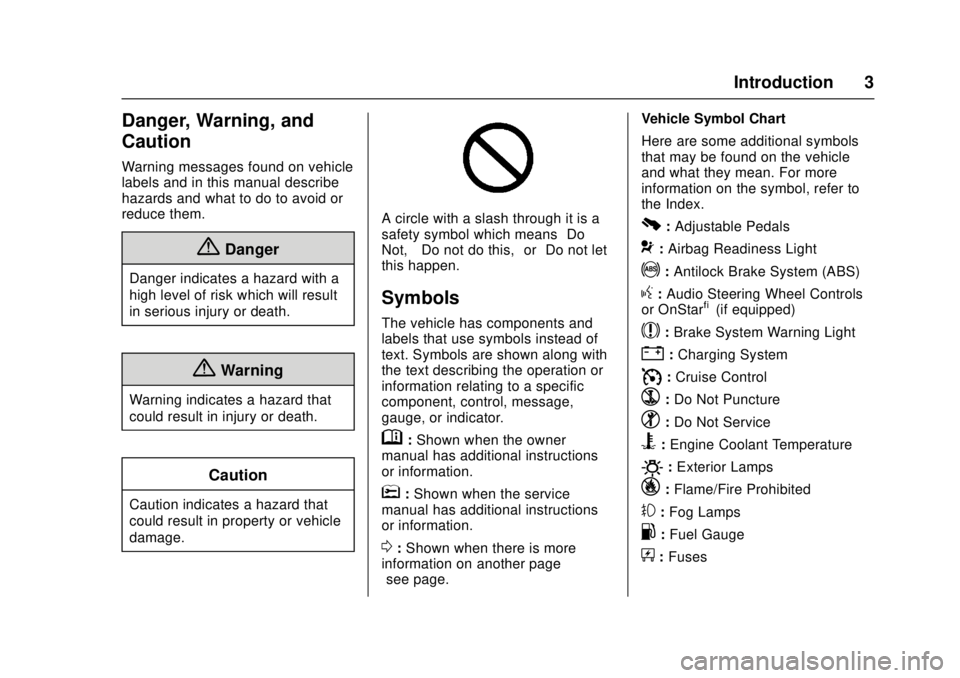
A circle with a slash through it is a
safety symbol which means“Do
Not,” “Do not do this,” or“Do not let
this happen.”
Symbols
The vehicle has components and
labels that use symbols instead of
text. Symbols are shown along with
the text describing the operation or
information relating to a specific
component, control, message,
gauge, or indicator.
M: Shown when the owner
manual has additional instructions
or information.
*: Shown when the service
manual has additional instructions
or information.
0: Shown when there is more
information on another page —
“see page.” Vehicle Symbol Chart
Here are some additional symbols
that may be found on the vehicle
and what they mean. For more
information on the symbol, refer to
the Index.
0:
Adjustable Pedals
9: Airbag Readiness Light
!:Antilock Brake System (ABS)
g: Audio Steering Wheel Controls
or OnStar®(if equipped)
$: Brake System Warning Light
":Charging System
I: Cruise Control
`:Do Not Puncture
^:Do Not Service
B:Engine Coolant Temperature
O:Exterior Lamps
_: Flame/Fire Prohibited
#:Fog Lamps
.:Fuel Gauge
+: Fuses
Page 6 of 511
GMC Sierra/Sierra Denali Owner Manual (GMNA-Localizing-U.S./Canada/
Mexico-9955992) - 2017 - crc - 4/18/17
In Brief 5
In Brief
Instrument Panel
Instrument Panel . . . . . . . . . . . . . . . . 6
Initial Drive Information
Initial Drive Information . . . . . . . . . . 8
Remote Keyless Entry (RKE)System . . . . . . . . . . . . . . . . . . . . . . . . 8
Remote Vehicle Start . . . . . . . . . . . 9
Door Locks . . . . . . . . . . . . . . . . . . . . . 9
Windows . . . . . . . . . . . . . . . . . . . . . . . 10
Seat Adjustment . . . . . . . . . . . . . . . 10
Memory Features . . . . . . . . . . . . . . 12
Heated and Ventilated Seats . . . 13
Head Restraint Adjustment . . . . 13
Safety Belts . . . . . . . . . . . . . . . . . . . . 13
Passenger Sensing System . . . 14
Mirror Adjustment . . . . . . . . . . . . . . 14
Steering Wheel Adjustment . . . . 16
Throttle and Brake Pedal Adjustment . . . . . . . . . . . . . . . . . . . 16
Interior Lighting . . . . . . . . . . . . . . . . 17
Exterior Lighting . . . . . . . . . . . . . . . 17
Windshield Wiper/Washer . . . . . . 18
Climate Controls . . . . . . . . . . . . . . . 18
Transmission . . . . . . . . . . . . . . . . . . 21
Four-Wheel Drive . . . . . . . . . . . . . . 22
Vehicle Features
Infotainment System . . . . . . . . . . . 23
Radio(s) . . . . . . . . . . . . . . . . . . . . . . . 23
Satellite Radio . . . . . . . . . . . . . . . . . 24
Portable Audio Devices . . . . . . . . 24
Bluetooth
®. . . . . . . . . . . . . . . . . . . . . 24
Steering Wheel Controls . . . . . . . 25
Cruise Control . . . . . . . . . . . . . . . . . 26
Driver Information Center (DIC) . . . . . . . . . . . . . . . . . 26
Forward Collision Alert (FCA) System . . . . . . . . . . . . . . . . . . . . . . . 26
Forward Automatic Braking (FAB) . . . . . . . . . . . . . . . . 27
Lane Departure Warning (LDW) . . . . . . . . . . . . . . . 27
Lane Keep Assist (LKA) . . . . . . . 27
Rear Vision Camera (RVC) . . . . 27
Parking Assist . . . . . . . . . . . . . . . . . 27
Power Outlets . . . . . . . . . . . . . . . . . 28
Universal Remote System . . . . . 28
Sunroof . . . . . . . . . . . . . . . . . . . . . . . . 28
eAssist Features
eAssist Overview . . . . . . . . . . . . . . 29
Performance and Maintenance
Traction Control/Electronic Stability Control . . . . . . . . . . . . . . 29
Tire Pressure Monitor . . . . . . . . . . 30 Fuel (Gasoline - Except
L86 6.2L Engine) . . . . . . . . . . . . . 30
Fuel (Gasoline - L86 6.2L Engine) . . . . . . . . . . . . . . . . . . . . . . . 30
Fuel (Diesel) . . . . . . . . . . . . . . . . . . . 31
E85 or FlexFuel . . . . . . . . . . . . . . . . 31
Engine Oil Life System . . . . . . . . 31
Driving for Better Fuel
Economy . . . . . . . . . . . . . . . . . . . . . 31
Roadside Assistance Program . . . . . . . . . . . . . . . . . . . . . . 32
Page 8 of 511

GMC Sierra/Sierra Denali Owner Manual (GMNA-Localizing-U.S./Canada/
Mexico-9955992) - 2017 - crc - 4/18/17
In Brief 7
1.Instrument Panel Illumination
Control 0184.
2. Integrated Trailer Brake Control (ITBC) System (If Equipped).
See Towing Equipment 0340.
3. Exterior Lamp Controls 0178.
Fog Lamps 0183 (If
Equipped).
4. Air Vents 0250.
5. Turn Signal Lever. See Turn
and Lane-Change Signals
0 182.
Windshield Wiper/Washer
0 126.
6. Favorite Switches (Out of View). See Steering Wheel
Controls 0125.
Volume Switches (Out of View).
See Steering Wheel Controls
0 125.
7. Instrument Cluster 0132.
8. Hazard Warning Flashers
0182.
9. Shift Lever. See Automatic
Transmission 0283. Tow/Haul Selector Button (If
Equipped). See
Tow/Haul
Mode 0288.
Range Selection Mode (If
Equipped). See Manual Mode
0 286.
10. Light Sensor. See Automatic
Headlamp System 0181.
11. Infotainment 0188.
12. Passenger Airbag On-Off Switch (If Equipped) (Out of
View). See Airbag On-Off
Switch 079.
13. Heated and Ventilated Front
Seats 062 (If Equipped).
14. Power Outlet 110/120V Alternating Current (If
Equipped). See Power Outlets
0 128.
15. Power Outlets 0128 (If
Equipped).
16. USB Port (Base Radio) 0206
or USB Port (Base Radio with
Touchscreen) 0208 (If
Equipped). 17.gTraction Control/Electronic
Stability Control 0299.
0Pedal Adjust Switch (If
Equipped). See Adjustable
Throttle and Brake Pedal
0 273.
{Cargo Lamp 0184.
XParking Assist Button (If
Equipped). See Assistance
Systems for Parking or Backing
0 306.
ALane Keep Assist (LKA)
(1500 Series) 0313 (If
Equipped).
5Hill Descent Control Switch
(If Equipped). See Hill Descent
Control (HDC) 0301.
qExhaust Brake Switch (If
Equipped). See “Exhaust
Brake” in the Duramax diesel
supplement.
gPower Take Off (PTO)
Switch (If Equipped). See the
Duramax diesel supplement.
Page 9 of 511
GMC Sierra/Sierra Denali Owner Manual (GMNA-Localizing-U.S./Canada/
Mexico-9955992) - 2017 - crc - 4/18/17
8 In Brief
Auxiliary Button (If Equipped).
SeeAdd-On Electrical
Equipment 0350.
18. Climate Control Systems (with
Heater Only) 0243 orClimate
Control Systems (with Air
Conditioning) 0245 (If
Equipped).
Dual Automatic Climate Control
System 0246 (If Equipped).
19. Steering Wheel Controls 0125
(If Equipped).
Driver Information Center (DIC)
Controls.
See Driver Information Center
(DIC) (Base Level Cluster)
0 152 orDriver Information
Center (DIC) (Uplevel and
Denali Cluster) 0154.
20. Hood Release. See Hood
0 358.
21. Horn 0125.
22. Steering Wheel Adjustment
0124 (Out of View).
23. Cruise Control 0302.
Heated Steering Wheel 0125. Forward Collision Alert (FCA)
System
0308 (If Equipped).
24. Data Link Connector (DLC) (Out of View). See Malfunction
Indicator Lamp (Check Engine
Light) 0144.
25. Parking Brake 0297.
26. Electronic Transfer Case Knob (If Equipped). See Four-Wheel
Drive 0289.
Card Holder (If Equipped). See
Instrument Panel Storage
0 119.Initial Drive
Information
This section provides a brief
overview about some of the
important features that may or may
not be on your specific vehicle.
For more detailed information, refer
to each of the features which can be
found later in this owner ’s manual.
Remote Keyless Entry
(RKE) System
The Remote Keyless Entry (RKE)
transmitter functions may work from
up to 60 m (197 ft) away from the
vehicle.
Page 17 of 511
GMC Sierra/Sierra Denali Owner Manual (GMNA-Localizing-U.S./Canada/
Mexico-9955992) - 2017 - crc - 4/18/17
16 In Brief
Steering Wheel
Adjustment
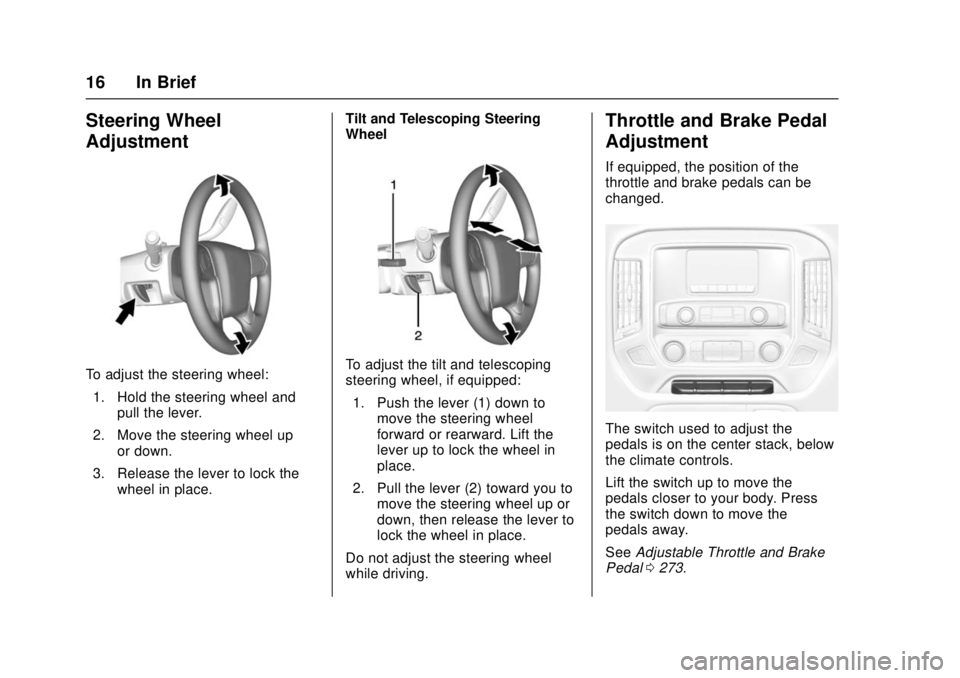
To adjust the steering wheel:1. Hold the steering wheel and pull the lever.
2. Move the steering wheel up or down.
3. Release the lever to lock the wheel in place. Tilt and Telescoping Steering
WheelTo adjust the tilt and telescoping
steering wheel, if equipped:
1. Push the lever (1) down to move the steering wheel
forward or rearward. Lift the
lever up to lock the wheel in
place.
2. Pull the lever (2) toward you to move the steering wheel up or
down, then release the lever to
lock the wheel in place.
Do not adjust the steering wheel
while driving.
Throttle and Brake Pedal
Adjustment
If equipped, the position of the
throttle and brake pedals can be
changed.
The switch used to adjust the
pedals is on the center stack, below
the climate controls.
Lift the switch up to move the
pedals closer to your body. Press
the switch down to move the
pedals away.
See Adjustable Throttle and Brake
Pedal 0273.
Page 28 of 511
GMC Sierra/Sierra Denali Owner Manual (GMNA-Localizing-U.S./Canada/
Mexico-9955992) - 2017 - crc - 4/18/17
In Brief 27
SeeForward Collision Alert (FCA)
System 0308.
Forward Automatic
Braking (FAB)
If the vehicle has Forward Collision
Alert (FCA), it also has FAB, which
includes Intelligent Brake
Assist (IBA). When the system
detects a vehicle ahead in your path
that is traveling in the same
direction that you may be about to
crash into, it can provide a boost to
braking or automatically brake the
vehicle. This can help avoid or
lessen the severity of crashes when
driving in a forward gear.
See Forward Automatic Braking
(FAB) 0310.
Lane Departure
Warning (LDW)
If equipped, LDW may help avoid
unintentional lane departures at
speeds of 56 km/h (35 mph) or
greater. LDW uses a camera sensor
to detect the lane markings. The
LDW light,
@, is green if a lane marking is detected. If the vehicle
departs the lane, the light will
change to amber and flash. In
addition, beeps will sound or the
driver seat will pulse.
See
Lane Departure Warning (LDW)
(2500/3500 Series) 0312.
Lane Keep Assist (LKA)
If equipped, LKA may help avoid
crashes due to unintentional lane
departures. It may assist by gently
turning the steering wheel if the
vehicle approaches a detected lane
marking without using a turn signal
in that direction. It may also provide
a Lane Departure Warning (LDW)
alert as the lane marking is crossed.
The system will not assist or alert if
it detects that you are actively
steering. Override LKA by turning
the steering wheel. LKA uses a
camera to detect lane markings
between 60 km/h (37 mph) and
180 km/h (112 mph).
See Lane Departure Warning (LDW)
(2500/3500 Series) 0312 andLane
Keep Assist (LKA) (1500 Series)
0 313.
Rear Vision
Camera (RVC)
If equipped, RVC shows a view of
the area behind the vehicle on the
infotainment display when the
vehicle is shifted into R (Reverse) to
aid with parking and low-speed
backing maneuvers.
See Assistance Systems for Parking
or Backing 0306.
Parking Assist
If equipped, Rear Parking
Assist (RPA) uses sensors on the
rear bumper to assist with parking
and avoiding objects while in
R (Reverse). It operates at speeds
less than 8 km/h (5 mph). RPA may
show a warning triangle on the
infotainment display and a graphic
on the instrument cluster to provide
the object distance. In addition,
multiple beeps or seat pulses may
occur if very close to an object.
The vehicle may also have the Front
Parking Assist system.
See Assistance Systems for Parking
or Backing 0306.
Page 32 of 511
GMC Sierra/Sierra Denali Owner Manual (GMNA-Localizing-U.S./Canada/
Mexico-9955992) - 2017 - crc - 4/18/17
In Brief 31
Fuel (Diesel)
For diesel vehicles, do not use
gasoline. See“Fuel for Diesel
Engines” in the Duramax diesel
supplement.
E85 or FlexFuel
FlexFuel Possible
Certain models are compatible with
E85 fuel. See E85 or FlexFuel
0 317.
Engine Oil Life System
The engine oil life system calculates
engine oil life based on vehicle use
and, on most vehicles, displays a
DIC message when it is necessary
to change the engine oil and filter.
The oil life system should be reset
to 100% only following an oil
change. Resetting the Oil Life System
To reset the engine oil life system:
1. Display OIL LIFE REMAINING on the DIC.
See Driver Information Center
(DIC) (Base Level Cluster)
0 152 orDriver Information
Center (DIC) (Uplevel and
Denali Cluster) 0154. If the
vehicle does not have DIC
buttons, the vehicle must be in
P (Park) to access this display.
2. Press and hold
Von the DIC,
or the trip odometer reset stem
if the vehicle does not have
DIC buttons, for several
seconds. The oil life will
change to 100%.
The oil life system can also be reset
as follows: 1. Display OIL LIFE REMAINING on the DIC.
See Driver Information Center
(DIC) (Base Level Cluster)
0 152 orDriver Information
Center (DIC) (Uplevel and
Denali Cluster) 0154. 2. Fully press the accelerator
pedal slowly three times within
five seconds.
3. If the display changes to 100%, the system is reset.
See Engine Oil Life System 0367.
Driving for Better Fuel
Economy
Driving habits can affect fuel
mileage. Here are some driving tips
to get the best fuel economy
possible.
.
Avoid fast starts and accelerate
smoothly.
. Brake gradually and avoid
abrupt stops.
. Avoid idling the engine for long
periods of time.
. When road and weather
conditions are appropriate, use
cruise control.
. Always follow posted speed
limits or drive more slowly when
conditions require.
Page 80 of 511
GMC Sierra/Sierra Denali Owner Manual (GMNA-Localizing-U.S./Canada/
Mexico-9955992) - 2017 - crc - 4/18/17
Seats and Restraints 79
{Warning
A crash severe enough to inflate
the airbags may have also
damaged important functions in
the vehicle, such as the fuel
system, brake and steering
systems, etc. Even if the vehicle
appears to be drivable after a
moderate crash, there may be
concealed damage that could
make it difficult to safely operate
the vehicle.
Use caution if you should attempt
to restart the engine after a crash
has occurred.
In many crashes severe enough to
inflate the airbag, windshields are
broken by vehicle deformation.
Additional windshield breakage may
also occur from the front outboard
passenger airbag.
. Airbags are designed to inflate
only once. After an airbag
inflates, you will need some new
parts for the airbag system.
If you do not get them, the airbag system will not be there
to help protect you in another
crash. A new system will include
airbag modules and possibly
other parts. The service manual
for the vehicle covers the need
to replace other parts.
. The vehicle has a crash sensing
and diagnostic module which
records information after a
crash.
See Vehicle Data Recording and
Privacy 0485 andEvent Data
Recorders 0486.
. Let only qualified technicians
work on the airbag systems.
Improper service can mean that
an airbag system will not work
properly. See your dealer for
service.
Airbag On-Off Switch
If the passenger side instrument
panel endcap has the switch
pictured in the following illustration,
the vehicle has an airbag on-off
switch that you can use to manually turn on or off the front outboard
passenger frontal airbag. See
Instrument Panel
06.
If the vehicle does not have an
airbag on-off switch, it may have a
passenger sensing system. See
Passenger Sensing System 081.
This switch should only be turned to
the off position if the person in the
front outboard passenger position is
a member of a passenger risk group
identified by the national
government as follows:
Infant. An infant (less than 1 year
old) must ride in the front seat
because:
. My vehicle has no rear seat;
Page 124 of 511
GMC Sierra/Sierra Denali Owner Manual (GMNA-Localizing-U.S./Canada/
Mexico-9955992) - 2017 - crc - 4/18/17
Instruments and Controls 123
Instruments and
Controls
Controls
Steering Wheel Adjustment . . . 124
Steering Wheel Controls . . . . . . 125
Heated Steering Wheel . . . . . . . 125
Horn . . . . . . . . . . . . . . . . . . . . . . . . . . 125
Windshield Wiper/Washer . . . . 126
Compass . . . . . . . . . . . . . . . . . . . . . 126
Clock . . . . . . . . . . . . . . . . . . . . . . . . . 127
Power Outlets . . . . . . . . . . . . . . . . 128
Wireless Charging . . . . . . . . . . . . 130
Warning Lights, Gauges, and
Indicators
Warning Lights, Gauges, andIndicators . . . . . . . . . . . . . . . . . . . 131
Instrument Cluster . . . . . . . . . . . . 132
Speedometer . . . . . . . . . . . . . . . . . 136
Odometer . . . . . . . . . . . . . . . . . . . . . 136
Trip Odometer . . . . . . . . . . . . . . . . 136
Tachometer . . . . . . . . . . . . . . . . . . . 136
Fuel Gauge . . . . . . . . . . . . . . . . . . . 136
Engine Oil Pressure Gauge . . . . . . . . . . . . . . . . . . . . . . 137
Engine Coolant Temperature Gauge . . . . . . . . . . . . . . . . . . . . . . 138 Transmission Temperature
Gauge . . . . . . . . . . . . . . . . . . . . . . 139
Voltmeter Gauge . . . . . . . . . . . . . 139
Safety Belt Reminders . . . . . . . . 140
Airbag Readiness Light . . . . . . . 141
Airbag On-Off Light . . . . . . . . . . . 141
Passenger Airbag Status Indicator . . . . . . . . . . . . . . . . . . . . 143
Charging System Light . . . . . . . 143
Malfunction Indicator Lamp (Check Engine Light) . . . . . . . . 144
Brake System Warning Light . . . . . . . . . . . . . . . . . . . . . . . . 145
Antilock Brake System (ABS) Warning Light . . . . . . . . . . . . . . . 146
Four-Wheel-Drive Light . . . . . . . 147
Tow/Haul Mode Light . . . . . . . . . 147
Hill Descent Control Light . . . . 147
Lane Departure Warning (LDW) Light (2500/3500) . . . . 147
Lane Keep Assist (LKA) Light (1500 Series) . . . . . . . . . . . . . . . 148
Vehicle Ahead Indicator . . . . . . 148
Traction Off Light . . . . . . . . . . . . . 148
StabiliTrak OFF Light . . . . . . . . . 148
Traction Control System (TCS)/ StabiliTrak Light . . . . . . . . . . . . . 149
Engine Coolant Temperature Warning Light . . . . . . . . . . . . . . . 149
Tire Pressure Light . . . . . . . . . . . 150
Engine Oil Pressure Light . . . . 150 Low Fuel Warning Light . . . . . . 150
Security Light . . . . . . . . . . . . . . . . . 151
High-Beam On Light . . . . . . . . . . 151
Front Fog Lamp Light . . . . . . . . . 151
Lamps On Reminder . . . . . . . . . 151
Cruise Control Light . . . . . . . . . . 152
Door Ajar Light . . . . . . . . . . . . . . . 152
Information Displays
Driver Information Center (DIC)
(Base Level Cluster) . . . . . . . . 152
Driver Information Center (DIC) (Uplevel and Denali
Cluster) . . . . . . . . . . . . . . . . . . . . . 154
Vehicle Messages
Vehicle Messages . . . . . . . . . . . . 157
Battery Voltage and ChargingMessages . . . . . . . . . . . . . . . . . . . 157
Brake System Messages . . . . . 158
Compass Messages . . . . . . . . . . 158
Door Ajar Messages . . . . . . . . . . 158
Engine Cooling System Messages . . . . . . . . . . . . . . . . . . . 159
Engine Oil Messages . . . . . . . . . 159
Engine Power Messages . . . . . 160
Fuel System Messages . . . . . . . 160
Key and Lock Messages . . . . . 160
Lamp Messages . . . . . . . . . . . . . . 160
Object Detection System Messages . . . . . . . . . . . . . . . . . . . 161
Page 146 of 511
GMC Sierra/Sierra Denali Owner Manual (GMNA-Localizing-U.S./Canada/
Mexico-9955992) - 2017 - crc - 4/18/17
Instruments and Controls 145
If towing a trailer, reduce the
amount of cargo being hauled as
soon as possible.
If the light continues to flash, find a
safe place to park. Turn the vehicle
off and wait at least 10 seconds
before restarting the engine. If the
light is still flashing, follow the
previous guidelines and see your
dealer for service as soon as
possible.
If the light is on steady :A
malfunction has been detected.
Diagnosis and service may be
required.
Check the following:
. A loose or missing fuel cap may
cause the light to come on. See
Filling the Tank 0317. A few
driving trips with the cap
properly installed may turn the
light off.
. Poor fuel quality can cause
inefficient engine operation and
poor driveability, which may go
away once the engine is warmed
up. If this occurs, change the
fuel brand. It may require at least one full tank of the proper
fuel to turn the light off. See
Fuel
0 315.
If the light remains on, see your
dealer.
Emissions Inspection and
Maintenance Programs
If the vehicle requires an Emissions
Inspection/Maintenance test, the
test equipment will likely connect to
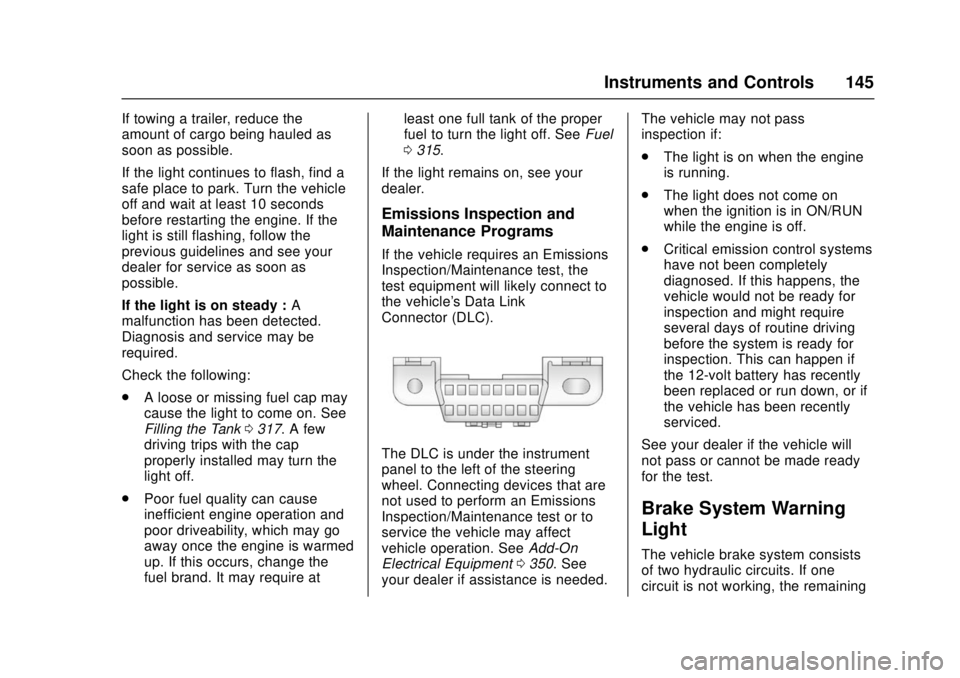
the vehicle's Data Link
Connector (DLC).
The DLC is under the instrument
panel to the left of the steering
wheel. Connecting devices that are
not used to perform an Emissions
Inspection/Maintenance test or to
service the vehicle may affect
vehicle operation. See Add-On
Electrical Equipment 0350. See
your dealer if assistance is needed. The vehicle may not pass
inspection if:
.
The light is on when the engine
is running.
. The light does not come on
when the ignition is in ON/RUN
while the engine is off.
. Critical emission control systems
have not been completely
diagnosed. If this happens, the
vehicle would not be ready for
inspection and might require
several days of routine driving
before the system is ready for
inspection. This can happen if
the 12-volt battery has recently
been replaced or run down, or if
the vehicle has been recently
serviced.
See your dealer if the vehicle will
not pass or cannot be made ready
for the test.
Brake System Warning
Light
The vehicle brake system consists
of two hydraulic circuits. If one
circuit is not working, the remaining