infotainment GMC SIERRA 2019 Owner's Guide
[x] Cancel search | Manufacturer: GMC, Model Year: 2019, Model line: SIERRA, Model: GMC SIERRA 2019Pages: 477, PDF Size: 8.7 MB
Page 263 of 477
GMC Sierra/Sierra Denali Owner Manual (GMNA-Localizing-U.S./Canada/
Mexico-1500-11698638) - 2019 - CRC - 5/14/19
262 Driving and Operating
Front/Rear Junction View :
Displays a front or rear cross traffic
view that shows objects directly to
the left and right of the front or back
of the vehicle. Touch Junction View
on the infotainment display when a
camera view is active. Touching the
button multiple times will toggle
between front and rear camera
views.
Front/Rear Overhead View :
Displays a front or rear overhead
view of the vehicle. Touching the
button will toggle between the two
views.
Front/Rear Bowl View :Displays a
view of the vehicle from either the
front or the back of the vehicle.
Touch Bowl View on the
infotainment display when a camera
view is active. Touching the button
multiple times will toggle between
forward and rearward views. Park
Assist and RCTA overlays are not
available when Bowl view is active.
Side Forward/Rearward View :
Displays a view that shows objects
next to the front or rear sides of the
vehicle. Touch Side Forward/ Rearward View on the infotainment
display when a camera view is
active. Touching the button multiple
times will toggle between forward
and rearward views. Park Assist
and RCTA overlays are not
available when Side Forward/
Rearward view is active.
Hitch View :
Assists while
connecting to a trailer. Displays a
zoomed-in view of the hitch to help
align the vehicle’s hitch ball with the
trailer coupler. Shifting into P (Park)
while in this view will automatically
engage the Electronic Parking
Brake (EPB).
Guidance Lines : Displays
available guidelines, including
standard and Hitch Guidance. When
enabled, the guidelines will display
when the vehicle is shifted into
R (Reverse).
Top Down View : Displays an
image of the area surrounding the
vehicle, along with the rear camera
view in the infotainment display. The
rear camera view will be replaced
by the front camera view after
shifting from R (Reverse) to a forward gear or when the vehicle is
moving forward slower than 12 km/h
(8 mph). This view can only be
enabled in Front/Rear Standard
View by touching the Top Down
View button when the CAMERA
view is active.
Hitch Guidance
This feature displays a single,
centered guideline on the camera
display to assist with aligning a
vehicle’s hitch ball with a trailer
coupler. Select the trailer guidance
line button, then align the trailer
guidance line over the trailer
coupler. Continuously steer the
vehicle to keep the guidance line
centered on the coupler when
backing. RVC Park Assist overlays
will not display when the trailer
guidance line is active. Hitch
Guidance is only available in
Standard View.
To check the trailer when in a
forward gear above 12 km/h
(8 mph), touch CAMERA on the
infotainment display to view the rear
Page 264 of 477
GMC Sierra/Sierra Denali Owner Manual (GMNA-Localizing-U.S./Canada/
Mexico-1500-11698638) - 2019 - CRC - 5/14/19
Driving and Operating 263
camera. Touch X to exit the view or
it will be removed automatically after
eight seconds.
{Warning
Use Hitch Guidance only to help
back the vehicle to a trailer hitch
or, when traveling above 12 km/h
(8 mph), to briefly check the
status of your trailer. Do not use
for any other purpose, such as
making lane change decisions.
Before making a lane change,
always check the mirrors and
glance over your shoulder.
Improper use could result in
serious injury to you or others.
Surround Vision (270 Degrees
with Trailer Camera Views)
If equipped, the Surround Vision
(270 Degrees) has additional
trailering views and no Front Vision
Camera. It can display various
views surrounding the vehicle in the
infotainment display using three
cameras mounted around the vehicle. The side cameras are on
the bottom of the outside mirrors
and the rear camera is in the
tailgate handle. A fourth camera can
be mounted to the rear of a trailer to
allow access to all possible camera
features. See your dealer for an
accessory fourth trailer camera.
The Surround Vision (270 Degrees)
can be accessed by selecting
CAMERA in the infotainment display
or when the vehicle is shifted into
R (Reverse). To return to the
previous screen sooner, press any
button on the infotainment system,
shift into P (Park), or, while in
D (Drive), reach a vehicle speed of
approximately 12 km/h (8 mph).
Touch the camera view buttons
along the bottom of the infotainment
display.
.
Rear Standard View
. Rear Junction View
. Rear Overhead View
. Hitch View
. Trailer Views: Mirror Trailer
View, Rear Trailer Camera View,
Rear Trailer Combo View.
Touching this button multiple
times will toggle between the
available views.
. Side Forward/Rearward View
. Guidance Lines: Touching this
button will toggle the guidelines
in select rear camera views
between Off, Standard Rear, and
Hitch Guidance.
. Top Down View
Page 265 of 477
GMC Sierra/Sierra Denali Owner Manual (GMNA-Localizing-U.S./Canada/
Mexico-1500-11698638) - 2019 - CRC - 5/14/19
264 Driving and Operating
Park Assist
With Front and Rear Park Assist, as
the vehicle moves at speeds of less
than 8 km/h (5 mph) the sensors on
the bumpers may detect objects up
to 1.2 m (4 ft) in front and 2.5 m (8 ft)
behind the vehicle within a zone
25 cm (10 in) high off the ground
and below bumper level. These
detection distances may be shorter
during warmer or humid weather.
Blocked sensors will not detect
objects and can also cause false
detections. Keep the sensors clean
of mud, dirt, snow, ice, and slush;
and clean sensors after a car wash
in freezing temperatures.
{Warning
The Park Assist system does not
detect children, pedestrians,
bicyclists, animals, or objects
located below the bumper or that
are too close or too far from the
vehicle. It is not available at
speeds greater than 8 km/h(Continued)
Warning (Continued)
(5 mph). To prevent injury, death,
or vehicle damage, even with
Park Assist, always check the
area around the vehicle and
check all mirrors before moving
forward or backing.
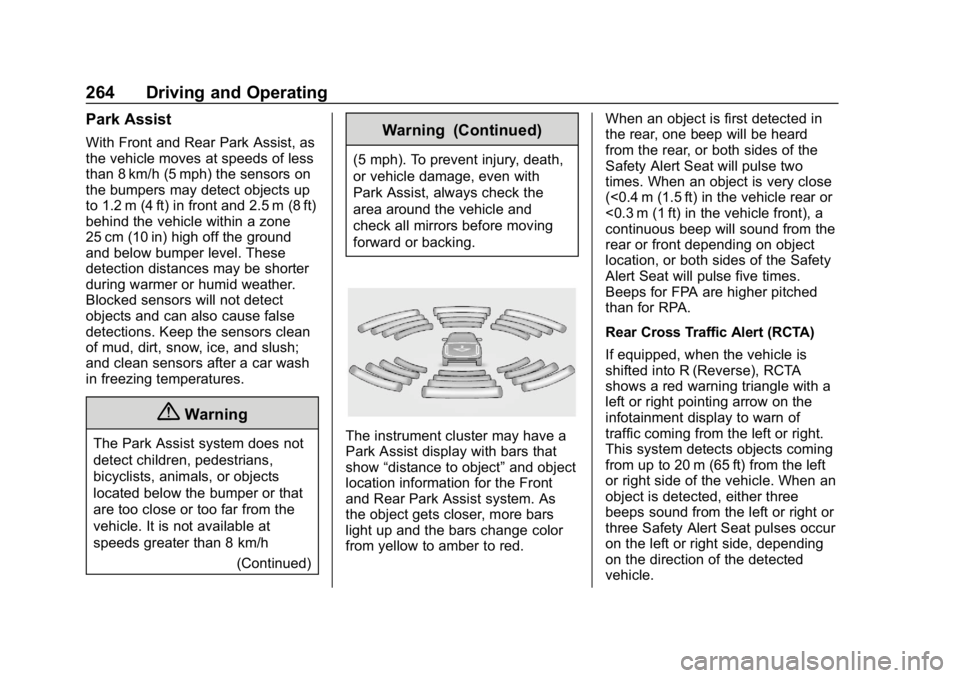
The instrument cluster may have a
Park Assist display with bars that
show“distance to object” and object
location information for the Front
and Rear Park Assist system. As
the object gets closer, more bars
light up and the bars change color
from yellow to amber to red. When an object is first detected in
the rear, one beep will be heard
from the rear, or both sides of the
Safety Alert Seat will pulse two
times. When an object is very close
(<0.4 m (1.5 ft) in the vehicle rear or
<0.3 m (1 ft) in the vehicle front), a
continuous beep will sound from the
rear or front depending on object
location, or both sides of the Safety
Alert Seat will pulse five times.
Beeps for FPA are higher pitched
than for RPA.
Rear Cross Traffic Alert (RCTA)
If equipped, when the vehicle is
shifted into R (Reverse), RCTA
shows a red warning triangle with a
left or right pointing arrow on the
infotainment display to warn of
traffic coming from the left or right.
This system detects objects coming
from up to 20 m (65 ft) from the left
or right side of the vehicle. When an
object is detected, either three
beeps sound from the left or right or
three Safety Alert Seat pulses occur
on the left or right side, depending
on the direction of the detected
vehicle.
Page 302 of 477
GMC Sierra/Sierra Denali Owner Manual (GMNA-Localizing-U.S./Canada/
Mexico-1500-11698638) - 2019 - CRC - 5/14/19
Driving and Operating 301
Trailer tires deteriorate over time.
The trailer tire sidewall will show the
week and year the tire was
manufactured. Many trailer tire
manufacturers recommend
replacing tires more than six
years old.
Overloading is another leading
cause of trailer tire blow-outs. Never
load your trailer with more weight
than the tires are designed to
support. The load rating is located
on the trailer tire sidewall.
Always know the maximum speed
rating for the trailer tires before
driving. This may be significantly
lower than the vehicle tire speed
rating. The speed rating may be on
the trailer tire sidewall. If the speed
rating is not shown, the default
trailer tire speed rating is 105 km/h
(65 mph).
Trailering App
Trailer Light App
If equipped, the Trailer Lights App is
on the Home Page of the
infotainment display.Touch Start to cycle the trailer lights
on and off to determine if they are
working. The test follows this
sequence:
1. The running lights turn on first and remain on throughout the
sequence.
2. The brake lights turn on for about two seconds.
3. The left turn signal light flashes three times.
4. The right turn signal light flashes three times.
5. The reverse lights turn on for about two seconds.
6. Steps 2–5 repeat for approximately one minute and
45 seconds, or until the test
deactivates.
Touch Stop to stop the test. The test
will automatically end after
one minute and 45 seconds.
The sequence also deactivates
when any of the following occur:
. The ignition is turned off. .
The transmission is shifted out
of P (Park).
. The brake pedal pressed.
. The turn signal is activated.
. The hazard warning lights
activated.
Trailering App
If equipped, the Trailering App is on
the Home Page of the infotainment
display.
This feature allows profiles for
connected trailers to be created to
view status, and to store and track
trailer usage information.
The Trailering App Preview will
appear when the Trailering App is
opened for the first time from the
Home Page. Touch GET STARTED
in the Trailering App to go into
the app.
When a trailer is electrically
connected, there will be an option to
create a profile, use a guest profile,
or cancel. After Cancel is selected a
third time, Don’t Remind Me will
display and touching that will turn off
Page 304 of 477
GMC Sierra/Sierra Denali Owner Manual (GMNA-Localizing-U.S./Canada/
Mexico-1500-11698638) - 2019 - CRC - 5/14/19
Driving and Operating 303
see a tire or trailer dealer for
service. The learning process must
be repeated when the trailer tires
are rotated or replaced. See“Editing
a Trailer Profile” later in this section
for tire pressure sensor relearn
information.
Tool Method: A TTPMS activation
tool can be purchased separately to
learn the sensor locations.
Manual Method: Without the tool,
the air pressure can be increased or
decreased in each tire for
10 seconds. Do not exceed the
maximum inflation pressure found
on the tire sidewalls. Make sure to
re-adjust tire pressure to the
recommended level when the
process is complete.
Sensor Learning Steps
To complete the sensor-to-vehicle
learn process:
1. Touch Start on the Learn Sensors screen. The horn
chirps twice and the Learning
Active screen appears on the
infotainment display. 2. Start with the driver side front
trailer tire.
3. Activate the tool near the valve stem or adjust the air pressure
of this tire until the horn chirps
and all working vehicle and
trailer lights flash.
The process stops without
saving the sensor locations if
this step takes more than
two minutes.
4. Move to the next tire and repeat Step 3 for each sensor.
The horn chirps twice when all
sensors are completed.
5. Return to the vehicle to complete the setup.
Maintenance Reminders
Select Yes to set up the
maintenance reminders for the
Trailer Profile. Follow the on-screen
prompts. The maximum number of
reminders is 10. Select No to skip
this step.
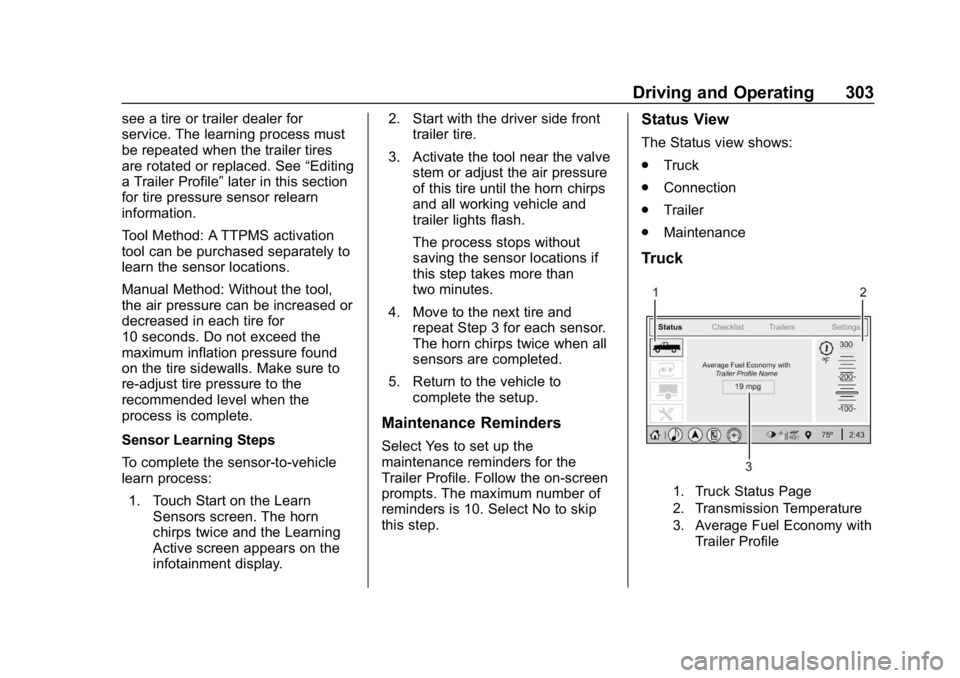
Status View
The Status view shows:
.Truck
. Connection
. Trailer
. Maintenance
Truck
1. Truck Status Page
2. Transmission Temperature
3. Average Fuel Economy with
Trailer Profile
Page 305 of 477
GMC Sierra/Sierra Denali Owner Manual (GMNA-Localizing-U.S./Canada/
Mexico-1500-11698638) - 2019 - CRC - 5/14/19
304 Driving and Operating
Average Fuel Economy
Touch to view the average fuel
economy of the vehicle while the
Trailer Profile is active.
Transmission Temperature
Touch to view the temperature of
the transmission fluid graphic. The
graphic will indicate a dangerous
level if the temperature is at
130 °C–150 °C (270 °F–300 °F).
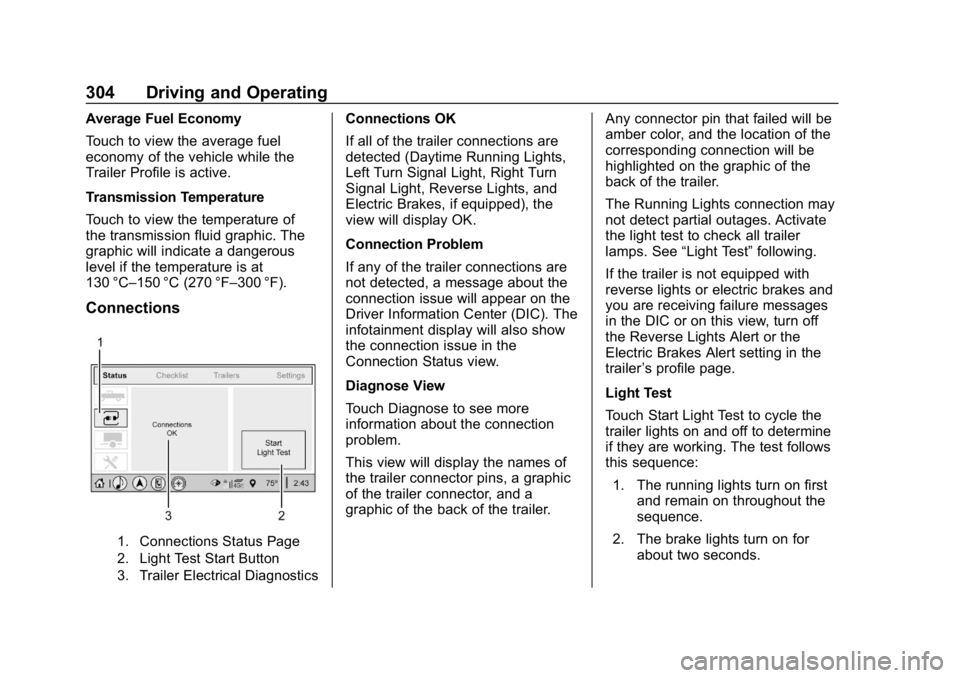
Connections
1. Connections Status Page
2. Light Test Start Button
3. Trailer Electrical Diagnostics
Connections OK
If all of the trailer connections are
detected (Daytime Running Lights,
Left Turn Signal Light, Right Turn
Signal Light, Reverse Lights, and
Electric Brakes, if equipped), the
view will display OK.
Connection Problem
If any of the trailer connections are
not detected, a message about the
connection issue will appear on the
Driver Information Center (DIC). The
infotainment display will also show
the connection issue in the
Connection Status view.
Diagnose View
Touch Diagnose to see more
information about the connection
problem.
This view will display the names of
the trailer connector pins, a graphic
of the trailer connector, and a
graphic of the back of the trailer.Any connector pin that failed will be
amber color, and the location of the
corresponding connection will be
highlighted on the graphic of the
back of the trailer.
The Running Lights connection may
not detect partial outages. Activate
the light test to check all trailer
lamps. See
“Light Test”following.
If the trailer is not equipped with
reverse lights or electric brakes and
you are receiving failure messages
in the DIC or on this view, turn off
the Reverse Lights Alert or the
Electric Brakes Alert setting in the
trailer ’s profile page.
Light Test
Touch Start Light Test to cycle the
trailer lights on and off to determine
if they are working. The test follows
this sequence: 1. The running lights turn on first and remain on throughout the
sequence.
2. The brake lights turn on for about two seconds.
Page 362 of 477
GMC Sierra/Sierra Denali Owner Manual (GMNA-Localizing-U.S./Canada/
Mexico-1500-11698638) - 2019 - CRC - 5/14/19
Vehicle Care 361
FusesUsage
F30 Sensing and diagnostic module/
Parking brake
F31 Body control module 4
F32 Special equipment option/Data link
connection
F33 Body control module 8
F34 Cargo lamp
F40 CGM
F41 Infotainment 1
F42 TCP
F43 –
F44 AVM
F45 Body control module 2
F46 Heating, ventilation, and air conditioning/
Battery 1
F47 Instrument panel cluster/Battery
F48 Transmission control module Fuses
Usage
F49 Body control module 1
F50 –
F51 Battery 1
F52 Battery 2
F53 –
F54 Sunroof
F55 Driver power seat
F56 DC DC TRANS 1
F57 DC DC TRANS 2
F58 Infotainment 2
Circuit
Breakers Usage
1 Accessory power outlet 2
2 Accessory power outlet 1/Cigarette
Lighter
3 Accessory power outlet 3
4 Accessory power outlet 4 Relays
Usage
K1 Run/Crank
K2 Retained accessory power/Accessory 1
K4 Retained accessory power/Accessory 2
K5 –
Instrument Panel Fuse
Block (Left)
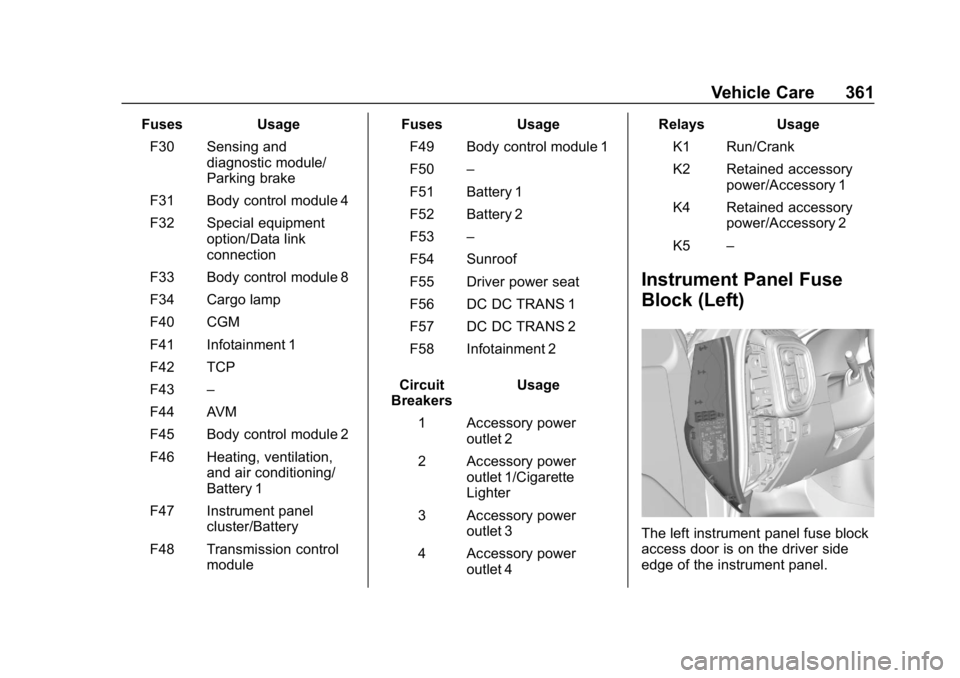
The left instrument panel fuse block
access door is on the driver side
edge of the instrument panel.
Page 439 of 477
GMC Sierra/Sierra Denali Owner Manual (GMNA-Localizing-U.S./Canada/
Mexico-1500-11698638) - 2019 - CRC - 5/13/19
438 Customer Information
Customer
Information
Customer Information
Customer SatisfactionProcedure . . . . . . . . . . . . . . . . . . . 438
Customer Assistance Offices . . . . . . . . . . . . . . . . . . . . . . 440
Customer Assistance for Text Telephone (TTY) Users . . . . . 441
Online Owner Center . . . . . . . . . 441
GM Mobility Reimbursement Program . . . . . . . . . . . . . . . . . . . . 442
Roadside Assistance Program . . . . . . . . . . . . . . . . . . . . 442
Scheduling Service Appointments . . . . . . . . . . . . . . . 444
Courtesy Transportation Program . . . . . . . . . . . . . . . . . . . . 444
Collision Damage Repair . . . . . 445
Publication Ordering Information . . . . . . . . . . . . . . . . . . 447
Radio Frequency Statement . . . . . . . . . . . . . . . . . . . 448
Reporting Safety Defects
Reporting Safety Defects tothe United States
Government . . . . . . . . . . . . . . . . . 448
Reporting Safety Defects to the Canadian
Government . . . . . . . . . . . . . . . . . 449
Reporting Safety Defects to General Motors . . . . . . . . . . . . . 449
Vehicle Data Recording and
Privacy
Vehicle Data Recording andPrivacy . . . . . . . . . . . . . . . . . . . . . . 450
Event Data Recorders . . . . . . . . 450
OnStar . . . . . . . . . . . . . . . . . . . . . . . 451
Infotainment System . . . . . . . . . . 451
Customer Information
Customer Satisfaction
Procedure
Your satisfaction and goodwill are
important to your dealer and to
GMC. Normally, any concerns with
the sales transaction or the
operation of the vehicle will be
resolved by your dealer's sales or
service departments. Sometimes,
however, despite the best intentions
of all concerned, misunderstandings
can occur. If your concern has not
been resolved to your satisfaction,
the following steps should be taken:
STEP ONE : Discuss your concern
with a member of dealership
management. Normally, concerns
can be quickly resolved at that level.
If the matter has already been
reviewed with the sales, service,
or parts manager, contact the owner
of your dealership or the general
manager.
STEP TWO : If after contacting a
member of dealership management,
it appears your concern cannot be
Page 448 of 477
GMC Sierra/Sierra Denali Owner Manual (GMNA-Localizing-U.S./Canada/
Mexico-1500-11698638) - 2019 - CRC - 5/13/19
Customer Information 447
.Vehicle make, model, and
model year
. Vehicle Identification
Number (VIN)
. Insurance company and policy
number
. General description of the
damage to the other vehicle
Choose a reputable repair facility
that uses quality replacement parts.
See “Collision Parts” earlier in this
section.
If the airbag has inflated, see What
Will You See after an Airbag
Inflates? 092.
Managing the Vehicle Damage
Repair Process
In the event that the vehicle requires
damage repairs, GM recommends
that you take an active role in its
repair. If you have a pre-determined
repair facility of choice, take the
vehicle there, or have it towed there.
Specify to the facility that any
required replacement collision parts
be original equipment parts, either
new Genuine GM parts or recycled original GM parts. Remember,
recycled parts will not be covered by
the GM vehicle warranty.
Insurance pays the bill for the repair,
but you must live with the repair.
Depending on your policy limits,
your insurance company may
initially value the repair using
aftermarket parts. Discuss this with
the repair professional, and insist on
Genuine GM parts. Remember,
if the vehicle is leased, you may be
obligated to have the vehicle
repaired with Genuine GM parts,
even if your insurance coverage
does not pay the full cost.
If another party's insurance
company is paying for the repairs,
you are not obligated to accept a
repair valuation based on that
insurance company's collision policy
repair limits, as you have no
contractual limits with that company.
In such cases, you can have control
of the repair and parts choices as
long as the cost stays within
reasonable limits.
Publication Ordering
Information
Service Manuals
Service manuals have the diagnosis
and repair information on the
engine, transmission, axle,
suspension, brakes, electrical
system, steering system, body, etc.
Customer Literature
Owner
’s manuals are written
specifically for owners and are
intended to provide basic
operational information about the
vehicle. The owner ’s manual
includes the Maintenance Schedule
for all models.
Customer literature publications
available for purchase include
owner ’s manuals, warranty
manuals, infotainment manuals, and
portfolios. Portfolios include an
owner ’s manual, warranty manual,
infotainment manual, if applicable,
and zip lock bag or pouch.
Page 452 of 477
GMC Sierra/Sierra Denali Owner Manual (GMNA-Localizing-U.S./Canada/
Mexico-1500-11698638) - 2019 - CRC - 5/13/19
Customer Information 451
GM will not access these data or
share it with others except: with the
consent of the vehicle owner or,
if the vehicle is leased, with the
consent of the lessee; in response
to an official request by police or
similar government office; as part of
GM's defense of litigation through
the discovery process; or, as
required by law. Data that GM
collects or receives may also be
used for GM research needs or may
be made available to others for
research purposes, where a need is
shown and the data is not tied to a
specific vehicle or vehicle owner.
OnStar
If the vehicle is equipped with
OnStar and has an active service
plan, additional data may be
collected through the OnStar
system. This includes information
about the vehicle’s operation;
collisions involving the vehicle; the
use of the vehicle and its features;
and, in certain situations, the
location and approximate GPS
speed of the vehicle. Refer to theOnStar Terms and Conditions and
Privacy Statement on the OnStar
website.
See
OnStar Additional Information
0 454.
Infotainment System
If the vehicle is equipped with a
navigation system as part of the
infotainment system, use of the
system may result in the storage of
destinations, addresses, telephone
numbers, and other trip information.
See the infotainment manual for
information on stored data and for
deletion instructions.