speed limit GMC SIERRA 2020 Owner's Manual
[x] Cancel search | Manufacturer: GMC, Model Year: 2020, Model line: SIERRA, Model: GMC SIERRA 2020Pages: 502, PDF Size: 8.04 MB
Page 132 of 502

GMC Sierra/Sierra Denali Owner Manual (GMNA-Localizing-U.S./Canada/
Mexico-13337776) - 2020 - CRC - 4/4/19
Instruments and Controls 131
Phone
In the Phone menu, if there is no
active phone call, view recent calls,
scroll through contacts, select from
the favorites, or change the phone
source. If there is an active call,
mute the phone or switch to handset
operation.
Options
Use the thumbwheel to scroll
through items in the Options menu.
Head-up Display (HUD) :
If equipped, this feature allows for
adjusting the angle of the HUD
image and changing or turning off
the Speed Limit Sign.
HUD Rotation: Press the
thumbwheel while Adjust Rotation is
highlighted to enter Adjust Mode.
Scroll to adjust the angle of the
HUD display. Press the thumbwheel
to confirm and save the setting. This
feature may only be available in
P (Park).
Speed Limit: Press the thumbwheel
while Speed Limit is highlighted to
turn it on or off.Speed Limit Style: Press the
thumbwheel while Speed Limit Style
is highlighted to change the speed
sign style.
Units :
Press the thumbwheel while
Units is displayed to enter the Units
menu. Choose US or metric units by
pressing the thumbwheel while the
desired item is highlighted.
A selected mark will be displayed
next to the selected item.
Info Page Options : Press the
thumbwheel while Info Page
Options is displayed to enter and
select the items to be displayed in
the Info app. A selected mark will be
displayed next to the selected item.
Home : Press the thumbwheel to
select the available elements to
display. Not all elements will be
available on all vehicles:
Speedometer, Speed Sign, Time,
and Fuel Range.
Display (Uplevel) : Press the
thumbwheel to enter the Display
menu. Select to turn on or off the
compass or speed sign. Speed Warning :
The Speed
Warning display allows the driver to
set a speed that they do not want to
exceed. To set the Speed Warning,
press the thumbwheel when Speed
Warning is displayed, or press the
thumbwheel on the main view to set
the speed value. Scroll to adjust the
value. Press the thumbwheel to set
the speed. Once the speed is set,
this feature can be turned off by
pressing the thumbwheel while
viewing this page. If the selected
speed limit is exceeded, a pop-up
warning is displayed with a chime.
Software Information : Press the
thumbwheel while Software
Information is highlighted to display
open source software information.
Speedometer
The speedometer shows the
vehicle's speed in either kilometers
per hour (km/h) or miles per
hour (mph).
Page 141 of 502
GMC Sierra/Sierra Denali Owner Manual (GMNA-Localizing-U.S./Canada/
Mexico-13337776) - 2020 - CRC - 4/4/19
140 Instruments and Controls
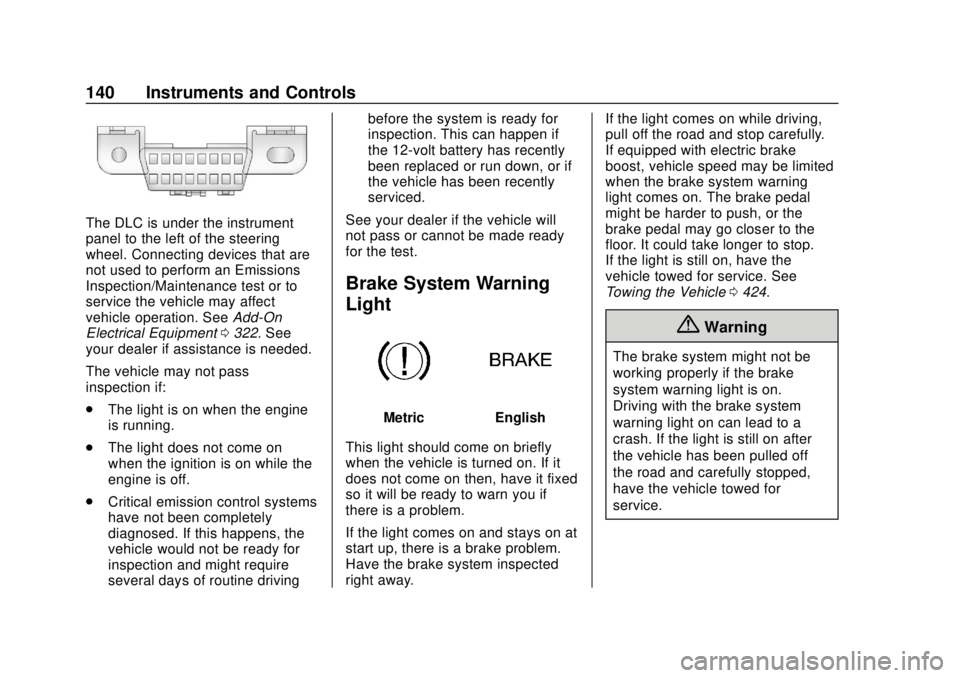
The DLC is under the instrument
panel to the left of the steering
wheel. Connecting devices that are
not used to perform an Emissions
Inspection/Maintenance test or to
service the vehicle may affect
vehicle operation. SeeAdd-On
Electrical Equipment 0322. See
your dealer if assistance is needed.
The vehicle may not pass
inspection if:
. The light is on when the engine
is running.
. The light does not come on
when the ignition is on while the
engine is off.
. Critical emission control systems
have not been completely
diagnosed. If this happens, the
vehicle would not be ready for
inspection and might require
several days of routine driving before the system is ready for
inspection. This can happen if
the 12-volt battery has recently
been replaced or run down, or if
the vehicle has been recently
serviced.
See your dealer if the vehicle will
not pass or cannot be made ready
for the test.
Brake System Warning
Light
MetricEnglish
This light should come on briefly
when the vehicle is turned on. If it
does not come on then, have it fixed
so it will be ready to warn you if
there is a problem.
If the light comes on and stays on at
start up, there is a brake problem.
Have the brake system inspected
right away. If the light comes on while driving,
pull off the road and stop carefully.
If equipped with electric brake
boost, vehicle speed may be limited
when the brake system warning
light comes on. The brake pedal
might be harder to push, or the
brake pedal may go closer to the
floor. It could take longer to stop.
If the light is still on, have the
vehicle towed for service. See
Towing the Vehicle
0424.
{Warning
The brake system might not be
working properly if the brake
system warning light is on.
Driving with the brake system
warning light on can lead to a
crash. If the light is still on after
the vehicle has been pulled off
the road and carefully stopped,
have the vehicle towed for
service.
Page 151 of 502

GMC Sierra/Sierra Denali Owner Manual (GMNA-Localizing-U.S./Canada/
Mexico-13337776) - 2020 - CRC - 4/4/19
150 Instruments and Controls
If the vehicle has a diesel engine,
see the Duramax diesel
supplement.
SorT:Press to move left or right
between the interactive display
zones in the cluster. Press the
thumbwheel to select.
yorz: Use the thumbwheel to
scroll up or down in a list. Press the
thumbwheel to select.
Info Page Options
The info pages on the DIC can be
turned on or off through the
Options menu. 1. Press
Tto scroll to the
Options application.
2. Scroll
yorzto choose Info
pages and press the
thumbwheel.
3. Scroll
yorzto move
through the list of possible
information displays.
4. Press the thumbwheel while an item is highlighted to select or
deselect that item.
The info pages can also be turned
on or off through the DIC page Info
Page Options.
Info Pages
The following is the list of all
possible DIC info page displays.
Some may not be available for your
particular vehicle. Some items may
not be turned on by default but can
be turned on through the Options
app. See “Info Page Options” earlier
in this section.
While in the Info Page Options
menu, the info pages can be
restored to the default factory settings by pressing and holding
K
on the left steering wheel controls
and the thumbwheel on the right
steering wheel controls at the
same time.
Speed :
Shows the vehicle speed in
either kilometers per hour (km/h) or
miles per hour (mph). The vehicle
odometer is also shown on this
page. If equipped, press the
thumbwheel to open the menu and
select to display speed limit signs.
Trip 1 or Trip 2, and Average Fuel
Economy : Shows the current
distance traveled, in either
kilometers (km) or miles (mi), since
the trip odometer was last reset.
The Average Fuel Economy display
shows the approximate average
liters per 100 kilometers (L/100 km)
or miles per gallon (mpg). This
number is calculated based on the
number of L/100 km (mpg) recorded
since the last time this menu item
was reset. This number reflects only
the approximate average fuel
Page 155 of 502

GMC Sierra/Sierra Denali Owner Manual (GMNA-Localizing-U.S./Canada/
Mexico-13337776) - 2020 - CRC - 4/4/19
154 Instruments and Controls
!:Press to select the display
view. Each press will change the
display view.
D: Pull and hold to brighten the
display. Press and hold to dim the
display. Continue to hold to turn the
display off.
The HUD image will automatically
dim and brighten to compensate for
outside lighting. Use
Dto adjust
as needed.
The HUD image can temporarily
light up depending on the angle and
position of sunlight on the HUD
display. This is normal.
Polarized sunglasses could make
the HUD image harder to see.
Head-Up Display (HUD) Rotation
Option
If equipped, this feature under the
Options menu of the instrument
cluster allows for adjusting the angle
of the HUD image and changing or
turning off the Speed Limit Sign. HUD Rotation: Press the
thumbwheel while Adjust Rotation is
highlighted to enter Adjust Mode.
Scroll to adjust the angle of the
HUD display. Press the thumbwheel
to confirm and save the setting. This
feature may only be available in
P (Park).
Speed Limit Style Adjustment
If equipped, the speed limit style
can be changed to a speed limit bar
or speed limit sign from the Options
menu in the instrument cluster.
Press the thumbwheel while Speed
Limit Style is highlighted to change
the speed sign style or to turn it off.
HUD Views
There are four views in the HUD.
Some vehicle information and
vehicle messages or alerts may be
displayed in any view.
English Shown, Metric Similar
Speed View : This displays the
speedometer reading in English or
metric units, and speed limit. Some
information only appears on
vehicles that have these features,
and when they are active.
English Shown, Metric Similar
Active Safety View : This displays
the speed view along with a driver
assistance graphic on the left.
Page 157 of 502
GMC Sierra/Sierra Denali Owner Manual (GMNA-Localizing-U.S./Canada/
Mexico-13337776) - 2020 - CRC - 4/4/19
156 Instruments and Controls
Vehicle Messages
Messages displayed on the Driver
Information Center (DIC) indicate
the status of the vehicle or some
action that may be needed to
correct a condition. Multiple
messages may appear one after
another.
The messages that do not require
immediate action can be
acknowledged and cleared by
pressing the thumbwheel. The
messages that require immediate
action cannot be cleared until that
action is performed.
All messages should be taken
seriously; clearing the message
does not correct the problem.
If a SERVICE message appears,
see your dealer.
Follow the instructions given in the
messages. The system displays
messages regarding the following
topics:
.Service Messages
. Fluid Levels .
Vehicle Security
. Brakes
. Steering
. Ride Control Systems
. Driver Assistance Systems
. Cruise Control
. Lighting and Bulb Replacement
. Wiper/Washer Systems
. Doors and Windows
. Seat Belts
. Airbag Systems
. Engine and Transmission
. Tire Pressure
. Battery
Engine Power Messages
ENGINE POWER IS REDUCED
This message displays when the
vehicle's propulsion power is
reduced. A reduction in propulsion
power can affect the vehicle's ability
to accelerate. If this message is on,
but there is no observed reduction in performance, proceed to your
destination. The performance may
be reduced the next time the vehicle
is driven. The vehicle may be driven
while this message is on, but
maximum acceleration and speed
may be reduced. Anytime this
message stays on, or displays
repeatedly, the vehicle should be
taken to your dealer for service as
soon as possible.
Under certain operating conditions,
propulsion will be disabled. Try
restarting after the vehicle has been
off for 30 seconds.
Vehicle Speed Messages
SPEED LIMITED TO XXX KM/
H (MPH)
This message shows that the
vehicle speed has been limited to
the speed displayed. The limited
speed is a protection for various
propulsion and vehicle systems,
such as lubrication, thermal, brakes,
suspension, Teen Driver if
equipped, or tires.
Page 187 of 502
GMC Sierra/Sierra Denali Owner Manual (GMNA-Localizing-U.S./Canada/
Mexico-13337776) - 2020 - CRC - 4/4/19
186 Driving and Operating
Lane Change Alert (LCA) . . . . . 274
Lane Departure Warning(LDW) (2500/3500
Series) . . . . . . . . . . . . . . . . . . . . . . 276
Lane Keep Assist (LKA) (1500
Series) . . . . . . . . . . . . . . . . . . . . . . 278
Fuel
Top Tier Fuel . . . . . . . . . . . . . . . . . 280
Recommended Fuel (Except6.2L V8 Engine) . . . . . . . . . . . . . 280
Recommended Fuel (6.2L V8 Engine) . . . . . . . . . . . . . . . . . . 281
Prohibited Fuels . . . . . . . . . . . . . . 281
Fuels in Foreign Countries . . . 281
Fuel Additives . . . . . . . . . . . . . . . . 282
E85 or FlexFuel . . . . . . . . . . . . . . 282
Filling the Tank (Pickup Model) . . . . . . . . . . . . . . . . . . . . . . 283
Filling the Tank (Chassis Cab Model) . . . . . . . . . . . . . . . . . . . . . . 285
Filling a Portable Fuel Container . . . . . . . . . . . . . . . . . . . 286
Trailer Towing
General TowingInformation . . . . . . . . . . . . . . . . . . 287
Driving Characteristics and Towing Tips . . . . . . . . . . . . . . . . . 287
Trailer Towing . . . . . . . . . . . . . . . . 292
Towing Equipment . . . . . . . . . . . . 296 Trailer Sway Control (TSC) . . . 308
Trailering App . . . . . . . . . . . . . . . . 310
Conversions and Add-Ons
Add-On Electrical
Equipment . . . . . . . . . . . . . . . . . . 322
Adding a Snow Plow or Similar Equipment . . . . . . . . . . . . . . . . . . 323
Pickup Conversion to Chassis Cab . . . . . . . . . . . . . . . . 326
Driving Information
Driving for Better Fuel
Economy
Driving habits can affect fuel
mileage. Here are some driving tips
to get the best fuel economy
possible:
. Set the climate controls to the
desired temperature after the
engine is started, or turn them
off when not required.
. Avoid fast starts and accelerate
smoothly.
. Brake gradually and avoid
abrupt stops.
. Avoid idling the engine for long
periods of time.
. When road and weather
conditions are appropriate, use
cruise control.
. Always follow posted speed
limits or drive more slowly when
conditions require.
. Keep vehicle tires properly
inflated.
Page 195 of 502

GMC Sierra/Sierra Denali Owner Manual (GMNA-Localizing-U.S./Canada/
Mexico-13337776) - 2020 - CRC - 4/4/19
194 Driving and Operating
Warning (Continued)
descending a hill and use a low
gear to keep vehicle speed under
control.
If a brake fade condition is detected,
a DIC warning message is
displayed. Adjust brake pedal use
and shift to a lower transmission
gear to reduce braking.
If the brakes continue to fade to a
severe condition, additional DIC
messages are displayed. The brake
system warning light will illuminate,
and the vehicle speed may be
limited. See Brake System Warning
Light 0140.
If the vehicle stalls on a hill:
1. Apply the brakes to stop the vehicle, and then apply the
parking brake. 2. Shift into P (Park) and then
restart the engine.
.If driving uphill when the
vehicle stalls, shift to
R (Reverse), release the
parking brake, and back
straight down.
. Never try to turn the vehicle
around. If the hill is steep
enough to stall the vehicle,
it is steep enough to cause
it to roll over.
. If you cannot make it up the
hill, back straight down
the hill.
. Never back down a hill in
N (Neutral) using only the
brake. The vehicle can roll
backward quickly and you
could lose control.
. If driving downhill when the
vehicle stalls, shift to a
lower gear, release the
parking brake, and drive
straight down the hill. 3. If the vehicle cannot be
restarted after stalling, set the
parking brake, shift into
P (Park), and turn the
vehicle off.
3.1. Leave the vehicle and
seek help.
3.2. Stay clear of the path the vehicle would take if it
rolled downhill.
. Avoid turns that take the vehicle
across the incline of the hill.
A hill that can be driven straight
up or down might be too steep to
drive across. Driving across an
incline puts more weight on the
downhill wheels, which could
cause a downhill slide or a
rollover.
. Surface conditions can be a
problem. Loose gravel, muddy
spots, or even wet grass can
cause the tires to slip sideways,
downhill. If the vehicle slips
sideways, it can hit something
that will trip it —a rock, a rut,
etc. —and roll over.
Page 224 of 502
GMC Sierra/Sierra Denali Owner Manual (GMNA-Localizing-U.S./Canada/
Mexico-13337776) - 2020 - CRC - 4/4/19
Driving and Operating 223
D :This position is for normal
driving. It provides the best fuel
economy. If more power is needed
for passing, press the accelerator
pedal down.
. When going less than about 55
km/h (35 mph), push the
accelerator pedal about
halfway down.
. When going about 55 km/h (35
mph) or more, push the
accelerator all the way down.
By doing this, the vehicle shifts
down to the next gear and has
more power.
Use D (Drive) and Tow/Haul Mode
when towing a trailer, carrying a
heavy load, driving on steep hills,
or driving off-road. Shift the
transmission to a lower gear if the
transmission shifts too often.
Downshifting the transmission in
slippery road conditions could result
in skidding. See “Skidding”under
Loss of Control 0190. The vehicle has a shift stabilization
feature that adjusts the transmission
shifting to the current driving
conditions in order to reduce rapid
upshifts and downshifts. This shift
stabilization feature is designed to
determine, before making an
upshift, if the engine is able to
maintain vehicle speed by analyzing
things such as vehicle speed,
throttle position, and vehicle load.
If the shift stabilization feature
determines that a current vehicle
speed cannot be maintained, the
transmission does not upshift and
instead holds the current gear.
In some cases, this could appear to
be a delayed shift, however the
transmission is operating normally.
If the engine or transmission detects
an impending hot fluid condition, the
transmission may upshift to limit
temperatures. Downshifts may also
be prevented. Normal operation
may continue unless the display
indicates there is a hot condition
and engine should be idled. The transmission uses adaptive
shift controls. The adaptive shift
control process continually
compares key shift parameters to
pre-programmed ideal shifts stored
in the transmission’s computer. The
transmission constantly makes
adjustments to improve vehicle
performance according to how the
vehicle is being used, such as with
a heavy load or when the
temperature changes. During this
adaptive shift control process,
shifting might feel different as the
transmission determines the best
settings.
When temperatures are very cold,
the transmission's gear shifting
could be delayed providing more
stable shifts until the engine warms
up. Shifts could be more noticeable
with a cold transmission. This
difference in shifting is normal.
If equipped with the 2.7L L4 engine,
engine speeds may be increased
while driving at highway speeds
while the engine is still warming up.
Page 227 of 502
GMC Sierra/Sierra Denali Owner Manual (GMNA-Localizing-U.S./Canada/
Mexico-13337776) - 2020 - CRC - 4/4/19
226 Driving and Operating
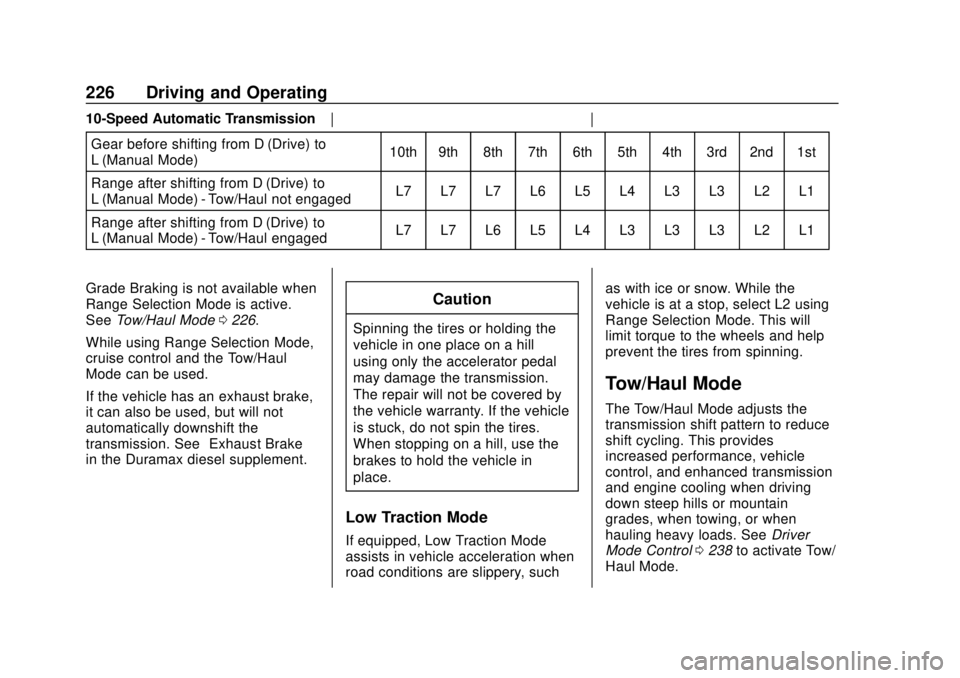
10-Speed Automatic TransmissionGear before shifting from D (Drive) to
L (Manual Mode) 10th 9th 8th 7th 6th 5th 4th 3rd 2nd 1st
Range after shifting from D (Drive) to
L (Manual Mode) - Tow/Haul not engaged L7 L7 L7 L6 L5 L4 L3 L3 L2 L1
Range after shifting from D (Drive) to
L (Manual Mode) - Tow/Haul engaged L7 L7 L6 L5 L4 L3 L3 L3 L2 L1
Grade Braking is not available when
Range Selection Mode is active.
See Tow/Haul Mode 0226.
While using Range Selection Mode,
cruise control and the Tow/Haul
Mode can be used.
If the vehicle has an exhaust brake,
it can also be used, but will not
automatically downshift the
transmission. See “Exhaust Brake”
in the Duramax diesel supplement.
Caution
Spinning the tires or holding the
vehicle in one place on a hill
using only the accelerator pedal
may damage the transmission.
The repair will not be covered by
the vehicle warranty. If the vehicle
is stuck, do not spin the tires.
When stopping on a hill, use the
brakes to hold the vehicle in
place.
Low Traction Mode
If equipped, Low Traction Mode
assists in vehicle acceleration when
road conditions are slippery, such as with ice or snow. While the
vehicle is at a stop, select L2 using
Range Selection Mode. This will
limit torque to the wheels and help
prevent the tires from spinning.
Tow/Haul Mode
The Tow/Haul Mode adjusts the
transmission shift pattern to reduce
shift cycling. This provides
increased performance, vehicle
control, and enhanced transmission
and engine cooling when driving
down steep hills or mountain
grades, when towing, or when
hauling heavy loads. See
Driver
Mode Control 0238 to activate Tow/
Haul Mode.
Page 238 of 502

GMC Sierra/Sierra Denali Owner Manual (GMNA-Localizing-U.S./Canada/
Mexico-13337776) - 2020 - CRC - 4/4/19
Driving and Operating 237
The button for TCS and StabiliTrak/
ESC is on the center stack.
Caution
Do not repeatedly brake or
accelerate heavily when TCS is
off. The vehicle driveline could be
damaged.
To turn off only TCS, press and
release
g. The traction off lighti
displays in the instrument cluster.
The appropriate message will
display in the DIC. To turn TCS on
again, press and release
g. The
traction off light
idisplayed in the
instrument cluster will turn off.
If TCS is limiting wheel spin when
g
is pressed, the system will not turn
off until the wheels stop spinning.
To turn off both TCS and StabiliTrak/
ESC, press and hold
guntil the
traction off light
iand the
StabiliTrak/ESC OFF light
gcome
on and stay on in the instrument cluster, then release. The
appropriate message will display in
the DIC.
To turn TCS and StabiliTrak/ESC on
again, press and release
g. The
traction off light
iand the
StabiliTrak/ESC OFF light
gin the
instrument cluster turn off.
StabiliTrak/ESC will automatically
turn on if the vehicle exceeds
56 km/h (35 mph). Traction control
will remain off.
The vehicle has a Trailer Sway
Control (TSC) feature and a Hill
Start Assist (HSA) feature. See
Trailer Sway Control (TSC) 0308 or
Hill Start Assist (HSA) 0235.
Adding accessories can affect the
vehicle performance. See
Accessories and Modifications
0 329.
Hill Descent
Control (HDC)
If equipped, Hill Descent Control
(HDC) sets and maintains vehicle
speed while driving down steep
grades in a forward or reverse gear.
The HDC switch is on the center
stack, below the climate controls.
Press
5to enable or disable HDC.
Vehicle speed must be below
50 km/h (31 mph).
When enabled, the HDC light
displays on the instrument cluster.
A blinking HDC light indicates the
system is actively applying the
brakes to maintain vehicle speed.
HDC can maintain vehicle speeds
between 1 and 22 km/h (1 and
14 mph) on grades greater than or
equal to 10%.