seats GMC SIERRA 2022 Owners Manual
[x] Cancel search | Manufacturer: GMC, Model Year: 2022, Model line: SIERRA, Model: GMC SIERRA 2022Pages: 474, PDF Size: 15.09 MB
Page 2 of 474

GMC Sierra/Sierra Denali 1500 Owner Manual (GMNA-Localizing-U.S./
Canada/Mexico-15883563) - 2022 - CRC - 11/19/21
Contents
Introduction . . . . . . . . . . . . . . . . . . . . . . . . . . . . . . 1
Keys, Doors, and Windows . . . . . . . . . . . . . . 13
Seats and Restraints . . . . . . . . . . . . . . . . . . . . 44
Storage . . . . . . . . . . . . . . . . . . . . . . . . . . . . . . . . . 96
Instruments and Controls . . . . . . . . . . . . . . 100
Lighting . . . . . . . . . . . . . . . . . . . . . . . . . . . . . . . . 145
Infotainment System . . . . . . . . . . . . . . . . . . . 155
Climate Controls . . . . . . . . . . . . . . . . . . . . . . . 196
Driving and Operating . . . . . . . . . . . . . . . . . 204
Vehicle Care . . . . . . . . . . . . . . . . . . . . . . . . . . . . 341
Service and Maintenance . . . . . . . . . . . . . . . 424
Technical Data . . . . . . . . . . . . . . . . . . . . . . . . . 438
Customer Information . . . . . . . . . . . . . . . . . . 442
Reporting Safety Defects . . . . . . . . . . . . . . . 450
OnStar . . . . . . . . . . . . . . . . . . . . . . . . . . . . . . . . . 453
Connected Services . . . . . . . . . . . . . . . . . . . . . 458
Index . . . . . . . . . . . . . . . . . . . . . . . . . . 461
Introduction
The names, logos, emblems, slogans, vehicle
model names, and vehicle body designs
appearing in this manual including, but not
limited to, GM, the GM logo, GMC, the GMC
Truck Emblem, SIERRA, and DENALI are
trademarks and/or service marks of General
Motors LLC, its subsidiaries, affiliates,
or licensors.
For vehicles first sold in Canada, substitute
the name“General Motors of Canada
Company” for GMC Division wherever it
appears in this manual.
This manual describes features that may or
may not be on the vehicle because of
optional equipment that was not purchased
on the vehicle, model variants, country
specifications, features/applications that may
not be available in your region, or changes subsequent to the printing of this owner’s
manual, including changes in standard or
optional content.
If the vehicle has the Duramax diesel
engine, see the Duramax diesel supplement
for additional and specific information on
this engine.
Refer to the purchase documentation
relating to your specific vehicle to confirm
the features.
Keep this manual in the vehicle for quick
reference.
Canadian Vehicle Owners
A French language manual can be obtained
from your dealer, at www.helminc.com,
or from:
Propriétaires Canadiens
On peut obtenir un exemplaire de ce guide
en français auprès du concessionnaire ou à
l'adresse suivante:
Litho in U.S.A.
Part No. 84719636 A First Printing©2021 General Motors LLC. All Rights Reserved.
Page 6 of 474
GMC Sierra/Sierra Denali 1500 Owner Manual (GMNA-Localizing-U.S./
Canada/Mexico-15883563) - 2022 - CRC - 11/19/21
Introduction 5
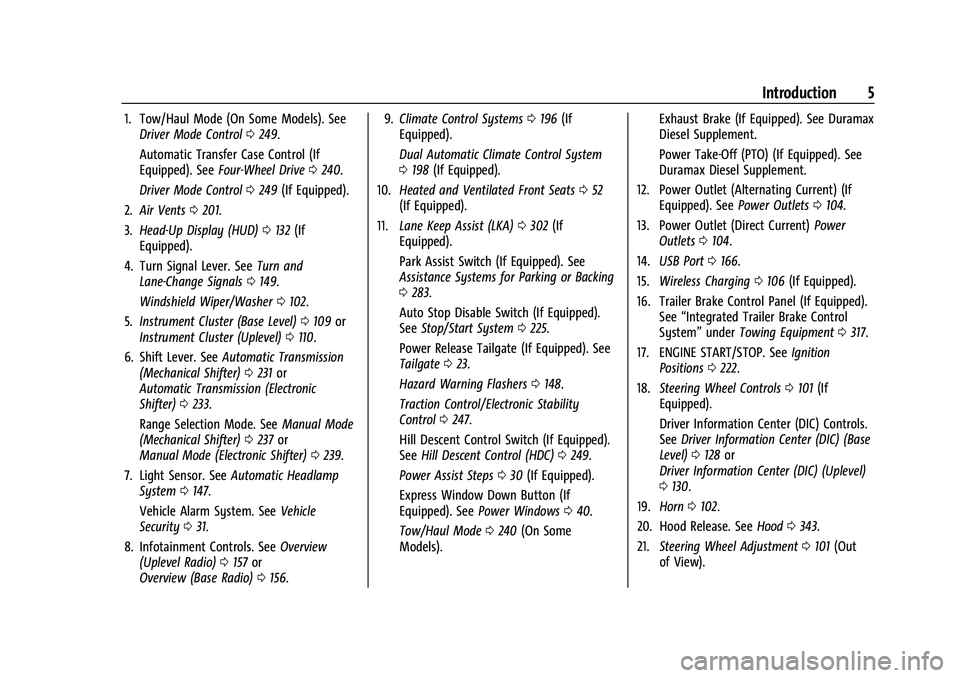
1. Tow/Haul Mode (On Some Models). SeeDriver Mode Control 0249.
Automatic Transfer Case Control (If
Equipped). See Four-Wheel Drive 0240.
Driver Mode Control 0249 (If Equipped).
2. Air Vents 0201.
3. Head-Up Display (HUD) 0132 (If
Equipped).
4. Turn Signal Lever. See Turn and
Lane-Change Signals 0149.
Windshield Wiper/Washer 0102.
5. Instrument Cluster (Base Level) 0109 or
Instrument Cluster (Uplevel) 0110.
6. Shift Lever. See Automatic Transmission
(Mechanical Shifter) 0231 or
Automatic Transmission (Electronic
Shifter) 0233.
Range Selection Mode. See Manual Mode
(Mechanical Shifter) 0237 or
Manual Mode (Electronic Shifter) 0239.
7. Light Sensor. See Automatic Headlamp
System 0147.
Vehicle Alarm System. See Vehicle
Security 031.
8. Infotainment Controls. See Overview
(Uplevel Radio) 0157 or
Overview (Base Radio) 0156. 9.
Climate Control Systems 0196 (If
Equipped).
Dual Automatic Climate Control System
0 198 (If Equipped).
10. Heated and Ventilated Front Seats 052
(If Equipped).
11. Lane Keep Assist (LKA) 0302 (If
Equipped).
Park Assist Switch (If Equipped). See
Assistance Systems for Parking or Backing
0 283.
Auto Stop Disable Switch (If Equipped).
See Stop/Start System 0225.
Power Release Tailgate (If Equipped). See
Tailgate 023.
Hazard Warning Flashers 0148.
Traction Control/Electronic Stability
Control 0247.
Hill Descent Control Switch (If Equipped).
See Hill Descent Control (HDC) 0249.
Power Assist Steps 030 (If Equipped).
Express Window Down Button (If
Equipped). See Power Windows 040.
Tow/Haul Mode 0240 (On Some
Models). Exhaust Brake (If Equipped). See Duramax
Diesel Supplement.
Power Take-Off (PTO) (If Equipped). See
Duramax Diesel Supplement.
12. Power Outlet (Alternating Current) (If Equipped). See Power Outlets0104.
13. Power Outlet (Direct Current) Power
Outlets 0104.
14. USB Port 0166.
15. Wireless Charging 0106 (If Equipped).
16. Trailer Brake Control Panel (If Equipped). See“Integrated Trailer Brake Control
System” underTowing Equipment 0317.
17. ENGINE START/STOP. See Ignition
Positions 0222.
18. Steering Wheel Controls 0101 (If
Equipped).
Driver Information Center (DIC) Controls.
See Driver Information Center (DIC) (Base
Level) 0128 or
Driver Information Center (DIC) (Uplevel)
0 130.
19. Horn 0102.
20. Hood Release. See Hood0343.
21. Steering Wheel Adjustment 0101 (Out
of View).
Page 9 of 474
GMC Sierra/Sierra Denali 1500 Owner Manual (GMNA-Localizing-U.S./
Canada/Mexico-15883563) - 2022 - CRC - 11/19/21
8 Introduction
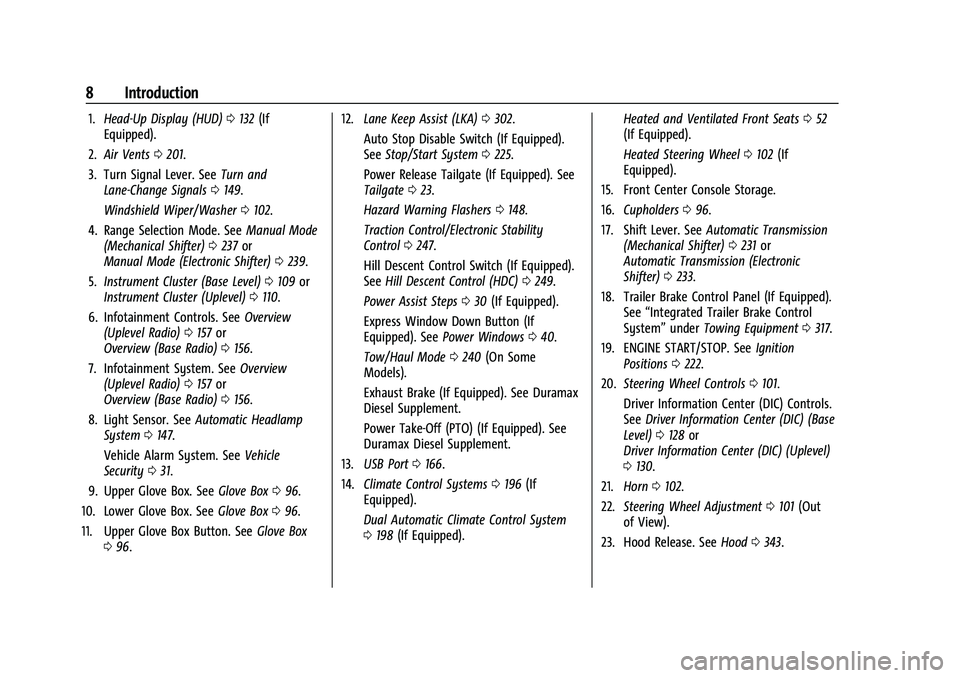
1.Head-Up Display (HUD) 0132 (If
Equipped).
2. Air Vents 0201.
3. Turn Signal Lever. See Turn and
Lane-Change Signals 0149.
Windshield Wiper/Washer 0102.
4. Range Selection Mode. See Manual Mode
(Mechanical Shifter) 0237 or
Manual Mode (Electronic Shifter) 0239.
5. Instrument Cluster (Base Level) 0109 or
Instrument Cluster (Uplevel) 0110.
6. Infotainment Controls. See Overview
(Uplevel Radio) 0157 or
Overview (Base Radio) 0156.
7. Infotainment System. See Overview
(Uplevel Radio) 0157 or
Overview (Base Radio) 0156.
8. Light Sensor. See Automatic Headlamp
System 0147.
Vehicle Alarm System. See Vehicle
Security 031.
9. Upper Glove Box. See Glove Box096.
10. Lower Glove Box. See Glove Box096.
11. Upper Glove Box Button. See Glove Box
0 96. 12.
Lane Keep Assist (LKA) 0302.
Auto Stop Disable Switch (If Equipped).
See Stop/Start System 0225.
Power Release Tailgate (If Equipped). See
Tailgate 023.
Hazard Warning Flashers 0148.
Traction Control/Electronic Stability
Control 0247.
Hill Descent Control Switch (If Equipped).
See Hill Descent Control (HDC) 0249.
Power Assist Steps 030 (If Equipped).
Express Window Down Button (If
Equipped). See Power Windows 040.
Tow/Haul Mode 0240 (On Some
Models).
Exhaust Brake (If Equipped). See Duramax
Diesel Supplement.
Power Take-Off (PTO) (If Equipped). See
Duramax Diesel Supplement.
13. USB Port 0166.
14. Climate Control Systems 0196 (If
Equipped).
Dual Automatic Climate Control System
0 198 (If Equipped). Heated and Ventilated Front Seats
052
(If Equipped).
Heated Steering Wheel 0102 (If
Equipped).
15. Front Center Console Storage.
16. Cupholders 096.
17. Shift Lever. See Automatic Transmission
(Mechanical Shifter) 0231 or
Automatic Transmission (Electronic
Shifter) 0233.
18. Trailer Brake Control Panel (If Equipped). See“Integrated Trailer Brake Control
System” underTowing Equipment 0317.
19. ENGINE START/STOP. See Ignition
Positions 0222.
20. Steering Wheel Controls 0101.
Driver Information Center (DIC) Controls.
See Driver Information Center (DIC) (Base
Level) 0128 or
Driver Information Center (DIC) (Uplevel)
0 130.
21. Horn 0102.
22. Steering Wheel Adjustment 0101 (Out
of View).
23. Hood Release. See Hood0343.
Page 12 of 474
GMC Sierra/Sierra Denali 1500 Owner Manual (GMNA-Localizing-U.S./
Canada/Mexico-15883563) - 2022 - CRC - 11/19/21
Introduction 11
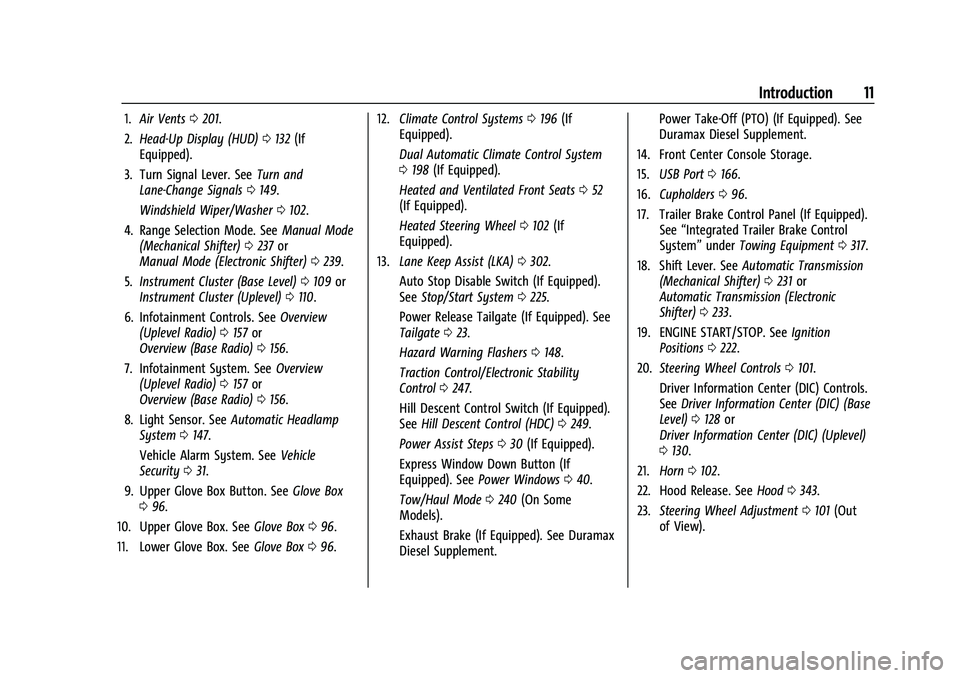
1.Air Vents 0201.
2. Head-Up Display (HUD) 0132 (If
Equipped).
3. Turn Signal Lever. See Turn and
Lane-Change Signals 0149.
Windshield Wiper/Washer 0102.
4. Range Selection Mode. See Manual Mode
(Mechanical Shifter) 0237 or
Manual Mode (Electronic Shifter) 0239.
5. Instrument Cluster (Base Level) 0109 or
Instrument Cluster (Uplevel) 0110.
6. Infotainment Controls. See Overview
(Uplevel Radio) 0157 or
Overview (Base Radio) 0156.
7. Infotainment System. See Overview
(Uplevel Radio) 0157 or
Overview (Base Radio) 0156.
8. Light Sensor. See Automatic Headlamp
System 0147.
Vehicle Alarm System. See Vehicle
Security 031.
9. Upper Glove Box Button. See Glove Box
0 96.
10. Upper Glove Box. See Glove Box096.
11. Lower Glove Box. See Glove Box096. 12.
Climate Control Systems 0196 (If
Equipped).
Dual Automatic Climate Control System
0 198 (If Equipped).
Heated and Ventilated Front Seats 052
(If Equipped).
Heated Steering Wheel 0102 (If
Equipped).
13. Lane Keep Assist (LKA) 0302.
Auto Stop Disable Switch (If Equipped).
See Stop/Start System 0225.
Power Release Tailgate (If Equipped). See
Tailgate 023.
Hazard Warning Flashers 0148.
Traction Control/Electronic Stability
Control 0247.
Hill Descent Control Switch (If Equipped).
See Hill Descent Control (HDC) 0249.
Power Assist Steps 030 (If Equipped).
Express Window Down Button (If
Equipped). See Power Windows 040.
Tow/Haul Mode 0240 (On Some
Models).
Exhaust Brake (If Equipped). See Duramax
Diesel Supplement. Power Take-Off (PTO) (If Equipped). See
Duramax Diesel Supplement.
14. Front Center Console Storage.
15. USB Port 0166.
16. Cupholders 096.
17. Trailer Brake Control Panel (If Equipped). See“Integrated Trailer Brake Control
System” underTowing Equipment 0317.
18. Shift Lever. See Automatic Transmission
(Mechanical Shifter) 0231 or
Automatic Transmission (Electronic
Shifter) 0233.
19. ENGINE START/STOP. See Ignition
Positions 0222.
20. Steering Wheel Controls 0101.
Driver Information Center (DIC) Controls.
See Driver Information Center (DIC) (Base
Level) 0128 or
Driver Information Center (DIC) (Uplevel)
0 130.
21. Horn 0102.
22. Hood Release. See Hood0343.
23. Steering Wheel Adjustment 0101 (Out
of View).
Page 15 of 474
GMC Sierra/Sierra Denali 1500 Owner Manual (GMNA-Localizing-U.S./
Canada/Mexico-15883563) - 2022 - CRC - 11/19/21
14 Keys, Doors, and Windows
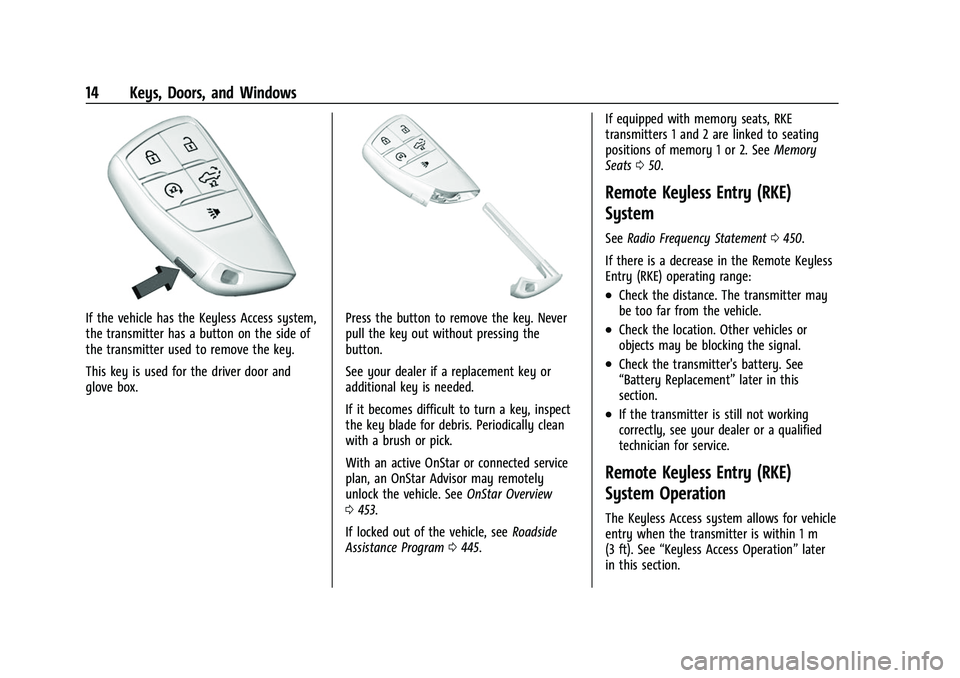
If the vehicle has the Keyless Access system,
the transmitter has a button on the side of
the transmitter used to remove the key.
This key is used for the driver door and
glove box.Press the button to remove the key. Never
pull the key out without pressing the
button.
See your dealer if a replacement key or
additional key is needed.
If it becomes difficult to turn a key, inspect
the key blade for debris. Periodically clean
with a brush or pick.
With an active OnStar or connected service
plan, an OnStar Advisor may remotely
unlock the vehicle. SeeOnStar Overview
0 453.
If locked out of the vehicle, see Roadside
Assistance Program 0445. If equipped with memory seats, RKE
transmitters 1 and 2 are linked to seating
positions of memory 1 or 2. See
Memory
Seats 050.
Remote Keyless Entry (RKE)
System
See Radio Frequency Statement 0450.
If there is a decrease in the Remote Keyless
Entry (RKE) operating range:
.Check the distance. The transmitter may
be too far from the vehicle.
.Check the location. Other vehicles or
objects may be blocking the signal.
.Check the transmitter's battery. See
“Battery Replacement” later in this
section.
.If the transmitter is still not working
correctly, see your dealer or a qualified
technician for service.
Remote Keyless Entry (RKE)
System Operation
The Keyless Access system allows for vehicle
entry when the transmitter is within 1 m
(3 ft). See “Keyless Access Operation” later
in this section.
Page 17 of 474

GMC Sierra/Sierra Denali 1500 Owner Manual (GMNA-Localizing-U.S./
Canada/Mexico-15883563) - 2022 - CRC - 11/19/21
16 Keys, Doors, and Windows
If equipped with remote mirror folding,
pressing and holding
Kfor one second will
unfold the mirrors, if enabled. See Vehicle
Personalization 0137.
Press and hold
Kuntil the windows fully
open, if remote window operation is
enabled. See Vehicle Personalization 0137.
x:Press twice quickly to release the
tailgate, if equipped.
7: Press and release to initiate vehicle
locator. The turn signal lamps flash and the
horn sounds three times.
Press and hold
7for more than
three seconds to activate the panic alarm.
The turn signal lamps flash and the horn
sounds repeatedly for 30 seconds. The alarm
turns off when the ignition is turned on or
7is pressed again. The ignition must be off
for the panic alarm to work.
Keyless Access Operation
The Keyless Access system allows for doors
and the tailgate to be accessed without
pressing the RKE transmitter button. The RKE
transmitter must be within 1 m (3 ft) of the tailgate or door being opened. If the vehicle
has this feature, there will be a button on
the outside door handles.
Keyless Access can be programmed to
unlock all doors on the first lock/unlock
press from the driver door. Keyless
Unlocking can also be turned off. See
Vehicle
Personalization 0137.
If equipped with memory seats, RKE
transmitters 1 and 2 are linked to seating
positions of memory 1 or 2. See Memory
Seats 050.
Keyless Unlocking/Locking from the
Driver Door
When the doors are locked and the RKE
transmitter is within 1 m (3 ft) of the door
handle, pressing the lock/unlock button on
the driver door handle will unlock the driver
door. If the lock/unlock button is pressed
again within five seconds, all passenger
doors and the tailgate will unlock.
Driver Side Shown, Passenger Side Similar
Pressing the lock/unlock button will cause
all doors to lock if any of the following
occur:
.It has been more than five seconds since
the first lock/unlock button press.
.Two lock/unlock button presses were
used to unlock all doors.
.Any vehicle door has been opened and all
doors are now closed.
Keyless Unlocking/Locking from the
Passenger Doors
When the doors are locked and the RKE
transmitter is within 1 m (3 ft) of the door
handle, pressing the lock/unlock button on a
passenger door handle will unlock all doors.
Page 19 of 474
GMC Sierra/Sierra Denali 1500 Owner Manual (GMNA-Localizing-U.S./
Canada/Mexico-15883563) - 2022 - CRC - 11/19/21
18 Keys, Doors, and Windows
Programming Transmitters to the Vehicle
Only RKE transmitters programmed to the
vehicle will work. If a transmitter is lost or
stolen, a replacement can be purchased and
programmed through your dealer. The
vehicle can be reprogrammed so that lost or
stolen transmitters no longer work. Each
vehicle can have up to eight transmitters
matched to it.
Starting the Vehicle with a Low
Transmitter Battery
If the transmitter battery is weak or if there
is interference with the signal, the DIC may
display NO REMOTE DETECTED or NO
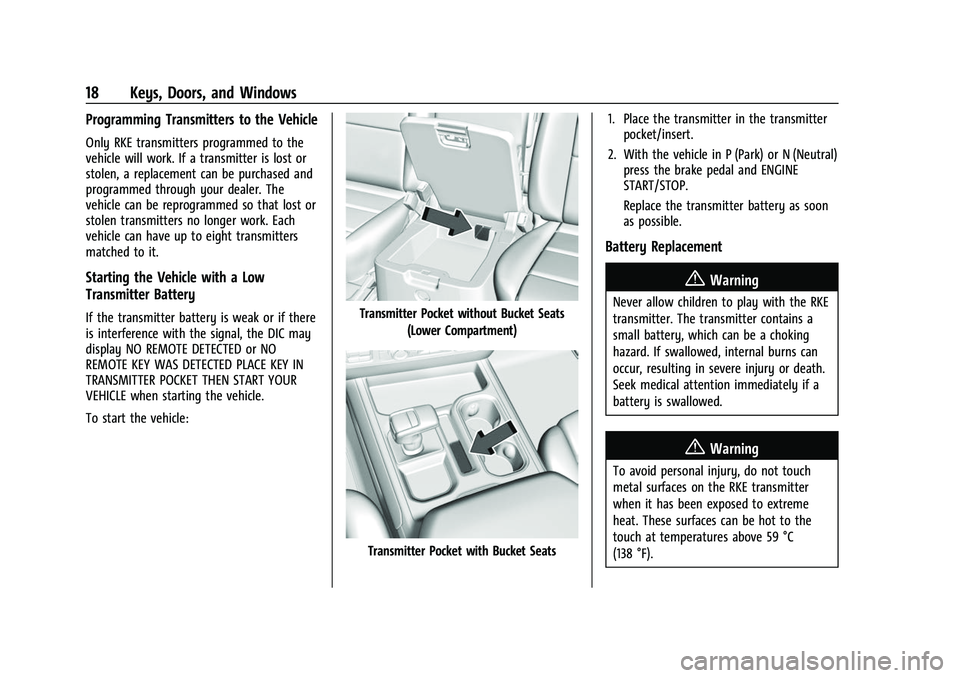
REMOTE KEY WAS DETECTED PLACE KEY IN
TRANSMITTER POCKET THEN START YOUR
VEHICLE when starting the vehicle.
To start the vehicle:Transmitter Pocket without Bucket Seats(Lower Compartment)
Transmitter Pocket with Bucket Seats 1. Place the transmitter in the transmitter
pocket/insert.
2. With the vehicle in P (Park) or N (Neutral) press the brake pedal and ENGINE
START/STOP.
Replace the transmitter battery as soon
as possible.
Battery Replacement
{Warning
Never allow children to play with the RKE
transmitter. The transmitter contains a
small battery, which can be a choking
hazard. If swallowed, internal burns can
occur, resulting in severe injury or death.
Seek medical attention immediately if a
battery is swallowed.
{Warning
To avoid personal injury, do not touch
metal surfaces on the RKE transmitter
when it has been exposed to extreme
heat. These surfaces can be hot to the
touch at temperatures above 59 °C
(138 °F).
Page 21 of 474
GMC Sierra/Sierra Denali 1500 Owner Manual (GMNA-Localizing-U.S./
Canada/Mexico-15883563) - 2022 - CRC - 11/19/21
20 Keys, Doors, and Windows
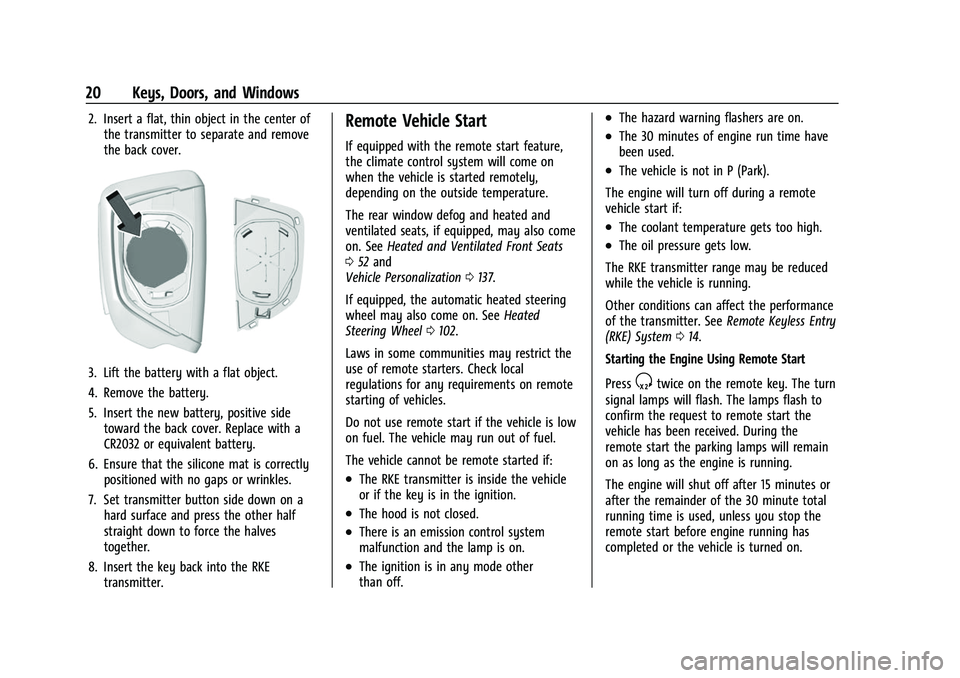
2. Insert a flat, thin object in the center ofthe transmitter to separate and remove
the back cover.
3. Lift the battery with a flat object.
4. Remove the battery.
5. Insert the new battery, positive sidetoward the back cover. Replace with a
CR2032 or equivalent battery.
6. Ensure that the silicone mat is correctly positioned with no gaps or wrinkles.
7. Set transmitter button side down on a hard surface and press the other half
straight down to force the halves
together.
8. Insert the key back into the RKE transmitter.
Remote Vehicle Start
If equipped with the remote start feature,
the climate control system will come on
when the vehicle is started remotely,
depending on the outside temperature.
The rear window defog and heated and
ventilated seats, if equipped, may also come
on. See Heated and Ventilated Front Seats
0 52 and
Vehicle Personalization 0137.
If equipped, the automatic heated steering
wheel may also come on. See Heated
Steering Wheel 0102.
Laws in some communities may restrict the
use of remote starters. Check local
regulations for any requirements on remote
starting of vehicles.
Do not use remote start if the vehicle is low
on fuel. The vehicle may run out of fuel.
The vehicle cannot be remote started if:
.The RKE transmitter is inside the vehicle
or if the key is in the ignition.
.The hood is not closed.
.There is an emission control system
malfunction and the lamp is on.
.The ignition is in any mode other
than off.
.The hazard warning flashers are on.
.The 30 minutes of engine run time have
been used.
.The vehicle is not in P (Park).
The engine will turn off during a remote
vehicle start if:
.The coolant temperature gets too high.
.The oil pressure gets low.
The RKE transmitter range may be reduced
while the vehicle is running.
Other conditions can affect the performance
of the transmitter. See Remote Keyless Entry
(RKE) System 014.
Starting the Engine Using Remote Start
Press
Stwice on the remote key. The turn
signal lamps will flash. The lamps flash to
confirm the request to remote start the
vehicle has been received. During the
remote start the parking lamps will remain
on as long as the engine is running.
The engine will shut off after 15 minutes or
after the remainder of the 30 minute total
running time is used, unless you stop the
remote start before engine running has
completed or the vehicle is turned on.
Page 36 of 474

GMC Sierra/Sierra Denali 1500 Owner Manual (GMNA-Localizing-U.S./
Canada/Mexico-15883563) - 2022 - CRC - 11/19/21
Keys, Doors, and Windows 35
Power Mirrors
To adjust each mirror:1. Press
jor|to select the driver or
passenger side mirror. The indicator light
will illuminate.
2. Press the arrows on the control pad to move the mirror in the desired direction.
3. Adjust each outside mirror so that a little of the vehicle and the area behind it can
be seen.
4. Press
jor|again to deselect the
mirror. Turn Signal Indicator
If equipped, the mirror has turn signal
indicator lights, which flash in the direction
of the turn or lane change.
Task Lighting
If equipped, task lighting projects light from
the outside mirrors to the sides of the
vehicle. See
Task Lighting 0150.
Puddle Lamps
If equipped, puddle lamps project light from
the bottom of the mirror to the area of
ground below the driver and passenger
doors. See Entry Lighting 0153 and
Exit Lighting 0153.
Memory Mirrors
The vehicle may have memory mirrors. See
Memory Seats 050.
Lane Change Alert (LCA)
The vehicle may have LCA. See Lane Change
Alert (LCA) 0299.
Folding Mirrors
Manual Folding Mirrors
If equipped, push the mirror toward the
vehicle to fold. Push the mirror outward to
return to its original position.
Manually fold the mirrors inward to prevent
damage when going through an automatic
car wash.
Power Folding Mirrors
If equipped, pressgto power fold the
mirrors. Press again to unfold.
Page 38 of 474
GMC Sierra/Sierra Denali 1500 Owner Manual (GMNA-Localizing-U.S./
Canada/Mexico-15883563) - 2022 - CRC - 11/19/21
Keys, Doors, and Windows 37
1. When the approaching vehicle is a longdistance away, the image in the main
mirror is small and near the inboard
edge of the mirror.
2. As the vehicle gets closer, the image in the main mirror gets larger and moves
outboard.
3. As the vehicle enters the blind zone, the image transitions from the main mirror
to the blind spot mirror.
4. When the vehicle is in the blind zone, the image only appears in the blind spot
mirror.
Using the Outside Mirror with the Blind
Spot Mirror
1. Set the main mirror so that the side ofthe vehicle can just be seen and the
blind spot mirror has an
unobstructed view.
2. When checking for traffic or before changing a lane, look at the main driver/
passenger side mirror to observe traffic
in the adjacent lane, behind your vehicle.
Check the blind spot mirror for a vehicle
in the blind zone. Then, glance over your
shoulder to double check before moving
slowly into the adjacent lane.
Reverse Tilt Mirrors
If equipped with reverse tilt mirrors and
memory seats, the passenger and/or driver
mirror tilts to a preselected position when
the vehicle is in R (Reverse). This allows the
curb to be seen when parallel parking.
The mirror(s) may move from their tilted
position when:
.The vehicle is shifted out of R (Reverse),
or remains in R (Reverse) for about
30 seconds.
.The vehicle is turned off.
.The vehicle is driven in R (Reverse) above
a set speed.
To turn this feature on or off, see Vehicle
Personalization 0137.
Interior Mirrors
Interior Rearview Mirrors
Adjust the rearview mirror for a clear view
of the area behind your vehicle.
Do not spray glass cleaner directly on the
mirror. Use a soft towel dampened with
water.
Manual Rearview Mirror
If equipped, push the tab forward for
daytime use and pull it rearward for
nighttime use to avoid glare from the
headlamps from behind.
Automatic Dimming Rearview
Mirror
If equipped, the mirror will automatically
reduce the glare of the headlamps from
behind. The dimming feature comes on each
time the vehicle is started.
Rear Camera Mirror
If equipped, this automatic dimming mirror
provides a wide angle camera view of the
area behind the vehicle.