alarm GMC SIERRA 2023 Owners Manual
[x] Cancel search | Manufacturer: GMC, Model Year: 2023, Model line: SIERRA, Model: GMC SIERRA 2023Pages: 430, PDF Size: 18.76 MB
Page 9 of 430
GMC Sierra/Sierra Denali 2500 HD/3500 HD Owner Manual (GMNA-
Localizing-U.S./Canada-16504257) - 2023 - CRC - 5/9/22
8 Keys, Doors, and Windows
Keys, Doors, and
Windows
Keys and Locks
Keys (Key Access) . . . . . . . . . . . . . . . . . . . . . . . 8
Keys (Keyless Access) . . . . . . . . . . . . . . . . . . . 11
Remote Keyless Entry (RKE) System . . . . 12
Remote Keyless Entry (RKE) SystemOperation (Key Access) . . . . . . . . . . . . . . . . 12
Remote Keyless Entry (RKE) System Operation (Keyless Access) . . . . . . . . . . . . 14
Remote Vehicle Start . . . . . . . . . . . . . . . . . . . 22
Door Locks . . . . . . . . . . . . . . . . . . . . . . . . . . . . . . 23
Power Door Locks . . . . . . . . . . . . . . . . . . . . . . 24
Delayed Locking . . . . . . . . . . . . . . . . . . . . . . . . 24
Automatic Door Locks . . . . . . . . . . . . . . . . . . 24
Lockout Protection . . . . . . . . . . . . . . . . . . . . . . 25
Safety Locks . . . . . . . . . . . . . . . . . . . . . . . . . . . . 25
Doors
Tailgate . . . . . . . . . . . . . . . . . . . . . . . . . . . . . . . . 26
Transporting Items That Can Catch Fire . . . . . . . . . . . . . . . . . . . . . . . . . . . . . 33
Power Assist Steps . . . . . . . . . . . . . . . . . . . . . 33
Vehicle Security
Vehicle Security . . . . . . . . . . . . . . . . . . . . . . . . 34
Vehicle Alarm System . . . . . . . . . . . . . . . . . . 34
Steering Column Lock . . . . . . . . . . . . . . . . . . . 35 Immobilizer . . . . . . . . . . . . . . . . . . . . . . . . . . . . . 35
Immobilizer Operation . . . . . . . . . . . . . . . . . . 35
Exterior Mirrors
Convex Mirrors . . . . . . . . . . . . . . . . . . . . . . . . . 36
Manual Mirrors . . . . . . . . . . . . . . . . . . . . . . . . . 37
Trailer-Tow Mirrors . . . . . . . . . . . . . . . . . . . . . 37
Power Mirrors . . . . . . . . . . . . . . . . . . . . . . . . . . 38
Folding Mirrors . . . . . . . . . . . . . . . . . . . . . . . . . 39
Heated Mirrors . . . . . . . . . . . . . . . . . . . . . . . . . 39
Automatic Dimming Mirror . . . . . . . . . . . . . 39
Blind Spot Mirrors . . . . . . . . . . . . . . . . . . . . . . 39
Reverse Tilt Mirrors . . . . . . . . . . . . . . . . . . . . 40
Interior Mirrors
Interior Rearview Mirrors . . . . . . . . . . . . . . . 40
Manual Rearview Mirror . . . . . . . . . . . . . . . . 41
Automatic Dimming Rearview Mirror . . . 41
Rear Camera Mirror . . . . . . . . . . . . . . . . . . . . . 41
Truck Bed Camera Rearview Mirror . . . . . 43
Windows
Windows . . . . . . . . . . . . . . . . . . . . . . . . . . . . . . . 44
Manual Windows . . . . . . . . . . . . . . . . . . . . . . 44
Power Windows . . . . . . . . . . . . . . . . . . . . . . . . 44
Rear Windows . . . . . . . . . . . . . . . . . . . . . . . . . . 46
Sun Visors . . . . . . . . . . . . . . . . . . . . . . . . . . . . . . 46
Roof
Sunroof . . . . . . . . . . . . . . . . . . . . . . . . . . . . . . . . . 47
Keys and Locks
Keys (Key Access)
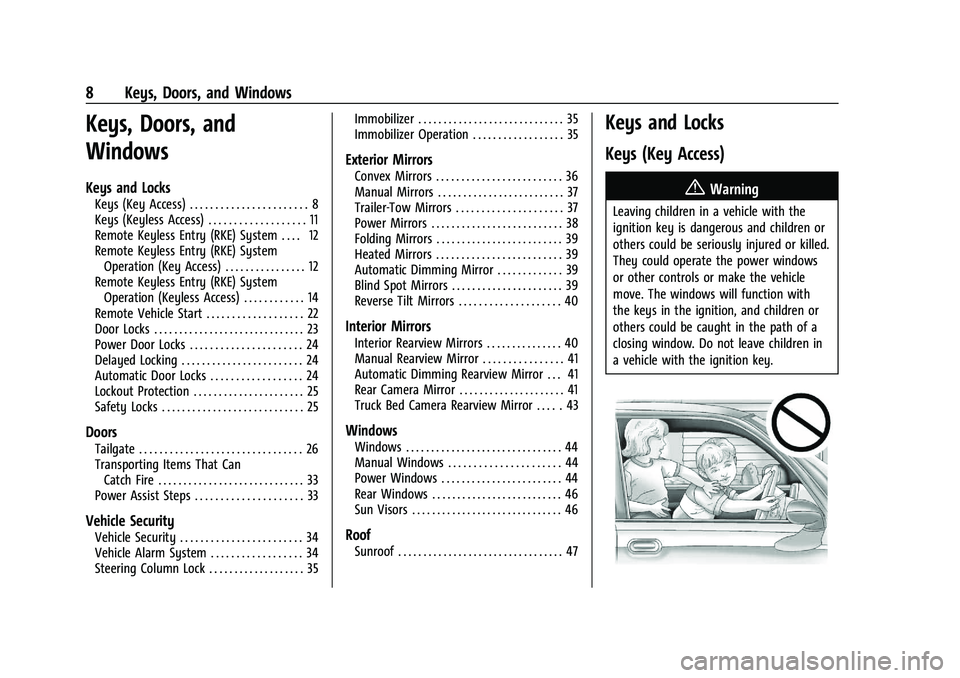
{Warning
Leaving children in a vehicle with the
ignition key is dangerous and children or
others could be seriously injured or killed.
They could operate the power windows
or other controls or make the vehicle
move. The windows will function with
the keys in the ignition, and children or
others could be caught in the path of a
closing window. Do not leave children in
a vehicle with the ignition key.
Page 13 of 430
GMC Sierra/Sierra Denali 2500 HD/3500 HD Owner Manual (GMNA-
Localizing-U.S./Canada-16504257) - 2023 - CRC - 5/9/22
12 Keys, Doors, and Windows
With an active OnStar or connected service
plan, an OnStar Advisor may remotely
unlock the vehicle. SeeOnStar Overview
0 408.
If locked out of the vehicle, see Roadside
Assistance Program 0399.
If equipped with memory seats, RKE
transmitters 1 and 2 are linked to seating
positions of memory 1 or 2. See Memory
Seats 053.
Remote Keyless Entry (RKE)
System
See Radio Frequency Statement 0404.
If there is a decrease in the Remote Keyless
Entry (RKE) operating range:
.Check the distance. The transmitter may
be too far from the vehicle.
.Check the location. Other vehicles or
objects may be blocking the signal.
.Check the transmitter's battery. See
“Battery Replacement” later in this
section.
.If the transmitter is still not working
correctly, see your dealer or a qualified
technician for service.
Remote Keyless Entry (RKE)
System Operation (Key Access)
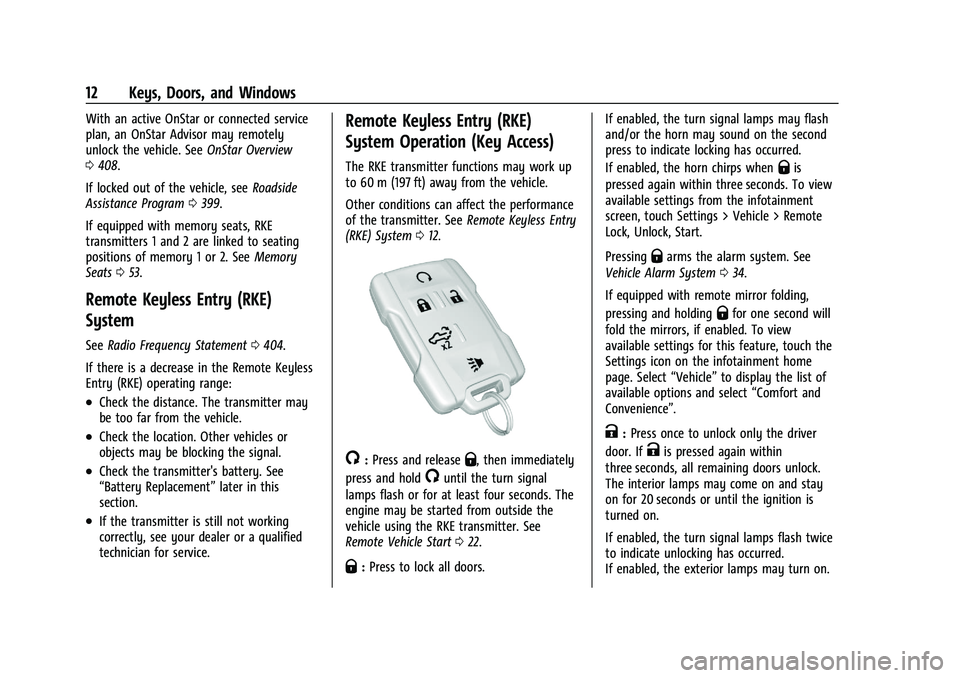
The RKE transmitter functions may work up
to 60 m (197 ft) away from the vehicle.
Other conditions can affect the performance
of the transmitter. See Remote Keyless Entry
(RKE) System 012.
/:Press and releaseQ, then immediately
press and hold
/until the turn signal
lamps flash or for at least four seconds. The
engine may be started from outside the
vehicle using the RKE transmitter. See
Remote Vehicle Start 022.
Q:Press to lock all doors. If enabled, the turn signal lamps may flash
and/or the horn may sound on the second
press to indicate locking has occurred.
If enabled, the horn chirps when
Qis
pressed again within three seconds. To view
available settings from the infotainment
screen, touch Settings > Vehicle > Remote
Lock, Unlock, Start.
Pressing
Qarms the alarm system. See
Vehicle Alarm System 034.
If equipped with remote mirror folding,
pressing and holding
Qfor one second will
fold the mirrors, if enabled. To view
available settings for this feature, touch the
Settings icon on the infotainment home
page. Select “Vehicle”to display the list of
available options and select “Comfort and
Convenience”.
K: Press once to unlock only the driver
door. If
Kis pressed again within
three seconds, all remaining doors unlock.
The interior lamps may come on and stay
on for 20 seconds or until the ignition is
turned on.
If enabled, the turn signal lamps flash twice
to indicate unlocking has occurred.
If enabled, the exterior lamps may turn on.
Page 14 of 430

GMC Sierra/Sierra Denali 2500 HD/3500 HD Owner Manual (GMNA-
Localizing-U.S./Canada-16504257) - 2023 - CRC - 5/9/22
Keys, Doors, and Windows 13
To view available settings from the
infotainment screen, touch Settings >
Vehicle > Remote Lock, Unlock, Start.
Pressing
Kon the RKE transmitter disarms
the alarm system. See Vehicle Alarm System
0 34.
If equipped with remote mirror folding,
pressing and holding
Kfor one second will
unfold the mirrors, if enabled. To view
available settings for this feature, touch the
Settings icon on the infotainment home
page. Select “Vehicle”to display the list of
available options and select “Comfort and
Convenience”.
Press and hold
Kto remotely open the
windows, if enabled. To view available
settings from the infotainment screen, touch
Settings > Vehicle > Remote Lock, Unlock,
Start.
x: Press twice quickly to release the
tailgate, if equipped.
7: Press and release to initiate the vehicle
locator. The turn signal lamps flash and the
horn sounds three times. Press and hold
7for more than
three seconds to activate the panic alarm.
The turn signal lamps flash and the horn
sounds repeatedly for 30 seconds. The alarm
turns off when the ignition is turned on or
7is pressed again. The ignition must be off
for the panic alarm to work.
Programming Transmitters to the Vehicle
Only RKE transmitters programmed to this
vehicle will work. If a transmitter is lost or
stolen, a replacement can be purchased and
programmed through your dealer. Each
vehicle can have up to eight transmitters
programmed to it. See your dealer for
transmitter programming.
Battery Replacement
{Warning
Never allow children to play with the RKE
transmitter. The transmitter contains a
small battery, which can be a choking
hazard. If swallowed, internal burns can
occur, resulting in severe injury or death.
Seek medical attention immediately if a
battery is swallowed.
{Warning
To avoid personal injury, do not touch
metal surfaces on the RKE transmitter
when it has been exposed to extreme
heat. These surfaces can be hot to the
touch at temperatures above 59 °C
(138 °F).
Caution
When replacing the battery, do not touch
any of the circuitry on the transmitter.
Static from your body could damage the
transmitter.
Caution
Always replace the battery with the
correct type. Replacing the battery with
an incorrect type could potentially create
a risk of battery explosion. Dispose of
used batteries according to instructions
and local laws. Do not attempt to burn,
crush, or cut the used battery, and avoid
exposing the battery to environments
with extremely low air pressures or high
temperatures.
Page 16 of 430
GMC Sierra/Sierra Denali 2500 HD/3500 HD Owner Manual (GMNA-
Localizing-U.S./Canada-16504257) - 2023 - CRC - 5/9/22
Keys, Doors, and Windows 15
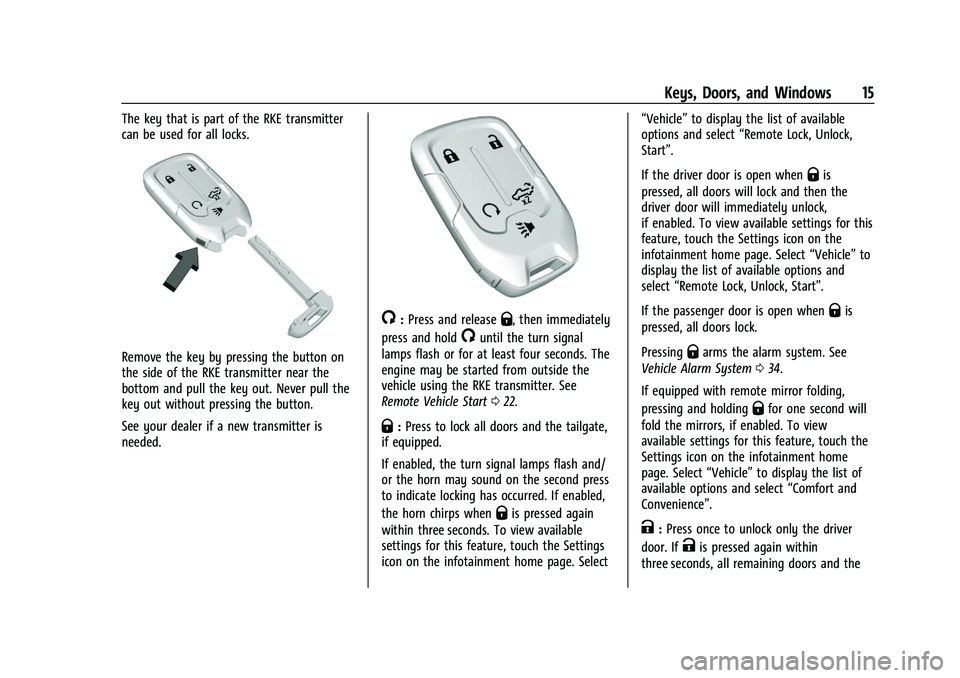
The key that is part of the RKE transmitter
can be used for all locks.
Remove the key by pressing the button on
the side of the RKE transmitter near the
bottom and pull the key out. Never pull the
key out without pressing the button.
See your dealer if a new transmitter is
needed.
/:Press and releaseQ, then immediately
press and hold
/until the turn signal
lamps flash or for at least four seconds. The
engine may be started from outside the
vehicle using the RKE transmitter. See
Remote Vehicle Start 022.
Q:Press to lock all doors and the tailgate,
if equipped.
If enabled, the turn signal lamps flash and/
or the horn may sound on the second press
to indicate locking has occurred. If enabled,
the horn chirps when
Qis pressed again
within three seconds. To view available
settings for this feature, touch the Settings
icon on the infotainment home page. Select “Vehicle”
to display the list of available
options and select “Remote Lock, Unlock,
Start”.
If the driver door is open when
Qis
pressed, all doors will lock and then the
driver door will immediately unlock,
if enabled. To view available settings for this
feature, touch the Settings icon on the
infotainment home page. Select “Vehicle”to
display the list of available options and
select “Remote Lock, Unlock, Start”.
If the passenger door is open when
Qis
pressed, all doors lock.
Pressing
Qarms the alarm system. See
Vehicle Alarm System 034.
If equipped with remote mirror folding,
pressing and holding
Qfor one second will
fold the mirrors, if enabled. To view
available settings for this feature, touch the
Settings icon on the infotainment home
page. Select “Vehicle”to display the list of
available options and select “Comfort and
Convenience”.
K: Press once to unlock only the driver
door. If
Kis pressed again within
three seconds, all remaining doors and the
Page 17 of 430

GMC Sierra/Sierra Denali 2500 HD/3500 HD Owner Manual (GMNA-
Localizing-U.S./Canada-16504257) - 2023 - CRC - 5/9/22
16 Keys, Doors, and Windows
tailgate unlock. The interior lamps may
come on and stay on for 20 seconds or until
the ignition is turned on.
If enabled, the turn signal lamps flash twice
to indicate unlocking has occurred.
If enabled, the exterior lamps may turn on.
To view available settings for this feature,
touch the Settings icon on the infotainment
home page. Select“Vehicle”to display the
list of available options and select “Remote
Lock, Unlock, Start”.
Pressing
Kon the RKE transmitter disarms
the alarm system. See Vehicle Alarm System
0 34.
If equipped with remote mirror folding,
pressing and holding
Kfor one second will
unfold the mirrors, if enabled. To view
available settings for this feature, touch the
Settings icon on the infotainment home
page. Select “Vehicle”to display the list of
available options and select “Comfort and
Convenience”.
Press and hold
Kuntil the windows fully
open, if remote window operation is
enabled. To view available settings for this
feature, touch the Settings icon on the infotainment home page. Select
“Vehicle”to
display the list of available options and
select “Remote Lock, Unlock, Start”.
x:Press twice quickly to release the
tailgate, if equipped.
7: Press and release to initiate vehicle
locator. The turn signal lamps flash and the
horn sounds three times.
Press and hold
7for more than
three seconds to activate the panic alarm.
The turn signal lamps flash and the horn
sounds repeatedly for 30 seconds. The alarm
turns off when the ignition is turned on or
7is pressed again. The ignition must be off
for the panic alarm to work.
Keyless Access Operation
The Keyless Access system allows for doors
and the tailgate to be accessed without
pressing the RKE transmitter button. The RKE
transmitter must be within 1 m (3 ft) of the
tailgate or door being opened. If the vehicle
has this feature, there will be a button on
the outside door handles. Keyless Access can be programmed to
unlock all doors on the first lock/unlock
press from the driver door. Keyless
Unlocking can also be turned off. To view
available settings for this feature, touch the
Settings icon on the infotainment home
page. Select
“Vehicle”to display the list of
available options and select “Remote Lock,
Unlock, Start”.
If equipped with memory seats, RKE
transmitters 1 and 2 are linked to seating
positions of memory 1 or 2. See Memory
Seats 053.
Keyless Unlocking/Locking from the
Driver Door
When the doors are locked and the RKE
transmitter is within 1 m (3 ft) of the door
handle, pressing the lock/unlock button on
the driver door handle will unlock the driver
door. If the lock/unlock button is pressed
again within five seconds, all passenger
doors and the tailgate will unlock.
Page 18 of 430

GMC Sierra/Sierra Denali 2500 HD/3500 HD Owner Manual (GMNA-
Localizing-U.S./Canada-16504257) - 2023 - CRC - 5/9/22
Keys, Doors, and Windows 17
Driver Side Shown, Passenger Side Similar
Pressing the lock/unlock button will cause
all doors to lock if any of the following
occur:
.It has been more than five seconds since
the first lock/unlock button press.
.Two lock/unlock button presses were
used to unlock all doors.
.Any vehicle door has been opened and all
doors are now closed.
Keyless Unlocking/Locking from the
Passenger Doors
When the doors are locked and the RKE
transmitter is within 1 m (3 ft) of the door
handle, pressing the lock/unlock button on a
passenger door handle will unlock all doors. Pressing the lock/unlock button will cause
all doors to lock if any of the following
occur:
.The lock/unlock button was used to
unlock all doors.
.Any vehicle door has been opened and all
doors are now closed.
Disable/Enable Keyless Unlocking of Exterior
Door Handles and Tailgate
If equipped, keyless unlocking of the exterior
door handles and tailgate can be disabled
and enabled.
Disabling Keyless Unlocking:
With the vehicle off, press and hold
Qand
Kon the RKE transmitter at the same time
for approximately three seconds. The turn
signal lamps will flash four times quickly to
indicate access is disabled. Using any
exterior handle to unlock the doors or open
the tailgate will cause the turn signal lamps
to flash four times quickly, indicating access
is disabled. If disabled, disarm the alarm
system before starting the vehicle. Enabling Keyless Unlocking:
With the vehicle off, press and hold
Qand
Kon the RKE transmitter at the same time
for approximately three seconds. The turn
signal lamps will flash twice quickly to
indicate access is enabled.
Passive Locking
This feature will lock the vehicle several
seconds after all doors are closed, if the
vehicle is off and at least one RKE
transmitter has been removed from the
interior, or none remain in the interior.
If other electronic devices interfere with the
RKE transmitter signal, the vehicle may not
detect the RKE transmitter inside the vehicle.
If passive locking is enabled, the doors may
lock with the RKE transmitter inside the
vehicle. Do not leave the RKE transmitter in
an unattended vehicle.
To view available settings for this feature,
touch the Settings icon on the infotainment
home page. Select “Vehicle”to display the
list of available options and select “Remote
Lock, Unlock, Start”.
Page 24 of 430
GMC Sierra/Sierra Denali 2500 HD/3500 HD Owner Manual (GMNA-
Localizing-U.S./Canada-16504257) - 2023 - CRC - 5/9/22
Keys, Doors, and Windows 23
The engine will continue to run for
15 minutes. After 30 seconds, repeat
Steps 1 and 2 for a 15-minute time
extension.
Turn the ignition on to operate the vehicle.
Extending Engine Run Time
The engine run time can be extended by
15 minutes, for a total of 30 minutes,
if during the first 15 minutes Steps 1 and 2
are repeated while the engine is still
running. An extension can be requested
30 seconds after starting.
A maximum of two remote starts, or a
single start with an extension, is allowed
between ignition cycles.
The vehicle's ignition must be turned on and
then back off to use remote start again.
Canceling a Remote Start
To cancel a remote start, do one of the
following:
.Press and hold/until the parking lamps
turn off.
.Turn on the hazard warning flashers.
.Turn the ignition on and then off.
Door Locks
{Warning
Unlocked doors can be dangerous.
.Passengers, especially children, can
easily open the doors and fall out of a
moving vehicle. The doors can be
unlocked and opened while the vehicle
is moving. The chance of being thrown
out of the vehicle in a crash is
increased if the doors are not locked.
So, all passengers should wear seat
belts properly and the doors should be
locked whenever the vehicle is driven.
.Young children who get into unlocked
vehicles may be unable to get out.
A child can be overcome by extreme
heat and can suffer permanent injuries
or even death from heat stroke.
Always lock the vehicle whenever
leaving it.
.Outsiders can easily enter through an
unlocked door when you slow down
or stop the vehicle. Locking the doors
can help prevent this from happening. There are several ways to lock and unlock
the vehicle.
From outside:
.Use the Remote Keyless Entry (RKE)
transmitter.
.Use Keyless Access, if equipped.
.Use the key in the driver door or the
passenger door, if equipped.
From inside, use the power door locks or the
manual door locks. To lock the door with
the manual door locks, push down on the
manual lock knob.
From inside, pull the door handle once to
unlock the door. Pull the handle again to
open the door.
See Vehicle Alarm System 034.
Page 35 of 430
GMC Sierra/Sierra Denali 2500 HD/3500 HD Owner Manual (GMNA-
Localizing-U.S./Canada-16504257) - 2023 - CRC - 5/9/22
34 Keys, Doors, and Windows
Vehicle Security
This vehicle has theft-deterrent features;
however, they do not make the vehicle
impossible to steal.
Vehicle Alarm System
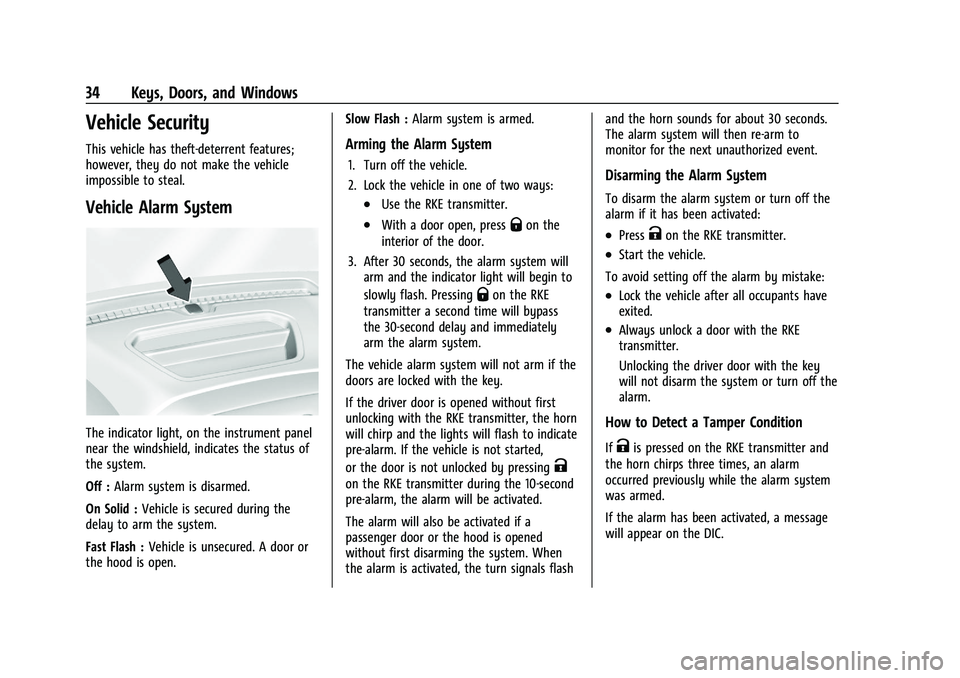
The indicator light, on the instrument panel
near the windshield, indicates the status of
the system.
Off :Alarm system is disarmed.
On Solid : Vehicle is secured during the
delay to arm the system.
Fast Flash : Vehicle is unsecured. A door or
the hood is open. Slow Flash :
Alarm system is armed.
Arming the Alarm System
1. Turn off the vehicle.
2. Lock the vehicle in one of two ways:
.Use the RKE transmitter.
.With a door open, pressQon the
interior of the door.
3. After 30 seconds, the alarm system will arm and the indicator light will begin to
slowly flash. Pressing
Qon the RKE
transmitter a second time will bypass
the 30-second delay and immediately
arm the alarm system.
The vehicle alarm system will not arm if the
doors are locked with the key.
If the driver door is opened without first
unlocking with the RKE transmitter, the horn
will chirp and the lights will flash to indicate
pre-alarm. If the vehicle is not started,
or the door is not unlocked by pressing
K
on the RKE transmitter during the 10-second
pre-alarm, the alarm will be activated.
The alarm will also be activated if a
passenger door or the hood is opened
without first disarming the system. When
the alarm is activated, the turn signals flash and the horn sounds for about 30 seconds.
The alarm system will then re-arm to
monitor for the next unauthorized event.
Disarming the Alarm System
To disarm the alarm system or turn off the
alarm if it has been activated:
.PressKon the RKE transmitter.
.Start the vehicle.
To avoid setting off the alarm by mistake:
.Lock the vehicle after all occupants have
exited.
.Always unlock a door with the RKE
transmitter.
Unlocking the driver door with the key
will not disarm the system or turn off the
alarm.
How to Detect a Tamper Condition
IfKis pressed on the RKE transmitter and
the horn chirps three times, an alarm
occurred previously while the alarm system
was armed.
If the alarm has been activated, a message
will appear on the DIC.
Page 298 of 430

GMC Sierra/Sierra Denali 2500 HD/3500 HD Owner Manual (GMNA-
Localizing-U.S./Canada-16504257) - 2023 - CRC - 5/9/22
Driving and Operating 297
Theft Alert
A theft alert can be set if a trailer is
connected and the alert is enabled. When
the trailer is disconnected and the vehicle is
off, an alarm will sound.
Touch Theft Alert in Settings to view the
Theft Alert settings page. These alerts are
based on the Trailer Profile, so the settings
for each Trailer Profile must be turned on or
off. Touch a profile to view more
information or adjust the setting for that
profile.
This setting will be off by default for each
Trailer Profile, including the Guest Trailer
Profile.
A smartphone will receive a notification that
the trailer related to the selected Trailer
Profile is disconnected from the vehicle,
if the setting is on for the active Trailer
Profile, the vehicle has an OnStar or
connected service plan and the smartphone
number has been added to the account for
this notification.
If the setting is turned off for a given Trailer
Profile, the smartphone will not receive this
security notification even if the Trailer
Profile is active.
Tow/Haul Mode Reminder
This is a reminder to turn on the Tow/Haul
Mode when towing a trailer. SeeTow/Haul
Mode 0234.
Touch Tow/Haul Mode Reminder in Settings
to view the Tow/Haul Mode Reminder
settings page. These alerts are based on the
Trailer Profile, so the settings for each
Trailer Profile must be turned on or off.
Touch a profile to view more information or
to adjust the setting for that profile.
This setting will default to OFF for each
Trailer Profile, including the Guest Trailer
Profile.
If Tow/Haul Mode is off and this setting is
on for a Trailer Profile, each time the vehicle
is turned on a reminder will appear to turn
on Tow/Haul Mode when the Trailer Profile
is active.
If Tow/Haul Mode is on and this setting is
on for a Trailer Profile, the reminder will not
appear when the Trailer Profile is active.
Trailer Length Indicator
Touch Trailer Length Indicator to view the
Trailer Length Indicator settings page. If this
setting is ON a guideline is displayed in the side mirror camera view to indicate the rear
of the attached trailer. If this setting is OFF
the guideline will not be displayed.
This setting will default to OFF if the trailer
length indicator feature is not set up. See
"Towing Assistance" for details on the setup.
Conversions and Add-Ons
Add-On Electrical Equipment
{Warning
The Data Link Connector (DLC) is used for
vehicle service and Emission Inspection/
Maintenance testing. See
Malfunction
Indicator Lamp (Check Engine Light) 0120
. A device connected to the DLC —such
as an aftermarket fleet or driver-behavior
tracking device —may interfere with
vehicle systems. This could affect vehicle
operation and cause a crash. Such devices
may also access information stored in the
vehicle’s systems.
Page 410 of 430
GMC Sierra/Sierra Denali 2500 HD/3500 HD Owner Manual (GMNA-
Localizing-U.S./Canada-16504257) - 2023 - CRC - 5/9/22
OnStar 409
.Give OnStar Turn-by-Turn Navigation voice
commands.
.Obtain and customize the Wi-Fi hotspot
name or SSID and password, if equipped.
Press
Qto connect to an Advisor to:
.Verify account information or update
contact information.
.Get driving directions.
.Receive a Diagnostic check of the vehicle's
key operating systems.
.Receive Roadside Assistance.
.Manage Wi-Fi Settings, if equipped.
Press
>to get a priority connection to an
OnStar Advisor available 24/7 to:
.Get help for an emergency.
.Be a Good Samaritan or respond to an
AMBER Alert.
.Get assistance in severe weather or other
crisis situations and find evacuation
routes.
OnStar Services
Emergency
Emergency Services require an active safety
and security plan. With Automatic Crash
Response, built-in sensors can automatically
alert a specially trained OnStar Advisor who
is immediately connected in to the vehicle
to help.
Press
>for a priority connection to an
OnStar Advisor who can contact emergency
service providers, direct them to your exact
location, and relay important information.
With OnStar Crisis Assist, specially trained
Advisors are available 24 hours a day, 7 days
a week, to provide a central point of
contact, assistance, and information during a
crisis.
With Roadside Assistance, Advisors can
locate a nearby service provider to help with
a flat tire, a battery jump, or an empty
gas tank.
Security
If equipped, OnStar provides these services:
.With Stolen Vehicle Assistance, OnStar
Advisors can use GPS to pinpoint the
vehicle and help authorities quickly
recover it.
.With Remote Ignition Block, if equipped,
OnStar can block the vehicle from being
restarted.
.With Stolen Vehicle Slowdown,
if equipped, OnStar can work with law
enforcement to gradually slow the
vehicle down.
Theft Alarm Notification
If equipped, if the doors are locked and the
vehicle alarm sounds, a notification by text,
e-mail, or phone call will be sent. If the
vehicle is stolen, an OnStar Advisor can work
with authorities to recover the vehicle.