power assist steps GMC SIERRA 2024 Owners Manual
[x] Cancel search | Manufacturer: GMC, Model Year: 2024, Model line: SIERRA, Model: GMC SIERRA 2024Pages: 440, PDF Size: 9.21 MB
Page 8 of 440

GMC Sierra/Sierra Denali 2500 HD/3500 HD Owner Manual (GMNA-
Localizing-U.S./Canada-16908340) - 2024 - CRC - 12/13/22
6 Introduction
1. Tow/Haul Mode (On Some Models). SeeDriver Mode Control 0238.
Automatic Transfer Case Control (If
Equipped). See Four-Wheel Drive 0228.
Driver Mode Control 0238 (If Equipped).
2. Air Vents 0196.
3. Turn Signal Lever. See Turn and
Lane-Change Signals 0147.
Windshield Wiper/Washer 0106.
4. Head-Up Display (HUD) 0135 (If
Equipped).
5. Instrument Cluster (Base Level) 0112 or
Instrument Cluster (Uplevel) 0113.
6. Shift Lever. See Automatic Transmission
0 223.
Range Selection Mode. See Manual Mode
0 226.
7. Light Sensor. See Automatic Headlamp
System 0145.
8. Infotainment Controls. See Overview
(Uplevel Radio) 0155 or
Overview (Base Radio) 0154.
9. Upper Glove Box. See Glove Box099. 10. Lower Glove Box. See
Glove Box099.
11. Climate Control Systems 0191 (If
Equipped).
Dual Automatic Climate Control System
0 193 (If Equipped).
12.
XPark Assist Switch (If Equipped). See
Assistance Systems for Parking or Backing
0 253.
5Power Release Tailgate (If
Equipped). See Tailgate024.
|Hazard Warning Flashers 0146.
gTraction Control/Electronic Stability
Control 0236.
-DC/AC Switch. See Power Outlets
0 107.
@Lane Departure Warning (LDW) 0270
(If Equipped).
5Hill Descent Control Switch (If
Equipped). See Hill Descent Control (HDC)
0 237.
jPower Assist Steps 031 (If
Equipped).
LExpress Window Down Button (If
Equipped). See Power Windows 042.
Tow/Haul Mode 0227 (On Some
Models).
Exhaust Brake (If Equipped). See Duramax
Diesel Supplement.
Power Take-Off (PTO) (If Equipped). See
Duramax Diesel Supplement.
13. Power Outlet (Alternating Current) (If Equipped). See Power Outlets0107.
14. Power Outlets 0107.
15. USB Port 0163.
16. Trailer Brake Control Panel (If Equipped). See“Integrated Trailer Brake Control
System” underTowing Equipment 0284.
17. ENGINE START/STOP. See Ignition
Positions 0216.
18. Steering Wheel Controls 0156 (If
Equipped).
Driver Information Center (DIC) Controls.
See Driver Information Center (DIC) (Base
Level) 0131 or
Driver Information Center (DIC) (Uplevel)
0 133.
Page 11 of 440

GMC Sierra/Sierra Denali 2500 HD/3500 HD Owner Manual (GMNA-
Localizing-U.S./Canada-16908340) - 2024 - CRC - 12/13/22
Introduction 9
1.Head-Up Display (HUD) 0135 (If
Equipped).
2. Air Vents 0196.
3. Turn Signal Lever. See Turn and
Lane-Change Signals 0147.
Windshield Wiper/Washer 0106.
4. Instrument Cluster (Base Level) 0112 or
Instrument Cluster (Uplevel) 0113.
5. Shift Lever. See Automatic Transmission
0 223.
Range Selection Mode. See Manual Mode
0 226.
6. Infotainment System. See Overview
(Uplevel Radio) 0155 or
Overview (Base Radio) 0154.
7. Light Sensor. See Automatic Headlamp
System 0145.
Vehicle Alarm System. See Vehicle
Security 032.
8. Upper Glove Box. See Glove Box099.
9. Lower Glove Box. See Glove Box099.
10. Upper Glove Box Button. See Glove Box
0 99. 11. Power Release Tailgate (If Equipped). See
Tailgate 024.
Hazard Warning Flashers 0146.
Traction Control/Electronic Stability
Control 0236.
Hill Descent Control Switch (If Equipped).
See Hill Descent Control (HDC) 0237.
Power Assist Steps 031 (If Equipped).
Express Window Down Button (If
Equipped). See Power Windows 042.
Tow/Haul Mode 0227 (On Some
Models).
Exhaust Brake (If Equipped). See Duramax
Diesel Supplement.
Power Take-Off (PTO) (If Equipped). See
Duramax Diesel Supplement.
12. USB Port 0163.
13. Climate Control Systems 0191 (If
Equipped).
Dual Automatic Climate Control System
0 193 (If Equipped).
Heated and Ventilated Front Seats 054
(If Equipped).
Heated Steering Wheel 0105 (If
Equipped). 14. Front Center Console Storage.
15.
Cupholders 0100.
16. Trailer Brake Control Panel (If Equipped). See“Integrated Trailer Brake Control
System” underTowing Equipment 0284.
17. ENGINE START/STOP. See Ignition
Positions 0216.
18. Steering Wheel Controls 0156.
Driver Information Center (DIC) Controls.
See Driver Information Center (DIC) (Base
Level) 0131 or
Driver Information Center (DIC) (Uplevel)
0 133.
19. Horn 0106.
20. Steering Wheel Adjustment 0105 (Out
of View).
21. Hood Release. See Hood0312.
22. Cruise Control 0239.
Adaptive Cruise Control (Camera) 0241
(If Equipped).
Forward Collision Alert (FCA) System
0 263 (If Equipped).
Page 14 of 440

GMC Sierra/Sierra Denali 2500 HD/3500 HD Owner Manual (GMNA-
Localizing-U.S./Canada-16908340) - 2024 - CRC - 12/13/22
12 Introduction
1.Air Vents 0196.
2. Head-Up Display (HUD) 0135 (If
Equipped).
3. Turn Signal Lever. See Turn and
Lane-Change Signals 0147.
Windshield Wiper/Washer 0106.
4. Instrument Cluster (Base Level) 0112 or
Instrument Cluster (Uplevel) 0113.
5. Shift Lever. See Automatic Transmission
0 223.
Range Selection Mode. See Manual Mode
0 226.
6. Infotainment System. See Overview
(Uplevel Radio) 0155 or
Overview (Base Radio) 0154.
7. Light Sensor. See Automatic Headlamp
System 0145.
Vehicle Alarm System. See Vehicle
Security 032.
8. Upper Glove Box Button. See Glove Box
0 99.
9. Upper Glove Box. See Glove Box099.
10. Lower Glove Box. See Glove Box099. 11.
Climate Control Systems 0191 (If
Equipped).
Dual Automatic Climate Control System
0 193 (If Equipped).
Heated and Ventilated Front Seats 054
(If Equipped).
Heated Steering Wheel 0105 (If
Equipped).
12. Power Release Tailgate (If Equipped). See Tailgate 024.
Hazard Warning Flashers 0146.
Traction Control/Electronic Stability
Control 0236.
Hill Descent Control Switch (If Equipped).
See Hill Descent Control (HDC) 0237.
Power Assist Steps 031 (If Equipped).
Express Window Down Button (If
Equipped). See Power Windows 042.
Tow/Haul Mode 0227 (On Some
Models).
Exhaust Brake (If Equipped). See Duramax
Diesel Supplement.
Power Take-Off (PTO) (If Equipped). See
Duramax Diesel Supplement. 13. Front Center Console Storage.
14.
USB Port 0163.
15. Cupholders 0100.
16. Trailer Brake Control Panel (If Equipped). See“Integrated Trailer Brake Control
System” underTowing Equipment 0284.
17. ENGINE START/STOP. See Ignition
Positions 0216.
18. Steering Wheel Controls 0156.
Driver Information Center (DIC) Controls.
See Driver Information Center (DIC) (Base
Level) 0131 or
Driver Information Center (DIC) (Uplevel)
0 133.
19. Horn 0106.
20. Hood Release. See Hood0312.
21. Steering Wheel Adjustment 0105 (Out
of View).
22. Cruise Control 0239.
Adaptive Cruise Control (Camera) 0241
(If Equipped).
Forward Collision Alert (FCA) System
0 263 (If Equipped).
Page 16 of 440
GMC Sierra/Sierra Denali 2500 HD/3500 HD Owner Manual (GMNA-
Localizing-U.S./Canada-16908340) - 2024 - CRC - 12/7/22
14 Keys, Doors, and Windows
Keys, Doors, and
Windows
Keys and Locks
Keys . . . . . . . . . . . . . . . . . . . . . . . . . . . . . . . . . . . . 14
Remote Key . . . . . . . . . . . . . . . . . . . . . . . . . . . . . 15
Remote Key Operation . . . . . . . . . . . . . . . . . . 15
Remote Vehicle Start . . . . . . . . . . . . . . . . . . . 21
Door Locks . . . . . . . . . . . . . . . . . . . . . . . . . . . . . . 22
Power Door Locks . . . . . . . . . . . . . . . . . . . . . . . 23
Delayed Locking . . . . . . . . . . . . . . . . . . . . . . . . 23
Automatic Door Locks . . . . . . . . . . . . . . . . . . 23
Lockout Protection . . . . . . . . . . . . . . . . . . . . . . 23
Safety Locks . . . . . . . . . . . . . . . . . . . . . . . . . . . . 24
Doors
Tailgate . . . . . . . . . . . . . . . . . . . . . . . . . . . . . . . . 24
Transporting Items That CanCatch Fire . . . . . . . . . . . . . . . . . . . . . . . . . . . . . 31
Power Assist Steps . . . . . . . . . . . . . . . . . . . . . . 31
Vehicle Security
Vehicle Security . . . . . . . . . . . . . . . . . . . . . . . . 32
Vehicle Alarm System . . . . . . . . . . . . . . . . . . 32
Steering Column Lock . . . . . . . . . . . . . . . . . . . 33
Immobilizer . . . . . . . . . . . . . . . . . . . . . . . . . . . . . 33
Immobilizer Operation . . . . . . . . . . . . . . . . . . 33
Exterior Mirrors
Convex Mirrors . . . . . . . . . . . . . . . . . . . . . . . . . 34
Manual Mirrors . . . . . . . . . . . . . . . . . . . . . . . . . 34
Trailer-Tow Mirrors . . . . . . . . . . . . . . . . . . . . . 35
Power Mirrors . . . . . . . . . . . . . . . . . . . . . . . . . . 35
Folding Mirrors . . . . . . . . . . . . . . . . . . . . . . . . . 36
Heated Mirrors . . . . . . . . . . . . . . . . . . . . . . . . . 37
Automatic Dimming Mirror . . . . . . . . . . . . . 37
Blind Spot Mirrors . . . . . . . . . . . . . . . . . . . . . . 37
Reverse Tilt Mirrors . . . . . . . . . . . . . . . . . . . . . 38
Interior Mirrors
Interior Rearview Mirrors . . . . . . . . . . . . . . . 38
Manual Rearview Mirror . . . . . . . . . . . . . . . . 38
Automatic Dimming Rearview Mirror . . . 38
Rear Camera Mirror . . . . . . . . . . . . . . . . . . . . 38
Truck Bed Camera Rearview Mirror . . . . . 41
Windows
Windows . . . . . . . . . . . . . . . . . . . . . . . . . . . . . . . 41
Power Windows . . . . . . . . . . . . . . . . . . . . . . . . 42
Rear Windows . . . . . . . . . . . . . . . . . . . . . . . . . . 44
Sun Visors . . . . . . . . . . . . . . . . . . . . . . . . . . . . . . 44
Roof
Sunroof . . . . . . . . . . . . . . . . . . . . . . . . . . . . . . . . 44
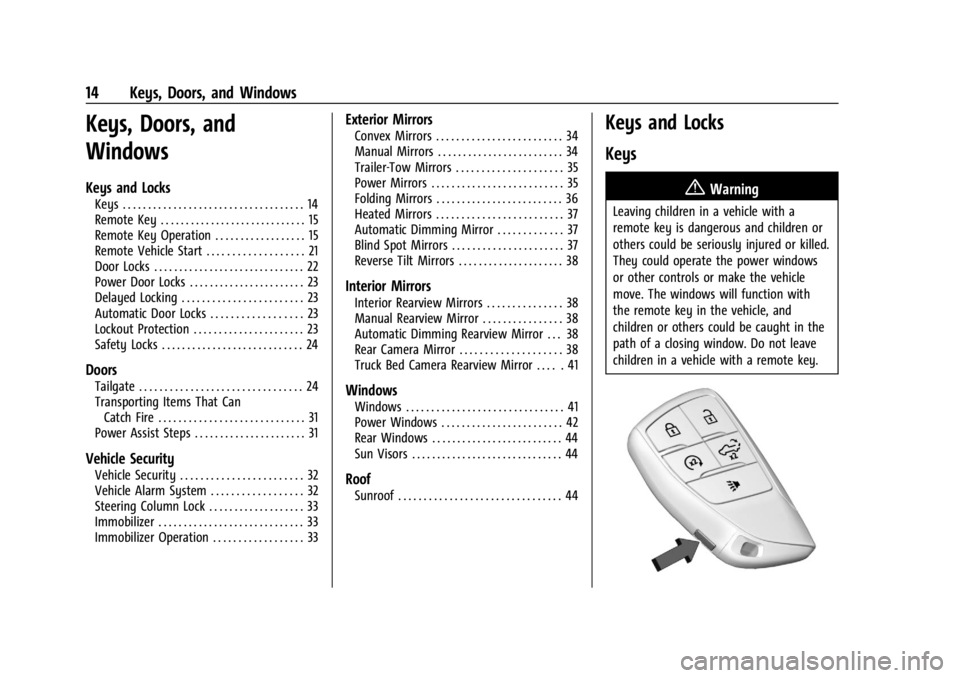
Keys and Locks
Keys
{Warning
Leaving children in a vehicle with a
remote key is dangerous and children or
others could be seriously injured or killed.
They could operate the power windows
or other controls or make the vehicle
move. The windows will function with
the remote key in the vehicle, and
children or others could be caught in the
path of a closing window. Do not leave
children in a vehicle with a remote key.
Page 33 of 440
GMC Sierra/Sierra Denali 2500 HD/3500 HD Owner Manual (GMNA-
Localizing-U.S./Canada-16908340) - 2024 - CRC - 12/7/22
Keys, Doors, and Windows 31
Alternate Method
When applying any load to the tailgate,
distribute the weight evenly across the
width of the tailgate. This applies to all
tailgate types.
.Use a load-distributing member (1).
.Secure the ramp to the bumper (2).
Transporting Items That Can
Catch Fire
{Warning
To avoid personal injury and/or vehicle
damage when transporting items that
can catch fire, such as leaves, mulch, hay,
or cardboard, in the truck bed:
.Make sure items are securely
contained inside the truck bed. Never
allow them to hang over the sides or
fall in between the truck bed and
the cab.
.Never place items between the cab
and the truck bed. They could touch
hot exhaust parts and ignite.
{Warning
Keep cigarettes, sparks, and other ignition
sources away from the area between the
bed of the truck and cab. They could fall
onto the fuel system below and start a
fire. You or others could be injured
and/or the vehicle damaged.
Power Assist Steps
{Warning
To avoid personal injury or property
damage, before entering or exiting the
vehicle, be sure the power assist step is
fully extended. Do not step on the power
assist step while it is moving. Never place
hands or other body parts between the
extended power assist step and the
vehicle.
If equipped, the power assist steps will
deploy when the door is opened and
automatically retract three seconds after the
door is closed. The power assist steps will
retract immediately if the vehicle starts
moving. Check the step position before
exiting the vehicle.
Disable the power assist steps before jacking
or placing any object under the vehicle.
Too much ice buildup may prevent
deployment of the power assist steps. If this
happens, disable the power assist steps,
clear the ice, then enable the assist steps
and confirm normal function prior to use.
Page 34 of 440
GMC Sierra/Sierra Denali 2500 HD/3500 HD Owner Manual (GMNA-
Localizing-U.S./Canada-16908340) - 2024 - CRC - 12/7/22
32 Keys, Doors, and Windows
Keep hands, children, pets, objects, and
clothing clear of the power assist steps
when in motion. The steps will reverse
direction if they encounter an obstruction
when opening or closing. Remove the
obstruction, then open and close the door
on the same side to complete the motion of
the assist steps. If the obstruction is not
cleared, the assist steps remain extended
while driving.
Extend or retract both power assist steps
for cleaning through the vehicle settings
menu. To view available settings from the
infotainment screen, touch Settings >
Vehicle > Comfort and Convenience.
Enable/Disable
The power assist steps can be enabled or
disabled through the vehicle settings menu.
To view available settings from the
infotainment screen, touch Settings >
Vehicle > Comfort and Convenience.
Vehicle Security
This vehicle has theft-deterrent features;
however, they do not make the vehicle
impossible to steal.
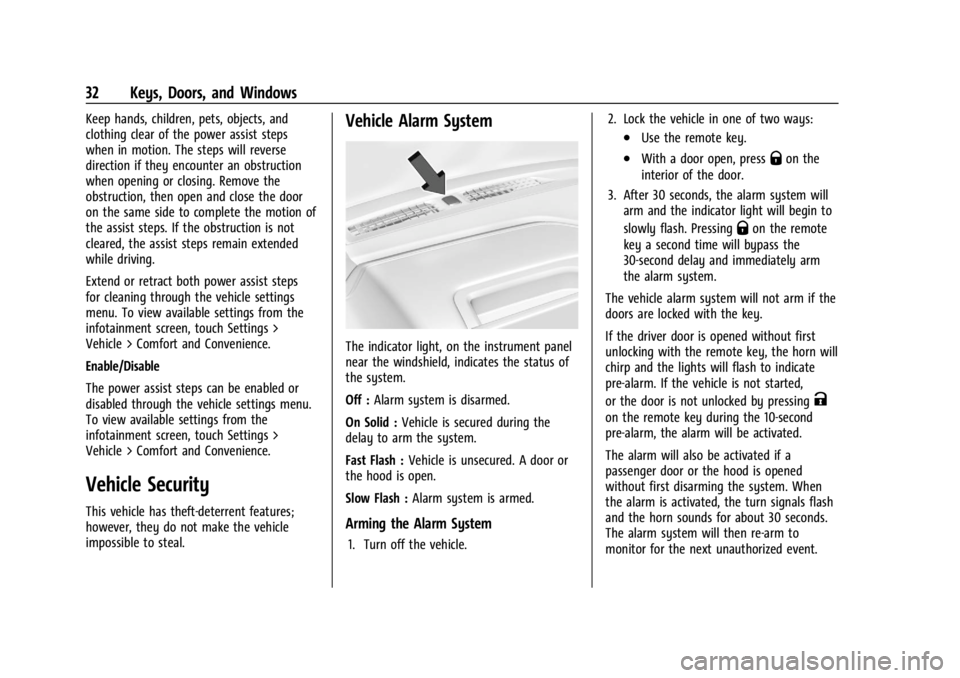
Vehicle Alarm System
The indicator light, on the instrument panel
near the windshield, indicates the status of
the system.
Off :Alarm system is disarmed.
On Solid : Vehicle is secured during the
delay to arm the system.
Fast Flash : Vehicle is unsecured. A door or
the hood is open.
Slow Flash : Alarm system is armed.
Arming the Alarm System
1. Turn off the vehicle. 2. Lock the vehicle in one of two ways:
.Use the remote key.
.With a door open, pressQon the
interior of the door.
3. After 30 seconds, the alarm system will arm and the indicator light will begin to
slowly flash. Pressing
Qon the remote
key a second time will bypass the
30-second delay and immediately arm
the alarm system.
The vehicle alarm system will not arm if the
doors are locked with the key.
If the driver door is opened without first
unlocking with the remote key, the horn will
chirp and the lights will flash to indicate
pre-alarm. If the vehicle is not started,
or the door is not unlocked by pressing
K
on the remote key during the 10-second
pre-alarm, the alarm will be activated.
The alarm will also be activated if a
passenger door or the hood is opened
without first disarming the system. When
the alarm is activated, the turn signals flash
and the horn sounds for about 30 seconds.
The alarm system will then re-arm to
monitor for the next unauthorized event.
Page 184 of 440
GMC Sierra/Sierra Denali 2500 HD/3500 HD Owner Manual (GMNA-
Localizing-U.S./Canada-16908340) - 2024 - CRC - 12/7/22
182 Infotainment System
Apps
The menu may contain the following:
Android Auto
Allows interacting directly with a mobile
device on the infotainment display. See
Apple CarPlay and Android Auto (Base
Radio)0177 or
Apple CarPlay and Android Auto (Uplevel
Radio) 0179.
Apple CarPlay
This feature allows you to interact directly
with your mobile device on the infotainment
display. See Apple CarPlay and Android Auto
(Base Radio) 0177 or
Apple CarPlay and Android Auto (Uplevel
Radio) 0179.
Audio
Adjusts different audio settings.
Phone
Adjusts different phone settings.
Vehicle
The menu may contain the following:
Rear Seat Reminder
Allows for a chime and a message when the
rear door has been opened before or during
operation of the vehicle.
Climate and Air Quality
Adjusts different climate settings.
Collision/Detection Systems
Adjusts different driver assistance system
settings.
Comfort and Convenience
Adjusts different comfort and convenience
settings.
Lighting
Adjusts different lighting settings.
Power Door Locks
Adjusts different door lock settings.
Remote Lock, Unlock, and Start
Adjusts different remote lock settings.
Ride Height
Adjusts different ride height settings. Power Assist Steps
Adjusts different running board settings.
Seating Position
Adjusts different seat settings.
Suspension
Adjusts different suspension settings.
Trailering
Adjusts different trailering settings.
Teen Driver
See
Teen Driver 0185.
Valet Mode
This will lock the infotainment system and
steering wheel controls. It may also limit
access to vehicle storage locations,
if equipped.
To enable valet mode: 1. Enter a four-digit code on the keypad.
2. Select Enter to go to the confirmation screen.
3. Re-enter the four-digit code.
Touch Lock or Unlock to lock or unlock the
system. Touch Back to go back to the
previous menu.
Page 185 of 440
GMC Sierra/Sierra Denali 2500 HD/3500 HD Owner Manual (GMNA-
Localizing-U.S./Canada-16908340) - 2024 - CRC - 12/7/22
Infotainment System 183
Settings (Uplevel Radio)
To access the Settings menus:1. Touch Settings on the Home Page on the infotainment display.
2. Touch the desired category to display a list of available options.
3. Touch to select the desired feature setting.
4. Touch the options on the infotainment display to disable or enable a feature.
5. Touch
Sto go back.
The Settings menu may contain the
following:
Connections
The menu may contain the following:
Phones
Allows connecting to a different cell phone
or mobile device source, disconnect a cell
phone or media device, or delete a cell
phone or media device.
Wi-Fi Networks
Shows connected and available Wi-Fi
networks. Wi-Fi Hotspot
Allows adjustment of different Wi-Fi
features.
Vehicle-to-Phone Sharing
Trusted Device
Allows for setting a phone as your trusted
device to establish a secure communication
channel between your phone and vehicle
that enables convenient features like instant
profile unlocking and account sign in. When
nearby, your trusted device is recognized
automatically via a unique Bluetooth
connection. Requires the MyBrand
mobile app.
Vehicle
The menu may contain the following:
Teen Driver
See
Teen Driver 0185.
Rear Seat Reminder
Allows for a chime and a message when the
rear door has been opened before or during
operation of the vehicle. Buckle to Drive
This feature can prevent shifting out of Park
when the driver, and if applicable the front
passenger, seat belt is not buckled. See
Buckle To Drive
058.
Climate and Air Quality
Adjusts different climate settings.
Collision/Detection Systems
Adjusts different driver assistance system
settings.
Comfort and Convenience
Adjusts different comfort and convenience
settings.
Lighting
Adjusts different lighting settings.
Power Door Locks
Adjusts different door lock settings.
Remote Lock, Unlock, and Start
Adjusts different remote lock settings.
Ride Height
Adjusts different ride height settings.
Power Assist Steps
Adjusts different running board settings.
Page 371 of 440
GMC Sierra/Sierra Denali 2500 HD/3500 HD Owner Manual (GMNA-
Localizing-U.S./Canada-16908340) - 2024 - CRC - 12/7/22
Vehicle Care 369
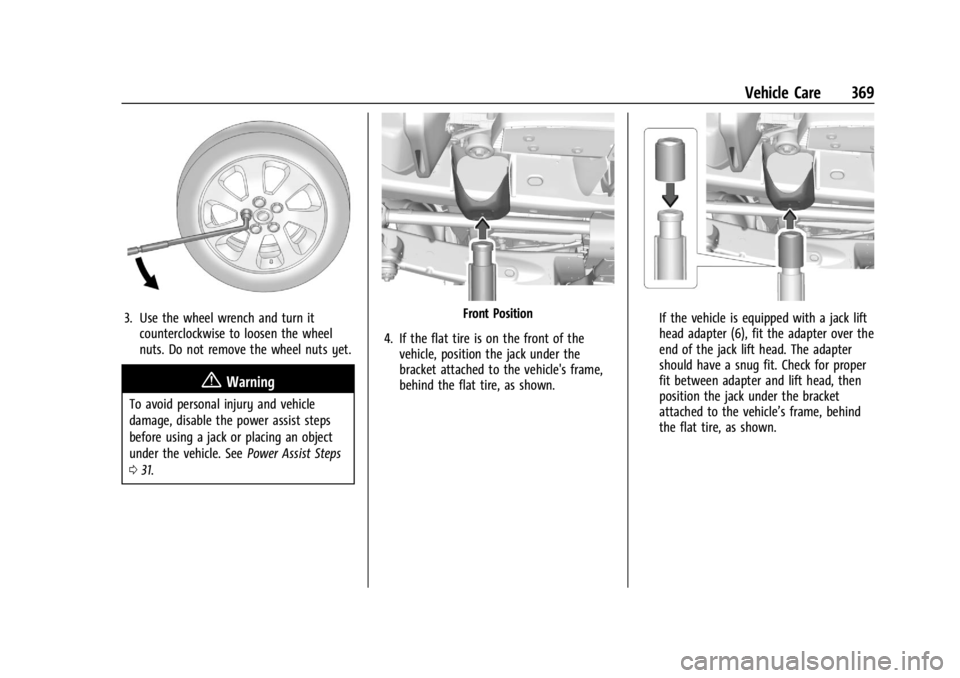
3. Use the wheel wrench and turn itcounterclockwise to loosen the wheel
nuts. Do not remove the wheel nuts yet.
{Warning
To avoid personal injury and vehicle
damage, disable the power assist steps
before using a jack or placing an object
under the vehicle. See Power Assist Steps
0 31.
Front Position
4. If the flat tire is on the front of the vehicle, position the jack under the
bracket attached to the vehicle's frame,
behind the flat tire, as shown.If the vehicle is equipped with a jack lift
head adapter (6), fit the adapter over the
end of the jack lift head. The adapter
should have a snug fit. Check for proper
fit between adapter and lift head, then
position the jack under the bracket
attached to the vehicle’s frame, behind
the flat tire, as shown.
Page 386 of 440
GMC Sierra/Sierra Denali 2500 HD/3500 HD Owner Manual (GMNA-
Localizing-U.S./Canada-16908340) - 2024 - CRC - 12/7/22
384 Vehicle Care
Cleaning Underhood Components
Caution
Do not power wash any component
under the hood that has this
e
symbol.
This could cause damage that would not
be covered by the vehicle warranty.
Solvents or aggressive cleaners may harm
underhood components. The usages of these
chemicals should be avoided.
Recommend water only.
A pressure washer may be used, but care
must be utilized. The following criteria must
be followed:
.Water pressure must be kept below
14 000 KPa (2,000 PSI).
.Water temperature must be below 80 °C
(180 °F).
.Spray nozzle with a 40 degree wide angle
spray pattern or wider must be used.
.Nozzle must be kept at least 30 cm (1 ft)
away from all surfaces. Automatic Car Wash
Caution
Some automatic car washes can cause
damage to the vehicle, wheels and
ground effects. Automatic car washes are
not recommended, due to lack of
clearance for the undercarriage and/or
wide rear tires and wheels.
Caution
Automatic car washes can cause damage
to the vehicle, wheels, ground effects,
and convertible top (if equipped).
Do not use automatic car washes due to
lack of clearance for the undercarriage,
wide rear tires, and wheels.
If using an automatic car wash, follow with
the car wash instructions. The windshield
wiper and rear window wiper, if equipped,
must be turned off. Remove any accessories
that may be damaged or interfere with the
car wash equipment.
See Power Assist Steps 031 for cleaning
information. Rinse the vehicle well, before washing and
after, to remove all cleaning agents
completely. If they are allowed to dry on
the surface, they could stain.
Dry the finish with a soft, clean chamois or
an all-cotton towel to avoid surface
scratches and water spotting.
Finish Care
Application of aftermarket clearcoat
sealant/wax materials is not recommended.
If painted surfaces are damaged, see your
dealer to have the damage assessed and
repaired. Foreign materials such as calcium
chloride and other salts, ice melting agents,
road oil and tar, tree sap, bird droppings,
chemicals from industrial chimneys, etc., can
damage the vehicle's finish if they remain
on painted surfaces. Wash the vehicle as
soon as possible. If necessary, use
non-abrasive cleaners that are marked safe
for painted surfaces to remove foreign
matter.
Occasional hand waxing or mild polishing
should be done to remove residue from the
paint finish. See your dealer for approved
cleaning products.