radio controls GMC SIERRA CLASSIC 2007 User Guide
[x] Cancel search | Manufacturer: GMC, Model Year: 2007, Model line: SIERRA CLASSIC, Model: GMC SIERRA CLASSIC 2007Pages: 674, PDF Size: 3.5 MB
Page 311 of 674
Radio Messages
CAL ERR (Calibration Error):The audio system
has been calibrated for your vehicle from the
factory. If CAL ERR appears on the display, it
means that the radio has not been congured
properly for the vehicle and must be returned to
your GM dealer for service.
LOCKED:This message is displayed when the
THEFTLOCK
®system has locked up. Take
the vehicle to your GM dealer for service.
If any error occurs repeatedly, or if an error cannot
be corrected, contact your GM dealer.
Radio Messages for XM™ Only
SeeXM Radio Messages on page 332later in this
section for further detail.
Playing a Cassette Tape
The tape player is built to work best with tapes
that are up to 30 to 45 minutes long on each side.
Tapes longer than that are so thin they may not
work well in this player. The longer side with
the tape visible should face to the right. If you hearnothing or hear a garbled sound, the tape may not
be in squarely. Press the eject button to remove
the tape and start over.
If the ignition and radio are off, the tape can be
inserted, but will not play until ignition and
radio are on. If the ignition is on and the radio is
off, the tape can be inserted and will begin playing.
While the tape is playing, use the VOL, AUDIO,
and SEEK controls just as you do for the
radio. The cassette tape symbol will appear on the
display and an arrow showing which side of the
tape is playing. The tape player will play the other
side of the tape when it reaches the end.
Cassette tape adapter kits for portable CD players
will work in the cassette tape player. See “CD
Adapter Kits” later for more information.
The tape bias is set automatically when a metal or
chrome tape is inserted.
If an error appears on the display, see “Cassette
Tape Messages” later in this section.
311
Page 321 of 674
To scan preset stations, press and hold either
the SCAN or the TYPE arrows for more than
four seconds. PSC will appear on the display and
you will hear a double beep. The radio will go to a
preset station, play for a few seconds, then go on to
the next preset station. Press either the SCAN or
the TYPE arrows again to stop scanning presets.
The radio will only scan stations with a strong signal
that are in the selected band.
Setting Preset Stations
Up to 30 stations (six FM1, six FM2, and six AM,
six XM1 and six XM2 (if equipped)), can be
programed on the six numbered pushbuttons, by
performing the following steps:
1. Turn the radio on.
2. Press BAND to select FM1, FM2, AM, or XM1
or XM2.
3. Tune in the desired station.
4. Press and hold one of the six numbered
pushbuttons until you hear a beep.
Whenever that numbered pushbutton is
pressed, the station that was set will return for
that pushbutton.
5. Repeat the steps for each pushbutton.To store an equalization setting to a preset station
perform the following:
1. Tune to the preset station.
2. Press and release the AUTO EQ
(equalization) button to select the equalization
setting.
Once the equalization no longer appears on
the display, the equalization will be set for that
preset station.
Setting the Tone (Bass/Treble)
AUDIO:Push and release the AUDIO knob until
BASS or TREB appears on the display. Turn
the knob to increase or to decrease. The display
will show the bass or treble level. If a station
is weak or noisy, decrease the treble.
To adjust the bass or treble to the middle position
while it is displayed, push and hold the AUDIO
knob. The radio will produce one beep and adjust
the display level to the middle position.
To adjust all tone and speaker controls to the
middle position, push and hold the AUDIO knob
when no tone or speaker controls are displayed.
ALL CENTERED will appear on the display
and you will hear a beep.
321
Page 322 of 674
AUTO EQ (Automatic Equalization):Press this
button to select customized equalization settings
designed for country/western, jazz, talk, pop, rock,
and classical.
The radio will save separate AUTO EQ settings
for each preset and source.
If the radio is equipped with the Bose
®audio
system, the equalization settings are either
CUSTOM or TALK.
Adjusting the Speakers (Balance/Fade)
AUDIO:To adjust the balance between the
right and the left speakers, push and release the
AUDIO knob until BAL (balance) appears on
the display. Turn the knob to move the sound
toward the right or the left speakers.
To adjust the fade between the front and rear
speakers, push and release the AUDIO knob until
FAD (fade) appears on the display. Turn the
knob to move the sound toward the front or the
rear speakers.
To adjust the balance or fade to the middle
position while it is displayed, push and hold the
AUDIO knob. The radio will produce one beep and
adjust the display level to the middle position.To adjust all tone and speaker controls to the
middle position, push and hold the AUDIO knob
when no tone or speaker controls are displayed.
ALL CENTERED will appear on the display
and you will hear a beep.
Finding a Program Type (PTY) Station
(RDS and XM™)
To select and nd a desired PTY perform the
following:
1. Press the TYPE button to activate program
type select mode. P-TYPE and the last
selected PTY will appear on the display.
2. Turn the TYPE knob or press and release the
TYPE button to select a PTY.
3. Once the desired PTY is displayed, press
either the TYPE or the SEEK arrows to
select and to take you to the PTY’s rst
station.
4. To go to another station within that PTY,
press the TYPE button then, press either
the TYPE or the SEEK arrows once. If
the PTY is not displayed, go back to Step 1.
5. Press either the TYPE or the SEEK arrows
twice to exit program type select mode.
322
Page 347 of 674
Rear Seat Audio (RSA)
This feature allows rear seat passengers to listen
to any of the sources: radio, cassette tapes,
CDs, or DVDs. However, the rear seat passengers
can only control the sources that the front seat
passengers are not listening to. For example, rear
seat passengers may listen to and control
cassette tapes, CDs, or DVDs through the
headphones while the driver listens to the radio
through the front speakers. The rear seat
passengers have control of the volume for each
set of headphones.
The front seat audio controls always have priority
over the RSA controls. If the front seat
passengers switch the source for the main radio to
a remote source, the RSA will not be able to
control the source. You can operate the rear seat
audio when the main radio is off.
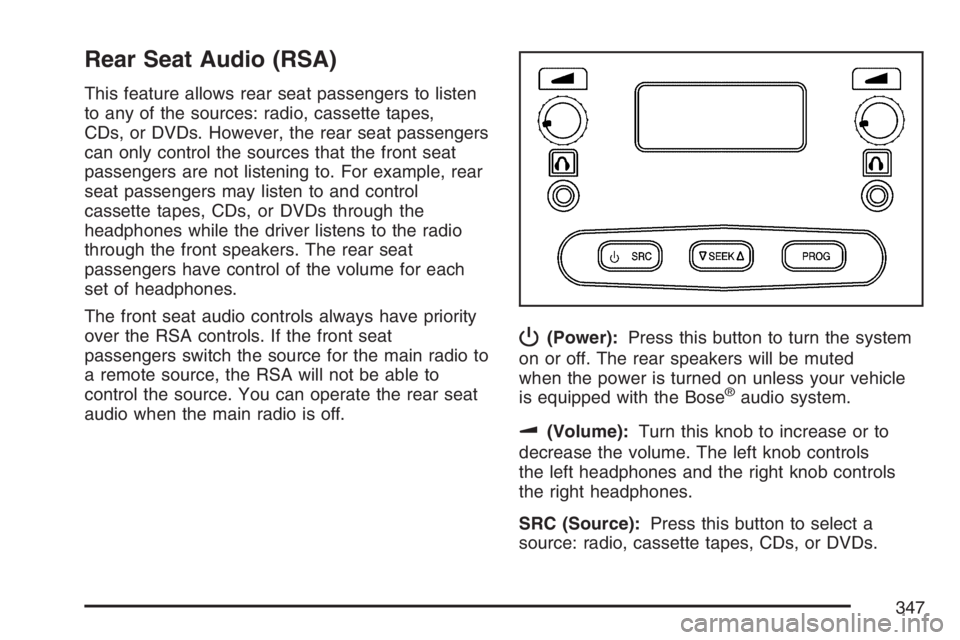
P(Power):Press this button to turn the system
on or off. The rear speakers will be muted
when the power is turned on unless your vehicle
is equipped with the Bose
®audio system.
u(Volume):Turn this knob to increase or to
decrease the volume. The left knob controls
the left headphones and the right knob controls
the right headphones.
SRC (Source):Press this button to select a
source: radio, cassette tapes, CDs, or DVDs.
347
Page 349 of 674
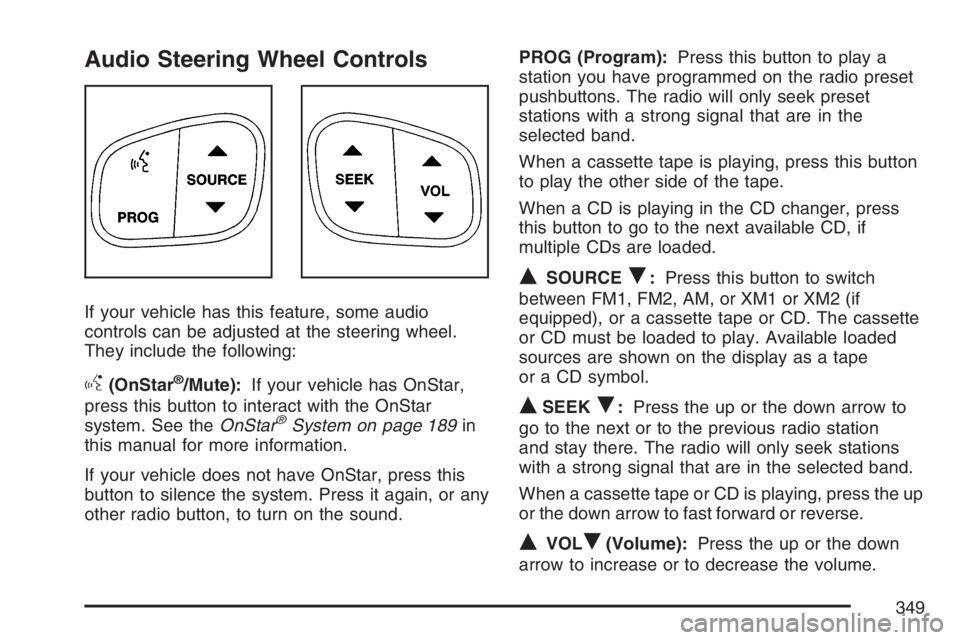
Audio Steering Wheel Controls
If your vehicle has this feature, some audio
controls can be adjusted at the steering wheel.
They include the following:
g(OnStar®/Mute):If your vehicle has OnStar,
press this button to interact with the OnStar
system. See theOnStar
®System on page 189in
this manual for more information.
If your vehicle does not have OnStar, press this
button to silence the system. Press it again, or any
other radio button, to turn on the sound.PROG (Program):Press this button to play a
station you have programmed on the radio preset
pushbuttons. The radio will only seek preset
stations with a strong signal that are in the
selected band.
When a cassette tape is playing, press this button
to play the other side of the tape.
When a CD is playing in the CD changer, press
this button to go to the next available CD, if
multiple CDs are loaded.
QSOURCER:Press this button to switch
between FM1, FM2, AM, or XM1 or XM2 (if
equipped), or a cassette tape or CD. The cassette
or CD must be loaded to play. Available loaded
sources are shown on the display as a tape
or a CD symbol.
QSEEKR:Press the up or the down arrow to
go to the next or to the previous radio station
and stay there. The radio will only seek stations
with a strong signal that are in the selected band.
When a cassette tape or CD is playing, press the up
or the down arrow to fast forward or reverse.
QVOLR(Volume):Press the up or the down
arrow to increase or to decrease the volume.
349
Page 660 of 674
Appearance Care (cont.)
Washing Your Vehicle.............................. 592
Weatherstrips........................................... 592
Windshield and Wiper Blades................... 594
Ashtray(s).................................................... 229
Audio System(s).......................................... 289
AM-FM Radio.......................................... 291
Audio Steering Wheel Controls................. 349
Care of Your Cassette Tape Player.......... 350
Care of Your CD and DVD Player............ 352
Care of Your CDs and DVDs................... 352
Chime Level Adjustment........................... 353
Fixed Mast Antenna................................. 353
Radio with Cassette and CD.................... 304
Radio with CD......................................... 294
Radio with Six-Disc CD............................ 318
Rear Seat Audio (RSA)............................ 347
Setting the Time for Radios with
Radio Data Systems (RDS).................. 291
Setting the Time for Radios without
Radio Data Systems (RDS).................. 290
Theft-Deterrent Feature............................ 348
Understanding Radio Reception............... 350
XM™ Satellite Radio Antenna System...... 353
Automatic Headlamp System....................... 223Automatic Transmission
Fluid...............................................494, 497
Operation................................................. 140
Auxiliary Roof Mounted Lamp Switch.......... 226
B
Battery........................................................ 520
Battery Warning Light.................................. 253
Before Leaving on a Long Trip.................... 398
Brake
Anti-Lock Brake System (ABS)................. 361
Emergencies............................................ 363
Parking.................................................... 169
System Warning Light.............................. 254
Brakes........................................................ 517
Braking....................................................... 360
Braking in Emergencies............................... 363
Break-In, New Vehicle................................. 134
Bulb Replacement....................................... 532
Center High-Mounted Stoplamp (CHMSL)
and Cargo Lamp.................................. 537
Front Turn Signal, Sidemarker and
Daytime Running Lamps....................... 534
Halogen Bulbs......................................... 532
660
Page 669 of 674
Overheated Engine Protection
Operating Mode....................................... 508
Owner Checks and Services....................... 625
Owners, Canadian.......................................... 3
P
Paint, Damage............................................ 596
Park (P)
Shifting Into............................................. 170
Shifting Out of......................................... 172
Parking
Brake....................................................... 169
Over Things That Burn............................ 173
Passenger Airbag Status Indicator............... 250
Passenger Sensing System......................... 103
Passing....................................................... 369
Passlock
®.................................................... 133
Pickup Conversion to Chassis Cab.............. 423
Power
Accessory Outlet(s).................................. 228
Door Locks.............................................. 121
Electrical System..................................... 599
Lumbar Controls........................................ 11
Retained Accessory (RAP)....................... 137
Seat.......................................................... 10Power (cont.)
Steering Fluid.......................................... 515
Windows.................................................. 130
Programmable Automatic Door Locks.......... 123
Q
Questions and Answers About Safety Belts ... 26
R
Radios........................................................ 289
AM-FM Radio.......................................... 291
Care of Your Cassette Tape Player.......... 350
Care of Your CD and DVD Player............ 352
Care of Your CDs and DVDs................... 352
Radio with Cassette and CD.................... 304
Radio with CD......................................... 294
Radio with Six-Disc CD............................ 318
Rear Seat Audio...................................... 347
Setting the Time for Radios with Radio
Data Systems (RDS)............................ 291
Setting the Time for Radios without
Radio Data Systems (RDS).................. 290
Theft-Deterrent......................................... 348
Understanding Reception......................... 350
669
Page 672 of 674
Spare Tire (cont.)
Removing................................................ 566
Storing..................................................... 584
Specications, Capacities............................ 609
Speedometer............................................... 246
Starting Your Engine................................... 137
Steering...................................................... 367
Steering Wheel Controls, Audio................... 349
Steering Wheel, Tilt Wheel.......................... 213
Storage Areas
Center Console Storage Area................... 202
Cupholder(s)............................................ 202
Front Storage Area.................................. 202
Glove Box................................................ 202
Stuck in Sand, Mud, Ice, or Snow............... 406
Sun Visors.................................................. 131
Sunroof....................................................... 205
Swing-Out Windows.................................... 131
T
Tachometer................................................. 246
Tailgate....................................................... 127
Taillamps
Turn Signal, Stoplamps and Back-up
Lamps.................................................. 539Theft-Deterrent, Radio................................. 348
Theft-Deterrent Systems.............................. 131
Content Theft-Deterrent............................ 131
Passlock
®................................................ 133
Tilt Wheel.................................................... 213
Tires........................................................... 543
Aluminum or Chrome-Plated Wheels,
Cleaning............................................... 594
Buying New Tires..................................... 556
Chains..................................................... 562
Changing a Flat Tire................................ 564
Cleaning.................................................. 595
Different Size........................................... 558
Dual Tire Operation.................................. 552
If a Tire Goes Flat................................... 563
Ination - Tire Pressure............................ 551
Inspection and Rotation............................ 553
Installing the Spare Tire........................... 571
Removing the Flat Tire............................. 571
Removing the Spare Tire and Tools......... 566
Secondary Latch System ......................... 580
Spare Tire................................................ 588
Storing a Flat or Spare Tire and Tools..... 584
Tire Sidewall Labeling.............................. 544
Tire Terminology and Denitions............... 548
672