key GMC SIERRA CLASSIC 2007 Owner's Manual
[x] Cancel search | Manufacturer: GMC, Model Year: 2007, Model line: SIERRA CLASSIC, Model: GMC SIERRA CLASSIC 2007Pages: 674, PDF Size: 3.5 MB
Page 135 of 674
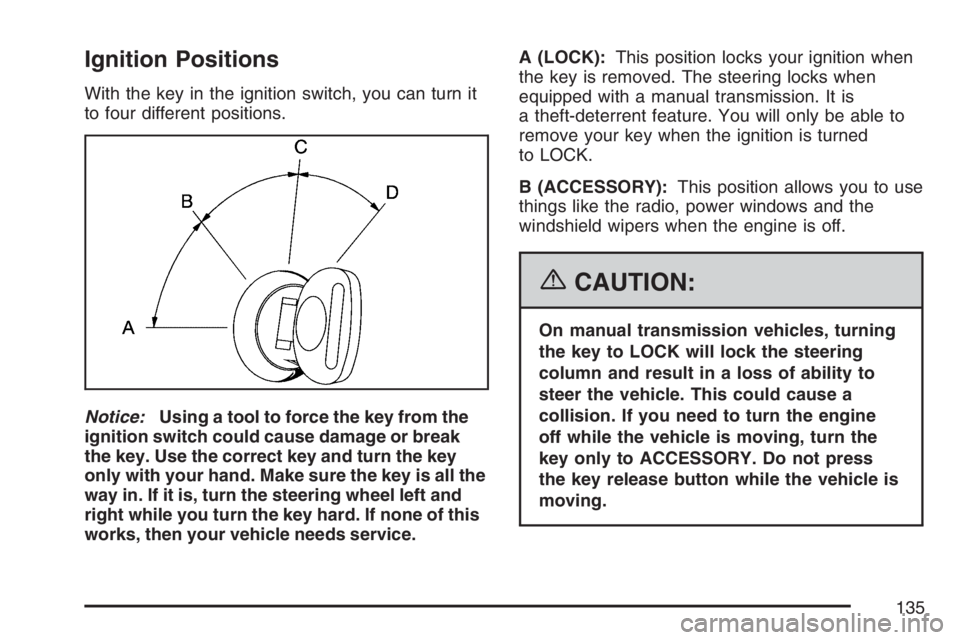
Ignition Positions
With the key in the ignition switch, you can turn it
to four different positions.
Notice:Using a tool to force the key from the
ignition switch could cause damage or break
the key. Use the correct key and turn the key
only with your hand. Make sure the key is all the
way in. If it is, turn the steering wheel left and
right while you turn the key hard. If none of this
works, then your vehicle needs service.A (LOCK):This position locks your ignition when
the key is removed. The steering locks when
equipped with a manual transmission. It is
a theft-deterrent feature. You will only be able to
remove your key when the ignition is turned
to LOCK.
B (ACCESSORY):This position allows you to use
things like the radio, power windows and the
windshield wipers when the engine is off.
{CAUTION:
On manual transmission vehicles, turning
the key to LOCK will lock the steering
column and result in a loss of ability to
steer the vehicle. This could cause a
collision. If you need to turn the engine
off while the vehicle is moving, turn the
key only to ACCESSORY. Do not press
the key release button while the vehicle is
moving.
135
Page 136 of 674
C (RUN):This is the position for driving.
The battery could be drained if you leave the key
in the ACCESSORY or RUN position with the
engine off. You may not be able to start your
vehicle if the battery is allowed to drain for
an extended period of time.
D (START):This position starts your engine.
Key In the Ignition
Never leave your vehicle with the keys inside, as it
is an easy target for joy riders or thieves. If you
leave the key in the ignition and park your vehicle,
a chime will sound, when you open the driver’s
door. Always remember to remove your key from
the ignition and take it with you. This will lock
your ignition and transaxle. Also, always remember
to lock the doors.
The battery could be drained if you leave the key
in the ignition while your vehicle is parked.
You may not be able to start your vehicle after it
has been parked for an extended period of time.
Key Release Button
(Manual Transmission)
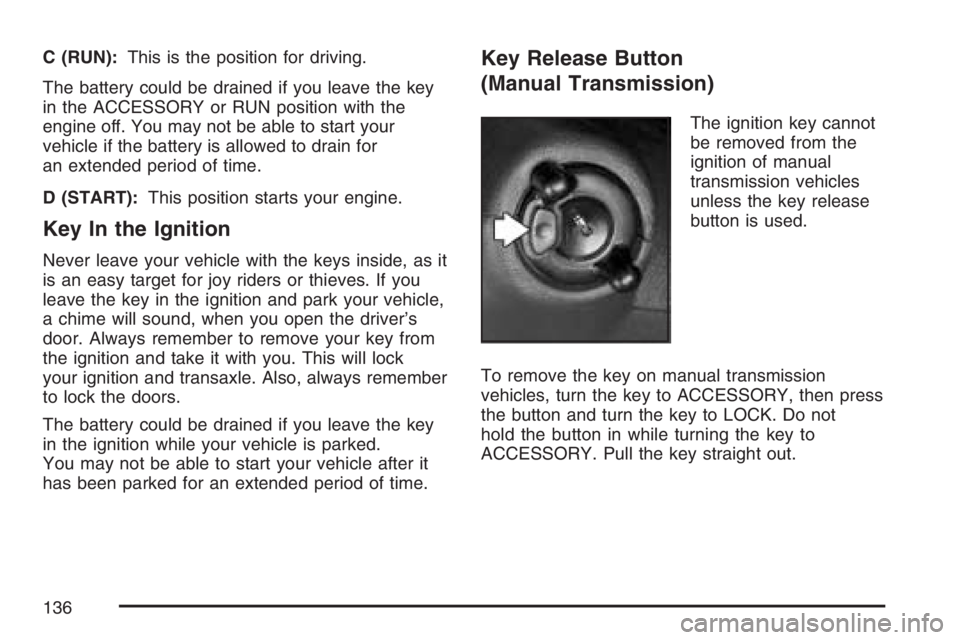
The ignition key cannot
be removed from the
ignition of manual
transmission vehicles
unless the key release
button is used.
To remove the key on manual transmission
vehicles, turn the key to ACCESSORY, then press
the button and turn the key to LOCK. Do not
hold the button in while turning the key to
ACCESSORY. Pull the key straight out.
136
Page 137 of 674
Retained Accessory Power (RAP)
If the vehicle has Retained Accessory Power
(RAP), certain features will continue to operate for
up to 10 minutes after the ignition key is turned
to LOCK unless a door is opened.
Starting the Engine
Your vehicle has a Starter Motor Control. This
feature assists in starting the engine and protects
the electrical system. This feature may cause
the engine to crank even after the ignition key is
not in START.
Automatic Transmission
Move your shift lever to PARK (P) or
NEUTRAL (N). Your engine will not start in any
other position — that is a safety feature. To restart
when you are already moving, use NEUTRAL (N)
only. If you have a diesel engine refer to the
diesel supplement for the starting procedure.Notice:Do not try to shift to PARK (P) if your
vehicle is moving. If you do, you could
damage the transmission. Shift to PARK (P)
only when your vehicle is stopped.
Manual Transmission
The gear selector should be in NEUTRAL (N) and
the parking brake engaged. Hold the clutch
pedal to the oor and start the engine. Your
vehicle will not start if the clutch pedal is not all
the way down — that is a safety feature.
137
Page 138 of 674
Starting Procedure
1. With your foot off the accelerator pedal, turn
the ignition key to START. When the engine
starts, let go of the key. The idle speed will go
down as your engine gets warm. Do not
race the engine immediately after starting it.
Operate the engine and transmission
gently until the oil warms up and lubricates all
moving parts.
Your vehicle has a Computer-Controlled
Cranking System. This feature assists in
starting the engine and protects the electrical
system. If the ignition key is turned to the
START, and then released when the engine
begins cranking, the engine will continue
cranking until the vehicle starts or until
it exceeds the maximum cranking time allowed,
approximately 15 seconds to prevent cranking
motor damage. To prevent gear damage,
this system also prevents cranking if the
engine is already running. The engine cranking
can be stopped by turning the ignition switch
to the ACCESSORY or LOCK.Notice:Holding your key in START for longer
than 15 seconds at a time will disengage
the starter motor, cause your battery to be
drained much sooner, and add excessive heat
that can damage your starter motor. Try not
to hold the key in START for longer than
15 seconds and wait about 15 seconds
between each try to help avoid draining your
battery or damaging your starter.
2. If it does not start within 10 seconds, push the
accelerator pedal all the way to the oor,
while you hold the ignition key in START.
When the engine starts, let go of the key and
let up on the accelerator pedal. Wait about
15 seconds between each try.
138
Page 139 of 674
When starting your engine in very cold weather
(below 0°F or−18°C), do this:
1. With your foot off the accelerator pedal, turn
the ignition key to START and hold it there up
to 15 seconds. When the engine starts, let
go of the key.
2. If your engine still will not start, or starts but
then stops, it could be ooded with too much
gasoline. Try pushing your accelerator pedal all
the way to the oor and holding it there as you
hold the key in START for about three seconds.
When the engine starts, let go of the key and
accelerator. If the vehicle starts briey but then
stops again, do the same thing, but this time
keep the pedal down for ve or six seconds.
This clears the extra gasoline from the engine.
Notice:Your engine is designed to work with
the electronics in your vehicle. If you add
electrical parts or accessories, you could
change the way the engine operates. Before
adding electrical equipment, check with your
dealer. If you do not, your engine might not
perform properly. Any resulting damage would
not be covered by your vehicle’s warranty.Engine Coolant Heater
In very cold weather, 0°F (−18°C) or colder, the
engine coolant heater can help. You will get easier
starting and better fuel economy during engine
warm-up. Usually, the coolant heater should
be plugged in a minimum of four hours prior to
starting your vehicle. At temperatures above
32°F (0°C), use of the coolant heater is not
required. Your vehicle may also have an internal
thermostat in the plug end of the cord. This
will prevent operation of the engine coolant
heater when the temperature is at or above
0°F (−18 C°) as noted on the cord.
To Use the Engine Coolant Heater
1. Turn off the engine.
2. Open the hood and unwrap the electrical
cord. The cord is located on the driver’s
side of the engine compartment, near
the power steering uid reservoir. If you have
a diesel engine, refer to diesel supplement
for location.
139
Page 143 of 674
DRIVE (D):This position is for normal driving. It
provides the best fuel economy for your vehicle. If
you need more power for passing, and you are:
Going less than about 35 mph (55 km/h), push
your accelerator pedal about halfway down.
Going about 35 mph (55 km/h) or more, push
the accelerator all the way down.
By doing this, the vehicle shifts down to the
next gear and has more power.
Downshifting the transmission in slippery road
conditions could result in skidding, see “Skidding”
underLoss of Control on page 371
DRIVE (D) can be used when towing a trailer,
carrying a heavy load, driving on steep hills, or for
off-road driving. You may want to shift the
transmission to THIRD (3) or, if necessary, a lower
gear selection if the transmission shifts too often.
If your vehicle has the Allison Transmission
®, it will
shift into rst range when DRIVE (D) is selected.
As vehicle speed increases, the transmission
will upshift automatically through each available
range up to SIXTH (6). As the vehicle slows,
the transmission will downshift automatically.The Allison Transmission
®uses a shift stabilization
feature that adjusts the transmission shifting to
the current driving conditions in order to reduce
rapid upshifts and downshifts. This shift
stabilization feature is designed to determine
before making an upshift if the engine will be able
to maintain vehicle speed by analyzing things
such as throttle position, vehicle load, and
hill grade. If the shift stabilization feature
determines that current vehicle speed cannot be
maintained, the transmission does not upshift
and instead holds the current gear. In some cases,
this may appear to be a delayed shift, however
the transmission is operating normally.
The Allison Transmission
®also uses adaptive shift
controls. Adaptive shift controls continually
compares key shift parameters to pre-programmed
ideal shift conditions. The Allison Transmission
®
constantly makes adjustments to improve vehicle
performance according to the way the vehicle is
being used, such as with a heavy load. During this
adaptive shift controls process, some shifts may
feel different as the transmission determines
optimum settings for a particular shift.
143
Page 162 of 674
Shifting Into NEUTRAL
{CAUTION:
Shifting the transfer case to NEUTRAL
can cause your vehicle to roll even if the
transmission is in PARK (P). You or
someone else could be seriously injured.
Be sure to set the parking brake before
placing the transfer case in NEUTRAL.
SeeParking Brake on page 169.
To shift the transfer case to NEUTRAL do the
following:
1. Make sure the vehicle is parked so that it will
not roll.
2. Set the parking brake and apply the regular
brake pedal.
3. Start the vehicle or turn the ignition to RUN.4. Put the transmission in NEUTRAL (N).
5. Shift the transfer case to Two-Wheel
Drive High.
6. Simultaneously press and hold the Two-Wheel
Drive High and Four-Wheel Drive Low buttons
for 10 seconds. The red NEUTRAL light will
come on when the transfer case shift to
NEUTRAL is complete.
7. If the engine is running, shift the transmission
to REVERSE (R) for one second, then shift
the transmission to DRIVE (D) for one second,
or FIRST (1) for vehicles that have a manual
transmission.
8. Turn the engine off, by turning the key to
ACCESSORY.
9. Place the transmission shift lever in
PARK (P).
10. Release the parking brake prior to moving the
vehicle.
11. Turn the ignition to LOCK.
162
Page 168 of 674
5. Simultaneously press and hold the Two-Wheel
Drive High and Four-Wheel Drive Low buttons
for 10 seconds. The red NEUTRAL light will
come on when the transfer case shift to
NEUTRAL is complete.
6. Start the engine if it is not already running.
7. Press and hold the foot brake pedal and
Shift the transmission to REVERSE (R)
for one second, then shift the transmission for
one second to DRIVE (D) for an automatic
transmission, or FIRST (1) for vehicles
that have a manual transmission. Then let out
the clutch. This is to ensure the transfer
case is in NEUTRAL. If not, repeat this
procedure starting at Step 3.
8. Turn the engine off, by turning the key to
ACCESSORY.
9. Place the transmission shift lever in PARK (P)
for an automatic transmission, or FIRST (1)
for vehicles that have a manual transmission.
10. Release the parking brake prior to moving the
vehicle.
11. Turn the ignition to LOCK.Shifting Out of NEUTRAL
To shift out of NEUTRAL:
1. Set the parking brake and press and hold the
regular brake pedal.
2. Shift the transmission to NEUTRAL (N) for an
automatic transmission, or press the clutch
pedal for vehicles that have a manual
transmission. Then turn the ignition to RUN
with the engine off.
3. Press the button for the desired transfer case
shift position (Two-Wheel Drive High,
Four-Wheel Drive High, or Four-Wheel
Drive Low).
4. After the transfer case has shifted out of
NEUTRAL the red light will go out.
5. Release the parking brake prior to moving the
vehicle.
168
Page 170 of 674
Shifting Into Park (P)
(Automatic Transmission)
{CAUTION:
It can be dangerous to get out of your
vehicle if the shift lever is not fully in
PARK (P) with the parking brake rmly set.
Your vehicle can roll. If you have left the
engine running, the vehicle can move
suddenly. You or others could be injured.
To be sure your vehicle will not move, even
when you are on fairly level ground, use
the steps that follow. With four-wheel drive,
if your transfer case is in NEUTRAL, your
vehicle will be free to roll, even if your shift
lever is in PARK (P). So, be sure the
transfer case is in a drive gear — not in
NEUTRAL. If you are pulling a trailer, see
Towing a Trailer on page 429.1. Hold the brake pedal down with your right foot
and set the parking brake.
2. Move the shift lever into the PARK (P)
position by pulling the shift lever toward
you and moving it up as far as it will go.
3. If your vehicle has four-wheel drive, be sure
the transfer case is in a drive gear – not in
NEUTRAL.
4. Turn the ignition key to LOCK.
5. Remove the key and take it with you. If you
can leave your vehicle with the ignition key in
your hand, your vehicle is in PARK (P).
170
Page 172 of 674
If torque lock does occur, you may need to have
another vehicle push yours a little uphill to
take some of the pressure from the parking pawl
in the transmission, so you can pull the shift
lever out of PARK (P).
Shifting Out of Park (P)
(Automatic Transmission)
Your vehicle has an automatic transmission shift
lock control system which locks the shift lever
in PARK (P) when the ignition is in the LOCK
position. You have to fully apply your regular
brakes before you can shift from PARK (P) when
the ignition is in RUN. SeeAutomatic Transmission
Operation on page 140and “Torque Lock”
underShifting Out of Park (P) (Automatic
Transmission) on page 172.
If your vehicle has an Allison Transmission
®, the
transmission has a park pawl designed to hold the
higher weight of commercial medium duty
trucks. Therefore, the Allison Transmission
®uses
larger parts than other automatic transmissions.
These larger parts may sometimes make a
clunking noise when the selector lever is movedfrom DRIVE (D) or REVERSE (R) to PARK (P).
This is normal and there is no damage occurring
during these shifts.
If you cannot shift out of PARK (P), ease pressure
on the shift lever and push the shift lever all the
way up into PARK (P) as you maintain brake
application. Then, move the shift lever into
the gear you want.
If you ever hold the brake pedal down but still can
not shift out of PARK (P), try this:
1. Turn the key to ACCESSORY. There is no
shift interlock in this key position.
2. Apply and hold the brake until the end of
Step 4.
3. Shift the transmission to NEUTRAL (N).
4. Start the vehicle and then shift to the gear
you want.
5. Have the system xed as soon as you can.
172