transmission GMC SIERRA CLASSIC 2007 Repair Manual
[x] Cancel search | Manufacturer: GMC, Model Year: 2007, Model line: SIERRA CLASSIC, Model: GMC SIERRA CLASSIC 2007Pages: 674, PDF Size: 3.5 MB
Page 265 of 674
Here are some situations you may experience with
your fuel gage. None of these indicate a problem
with the fuel gage.
At the gas station, the fuel pump shuts off
before the gage reads full.
It takes a little more or less fuel to ll up than
the fuel gage indicated. For example, the
gage may have indicated the tank was half full,
but it actually took a little more or less than
half the tank’s capacity to ll the tank.
The gage goes back to empty when you turn
off the ignition.
If you have a diesel engine, see “Fuel Gage” in
the Diesel Engine Supplement.
Low Fuel Warning Light
The light next to the fuel gage will come on briey
when you are starting the engine.
This light comes on when the fuel tank is low on
fuel. To turn it off, add fuel to the fuel tank.
SeeFuel on page 470.
Driver Information Center (DIC)
The Driver Information Center (DIC) display is
located on the instrument panel cluster, below the
speedometer. If your vehicle has DIC buttons,
they are located on the steering wheel. The DIC
can display information such as the trip odometer,
fuel economy, customization features, and
warning/status messages.
If your vehicle does not have DIC steering wheel
buttons, you will not have all of the features
listed. Scroll through the odometer, trip odometer,
engine hours, and selected range if your vehicle
has an Allison Transmission
®by pressing the
trip odometer reset stem located on the instrument
panel cluster. Turn off, or acknowledge, DIC
messages by pressing the trip odometer reset
stem. SeeSpeedometer and Odometer on
page 246for information on features for vehicles
without DIC buttons.
265
Page 266 of 674
If your vehicle has an Allison Transmission®and
the shift lever is in the MANUAL MODE (M)
position, the DIC will display the current gear
range. The DIC will also display the gear range as
it is shifted up or down. For example, if the gear
range is currently set to 6, the DIC will display
(6)54321. When thegear range is shifted down
one time, the DIC will display 6 (5)4321. See
Automatic Transmission Operation on page 140for
more information.
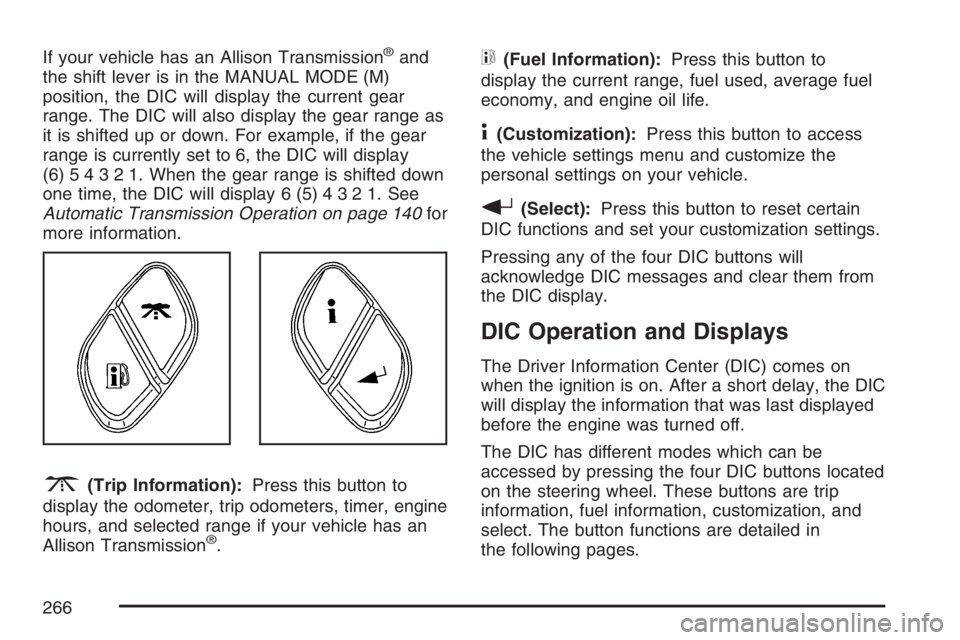
3(Trip Information):Press this button to
display the odometer, trip odometers, timer, engine
hours, and selected range if your vehicle has an
Allison Transmission
®.
t(Fuel Information):Press this button to
display the current range, fuel used, average fuel
economy, and engine oil life.
4(Customization):Press this button to access
the vehicle settings menu and customize the
personal settings on your vehicle.
r(Select):Press this button to reset certain
DIC functions and set your customization settings.
Pressing any of the four DIC buttons will
acknowledge DIC messages and clear them from
the DIC display.
DIC Operation and Displays
The Driver Information Center (DIC) comes on
when the ignition is on. After a short delay, the DIC
will display the information that was last displayed
before the engine was turned off.
The DIC has different modes which can be
accessed by pressing the four DIC buttons located
on the steering wheel. These buttons are trip
information, fuel information, customization, and
select. The button functions are detailed in
the following pages.
266
Page 268 of 674
Engine Hours:Press the trip information button
until ENGINE HOURS appears on the display.
This mode shows the total number of hours
the engine has run. Pressing and holding the reset
stem located on the instrument cluster for about
four seconds will also display the engine hour
information after the odometer is displayed when
the vehicle is off.
Selected Range:If your vehicle has an Allison
Transmission
®and the vehicle is in the MANUAL
MODE (M) position, press the trip information
button until SELECTED RANGE: M# appears on
the display. The DIC will display the current
gear range. For example, if the gear range is set
to 6, the DIC will display SELECTED RANGE: M6.
SeeAutomatic Transmission Operation on
page 140for more information.
Fuel Information Button
t
(Fuel Information):Press the fuel information
button to scroll through the range, fuel used,
average fuel economy, and the engine oil
life system.Fuel Range:Press the fuel information button
until RANGE appears on the display. This
mode shows the remaining distance you can drive
without refueling. It is based on fuel economy
and the fuel remaining in the fuel tank. The display
will show LOW if the fuel level is low.
The fuel economy data used to determine fuel
range is an average of recent driving conditions.
As your driving conditions change, this data is
gradually updated. Fuel range cannot be reset.
Fuel Used:Press the fuel information button until
FUEL USED appears on the display. This mode
shows the number of gallons or liters of fuel used
since the last reset of this menu item. To reset
the fuel used information, press and hold the select
button for one second while FUEL USED is
displayed.
Average Fuel Economy:Press the fuel
information button until AVG ECON appears on
the display. This mode shows how many miles per
gallon (MPG) or liters per 100 kilometers
(L/100 km) your vehicle is getting based on
current and past driving conditions.
268
Page 273 of 674
DRIVER DOOR AJAR
If the driver’s door is not fully closed, this message
will appear on the display and you will hear a
chime. Stop and turn off the vehicle, check
the door for obstructions, and close the door again.
Check to see if the message still appears on the
DIC. Pressing any of the four DIC buttons will
acknowledge the message and clear it from the
DIC display. If your vehicle does not have the four
DIC buttons, pressing the trip odometer reset
stem will acknowledge the message and clear it
from the DIC display.
ENGINE COOLANT HOT
If the cooling system temperature gets hot, this
message will appear in the DIC. Turn off the
air conditioning. If the message is still on, or if the
engine coolant temperature gage continues to
rise, pull the vehicle over when it is safe to do so.
SeeEngine Coolant Temperature Gage on
page 256for more information. Stop the vehicle
and let the engine idle in PARK (P) for a few
minutes, or NEUTRAL with the parking brake set
for manual transmissions, to allow the coolant
to reach a safe temperature. This message
will clear when the coolant temperature drops to
safe operating temperature.
ENGINE OVERHEATED
Notice:If you drive your vehicle while the
engine is overheating, severe engine damage
may occur. If an overheat warning appears
on the instrument panel cluster and/or
DIC, stop the vehicle as soon as possible.
Do not increase the engine speed above
normal idling speed. SeeEngine Overheating
on page 505for more information.
If the engine cooling system reaches unsafe
temperatures for operation, this message
will appear in the DIC and you will hear a chime.
Stop and turn off the vehicle as soon as it is
safe to do so to avoid severe damage. This
message will clear when the engine has cooled to
a safe operating temperature.
273
Page 276 of 674
PASSENGER DOOR AJAR
If the passenger’s door is not fully closed, this
message will appear on the display and you will
hear a chime. Stop and turn off the vehicle, check
the door for obstructions, and close the door
again. Check to see if the message still appears
on the DIC. Pressing any of the four DIC
buttons will acknowledge the message and clear it
from the DIC display. If your vehicle does not
have the four DIC buttons, pressing the trip
odometer reset stem will acknowledge the
message and clear it from the DIC display.
RANGE SHIFT INHIBITED
(Allison Transmission®Only)
If the transmission is unable to shift into a selected
gear, this message will appear on the DIC. The
electronic shift position indicator on the instrument
panel cluster may blink when this occurs. To
make the vehicle shift to the requested gear, you
may have to shift back to PARK (P) or
NEUTRAL (N) and re-select the desired gear.
REDUCED ENGINE POWER
This message is displayed when the cooling
system temperature gets too hot and the engine
further enters the engine coolant protection mode.
SeeEngine Overheating on page 505for further
information.
This message will also display when the vehicle’s
engine power is reduced. Reduced engine
power can affect the vehicle’s ability to accelerate.
If this message is on, but there is no reduction
in performance, proceed to your destination. The
performance may be reduced the next time
the vehicle is driven. The vehicle may be driven at
a reduced speed while this message is on, but
acceleration and speed may be reduced. Anytime
this message stays on, the vehicle should be
taken to your dealer for service as soon as
possible.
276
Page 280 of 674
TRANSMISSION HOT
Notice:If you drive your vehicle while the
transmission uid is overheating and the
transmission temperature warning is displayed
on the instrument panel cluster and/or DIC,
you can damage the transmission. This could
lead to costly repairs that would not be
covered by your warranty. Do not drive your
vehicle with overheated transmission uid
or while the transmission temperature warning
is displayed.
If the transmission uid temperature becomes
high, this message will appear on the DIC display.
When the transmission enters the protection
mode, you may notice a change in the
transmission shifting patterns. When the
transmission uid temperature returns to normal,
the display will turn off and the transmission
shifting patterns will return to normal.If the vehicle has the Tow/Haul mode, use this
feature if the transmission is operating at higher
temperatures and/or the following situations
exist, which can cause the transmission to operate
at higher temperatures:
Towing a trailer
Hot outside air temperatures
Hauling a large or heavy load
Over-loading
Low transmission uid level
High transmission uid level
Restricted air ow to the radiator and the
auxiliary transmission oil cooler
A temporary solution to hotter transmission
operating temperatures may be to let the
transmission cool down. If the transmission is
operated at higher temperatures on a frequent
basis, seeScheduled Maintenance (Gasoline
Engine) on page 617for the transmission
your vehicle is equipped with for the proper
transmission maintenance intervals. Also see
Transmission Temperature Gage on page 257for
more information.
280
Page 281 of 674
TRANS (Transmission) HOT IDLE
ENGINE
Notice:If you drive your vehicle while the
transmission uid is overheating and the
transmission temperature warning is displayed
on the instrument panel cluster and/or DIC,
you can damage the transmission. This could
lead to costly repairs that would not be
covered by your warranty. Do not drive your
vehicle with overheated transmission uid
or while the transmission temperature warning
is displayed.
If the transmission uid in the vehicle gets hot, this
message will appear on the DIC along with a
continuous chime. Driving with the transmission
uid temperature high can cause damage to
the vehicle. Stop the vehicle and let it idle to allow
the transmission to cool. This message will
clear and the chime will stop when the uid
temperature reaches a safe level. See
Transmission Temperature Gage on page 257.
TRANS (Transmission) IN WARM UP
(Allison Transmission®Only)
When temperatures are very cold, the transmission
will prevent certain operations such as shifts to
some ranges and engaging the torque converter
clutch to protect against damage. When active, the
DIC will display the message TRANS IN
WARM UP.
TURN SIGNAL ON
If a turn signal is left on for 3/4 of a mile (1.2 km),
this message will appear on the display and
you will hear a chime. Move the turn
signal/multifunction lever to the off position.
Pressing any of the four DIC buttons will
acknowledge the message and clear it from the
DIC display. If your vehicle does not have the
four DIC buttons, pressing the trip odometer reset
stem will acknowledge the message and clear
it from the DIC display.
281
Page 282 of 674
DIC Vehicle Customization
Your vehicle may have customization capabilities
that allow you to program some features to one
setting based on your preference. All of the
customizable options listed may not be available on
your vehicle. Only the options available will be
displayed on your Driver Information Center (DIC).
The default settings for the customization features
were set when your vehicle left the factory, but
may have been changed from their default
state since then.
To change feature preferences, make sure the
ignition is on and the vehicle is in PARK (P).
To avoid excessive drain on the battery, it
is recommended that the headlamps are turned
off. Press the customization button to scroll
through the available customizable options.
After pressing the customization button, VEHICLE
SETTINGS will momentarily display before
going to a customization option.
Lock Doors (Automatic Transmission only)
If you have an automatic transmission vehicle,
press the customization button until LOCK DOORS
appears in the display. To select your preference
for automatic locking, press the select button
while LOCK DOORS is displayed on the DIC.
Pressing the select button will scroll through the
following choices:
LOCK DOORS: IN GEAR (default):The doors
will lock when the vehicle is shifted out of
PARK (P).
LOCK DOORS: WITH SPEED:The doors will
lock when the vehicle speed is above
8 mph (13 km/h) for three seconds.
Choose one of the available options and press the
customization button while it is displayed on the
DIC to select it and move on to the next feature.
For more information on automatic door locks, see
Programmable Automatic Door Locks on
page 123.
282
Page 283 of 674
Unlock Doors (Automatic
Transmission only)
If you have an automatic transmission vehicle,
press the customization button until UNLOCK
DOORS appears in the display. To select
your preference for automatic unlocking, press the
select button while UNLOCK DOORS is displayed
on the DIC. Pressing the select button will
scroll through the following choices:
UNLOCK DOORS: IN PARK (default):All of the
doors will unlock when the vehicle is shifted
into PARK (P).
UNLOCK DRIVER: IN PARK:The driver’s door
will be unlocked when the vehicle is shifted
into PARK (P).
UNLOCK DOORS: KEY OUT:All of the doors
will unlock when the key is taken out of the
ignition.UNLOCK DOORS: MANUALLY:The doors will
not be unlocked automatically.
Choose one of the available options and press the
customization button while it is displayed on the
DIC to select it and move on to the next feature.
For more information on automatic door locks, see
Programmable Automatic Door Locks on
page 123.
Door Lock Delay (Crew Cab only)
If your DIC does not have this feature, you still
may be able to program the delayed locking
feature. SeeDelayed Locking on page 122for
more information.
When locking the doors with the power lock switch
or the Remote Keyless Entry (RKE) transmitter
and a door is open, the delayed locking feature will
delay locking the doors until ve seconds after
the last door is closed.
283
Page 363 of 674
Remember: ABS does not change the time you
need to get your foot up to the brake pedal or
always decrease stopping distance. If you get too
close to the vehicle in front of you, you will not have
time to apply your brakes if that vehicle suddenly
slows or stops. Always leave enough room up
ahead to stop, even though you have ABS.
Using ABS
Do not pump the brakes. Just hold the brake
pedal down rmly and let anti-lock work for you.
You may feel the brakes vibrate, or you may notice
some noise, but this is normal.
Braking in Emergencies
With ABS, you can steer and brake at the same
time. In many emergencies, steering can help you
more than even the very best braking.
Traction Assist System (TAS)
Your vehicle may have a Traction Assist
System (TAS) that limits wheel spin. This is
especially useful in slippery road conditions.
The system operates only if it senses that one or
both of the rear wheels are spinning or beginning
to lose traction. When this happens, the system
reduces engine power to limit wheel spin.
The traction control system is enabled every time
your vehicle is started. The system will activate
if it senses that any of the wheels are spinning or
beginning to lose traction.
You may hear or feel the system working or notice a
lack of accelerator response, but this is normal.
The Traction Assist System may operate on dry
roads under some conditions. When this happens,
you may notice a reduction in acceleration.
This is normal and doesn’t mean there’s a problem
with your vehicle. Examples of these conditions
include a hard acceleration in a turn, an abrupt
upshift or downshift of the transmission or driving
on rough roads.
363