audio GMC SIERRA DENALI 2004 User Guide
[x] Cancel search | Manufacturer: GMC, Model Year: 2004, Model line: SIERRA DENALI, Model: GMC SIERRA DENALI 2004Pages: 452, PDF Size: 3.02 MB
Page 204 of 452
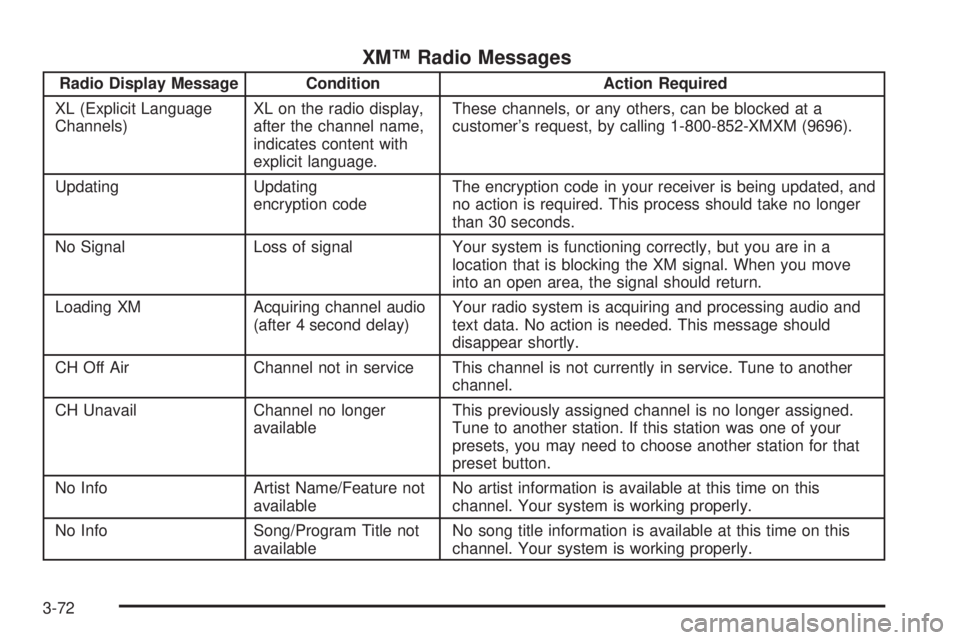
XMŸ Radio Messages
Radio Display Message Condition Action Required
XL (Explicit Language
Channels)XL on the radio display,
after the channel name,
indicates content with
explicit language.These channels, or any others, can be blocked at a
customer's request, by calling 1-800-852-XMXM (9696).
Updating Updating
encryption codeThe encryption code in your receiver is being updated, and
no action is required. This process should take no longer
than 30 seconds.
No Signal Loss of signal Your system is functioning correctly, but you are in a
location that is blocking the XM signal. When you move
into an open area, the signal should return.
Loading XM Acquiring channel audio
(after 4 second delay)Your radio system is acquiring and processing audio and
text data. No action is needed. This message should
disappear shortly.
CH Off Air Channel not in service This channel is not currently in service. Tune to another
channel.
CH Unavail Channel no longer
availableThis previously assigned channel is no longer assigned.
Tune to another station. If this station was one of your
presets, you may need to choose another station for that
preset button.
No Info Artist Name/Feature not
availableNo artist information is available at this time on this
channel. Your system is working properly.
No Info Song/Program Title not
availableNo song title information is available at this time on this
channel. Your system is working properly.
3-72
Page 206 of 452
Playing a Cassette Tape
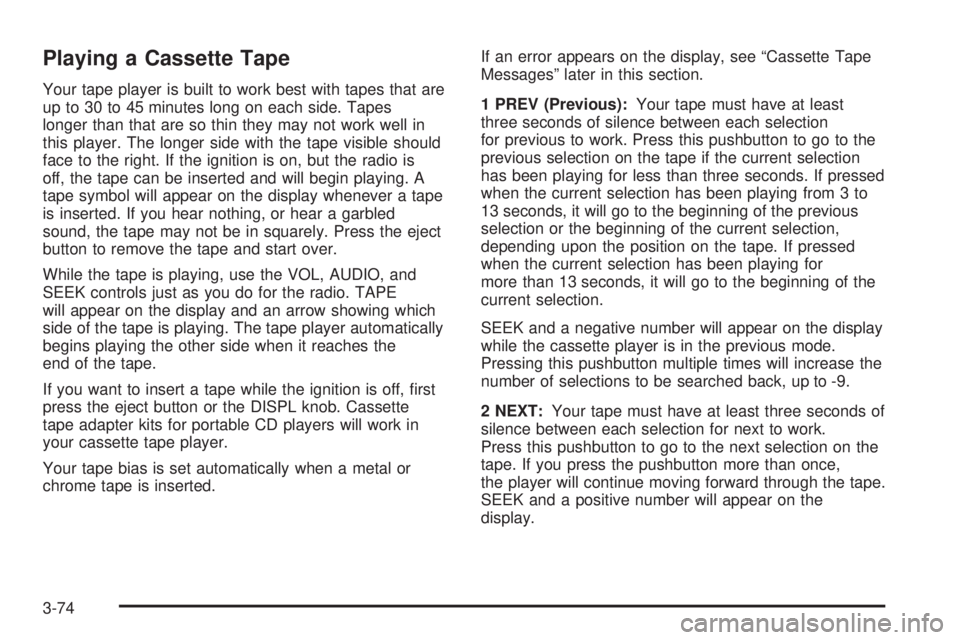
Your tape player is built to work best with tapes that are
up to 30 to 45 minutes long on each side. Tapes
longer than that are so thin they may not work well in
this player. The longer side with the tape visible should
face to the right. If the ignition is on, but the radio is
off, the tape can be inserted and will begin playing. A
tape symbol will appear on the display whenever a tape
is inserted. If you hear nothing, or hear a garbled
sound, the tape may not be in squarely. Press the eject
button to remove the tape and start over.
While the tape is playing, use the VOL, AUDIO, and
SEEK controls just as you do for the radio. TAPE
will appear on the display and an arrow showing which
side of the tape is playing. The tape player automatically
begins playing the other side when it reaches the
end of the tape.
If you want to insert a tape while the ignition is off, ®rst
press the eject button or the DISPL knob. Cassette
tape adapter kits for portable CD players will work in
your cassette tape player.
Your tape bias is set automatically when a metal or
chrome tape is inserted.If an error appears on the display, see ªCassette Tape
Messagesº later in this section.
1 PREV (Previous):Your tape must have at least
three seconds of silence between each selection
for previous to work. Press this pushbutton to go to the
previous selection on the tape if the current selection
has been playing for less than three seconds. If pressed
when the current selection has been playing from 3 to
13 seconds, it will go to the beginning of the previous
selection or the beginning of the current selection,
depending upon the position on the tape. If pressed
when the current selection has been playing for
more than 13 seconds, it will go to the beginning of the
current selection.
SEEK and a negative number will appear on the display
while the cassette player is in the previous mode.
Pressing this pushbutton multiple times will increase the
number of selections to be searched back, up to -9.
2 NEXT:Your tape must have at least three seconds of
silence between each selection for next to work.
Press this pushbutton to go to the next selection on the
tape. If you press the pushbutton more than once,
the player will continue moving forward through the tape.
SEEK and a positive number will appear on the
display.
3-74
Page 209 of 452
Playing a CD
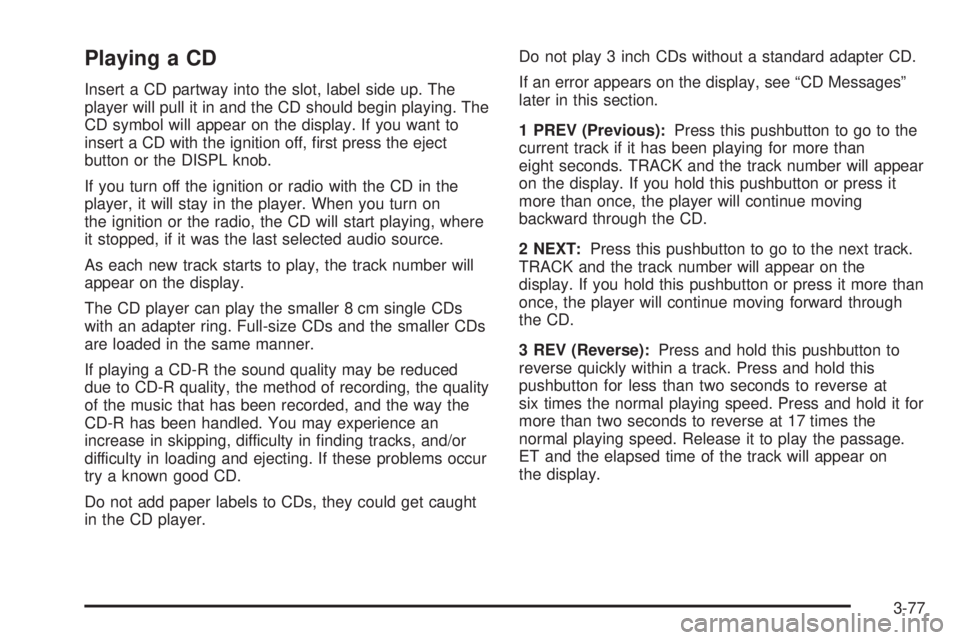
Insert a CD partway into the slot, label side up. The
player will pull it in and the CD should begin playing. The
CD symbol will appear on the display. If you want to
insert a CD with the ignition off, ®rst press the eject
button or the DISPL knob.
If you turn off the ignition or radio with the CD in the
player, it will stay in the player. When you turn on
the ignition or the radio, the CD will start playing, where
it stopped, if it was the last selected audio source.
As each new track starts to play, the track number will
appear on the display.
The CD player can play the smaller 8 cm single CDs
with an adapter ring. Full-size CDs and the smaller CDs
are loaded in the same manner.
If playing a CD-R the sound quality may be reduced
due to CD-R quality, the method of recording, the quality
of the music that has been recorded, and the way the
CD-R has been handled. You may experience an
increase in skipping, difficulty in ®nding tracks, and/or
difficulty in loading and ejecting. If these problems occur
try a known good CD.
Do not add paper labels to CDs, they could get caught
in the CD player.Do not play 3 inch CDs without a standard adapter CD.
If an error appears on the display, see ªCD Messagesº
later in this section.
1 PREV (Previous):Press this pushbutton to go to the
current track if it has been playing for more than
eight seconds. TRACK and the track number will appear
on the display. If you hold this pushbutton or press it
more than once, the player will continue moving
backward through the CD.
2 NEXT:Press this pushbutton to go to the next track.
TRACK and the track number will appear on the
display. If you hold this pushbutton or press it more than
once, the player will continue moving forward through
the CD.
3 REV (Reverse):Press and hold this pushbutton to
reverse quickly within a track. Press and hold this
pushbutton for less than two seconds to reverse at
six times the normal playing speed. Press and hold it for
more than two seconds to reverse at 17 times the
normal playing speed. Release it to play the passage.
ET and the elapsed time of the track will appear on
the display.
3-77
Page 212 of 452
Rear Seat Audio (RSA)
This feature allows rear seat passengers to listen to any
of the audio sources: radio, cassette tapes, CDs, or
DVDs, depending on your vehicles options. However,
the rear seat passengers can only control the music
sources that the front seat passengers are not listening
to. For example, rear seat passengers may listen to
a cassette tape through headphones while the driver
listens to the radio through the front speakers. The rear
seat passengers have control of the volume for each
set of headphones. The front seat audio controls always
override the RSA controls.
Rear Seat Audio Controls
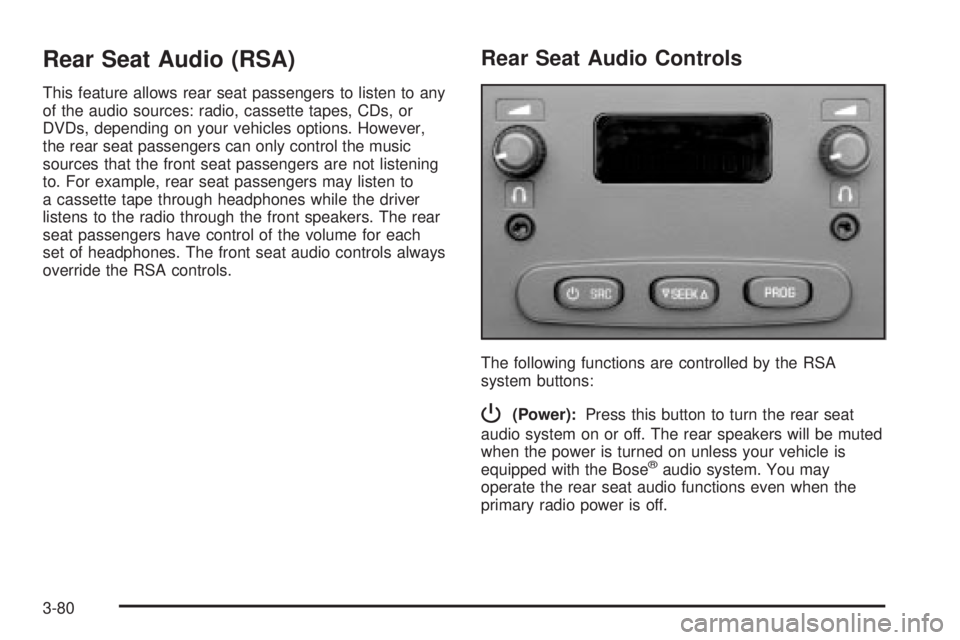
The following functions are controlled by the RSA
system buttons:
P(Power):Press this button to turn the rear seat
audio system on or off. The rear speakers will be muted
when the power is turned on unless your vehicle is
equipped with the Bose
žaudio system. You may
operate the rear seat audio functions even when the
primary radio power is off.
3-80
Page 213 of 452
u(Volume):Turn the knob to increase or to decrease
volume. The left knob controls the left headphone and
the right knob controls the right headphone.
SRC (Source):Press this button to select an audio
source: radio, cassette tapes, CDs, or DVDs, depending
on your vehicles options.
xSEEKw:While listening to FM1, FM2, or AM,
press the up or the down arrow to tune to the next or to
the previous station and stay there. If the front radio
is in use, you cannot seek through different stations.
While listening to a cassette tape, press the up or
the down arrow to hear the next or the previous
selection. If the cassette tape on the front radio is in
use, you cannot seek through different selections on a
tape.
While listening to a CD, press the up arrow to hear the
next track on the CD. Press the down arrow to go
back to the start of the current track if more than eight
seconds have played. If the CD player on the front radio
is in use, you cannot seek through different tracks.PROG (Program):The front passengers must be
listening to something different for each of these
functions to work:
·Press this button to go to the preset radio stations
set on the pushbuttons on the main radio.
·When a cassette tape is playing, press this button
to go to the other side of the tape.
·When a CD is playing in the radio, press this button
to go back to the beginning of the CD.
·When a CD is playing in the CD changer, press this
button to select the next CD.
3-81
Page 217 of 452
Theft-Deterrent Feature
THEFTLOCKžis designed to discourage theft of your
radio. The feature works automatically by learning
a portion of the Vehicle Identi®cation Number (VIN).
If the radio is moved to a different vehicle, it will
not operate and LOCKED will appear on the display.
When the radio and vehicle are turned off, the blinking
red light indicates that THEFTLOCK
žis armed.
With THEFTLOCK
žactivated, your radio will not operate
if stolen.
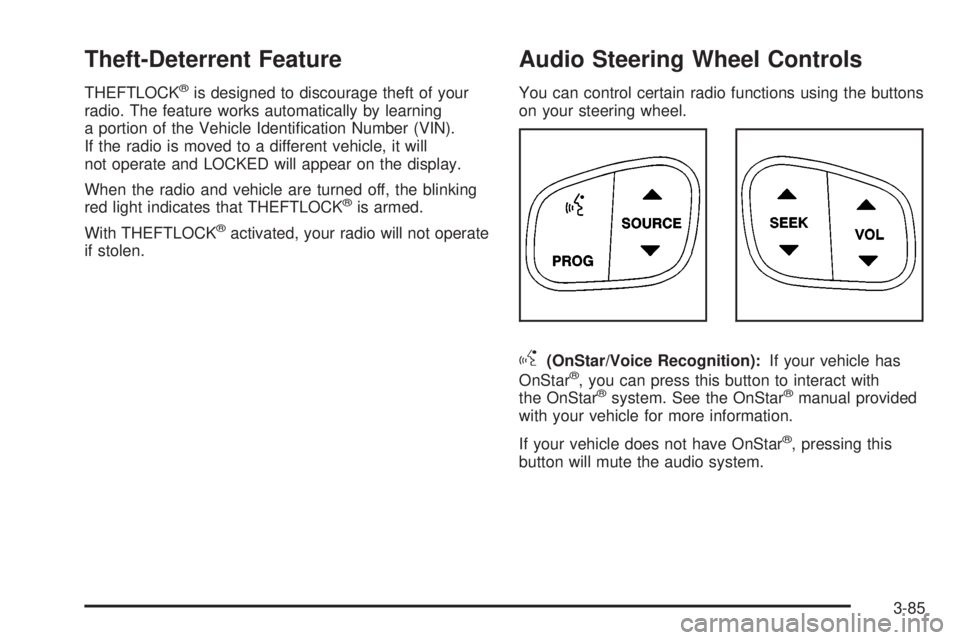
Audio Steering Wheel Controls
You can control certain radio functions using the buttons
on your steering wheel.
g(OnStar/Voice Recognition):If your vehicle has
OnStarž, you can press this button to interact with
the OnStaržsystem. See the OnStaržmanual provided
with your vehicle for more information.
If your vehicle does not have OnStar
ž, pressing this
button will mute the audio system.
3-85
Page 332 of 452
Replacing Brake System Parts
The braking system on a vehicle is complex. Its many
parts have to be of top quality and work well together if
the vehicle is to have really good braking. Your
vehicle was designed and tested with top-quality GM
brake parts. When you replace parts of your braking
system Ð for example, when your brake linings
wear down and you need new ones put in Ð be sure
you get new approved GM replacement parts. If you do
not, your brakes may no longer work properly. For
example, if someone puts in brake linings that are wrong
for your vehicle, the balance between your front and
rear brakes can change Ð for the worse. The braking
performance you have come to expect can change
in many other ways if someone puts in the wrong
replacement brake parts.
Battery
Your new vehicle comes with a maintenance free
ACDelcožbattery. When it is time for a new battery, get
one that has the replacement number shown on the
original battery's label. We recommend an ACDelco
ž
battery. SeeEngine Compartment Overview on
page 5-10for battery location.
Warning:Battery posts, terminals and related
accessories contain lead and lead compounds,
chemicals known to the State of California to cause
cancer and reproductive harm. Wash hands after
handling.
Vehicle Storage
If you are not going to drive your vehicle for 25 days
or more, remove the black, negative (-) cable from the
battery. This will help keep your battery from
running down.
{CAUTION:
Batteries have acid that can burn you and gas
that can explode. You can be badly hurt if you
are not careful. See
Jump Starting on
page 5-41
for tips on working around a battery
without getting hurt.
Contact your dealer to learn how to prepare your
vehicle for longer storage periods.
Also, for your audio system, see
Theft-Deterrent
Feature on page 3-85.
5-40
Page 405 of 452
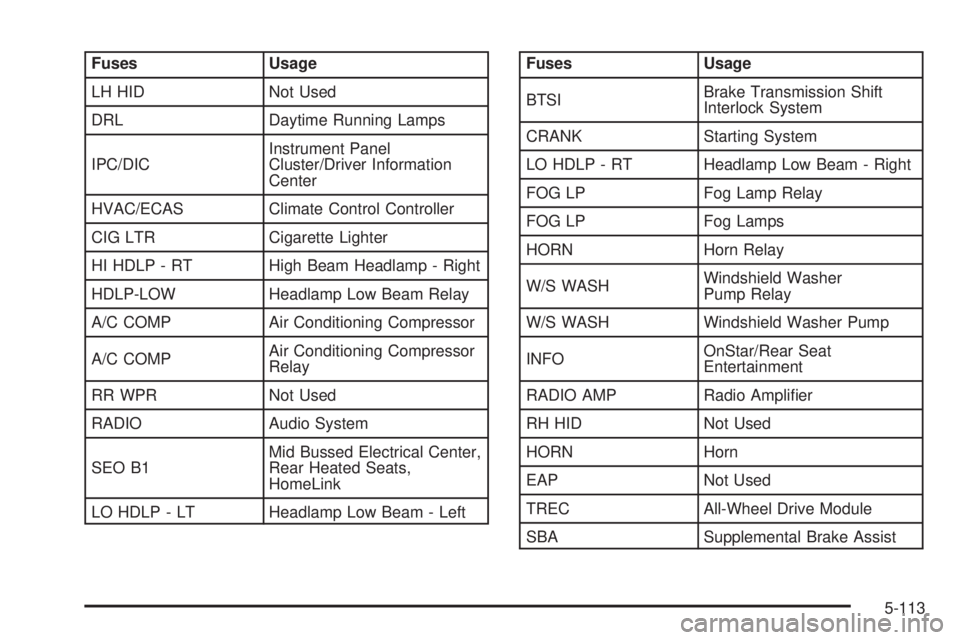
Fuses Usage
LH HID Not Used
DRL Daytime Running Lamps
IPC/DICInstrument Panel
Cluster/Driver Information
Center
HVAC/ECAS Climate Control Controller
CIG LTR Cigarette Lighter
HI HDLP - RT High Beam Headlamp - Right
HDLP-LOW Headlamp Low Beam Relay
A/C COMP Air Conditioning Compressor
A/C COMPAir Conditioning Compressor
Relay
RR WPR Not Used
RADIO Audio System
SEO B1Mid Bussed Electrical Center,
Rear Heated Seats,
HomeLink
LO HDLP - LT Headlamp Low Beam - LeftFuses Usage
BTSIBrake Transmission Shift
Interlock System
CRANK Starting System
LO HDLP - RT Headlamp Low Beam - Right
FOG LP Fog Lamp Relay
FOG LP Fog Lamps
HORN Horn Relay
W/S WASHWindshield Washer
Pump Relay
W/S WASH Windshield Washer Pump
INFOOnStar/Rear Seat
Entertainment
RADIO AMP Radio Ampli®er
RH HID Not Used
HORN Horn
EAP Not Used
TREC All-Wheel Drive Module
SBA Supplemental Brake Assist
5-113
Page 438 of 452
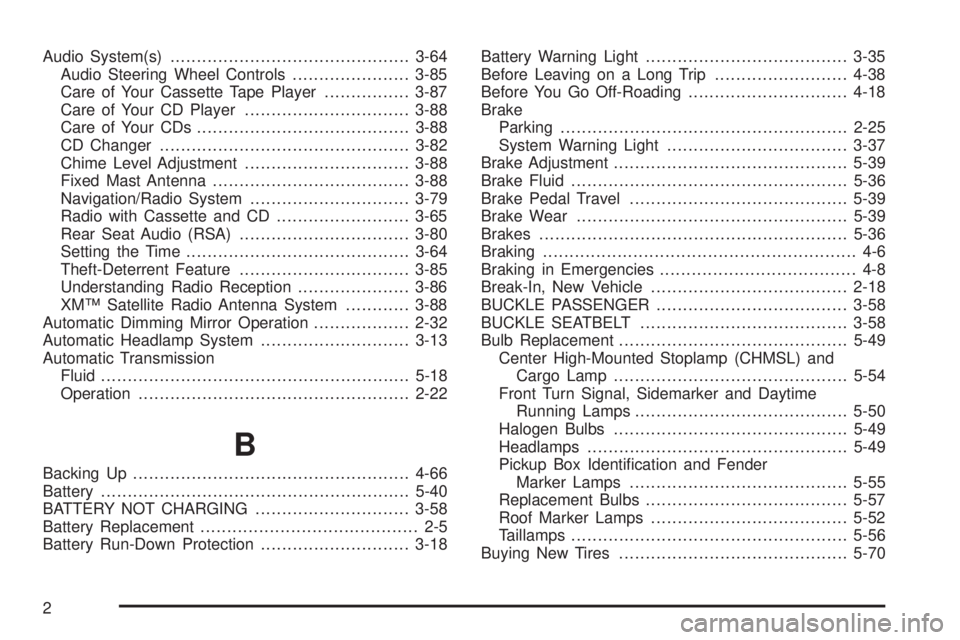
Audio System(s).............................................3-64
Audio Steering Wheel Controls......................3-85
Care of Your Cassette Tape Player................3-87
Care of Your CD Player...............................3-88
Care of Your CDs........................................3-88
CD Changer...............................................3-82
Chime Level Adjustment...............................3-88
Fixed Mast Antenna.....................................3-88
Navigation/Radio System..............................3-79
Radio with Cassette and CD.........................3-65
Rear Seat Audio (RSA)................................3-80
Setting the Time..........................................3-64
Theft-Deterrent Feature................................3-85
Understanding Radio Reception.....................3-86
XMŸ Satellite Radio Antenna System............3-88
Automatic Dimming Mirror Operation..................2-32
Automatic Headlamp System............................3-13
Automatic Transmission
Fluid..........................................................5-18
Operation...................................................2-22
B
Backing Up....................................................4-66
Battery..........................................................5-40
BATTERY NOT CHARGING.............................3-58
Battery Replacement......................................... 2-5
Battery Run-Down Protection............................3-18Battery Warning Light......................................3-35
Before Leaving on a Long Trip.........................4-38
Before You Go Off-Roading..............................4-18
Brake
Parking......................................................2-25
System Warning Light..................................3-37
Brake Adjustment............................................5-39
Brake Fluid....................................................5-36
Brake Pedal Travel.........................................5-39
Brake Wear...................................................5-39
Brakes..........................................................5-36
Braking........................................................... 4-6
Braking in Emergencies..................................... 4-8
Break-In, New Vehicle.....................................2-18
BUCKLE PASSENGER....................................3-58
BUCKLE SEATBELT.......................................3-58
Bulb Replacement...........................................5-49
Center High-Mounted Stoplamp (CHMSL) and
Cargo Lamp............................................5-54
Front Turn Signal, Sidemarker and Daytime
Running Lamps........................................5-50
Halogen Bulbs............................................5-49
Headlamps.................................................5-49
Pickup Box Identi®cation and Fender
Marker Lamps.........................................5-55
Replacement Bulbs......................................5-57
Roof Marker Lamps.....................................5-52
Taillamps....................................................5-56
Buying New Tires...........................................5-70
2
Page 447 of 452
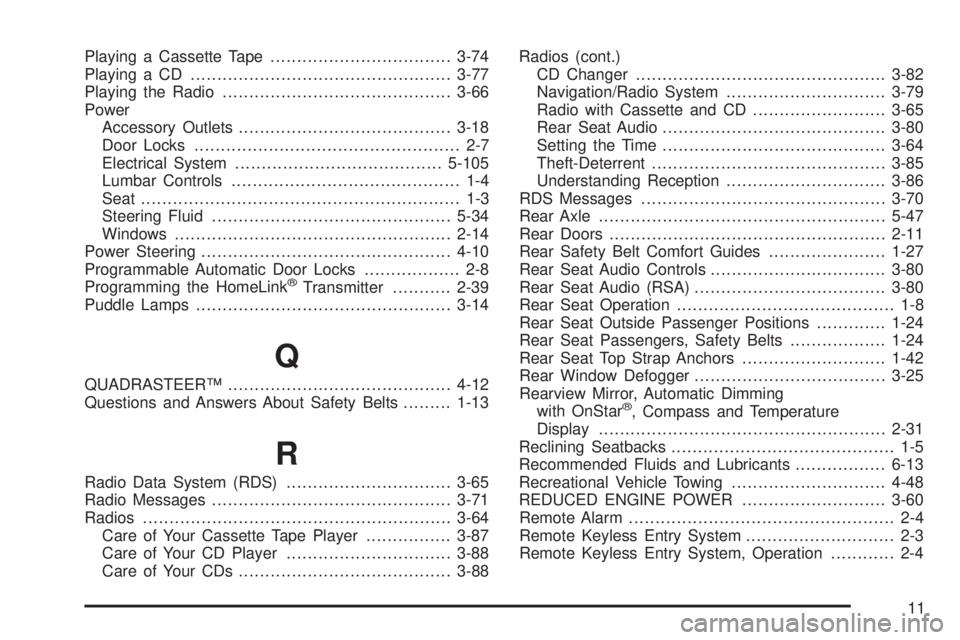
Playing a Cassette Tape..................................3-74
Playing a CD.................................................3-77
Playing the Radio...........................................3-66
Power
Accessory Outlets........................................3-18
Door Locks.................................................. 2-7
Electrical System.......................................5-105
Lumbar Controls........................................... 1-4
Seat............................................................ 1-3
Steering Fluid.............................................5-34
Windows....................................................2-14
Power Steering...............................................4-10
Programmable Automatic Door Locks.................. 2-8
Programming the HomeLink
žTransmitter...........2-39
Puddle Lamps................................................3-14
Q
QUADRASTEERŸ..........................................4-12
Questions and Answers About Safety Belts.........1-13
R
Radio Data System (RDS)...............................3-65
Radio Messages.............................................3-71
Radios..........................................................3-64
Care of Your Cassette Tape Player................3-87
Care of Your CD Player...............................3-88
Care of Your CDs........................................3-88Radios (cont.)
CD Changer...............................................3-82
Navigation/Radio System..............................3-79
Radio with Cassette and CD.........................3-65
Rear Seat Audio..........................................3-80
Setting the Time..........................................3-64
Theft-Deterrent............................................3-85
Understanding Reception..............................3-86
RDS Messages..............................................3-70
Rear Axle......................................................5-47
Rear Doors....................................................2-11
Rear Safety Belt Comfort Guides......................1-27
Rear Seat Audio Controls.................................3-80
Rear Seat Audio (RSA)....................................3-80
Rear Seat Operation......................................... 1-8
Rear Seat Outside Passenger Positions.............1-24
Rear Seat Passengers, Safety Belts..................1-24
Rear Seat Top Strap Anchors...........................1-42
Rear Window Defogger....................................3-25
Rearview Mirror, Automatic Dimming
with OnStar
ž, Compass and Temperature
Display......................................................2-31
Reclining Seatbacks.......................................... 1-5
Recommended Fluids and Lubricants.................6-13
Recreational Vehicle Towing.............................4-48
REDUCED ENGINE POWER...........................3-60
Remote Alarm.................................................. 2-4
Remote Keyless Entry System............................ 2-3
Remote Keyless Entry System, Operation............ 2-4
11