wheel GMC SIERRA DENALI 2004 User Guide
[x] Cancel search | Manufacturer: GMC, Model Year: 2004, Model line: SIERRA DENALI, Model: GMC SIERRA DENALI 2004Pages: 452, PDF Size: 3.02 MB
Page 112 of 452
Shifting Into Park (P)
{CAUTION:
It can be dangerous to get out of your vehicle
if the shift lever is not fully in PARK (P) with
the parking brake ®rmly set. Your vehicle can
roll. If you have left the engine running, the
vehicle can move suddenly. You or others
could be injured. To be sure your vehicle will
not move, even when you are on fairly level
ground, use the steps that follow. With
four-wheel drive, if your transfer case is in
NEUTRAL, your vehicle will be free to roll,
even if your shift lever is in PARK (P). So, be
sure the transfer case is in a drive gear Ð not
in NEUTRAL. If you are pulling a trailer, see
Towing a Trailer on page 4-58.
1. Hold the brake pedal down with your right foot and
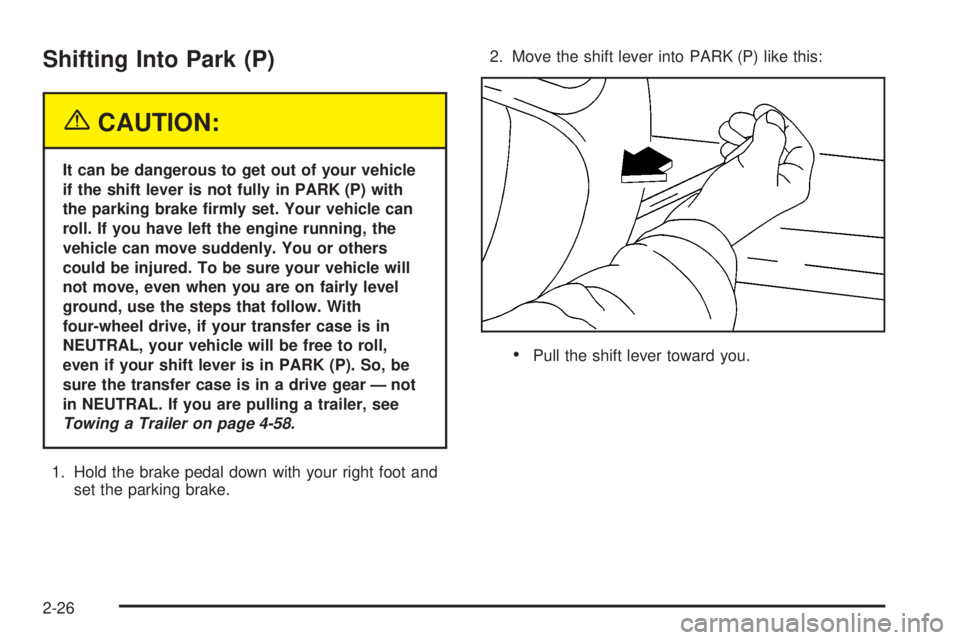
set the parking brake.2. Move the shift lever into PARK (P) like this:
·Pull the shift lever toward you.
2-26
Page 123 of 452
OnStaržServices
One of the following plans is normally included for a
speci®c duration with each vehicle equipped with
OnStar
ž. You can upgrade or extend your OnStarž
service plan to meet your needs.
Safe and Sound Plan
·
Automatic Noti®cation of Air Bag Deployment
·Emergency Services
·Roadside Assistance
·Stolen Vehicle Assistance
·AccidentAssist
·Remote Door Unlock
·Remote Diagnostics
·Online Concierge
Directions and Connections Plan
·
All Safe and Sound Plan services
·Route Support
·RideAssist
·Information and Convenience Services
Luxury and Leisure Plan
·
All Directions and Connections Plan services
·Personal Concierge
OnStaržPersonal Calling
With OnStaržPersonal Calling, you have a safer way to
stay connected while driving. It's a hands-free wireless
phone that's integrated into your vehicle. You can place
calls nationwide using voice-activated dialing with no
contracts and no additional roaming charges. To ®nd out
more about OnStar
žPersonal Calling, refer to the
OnStaržowner's guide in your vehicle's glove box, or
call OnStaržat 1-888-4-ONSTAR (1-888-466-7827).
OnStaržVirtual Advisor
With OnStaržVirtual Advisor you can listen to your
favorite news, entertainment and information topics,
such as traffic and weather reports, stock quotes
and sports scores. You listen to your e-mail through
your vehicle's speakers, and reply with your hands on
the wheel and your eyes on the road.
2-37
Page 124 of 452
OnStaržSteering Wheel Controls
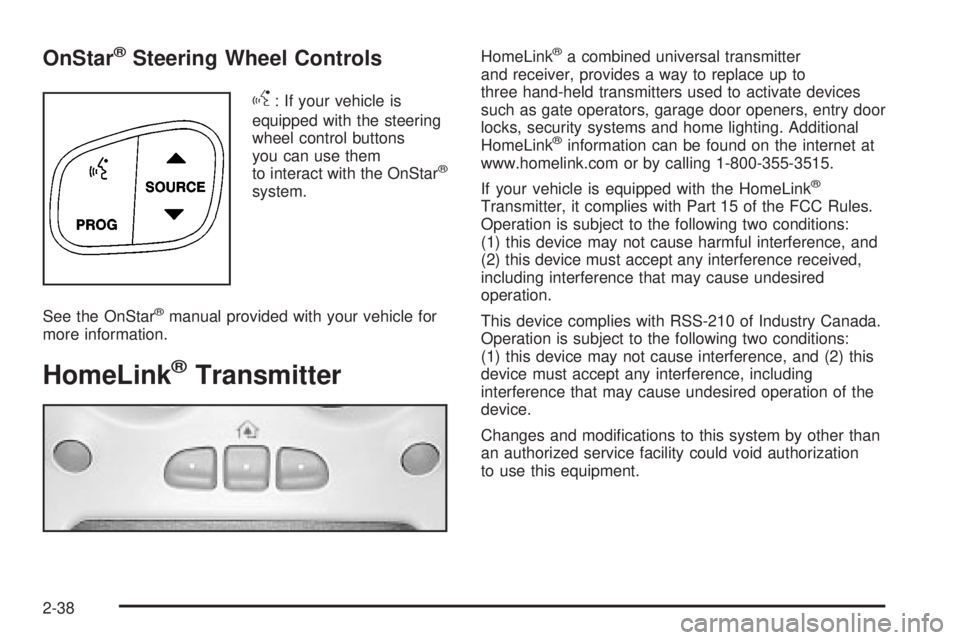
g
: If your vehicle is
equipped with the steering
wheel control buttons
you can use them
to interact with the OnStar
ž
system.
See the OnStar
žmanual provided with your vehicle for
more information.
HomeLinkžTransmitter
HomeLinkža combined universal transmitter
and receiver, provides a way to replace up to
three hand-held transmitters used to activate devices
such as gate operators, garage door openers, entry door
locks, security systems and home lighting. Additional
HomeLink
žinformation can be found on the internet at
www.homelink.com or by calling 1-800-355-3515.
If your vehicle is equipped with the HomeLink
ž
Transmitter, it complies with Part 15 of the FCC Rules.
Operation is subject to the following two conditions:
(1) this device may not cause harmful interference, and
(2) this device must accept any interference received,
including interference that may cause undesired
operation.
This device complies with RSS-210 of Industry Canada.
Operation is subject to the following two conditions:
(1) this device may not cause interference, and (2) this
device must accept any interference, including
interference that may cause undesired operation of the
device.
Changes and modi®cations to this system by other than
an authorized service facility could void authorization
to use this equipment.
2-38
Page 133 of 452
Instrument Panel Overview...............................3-2
Hazard Warning Flashers................................3-4
Other Warning Devices...................................3-4
Horn.............................................................3-5
Tilt Wheel.....................................................3-5
Turn Signal/Multifunction Lever.........................3-5
Exterior Lamps.............................................3-12
Interior Lamps..............................................3-16
Accessory Power Outlets...............................3-18
Ashtrays and Cigarette Lighter........................3-19
Climate Controls............................................3-19
Dual Automatic Climate Control System...........3-19
Warning Lights, Gages and Indicators.............3-27
Warning Lights, Gages, and Indicators.............3-27
Instrument Panel Cluster................................3-28
Speedometer and Odometer...........................3-29
Tachometer.................................................3-29
Safety Belt Reminder Light.............................3-29
Air Bag Readiness Light................................3-30
Air Bag Off Light..........................................3-30
Passenger Air Bag Status Indicator.................3-33
Battery Warning Light....................................3-35
Voltmeter Gage............................................3-36
Brake System Warning Light..........................3-37
Anti-Lock Brake System Warning Light.............3-38
Engine Coolant Temperature Gage..................3-38Transmission Temperature Gage.....................3-39
Malfunction Indicator Lamp.............................3-40
Oil Pressure Gage........................................3-43
Cruise Control Light......................................3-44
Tow/Haul Mode Light....................................3-44
Fuel Gage...................................................3-45
Low Fuel Warning Light.................................3-45
Driver Information Center (DIC).......................3-46
DIC Operation and Displays...........................3-46
DIC Warnings and Messages.........................3-57
Audio System(s).............................................3-64
Setting the Time...........................................3-64
Radio with Cassette and CD..........................3-65
Navigation/Radio System...............................3-79
Rear Seat Audio (RSA).................................3-80
CD Changer................................................3-82
Theft-Deterrent Feature..................................3-85
Audio Steering Wheel Controls.......................3-85
Radio Reception...........................................3-86
Care of Your Cassette Tape Player.................3-87
Care of Your CDs.........................................3-88
Care of Your CD Player................................3-88
Fixed Mast Antenna......................................3-88
XMŸ Satellite Radio Antenna System
(48 Contiguous US States).........................3-88
Chime Level Adjustment................................3-88
Section 3 Instrument Panel
3-1
Page 135 of 452
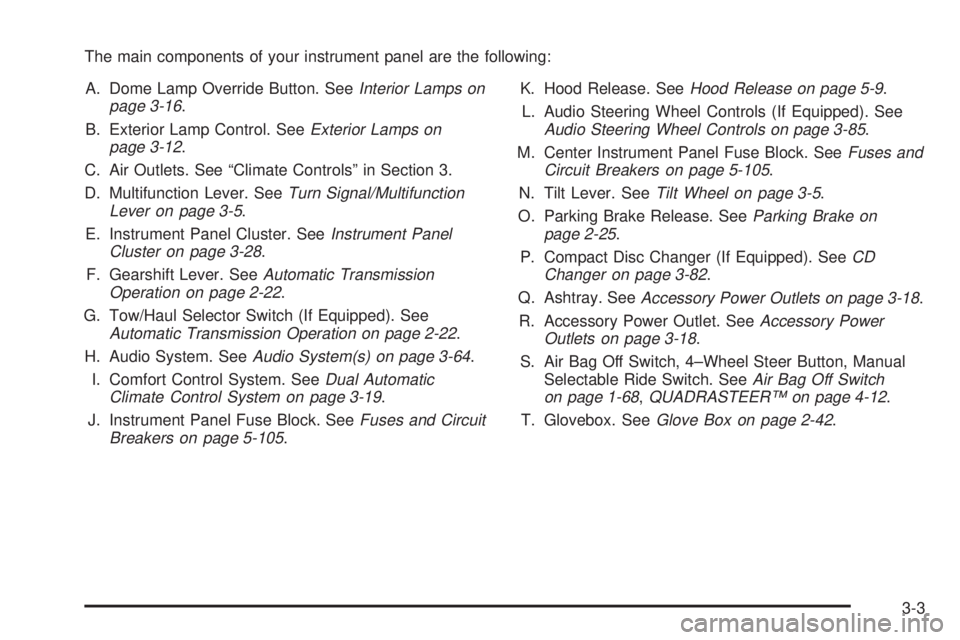
The main components of your instrument panel are the following:
A. Dome Lamp Override Button. See
Interior Lamps on
page 3-16.
B. Exterior Lamp Control. See
Exterior Lamps on
page 3-12.
C. Air Outlets. See ªClimate Controlsº in Section 3.
D. Multifunction Lever. See
Turn Signal/Multifunction
Lever on page 3-5.
E. Instrument Panel Cluster. See
Instrument Panel
Cluster on page 3-28.
F. Gearshift Lever. See
Automatic Transmission
Operation on page 2-22.
G. Tow/Haul Selector Switch (If Equipped). See
Automatic Transmission Operation on page 2-22.
H. Audio System. See
Audio System(s) on page 3-64.
I. Comfort Control System. See
Dual Automatic
Climate Control System on page 3-19.
J. Instrument Panel Fuse Block. See
Fuses and Circuit
Breakers on page 5-105.K. Hood Release. See
Hood Release on page 5-9.
L. Audio Steering Wheel Controls (If Equipped). See
Audio Steering Wheel Controls on page 3-85.
M. Center Instrument Panel Fuse Block. See
Fuses and
Circuit Breakers on page 5-105.
N. Tilt Lever. See
Tilt Wheel on page 3-5.
O. Parking Brake Release. See
Parking Brake on
page 2-25.
P. Compact Disc Changer (If Equipped). See
CD
Changer on page 3-82.
Q. Ashtray. See
Accessory Power Outlets on page 3-18.
R. Accessory Power Outlet. See
Accessory Power
Outlets on page 3-18.
S. Air Bag Off Switch, 4±Wheel Steer Button, Manual
Selectable Ride Switch. See
Air Bag Off Switch
on page 1-68,QUADRASTEERŸ on page 4-12.
T. Glovebox. See
Glove Box on page 2-42.
3-3
Page 137 of 452
Horn
To sound the horn, press the center pad on the
steering wheel.
Tilt Wheel
If your vehicle is equipped with a tilt wheel, it will allow
you to adjust the steering wheel before you drive.
You can raise it to the highest level to give your legs
more room when you exit and enter your vehicle.
The tilt steering wheel
lever is located on the
lower left side of the
column.
To tilt the wheel, hold the steering wheel and pull the
lever. Then move the steering wheel to a comfortable
position and release the lever to lock the wheel in place.
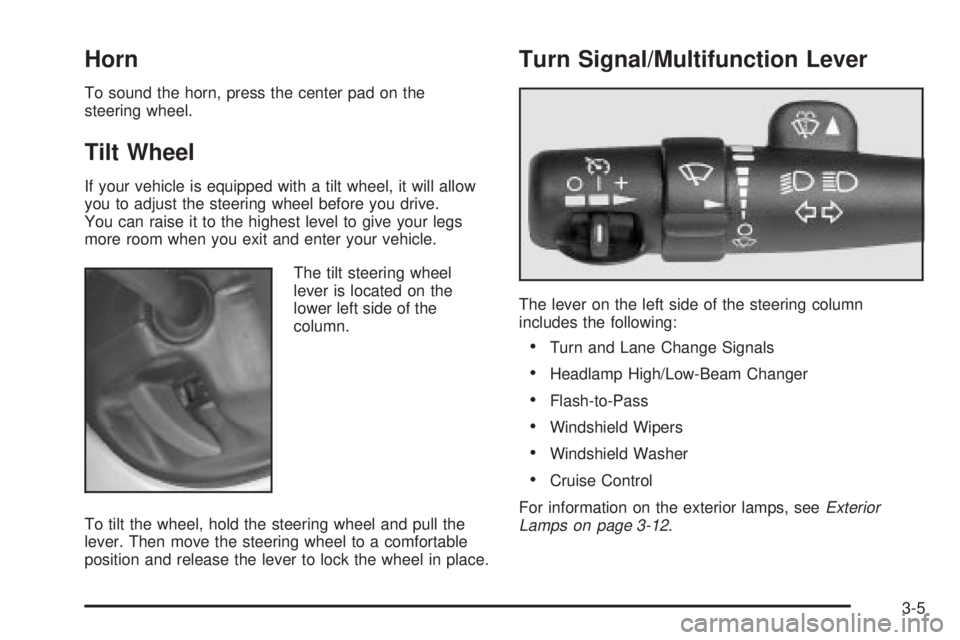
Turn Signal/Multifunction Lever
The lever on the left side of the steering column
includes the following:
·Turn and Lane Change Signals
·Headlamp High/Low-Beam Changer
·Flash-to-Pass
·Windshield Wipers
·Windshield Washer
·Cruise Control
For information on the exterior lamps, see
Exterior
Lamps on page 3-12.
3-5
Page 141 of 452
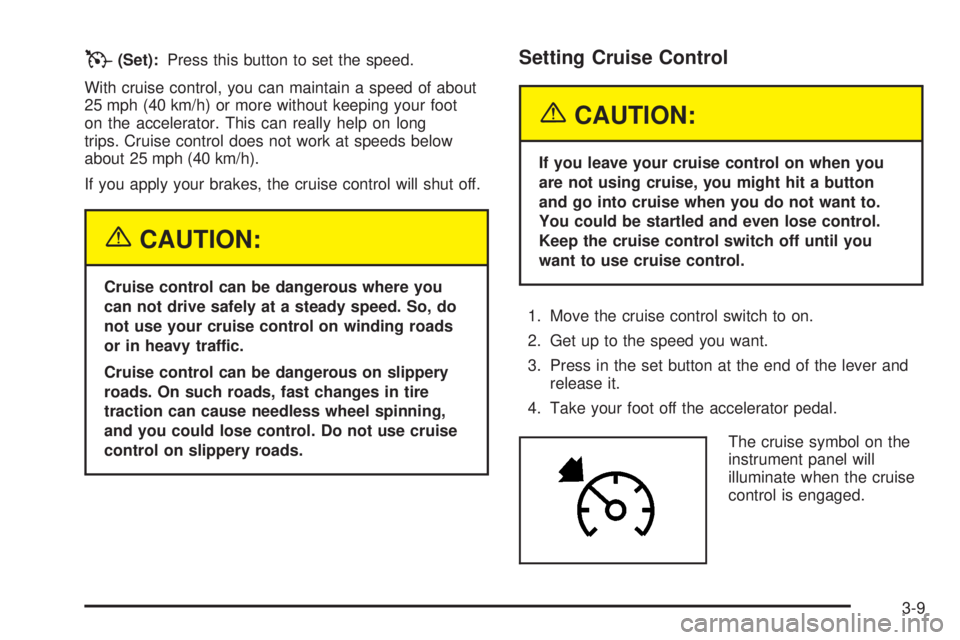
T(Set):Press this button to set the speed.
With cruise control, you can maintain a speed of about
25 mph (40 km/h) or more without keeping your foot
on the accelerator. This can really help on long
trips. Cruise control does not work at speeds below
about 25 mph (40 km/h).
If you apply your brakes, the cruise control will shut off.
{CAUTION:
Cruise control can be dangerous where you
can not drive safely at a steady speed. So, do
not use your cruise control on winding roads
or in heavy traffic.
Cruise control can be dangerous on slippery
roads. On such roads, fast changes in tire
traction can cause needless wheel spinning,
and you could lose control. Do not use cruise
control on slippery roads.
Setting Cruise Control
{CAUTION:
If you leave your cruise control on when you
are not using cruise, you might hit a button
and go into cruise when you do not want to.
You could be startled and even lose control.
Keep the cruise control switch off until you
want to use cruise control.
1. Move the cruise control switch to on.
2. Get up to the speed you want.
3. Press in the set button at the end of the lever and
release it.
4. Take your foot off the accelerator pedal.
The cruise symbol on the
instrument panel will
illuminate when the cruise
control is engaged.
3-9
Page 148 of 452
Interior Lamps
Instrument Panel Brightness Control
P
:This feature controls the brightness of the
instrument panel lights.
The thumbwheel for this feature is located next to the
exterior lamp control.
Turn the thumbwheel up to adjust the instrument panel
lights and return the radio display to full brightness
when the headlamps or parking lamps are on. To turn
on the dome lamps, with the vehicle doors closed,
turn the thumbwheel all the way up.
Exit Lighting
With exit lighting, the interior lamps will come on when
you remove the key from the ignition. The lamps will not
come on if the dome override button is pressed in.
Entry Lighting
Your vehicle is equipped with an illuminated entry
feature.
When a door is opened, the dome lamps and puddle
lamps will come on if the dome override button is in the
out position. If the dome override button is pressed
in, the lamps will not come on.
3-16
Page 149 of 452
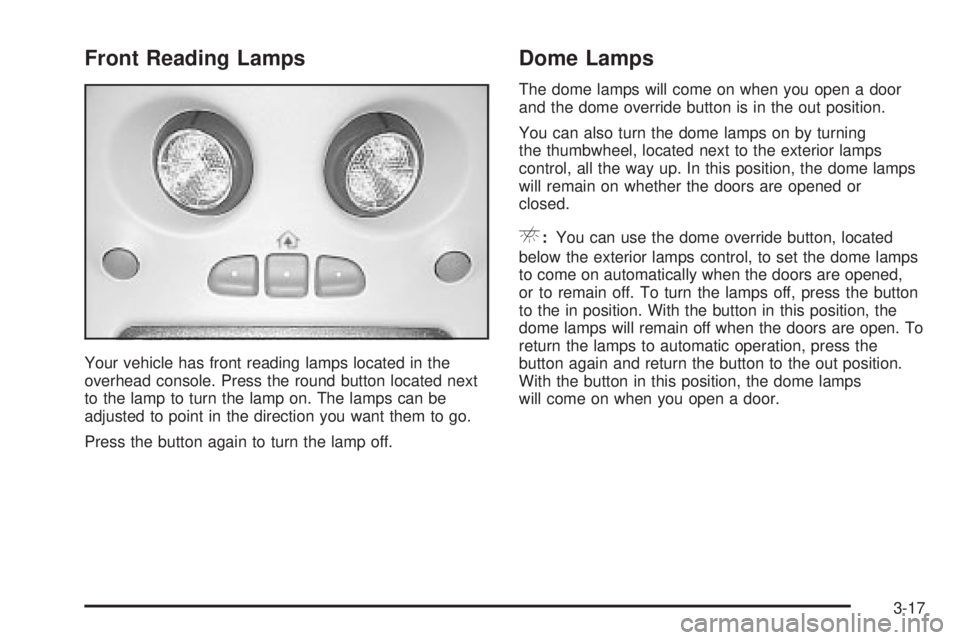
Front Reading Lamps
Your vehicle has front reading lamps located in the
overhead console. Press the round button located next
to the lamp to turn the lamp on. The lamps can be
adjusted to point in the direction you want them to go.
Press the button again to turn the lamp off.
Dome Lamps
The dome lamps will come on when you open a door
and the dome override button is in the out position.
You can also turn the dome lamps on by turning
the thumbwheel, located next to the exterior lamps
control, all the way up. In this position, the dome lamps
will remain on whether the doors are opened or
closed.
E:You can use the dome override button, located
below the exterior lamps control, to set the dome lamps
to come on automatically when the doors are opened,
or to remain off. To turn the lamps off, press the button
to the in position. With the button in this position, the
dome lamps will remain off when the doors are open. To
return the lamps to automatic operation, press the
button again and return the button to the out position.
With the button in this position, the dome lamps
will come on when you open a door.
3-17
Page 158 of 452
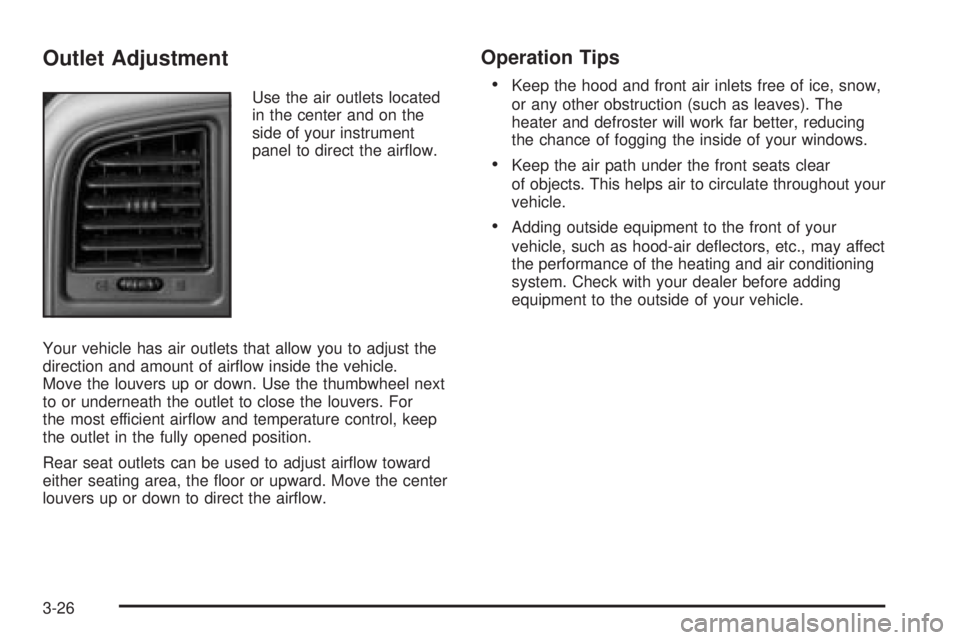
Outlet Adjustment
Use the air outlets located
in the center and on the
side of your instrument
panel to direct the air¯ow.
Your vehicle has air outlets that allow you to adjust the
direction and amount of air¯ow inside the vehicle.
Move the louvers up or down. Use the thumbwheel next
to or underneath the outlet to close the louvers. For
the most efficient air¯ow and temperature control, keep
the outlet in the fully opened position.
Rear seat outlets can be used to adjust air¯ow toward
either seating area, the ¯oor or upward. Move the center
louvers up or down to direct the air¯ow.
Operation Tips
·
Keep the hood and front air inlets free of ice, snow,
or any other obstruction (such as leaves). The
heater and defroster will work far better, reducing
the chance of fogging the inside of your windows.
·Keep the air path under the front seats clear
of objects. This helps air to circulate throughout your
vehicle.
·Adding outside equipment to the front of your
vehicle, such as hood-air de¯ectors, etc., may affect
the performance of the heating and air conditioning
system. Check with your dealer before adding
equipment to the outside of your vehicle.
3-26