air condition GMC SIERRA DENALI 2010 Owner's Guide
[x] Cancel search | Manufacturer: GMC, Model Year: 2010, Model line: SIERRA DENALI, Model: GMC SIERRA DENALI 2010Pages: 550, PDF Size: 4.17 MB
Page 340 of 550
Blizzard Conditions
Being stuck in snow can be in a serious situation. Stay
with the vehicle unless there is help nearby. If possible,
use theRoadside Assistance Program
on page 8‑7.
To get help and keep everyone in the vehicle safe:
.Turn on the Hazard Warning Flasherson
page 4‑3.
.Tie a red cloth to an outside mirror.
{WARNING:
Snow can trap engine exhaust under the vehicle.
This may cause exhaust gases to get inside.
Engine exhaust contains carbon monoxide (CO)
which cannot be seen or smelled. It can cause
unconsciousness and even death.
If the vehicle is stuck in the snow:
.Clear away snow from around the base of
your vehicle, especially any that is blocking
the exhaust pipe.
.Check again from time to time to be sure
snow does not collect there.
(Continued)
WARNING: (Continued)
.Open a window about 5 cm (two inches) on
the side of the vehicle that is away from the
wind to bring in fresh air.
.Fully open the air outlets on or under the
instrument panel.
.Adjust the Climate Control system to a setting
that circulates the air inside the vehicle and
set the fan speed to the highest setting. See
Climate Control System in the Index.
For more information about carbon monoxide, see
Engine Exhaust on page 3‑37.
Snow can trap exhaust gases under your vehicle.
This can cause deadly CO (carbon monoxide) gas
to get inside. CO could overcome you and kill you.
You cannot see it or smell it, so you might not
know it is in your vehicle. Clear away snow from
around the base of your vehicle, especially any
that is blocking the exhaust.
Run the engine for short periods only as needed to
keep warm, but be careful.
5-28
Page 362 of 550
The ITBC system is powered through the vehicle's
electrical system. Turning the ignition off will also turn
off the ITBC system. The ITBC system is fully functional
only when the ignition is in ON or in RUN.
The ITBC system can only be used with trailers with
electric brakes.
{WARNING:
Connecting a trailer that is not compatible with the
ITBC system may result in reduced or complete
loss of trailer braking. There may be an increase
in stopping distance or trailer instability which
could result in personal injury or damage to the
vehicle, trailer, or other property. An aftermarket
controller may be available for use with trailers
with surge, air or electric‐over‐hydraulic trailer
brake systems. To determine the type of brakes
on the trailer and the availability of controllers,
check with your trailer manufacturer or dealer/
retailer.When trailering, make sure of the following:
.The ITBC system is used only with trailers that are
equipped with electric brakes.
.All applicable local and federal laws and
regulations are followed.
.All electrical and mechanical connections to the
trailer are made correctly.
.The trailer
’s brakes are in proper working
condition.
.The trailer and vehicle are properly loaded for the
towing condition.
The ITBC system is a factory installed item.
Out‐of‐factory installation of this system should not be
attempted. GM is not responsible for warranty or
performance of the system resulting from out‐of‐factory
installation.
5-50
Page 367 of 550
To determine if the electrical fault is on the vehicle side
or trailer side of the trailer wiring harness connection,
do the following:1. Disconnect the trailer wiring harness from the vehicle.
2. Turn the ignition OFF.
3. Wait ten seconds, then turn the ignition back to RUN.
4. If the CHECK TRAILER WIRING message re-appears, the electrical fault is on the
vehicle side.
If the CHECK TRAILER WIRING message only
re-appears when connecting the trailer wiring
harness to the vehicle, the electrical fault is on the
trailer side.
SERVICE TRAILER BRAKE SYSTEM –This message
will be displayed when there is a problem with the ITBC
system. If this message persists over multiple ignition
cycles there is problem with the ITBC system. Take the
vehicle to an authorized GM dealer to have the ITBC
system diagnosed and repaired. If either the CHECK TRAILER WIRING or SERVICE
TRAILER BRAKE SYSTEM message is displayed while
driving the vehicle, power is no longer available to the
trailer brakes. When traffic conditions allow, carefully
pull the vehicle over to the side of the road and turn the
ignition off. Check the wiring connection to the trailer
and turn the ignition back on. If either of these
messages continues, either the vehicle or trailer needs
service.
An authorized GM dealer may be able to diagnose and
repair problems with the trailer. However, any diagnosis
and repair of the trailer is not covered under the vehicle
warranty. Please contact your trailer dealer for
assistance with trailer repairs and trailer warranty
information.
5-55
Page 381 of 550
Gasoline Octane
Use premium unleaded gasoline with a posted octane
rating of 91 or higher. You can also use regular
unleaded gasoline rated at 87 octane or higher, but the
vehicle's acceleration could be slightly reduced, and a
slight audible knocking noise, commonly referred to as
spark knock, might be heard. If the octane is less than
87, you might notice a heavy knocking noise when you
drive. If this occurs, use a gasoline rated at 87 octane
or higher as soon as possible. Otherwise, you could
damage the engine. If heavy knocking is heard when
using gasoline rated at 87 octane or higher, the engine
needs service.
Gasoline Specifications
At a minimum, gasoline should meet ASTM
specification D 4814 in the United States or
CAN/CGSB‐3.5 or 3.511 in Canada. Some gasolines
contain an octane-enhancing additive called
methylcyclopentadienyl manganese tricarbonyl (MMT).
We recommend against the use of gasolines containing
MMT. SeeAdditives
on page 6‑8for additional
information.
California Fuel
If the vehicle is certified to meet California Emissions
Standards, it is designed to operate on fuels that meet
California specifications. See the underhood emission
control label. If this fuel is not available in states
adopting California emissions standards, the vehicle will
operate satisfactorily on fuels meeting federal
specifications, but emission control system performance
might be affected. The malfunction indicator lamp could
turn on and the vehicle might fail a smog‐check test.
See Malfunction Indicator Lamp
on page 4‑38. If this
occurs, return to your authorized dealer/retailer for
diagnosis. If it is determined that the condition is caused
by the type of fuel used, repairs might not be covered
by the vehicle warranty.
6-7
Page 396 of 550
Engine Air Cleaner/Filter
SeeEngine Compartment Overviewon page 6‑16for
the location of the engine air cleaner/filter.
Inspect the air cleaner/filter at the Maintenance II
intervals and replace it at the first oil change after each
50,000 mile (80 000 km) interval. See Scheduled
Maintenance
on page 7‑3for more information.
If driving on dusty/dirty conditions, inspect the filter at
each engine oil change.
How to Inspect the Engine Air
Cleaner/Filter
To inspect the air cleaner/filter, remove the engine air
cleaner/filter from the vehicle by following Steps 1
through 6. When the engine air cleaner/filter is
removed, lightly shake it to release loose dust and dirt.
If the engine air cleaner/filter remains caked with dirt, a
new filter is required.
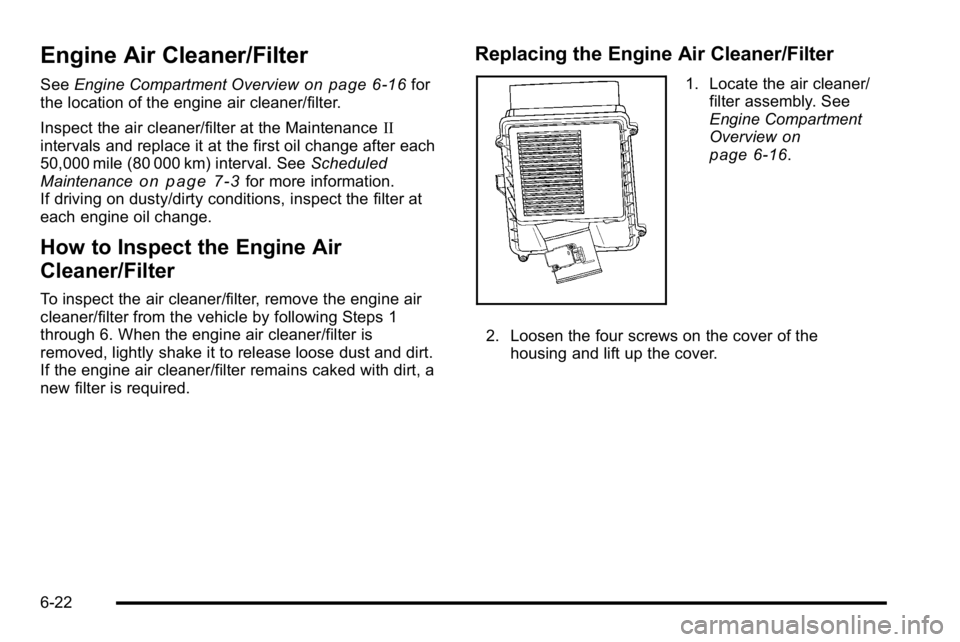
Replacing the Engine Air Cleaner/Filter
1. Locate the air cleaner/
filter assembly. See
Engine Compartment
Overview
on
page 6‑16.
2. Loosen the four screws on the cover of the housing and lift up the cover.
6-22
Page 410 of 550
If No Steam Is Coming From The
Engine Compartment
The ENGINE OVERHEATED STOP ENGINE or the
ENGINE OVERHEATED IDLE ENGINE message, along
with a low coolant condition, can indicate a serious
problem.
If an engine overheat warning is displayed but no steam
can be seen or heard, the problem may not be too
serious. Sometimes the engine can get a little too hot
when the vehicle:
.Climbs a long hill on a hot day.
.Stops after high-speed driving.
.Idles for long periods in traffic.
.Tows a trailer. SeeTowing a Trailer on page 5‑42.
If the overheat warning is displayed with no sign of
steam: 1. Turn the air conditioning off.
2. Turn the heater on to the highest temperature and to the highest fan speed. Open the windows as
necessary.
3. In heavy traffic, let the engine idle in N (Neutral) while stopped. If it is safe to do so, pull off the
road, shift to P (Park) or N (Neutral) and let the
engine idle. If the temperature overheat gage is no longer in the
overheat zone or an overheat warning no longer
displays, the vehicle can be driven. Continue to drive
the vehicle slow for about 10 minutes. Keep a safe
vehicle distance from the car in front of you. If the
warning does not come back on, continue to drive
normally.
If the warning continues, pull over, stop, and park the
vehicle right away.
If there is no sign of steam, idle the engine for
three minutes while parked. If the warning is still
displayed, turn off the engine until it cools down. Also,
see
“Overheated Engine Protection Operating Mode”
later in this section.
6-36
Page 411 of 550
Overheated Engine Protection
Operating Mode
If an overheated engine condition exists and the
ENGINE POWER IS REDUCED message is displayed,
an overheat protection mode which alternates firing
groups of cylinders helps prevent engine damage. In
this mode, you will notice a loss in power and engine
performance. This operating mode allows the vehicle to
be driven to a safe place in an emergency. Driving
extended miles (km) and/or towing a trailer in the
overheat protection mode should be avoided.
Notice:After driving in the overheated engine
protection operating mode, to avoid engine damage,
allow the engine to cool before attempting any
repair. The engine oil will be severely degraded.
Repair the cause of coolant loss, change the oil and
reset the oil life system. See Engine Oil
on
page 6‑18.
Engine Fan Noise
The vehicle has electric cooling fans. You might hear
the fans spinning at low speed during most everyday
driving. The fans can turn off if no cooling is required.
Under heavy vehicle loading, trailer towing, and/or high
outside temperatures, or if you are operating the air
conditioning system, the fans can change to high speed
and you might hear an increase in fan noise. This is
normal and indicates that the cooling system is
functioning properly. The fans change to low speed
when additional cooling is no longer required.
6-37
Page 416 of 550
Brake Wear
This vehicle has front disc brakes and could have rear
drum brakes or rear disc brakes.
Disc brake pads have built-in wear indicators that make
a high-pitched warning sound when the brake pads are
worn and new pads are needed. The sound can come
and go or be heard all the time the vehicle is moving,
except when applying the brake pedal firmly.
{WARNING:
The brake wear warning sound means that soon
the brakes will not work well. That could lead to
an accident. When the brake wear warning sound
is heard, have the vehicle serviced.
Notice: Continuing to drive with worn-out brake
pads could result in costly brake repair.
Some driving conditions or climates can cause a brake
squeal when the brakes are first applied or lightly
applied. This does not mean something is wrong with
the brakes. Properly torqued wheel nuts are necessary to help
prevent brake pulsation. When tires are rotated, inspect
brake pads for wear and evenly tighten wheel nuts in
the proper sequence to torque specifications in
Capacities and Specifications on page 6‑122.
If the vehicle has rear drum brakes, they do not have
wear indicators, but if a rear brake rubbing noise is
heard, have the rear brake linings inspected
immediately. Rear brake drums should be removed and
inspected each time the tires are removed for rotation or
changing. Drum brakes have an inspection hole to
inspect lining wear during scheduled maintenance.
When the front brake pads are replaced, have the rear
brakes inspected, too.
Brake linings should always be replaced as complete
axle sets.
Brake Pedal Travel
See your dealer/retailer if the brake pedal does not
return to normal height, or if there is a rapid increase in
pedal travel. This could be a sign that brake service
might be required.
Brake Adjustment
Every brake stop, the brakes adjust for wear.
6-42
Page 442 of 550
Tire Terminology and Definitions
Air Pressure:The amount of air inside the tire
pressing outward on each square inch of the tire.
Air pressure is expressed in pounds per square
inch (psi) or kilopascal (kPa).
Accessory Weight
:This means the combined
weight of optional accessories. Some examples of
optional accessories are, automatic transmission,
power steering, power brakes, power windows,
power seats, and air conditioning.
Aspect Ratio
:The relationship of a tire's height
to its width.
Belt
:A rubber coated layer of cords that is
located between the plies and the tread. Cords
may be made from steel or other reinforcing
materials.
Bead
:The tire bead contains steel wires wrapped
by steel cords that hold the tire onto the rim.
Bias Ply Tire
:A pneumatic tire in which the plies
are laid at alternate angles less than 90 degrees
to the centerline of the tread. Cold Tire Pressure
:The amount of air pressure
in a tire, measured in pounds per square inch (psi)
or kilopascals (kPa) before a tire has built up heat
from driving. See Inflation - Tire Pressure
on
page 6‑71
.
Curb Weight
:The weight of a motor vehicle with
standard and optional equipment including the
maximum capacity of fuel, oil, and coolant, but
without passengers and cargo.
DOT Markings
:A code molded into the sidewall
of a tire signifying that the tire is in compliance
with the U.S. Department of Transportation (DOT)
motor vehicle safety standards. The DOT code
includes the Tire Identification Number (TIN), an
alphanumeric designator which can also identify
the tire manufacturer, production plant, brand, and
date of production.
GVWR
:Gross Vehicle Weight Rating. See
Loading the Vehicle
on page 5‑31.
GAWR FRT
:Gross Axle Weight Rating for the
front axle. See Loading the Vehicle
on page 5‑31.
GAWR RR
:Gross Axle Weight Rating for the rear
axle. See Loading the Vehicle
on page 5‑31.
6-68
Page 446 of 550
How to Check
Use a good quality pocket-type gage to check tire
pressure. You cannot tell if your tires are properly
inflated simply by looking at them. Radial tires
may look properly inflated even when they are
underinflated. Check the tire's inflation pressure
when the tires are cold. Cold means your vehicle
has been sitting for at least three hours or driven
no more than 1 mile (1.6 km).
Remove the valve cap from the tire valve stem.
Press the tire gage firmly onto the valve to get a
pressure measurement. If the cold tire inflation
pressure matches the recommended pressure on
the Tire and Loading Information label, no further
adjustment is necessary. If the pressure is low,
add air until you reach the recommended amount.
If you overfill the tire, release air by pushing on
the metal stem in the center of the tire valve.
Recheck the tire pressure with the tire gage.
Be sure to put the valve caps back on the valve
stems. They help prevent leaks by keeping out dirt
and moisture.
High-Speed Operation
{WARNING:
Driving at high speeds, 160 km/h (100 mph) or
higher, puts an additional strain on tires.
Sustained high-speed driving causes excessive
heat build up and can cause sudden tire failure.
You could have a crash and you or others could
be killed. Some high-speed rated tires require
inflation pressure adjustment for high speed
operation. When speed limits and road conditions
are such that a vehicle can be driven at high
speeds, make sure the tires are rated for high
speed operation, in excellent condition, and set to
the correct cold tire inflation pressure for the
vehicle load.
Vehicles with P265/70R17 or P275/55R20 size tires
require inflation pressure adjustment when driving the
vehicle at speeds of 100 mph (160 km/h) or higher. Set
the cold tire inflation pressure to 3 psi (20 kPa) above
the recommended cold tire pressure shown on the Tire
and Loading Information label.
6-72