tow GMC SIERRA DENALI 2010 Manual PDF
[x] Cancel search | Manufacturer: GMC, Model Year: 2010, Model line: SIERRA DENALI, Model: GMC SIERRA DENALI 2010Pages: 550, PDF Size: 4.17 MB
Page 400 of 550
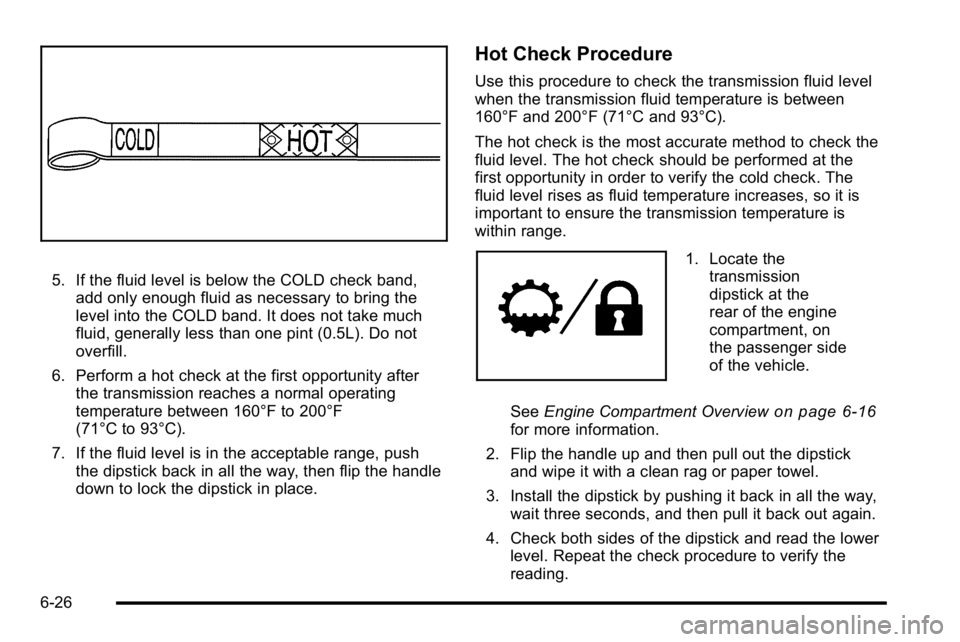
5. If the fluid level is below the COLD check band,add only enough fluid as necessary to bring the
level into the COLD band. It does not take much
fluid, generally less than one pint (0.5L). Do not
overfill.
6. Perform a hot check at the first opportunity after the transmission reaches a normal operating
temperature between 160°F to 200°F
(71°C to 93°C).
7. If the fluid level is in the acceptable range, push the dipstick back in all the way, then flip the handle
down to lock the dipstick in place.
Hot Check Procedure
Use this procedure to check the transmission fluid level
when the transmission fluid temperature is between
160°F and 200°F (71°C and 93°C).
The hot check is the most accurate method to check the
fluid level. The hot check should be performed at the
first opportunity in order to verify the cold check. The
fluid level rises as fluid temperature increases, so it is
important to ensure the transmission temperature is
within range.
1. Locate thetransmission
dipstick at the
rear of the engine
compartment, on
the passenger side
of the vehicle.
See Engine Compartment Overview
on page 6‑16for more information.
2. Flip the handle up and then pull out the dipstick and wipe it with a clean rag or paper towel.
3. Install the dipstick by pushing it back in all the way, wait three seconds, and then pull it back out again.
4. Check both sides of the dipstick and read the lower level. Repeat the check procedure to verify the
reading.
6-26
Page 410 of 550
If No Steam Is Coming From The
Engine Compartment
The ENGINE OVERHEATED STOP ENGINE or the
ENGINE OVERHEATED IDLE ENGINE message, along
with a low coolant condition, can indicate a serious
problem.
If an engine overheat warning is displayed but no steam
can be seen or heard, the problem may not be too
serious. Sometimes the engine can get a little too hot
when the vehicle:
.Climbs a long hill on a hot day.
.Stops after high-speed driving.
.Idles for long periods in traffic.
.Tows a trailer. SeeTowing a Trailer on page 5‑42.
If the overheat warning is displayed with no sign of
steam: 1. Turn the air conditioning off.
2. Turn the heater on to the highest temperature and to the highest fan speed. Open the windows as
necessary.
3. In heavy traffic, let the engine idle in N (Neutral) while stopped. If it is safe to do so, pull off the
road, shift to P (Park) or N (Neutral) and let the
engine idle. If the temperature overheat gage is no longer in the
overheat zone or an overheat warning no longer
displays, the vehicle can be driven. Continue to drive
the vehicle slow for about 10 minutes. Keep a safe
vehicle distance from the car in front of you. If the
warning does not come back on, continue to drive
normally.
If the warning continues, pull over, stop, and park the
vehicle right away.
If there is no sign of steam, idle the engine for
three minutes while parked. If the warning is still
displayed, turn off the engine until it cools down. Also,
see
“Overheated Engine Protection Operating Mode”
later in this section.
6-36
Page 411 of 550
Overheated Engine Protection
Operating Mode
If an overheated engine condition exists and the
ENGINE POWER IS REDUCED message is displayed,
an overheat protection mode which alternates firing
groups of cylinders helps prevent engine damage. In
this mode, you will notice a loss in power and engine
performance. This operating mode allows the vehicle to
be driven to a safe place in an emergency. Driving
extended miles (km) and/or towing a trailer in the
overheat protection mode should be avoided.
Notice:After driving in the overheated engine
protection operating mode, to avoid engine damage,
allow the engine to cool before attempting any
repair. The engine oil will be severely degraded.
Repair the cause of coolant loss, change the oil and
reset the oil life system. See Engine Oil
on
page 6‑18.
Engine Fan Noise
The vehicle has electric cooling fans. You might hear
the fans spinning at low speed during most everyday
driving. The fans can turn off if no cooling is required.
Under heavy vehicle loading, trailer towing, and/or high
outside temperatures, or if you are operating the air
conditioning system, the fans can change to high speed
and you might hear an increase in fan noise. This is
normal and indicates that the cooling system is
functioning properly. The fans change to low speed
when additional cooling is no longer required.
6-37
Page 453 of 550
Reset the Tire Pressure Monitor System. SeeTire
Pressure Monitor Operation
on page 6‑74.
Make certain that all wheel nuts are properly
tightened. See “Wheel Nut Torque” under
Capacities and Specifications
on page 6‑122.
{WARNING:
Rust or dirt on a wheel, or on the parts to
which it is fastened, can make wheel nuts
become loose after time. The wheel could
come off and cause an accident. When you
change a wheel, remove any rust or dirt from
places where the wheel attaches to the
vehicle. In an emergency, you can use a
cloth or a paper towel to do this; but be sure
to use a scraper or wire brush later,
if needed, to get all the rust or dirt off. See
Changing a Flat Tire
on page 6‑86.
Make sure the spare tire is stored securely. Push,
pull, and then try to rotate or turn the tire. If it
moves, tighten the cable. See Storing a Flat or
Spare Tire and Tools
on page 6‑100.
When It Is Time for New Tires
Various factors, such as maintenance, temperatures,
driving speeds, vehicle loading, and road conditions,
influence when you need new tires.
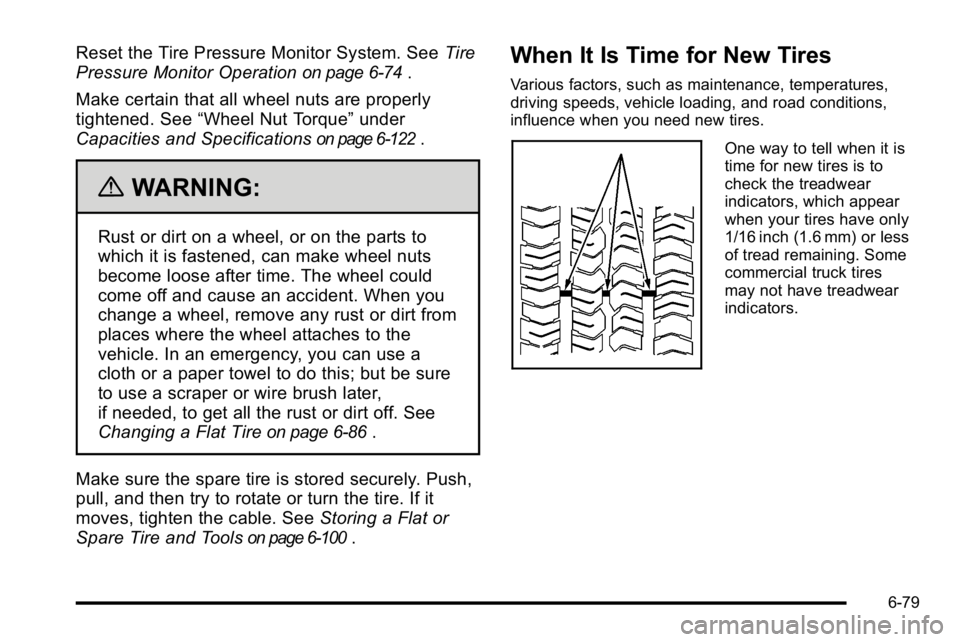
One way to tell when it is
time for new tires is to
check the treadwear
indicators, which appear
when your tires have only
1/16 inch (1.6 mm) or less
of tread remaining. Some
commercial truck tires
may not have treadwear
indicators.
6-79
Page 459 of 550
Used Replacement Wheels
{WARNING:
Putting a used wheel on the vehicle is dangerous.
You cannot know how it has been used or how far
it has been driven. It could fail suddenly and
cause a crash. If you have to replace a wheel, use
a new GM original equipment wheel.
Tire Chains
{WARNING:
Do not use tire chains. There is not enough
clearance. Tire chains used on a vehicle without
the proper amount of clearance can cause
damage to the brakes, suspension, or other
vehicle parts. The area damaged by the tire
chains could cause you to lose control of the
vehicle and you or others may be injured in a
crash. Use another type of traction device only if
its manufacturer recommends it for use on the(Continued)
WARNING: (Continued)
vehicle and tire size combination and road
conditions. Follow that manufacturer's
instructions. To help avoid damage to the vehicle,
drive slowly, re‐adjust or remove the device if it is
contacting the vehicle, and do not spin the
wheels. If you do find traction devices that will fit,
install them on the rear tires.
If a Tire Goes Flat
It is unusual for a tire to blowout while you are driving,
especially if you maintain your vehicle's tires properly.
If air goes out of a tire, it is much more likely to leak out
slowly. But if you should ever have a blowout, here are
a few tips about what to expect and what to do:
If a front tire fails, the flat tire creates a drag that pulls
the vehicle toward that side. Take your foot off the
accelerator pedal and grip the steering wheel firmly.
Steer to maintain lane position, and then gently brake to
a stop well out of the traffic lane.
6-85
Page 464 of 550
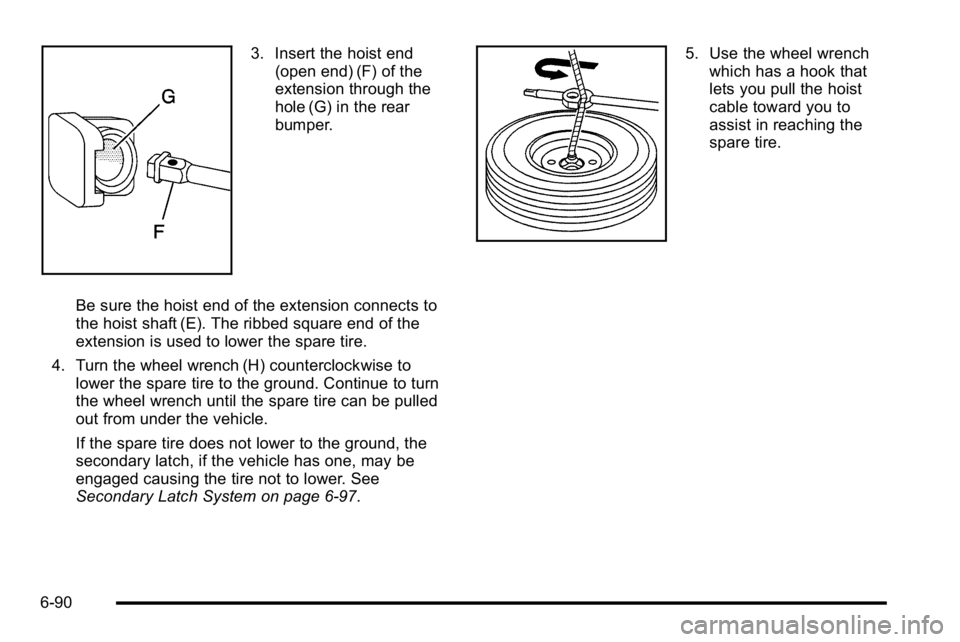
3. Insert the hoist end(open end) (F) of the
extension through the
hole (G) in the rear
bumper.
Be sure the hoist end of the extension connects to
the hoist shaft (E). The ribbed square end of the
extension is used to lower the spare tire.
4. Turn the wheel wrench (H) counterclockwise to lower the spare tire to the ground. Continue to turn
the wheel wrench until the spare tire can be pulled
out from under the vehicle.
If the spare tire does not lower to the ground, the
secondary latch, if the vehicle has one, may be
engaged causing the tire not to lower. See
Secondary Latch System on page 6‑97.5. Use the wheel wrenchwhich has a hook that
lets you pull the hoist
cable toward you to
assist in reaching the
spare tire.
6-90
Page 465 of 550
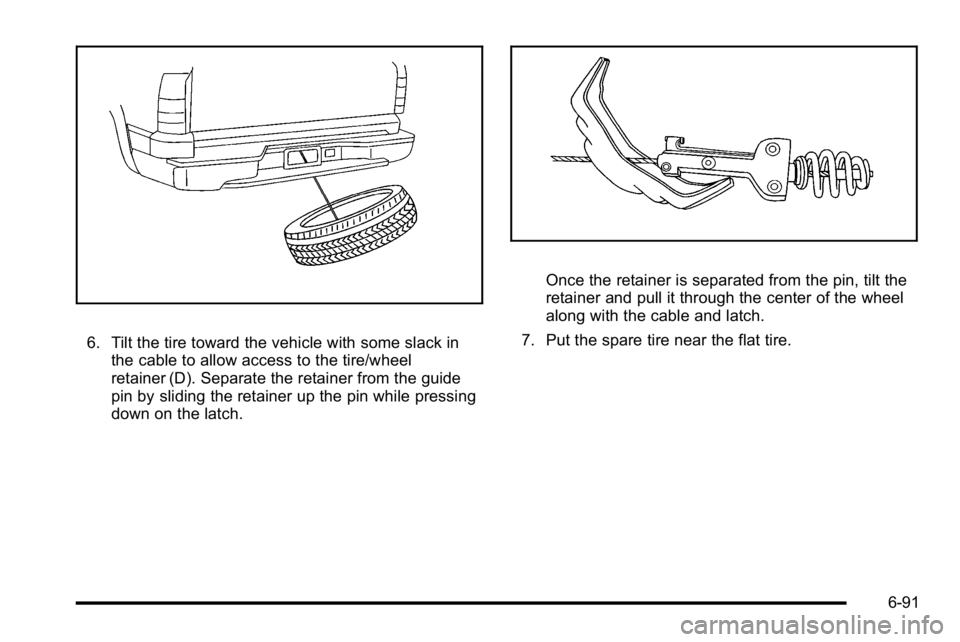
6. Tilt the tire toward the vehicle with some slack inthe cable to allow access to the tire/wheel
retainer (D). Separate the retainer from the guide
pin by sliding the retainer up the pin while pressing
down on the latch.
Once the retainer is separated from the pin, tilt the
retainer and pull it through the center of the wheel
along with the cable and latch.
7. Put the spare tire near the flat tire.
6-91
Page 469 of 550
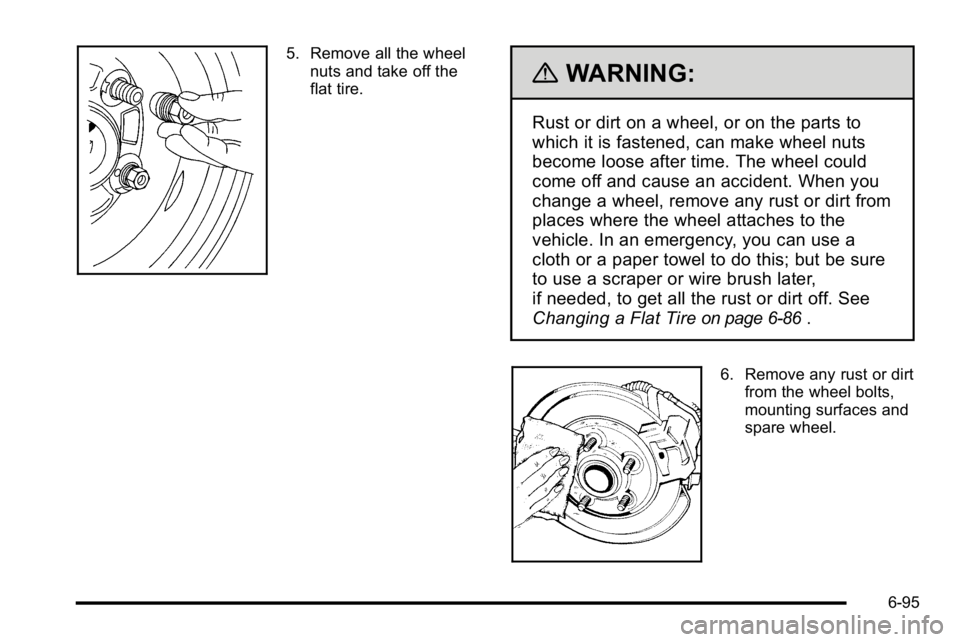
5. Remove all the wheelnuts and take off the
flat tire.
{WARNING:
Rust or dirt on a wheel, or on the parts to
which it is fastened, can make wheel nuts
become loose after time. The wheel could
come off and cause an accident. When you
change a wheel, remove any rust or dirt from
places where the wheel attaches to the
vehicle. In an emergency, you can use a
cloth or a paper towel to do this; but be sure
to use a scraper or wire brush later,
if needed, to get all the rust or dirt off. See
Changing a Flat Tire
on page 6‑86.
6. Remove any rust or dirtfrom the wheel bolts,
mounting surfaces and
spare wheel.
6-95
Page 470 of 550
{WARNING:
Never use oil or grease on bolts or nuts because
the nuts might come loose. The vehicle's wheel
could fall off, causing a crash.
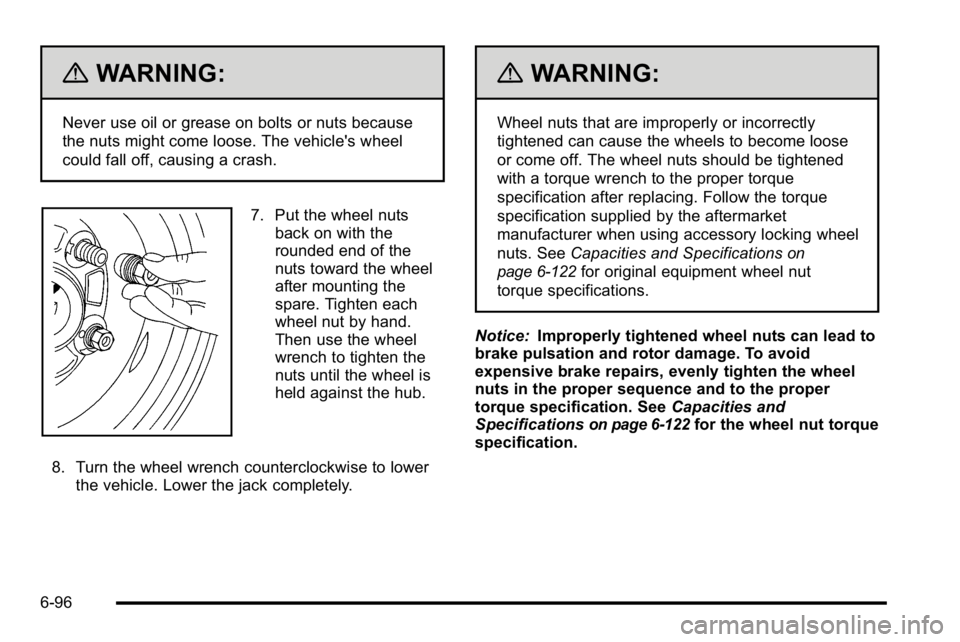
7. Put the wheel nutsback on with the
rounded end of the
nuts toward the wheel
after mounting the
spare. Tighten each
wheel nut by hand.
Then use the wheel
wrench to tighten the
nuts until the wheel is
held against the hub.
8. Turn the wheel wrench counterclockwise to lower the vehicle. Lower the jack completely.
{WARNING:
Wheel nuts that are improperly or incorrectly
tightened can cause the wheels to become loose
or come off. The wheel nuts should be tightened
with a torque wrench to the proper torque
specification after replacing. Follow the torque
specification supplied by the aftermarket
manufacturer when using accessory locking wheel
nuts. See Capacities and Specifications
on
page 6‑122
for original equipment wheel nut
torque specifications.
Notice: Improperly tightened wheel nuts can lead to
brake pulsation and rotor damage. To avoid
expensive brake repairs, evenly tighten the wheel
nuts in the proper sequence and to the proper
torque specification. See Capacities and
Specifications
on page 6‑122for the wheel nut torque
specification.
6-96
Page 472 of 550
3. Loosen the cable by turning the wrenchcounterclockwise three or four turns.
4. Repeat this procedure at least two times. If the spare tire lowers to the ground, continue with
Step 5 of Removing the Spare Tire and Tools
on
page 6‑88.
5. If the spare does not lower, turn the wrench counterclockwise until approximately 6 inches
(15 cm) of cable is exposed.
6. Stand the wheel blocks on their shortest ends, with the backs facing each other.
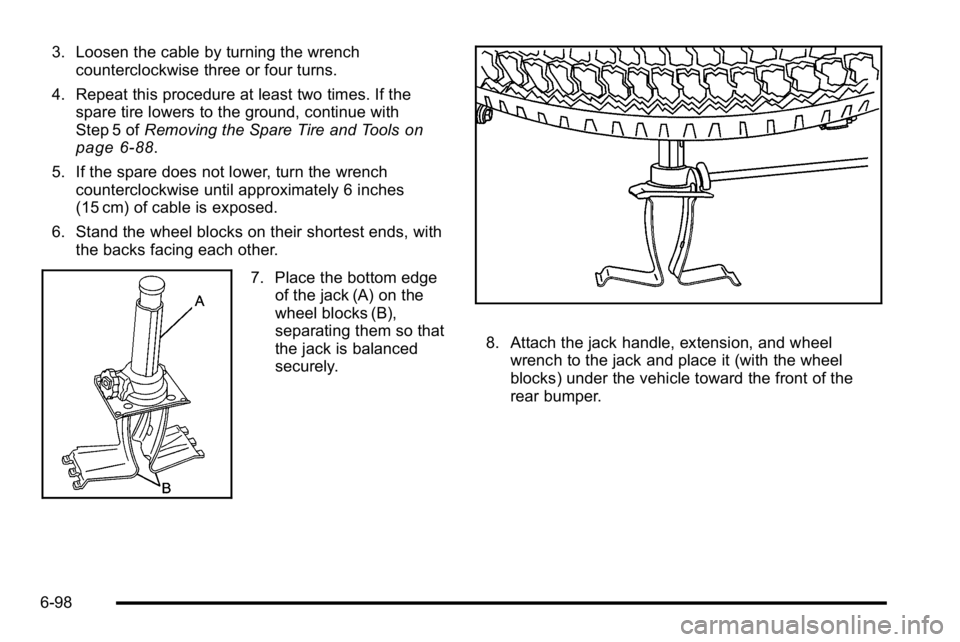
7. Place the bottom edgeof the jack (A) on the
wheel blocks (B),
separating them so that
the jack is balanced
securely.
8. Attach the jack handle, extension, and wheelwrench to the jack and place it (with the wheel
blocks) under the vehicle toward the front of the
rear bumper.
6-98